





Wireless Video Data Audio Transmitter and Receiver TX900 2 Watts 27km test video from mountain top to the seaside. (Video inside)
Wireless Video Data Audio Transmitter and Receiver, Two-way, Download-Upload
A customer saw our real test video about the 2 watts Power Amplifier 27km long-range wireless video transmitter and receiver. He placed an order for this equipment. He hoped we would also bring the transmitter to the top of the mountain and the receiver to the seaside for testing before shipment. We have done our best to meet the needs of the customers. So we did it and created today’s video. If you want to learn about the actual transmission effect of long-range HD 1080P wireless video transmission, as well as how to operate it. Please keep watching.
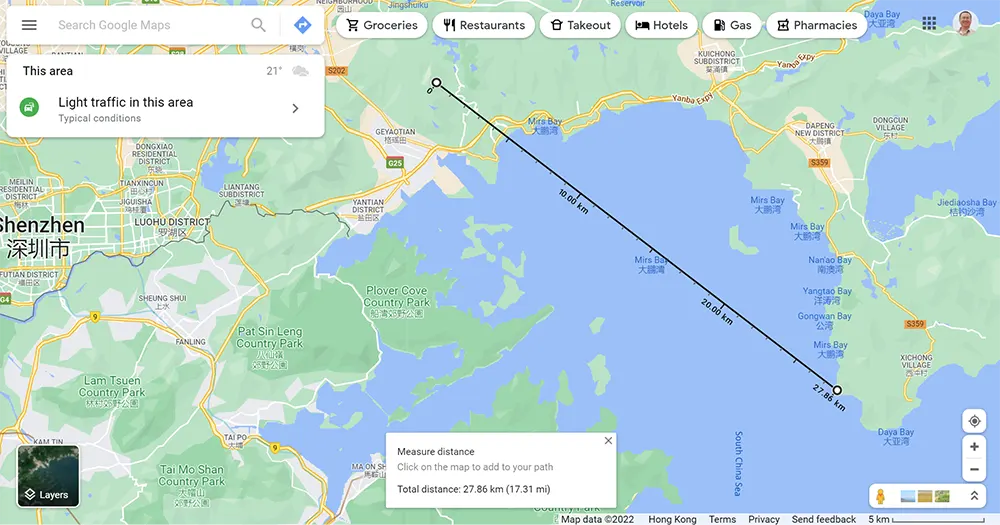
Let’s begin by looking at the test location and distance on Google Earth. Search Meishajian, which is located on Shenzhen’s third highest peak, for no obstructions and simulate the situation of an aircraft with a transmitter in the air, ensuring that the test is within the line of sight. There are many high-rise buildings in a coastal city like Shenzhen. Finding a test environment with a line of sight and a distance of 30 kilometers is difficult. A T-shape is formed from here to the seaside of Nan’ao. Our receiving station is on the beach, and we can see the top of the transmitter from a distance of 27 kilometers.
We used the good distance tool to determine that the distance between the transmitter and the receiver is nearly 27km. In the following video, we can see from the receiver’s web UI page that the current transmitter to receiver distance is 27390 meters.
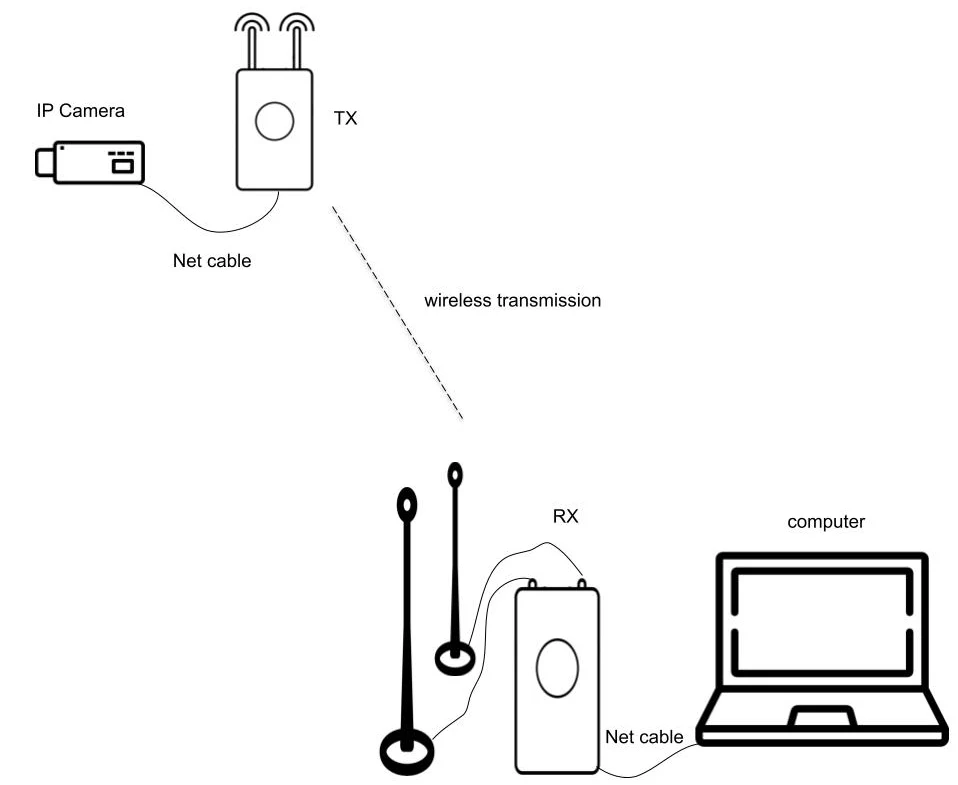
Now let’s take a look at the situation of the transmitter on the mountain. The transmitter, IP network camera, and battery are placed on the rock. The trekking pole and red bubble belt make a red flag, which is fluttering in the wind so that the picture on the receiver screen is not static, it can be observed whether the wireless transmission video is smooth. The receiver is on the other side of the sea. The black transmitter is connected to two 30cm height transmitting antennas, the left part is the IP network camera, which is connected to the transmitter with a network cable, and the right part is a 12V battery, which powers the transmitter and the IP network camera.
Please try to position the transmitter and receiver vertically while transmitting. The signal strength will then be strong. Allow me to turn the transmitter and receiver in my hand, and the receiver monitor video will begin to move. The receiver will determine whether or not the video is smooth.
Now let’s take a look at the picture of the receiver.
The receiver is connected to the computer through the network cable. We can use the RTSP player on the computer and see the smooth picture directly.
We can also enter 192.168.8.11 in the browser to open the setting page of the receiver. On this parameter setting page, we can see various parameters of the current transmitter and receiver. An important parameter in this table is the distance and the signal strength. Now we can see that from the current transmitter to the receiver distance is 27390 meters.

In the computer’s RTSP player, we can see that the wireless video transmission picture from the mountain transmitter has been kept very smooth, and the little red flag and the grass are fluttering in the wind without any lag, frozen, mosaic.
We are using an IP network camera to test, if your camera has HDMI 1080P, 4K HD, SDI, AHD, or CVBS output, we also can add an encoder to the transmitter, connect your video output, and send out the IP living streaming to the transmitter. At the receiver, output the video to a computer through a network cable, or to a network video recorder.
It can be seen that the picture is very smooth,
Here we continue to play the videos recorded by the transmitter and receiver on the computer, and we can also answer some questions that some clients care about and always asked.
Two-Way full duplex Wireless Video Data Audio Transmission
First, this set of wireless video data transmission transmitters and receivers is a two-way full duplex transmission system, it is like setting up an invisible wireless network in the air, two computers can be connected, and ping can be used in the computer’s cmd command state. In addition to transmitting video, data and audio can also be transmitted.
Power Amplifier options 2W, 5W, and 10W to support longer distance
Second, if you want to support longer distances, we can achieve longer distances by changing different amplifiers. For example, 300mW, 2 Watts, 5 Watts, 10 Watts power amplifier, the corresponding transmission distance is 7 km, 15 km, 30 km, 80 km, 100 km, the farthest can be transmitted to 150 km, we also have a 110 km The actual test video. If you are interested, I can also edit it and upload it for everyone to watch.
Up to 150Km, 4 times of English Channel Width
Third, what is the concept of supporting up to 150 kilometers? It is equivalent to 93 miles. The UK is separated from Europe by the English Channel, and its width is only 35 kilometers, that is, 150 kilometers is equivalent to the width of 4 times English Channels. It can also transmit high-definition videos with good signals.
Video Download, UART Data TX RX,
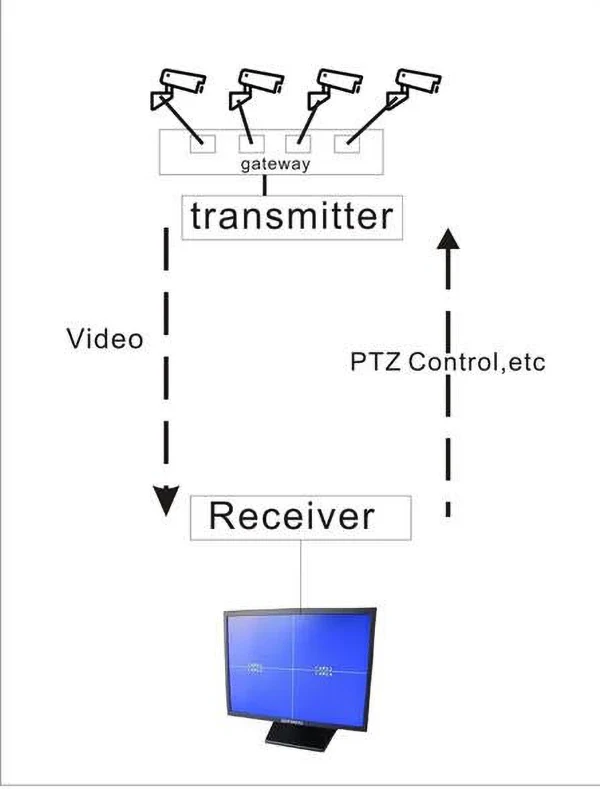
Fourth, if you need to control the PTZ camera, the receiver can also send control commands to adjust the direction and movement of the camera. This set of Wireless video data transmission transmitters and receivers also has three RS232 data interfaces, which can transmit various commands and data, and even connect with the drone’s flight control to remotely operate the drone.
AES 128 to protect video data safety
Fifth, this wireless video transmission device also supports aes128 for video encryption and decryption, so you don’t have to worry about your video, not safety, or being intercepted by others.
Two-Way Video Data Link Module + Power Amplifier
Sixth, Today we used 2 watts power amplifier. If your project demand, you can also purchase the two-way Wireless video data audio transmission transmitter and receiver module, and then configure your power amplifier.
1. What battery should I prepare for this 2 Watts, 5 Watts 10 Watts Power Amplifier transceiver?
2 Watts needs a 12V Power Supply, 5 Watts needs a 24V power supply, 10 Watts needs a 28V power supply
2. Regarding the video transmitter, what are the frequencies available?
There are three frequencies to choose from 800Mhz, 1.2G, and 2.4G.
But there is no 10W Power Amplifier for 150km at 2.4Ghz. So if the buyer wants to support a 150km transmission distance, only 800Mhz and 1.2G can be chosen.
3. Can you take a test video for me to see before shipping?
Of course, we also understand that wireless video transmission transmitters and receivers are very expensive. You are far away from the China factory. and hope that the goods you receive are fit for the best performance.
If you pay special attention to a specific parameter or function, we can take some test videos based on the features you want to see, please feel free to contact us. It won’t be shipped to you directly without your approval. Just like today, I tested and show the video to my client.
4. Can I use one 3-meter RF cable from the transmitter to the antenna?
Regarding the RF cable, our engineer doesn’t recommend that you used so long. There will be a reduced 0.5dB for one meter RF cable. For 3 meter RF cable, the signal strength will be reduced by 1.5dB.
5. It seems that your transmitter is supporting an IP camera, but my video source camera is HDMI or SDI video output, How can I use this transmitter and receiver?
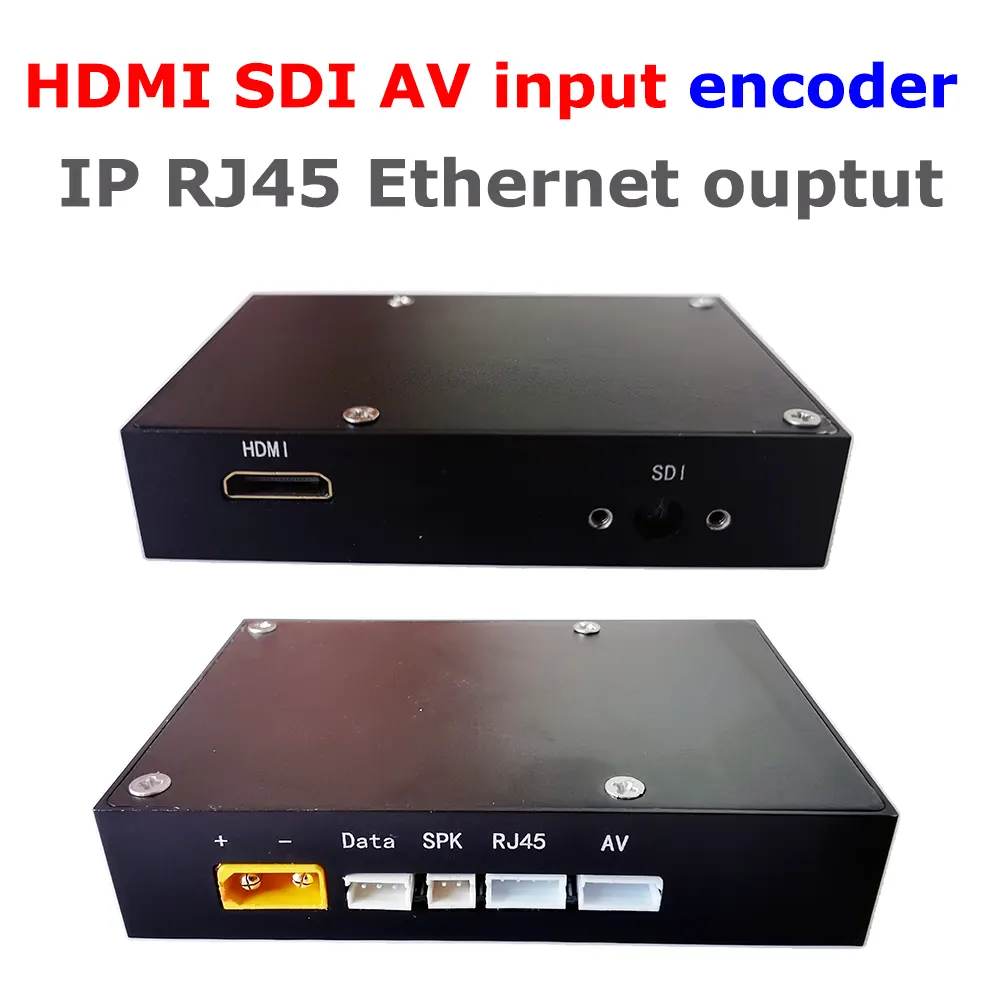
Yes, the default video input is IP RJ45 ethernet pot, if your camera is HDMI or SDI or AHD, just plus one small encoder box to solve this problem, this encoder box will output IP living stream to the transmitter.
6. What types of video inputs port does your wireless video transmitter have?
Our wireless video transmitters have these types of video input interfaces: HDMI 1080P and 4K HDMI, CVBS composite, SDI, AHD, IP Ethernet, and BNC, or tell us what type you need, and our engineer will modify it to meet your demand.
7. What is the transmission distance supported by your wireless video transmitter?
Our transmission distance can be adjusted by adding power amplifiers. At present, the main ones are 15km, 30km, 50km, 80km, 100km, and 150km, which depend on the needs of customers.
Of course, the transmission distances listed above are all within LOS the line-of-sight range. If there are obstacles between the transmitter and the receiver, NLOS (the non-line-of-sight), the transmission distance is greatly reduced, only 1km or 2km, depending on the number of intermediate obstacles and the local wireless environment.
8. What is one-way or two-way? Simples vs half-duplex, full-duplex
One-way means, We can only transmit and download video or data from the wireless video transmitter to the receiver in one direction, and we cannot upload video or data from the receiver to the transmitter. This type is also called simplex.
Two-way means that, not only we can download video or data from our wireless transmitter to the receiver, but also we can upload the video or data from the receiver to the transmitter. This is very suitable for operating drones. You can not only see the real-time video transmitted from the drone but also upload the command to control the drone or the command to control the PTZ camera to adjust the angle to the transmitter. This can operate simultaneously. This type is also named half-duplex or full-duplex.
9. Does your HDMI video transmitter support encryption and receiver decryption?
Most Wireless video transmitters now support AES128 or AES256 bit encryption and decryption, depending on which model you choose. Please contact us to verify.
10. Can the frequency of the wireless video transmitter be modified after ordinary users receive the goods?
The frequencies of both the wireless video transmitter and the wireless video receiver can be modified. Users need to purchase additional parameter configuration boards.
However, considering that the corresponding power amplifier and antenna are already fixed within a certain range when the goods are sent out. If the user adjusts the frequency of the transmitter, the corresponding power amplifier, transmitter antenna, and receiver antenna should also be modified to the same frequency, and these users need to be prepared. If not, it will cause the frequency of the wireless video transmitter to be different from the frequency of the antenna, making reception difficult. So please be sure to inform the correct frequency you need before placing an order.
If it is for security or confidentiality, you can use the encryption and decryption functions of the transmitter and receiver, which can ensure that your video transmission is private.
11. I saw that your model is very similar to my needs, but I need to modify one of the parameters, is that possible?
Yes, all our product parameters can be customized according to customers’ needs. If you have a special request, please let us know.
12. What should I do if my wireless video receiver shows a weak signal?
1. Change the place of the receiver to avoid potential local interference from magnetic solid environments.
2. Ensure that the antennas on both the transmitter and receiver are vertical.
3. Please raise the antennas of the transmitter and receiver to maintain a particular height difference.
4. Please look around to ensure that there are no obstacles between the transmitter and receiver.
5. Change the orientation of the receiver antenna.
6. If it doesn’t work, try moving the receiver to be near the transmitter’s position to see if it exceeds the effective wireless transmission distance.
7. Or consider adding a relay of the transmitting between the transmitter and receiver.
13. Can I buy modules of the transmitters and amplifiers only? I want to assemble them into my equipment.
We can, of course, supply wireless video transmitter modules and power amplifiers.
For the first sample test, I recommend that you purchase the entire set of products because our engineers have optimized the parameters to achieve the best performance.
After you have completed your test verification, you can remove the case or heat sink, install it on your device, and constantly adjust the parameters to achieve the best performance. In the future, you will be able to purchase only the modules or accessories that you require.
14. To support longer distances, can I use a 10 Watts or 20 Watts PA (power amplifier)?
Yes, if you need, we can change 10 Watts or 20 Watts PA to support a more extended range.
If you still have any questions, please feel free to contact us!


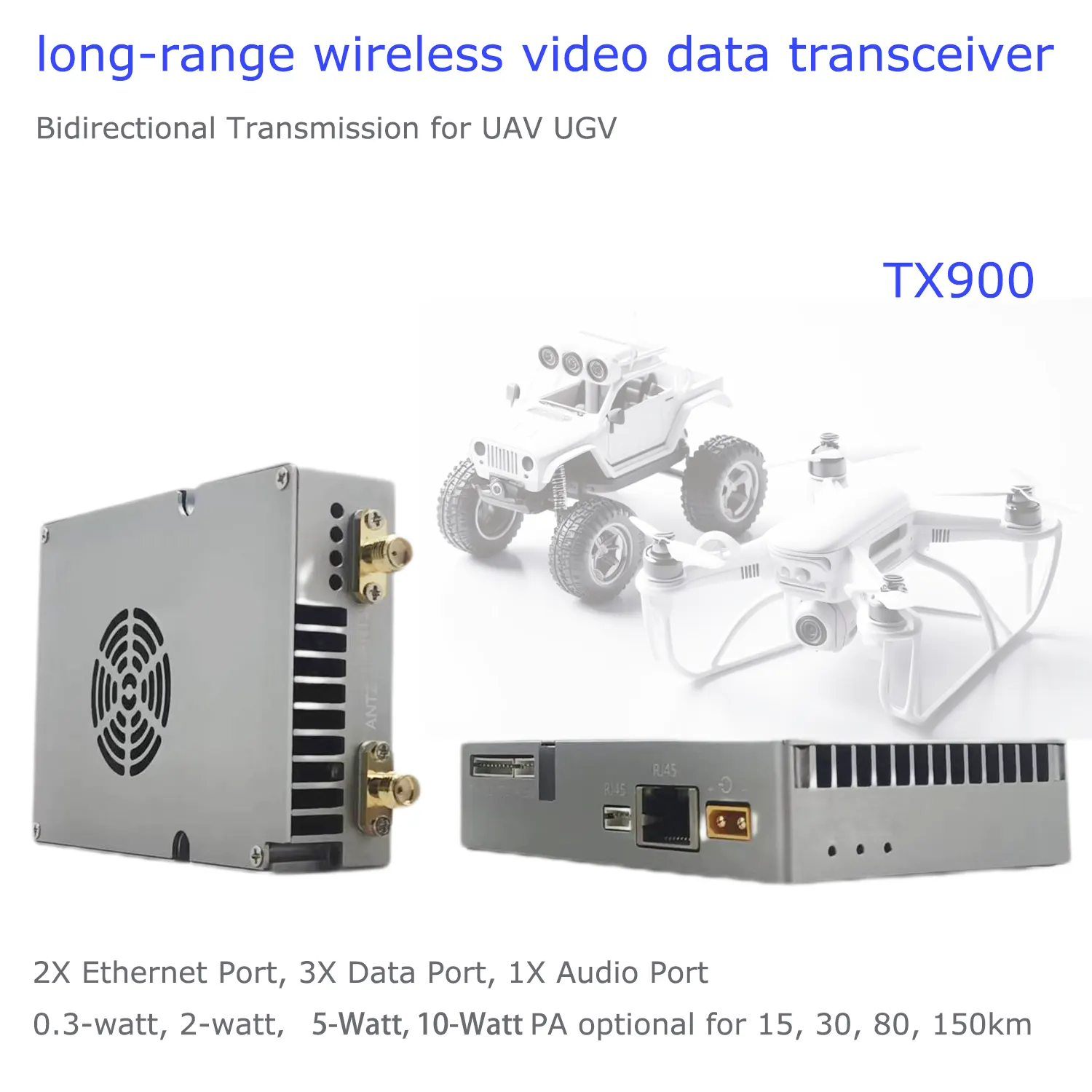


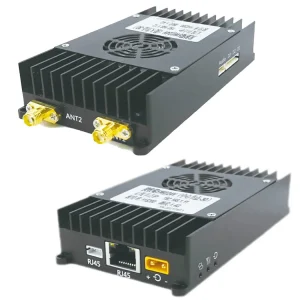
22km 55km 80km 100km 150km long-distance wireless video transmitter receiver transmission transceiver PA 2W 5W 10W
$905.00
Factory Price, base on one unit, one pair (TX+RX) needs two units. 

Do you want to purchase the module and assemble it yourself?
22km 55km 80km 100km 150km long-distance wireless video transmitter receiver transmission transceiver
22km 55km 80km 100km 150km long-distance wireless video transmitter-receiver transmission transceiver

Table of Contents
Selling Points / Features / Advantage


Signal Strength
Receiver screen can show the signal strength of the transmitter, users can move better reception place.

Video + Data + Control
Bidirectional transmission, Video Data Telemetry Downlink from Drone to GCS, Flight Control Commands Uplink from GCS to Drone

Lower Latency
From the receiver’s computer screen snap, we can see the current transmission latency delay is 28-76ms (millisecond). details


Bandwidth Presettable
The transmission bandwidth can be presentable at 3M, 5M, 10M, and 20M. Details 10-15-20Mbps

Two Antenna on the TX RX Transceiver
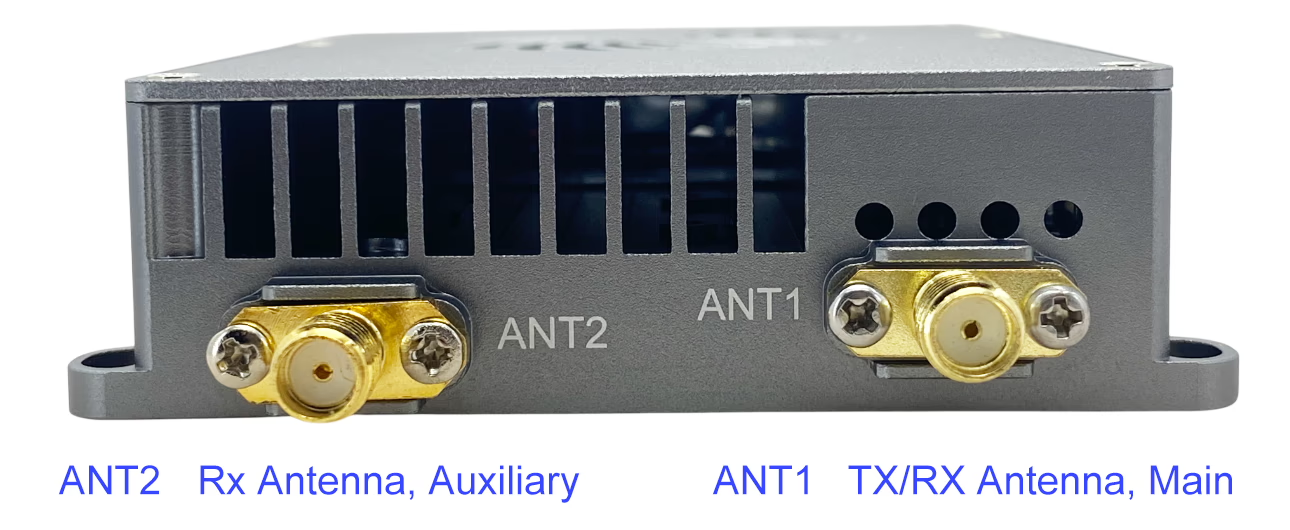
ANT1 for transceiver mode, ANT2 for receiving mode

Full set in the package
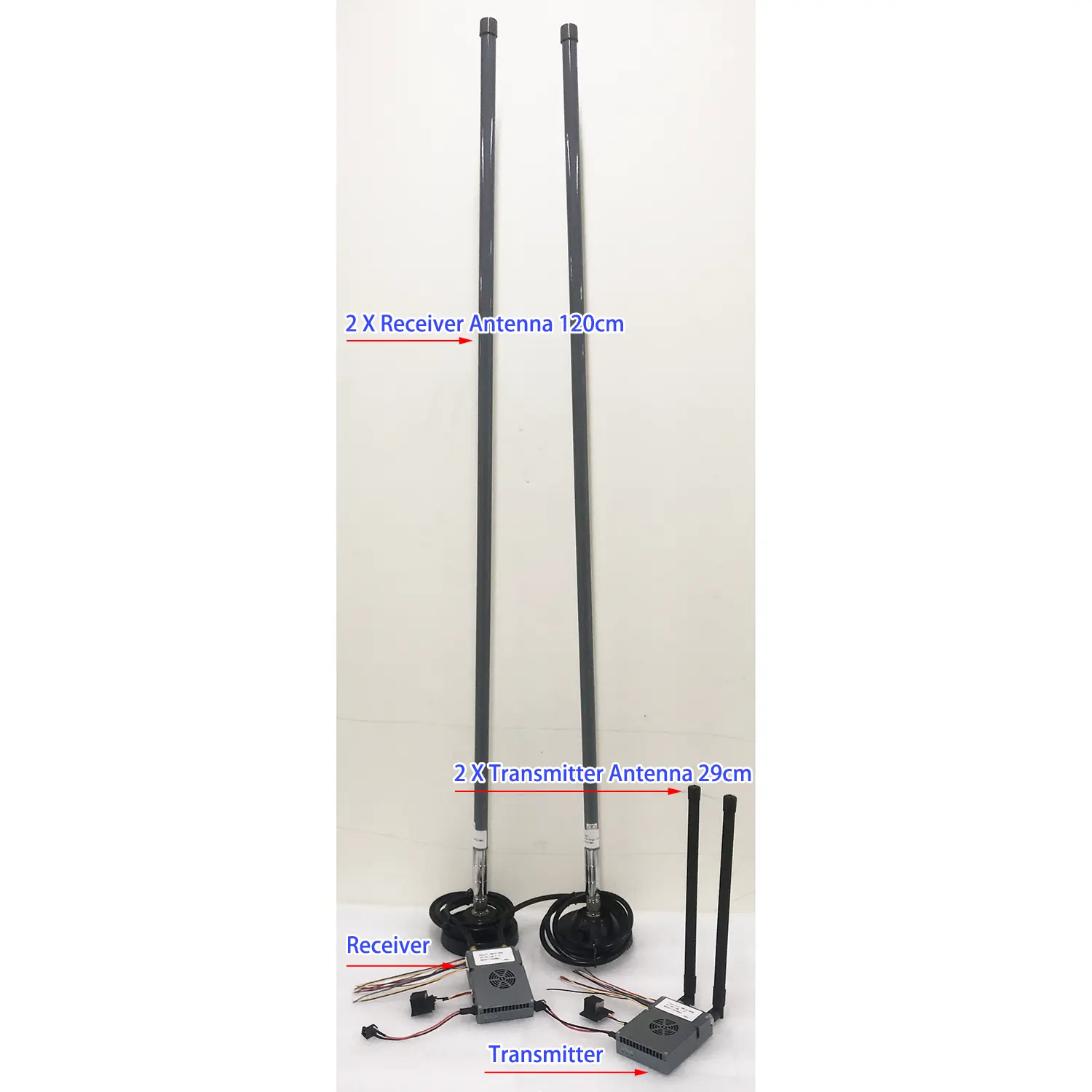
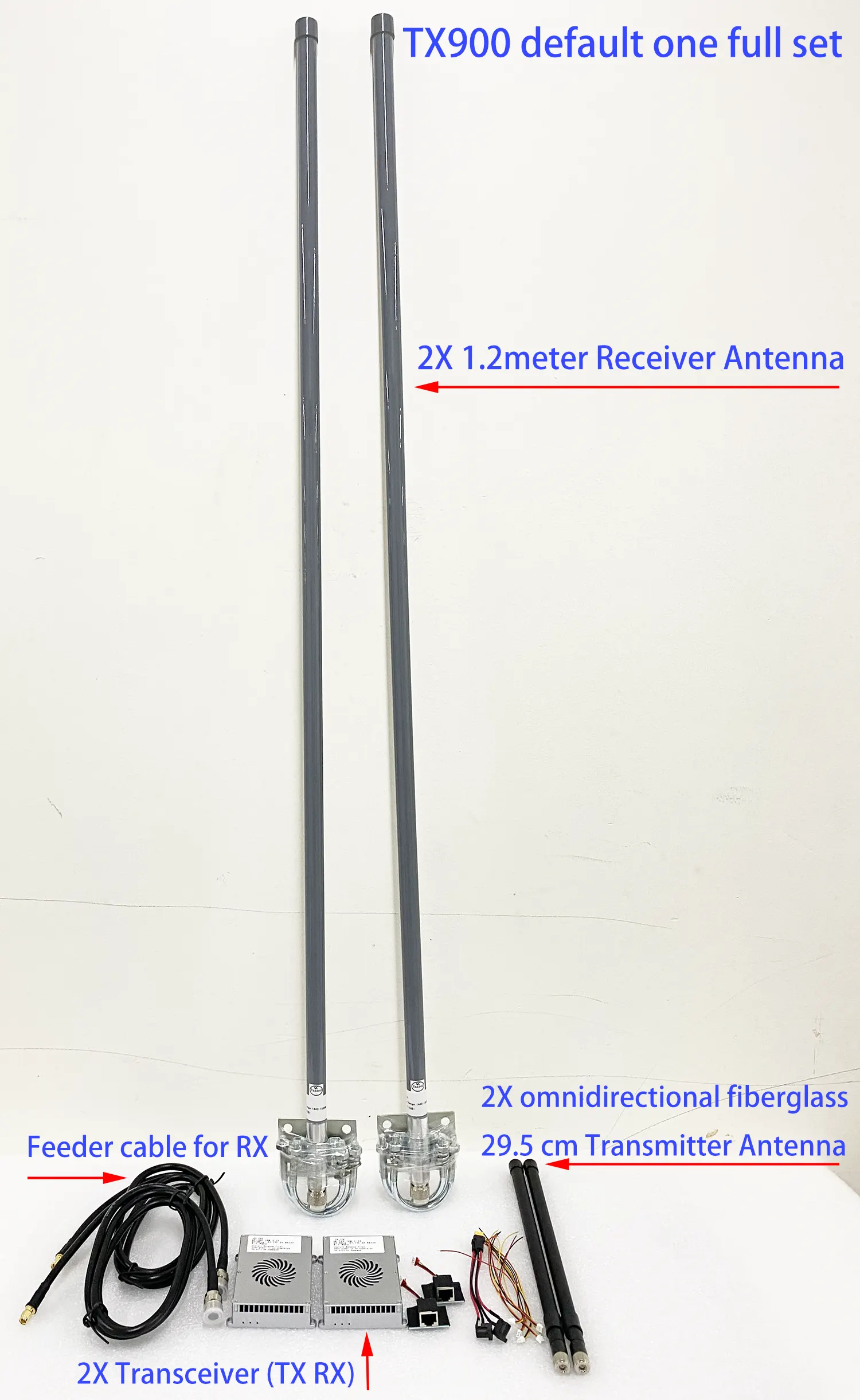
The package is including transmitter, receiver, both side antenna and accessories cable. Picture
- A web camera (HD camera with Ethernet) is recommended based on OFDM technology.
- Two-way broadband wireless link equipment allows the receiver to download audio-video content and upload data to the receiver.
- Interface: 2X Ethernet ports, 3X Data ports. If your camera only has one HDMI output, you will need an additional encoder device to encode the HDMI video and audio signal into digital data for transmission. At the receiver end, you can connect it directly to your computer or NVR. If you require output to an HDMI monitor, you will also need an additional decoder device to convert the digital data back into HDMI video and audio signals.
- The Default Data Interface is RS232. We can also modify it to TTL, Sbus, UART, or RS485. Please contact us if you need to know how to connect it to your flight controller, for example, PixHawk 4.
- Data Port Baud Rate: Data Port 1 supports 1200, 2400, 4800, 9600, 19200, 38400, 57600, 115200, 230400, 460800; Data Port 2 and Data Port 3 support 1200, 2400, 4800, 9600, 19200, 38400, 57600, 115200.
- Dual antennas: The SMA connector ANT1 main antenna works in transceiver mode, and the ANT2 auxiliary antenna works in receive mode.
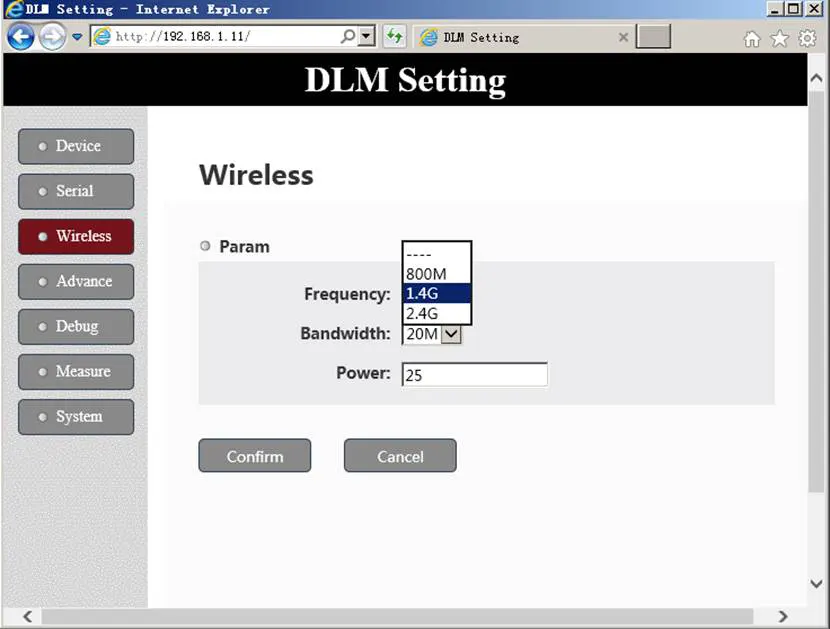
- Wireless working frequency band: 1427.9~1447.9MHz (1.4G) or 806~826MHz (800Mhz), or optional 2401.5~2481.5MHz (2.4G) support automatic frequency hopping in the frequency band (default working frequency is 1.4G)
- Wireless bandwidth: 3MHz, 5MHz, 10MHz, 20MHz, all nodes share the working bandwidth, and the maximum sharing rate of the system is 30Mbps.
- Modulation mode: QPSK/QAM16/QAM64 automatic adaptation.
- Networking mode: point-to-point, point-to-multi-point star network. (For example, 6 cameras and a transmitter to one receiver.)
- Wireless transmitting power: 10W.
- The node receiving sensitivity: -103 at 10MHz bandwidth.
- Support AES128 encryption and decryption.
- Transmission distance: 15km/30km/80km/150km optional.
- The device configuration and wireless working status can be viewed through the Web UI (user and password both are admin) of the network port or the serial port.
- 2W PA: DC12~16V, 33dBm, the average power consumption of the video transmitter is less than 12W, and the average power consumption of the video receiver is less than 10W. (Yellow power connector is XT30PW / XT60PW) (Without Any external PA, the module has 300mW, 25dBm)
5W PA: DC24~25V, 37dBm, the average power consumption of the video transmitter is less than 22W, and the average power consumption of the video receiver is less than 16W.
10W PA: DC24~30V, 40-41dBm, 28V power supply is recommended, the maximum average power consumption is less than 1.4A@28V, and the instantaneous peak power supply requirement can reach 2.8A@28V. - Size: 98*71*22mm (excluding the connector extending out of the shell, etc.).
- Weight: 0.3W 133 grams, 2W 142 grams, 5W 142grams, 10W 242.5 grams
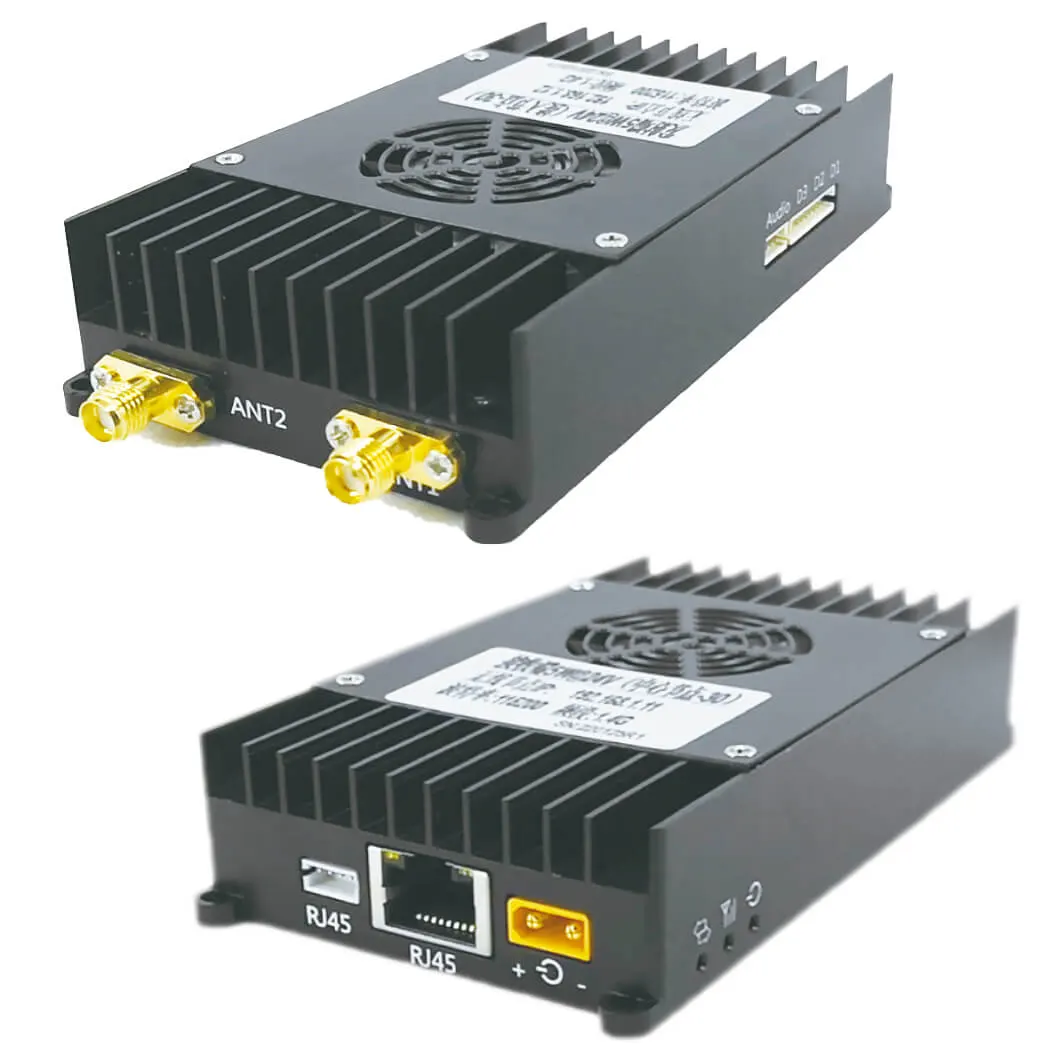
Input Output
| I/O | Description |
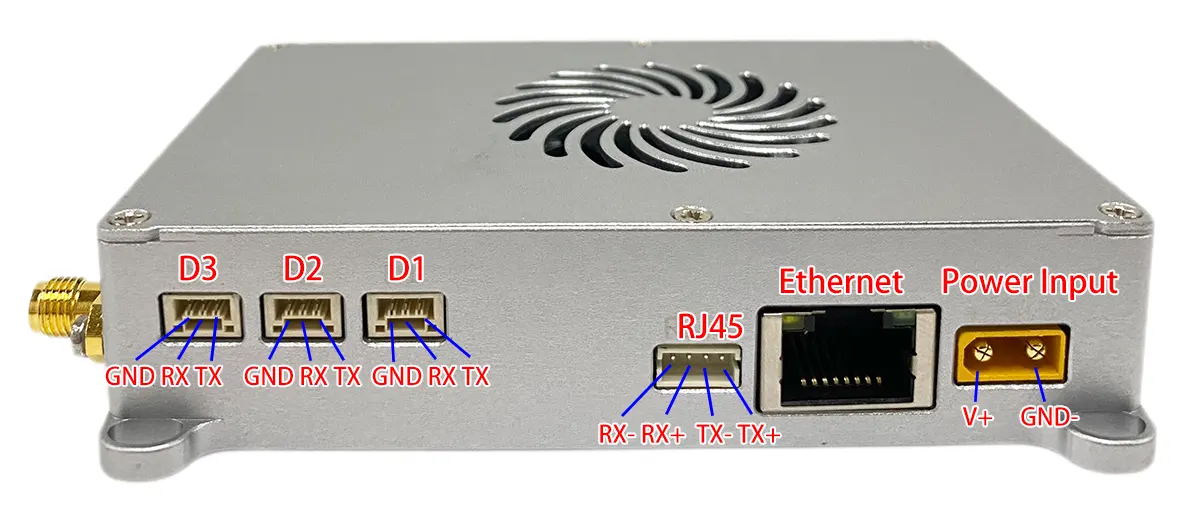
| Ethernet 1 | 4PIN ZH1.5mm connector bridged with Ethernet2 |
| Ethernet 2 | RJ45 connector bridged with Ethernet1 |
| RS232*3 | 9PIN ZH1.5mm connector, 3 channel RS232 uart |
| Audio in/out | 4PIN ZH1.5mm connector, audio in and audio out port |
| Power in | XT30PW-M connector |
| ANT1 | TX/RX Antenna port, SMA female |
| ANT2 | Rx Antenna port, SMA female |
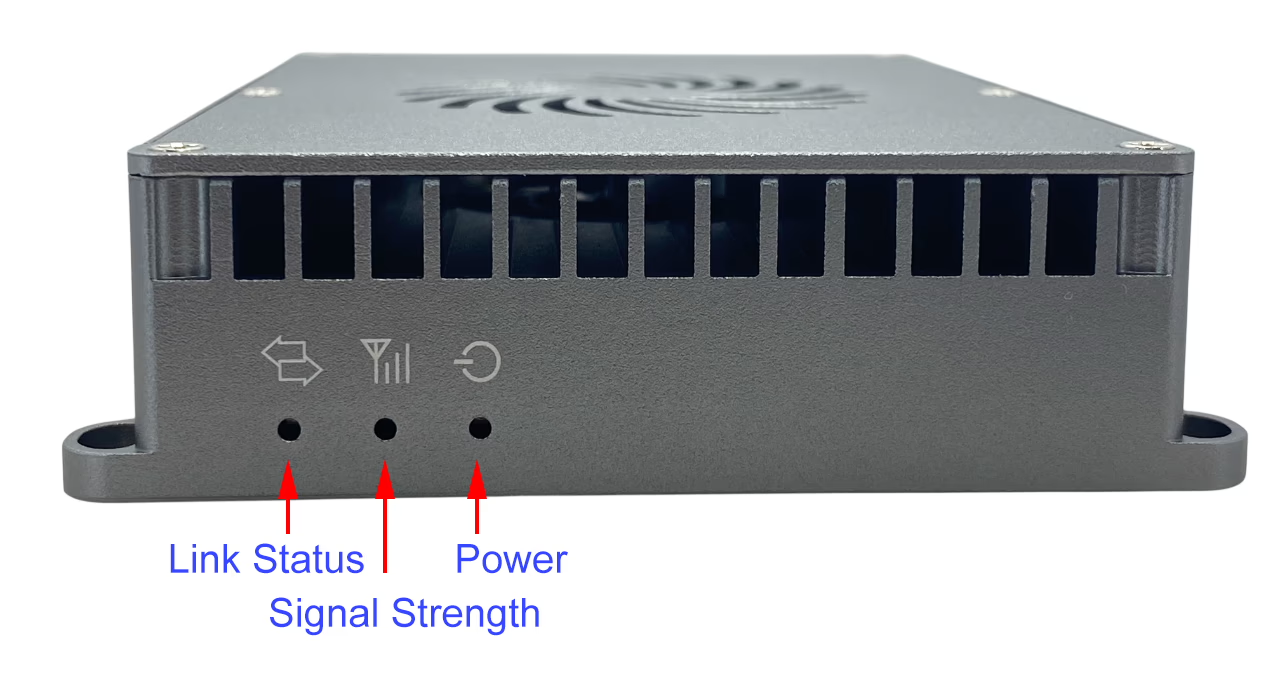
| Power LED | The red light on normally powered |
| Node LED | Blue light for Node type indicator |
| Link LED | Greenlight, wireless link working status indicator |
Transmitting Method
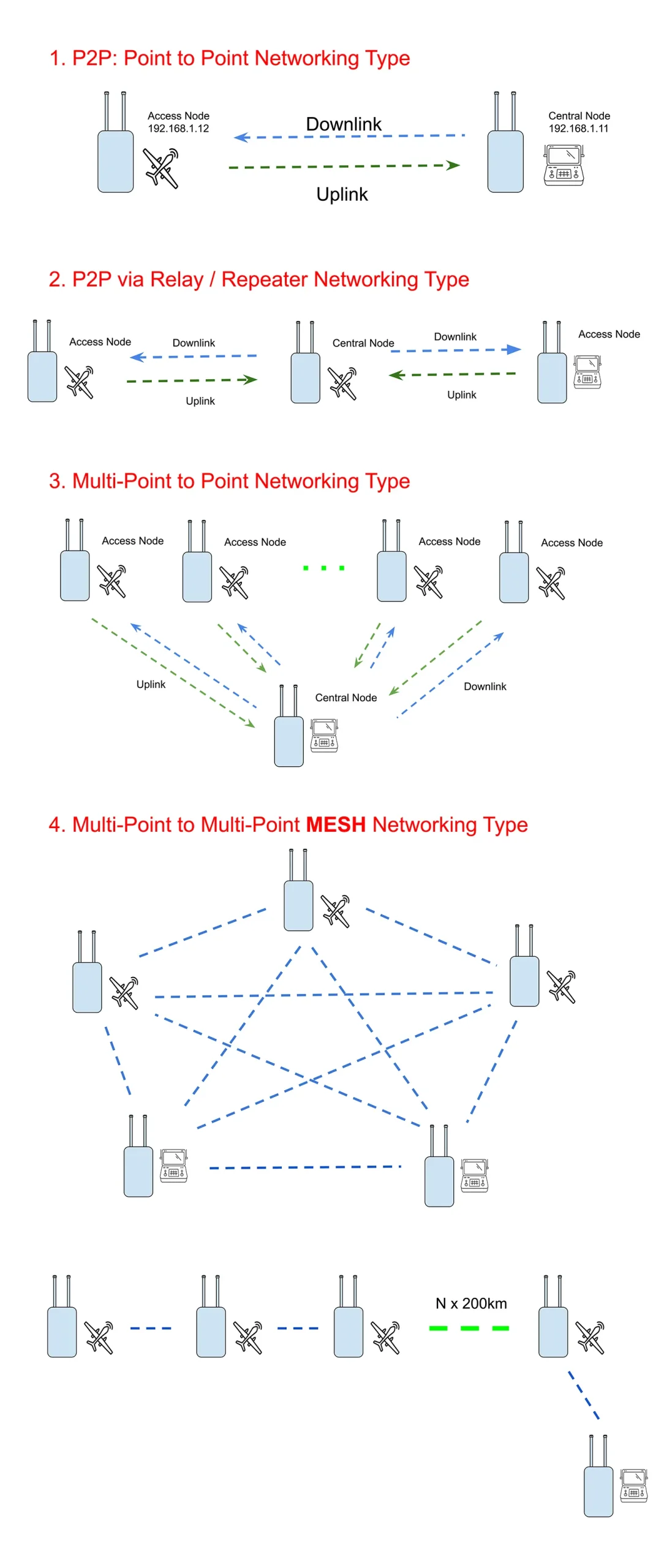
see Web UI configuration details
2W 27km Test transmitter and receiver map
Product Applications
-
UAV (drone) long-range video & data transmission
-
UGV / robotics real-time control and monitoring
-
Surveillance and border security operations
-
Emergency response and disaster relief communication
-
Military reconnaissance and industrial inspection
Key Features
-
Transmission Distance: 15km / 22km / 30km / 55km / 80km / 100km / 150km (LOS/NLOS supported)
-
Encryption: AES128 secure video encryption
-
Frequency Bands: 800MHz / 1.4GHz / 2.4GHz, with FHSS frequency hopping option
-
Latency: Ultra-low delay, 28–76ms typical
-
Bandwidth: Adjustable 3 / 5 / 10 / 20 MHz, max throughput 30Mbps
-
Modulation: QPSK / QAM16 / QAM64 automatic adaptation
-
Networking: Point-to-point, Point-to-multipoint, Relay mode, IP mesh supported
-
Interfaces:
-
2× Ethernet (RJ45 + 4PIN)
-
3× RS232 data ports (configurable to TTL / SBus / UART / RS485)
-
Audio input & output
-
-
Dual Antennas: Main TX/RX + auxiliary RX for stable link
-
Power Amplifier Options: 2W / 5W / 10W selectable
-
Compatibility: Works with IP cameras directly; HDMI/SDI cameras supported via external encoder/decoder
Customization Options
-
Selectable power level (2W, 5W, 10W) for different ranges
-
Frequency band customization (800MHz, 1.4GHz, 2.4GHz)
-
Optional frequency hopping module (TX900B, frequency range is 1420-1530MHz)
-
Flexible data interface: RS232, TTL, SBus, UART, or RS485
-
Relay node configuration for extended coverage
-
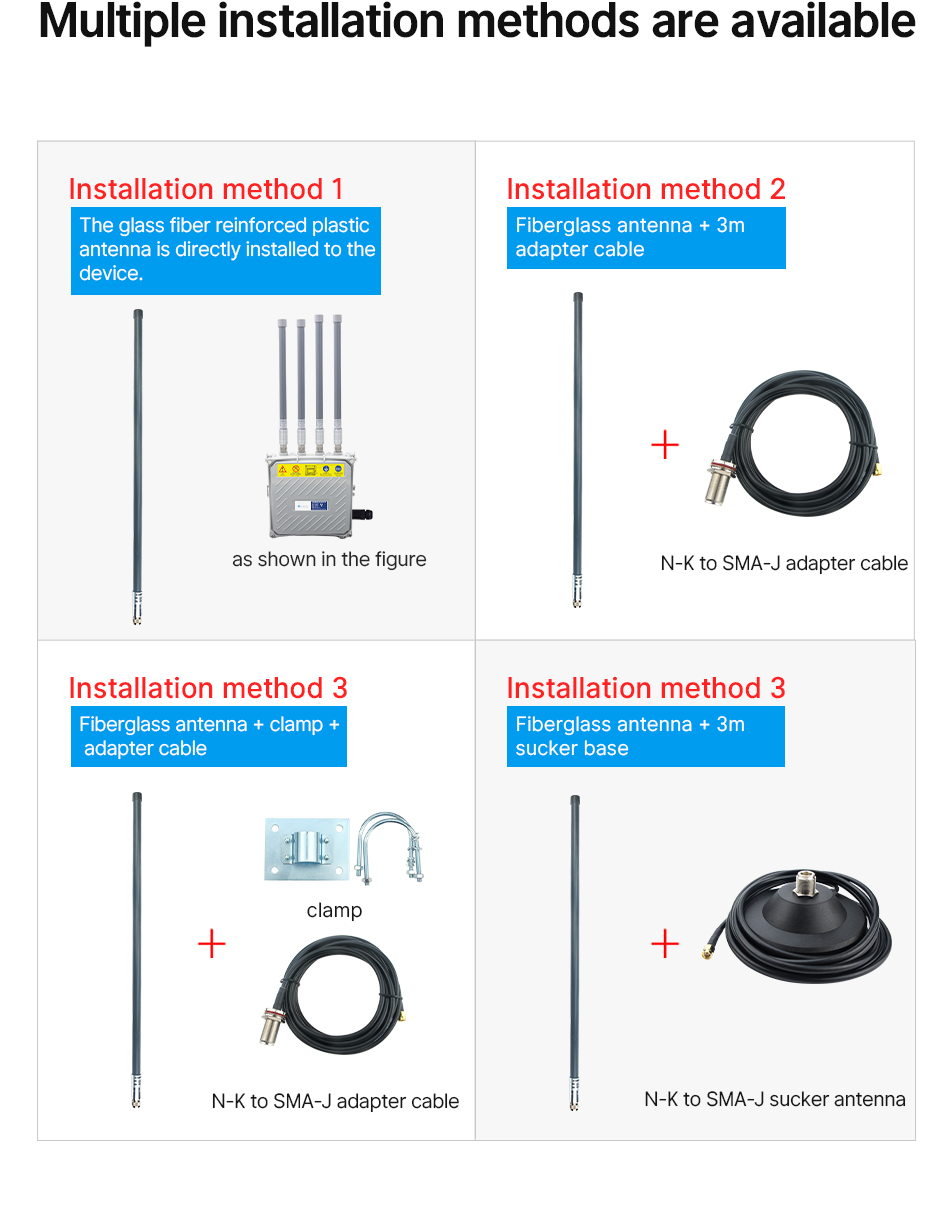
Optional antenna mounting accessories (magnetic base / U-shaped clamp)
-
Encoder & decoder add-ons for HDMI / SDI video sources
FAQs
The power supply of this transmitter and battery both are 3A@28V. At the normal time, the battery we used for tested is 7AH, it can work for 2~4 hours. If you buy15AH chargeable battery, it can work continuously for about 4~8 hours.
Not only switch the frequency at the web UI parameter easily, after changing the frequency, it also needs to change the Power Amplifier inside and the same frequency transmitter and receiver antenna. So buyer should confirm which frequency you need before delivery. The antenna is customized according to this frequency.
Regarding the RF cable, our engineer doesn't recommend that you used it so long. There will be a reduced 0.5dB for one meter RF cable. For 3 meters RF cable, the signal strength will be reduced by 1.5dB.
In order to support long-distance, It is better that you use the RF cable less than 1 meter?
In fact, the transmitter is very smaller, it is better to keep a short distance from the transmitter to the transmitter antenna. The power supply cable for the transmitter and ethernet cable from the camera to the transmitter can be longer as there are no losses like RF cable.
Yes, the default video input is IP RJ45 ethernet port, if your camera is HDMI or SDI or AHD, just plus one small encoder box to solve this problem. Please check the below model.
- If your area has a DVB-T or DVB-T2 digital television signal, the TV frequency range is 170-860Mhz, it has including 800Mhz, so choose 1.4G is better.
- Because the GPS antenna receives the GPS signal and the GPS direction on the drone is up, our transmitter antenna is pointing down to send the signal to the ground. As a result, the 1.4G frequency effect on GPS is negligible.
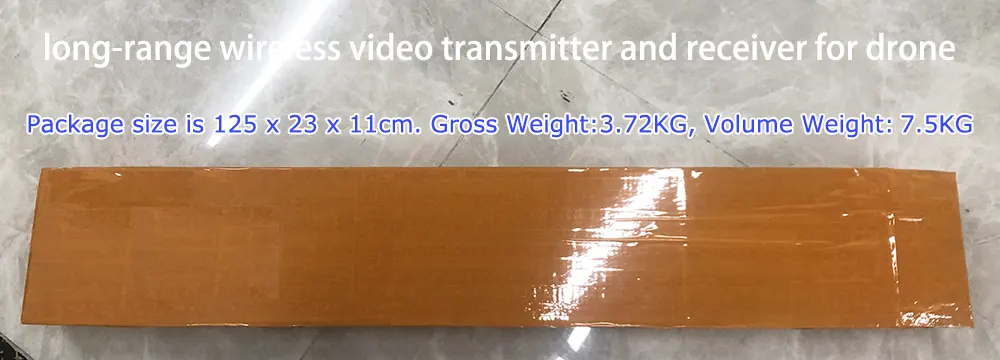
The package size is 125 x 23 x 11cm. Gross Weight:3.72KG, Volume Weight:7.5KG
Here is the full set picture.
Regarding frequency hopping, the engineer has some suggestions for you.
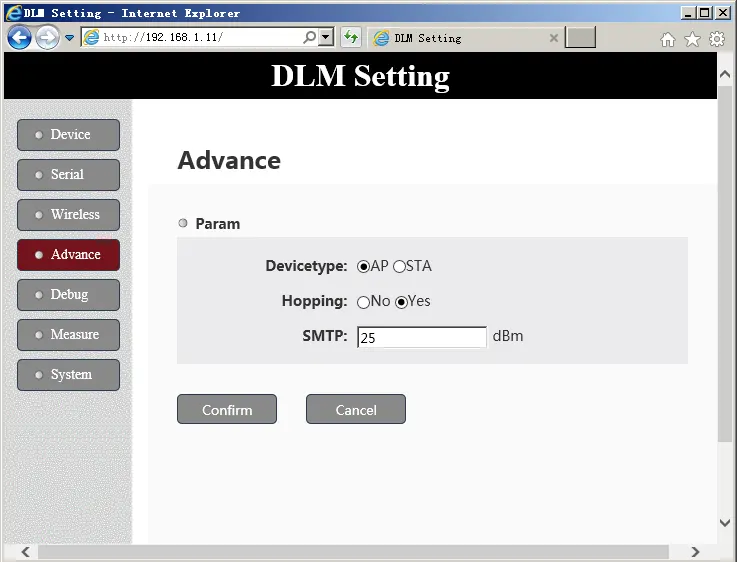
- As the system frequency range is 20Mb, if your bandwidth is chosen 20Mb, then it can not hop (only one point). If the bandwidth is chosen 10Mb, then you have two points to hop, if the bandwidth is chosen 5Mb, then you have 4 points to hop.
- If 1410Mhz has jammed, then 1420Mhz also has jammed, as the frequency is too close.
- When hopping frequency, the data or video transmission will be disconnected, and your video will be frozen.
- At the normal time, it is better to choose hopping is NOT.
- If your transmission distance is less than 15~22km, then we have another option to choose from, the frequency has 110Mb, and even if you choose 20Mb bandwidth, it has 5 points to choose from for frequency hopping.
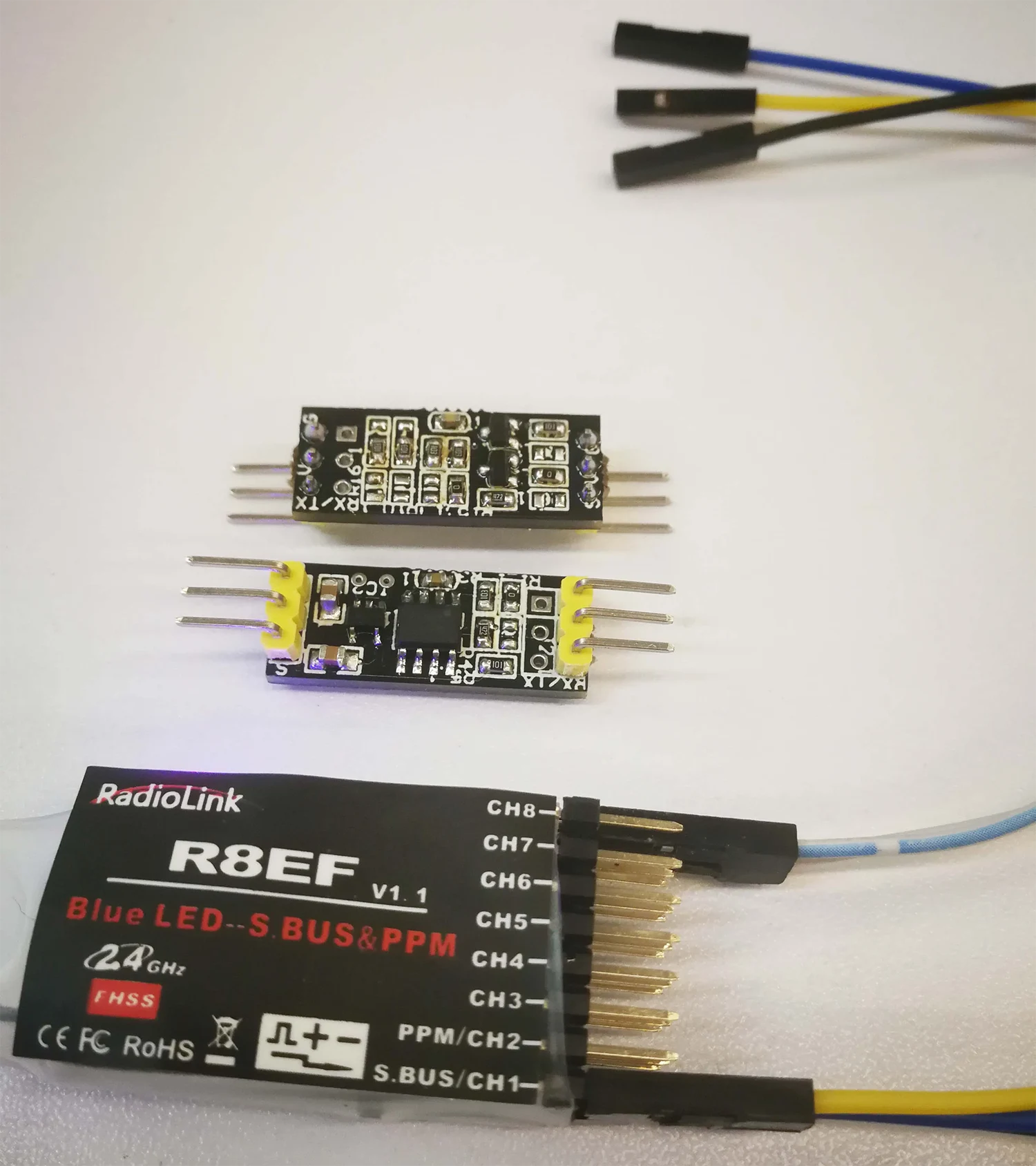
If you need to support S.bus, then please tell us before shippment, and we will modify our RS232 to TTL.
Our TX900 has three RS232 ports. If you need it to support S.bus, just need plus one small converter from S.BUS to RS232 is ok. ( Mini SBUS Conversion Module Uart to Sbus, Sbus to Uart ).
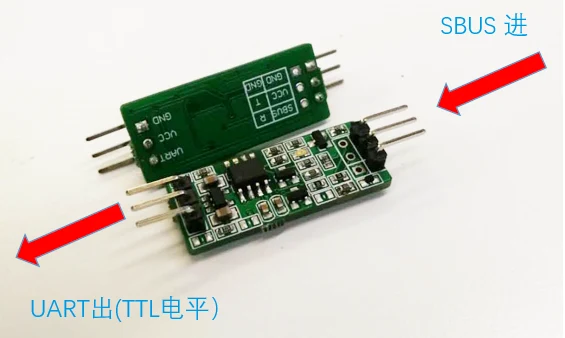
Please tell us if you need sbus port before delivery. Our engineer will modify the D2 port from RS232 to Sbus.

RSSI wireless link status data requires customers (such as flight controllers) to manually send AT commands to obtain it. It can be obtained in two ways:
- Configure UART3 (data port 3rd) as an AT command serial port, and then send AT commands through UART3 (D3) to obtain. https://ivcan.com/change-d3-from-transparent-serial-port-to-at-command/
- Update the firmware version 1.5.1 or above, so that there will be an additional TCP server inside for customers to access through TCP to send AT commands to obtain the wireless status.
- The LED light is used to indicate the wireless connection status (for example, if the wireless link is disconnected, the light will go out), and there is no dedicated external pin to notify the customer flight control.
Or see the UART AT command list here.
or see https://ivcan.com/how-to-get-the-rssi-and-snr-on-the-drone-transmitter/
- The serial port of our wireless video transmission is transparent, and no data is actively sent to the flight controller. This is controlled by the ground station.
- It won't send the failsafe command, but you can see the link status light from the signal indicator.

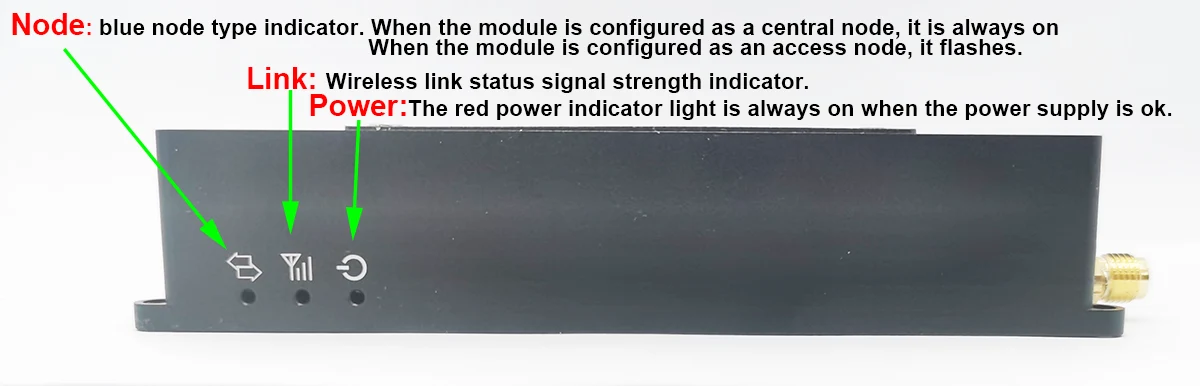
- Here is the link status signal strength indicator means
- Not Bright: Indicates that the wireless link of the module is not connected
- Red: Indicates that the wireless link of the module has been connected, but the wireless signal strength is very weak
- Orange: Indicates that the wireless link of the module has been connected, and the wireless signal strength is medium
- Green: Indicates that the wireless link of the module has been connected, and the wireless signal strength is very strong
- We understand that you hope to have this function, If aircraft loses signal during flight it will not return to home because flight controller will not understand that rc link is lost.
- You need to see the link status LED light, if it is Orange or Red, you should control the plane back in advance.
- You also can get the RSSI at the below windows


Please check the upgrade firmware setps, download the latest upgrade firmware at the below link.
https://ivcan.com/how-to-upgrade-the-latest-firmware-of-the-wireless-video-transmitter-and-receiver
At the normal usage, one node as the transmitter, another node as the receiver. If you need to support long range or over a mountain top, like the below picture, yes, please buy 3rd nord as the reapter.
You just need to put the 3rd node in the middle and set the 3rd node be a 2D3U then ok.
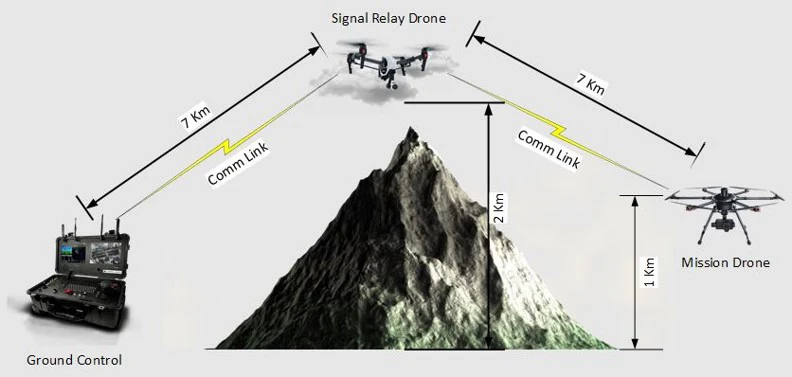
How to set 3rd node be 2D3U?
Set with AT command:
at+cfun=0
at^dstc=0
at+cfun=1
Restart the link device after the operation
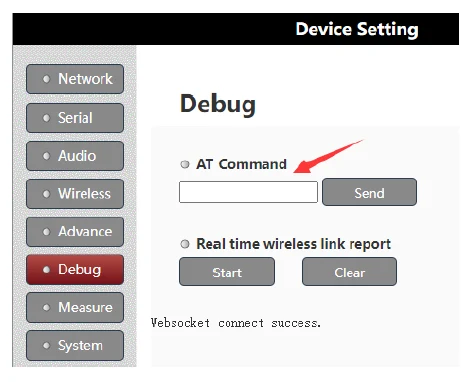
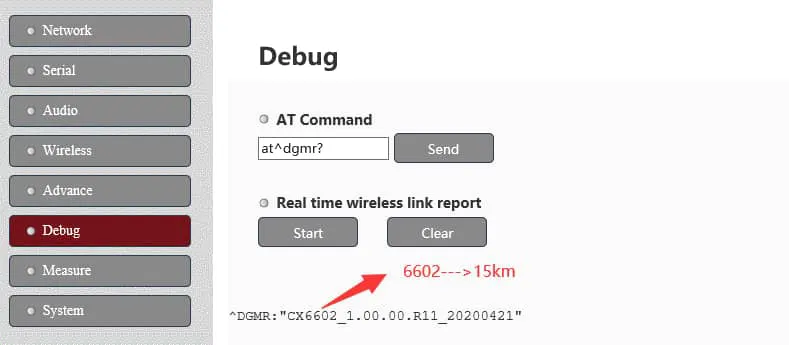
On the Web UI parameter mangagment page and debug section,
AT command
Input AT^DGMR?
If you get result is 6602, then it is 15km version.
If you get result is 6603, then it is 30km version.
4K video is supported.
4K video stream generally has more than 8Mbps, and 1080P video generally has more than 2M, so the distance of our wireless video transmission when transmitting 4K video will be shorter than that of 1080P.
In one word, the higher the definition of the video, the shorter the transmission distance.
The video compression is smaller, and the transmission distance is supported farther.
In the process of video transmission, if there is data loss, the picture will appear mosaic or stagnation, freeze and other phenomena.
There will be a limited number of retransmissions at the wireless link level (of course, data errors will also occur if the situation is not good). The upper-layer application on the end will not be aware of it, nor will it ask the sender to retransmit.
If the signal of the wireless link is not good at a certain point after the distance is extended, and there are always bit errors, it is impossible to design it to be retransmitted all the time, so that the end user experience will be very poor.
The wireless link layer has a limited retransmission mechanism. We have tested the tcp protocol for transmission at the video transmission layer (trying to retransmit on the upper layer through the tcp protocol), but the test found that there is no obvious improvement, and it will also lead to uncontrollable delays.
- The heat generated by the aircraft side is much larger than that of the ground side. If the fan is running, check whether the air inlet and outlet of the lower fan (the positions of the heat sinks at both ends) are blocked
- Try changing the power supply of the air unit transmitter from 24V to 12~18V (the transmit power will be reduced to about 35~36DB)
- Slightly reduce the transmit power of the aircraft by the below AT commands: AT^DSSMTP="23" Reboot after setting
Question: Are these settings maximum power of the module? (24 dBm)
Answer: 24dBm is the maximum output power of the link Module, and the gain of the PA (about 14dBm) needs to be added. The actual transmission power after the 24V power supply PA output is about 38dBm.
|
# |
Procurement Specifications |
YesNo |
Notes |
|
1 |
The unit shall operate in the VHF BAND and UHF band with its RF transmissions. |
UHF |
1427.9-1467.9Mhz |
|
2 |
The unit shall have an RF output power of 27 dBm or more. |
Yes |
2W 33dBm 5W 37dBm 10W 40-41dBm |
|
3 |
The unit shall provide Serial (Bidirectional, Fullduplex) as data interface. (RS232 or RS422) |
Yes |
RS232 bidirectional full duplex |
|
4 |
The unit power consumption shall not exceed 25W. |
Yes |
<22W |
|
5 |
The unit mass shall not exceed 250 grams.
|
Yes |
<150 grams (142grams) |
|
6 |
The unit shall have a data rate of at least 4.8 Kbps |
Yes |
RS232:>50kBps Ethernet:>2M Bps |
Lead time: 10 days for small quantity order.
HS code: 8517629900
The difference between the air unit (transmitter) and ground unit (receiver) is two points:
One is the device type: Air unit (transmitter) is the access node and the ground unit (receiver) is the central node.
Two is the rate ratio of the downlink and up link. Over 30km, the best rate ratio is 4:1 or 3:2.
If you don't want to connect the receiver ethernet cable directly to the computer. Then it is not easy to access the receiver at your local network.
Here is two solutions for you.
1. Add the IP address of the 192.168.1.x network segment on the PC side (the PC can be configured with multiple network segment IP addresses)
2. Modify the IP of the wireless video data receiver from 192.168.1.12 to the address of the 10.220.20.x network segment to meet your local network.
For further questions and solutions, please talk with your local area network workmate or engineer, our receiver is like a computer with IP address, it should keep the network segment IP address at the same, for example, 192.168.1.xxx.
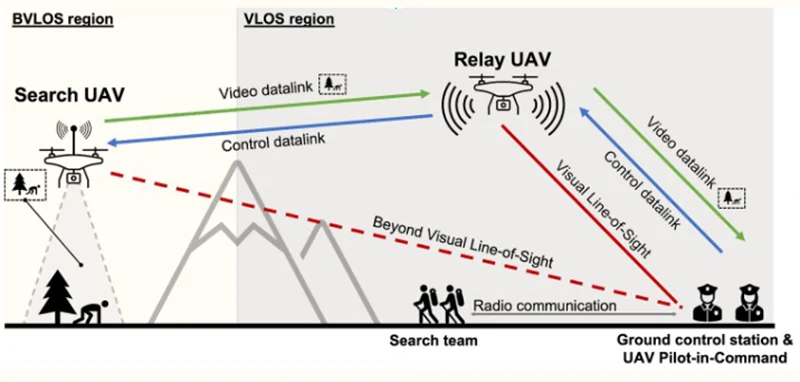
- Yes, there are three solutions to do that.
- TX900 has three data ports. Distinguish through different transparent serial ports, such as D2 to control relay aircraft and D3 to control mission aircraft. The disadvantage is that the TX900 receiver needs to be connected to two serial ports to send instructions separately.
- Use the same transparent serial port to send data in bulk, and then add layer protocols (such as header information) to the data to distinguish which aircraft should receive and process the data. The disadvantage is that the processing of sending and receiving data is complicated.
- Or use two receivers: One receiver is for the mission plane (transmitter), and another receiver is for the repeater drone. The connection and operation are easier.

Latest Test video from mountaintop to 27 km away to the seaside to check the long-range effect and operate at the receiver


Optional TX900B for some clients need frequency hopping function.
- TX900B-2W supports the frequency range is 1420~1530MHz, and there is 110Mb bandwidth to use. (800Mhz frequency range does not support this 110Mb bandwidth)
- The customer can set the working bandwidth as 1.4M/3M/5M/10M/20MHz (However 1.4M/3MHz may not be suited for video transmitting). Then TX900B-2W can work in FHSS mode (Frequency-hopping spread spectrum) and the central working frequency will be automatically selected by the system and may do frequency hopping (between 1420~1530MHz) during its working.
- Customers can also plan to use the frequency channels in the whole 1420~1530MHz and set the device to work in the fixed frequency channels too.
- TX900B-2W supports the longest distance at 22km.
- Except for the frequency range supported and the longest distance, the physical appearance, interface, UI, operation, and so on, the TX900B-2W is the same as the existing TX900B-15km-2W.
- TX900B-2W only supports a frequency range is 1420~1530MHz, it does not support 800MHz and 2.4GHz frequency ranges.
- There are two versions, TX900B-2W-15km, and TX900B-2W-22km.
- As the TX900B-2W frequency range is 110Mb, so if you configure the working bandwidth as 10Mb, then you will get 11 points to hopping.
- TX900B supports 110Mb bandwidth for frequency hopping and only has three optional transmission ranges, 22km, 55km, and 150km.
Related technical articles
- D3 serial port function configuration
- TX900 transparent transmission and UDP serial port instructions
- How to get the RSSI and SNR on the drone transmitter? Can I get this information from the serial port
- Set the D3 or UART3 data port at the transparent serial port or the AT command working mode.
- How to add and set the drone relay repeater at the UAV video data transmitter and receiver TX900?
- Replace D2 D3 to transmit data through the Ethernet port
- How to change RS232 to TTL for flight controller, Autopilot Pixhawk Cube Orange
- TX900 D3 serial port configuration
- How to switch the roles of transmitter and receiver?
- How to connect the flight control to the drone video data link via TCP?
- Why You Can’t Change the Frequency on Your Long-Range UAV Data Link?
| Power Amplifier | 2 Watts, 5 Watts, 10 Watts |
|---|---|
| Distance | 22km, 55km, 80km, 100km, 150km |
1 review for 22km 55km 80km 100km 150km long-distance wireless video transmitter receiver transmission transceiver PA 2W 5W 10W
Add a review


Related products
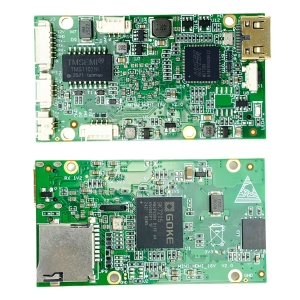
CVBS HDMI to IP Encoder
Mini Size HDMI Encoder Board Over IP Ethernet RJ45 Output modulator H.265 HTTP RSTP UDP ONVIF TCP
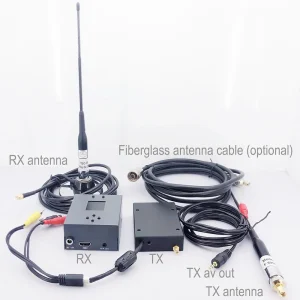

Video Transmitter

Bidirectional Two-Ways
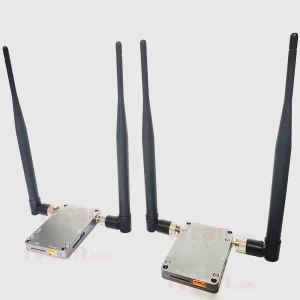
50-100km Drone Wireless Video Data Control Transmitter and Receiver 2W-5WPA 1.4G-2.4G Vcan1805
Video Transmitter
Helena –
This wireless video transceiver delivers flawless 20-100km transmission even in non-line-of-sight environments. The COFDM technology ensures robust anti-interference and anti-multipath fading performance, perfect for drone mapping and military reconnaissance missions. A game-changer for long-range operations!