






Introduction:
It’s our newest designed HD multi-functional CODFM video receiver special for army outdoor use. The use of advanced multi-carrier diversity reception technology to support high-speed mobile reception and non-line-of-sight.With 7-inch high-definition screen provides simple control operation by the user and perfect image display, Which provides quick reference data for quick installation works. Our product is widely used in the security, fire, emergency communications, and broadcasting industries.
Product Features:
- High brightness, contrast, anti-glare screen with a sunshade, sun clearly visible.
- Center marker,screen marker(viewfinder)function
- Color/B&W/R,G,B Monochrome display
- COFDM modulation,H.264/MPEG-2 full functional image decoding;
- Support Multicarrier double antenna diversity reception
- Built in with 7 inch 1080P high definition LCD screen;
- With internal Li-battery,support 4 hours continously working;
- Frequency can be customized according to requirements.Usual suggest at the range of 300-900MHz;
- Support video audio transmitting synchronously;
Specifications: - Frequency:300-900MHz (optional);
- Modulation:COFDM;
- Bandwidth:2/2.5/4/8MHz (adjustable);
- USB plugs: U disk inserted type DVR;
- Audio output:3.5mm jack (CVBS) headphone;
- Voltage:DC12V;
- Sensitivity:-104dBm/2MHz;
- Decoding mode:H.264/MPEG-2;
- Encryption mode:AES256 bits;
- Internal Li-battery:6000mA, can work 4 hours synchronously;
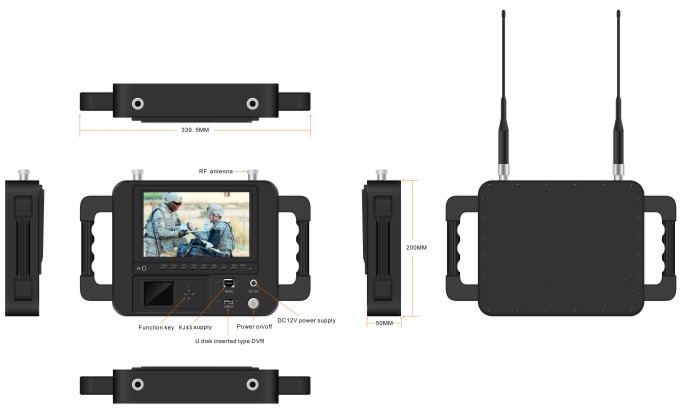
- Dimension:33420051mm
- Net weight:3.1kg
Front control panel:

- Headphone jack
- CAMERA: Camera mode key
- SCALE: Screen marker dispaly confirm,you can choose 80%,85%,90%,93%,96%,off.
- LEFT: Center mark (cross) display, volume adjustment is to reduce the volume, press the RIGHT button to confirm. Then press this button to control the volume decrease. In the menu settings for project selection and adjustment. showed that the volume is adjusted to reduce the volume. Press the right key to confirm and then click this button again to control the volume decrease. The menu is for project selection and fixed value adjustment.
- RIGHT: volume adjustment confirmation key. When you need to adjust the volume, first press to confirm the size press, then press this button to increase the volume control in the menu settings for project selection and adjustment.
- MENU: Menu key to enter/exit the menu.
- DOWN: Direct pressing this key, shortcut keys for the focus assist. To enter the menu for the down adjustment key select the next option.
- UP:Direct pressing this key,color/B&W/monochrome(R,G,B)select a shortcut.Enter the menu for the up adjustment key to select the previous option.
- Model: 1080P/1080I resolution, HD&sdi interfaces are automatically compatible.
- Power: On/standby select key
- Power indicator
- DC12V: power supply;
- ON/OFF
- RJ45: network connector.
- USB: U disk inserted type DVR;
SunShade installation and remove - Installation: Positive parallel alignment of the sunshade and monitor, the projection of the sunshade hanging claw at the monitor sunshade slot(see the monitor front view marked 17). Pay attention to the position should be aligned around inserted balanced slide down.
Sunshade installation view:
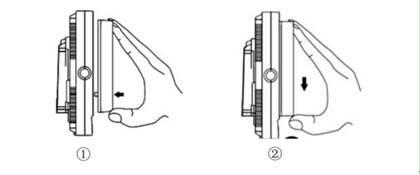
①The sun shade’s hanging claw and the monitor’s sun shade slot should be aligned around inserted balance to slide down.
②By equilibrium of sliding down to match up the sun shade and monitor.
③Please follow the steps, otherwise will damage the cover. Pls, do not press the L/R panel of the sun shade, if not, unable open the cover.
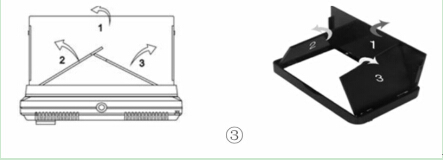
- Remove: When you want to shade cover to be removed from the monitor, hands clench the monitor and the sun shade, drag up the shade cover from the monitor, which separates the sun shade from the monitor.
Remove sun shade view:


①In accordance with the instructions below steps, close the sunshade in sequence.
②Drag up sun shade balance to separate the sunshade from the monitor.
③Remove the sunshade
Product application:

-
 Best FPV Video Transmitter Module 170-860Mhz Wireless RF audio video Transmitter for FPV Camera 3W PA 50km
 -
drone swarm mesh network 100km 60Mbps radio link 4-nodes 2X frequency hopping 2X 5-watt power amplifier
-
IP Mesh 100Mbps wireless video data transceiver 2X5W PA 16 hop
-
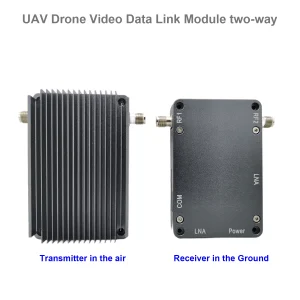
Drone Link for long-range Video Data Radio Telemetry Wireless transmission between UAV and Ground Control Station
-
UAV drone video data link module wireless video transmitter and receiver for camera long-range TDD transceiver two-way vcan1401
-
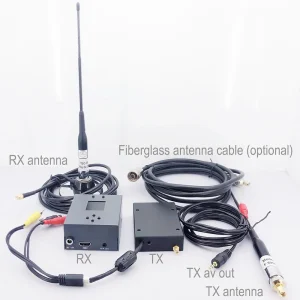
COFDM video transmitter-receiver AV in HDMI out FPV, Wireless 10km-15km-30km long-range cheaper and longer COFDM-912T
-
1740-1840Mhz 2WPA 30KM long range drone video transmitter and receiver with Sbus TTL
-
30Km long distance COFDM HDMI Wireless Video Transmitter Receiver full Set Audio Video TX RX for UAV Drone 1080P 908T
-
Two-way UAV Wireless Video Data RC Control Link module long-range bidirectional transceiver Transmitter-Receiver Vcan1681
-
long range wireless video data transmitter and receiver for drone UAV robot
-
Wireless Video Transmitter and Receiver for Camera, HDMI HD H265 264 encoder 1W/2.5W PA 1080P60 Vcan1726
-
22km 55km 80km 100km 150km long-distance wireless video transmitter receiver transmission transceiver PA 2W 5W 10W
-
drone video data telemetry transmitter-receiver UAV radio link tdd transceiver
-
10W PA 150KM airborne video data link long-range UAV wireless transmission transmitter receiver broadband tactical handhold
-
30-millisecond Drone UAV HDMI Wireless video transmitter Ultra-low-latency wireless transmission system Vcan1729
-
ip mesh MANET transceiver with bidirectional audio-IP board for robot UAV Drone
-
150km 100Mpbs frequency hopping at 2bands UAV radio link high transmission rate and anti-interference
-
Drone mesh wireless video data link 150-200km longe-range centerless ad hoc network transceiver










Ask A Question
Thank you for your response. ✨