




Введение:
It’s our newest designed HD multi-functional CODFM video receiver special for army outdoor use. The use of advanced multi-carrier diversity reception technology to support high-speed mobile reception and non-line-of-sight.With 7-inch high-definition screen provides simple control operation by the user and perfect image display, Which provides quick reference data for quick installation works. Our product is widely used in the security, огонь, экстренная связь, and broadcasting industries.
Особенности продукта:
- High brightness, контраст, anti-glare screen with a sunshade, sun clearly visible.
- Center marker,screen marker(viewfinder)функция
- Color/B&W/R,г,B Monochrome display
- COFDM модуляция,H.264/MPEG-2 full functional image decoding;
- Support Multicarrier double antenna diversity reception
- Встроенный с 7 inch 1080P high definition LCD screen;
- With internal Li-battery,поддерживать 4 hours continously working;
- Frequency can be customized according to requirements.Usual suggest at the range of 300-900MHz;
- Support video audio transmitting synchronously;
Технические характеристики: - частота:300-900МГц (необязательный);
- модуляция:COFDM;
- Пропускная способность:2/2.5/4/8МГц (регулируемый);
- USB plugs: U disk inserted type DVR;
- Аудио выход:3.5мм разъем (CVBS) headphone;
- Напряжение:12 В постоянного тока;
- чувствительность:-104дБм/2 МГц;
- Режим декодирования:H.264/MPEG-2;
- Режим шифрования:AES256 bits;
- Internal Li-battery:6000мА, can work 4 hours synchronously;
- измерение:33420051мм
- Вес нетто:3.1кг
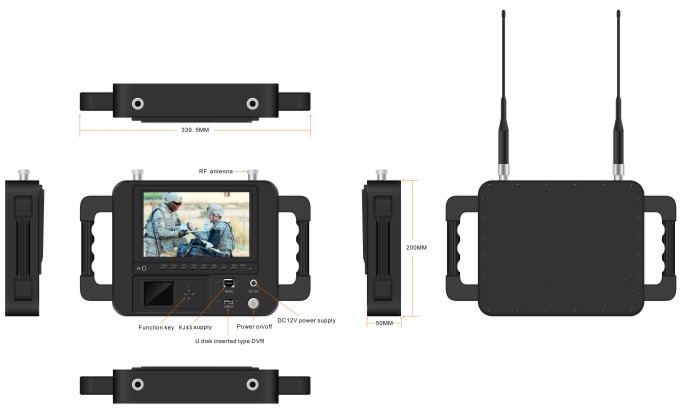
Front control panel:

- Headphone jack
- CAMERA: Camera mode key
- SCALE: Screen marker dispaly confirm,you can choose 80%,85%,90%,93%,96%,off.
- ЛЕВЫЙ: Center mark (cross) отображать, volume adjustment is to reduce the volume, press the RIGHT button to confirm. Then press this button to control the volume decrease. In the menu settings for project selection and adjustment. showed that the volume is adjusted to reduce the volume. Press the right key to confirm and then click this button again to control the volume decrease. The menu is for project selection and fixed value adjustment.
- ВЕРНО: volume adjustment confirmation key. When you need to adjust the volume, first press to confirm the size press, then press this button to increase the volume control in the menu settings for project selection and adjustment.
- МЕНЮ: Menu key to enter/exit the menu.
- ВНИЗ: Direct pressing this key, shortcut keys for the focus assist. To enter the menu for the down adjustment key select the next option.
- ВВЕРХ:Direct pressing this key,color/B&W/monochrome(Р,г,Б)select a shortcut.Enter the menu for the up adjustment key to select the previous option.
- Модель: 1080P/1080I resolution, HD&sdi interfaces are automatically compatible.
- Мощность: On/standby select key
- Индикатор питания
- 12 В постоянного тока: источник питания;
- ON/OFF
- RJ45: network connector.
- USB: U disk inserted type DVR;
SunShade installation and remove - Установка: Positive parallel alignment of the sunshade and monitor, the projection of the sunshade hanging claw at the monitor sunshade slot(see the monitor front view marked 17). Pay attention to the position should be aligned around inserted balanced slide down.
Sunshade installation view:
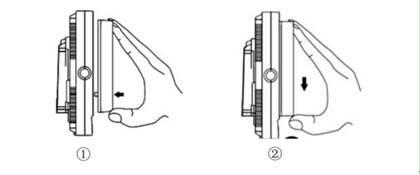
①The sun shade’s hanging claw and the monitor’s sun shade slot should be aligned around inserted balance to slide down.
②By equilibrium of sliding down to match up the sun shade and monitor.
③Please follow the steps, otherwise will damage the cover. Pls, do not press the L/R panel of the sun shade, if not, unable open the cover.
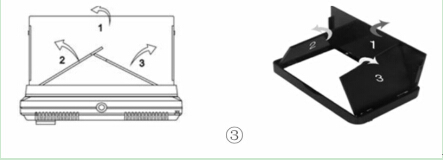
- Remove: When you want to shade cover to be removed from the monitor, hands clench the monitor and the sun shade, drag up the shade cover from the monitor, which separates the sun shade from the monitor.
Remove sun shade view:


①In accordance with the instructions below steps, close the sunshade in sequence.
②Drag up sun shade balance to separate the sunshade from the monitor.
③Remove the sunshade
Применение продукта:

-
 Сетчатая сеть сетки Drone 100 км 60 Мбит / с.
 -
Модуль видеопередатчика FPV 170-860 МГц, беспроводной радиочастотный аудио-видео передатчик для камеры FPV, 3 Вт, PA, 50 км
-
IP -сетка 100 Мбит / с беспроводных видеодантеров. 16 прыгать
-
Drone Link для передачи видеоданных на большие расстояния, радиотелеметрии, беспроводная передача между БПЛА и наземной станцией управления.
-
Модуль передачи данных дрона с БПЛА, беспроводной передатчик и приемник видео для камеры, трансивер TDD дальнего действия, двусторонний vcan1401
-
Видеопередатчик COFDM AV вход HDMI выход FPV, Беспроводная связь дальнего действия 10 км-15 км-30 км дешевле и дольше COFDM-912T
-
1740-1840MHZ 2WPA 30 -километровый видеопроводной передатчик и приемник с SBUS TTL с SBUS TTL
-
30Беспроводной видеопередатчик COFDM HDMI на большие расстояния, приемник, полный набор аудио-видео TX RX для БПЛА Дрон 1080P 908T
-
Двусторонний БПЛА, беспроводной модуль видеоданных, RC Control Link, двунаправленный приемопередатчик дальнего действия, передатчик-приемник Vcan1681
-
Беспроводной передатчик и приемник видеоданных большого радиуса действия для робота-дрона БПЛА
-
Беспроводной видеопередатчик и приемник для камеры, HDMI HD H265 264 энкодер 1 Вт/2,5 Вт PA 1080P60 Vcan1726
-
22км 55 км 80 км 100 км 150 км на длинные дистанции беспроводной передатчик передатчика передатчика Переводы PA 2W 5W 10 Вт
-
Дрон видеодантеры телеметрия передатчика-реципий
-
10W PA 150 км бортовой видеоканал передачи данных БПЛА дальнего действия, беспроводной передатчик, приемник, широкополосный тактический ручной захват
-
30-миллисекундный дрон БПЛА HDMI Беспроводной видеопередатчик Система беспроводной передачи со сверхмалой задержкой Vcan1729
-
ip-mesh трансивер MANET с двунаправленной аудио-IP платой для робота-БПЛА Drone
-
150Км 100-мегапорный запас частоты с частотой на 2 полосах БПЛА
-
Беспроводной канал передачи данных Drone Mesh, бесцентровый специальный сетевой приемопередатчик дальнего радиуса действия 150–200 км.









Задайте вопрос
Спасибо за ответ! ✨