





介绍:
It’s our newest designed HD multi-functional CODFM video receiver special for army outdoor use. The use of advanced multi-carrier diversity reception technology to support high-speed mobile reception and non-line-of-sight.With 7-inch high-definition screen provides simple control operation by the user and perfect image display, Which provides quick reference data for quick installation works. Our product is widely used in the security, 火, 紧急通讯, and broadcasting industries.
产品特点:
- High brightness, 对比, anti-glare screen with a sunshade, sun clearly visible.
- Center marker,screen marker(viewfinder)功能
- Color/B&W/R,G,B Monochrome display
- COFDM图传 调制,H.264/MPEG-2 full functional image decoding;
- Support Multicarrier double antenna diversity reception
- Built in with 7 inch 1080P high definition LCD screen;
- With internal Li-battery,支持 4 hours continously working;
- Frequency can be customized according to requirements.Usual suggest at the range of 300-900MHz;
- Support video audio transmitting synchronously;
产品规格: - 频率:300-900兆赫 (可选的);
- 调制:COFDM图传;
- 带宽:2/2.5/4/8兆赫 (可调整的);
- USB plugs: U disk inserted type DVR;
- 音频输出:3.5毫米插孔 (CVBS) headphone;
- 电压:直流12V;
- 灵敏度:-104分贝/2MHz;
- 解码方式:H.264/MPEG-2;
- 加密方式:AES256 bits;
- Internal Li-battery:6000毫安, can work 4 hours synchronously;
- 尺寸:33420051毫米
- Net weight:3.1公斤
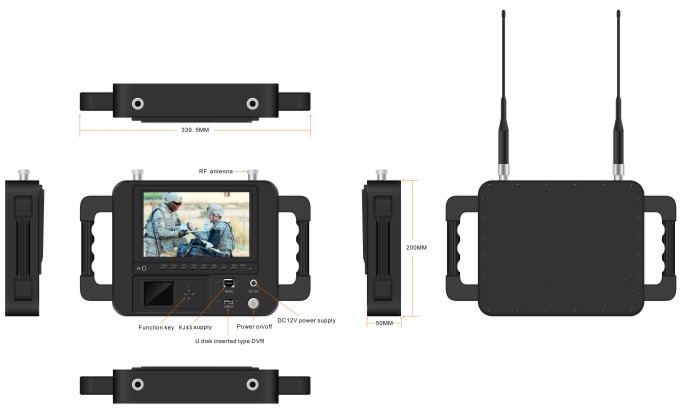
Front control panel:

- Headphone jack
- CAMERA: Camera mode key
- SCALE: Screen marker dispaly confirm,you can choose 80%,85%,90%,93%,96%,off.
- 左边: Center mark (cross) 展示, volume adjustment is to reduce the volume, press the RIGHT button to confirm. Then press this button to control the volume decrease. In the menu settings for project selection and adjustment. showed that the volume is adjusted to reduce the volume. Press the right key to confirm and then click this button again to control the volume decrease. The menu is for project selection and fixed value adjustment.
- 正确的: volume adjustment confirmation key. When you need to adjust the volume, first press to confirm the size press, then press this button to increase the volume control in the menu settings for project selection and adjustment.
- 菜单: Menu key to enter/exit the menu.
- 向下: Direct pressing this key, shortcut keys for the focus assist. To enter the menu for the down adjustment key select the next option.
- 向上:Direct pressing this key,color/B&W/monochrome(右,G,乙)select a shortcut.Enter the menu for the up adjustment key to select the previous option.
- 模型: 1080P/1080I resolution, HD&sdi interfaces are automatically compatible.
- 功率: On/standby select key
- 电源指示灯
- 直流12V: 电源;
- 开/关
- RJ45: network connector.
- USB: U disk inserted type DVR;
SunShade installation and remove - 安装: Positive parallel alignment of the sunshade and monitor, the projection of the sunshade hanging claw at the monitor sunshade slot(see the monitor front view marked 17). Pay attention to the position should be aligned around inserted balanced slide down.
Sunshade installation view:
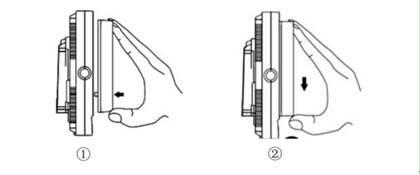
①The sun shade’s hanging claw and the monitor’s sun shade slot should be aligned around inserted balance to slide down.
②By equilibrium of sliding down to match up the sun shade and monitor.
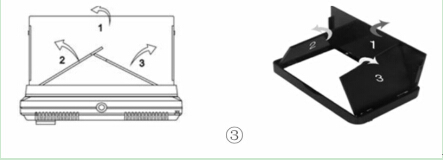
③Please follow the steps, otherwise will damage the cover. Pls, do not press the L/R panel of the sun shade, if not, unable open the cover.
- Remove: When you want to shade cover to be removed from the monitor, hands clench the monitor and the sun shade, drag up the shade cover from the monitor, which separates the sun shade from the monitor.
Remove sun shade view:


①In accordance with the instructions below steps, close the sunshade in sequence.
②Drag up sun shade balance to separate the sunshade from the monitor.
③Remove the sunshade
Product application:

-
 无人机群网络网络100km 60Mbps无线电链接4节点2x频率跳跃2x 5瓦功率放大器
 -
FPV 视频发射器模块 170-860Mhz 无线射频音频视频发射器适用于 FPV 摄像机 3W PA 50km
-
IP网格100Mbps无线视频数据收发器2x5W PA 16 跳
-
用于远程视频数据无线电遥测的无人机链路无人机和地面控制站之间的无线传输
-
无人机无人机视频数据链模块摄像头无线视频发射接收器远距离TDD收发器两路vcan1401
-
COFDM 视频发射器-接收器 AV 输入 HDMI 输出 FPV, 无线10km-15km-30km远距离更便宜更远COFDM-912T
-
1740-1840MHz 2WPA 30公里长距离无人机视频发射器和接收器带有SBUS TTL
-
30Km 远距离 COFDM HDMI 无线视频发射器接收器全套音频视频 TX RX 适用于无人机 1080P 908T
-
双向无人机无线视频数据RC Control Link模块远距离双向收发器Transmitter-Receiver Vcan1681
-
远程无线视频数据发射器和无人机无人机机器人的接收器
-
摄像机无线视频发射器和接收器, HDMI高清H265 264 编码器 1W/2.5W PA 1080P60 Vcan1726
-
22公里55公里80公里100公里150公里长的长途无线视频传输器接收器传输收发器PA 2W 5W 10W 10W
-
无人机视频数据遥测发射机接收器无线电链路TDD收发器
-
10W PA 150KM机载视频数据链远程无人机无线传输发射器接收器宽带战术手持
-
30-毫秒无人机无人机HDMI无线视频发射器超低延迟无线传输系统Vcan1729
-
IP网格Manet收发器带有双向音频IP板的机器人无人机无人机
-
150KM 100MPBS频率在2个带的频率无线电链路高传输速率和反干扰
-
无人机网状无线视频数据链路 150-200 公里远距离无中心自组织网络收发器









问一个问题
感谢您的回复。 ✨