





導入:
It’s our newest designed HD multi-functional CODFM video receiver special for army outdoor use. The use of advanced multi-carrier diversity reception technology to support high-speed mobile reception and non-line-of-sight.With 7-inch high-definition screen provides simple control operation by the user and perfect image display, Which provides quick reference data for quick installation works. Our product is widely used in the security, 火, 緊急通信, and broadcasting industries.
製品の特徴:
- High brightness, 対比, anti-glare screen with a sunshade, sun clearly visible.
- Center marker,screen marker(viewfinder)関数
- Color/B&W/R,G,B Monochrome display
- COFDM 変調,H.264/MPEG-2 full functional image decoding;
- Support Multicarrier double antenna diversity reception
- 内蔵 7 inch 1080P high definition LCD screen;
- With internal Li-battery,サポート 4 hours continously working;
- Frequency can be customized according to requirements.Usual suggest at the range of 300-900MHz;
- Support video audio transmitting synchronously;
仕様: - 周波数:300-900メガヘルツ (オプション);
- 変調:COFDM;
- 帯域幅:2/2.5/4/8メガヘルツ (調整可能な);
- USB plugs: Uディスク挿入型DVR;
- 音声出力:3.5ミリジャック (CVBS) ヘッドホン;
- 電圧:DC12V;
- 感度:-104dBm/2MHz;
- デコードモード:H.264/MPEG-2;
- 暗号化モード:AES256 bits;
- Internal Li-battery:6000ミリアンペア, can work 4 hours synchronously;
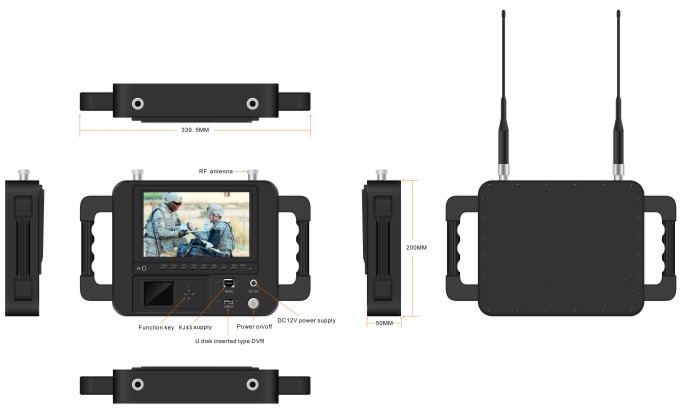
- 寸法:33420051ミリ
- Net weight:3.1kg
Front control panel:

- Headphone jack
- CAMERA: Camera mode key
- SCALE: Screen marker dispaly confirm,you can choose 80%,85%,90%,93%,96%,off.
- LEFT: Center mark (cross) 画面, volume adjustment is to reduce the volume, press the RIGHT button to confirm. Then press this button to control the volume decrease. In the menu settings for project selection and adjustment. showed that the volume is adjusted to reduce the volume. Press the right key to confirm and then click this button again to control the volume decrease. The menu is for project selection and fixed value adjustment.
- RIGHT: volume adjustment confirmation key. When you need to adjust the volume, first press to confirm the size press, then press this button to increase the volume control in the menu settings for project selection and adjustment.
- メニュー: Menu key to enter/exit the menu.
- 下: Direct pressing this key, shortcut keys for the focus assist. To enter the menu for the down adjustment key select the next option.
- 上:Direct pressing this key,color/B&W/monochrome(R,G,B)select a shortcut.Enter the menu for the up adjustment key to select the previous option.
- モデル: 1080P/1080I resolution, HD&sdi interfaces are automatically compatible.
- 力: On/standby select key
- 電源インジケーター
- DC12V: 電源;
- オン/オフ
- RJ45: network connector.
- USB: Uディスク挿入型DVR;
SunShade installation and remove - インストール: Positive parallel alignment of the sunshade and monitor, the projection of the sunshade hanging claw at the monitor sunshade slot(see the monitor front view marked 17). Pay attention to the position should be aligned around inserted balanced slide down.
Sunshade installation view:
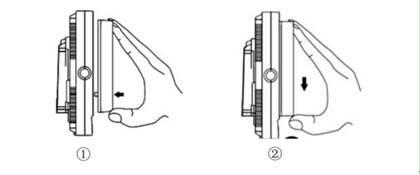
①The sun shade’s hanging claw and the monitor’s sun shade slot should be aligned around inserted balance to slide down.
②By equilibrium of sliding down to match up the sun shade and monitor.
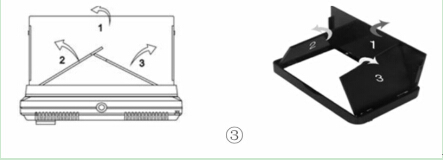
③Please follow the steps, otherwise will damage the cover. Pls, do not press the L/R panel of the sun shade, if not, unable open the cover.
- Remove: When you want to shade cover to be removed from the monitor, hands clench the monitor and the sun shade, drag up the shade cover from the monitor, which separates the sun shade from the monitor.
Remove sun shade view:


①In accordance with the instructions below steps, close the sunshade in sequence.
②Drag up sun shade balance to separate the sunshade from the monitor.
③Remove the sunshade
製品の用途:

-
 ドローンスウォームメッシュネットワーク100km 60Mbpsラジオリンク4ノード2x周波数ホッピング2x 5ワットパワーアンプ
 -
FPV ビデオトランスミッタモジュール 170-860Mhz ワイヤレス RF オーディオビデオトランスミッタ FPV カメラ 3 ワット PA 50 キロ
-
IPメッシュ100Mbpsワイヤレスビデオデータトランシーバー2x5W PA 16 ホップ
-
長距離ビデオデータ用のドローンリンク 無線テレメトリー UAV と地上管制局間の無線伝送
-
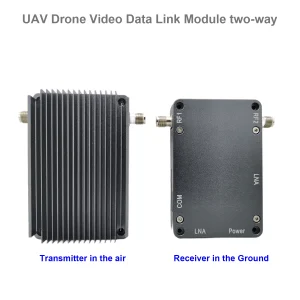
UAV ドローンビデオデータリンクモジュールワイヤレスビデオ送信機と受信機カメラ長距離 TDD トランシーバー双方向 vcan1401
-
COFDM ビデオ送受信機 AV 入力 HDMI 出力 FPV, ワイヤレス 10km-15km-30km 長距離 安くて長い COFDM-912T
-
1740-1840MHZ 2WPA 30km長距離ドローンビデオトランスミッターとSBUS TTLを使用したレシーバー
-
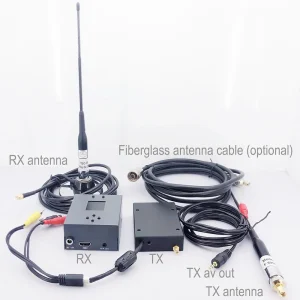
30キロ長距離 COFDM HDMI ワイヤレスビデオ送信機受信機フルセットオーディオビデオ TX RX UAV ドローン 1080P 908T
-
双方向 UAV ワイヤレス ビデオ データ RC コントロール リンク モジュール 長距離双方向トランシーバー 送受信機 Vcan1681
-
ドローンUAVロボット用の長距離ワイヤレスビデオデータ送信機とレシーバー
-
カメラ用ワイヤレスビデオトランスミッターおよびレシーバー, HDMI HD H265 264 エンコーダー 1W/2.5W PA 1080P60 Vcan1726
-
22km 55km 80km 100km 150km長距離ワイヤレスビデオトランスミッター受信機伝送トランシーバーPA 2W 5W 10W
-
ドローンビデオデータTelemetry Transmitter-Receiver UAV Radio Link TDD Transceiver
-
10W PA 150KM 空中ビデオデータリンク長距離 UAV ワイヤレス送信機受信機広帯域戦術ハンドホールド
-
30-ミリ秒 ドローン UAV HDMI 無線映像送信機 超低遅延無線伝送システム Vcan1729
-
ロボットUAVドローン用の双方向オーディオIPボードを備えたIPメッシュMANETトランシーバー
-
150KM 100MPBS 2バンドでの周波数ホッピングUAV無線リンク高伝送速度と干渉防止
-
ドローンメッシュワイヤレスビデオデータリンク150-200km長距離センターレスアドホックネットワークトランシーバー









質問する
ご回答をありがとうございました。 ✨