






Table of Contents
1. Overview of Radio Data Link Series Data Transmission Radio
Radio Data Link self-organizing network(Mesh) data link radio realizes the centerless long-distance communication between large-scale nodes, all nodes can communicate with each other independently without interfering, supports large-scale dense node access to wireless transmission, dynamic networking and flexible reorganization, supports full-multiplexing communication, the node sends data at the same time it can also receive the data of all other nodes without interfering with each other, and in the absence of the center, it can realize the interoperability of any node and all other nodes in the network. Without interfering with each other, it can realize the interconnection between any node in the network and all other nodes in the case of no center.
Radio Data Link mesh radio supports large-scale node access, multi-hop self-organizing network, -114dBm sensitivity, maximum 740kbps effective data transmission rate, 2ms ultra-low latency, which can be used for swarming drones, Internet of Things, data chain, remote control, data collection, artificial intelligence, military equipment and other application scenarios.
Radio Data Link has a variety of models to choose from, the functional characteristics of each model is the same, only the working frequency band and RF power are different.
Radio Data Link series data link mesh radio models
| model | RF power | Network scale | frequency bands |
| H400-500mW | 500mW | 1024 nodes, up to 16 hops | 370~510MHz |
| H800-500mW | 820~854MHz | ||
| H900-500mW | 902~928MHz | ||
| H800-20W | 20W | 820~854MHz | |
| H900-20W | 902~928MHz | ||
| F400-500mW | 500mW | Max. 256 nodes, up to 3 hops | 370~510MHz |
| F800-500mW | 820~854MHz | ||
| F900-500mW | 902~928MHz | ||
| F800-20W | 20W | 820~854MHz | |
| F900-20W | 902~928MHz |
Features
- Frequency: different models support different frequency bands, see models table;
- Bandwidth: 1MHz/500kHz/250kHz/125kHz selectable;
- Number of nodes and hops: Maximum 1024 nodes up to 16 hops;
- Frequency hopping speed:
- More than 1800 times per second @ 1MHz
- More than 900 times per second @ 500kHz
- More than 450 times per second @ 250kHz
- More than 225 times per second @ 125kHz
- Effective data rate: Maximum 740kbps@1MHz, 370kbps@500kHz, 185kbps@250kHz, 92kbps@125kHz
- Full-multiplexing communication: support
- Air-to-ground LOS(light of sight) distance: ≥30km(500mW), ≥300km(20W)
- Centerless self-organized network: support centerless self-organized network, any node of the network is destroyed without affecting the communication;
- Network construction time: within 1 second
- Wireless transmission delay: minimum 2ms
- Dynamic topology: support dynamic topology, support node joining and leaving, network topology change and deformation can be normal communication;
- RF power: 500mW(27dBm) or 20W(43dBm)
- Sensitivity: -114dBm@125kHz, -111dBm@250kHz, -108dBm@500kHz, -105dBm@1MHz
- Frequency stability: ≤1ppm
- QPSK modulation LDPC coding
- Encryption: 128-bit encryption
2. Serial port
The serial port type can be TTL, RS232 or RS422, and the default shipment is TTL 3.3V serial port. It can also be assembled as RS232 or RS422 serial port according to customer’s requirements before shipment. The TTL/RS232 serial port data bit is 8-bit, the stop bit is 1-bit, and there is no parity check bit. When the module operates in configuration mode, the baud rate is fixed at 9600. When operating in data transparent mode, the baud rate can be configured as 9600/19200/38400/57600/115200/230400/460800/921600. Suggest selecting a baud rate of 921600 when the RF bandwidth is 1MHz; When the RF bandwidth is 500kHz, select a baud rate of 460800; When the RF bandwidth is 250kHz, select a baud rate of 230400; When the RF bandwidth is 125kHz, select 115200 baud rate, so that the serial port baud rate matches the air interface payload to avoid packet loss during serial port data transmission and reception. Serial ports are mainly used for module parameter configuration and data transmission.
Our Radio Data Link data transmission radio supports two working states: transparent transmission mode and configuration mode. Users can configure the M0 level of Radio Data Link and the M1 status of the dip switch to put the system in the corresponding working state. When the voltage levels of M0 and M1 are not consistent, the system operates in configuration mode; When the voltage levels of M0 and M1 are the same, the system operates in transparent mode. The M0 and M1 pin systems have been pulled up to a high level internally and are in transparent mode. When M0 is suspended, the M1 dip switch is turned to the C side, and the system enters configuration mode. The M1 dip switch is turned to the D side, and the system enters transparent transmission mode. The configuration mode and transparent transmission mode are switched in real-time without the need to restart the system.
When RADIO DATA LINK is in configuration mode, it only responds to configuration commands and does not transmit received serial data to the air interface. It also does not output data to the serial port when receiving signals from the air interface. In configuration mode, the serial port baud rate is fixed at 9600, with 8 data bits, 1 stop bit, and no parity check bits.
When RADIO DATA LINK is in transparent transmission mode, if the received serial data is a configuration packet, perform parameter configuration; If the received serial data is not a configuration packet, it will be transmitted to the air interface, and the signal received from the air interface will be ejected to the serial port.
In configuration mode, only local configuration parameters are supported, while in transparent transmission mode, both local and remote parameter configurations are supported.
3. Number of system users and IDs
The number of system users is the maximum possible number of nodes in the system. It should be ensured that the number of system users set is greater than the number of nodes in the system, and the number of system users for all nodes should be set to the same value to ensure stable and reliable operation of the system.
The ID numbers of nodes within the system must be unique, and the ID numbers of different nodes must be different. If multiple nodes have the same ID number, it may cause system instability or communication difficulties among these nodes. The minimum value for ID number is 0, and the maximum value must be less than or equal to the number of system users.
4. Relay networking, payload rate, and frequency hopping
RADIO DATA LINK can enable or disable the relay function of the receiving node, and can be set to three modes: disable relay, intelligent relay, and forced relay. The relay control of nodes can be set to different values, which can turn off relay for some nodes, intelligent relay for some nodes, and forced relay for some nodes according to the application scenario.
The relay hop count is the maximum number of hops required by the transmitting node, which can be selected from 1 hop to 16 hops. The number of time slots is the number of time slots that a node can use. For every additional hop, the distance doubles, but the maximum data rate decreases. When the number of relay hops is less than or equal to the number of time slots, time slot multiplexing will not be performed, and the maximum payload data rate will decrease as the number of relay hops increases; When the number of relay hops is greater than the number of time slots, time slot multiplexing will be performed, and the maximum payload data rate will not decrease with the increase of relay hops. The default value for the number of time slots is 16, which should generally be greater than or equal to 4.
The more system nodes there are, the higher the network overhead, the lower the payload rate, and the lower the system bandwidth utilization. The relationship between the maximum payload rate and the number of nodes, relay hops, and time slots is as follows (note: Tables 4-1 to 4-4 are data under non hopping conditions):
Let N be the minimum value of the number of relay hops and time slots.
Table 4-1 Relationship between Node Quantity and Load Rate (1MHz RF Bandwidth)
| Number of nodes | Maximum load rate (kbps) | |||||||
| N=1 | N=2 | N=3 | N=4 | N=5 | N=6 | N=7 | N=8 | |
| 1~32 | 740 | 277 | 180 | 137 | 110 | 92 | 79 | 69 |
| 33~64 | 720 | 274 | 178 | 134 | 108 | 90 | 77 | 67 |
| 65~128 | 700 | 271 | 175 | 131 | 106 | 88 | 75 | 65 |
| 129~256 | 680 | 268 | 172 | 128 | 104 | 86 | 73 | 63 |
| 257~512 | 660 | 264 | 169 | 125 | 102 | 84 | 71 | 61 |
| 513~1024 | 640 | 260 | 166 | 122 | 100 | 82 | 69 | 59 |
| Number of nodes | Maximum load rate (kbps) | |||||||
| N=9 | N=10 | N=11 | N=12 | N=13 | N=14 | N=15 | N=16 | |
| 1~32 | 61 | 55 | 50 | 46 | 42 | 39 | 37 | 34 |
| 33~64 | 60 | 54 | 49 | 45 | 42 | 39 | 36 | 34 |
| 65~128 | 58 | 52 | 47 | 44 | 41 | 38 | 36 | 34 |
| 129~256 | 56 | 50 | 46 | 43 | 40 | 38 | 35 | 33 |
| 257~512 | 54 | 48 | 45 | 42 | 39 | 37 | 34 | 32 |
| 513~1024 | 52 | 46 | 44 | 42 | 38 | 36 | 34 | 32 |
Table 4-2 Relationship between Node Quantity and Load Rate (500KHz RF Bandwidth)
| Number of nodes | Maximum load rate (kbps) | |||||||
| N=1 | N=2 | N=3 | N=4 | N=5 | N=6 | N=7 | N=8 | |
| 1~32 | 370 | 141 | 90 | 69 | 55 | 46 | 39 | 34 |
| 33~64 | 360 | 139 | 89 | 68 | 54 | 45 | 38 | 33 |
| 65~128 | 350 | 137 | 88 | 66 | 53 | 44 | 37 | 32 |
| 129~256 | 340 | 135 | 86 | 64 | 51 | 43 | 36 | 31 |
| 257~512 | 330 | 133 | 84 | 62 | 49 | 41 | 34 | 29 |
| 513~1024 | 320 | 130 | 82 | 60 | 47 | 39 | 32 | 27 |
| Number of nodes | Maximum load rate (kbps) | |||||||
| N=9 | N=10 | N=11 | N=12 | N=13 | N=14 | N=15 | N=16 | |
| 1~32 | 31 | 27 | 25 | 23 | 21 | 20 | 18 | 17 |
| 33~64 | 30 | 27 | 24 | 23 | 21 | 20 | 18 | 17 |
| 65~128 | 29 | 26 | 24 | 22 | 20 | 19 | 18 | 17 |
| 129~256 | 28 | 25 | 23 | 22 | 20 | 19 | 17 | 16 |
| 257~512 | 27 | 24 | 23 | 21 | 19 | 18 | 17 | 16 |
| 513~1024 | 25 | 23 | 22 | 21 | 19 | 18 | 17 | 16 |
Table 4-3 Relationship between Node Quantity and Load Rate (250kHz RF Bandwidth)
| Number of nodes | Maximum load rate (kbps) | |||||||
| N=1 | N=2 | N=3 | N=4 | N=5 | N=6 | N=7 | N=8 | |
| 1~32 | 185 | 71 | 45 | 34 | 27 | 23 | 20 | 17 |
| 33~64 | 180 | 70 | 44 | 34 | 27 | 22 | 19 | 16 |
| 65~128 | 175 | 69 | 44 | 33 | 26 | 21 | 18 | 15 |
| 129~256 | 170 | 68 | 43 | 33 | 25 | 20 | 17 | 14 |
| 257~512 | 165 | 66 | 42 | 32 | 24 | 19 | 16 | 13 |
| 513~1024 | 160 | 65 | 41 | 31 | 23 | 18 | 15 | 12 |
| Number of nodes | Maximum load rate (kbps) | |||||||
| N=9 | N=10 | N=11 | N=12 | N=13 | N=14 | N=15 | N=16 | |
| 1~32 | 15 | 14 | 12 | 11 | 10 | 10 | 9 | 8 |
| 33~64 | 15 | 13 | 12 | 11 | 10 | 10 | 9 | 8 |
| 65~128 | 14 | 13 | 12 | 11 | 10 | 9 | 9 | 8 |
| 129~256 | 14 | 12 | 11 | 11 | 10 | 9 | 8 | 8 |
| 257~512 | 13 | 12 | 11 | 10 | 9 | 9 | 8 | 8 |
| 513~1024 | 13 | 11 | 11 | 10 | 9 | 9 | 8 | 8 |
Table 4-4 Relationship between Node Quantity and Load Rate (125kHz RF Bandwidth)
| Number of nodes | Maximum load rate (kbps) | |||||||
| N=1 | N=2 | N=3 | N=4 | N=5 | N=6 | N=7 | N=8 | |
| 1~32 | 92 | 36 | 23 | 17 | 14 | 11 | 10 | 8 |
| 33~64 | 90 | 35 | 22 | 17 | 13 | 11 | 9 | 8 |
| 65~128 | 87 | 34 | 22 | 17 | 13 | 10 | 9 | 7 |
| 129~256 | 85 | 34 | 21 | 16 | 12 | 10 | 8 | 7 |
| 257~512 | 82 | 33 | 21 | 16 | 12 | 9 | 8 | 6 |
| 513~1024 | 80 | 32 | 20 | 15 | 11 | 9 | 7 | 6 |
| Number of nodes | Maximum load rate (kbps) | |||||||
| N=9 | N=10 | N=11 | N=12 | N=13 | N=14 | N=15 | N=16 | |
| 1~32 | 7 | 7 | 6 | 5 | 5 | 5 | 4 | 4 |
| 33~64 | 7 | 6 | 6 | 5 | 5 | 5 | 4 | 4 |
| 65~128 | 7 | 6 | 6 | 5 | 5 | 4 | 4 | 4 |
| 129~256 | 7 | 6 | 5 | 5 | 5 | 4 | 4 | 4 |
| 257~512 | 6 | 6 | 5 | 5 | 4 | 4 | 4 | 4 |
| 513~1024 | 6 | 5 | 5 | 5 | 4 | 4 | 4 | 4 |
The effective bandwidth of the network is affected by the number of nodes, packet length, and packet interval, and may decrease based on the maximum load rate. The actual effective bandwidth is subject to actual measurement.
All nodes in the network share the total effective bandwidth, and the sum of data rates of all nodes in the network should not exceed the effective bandwidth, otherwise it may cause network congestion or even malfunction. The system will intelligently allocate channel resources to nodes.
RADIO DATA LINK supports frequency hopping function, with a maximum hopping speed of 1800 times per second @ 1MHz bandwidth, 900 times @ 500kHz bandwidth, 450 times @ 250kHz bandwidth, and 225 times @ 125kHz bandwidth. The number of hopping frequency sets is the same as the number of network hops. The maximum frequency hopping interval can be set to 64 times the RF bandwidth. When there is interference at any frequency point within the frequency hopping set, the frequency with the lowest interference will be selected for communication.
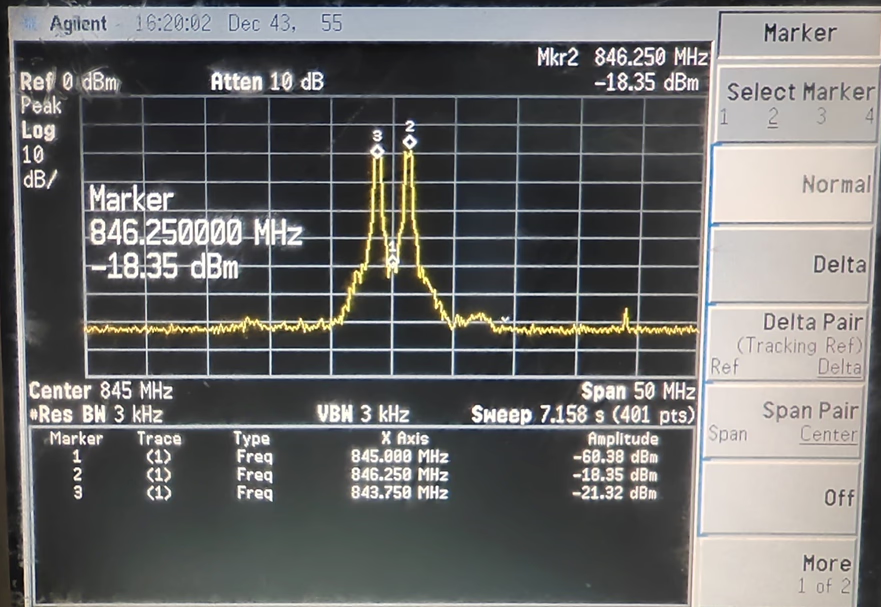
(1) Center frequency 845MHz, network hop count 2, bandwidth 500kHz, frequency hopping interval 5 times RF bandwidth
The frequency hopping spectrum is shown in the following figure. The network has 2 hops, corresponding to 2 frequency sets, with a hopping interval of 2.5MHz. The actual center frequencies of the two frequencies are 845-1.25 and 845+1.25MHz, which are 843.75 and 846.25MHz, respectively. The system will perform frequency hopping communication on the above two frequencies and select the frequency with the lowest interference for reception.
(2) Center frequency 845MHz, network hop count 3, bandwidth 500kHz, frequency hopping interval 5 times RF bandwidth
The frequency hopping spectrum is shown in the following figure. The network has 3 hops, corresponding to 3 frequency sets, with a hopping interval of 2.5MHz. The actual center frequencies of the three frequencies are 845-2.5, 845, and 845+2.5MHz, namely 842.5, 845, and 847.5MHz. The system will perform frequency hopping communication on the above three frequencies and select the frequency with the lowest interference for reception.

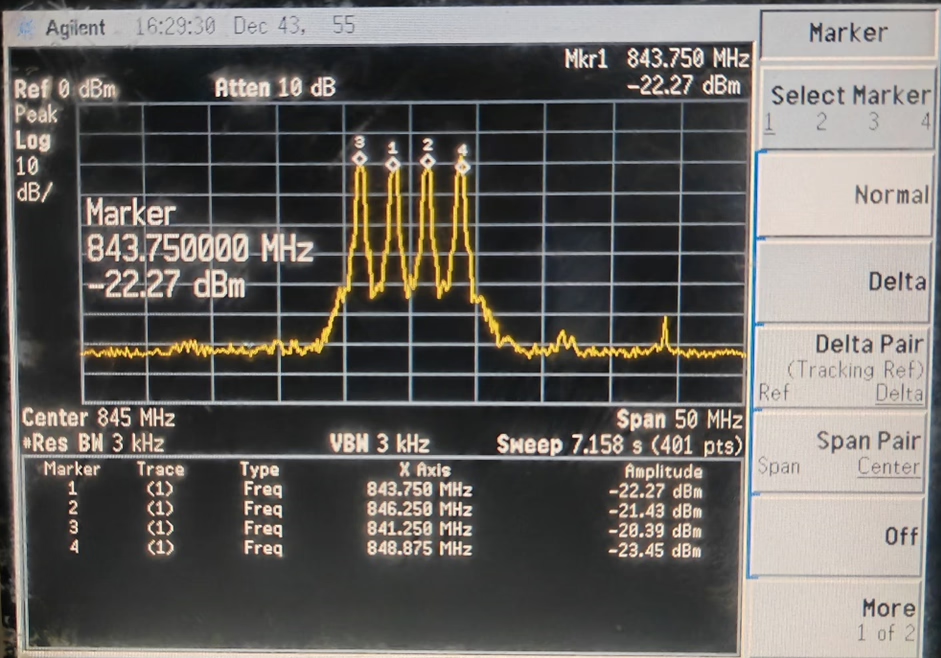
(3) Center frequency 845MHz, network hop count 4, bandwidth 500kHz, frequency hopping interval 5 times RF bandwidth
The frequency hopping spectrum is shown in the following figure. The network has 4 hops, corresponding to 4 frequency sets, with a hopping interval of 2.5MHz. The actual center frequencies of the four frequencies are 845-3.75, 845-1.25, 845+1.25, and 845+3.75MHz, namely 841.25, 843.75, 846.25, and 848.75MHz. The system will perform frequency hopping communication on the above four frequencies and select the frequency with the lowest interference for reception.
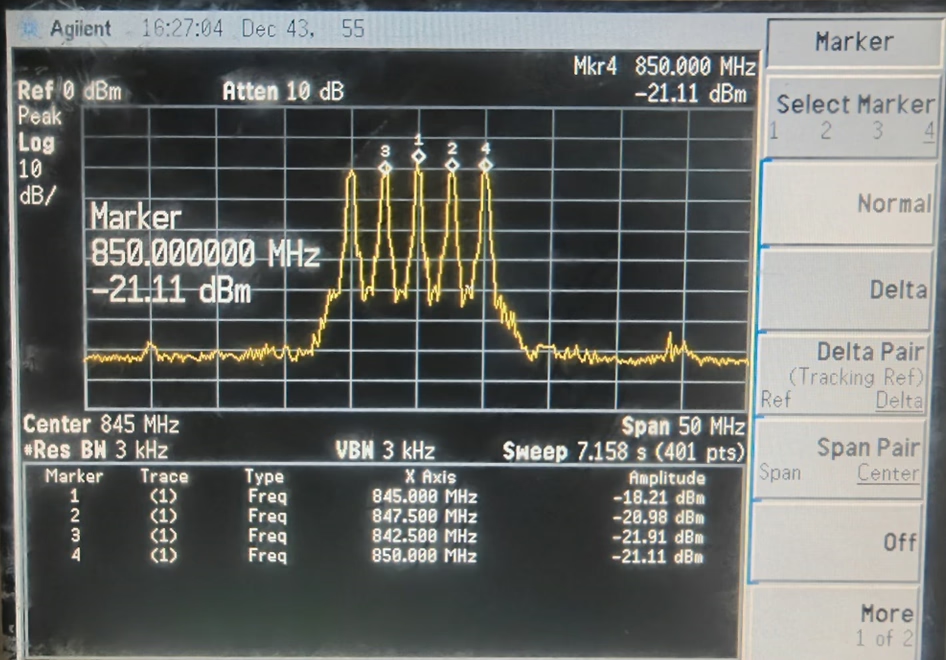
(4) Center frequency 845MHz, network hop count 5, bandwidth 500kHz, frequency hopping interval 5 times RF bandwidth
The frequency hopping spectrum is shown in the following figure. The network has 5 hops, corresponding to 5 frequency sets, with a hopping interval of 2.5MHz. The actual center frequencies of the five frequencies are 845-5, 845-2.5, 845, 845+2.5, and 845+5MHz, namely 840, 842.5, 845, 847.5, and 850MHz. The system will perform frequency hopping communication on the above five frequency points and select the frequency with the lowest interference for reception.
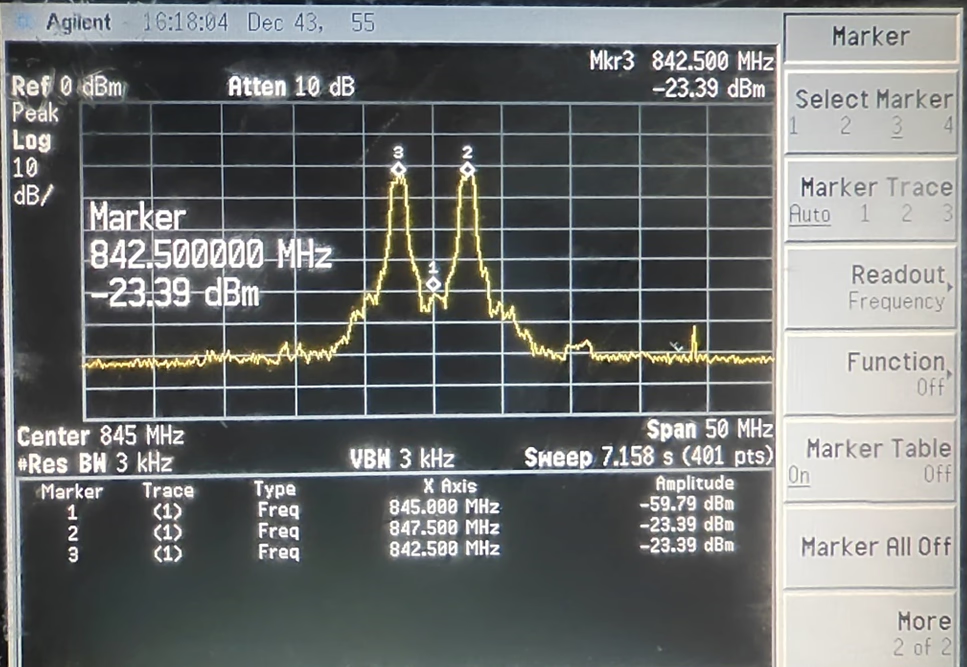
(5) Center frequency 845MHz, network hop count 2, bandwidth 1MHz, frequency hopping interval 5 times RF bandwidth
The frequency hopping spectrum is shown in the following figure. The network has 2 hops, corresponding to 2 frequency sets, with a frequency hopping interval of 5MHz. The actual center frequencies of the two frequencies are 845-2.5 and 845+2.5MHz, which is 842 5 and 847.5MHz. The system will perform frequency hopping communication on the above two frequencies and select the frequency with the lowest interference for reception.
(6) Center frequency 845MHz, network hop count 3, bandwidth 1MHz, frequency hopping interval 5 times RF bandwidth
The frequency hopping spectrum is shown in the following figure. The network has 3 hops, corresponding to 3 frequency sets, with a hopping interval of 5MHz. The actual center frequencies of the three frequencies are 845-5, 845, and 845+5MHz, which are 840, 845, and 850MHz. The system will perform frequency hopping communication on the above three frequencies and select the frequency with the lowest interference for reception.

5. Interval, length, and delay of contract issuance
The bandwidth resources of RADIO DATA LINK are very precious, and each node should maximize the optimization of packet frequency and packet length. Try to minimize the frequency and length of packages. What can be sent in one go, do not split it into two; What can be sent in 36 bytes should not be sent in 40 bytes.
The basic block unit of the physical layer is 36 bytes, and the relationship between the length of the transmitted packet and the channel occupancy time is as follows: (Note: The data in Table 5-1 is the value when there is no frequency hopping and the number of relay hops is 1 hop).
Table 5-1 Relationship between packet length and channel occupancy time
| packet length ( bytes) | Number of basic blocks | Channel occupancy time (ms) | |||
| 1MHz | 500kHz | 250kHz | 125kHz | ||
| 1~36 | 1 | 0.48 | 0.95 | 1.90 | 3.80 |
| 37~72 | 2 | 0.86 | 1.72 | 3.44 | 6.88 |
| 73~108 | 3 | 1.25 | 2.50 | 5.00 | 10.00 |
| 109~144 | 4 | 1.64 | 3.27 | 6.54 | 13.08 |
| 145~180 | 5 | 2.02 | 4.04 | 8.08 | 16.16 |
| 181~216 | 6 | 2.41 | 4.82 | 9.64 | 19.28 |
| 217~252 | 7 | 2.80 | 5.59 | 11.18 | 22.36 |
| 253~288 | 8 | 3.19 | 6.37 | 12.74 | 25.48 |
| 289~324 | 9 | 3.57 | 7.14 | 14.28 | 28.56 |
| 325~360 | 10 | 3.96 | 7.91 | 15.82 | 31.64 |
| 361~396 | 11 | 4.35 | 8.69 | 17.38 | 34.76 |
| 397~432 | 12 | 4.73 | 9.46 | 18.92 | 37.84 |
| … | … | … | |||
The minimum transmission delay of data packets is shown in the following table:
Table 5-2 Minimum Transmission Delay
| Channel bandwidth | 1MHz | 500kHz | 250kHz | 125kHz |
| Minimum delay (ms) | 2 | 3 | 4 | 6 |
Waveform diagram of data transmission and reception under 1MHz bandwidth: (yellow waveform for transmitting data, blue waveform for receiving data)
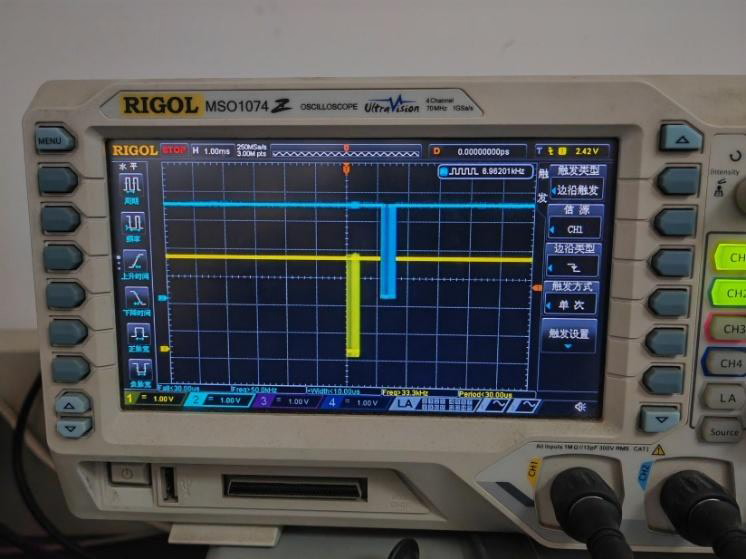
Waveform diagram of data transmission and reception under 500kHz bandwidth: (yellow waveform for transmitting data, blue waveform for receiving data)
Waveform diagram of data transmission and reception at 250kHz bandwidth: (yellow waveform for transmitting data, blue waveform for receiving data)
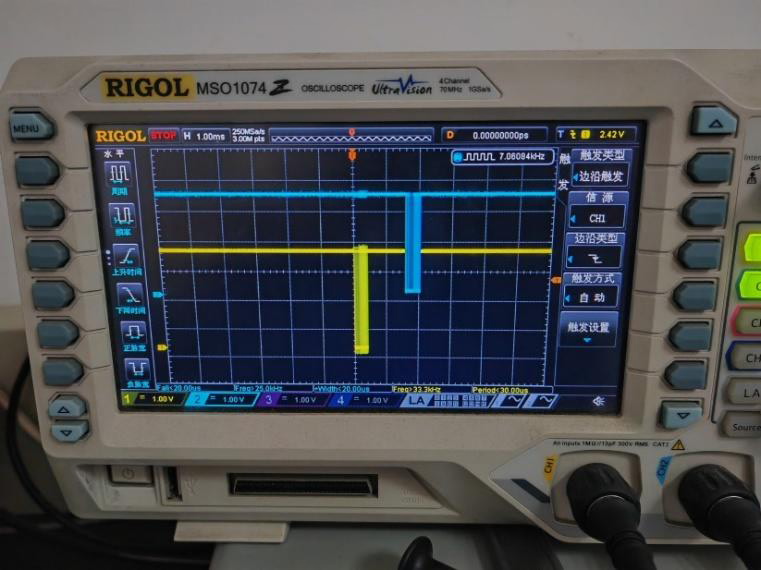
Waveform diagram of data transmission and reception at 125kHz bandwidth: (yellow waveform for
transmitting data, blue waveform for receiving data) +


6. Parameter configuration
The configuration package is fixed at 36 bytes, including a 2-byte header, a 29 byte register configuration, a 3-byte fixed value, and a 2-byte packet tail. Details are shown in Table 6. After receiving the configuration package in the correct format, the module performs parameter configuration and returns the configuration package to the main control device after successful configuration.
Table 6 Configuration Package Details
| byte | content | describe |
| 1 | 0xF0 | The starting of a package |
| 2 | 0x58 | |
| 3 – 31 | Register 0x00 – Register 0x1C | Register content |
| 32 | collocation method | 0x00 represents local configuration 0x3E represents remote configuration Other: Backup |
| 33~34 | Remote target ID | The target device ID required for remote single point configuration. 0xFFFF represents remote full staff configuration (IDs will not be configured in this mode). 0x0000 must be used for local configuration. |
| 35 | 0x0F | The ending of a package |
| 36 | 0x85 |
Example of local read command (default parameters):
F0 58 23 46 8B 00 10 00 00 E0 3F 0F D3 40 00 00 00 00 00 00 00 00 00 6E 02 35 B9 06 03 03 03 00 00 00 0F 85
Return value:
F0 58 23 46 8B 00 10 00 00 E0 3F 0F D3 40 00 00 00 00 00 00 00 00 00 6E 02 35 B9 06 03 03 03 00 00 00 0F 85
Example of local write command (default parameters):
F0 58 63 46 8B 00 10 00 00 E0 3F 0F D3 40 00 00 00 00 00 00 00 00 00 6E 02 35 B9 06 03 03 03 00 00 00 0F 85
Return value:
F0 58 63 46 8B 00 10 00 00 E0 3F 0F D3 40 00 00 00 00 00 00 00 00 00 6E 02 35 B9 06 03 03 03 00 00 00 0F 85
Example of remote read ID1 device command (default parameters):
F0 58 23 46 8B 00 10 00 00 E0 3F 0F D3 40 00 00 00 00 00 00 00 00 00 6E 02 35 B9 06 03 03 03 3E 00 01 0F 85
Return value:
F0 58 23 46 8B 00 10 00 00 E0 3F 0F D3 40 00 00 00 00 00 00 00 00 00 6E 02 35 B9 06 03 03 03 C1 00 01 0F 85
Example of remote write ID1 device command (default parameters):
F0 58 63 46 8B 00 10 00 00 E0 3F 0F D3 40 00 00 00 00 00 00 00 00 00 6E 02 35 B9 06 03 03 03 3E 00 01 0F 85
Return value:
F0 58 63 46 8B 00 10 00 00 E0 3F 0F D3 40 00 00 00 00 00 00 00 00 00 6E 02 35 B9 06 03 03 03 C1 00 01 0F 85
Example of remote reading of all device commands (default parameters):
F0 58 23 46 8B 00 10 00 00 E0 3F 0F D3 40 00 00 00 00 00 00 00 00 00 6E 02 35 B9 06 03 03 03 3E FF FF 0F 85
Return value:
F0 58 23 46 8B 00 10 00 00 E0 3F 0F D3 40 00 00 00 00 00 00 00 00 00 6E 02 35 B9 06 03 03 03 C1 FF FF 0F 85
Example of remote writing of all device commands (default parameters):
F0 58 63 46 8B 00 10 00 00 E0 3F 0F D3 40 00 00 00 00 00 00 00 00 00 6E 02 35 B9 06 03 03 03 3E FF FF 0F 85
Return value:
F0 58 63 46 8B 00 10 00 00 E0 3F 0F D3 40 00 00 00 00 00 00 00 00 00 6E 02 35 B9 06 03 03 03 C1 FF FF 0F 85
7. Register Overview
Table 7 Register Overview
| address | Register Name | describe |
| 0x00 | Read and write control | RADIO DATA LINK read-write control |
| 0x01 | Device mode and baud rate | Device mode and baud rate settings |
| 0x02 | Relay control | Relay control settings |
| 0x03 | High byte total number of system users | High byte total number of system users |
| 0x04 | Low byte total number of system users | Low byte total number of system users |
| 0x05 | Local ID high byte | Local ID high byte |
| 0x06 | Local ID low byte | Local ID low byte |
| 0x07 | RF power and frequency hopping control | RADIO DATA LINK RF power control |
| 0x08 | Data caching | Data caching |
| 0x09 | Grouping and time slots | Group code and time slot count |
| 0x0A | High byte frequency configuration | High byte frequency configuration |
| 0x0B | Middle Byte in frequency configuration | Middle Byte in frequency configuration |
| 0x0C | Low byte frequency configuration | Low byte frequency configuration |
| 0x0D | Encryption password byte 1 | Encryption password byte 1 |
| 0x0E | Encryption password byte 2 | Encryption password byte 2 |
| 0x0F | Encryption password byte 3 | Encryption password byte 3 |
| 0x10 | Encryption password byte 4 | Encryption password byte 4 |
| 0x11 | Encryption password byte 5 | Encryption password byte 5 |
| 0x12 | Encryption password byte 6 | Encryption password byte 6 |
| 0x13 | Encryption password byte 7 | Encryption password byte 7 |
| 0x14 | Encryption password byte 8 | Encryption password byte 8 |
| 0x15 | Encryption password byte 9 | Encryption password byte 9 |
| 0x16 | Encryption password byte 10 | Encryption password byte 10 |
| 0x17 | Encryption password byte 11 | Encryption password byte 11 |
| 0x18 | Encryption password byte 12 | Encryption password byte 12 |
| 0x19 | Encryption password byte 13 | Encryption password byte 13 |
| 0x1A | Encryption password byte 14 | Encryption password byte 14 |
| 0x1B | Encryption password byte 15 | Encryption password byte 15 |
| 0x1C | Encryption password byte 16 | Encryption password byte 16 |
8. Register details
Note 1: All nodes must have the same RF bandwidth, hopping switch, frequency, and encryption password in order to communicate with each other;
Note 2: The parameters of network hops, time slots, carrier sense, and total system users for all nodes must be the same to ensure that the system does not experience abnormal concurrent data conflicts.
Note 3: The larger the data cache parameter setting, the less likely it is to lose packets, but the data latency may increase. Set according to the actual application type.
8.1 Read/Write Control Register
| Name (Address) | bits | Variable Name | mode | Default value | describe |
| Read and write control (0x00) | 7 | Configuration Save | rw | 0 | Whether to save the current configuration after power off, only valid when writing the configuration 0=Do not save 1=Save |
| 6 | Read and write control | rw | 0 | Configure read-write control 0=Read configuration 1=Write configuration | |
| 5 | Version configuration | r | 1 | 0=Low version 1=High version | |
| 4-0 | Firmware version | r | 00003 | Version number |
8.2 Device Mode and Baud Rate Register
| Name (Address) | bits | Variable Name | pattern | Default value | describe |
| Device mode and baud rate (0x01) | 7-6 | RF bandwidth | rw | 1 | 0:1MHz 1:500kHz 2:250kHz 3:125kHz |
| 5 | Package header Enable | rw | 0 | Package header enable configuration, only valid in transparent transmission mode 0=Closed 1=Open Please refer to the table below for details | |
| 4-3 | Signal type | rw | 00 | Signal type configuration 00=Normal signal 01=Test signal 10=Single frequency signal 11=Loop signal Among them, the test signal can be used for power testing. Single frequency signals can be used for frequency stability testing. Loop back signal refers to receiving a signal and then sending it back through the serial port. At this time, external serial port reception is not enabled. The signal type will always be a normal signal when powered on, and changing to another type will not be saved. | |
| 2-0 | Baud rate | rW | 110 | Serial port baud rate configuration in transparent mode 000 = 9600 001 = 19200 010 = 38400 011 = 57600 100 = 115200 101 = 230400 110 = 460800 111 = 921600 |
When the header enable is enabled in register 0x01, transparent packets will be added to the header by the system on both sides of the receiver, so that the receiver can distinguish data sent from different IDs. The transparent packets added to the header are fixed at 44 bytes, and the specific format is as follows.
Table 8 Details of Transparent package Header
| byte | content | describe |
| 1 | 0xD8 | Sync Head |
| 2 | 0x73 | |
| 3 | 0x5A | |
| 4 | Noise intensity | Noise intensity, a total of 8 bits, the larger the value, the strongest the signal, with a step size of 1dB. Noise power (dBm)=noise intensity -125. |
| 5 – 6 | Effective byte length | Occupy the upper 6 bits of byte 5, indicating the effective byte length of the data portion, with a maximum of 36 bytes |
| Sender ID | Sender ID, consisting of 10 bits, including the lower 2 bits of byte 5 and the 8 bits of byte 6 | |
| 7 | Group code | The grouping code of the current data packet. |
| Current number of relay hops | The current number of relay hops is 4 bits, occupying the 7th byte (bit7~bit0) from bit3 to bit0. 0: 1st hop, 1: 2nd hop, 2: 3rd hop, 3: 4th hop, 4: 5th hop, and so on… 15: 16th hop. | |
| 8 | signal intensity | Signal strength, a total of 8 bits, the stronger the signal, with a step size of 1dB. Signal power (dBm)=signal strength -125. |
| 9 – 44 | data | The fixed length of the data is 36 bytes, including valid bytes and invalid bytes, with valid bytes coming first |
9. Relay control register
| Name (Address) | bits | Variable Name | mode | Default value | describe |
| Relay control (0x02) | 7-6 | Relay control | rw | 10 | 00=No relay 01=Intelligent Relay 10=forced relay Representing whether the receiving end is relaying, where: Intelligent relay will automatically select whether to relay based on signal quality, and mandatory relay will relay all signals |
| 5-2 | Network hops | rw | 0010 | Represents the number of network hops required for transmitting signals. 0000=1 jump 0001=2 jumps 0010=3 jumps 0011=4 jumps 0100=5 jumps 0101=6 jumps 0110=7 jumps 0111=8 jumps 1000=9 jumps 1001=10 jumps 1010=11 jumps 1011=12 jumps 1100=13 jumps 1101=14 jumps 1110=15 jumps 1111=16 jumps | |
| 1-0 | Carrier Sense | rw | 11 | Representing the duration of carrier sensing, the longer the sensing time, the less likely it is to cause packet conflicts and the greater the data delay. 00=Do not listen 01=Short listening 10=Medium Listening 11=Long listening |
10. Register of total system users
| Name (Address) | bits | Variable Name | mode | Default value | describe |
| (0x03) | 7-2 | Frequency hopping interval | rw | 000000 | 0:1 times the RF bandwidth 1: 2x RF bandwidth 2: 3x RF bandwidth N: N+1 times the RF bandwidth |
| 1-0 | 2 bits higher than the total number of users in the system | rw | 00 | The configuration range is 0-1023, and the actual total number of system users is the configuration value plus 1 | |
| Low byte total number of system users (0x04) | 7-0 | Low byte total number of system users | rw | 0x10 |
11. Local ID Register
| Name (Address) | bits | Variable Name | mode | Default value | describe |
| 0x05 | 7-2 | backup | – | 0x00 | backup |
| 1-0 | Local ID is 2 bits high | rx | 00 | Local ID configuration, with a configuration range of 0-1023. The ID value cannot exceed the total number of system users, and if it exceeds, it will be automatically limited to the total number of system users. For example, when a system of 100 devices needs to be established, the total number of users in the system can be set to 99, and the local IDs of each device can be set from 0 to 99 in sequence | |
| Local ID low byte (0x06) | 7-0 | Local ID low byte | rw | 0x00 |
12. RF power and frequency hopping control register
| Name (Address) | bits | Variable Name | mode | Default value | describe |
| RF power control (0x07) | 7 | Power amplifier switch | rw | 1 | Internal Power amplifier switch 0=Closed 1=Open |
| 6 | Low noise amplifier switch | rw | 1 | Low noise amplifier switch 0=Closed 1=Open | |
| 5-4 | Transmission power | rw | 10 | Transmission power control 00=low power (Decreased by 4dB) 01=Medium power (Decreased by 2dB) 10=medium to high power (nominal power) 11=High power (2dB saturated output, not recommended for use) | |
| 3 | Data filtering | rw | 0 | 0: Output broadcast group and same group data packets, 1: Only output broadcast group data packets | |
| 3 | Frequency hopping control | rw | 0 | Frequency hopping switch 0=Closed 1=Open | |
| 3 | Second pulse output | rw | 0 | 0: Do not output second pulses 1: Output second pulse Pulse accuracy within 1us per second | |
| 0 | Dual serial port configuration | rw | 0 | 0=Close dual serial ports 1=Enable dual serial ports |
13. Data cache register
| Name (Address) | bits | Variable Name | mode | Default value | describe |
| Data caching (0x08) | 7-0 | Data caching | rw | 0x3F | Data cache configuration, cache size=(configuration+1) * 32 bytes, for example, when configured as 0x20, the cache size is 1056 bytes. The cache supports a maximum of 256 * 32=8192 bytes. The larger the cache, the less likely it is to lose packets, but data latency may increase. Set according to the actual business type. |
14. Grouping and time slot register
| Name (Address) | bits | Variable Name | mode | Default value | describe |
| Grouping and time slots (0x09) | 7-4 | Group code | rw | 0000 | 0000=Broadcasting Group 0001=1 group 0010=2 groups 0011=3 groups 0100=4 groups 0101=5 groups 0110=6 groups 0111=7 groups 1000=8 groups 1001=9 groups 1010=10 groups 1011=11 groups 1100=12 groups 1101=13 groups 1110=14 groups 1111=15 groups The broadcasting group can receive data sent by all groups; When the data filtering parameter is 0, other groups can only receive data sent by this group and the broadcasting group. When the data filtering parameter is 1, other groups can only receive data sent by the broadcasting group. |
| 3-0 | Number of time slots | rw | 1111 | 0000=1 time slot 0001=2 time slots 0010=3 time slots 0011=4 time slots 0100=5 time slots 0101=6 time slots 0110=7 time slots 0111=8 time slots 1000=9 time slots 1001=10 time slots 1010=11 time slots 1011=12 time slots 1100=13 time slots 1101=14 time slots 1110=15 time slots 1111=16 time slots |
15. Frequency configuration register
| Name (Address) | bits | Variable Name | mode | Default value | describe |
| High frequency byte (0x0A) | 7-0 | High frequency byte | rw | 0xD3 | Frequency=(frequency value/61.03515625), for example, when configuring a frequency of 845MHz, (845000000/61.03515625)=13844480=0xD34000 |
| Middle Byte (0x0B) | 7-0 | Middle Byte | rw | 0x40 | |
| Low frequency byte (0x0C) | 7-0 | Low frequency byte | rw | 0x00 |
16. Encryption password register
| name (Address) | bits | Variable Name | mode | Default value | describe |
| password byte 1 (0x0D) | 7-0 | Password byte 1 | rw | 0x00 | Device password configuration, the device only communicates with devices that have the same password, and users can set their own password to ensure communication security |
| password byte 2 (0x0E) | 7-0 | Password byte 2 | rw | 0x00 | |
| password byte 3 (0x0F) | 7-0 | Password byte 3 | rw | 0x00 | |
| password byte 4 (0x10) | 7-0 | Password byte 4 | rw | 0x00 | |
| password byte 5 (0x11) | 7-0 | Password byte 5 | rw | 0x00 | |
| password byte 6 (0x12) | 7-0 | Password byte 6 | rw | 0x00 | |
| password byte 7 (0x13) | 7-0 | Password byte 7 | rw | 0x00 | |
| password byte 8 (0x14) | 7-0 | Password byte 8 | rw | 0x00 | |
| password byte 9 (0x15) | 7-0 | Password byte 9 | rw | 0x6E | |
| password byte 10 (0x16) | 7-0 | Password byte 10 | rw | 0x02 | |
| password byte 11 (0x17) | 7-0 | Password byte 11 | rw | 0x3F | |
| password byte 12 (0x18) | 7-0 | Password byte 12 | rw | 0xB9 | |
| password byte 13 (0x19) | 7-0 | Password byte 13 | rw | 0x06 | |
| password byte 14 (0x1A) | 7-0 | Password byte 14 | rw | 0x02 | |
| password byte 15 (0x1B) | 7-0 | Password byte 15 | rw | 0x03 | |
| password byte 16 (0x1C) | 7-0 | Password byte 16 | rw | 0x03 |
17. Common problems and solutions
Table 10 Common Problems and Solutions
| Problem description | Cause analysis | resolvent |
| Serial communication is abnormal | Serial port baud rate mismatch | When the module operates in configuration mode, the baud rate is fixed at 9600. When operating in transparent mode, the baud rate can be configured as 9600/19200/38400/57600/115200/230400/460800/921600 |
| The working mode is incorrect | Adjust M0 and M1 levels to change the operating mode | |
| The serial ports TX and RX are connected in reverse | Exchange serial port TX and RX line sequence | |
| Serial port level mismatch | Perform level conversion (note TTL is 3.3V) |
Ask A Question
Thank you for your response. ✨