






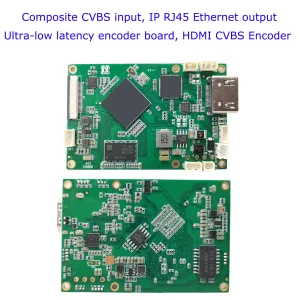
CVBS HDMI to IP Encoder

CVBS HDMI to IP Encoder
4K HDMI Video Encoder Decoder Board HDMI to Ethernet and Ethernet to HDMI RTSP UDP
One person asked us if it is possible to modify the gateway ip address on our HDMI/CVBS to rtsp stream via ethernet board. Confirmed, in our HDMI / CVBS to Ethernet video encoder board web management network settings page, there is only an option to modify the IP address, and there is no configuration option to modify the gateway IP address.
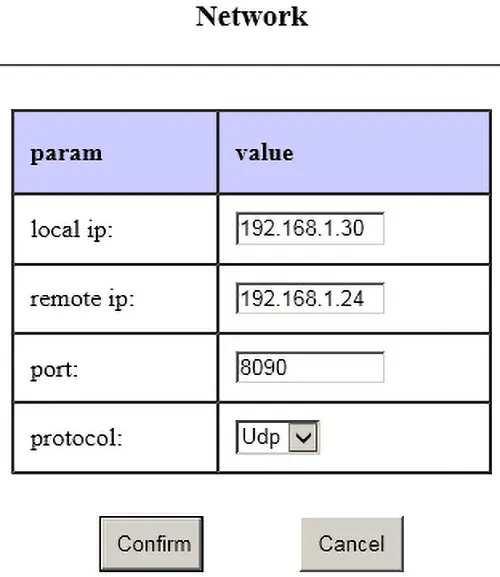
How does he need to set the gateway ip adddress? Because we only need the same IP address segment to access it, for exampl, 192.168.1.30. The gateway address is automatically generated by the firmware and is not provided to the user for setting. For example, if the IP address is 192.168.1.30, the gateway address is 192.168.1.1
The buyer repleid us, he need to connect our device to a router that has its own address (gateway address, 37.0.1.6). These addresses are different from 192.168.1.xxx. Is it possible to change the gateway in the firmware itself.
The gateway is only useful when the board needs to access the external network. Currently, the boards are all operated in the local area network. The board will use the gateway only when it accesses the external network (outside its own network segment). In addition, its own IP and gateway IP must be in the same segment. So if he really want to connect our device to his gateway, and want our device to access across network segments (such as serial port to network port), he can modify the device’s IP to be in the same IP segment as his gateway IP, and modify his gateway IP to end with 1, for example: 37.0.1.1
His network does not provide the ability to change the gateway IP address. He needs to configure the IP address and gateway on our device, for example, device address: 37.0.1.12; gateway address: 37.0.1.6.
In the past, our HDMI cvbs to ip video encoder does not have this function, our software engineer is happy to modify this firmware to meet his demand.
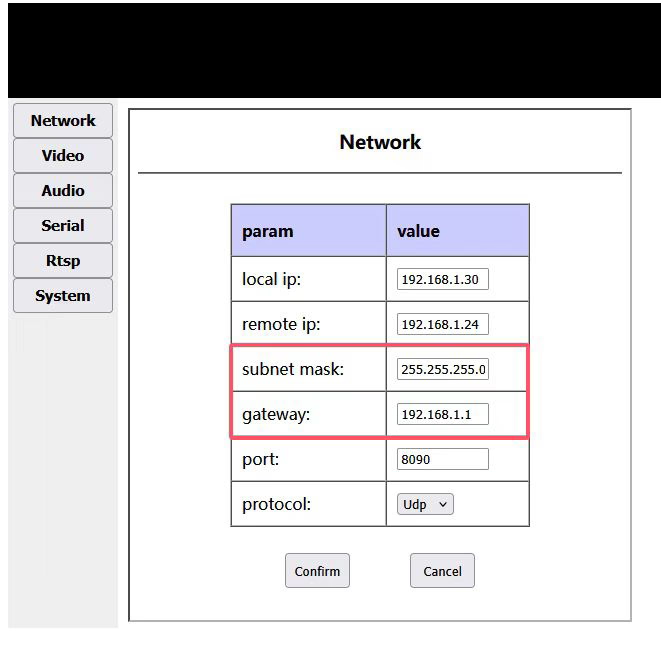
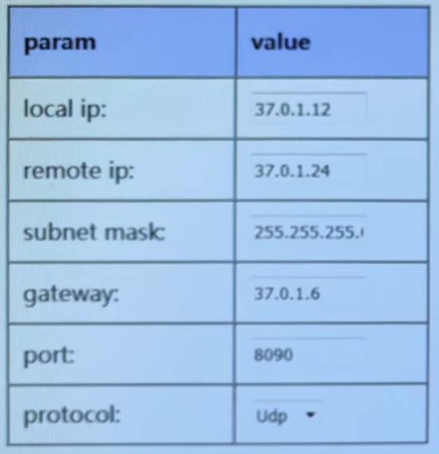
Table of Contents
Upgrade Firmware Download
upgrade firmware to set gateway ip on the HDMI cvbs to ip video encoder
If you have any special requirements for our HDMI CVBS To ip video encoder board, please contact us and our engineers will be happy to modify the firmware to meet your requirements.
CVBS HDMI to IP Encoder
CVBS HDMI to IP Encoder
4K HDMI Video Encoder Decoder Board HDMI to Ethernet and Ethernet to HDMI RTSP UDP
FAQ
Why do some customers request CVBS-to-IP video encoders with customizable input gateway
Some customers require CVBS-to-IP video encoders that allow a customizable input gateway because of specific network configurations in their systems. By setting a custom gateway, the encoder can correctly route video streams within complex or private networks, ensuring stable connectivity and proper integration with existing network devices such as routers, switches, or NVRs. This feature is especially important for:
Closed or private networks: Where the default gateway does not match the customer’s network architecture.
Multiple subnets: When video streams need to be sent across different subnets or VLANs.
Integration with existing systems: Ensuring the encoder can communicate with NVRs, monitoring servers, or cloud platforms without network conflicts.
Remote management: Allowing the device to be accessible from specific network paths for control or monitoring purposes.
Providing a customizable input gateway gives customers flexibility, reduces network configuration conflicts, and ensures reliable video transmission in diverse deployment scenarios.
Encoder Modules Boards









Decoder Modules Boards




Available for Customization
New Encoder Products
| No. | Product Name | Configuration | Key Features | Status |
|---|---|---|---|---|
| 1 | Dual-Channel USB UVC Visible Light Video Encoder | 2× USB input | Supports dual USB camera video encoding, and RTSP streaming; local CVBS/HDMI output; switchable display modes | Mass Production |
| 2 | Dual-Channel Encoder (1× USB Visible Light + 1× USB Thermal Imaging camera) | 2× USB input | Supports dual USB camera (visible + thermal) capture, encoding, and RTSP streaming; local CVBS/HDMI output; switchable display modes | Mass Production |
| 3 | RTSP Decoder HDMI/CVBS Display Module | HDMI + CVBS output | Supports up to 4×1080P@30fps RTSP stream decoding; Support video streaming protocol forwarding; HDMI/CVBS output display | Sample Available |
| 4 | RTSP Decoder HDMI/CVBS Display Module with 4.3"/5" LCD | HDMI output + LCD screen | Supports up to 4×1080P@30fps RTSP stream decoding; protocol forwarding; HDMI/CVBS output display | Debugging |
| 5 | Dual-Channel Encoder (1× USB Visible Light + 1× CVBS Analog) | 1× CVBS + 1× USB UVC input | Dual video (USB + CVBS), encoding and RTSP streaming; local CVBS/HDMI output; switchable display modes | Debugging |
| 6 | Dual-Channel Encoder (1× USB UVC + 1× AHD Analog) | 1× AHD + 1× USB UVC input | Dual video capture (USB + AHD), encoding and RTSP streaming; local CVBS/HDMI output; switchable display modes | Debugging |
| 7 | Dual-Channel Encoder (1× CVBS + 1× AHD Analog Video) | CVBS + AHD 2 video input | Dual analog video capture, encoding and RTSP streaming; local CVBS/HDMI output; switchable display modes | Debugging |
| 8 | Dual-Channel Encoder (1× CMOS Camera + 1× USB Thermal Imaging camera) | 1× USB interface | Supports CMOS + USB thermal camera capture, encoding and RTSP streaming; local CVBS/HDMI output; switchable display modes | Mass Production |
For customized video input/output conversion solutions not listed in our products, please contact us for OEM/ODM support. We can develop tailored products based on your requirements.
Ask A Question
Thank you for your response. ✨