





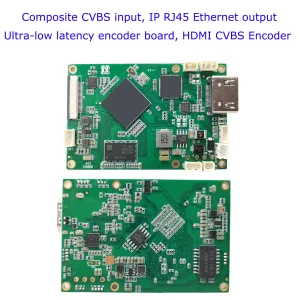
CVBS HDMI إلى تشفير IP

CVBS HDMI إلى تشفير IP
4لوحة فك ترميز الفيديو K HDMI من HDMI إلى إيثرنت وإيثرنت إلى HDMI RTSP UDP
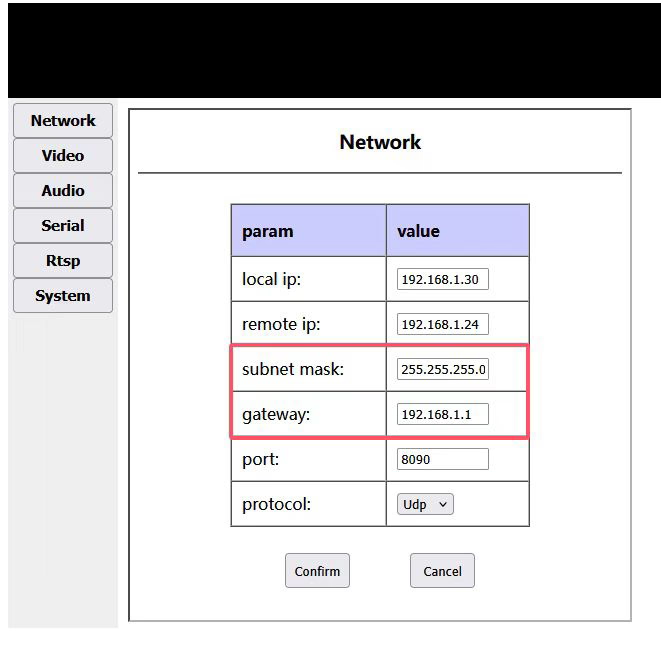
One person asked us if it is possible to modify the gateway ip address on our HDMI/CVBS to rtsp stream via ethernet board. Confirmed, in our HDMI / CVBS to Ethernet video encoder board web management network settings page, there is only an option to modify the IP address, and there is no configuration option to modify the gateway IP address.
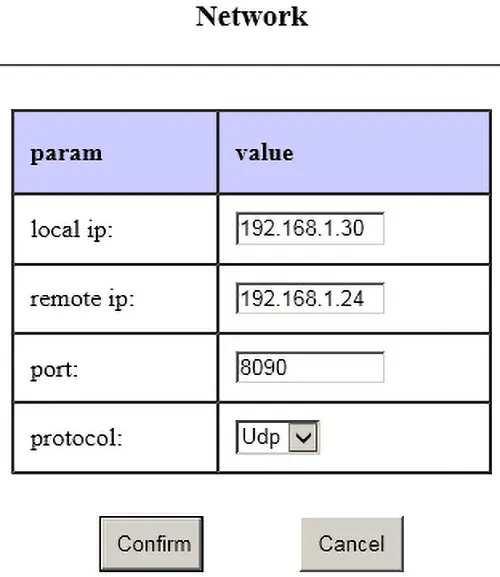
How does he need to set the gateway ip adddress? Because we only need the same IP address segment to access it, for exampl, 192.168.1.30. The gateway address is automatically generated by the firmware and is not provided to the user for setting. على سبيل المثال, if the IP address is 192.168.1.30, the gateway address is 192.168.1.1
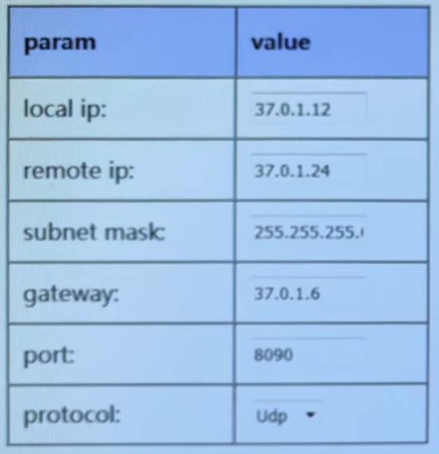
The buyer repleid us, he need to connect our device to a router that has its own address (gateway address, 37.0.1.6). These addresses are different from 192.168.1.xxx. Is it possible to change the gateway in the firmware itself.
The gateway is only useful when the board needs to access the external network. حالياً, the boards are all operated in the local area network. The board will use the gateway only when it accesses the external network (outside its own network segment). فضلاً عن ذلك, its own IP and gateway IP must be in the same segment. So if he really want to connect our device to his gateway, and want our device to access across network segments (such as serial port to network port), he can modify the device’s IP to be in the same IP segment as his gateway IP, and modify his gateway IP to end with 1, على سبيل المثال: 37.0.1.1
His network does not provide the ability to change the gateway IP address. He needs to configure the IP address and gateway on our device, على سبيل المثال, device address: 37.0.1.12; gateway address: 37.0.1.6.
In the past, our HDMI cvbs to ip video encoder does not have this function, our software engineer is happy to modify this firmware to meet his demand.
جدول المحتويات
Upgrade Firmware Download
upgrade firmware to set gateway ip on the HDMI cvbs to ip video encoder
If you have any special requirements for our HDMI CVBS To ip video encoder board, please contact us and our engineers will be happy to modify the firmware to meet your requirements.
CVBS HDMI إلى تشفير IP
CVBS HDMI إلى تشفير IP
4لوحة فك ترميز الفيديو K HDMI من HDMI إلى إيثرنت وإيثرنت إلى HDMI RTSP UDP
التعليمات
Why do some customers request CVBS-to-IP video encoders with customizable input gateway
Some customers require CVBS-to-IP video encoders that allow a customizable input gateway because of specific network configurations in their systems. By setting a custom gateway, the encoder can correctly route video streams within complex or private networks, ensuring stable connectivity and proper integration with existing network devices such as routers, مفاتيح, or NVRs. This feature is especially important for:
Closed or private networks: Where the default gateway does not match the customer’s network architecture.
Multiple subnets: When video streams need to be sent across different subnets or VLANs.
Integration with existing systems: Ensuring the encoder can communicate with NVRs, monitoring servers, or cloud platforms without network conflicts.
Remote management: Allowing the device to be accessible from specific network paths for control or monitoring purposes.
Providing a customizable input gateway gives customers flexibility, reduces network configuration conflicts, and ensures reliable video transmission in diverse deployment scenarios.
لوحات وحدات التشفير









لوحات وحدات فك التشفير




متاح للتخصيص
منتجات التشفير الجديدة
| لا. | اسم المنتج | إعدادات | الميزات الرئيسية | حالة |
|---|---|---|---|---|
| 1 | جهاز تشفير الفيديو بالضوء المرئي USB UVC ثنائي القناة | 2× مدخل يو اس بي | يدعم ترميز فيديو كاميرا USB المزدوجة, وتدفق RTSP; مخرج CVBS/HDMI المحلي; أوضاع العرض القابلة للتحويل | إنتاج متسلسل |
| 2 | التشفير ثنائي القناة (1× ضوء مرئي USB + 1× كاميرا تصوير حراري بمنفذ USB) | 2× مدخل يو اس بي | يدعم كاميرا USB مزدوجة (مرئي + الحرارية) يأسر, ترميز, وتدفق RTSP; مخرج CVBS/HDMI المحلي; أوضاع العرض القابلة للتحويل | إنتاج متسلسل |
| 3 | وحدة عرض HDMI/CVBS فك ترميز RTSP | HDMI + إخراج CVBS | يدعم ما يصل إلى 4 × 1080P @ 30fps فك تشفير دفق RTSP; دعم إعادة توجيه بروتوكول دفق الفيديو; عرض إخراج HDMI/CVBS | عينة متاحة |
| 4 | وحدة عرض HDMI/CVBS لفك ترميز RTSP مع 4.3"/5" شاشات الكريستال السائل | مخرج اتش دي ام اي + شاشة ال سي دي | يدعم ما يصل إلى 4 × 1080P @ 30fps فك تشفير دفق RTSP; إعادة توجيه البروتوكول; عرض إخراج HDMI/CVBS | تصحيح الأخطاء |
| 5 | التشفير ثنائي القناة (1× ضوء مرئي USB + 1× CVBS التناظرية) | 1× كفبس + 1× مدخل USB UVC | فيديو مزدوج (يو اس بي + CVBS), الترميز وتدفق RTSP; مخرج CVBS/HDMI المحلي; أوضاع العرض القابلة للتحويل | تصحيح الأخطاء |
| 6 | التشفير ثنائي القناة (1× يو إس بي يو في سي + 1× أتش دي تناظري) | 1× أهد + 1× مدخل USB UVC | التقاط الفيديو المزدوج (يو اس بي + AHD), الترميز وتدفق RTSP; مخرج CVBS/HDMI المحلي; أوضاع العرض القابلة للتحويل | تصحيح الأخطاء |
| 7 | التشفير ثنائي القناة (1× كفبس + 1× فيديو تناظري AHD) | CVBS + AHD 2 إدخال الفيديو | التقاط فيديو تناظري مزدوج, الترميز وتدفق RTSP; مخرج CVBS/HDMI المحلي; أوضاع العرض القابلة للتحويل | تصحيح الأخطاء |
| 8 | التشفير ثنائي القناة (1× كاميرا سيموس + 1× كاميرا تصوير حراري بمنفذ USB) | 1× واجهة يو اس بي | يدعم سيموس + التقاط الكاميرا الحرارية USB, الترميز وتدفق RTSP; مخرج CVBS/HDMI المحلي; أوضاع العرض القابلة للتحويل | إنتاج متسلسل |
لحلول تحويل إدخال/إخراج الفيديو المخصصة غير المدرجة في منتجاتنا, يرجى الاتصال بنا للحصول على دعم OEM/ODM. يمكننا تطوير منتجات مخصصة بناءً على متطلباتك.
اطرح سؤالاً
شكرًا لردكم ✨