





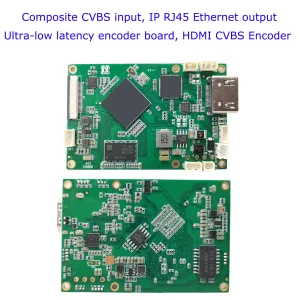
CVBS HDMI к IP -энкодеру

CVBS HDMI к IP -энкодеру
4K Плата декодера видеокодера HDMI HDMI-Ethernet и Ethernet-HDMI RTSP UDP
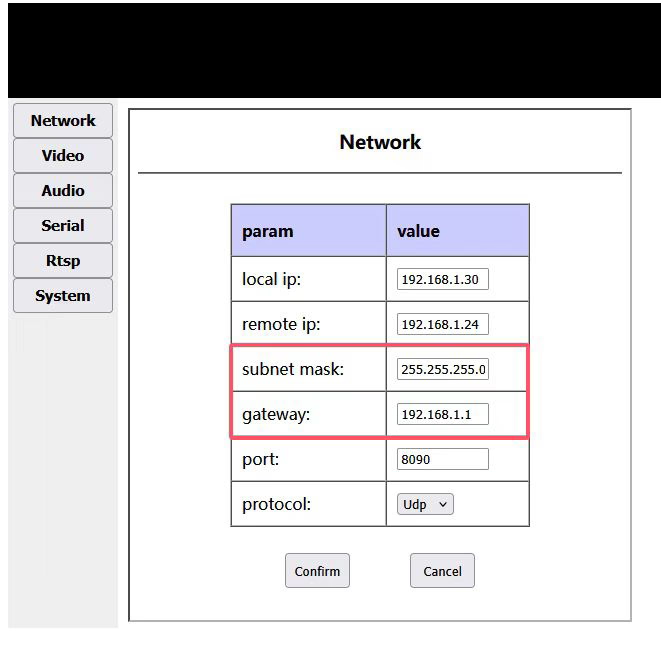
One person asked us if it is possible to modify the gateway ip address on our HDMI/CVBS to rtsp stream via ethernet board. Confirmed, in our HDMI / CVBS to Ethernet video encoder board web management network settings page, there is only an option to modify the IP address, and there is no configuration option to modify the gateway IP address.
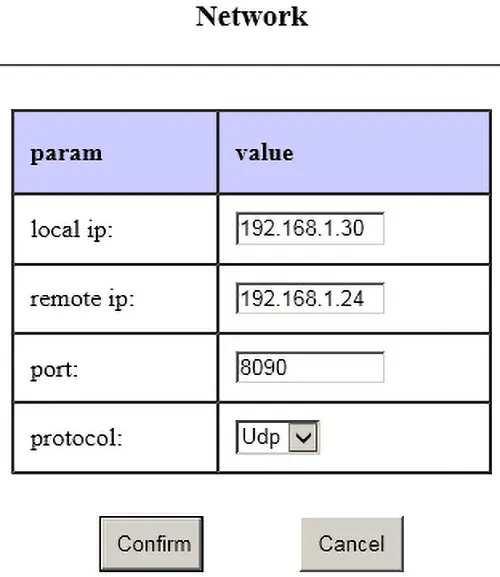
How does he need to set the gateway ip adddress? Because we only need the same IP address segment to access it, for exampl, 192.168.1.30. The gateway address is automatically generated by the firmware and is not provided to the user for setting. Например, if the IP address is 192.168.1.30, the gateway address is 192.168.1.1
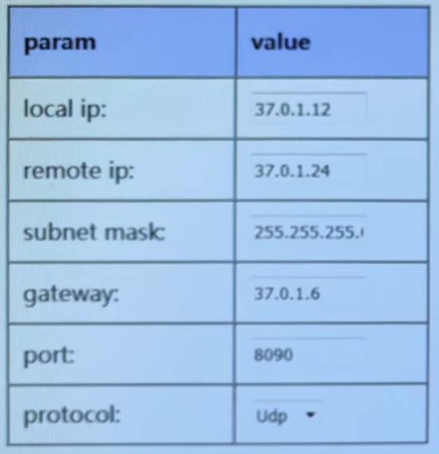
The buyer repleid us, he need to connect our device to a router that has its own address (gateway address, 37.0.1.6). These addresses are different from 192.168.1.xxx. Is it possible to change the gateway in the firmware itself.
The gateway is only useful when the board needs to access the external network. Currently, the boards are all operated in the local area network. The board will use the gateway only when it accesses the external network (outside its own network segment). Кроме того, its own IP and gateway IP must be in the same segment. So if he really want to connect our device to his gateway, and want our device to access across network segments (such as serial port to network port), he can modify the device’s IP to be in the same IP segment as his gateway IP, and modify his gateway IP to end with 1, например: 37.0.1.1
His network does not provide the ability to change the gateway IP address. He needs to configure the IP address and gateway on our device, например, device address: 37.0.1.12; gateway address: 37.0.1.6.
В прошлом, our HDMI cvbs to ip video encoder does not have this function, our software engineer is happy to modify this firmware to meet his demand.
Оглавление
Обновление прошивки Загрузка
upgrade firmware to set gateway ip on the HDMI cvbs to ip video encoder
If you have any special requirements for our HDMI CVBS To ip video encoder board, please contact us and our engineers will be happy to modify the firmware to meet your requirements.
CVBS HDMI к IP -энкодеру
CVBS HDMI к IP -энкодеру
4K Плата декодера видеокодера HDMI HDMI-Ethernet и Ethernet-HDMI RTSP UDP
Вопросы-Ответы
Why do some customers request CVBS-to-IP video encoders with customizable input gateway
Some customers require CVBS-to-IP video encoders that allow a customizable input gateway because of specific network configurations in their systems. By setting a custom gateway, the encoder can correctly route video streams within complex or private networks, ensuring stable connectivity and proper integration with existing network devices such as routers, switches, или сетевые видеорегистраторы. This feature is especially important for:
Closed or private networks: Where the default gateway does not match the customer’s network architecture.
Multiple subnets: When video streams need to be sent across different subnets or VLANs.
Интеграция с существующими системами: Ensuring the encoder can communicate with NVRs, monitoring servers, or cloud platforms without network conflicts.
Remote management: Allowing the device to be accessible from specific network paths for control or monitoring purposes.
Providing a customizable input gateway gives customers flexibility, reduces network configuration conflicts, and ensures reliable video transmission in diverse deployment scenarios.
Платы модулей энкодеров









Платы модулей декодеров




Доступно для настройки
Новые продукты кодировщиков
| Нет. | Название продукта | Конфигурация | Ключевая особенность | Статус |
|---|---|---|---|---|
| 1 | Двухканальный USB-видеокодер видимого света UVC | 2× USB-вход | Поддержка кодирования видео с двойной USB-камеры., и потоковая передача RTSP; локальный выход CVBS/HDMI; переключаемые режимы отображения | Массовое производство |
| 2 | Двухканальный кодер (1× USB Visible Light + 1× USB-тепловизор) | 2× USB-вход | Supports dual USB camera (видимый + термический) захватывать, кодирование, и потоковая передача RTSP; локальный выход CVBS/HDMI; переключаемые режимы отображения | Массовое производство |
| 3 | Декодер RTSP Модуль дисплея HDMI/CVBS | HDMI + CVBS-выход | Поддерживает декодирование потока RTSP до 4 × 1080P при 30 кадрах в секунду.; Поддержка пересылки протокола потокового видео; Выходной дисплей HDMI/CVBS | Образец доступен |
| 4 | Декодер RTSP Модуль дисплея HDMI/CVBS с 4.3"/5" ЖК-дисплей | HDMI-выход + ЖК-экран | Поддерживает декодирование потока RTSP до 4 × 1080P при 30 кадрах в секунду.; пересылка протокола; Выходной дисплей HDMI/CVBS | Отладка |
| 5 | Двухканальный кодер (1× USB Visible Light + 1× CVBS Analog) | 1× ЦВБС + 1× USB-вход UVC | Двойное видео (USB + CVBS), кодирование и потоковая передача RTSP; локальный выход CVBS/HDMI; переключаемые режимы отображения | Отладка |
| 6 | Двухканальный кодер (1× USB УФС + 1× AHD Analog) | 1× ЭХД + 1× USB-вход UVC | Двойной захват видео (USB + AHD), кодирование и потоковая передача RTSP; локальный выход CVBS/HDMI; переключаемые режимы отображения | Отладка |
| 7 | Двухканальный кодер (1× ЦВБС + 1× AHD Analog Video) | CVBS + AHD 2 видеовход | Dual analog video capture, кодирование и потоковая передача RTSP; локальный выход CVBS/HDMI; переключаемые режимы отображения | Отладка |
| 8 | Двухканальный кодер (1× КМОП-камера + 1× USB-тепловизор) | 1× USB-интерфейс | Поддерживает КМОП + USB thermal camera capture, кодирование и потоковая передача RTSP; локальный выход CVBS/HDMI; переключаемые режимы отображения | Массовое производство |
Для индивидуальных решений по преобразованию видеовхода/выхода, не перечисленных в наших продуктах, пожалуйста, свяжитесь с нами для поддержки OEM/ODM. Мы можем разработать индивидуальную продукцию в соответствии с вашими требованиями..
Задайте вопрос
Спасибо за ответ. ✨