






Some clients、I would like to know the OSD menu of the Japanese ISDB-T TV receiver.。Also、I also want to know how to send TV search channels when getting new products。here、Here's a video to show you more details。
1.Connect the digital TV antenna and power supply。
2.Select Search from the first OSD menu on the remote control、Move up or down to select。
- [OK]press、Start automatic search for TV channels。
4.Wait for a while until all frequency searches are completed.、The search will end automatically。
5.Enter the machine settings menu、Search for stations、operate the remote control、You can also press the menu button。
6.Press the arrow key down on the remote control、Move cursor to automatic search
7.Press the confirmation button on the remote control、Enter the automatic search interface
8.Once the search is complete、The program will automatically close and play。
We have been designing and manufacturing ISDB-T digital TV receivers for the Japanese market for over 10 years.。 1antenna、2antenna、4antenna、B-CAS、With EWBS function。Also、We designed ISDB-T digital TV module for Japan。Please contact us if you are interested.。
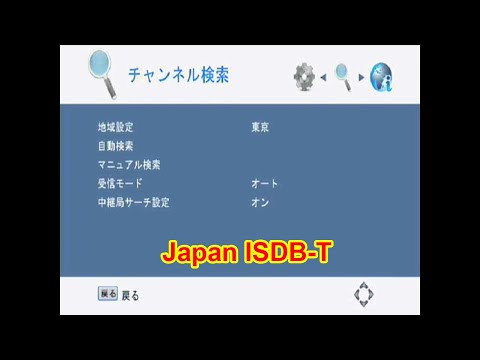
Table of Contents
ISDB-T Adopted Countries
ISDB-T Categories
ISDB-T Bandwidth
ISDB-T Segment
ISDB-T Antenna Quantity
ISDB-T Frequency
ISDB-T Related
ISDB-T Chipset
ISDB-T knowledge
Japan ISDB-T
Ask A Question
Thank you for your response. ✨