






Many customers want to transmit video, audio, and UART data using our encoder boards. Here’s a clear guide on what’s possible, the limitations, and the best way to achieve it.
1. Current Status of HDMI+CVBS Encoder Boards
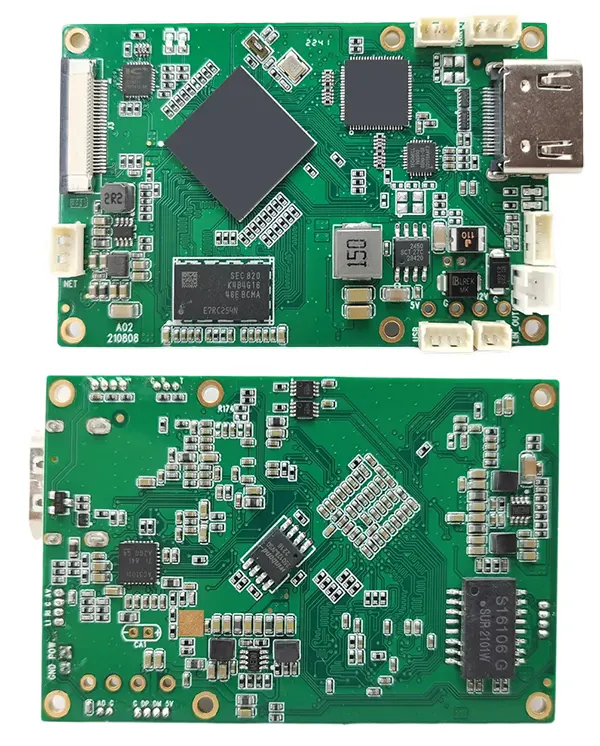
| Feature | HDMI+CVBS Encoder Board |
|---|---|
| Serial tab in web UI | ❌ Not available |
| UART data transmission | ❌ Not available by default; can be customized |
| Video/Audio Protocols | ✅ RTSP (video/audio only) ✅ UDP (supports video/audio + UART if used with decoder) |
Key point: The encoder board alone cannot decode UART data on a PC with VLC or other generic players. You need our paired decoder board.

CVBS HDMI to IP Encoder
IP to HDMI CVBS video decoder board H264 low latency RTSP to HDMI decoder

CVBS HDMI to IP Encoder
4K HDMI Video Encoder Decoder Board HDMI to Ethernet and Ethernet to HDMI RTSP UDP
2. How UART Data Transmission Works
- Encoder Board
- Accepts UART data input for transmission (UDP only).
- RTSP stream is video/audio only; UART data cannot be sent via RTSP.
- Decoder Board
- Required to properly decode UART data from the encoder.
- Generic video players (e.g., VLC) cannot decode UART data.
Illustration of Setup:
PC ---Ethernet---> HDMI+CVBS Encoder Board ---UDP---> Matching Decoder Board ---> UART Data Output
3. Alternative: AV (CVBS) Input with UART
If you are using AV (CVBS) input, you can use our dedicated converter board:
CVBS/AV Video to Ethernet IP Video Stream Converter Board
| Feature | AV (CVBS) Converter Board |
|---|---|
| HDMI input | ❌ Not supported |
| UART data input | ✅ Supported |
| Data retrieval on PC | ✅ TCP protocol |
Tip: This is ideal if you only need UART + CVBS video streaming, and want to receive UART data directly on a PC.
4. Recommendations
- HDMI+CVBS input + UART: Must use both encoder and matching decoder.
- AV (CVBS) + UART: Use the AV converter board with TCP to retrieve UART data on PC.
- Do not expect VLC or generic players to decode UART data; they only handle video/audio streams.
Conclusion:
Our encoder boards can transmit UART data, but only with the matching decoder or the AV converter board. Understanding these options ensures you pick the right board for your system and avoid confusion or failed setups.
Table of Contents
Encoder Modules Boards









Decoder Modules Boards




Available for Customization
New Encoder Products
| No. | Product Name | Configuration | Key Features | Status |
|---|---|---|---|---|
| 1 | Dual-Channel USB UVC Visible Light Video Encoder | 2× USB input | Supports dual USB camera video encoding, and RTSP streaming; local CVBS/HDMI output; switchable display modes | Mass Production |
| 2 | Dual-Channel Encoder (1× USB Visible Light + 1× USB Thermal Imaging camera) | 2× USB input | Supports dual USB camera (visible + thermal) capture, encoding, and RTSP streaming; local CVBS/HDMI output; switchable display modes | Mass Production |
| 3 | RTSP Decoder HDMI/CVBS Display Module | HDMI + CVBS output | Supports up to 4×1080P@30fps RTSP stream decoding; Support video streaming protocol forwarding; HDMI/CVBS output display | Sample Available |
| 4 | RTSP Decoder HDMI/CVBS Display Module with 4.3"/5" LCD | HDMI output + LCD screen | Supports up to 4×1080P@30fps RTSP stream decoding; protocol forwarding; HDMI/CVBS output display | Debugging |
| 5 | Dual-Channel Encoder (1× USB Visible Light + 1× CVBS Analog) | 1× CVBS + 1× USB UVC input | Dual video (USB + CVBS), encoding and RTSP streaming; local CVBS/HDMI output; switchable display modes | Debugging |
| 6 | Dual-Channel Encoder (1× USB UVC + 1× AHD Analog) | 1× AHD + 1× USB UVC input | Dual video capture (USB + AHD), encoding and RTSP streaming; local CVBS/HDMI output; switchable display modes | Debugging |
| 7 | Dual-Channel Encoder (1× CVBS + 1× AHD Analog Video) | CVBS + AHD 2 video input | Dual analog video capture, encoding and RTSP streaming; local CVBS/HDMI output; switchable display modes | Debugging |
| 8 | Dual-Channel Encoder (1× CMOS Camera + 1× USB Thermal Imaging camera) | 1× USB interface | Supports CMOS + USB thermal camera capture, encoding and RTSP streaming; local CVBS/HDMI output; switchable display modes | Mass Production |
For customized video input/output conversion solutions not listed in our products, please contact us for OEM/ODM support. We can develop tailored products based on your requirements.
Ask A Question
Thank you for your response. ✨