






Buyer: The COFDM video transmitter doesn’t send video and the Configuration Board says “connect to target device” and no response. It works well on the receiver. Is there a reset procedure or something?
iVcan: Before powering on the COFDM video transmitter, ensure the transmitter antenna is connected. It’s critically important. Otherwise, the COFDM video transmitter’s power amplifier will easily burn out.
If you have any questions, please record a video so we can better understand the possible issue. It’s difficult to locate the problem in the text; visual aids like pictures or videos would be helpful.
Buyer: The voltage is precisely 12V. I am not receiving a response from the transmitter. The green and red lights and the fan are operational.
Please test it first using your home power supply of 110-220V and 2.5A to 12V. I’m unsure if your battery’s current is weak.
The COFDM Video transmitter needs 1-2s to startup, when startup, no need to press the button on the parameter configuration board tool. Don’t forget to watch for changes in the LED lighting. Could you please send us a video of the flashing LED lights?
Try connecting your camera or video source to the transmitter; check if its green light blinks.
Please check the connection between the parameter configuration board and the transmitter carefully. Sometimes loose wires or poor contact can also cause errors. With video input on the transmitter, the green light should flash, indicating encoding has begun.
Another method is to connect the transmitter configuration port to the computer through the USB serial port and then send AT commands.
Still has a problem, do not connect the parameter configuration board first,
just connect the signal source (CVBS or HDMI) and give it power to see the green light change.
Please also take a video for us.
Provide two ideas for troubleshooting transmitter problems
- Connect the transmitter configuration serial port to the PC via the USB serial port, and send AT commands to the PC via the serial port debugging assistant.

- Connect the HDMI input port of the transmitter to the HDMI output of the Windows laptop. Right-click on the Windows desktop and select “Display Settings” to check whether the second monitor is found?
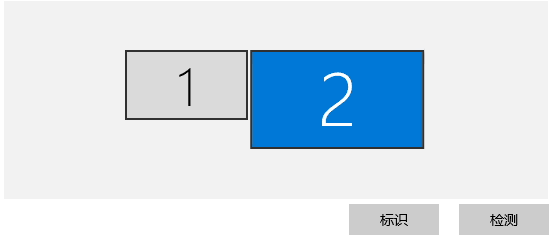

Still have a problem.
Connect the configuration serial port to the PC via the USB serial port, change the baud rate to 115200, and power on to see if there is any system startup information (uboot startup information)
The method is suitable for the below model.

Ask A Question
Thank you for your response. ✨