






Table of Contents
Question: I noted that the TX900 webpage does not send RSSI data to the flight controller; it will not trigger a failsafe action when the radio link is lost. Is there any way to work around this issue?
Answer: RSSI wireless link status data requires customers (such as flight controllers) to manually send AT commands to obtain it. It can be obtained in two ways:
- Configure UART3 (data port 3rd) as an AT command serial port, and then send AT commands through UART3 (D3) to obtain. https://ivcan.com/change-d3-from-transparent-serial-port-to-at-command/
- Update the firmware version 1.5.1 or above, so that there will be an additional TCP server inside for customers to access through TCP to send AT commands to obtain the wireless status.
Here is the explanation from our engineer.
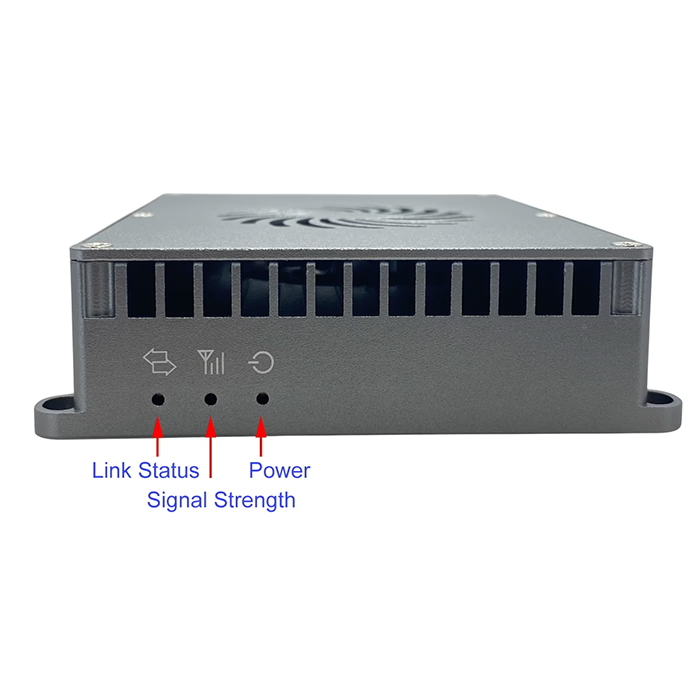
- The LED light is used to indicate the wireless connection status (for example, if the wireless link is disconnected, the light will go out), and there is no dedicated external pin to notify the customer of flight control.
- Our core module has GPIO pins, but they are basically connected to LED lights. Our vcan1681 module also has such pins, but currently, it is also connected to LED lights.
- If you are willing to spend money on customization, we can customize a special one for you, and the external interface can be changed.
- When customers use our drone wireless video data links, they will definitely need to obtain air-side flight control information through the serial port or network port to the serial port.
- The general method is to add verification to the ground station software and flight control software to measure the reliability of the wireless link. At this time, you can completely sense the link quality and link disconnection events in the software, and then set the threshold in the software to alarm and handle it.
- That is to say, when the ground station software obtains the air system flight control information through our wireless link if the error rate exceeds a certain threshold, it can be considered that the wireless link has reached an unreliable threshold and needs to be processed. This is a common practice among Chinese drone companies.
Talking RSSI SNR for the below products



Question: Can you develop a new model for me? It is easy to get RSSI and SNR?
Do you just need to get the real-time status of whether the wireless link is connected/disconnected? Or do we need to obtain even RSSI?
Because a GPIO can only identify two states: 0/1, it can only be used to indicate whether the wireless link is connected/disconnected, and cannot express the values of RSSI (the values of RSSI and SNR still need to be obtained through AT commands)
If you need us to actively report information such as RSSI and SNR in addition to the status of the link being connected/disconnected, then you must operate according to the customized project. You need to clearly describe your needs, docking interfaces, etc. (instead of In a simple sentence), so that we can evaluate the difficulty of developing customization and the ways to achieve it.
Question: How to obtain the wireless link status of TX900?
Customers can obtain real-time wireless link status in three ways: (download operation PDF)
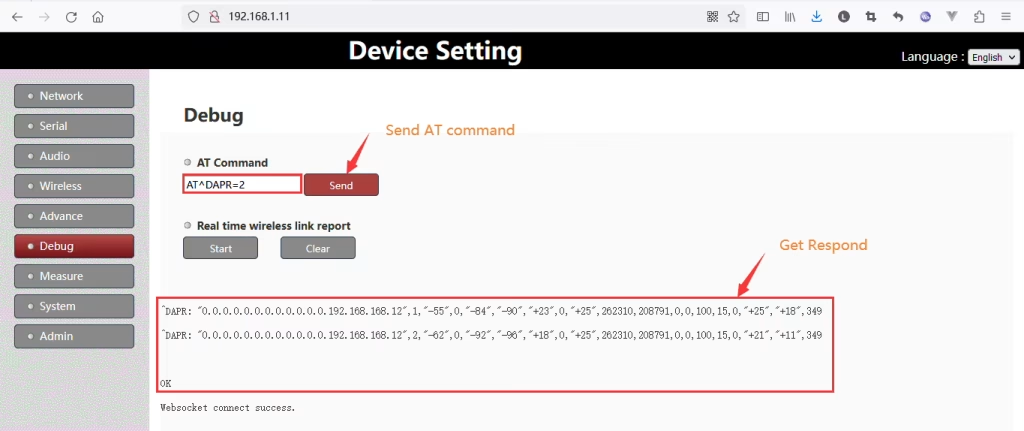
1. Through the debug page of the web server
Users can access the device’s web server through the web browser
(such as http://192.168.1.11), go to the debug page, and enter the AT command (for example: AT^DAPR=2) in the “AT Command” input box. You will see the corresponding reply information for the wireless link.
2. Through the configuration serial port of D3
After referring to “Set D3 or UART3 as control UART or data UART” and setting D3 as the configuration serial port, AT commands can be sent through the D3 serial port to obtain wireless link status.
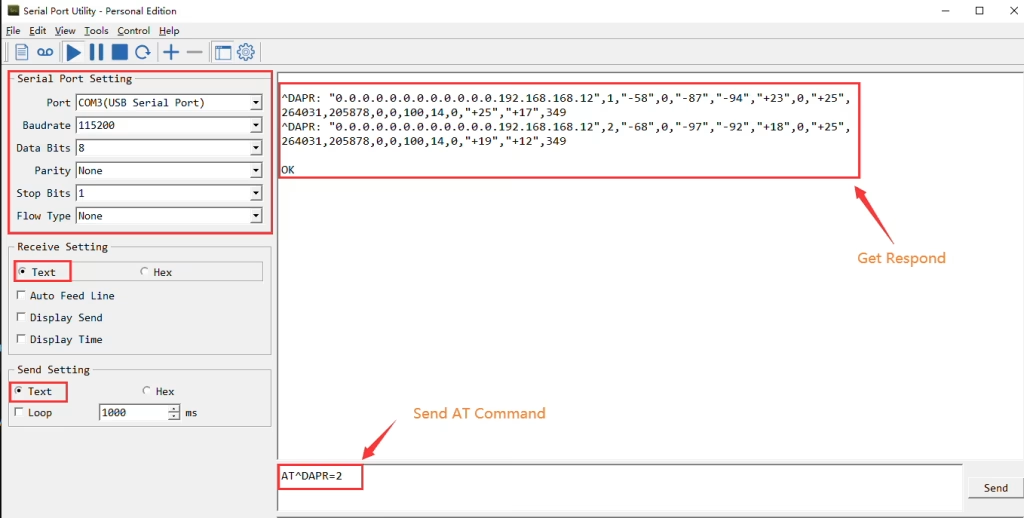
Attention:
At the end of an AT instruction (such as AT^DAPR=2), CRLF(\r\n) should be added to indicate the end of the instruction (some software will add it automatically, while others require the user to manually add it), otherwise, the device will not respond.
3. Through the built-in TCP server for configuration
The device build-in a TCP server(port fixed to 20003),users can access to this TCP server and sending AT commands to obtain wireless link status.
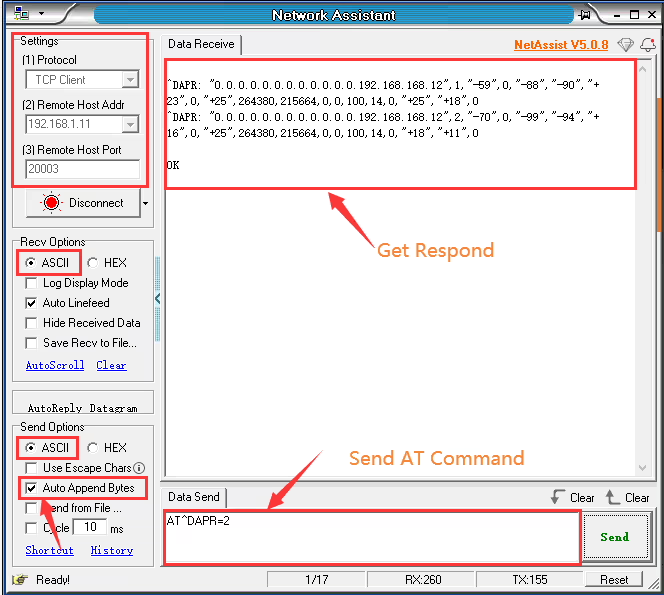
Get Network Assistant Software, (NetAssist V5)
https://drive.google.com/file/d/1rhjIR2b5kFjMVVIxfEIAFzGLVDM6Yl3u/view?usp=drive_link
Attention:
At the end of an AT instruction (such as AT^DAPR=2), CRLF(\r\n) should be added to indicate the end of the instruction (some software will add it automatically, while others require the user to manually add it), otherwise, the device will not respond.
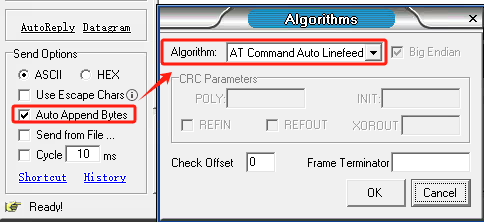
If your operation does not produce any result, please tell us your firmware version number. If it is too old, it will not support the third acquisition method. You can also contact us to upgrade.
What is SNR and RSSI?
SNR (Signal-to-Noise Ratio) is a ratio-based metric that measures your signal in relation to the noise.SNR is made up of two values that are measured as a positive number between 0db and 120db, with the closer it is to 120db, the better: signal value and noise value, both of which are commonly reported in decibels (db).
The RSSI (Received signal strength indication) will look at the Signal (Also known as RSSI) first this value is measured in decibels from 0 (zero) to -120 (minus 120) now when looking at this value the closer to 0 (zero) the stronger the signal is which means it’s better, typically voice networks require a -65db or better signal level while a data network requires -80db or better.
Because the signal is affected by the AP’s transmit power and antenna, as well as the client’s antenna, the normal range in a network would be -45db to -87db depending on power levels and design.
Signal strength (RSSI, “signal strength”, Signal/Noise Ratio). It is often preferable to concentrate on RSSI.
- RSSI -90 dBm: This signal is incredibly faint, and it is at the limit of what a receiver can receive.
- RSSI -67dBm indicates a rather strong signal.
- RSSI greater than -55dBm indicates a very strong signal.
- RSSI > -30dBm indicates that your sniffer is right adjacent to the emitter.
Failsafe
Question: In case of signal loss from the operator, will FailSafe be activated?
Answer: Failsafe is the function of the flight controller. We just provide signal transmission and transmit transparent data. What data do you give us, We transmit them for you.
Question: Unless your receiver reports that the connection is lost, FailSafe is not activated.
Answer: You can get the signal strength. Our wireless video data transmitter and receiver don’t have this function. I believe that the wireless image transmission of Chinese suppliers does not have this function, except that the drone set has already the failsafe function.
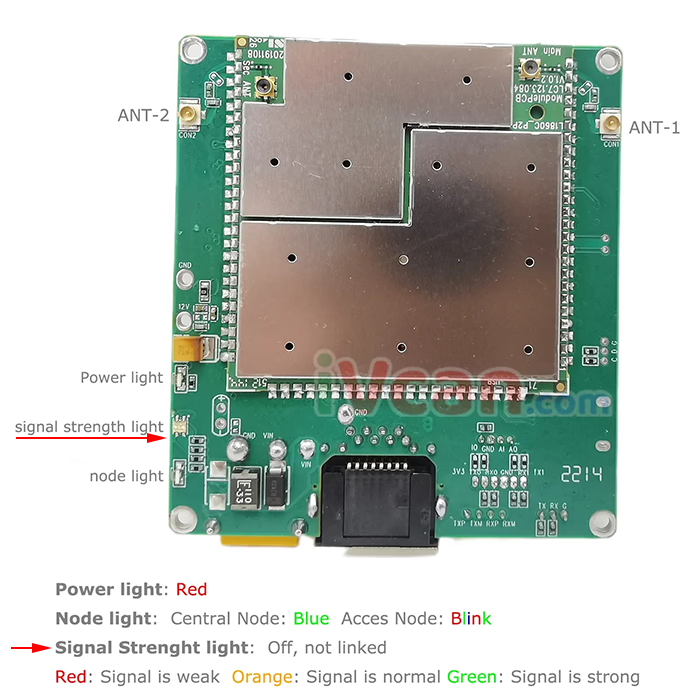
Signal Strength LED and 3 GPIO
Q: Is it possible to output RSSI to a pin (for example, as an analog RSSI signal) so it can be used by the flight controller?
A: The drone video/data link transceiver does not support analog RSSI voltage output. However, it provides digital signal strength indication through dedicated GPIO pins.
The module includes:
- One LED for signal strength indication
- Three GPIO pins corresponding to three different signal strength levels
By reading the logic status (high/low) of these three GPIO pins, the flight controller can determine the current signal strength level and monitor link quality accordingly.
Although analog RSSI output is not available, this digital level-based indication can still serve as a reliable and important signal strength reference for long-distance flight operations.
For detailed pin definitions, voltage levels, or threshold specifications, please refer to the interface documentation or contact technical support.
Ask A Question
Thank you for your response. ✨