






1. 包裝內容
空氣 單元 & 地面 單元
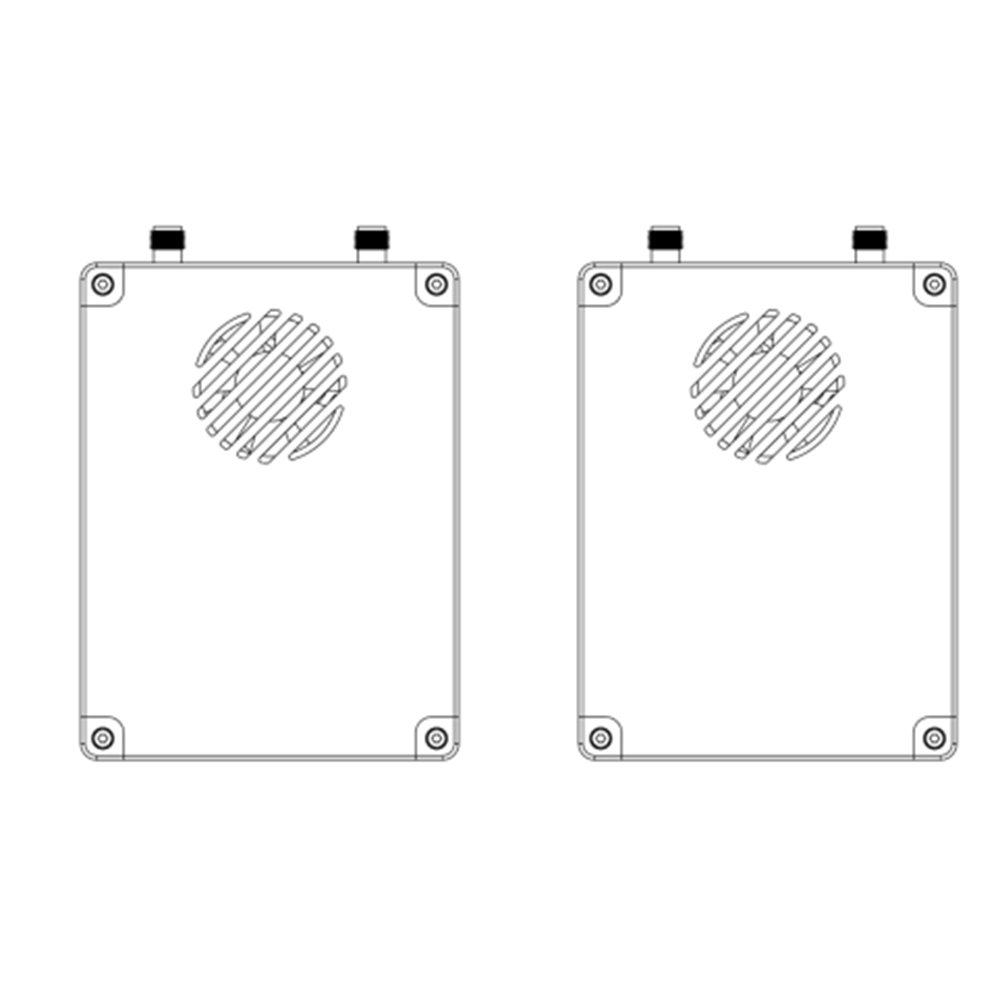
一個ir unit antenna × 2
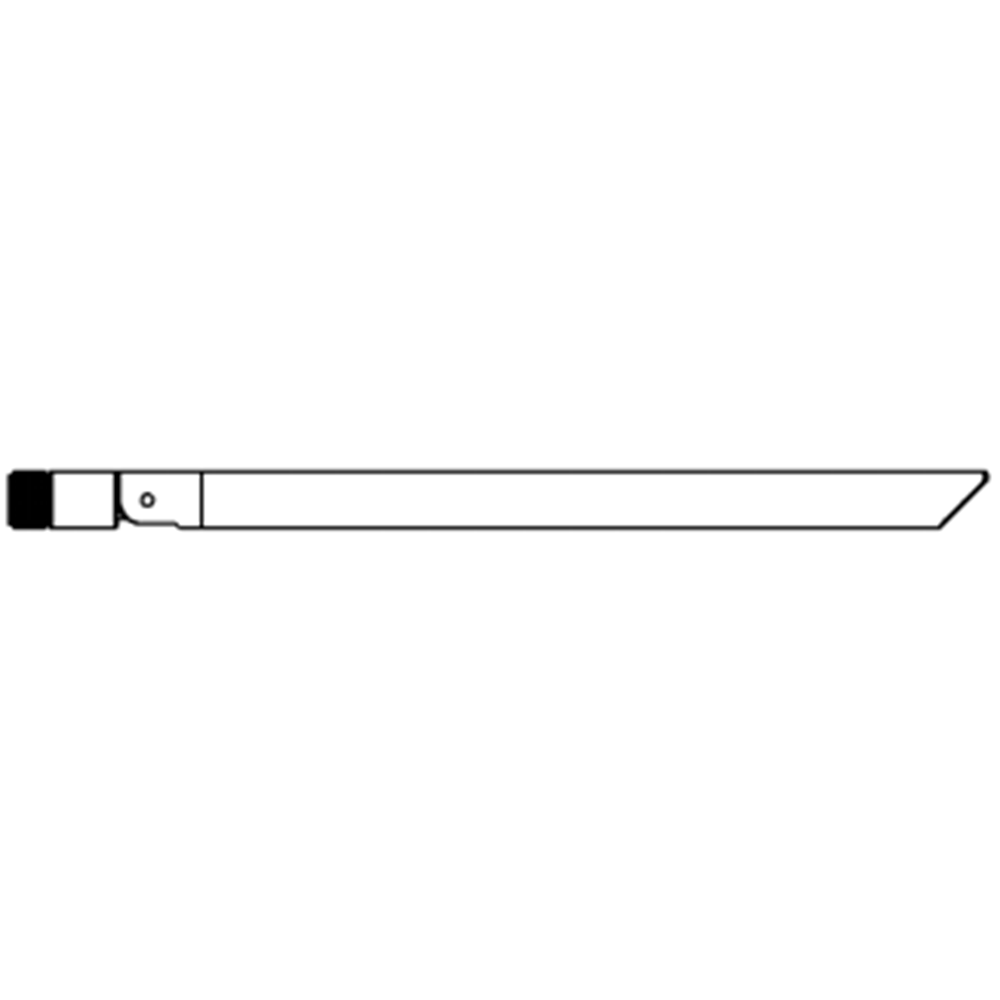
Ground unit antenna × 2

空氣 單元 電纜
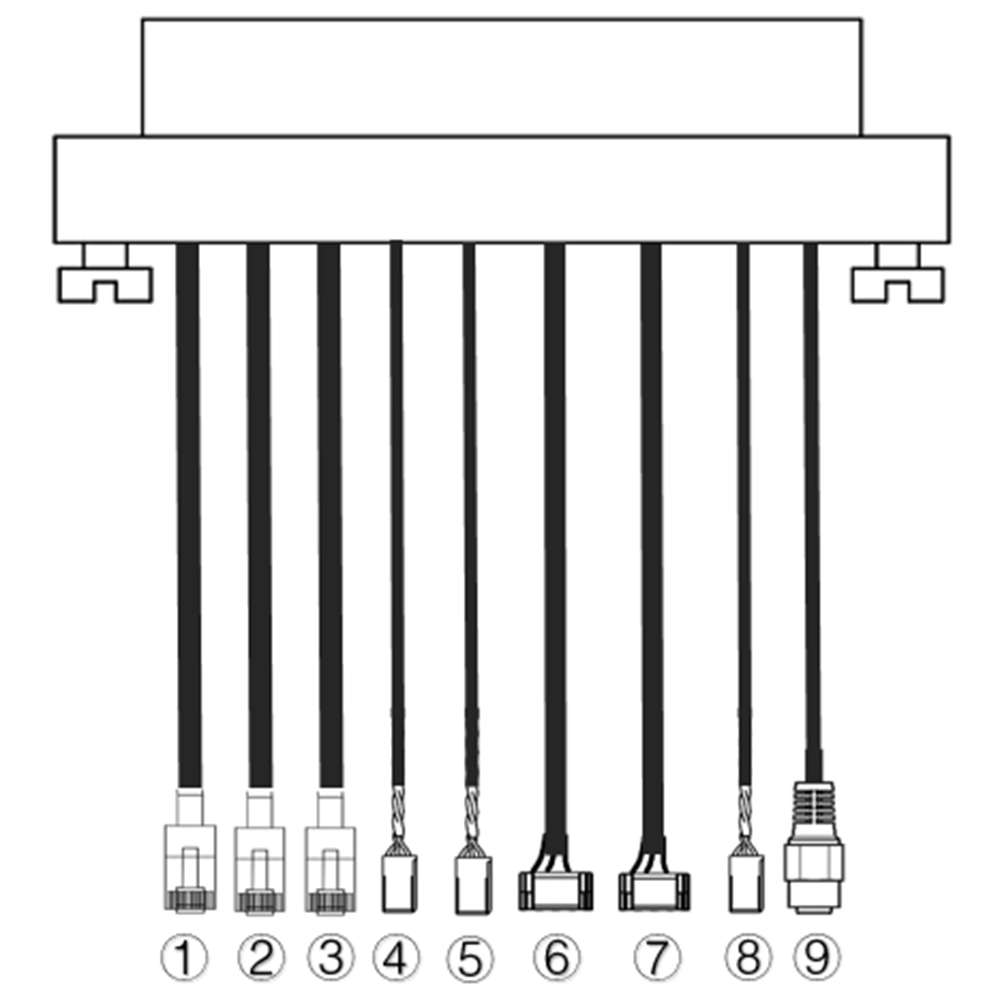
| 沒有. | 接口 |
| 1,2,3 | 以太網絡 |
| 4,5 | S.BUS, 如圖所示, 該 1英石 pin from the left of dupont connector is S.BUS signal, 該 3RD 是 G. |
| 6,7 | 遙測系列, 如圖所示, 該 2ND GH1.25連接器左側的引腳是Rx, 該 3RD 是發送方, 該 6日 是 G. (默認TTL, RS232/422 替代方案) |
| 8 | 生產計劃管理, 如圖所示, 該 1英石 pin from the left is PPM signal, 該 3RD 是 G. |
| 9 | 功率 |
Ground unit cables
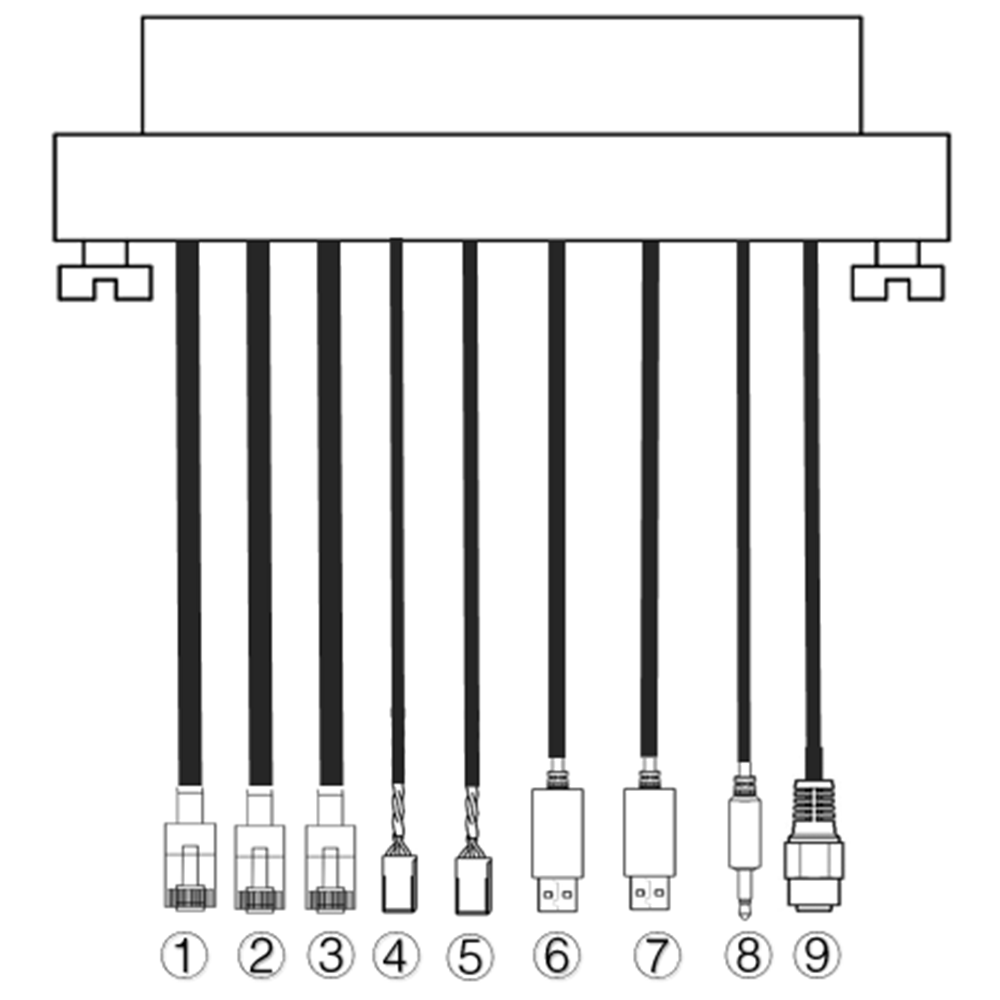
| 沒有. | 接口 |
| 1,2,3 | 以太網絡 |
| 4,5 | S.BUS, 如圖所示, 該 1英石 左起引腳為S.BUS信號, 該 2ND 是5V+, 該 3RD 是 G. |
| 6,7 | 串行USB(默認為TTL-USB, RS232/422 替代方案) |
| 8 | 生產計劃管理 |
| 9 | 功率 |
2. 產品 描述
2.1. Parameters
| 參數 | 價值 |
| 頻率 | 1330~1450MHz |
| 頻寬 | 10兆赫 (上行鏈路), 10兆赫 (下行鏈路) |
| 功率 | 33dBm的 |
| 調製 | OFDM |
| 星座 | BPSK, QPSK, 16QAM |
| FEC | 低密度脂蛋白(1/2, 2/3, 3/4, 5/6) |
| 雙工 | 時分雙工 |
| 下行吞吐量 | 2.3Mbps ~ 8bps |
| 上行吞吐量 | 600kbps的 |
| 加密 | AES 256 |
| 接口 | 以太網絡, USB, TTL, RS232, RS422, PPM/S.BUS |
| 能量消耗 | 18W¯¯(空氣單元); 10W¯¯(地面單位) |
| 潛伏 | <300女士 (取決於相機) |
| 尺寸 | 92.5*70.3*25毫米 |
| 重量 | 198G |
| 額定電壓/電流 | 直流24V/1.2A (或6S鋰電池) |
| 工作溫度 | -40°C ~60°C |
2.2. 空氣 單元 接口
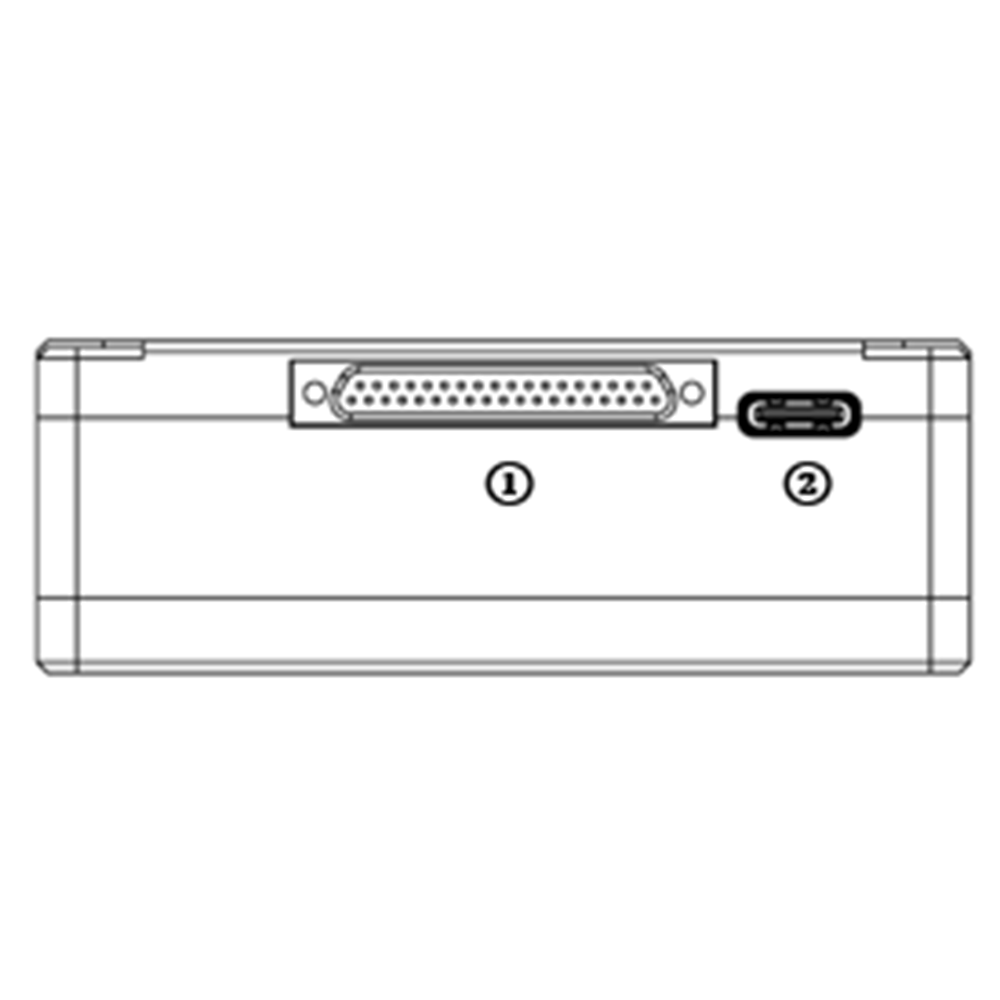
- J30J connector
It’s a J30J-37 pin connector providing power/Ethernet/serial/PPM/S.BUS.
- USB端口
Connect this port to the USB port of a PC, and use the wireless video link PC program to upgrade firmware and set parameters of the air unit.
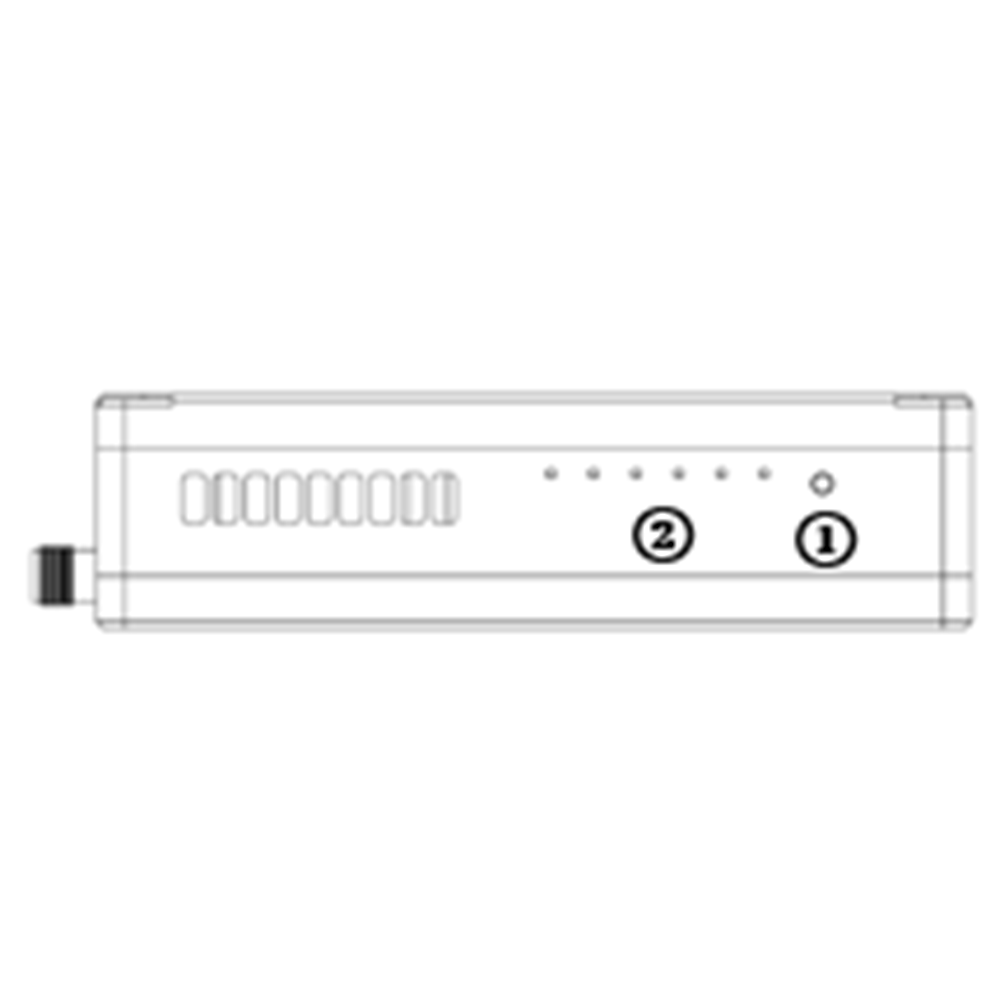
- Binding button
Press-and-hold this button to perform the binding operation. Bound already before factory delivery, no need to bind again by user.
- 發光二極管
從左到右: 電源指示燈 (1), Ethernet link indicator (2~4), UL/DL radio link indicator (5~6) not used for air unit. LED6 will be flashing during bind process.
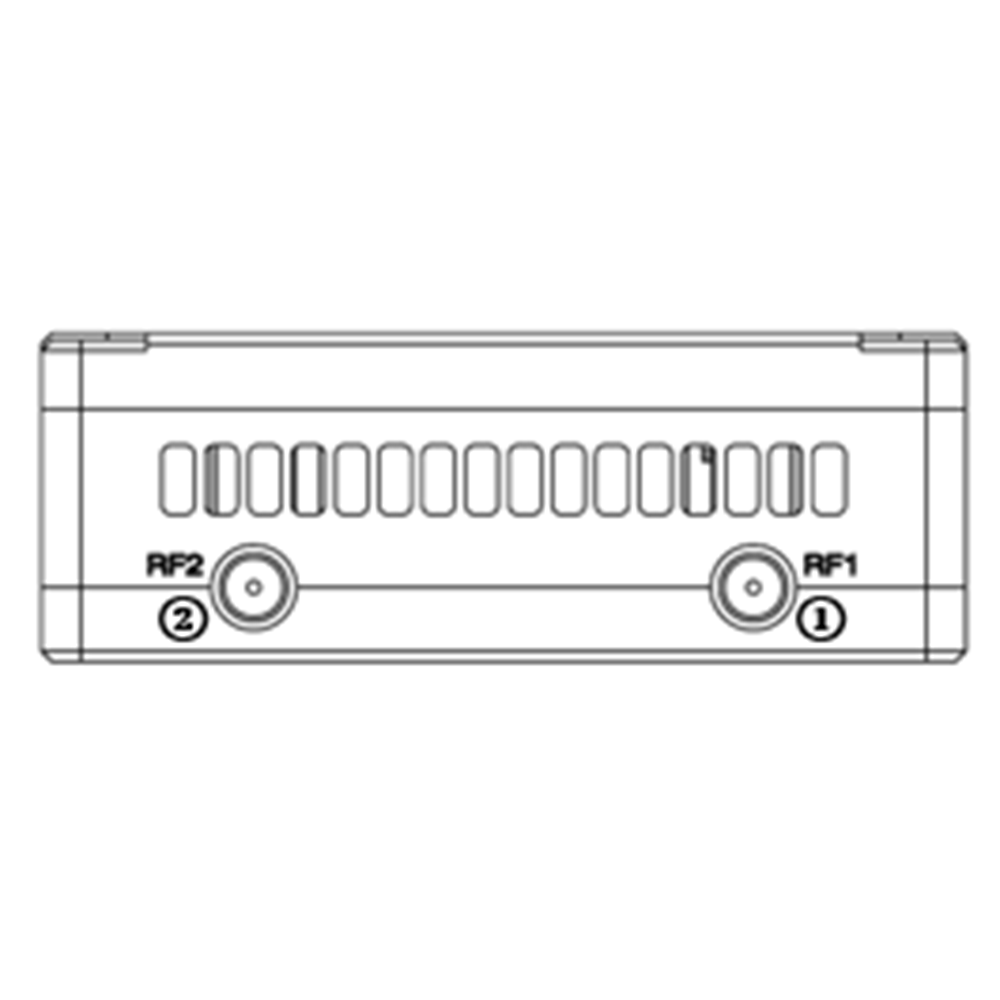
- RF1 Port
連接 1英石 air unit antenna to this port.
- RF2 Port
Connect the 2nd air unit antenna to this port.
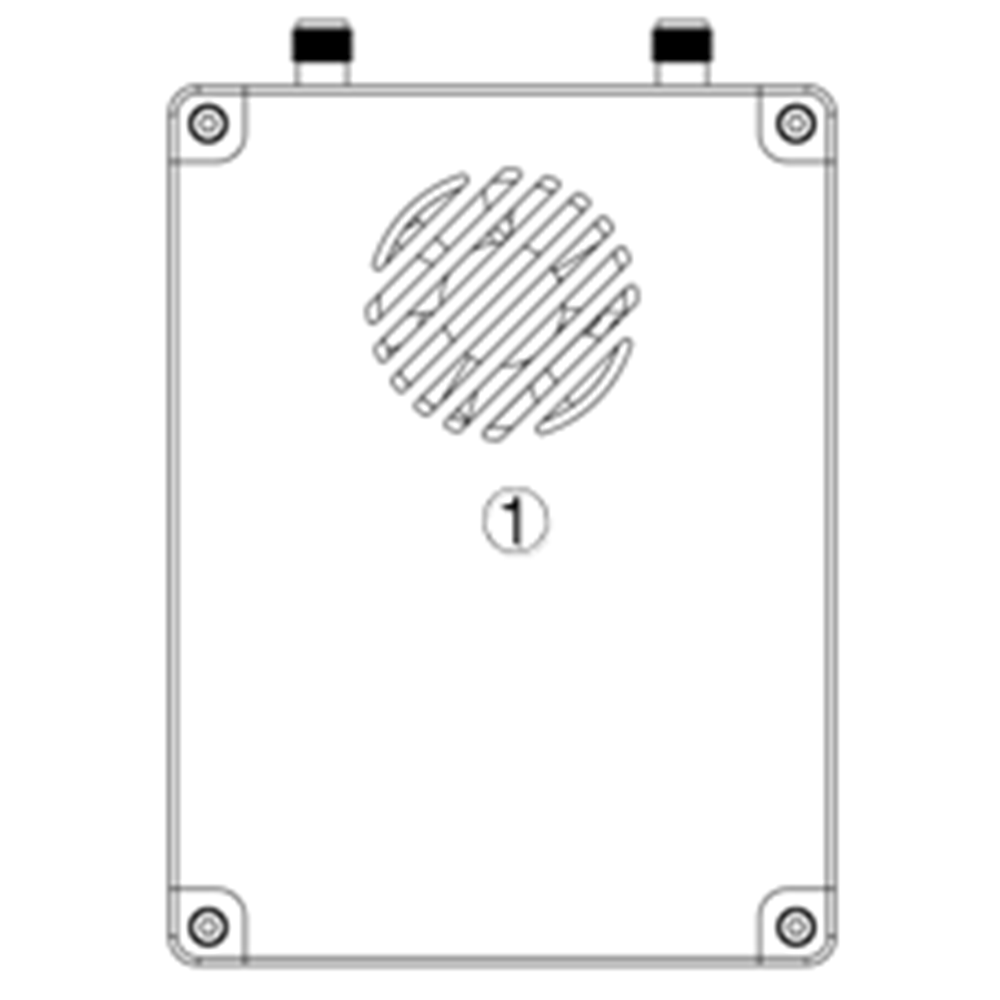
- Fan Ventilation Outlet
Don’t block this fan ventilation outlet to ensure effective cooling.
2.3. 地面 單元 接口
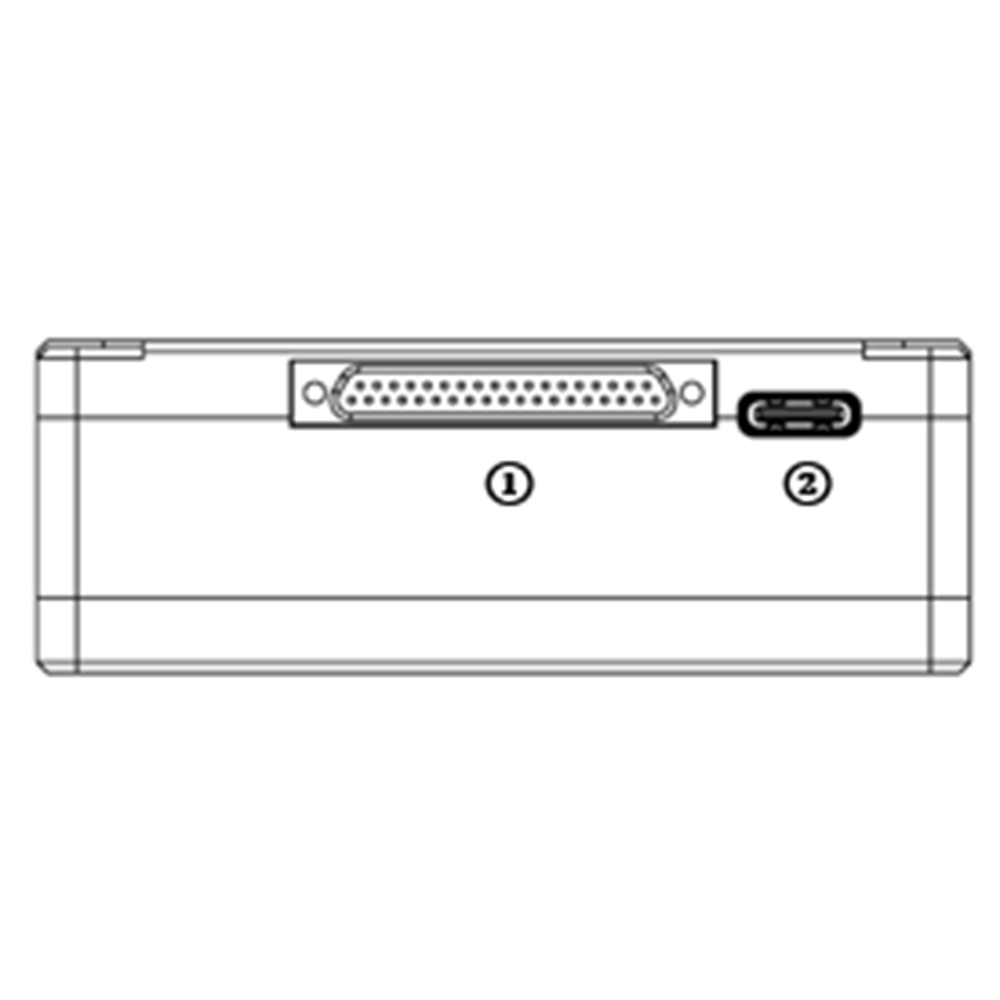
- J30J connector
It’s a J30J-37 pin connector providing power/Ethernet/serial/PPM/S.BUS.
- USB端口
Connect this port to the USB port of a PC, and use the wireless video link PC program to upgrade firmware and set parameters of the air unit.
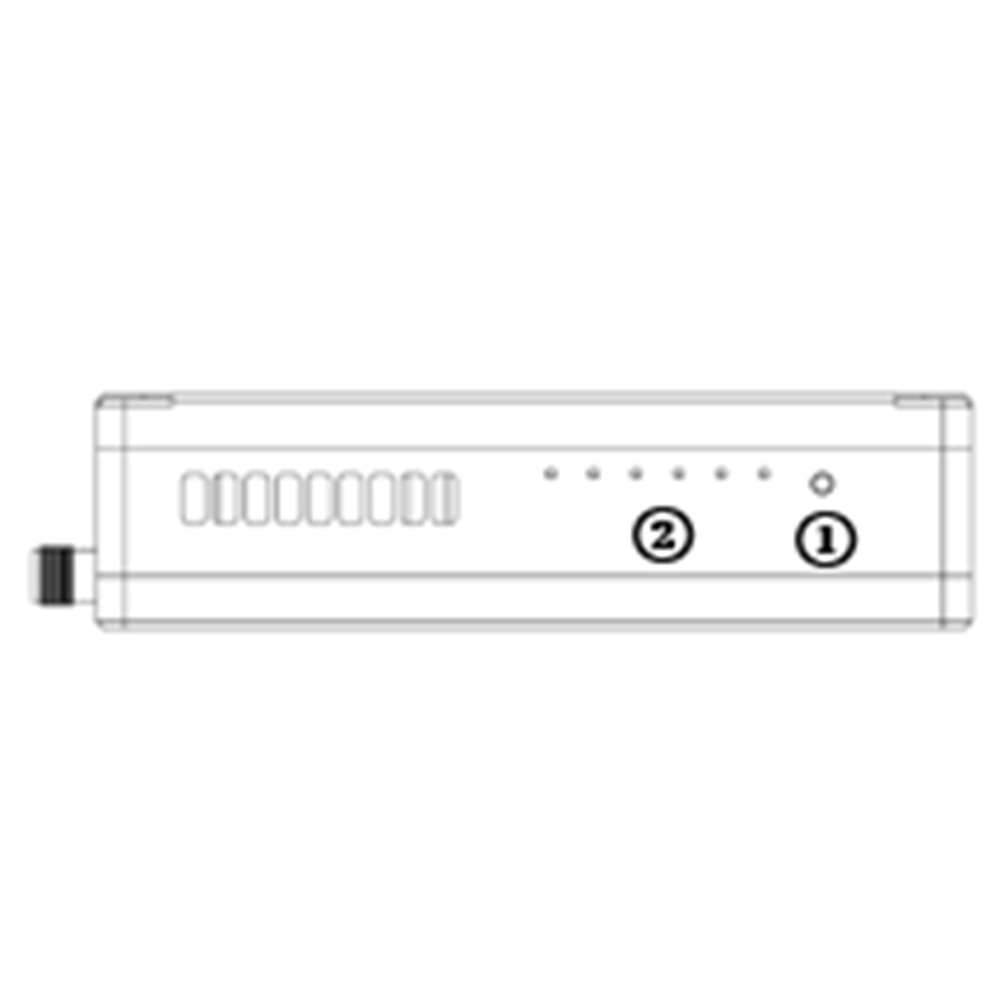
- Binding button
Press-and-hold this button to perform the binding operation. Bound already before factory delivery, no need to bind again by user.
- 發光二極管
從左到右: 電源指示燈 (1), Ethernet link indicator (2~4), UL/DL radio link indicator (5~6). LED6 will be flashing during bind process.
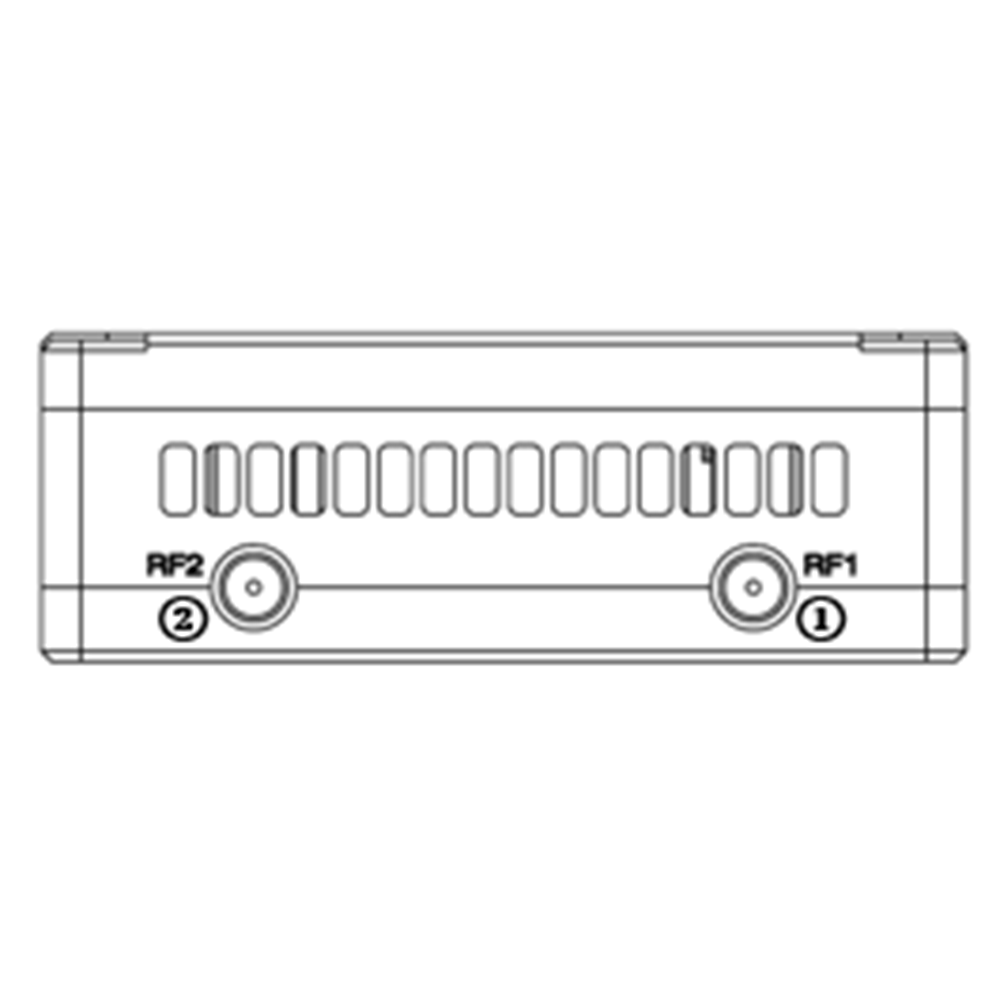
- RF1 Port
連接 1英石 air unit antenna to this port.
- RF2 Port
Connect the 2nd air unit antenna to this port.
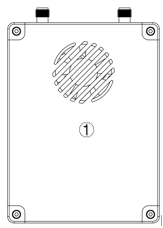
- Fan Ventilation Outlet
Don’t block this fan ventilation outlet to ensure effective cooling.
3. 小號ystem 設定
3.1. 空氣 單元 安裝
目錄
3.1.1. 一個ntenna 安裝
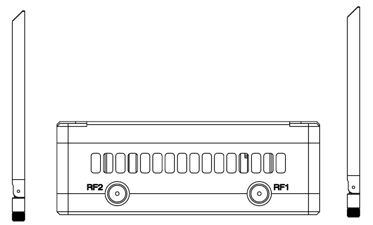
Screw the air unit antennas on the RF ports.
注意:
- To avoid equipment damage, install antennas before powering on the units.
- When mount air unit to drone, make sure the antennas are not both blocked by any part of the drone.
- Both antennas need to be installed.
3.1.2. Power supply
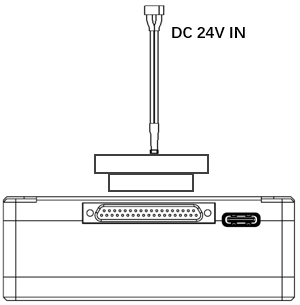
Insert the J30J connector to the J30J port of air unit and connect battery/power source to the power port at the other end.
注意:
- To avoid equipment damage, install antennas before powering on the units.
- Recommended rated voltage/current is DC24V/1.2A (或6S鋰電池).
3.1.3. Connect camera
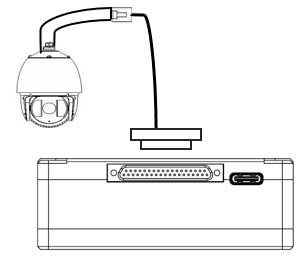
Connect the video output port of the IP camera to the Ethernet video input port of the air unit.
3.1.4. Connect flight controller ( - [RC & 遙測)
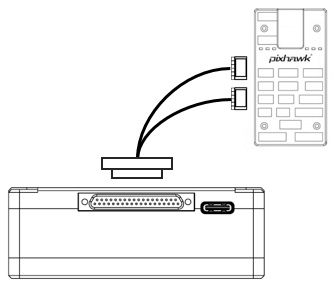
Insert the J30J connector to the J30J port of air unit and connect the other end of the serial cable to the telemetry port of a flight controller.
Insert the J30J connector to the J30J port of air unit and connect the other end of the RC cable to the PPM/S.BUS port of a flight controller.
3.2. Ground Unit Installation
3.2.1. Antenna installation
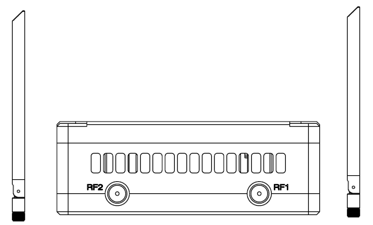
Screw the ground unit antennas on the RF ports.
注意:
- To avoid equipment damage, install antennas before powering on the units.
- Both antennas need to be installed.
- Adjust the antenna to be vertical to the ground during operation.
3.2.2. Power supply
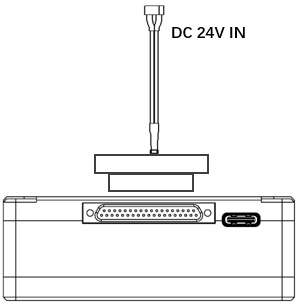
Insert the power connector of a power source into the power port of the ground unit
FIAT Ducato 防水 CCD 剎車燈攝像頭帶音頻夜視紅外 LED VCAN1338ote:
- Recommended rated voltage/current is DC12V/1.2A (or 3S lithium battery).
- To avoid equipment damage, install antennas before powering on the units.
3.2.3. Telemetry connection
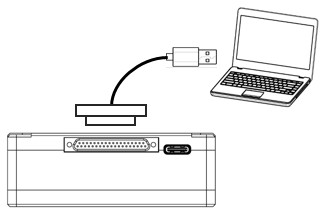
Insert the J30J connector to the J30J port of ground unit and connect the other end of supplied serial cable to the telemetry port of the ground control station.
注意:
- Ensure the baud rate of ground station and the baud rate of wireless video link module are configured to be the same.
- Ensure the serial cable sequence matches the interface definition of wireless video link module.
3.2.4. Connect remote controller
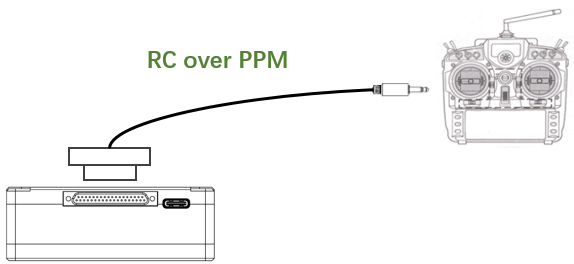
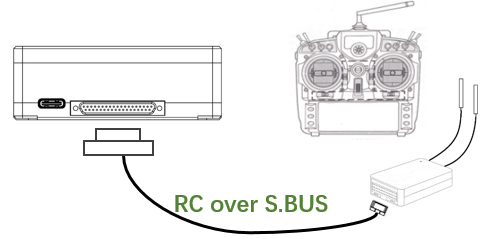
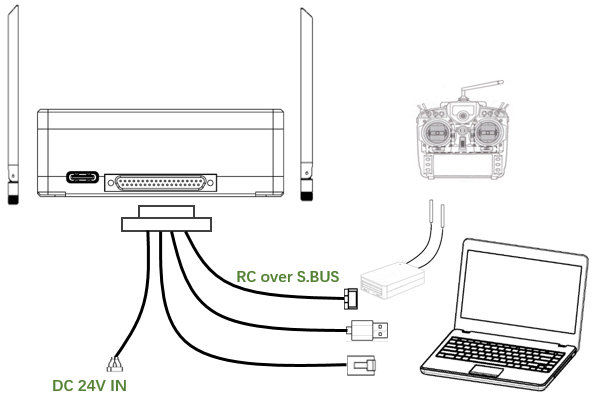
Using PPM mode: Insert the trainer port connector of the supplied RC cable to the trainer port of a remote controller and Insert the J30J connector to the J30J port of ground unit. Using S.BUS mode: Insert the J30J connector to the J30J port of ground unit, connect the other end to a S.BUS receiver, and the S.BUS receiver communicates with the remote controller wirelessly.
FIAT Ducato 防水 CCD 剎車燈攝像頭帶音頻夜視紅外 LED VCAN1338ote:
- Ensure the RC cable’s pin-out matches the interface pin-out of wireless video link module.
- If a S.BUS receiver is used, there should be enough guard band between the working frequency band of the receiver and the working frequency band of wireless video link module.
3.2.5. 小號etup video output
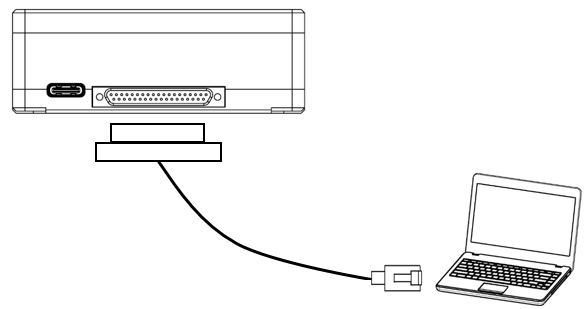
Insert the J30J connector to the J30J port of ground unit and connect the other end of supplied Ethernet cable to PC or the ground control station. Make sure IP addresses of camera and PC are in the same subnet.
3.2.6. 使用 wireless video link 系統
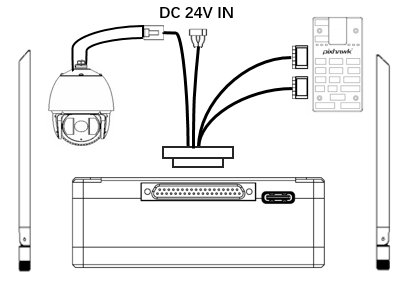
- Install antennas to the air unit.
- Connect IP camera output to Ethernet port of the air unit.
- Connect the PPM/S.bus port of the flight controller to the RC port of the air unit.
- Connect the telemetry port of the flight controller to the serial port of the air unit.
- Connect a 24V DC power source to the power port of the air unit and turn it on.
- If the latest firmware is needed, connect the air unit to a PC using USB cable and run wireless video link PC program to upgrade the firmware of the unit to the latest one.
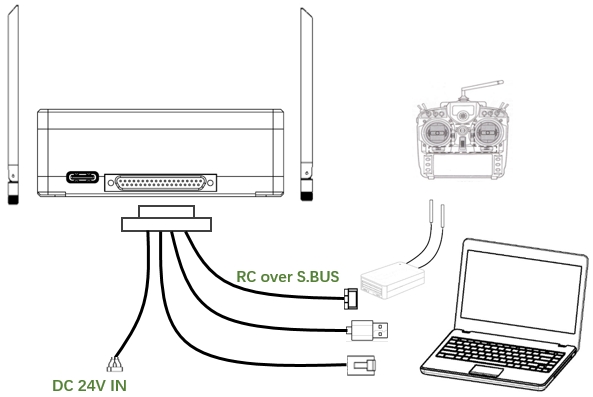
- Install antennas to the ground unit.
- Configure the remote controller to be in trainer mode. If PPM mode is used, connect the remote controller interface of the ground unit to the trainer port of the remote control. If S.BUS mode is used, a S.BUS receiver needs to be connected to the ground unit using supplied cable, and the connection between the S.BUS receiver and the remote controller need to be established.
- Connect the USB port of a ground control station to the serial port of the ground unit through a Serial-2-USB adaptor to use telemetry link.
- Connect the Ethernet port of a GCS or PC to the RJ45 connector of ground unit to get IP video/telemetry (telemetry over Ethernet).
- Turn on the ground unit.
- If the latest firmware is needed, connect the ground unit to a PC using USB cable and run wireless video link PC program to upgrade the firmware of the unit to the latest one.
- After downlink and uplink are established, both LEDs of the ground unit will be on.
4. 軟件
4.1. 安裝
wireless video link provide program installation files, program file name: wireless video link Wireless App Setup.exe. The installer icon is as following:
Double-click the installer to install and customize the program installation directory. 配置後, click “Next” to move to the next step. To cancel the installation, click “Cancel”.
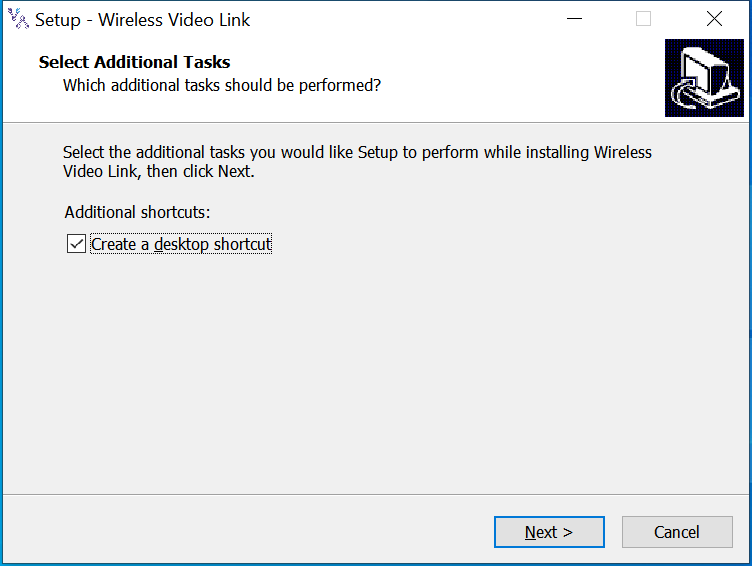
Check the “Create desktop shortcut” if desktop shortcut is needed. If it is not checked, the desktop shortcut will not be created. 配置後, click “Next” to move to the next step. To go back to the previous step, click “Back”. To cancel the installation, click “Cancel”.
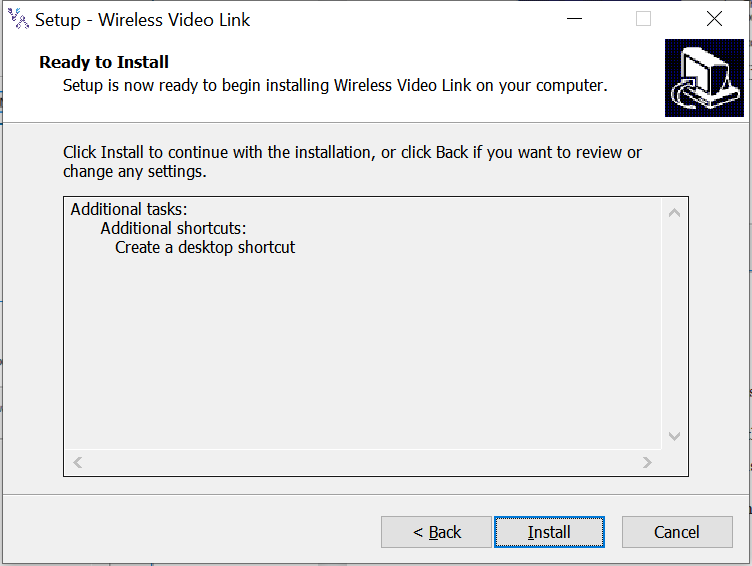
Click “Install” to proceed with the installation. To go back to the previous step, click “Back”. To cancel the installation, click “Cancel”.
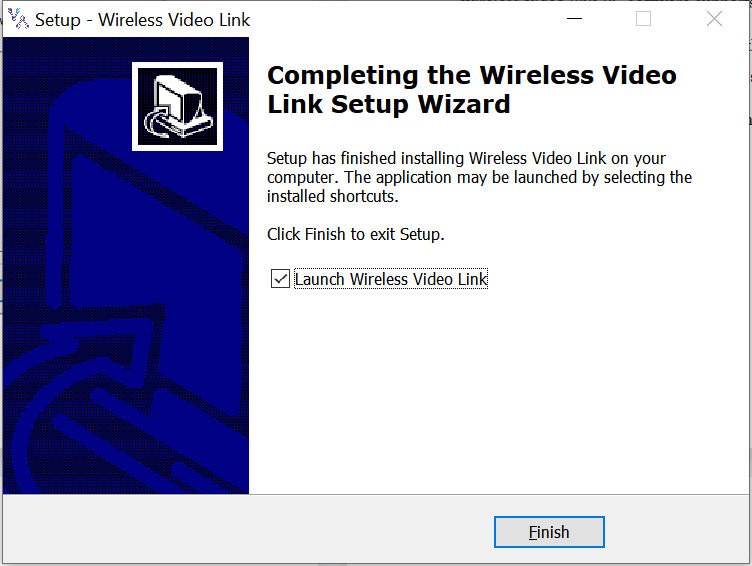
注意: Please disable the anti-virus software, otherwise the anti-virus may prevent the driver from being installed during the driver installation.
在此刻, the software installation is done and the driver installation is completed.
4.2. 軟件 語言
wireless video link PC software supports both Chinese and English.
The software will display in Chinese if the operating system of the PC is in Chinese, otherwise the software displays in English.
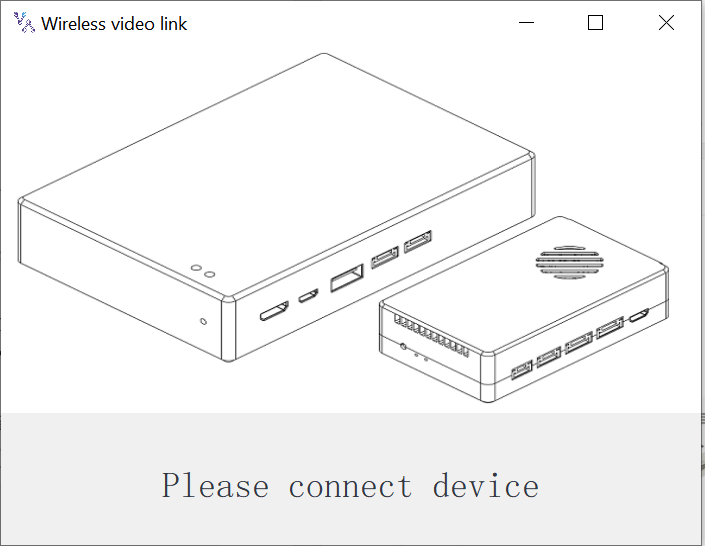
If the device is not connected to the computer properly, wireless video link PC software shows the following picture:
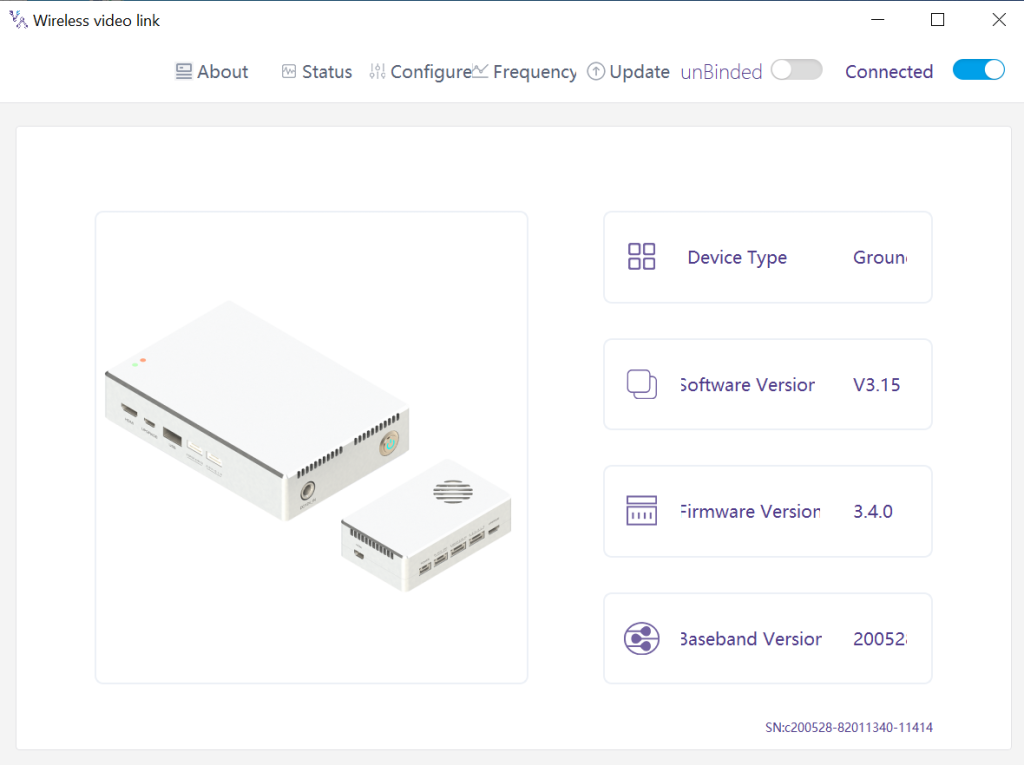
If the device is connected to the computer properly, wireless video link PC software shows the following picture:
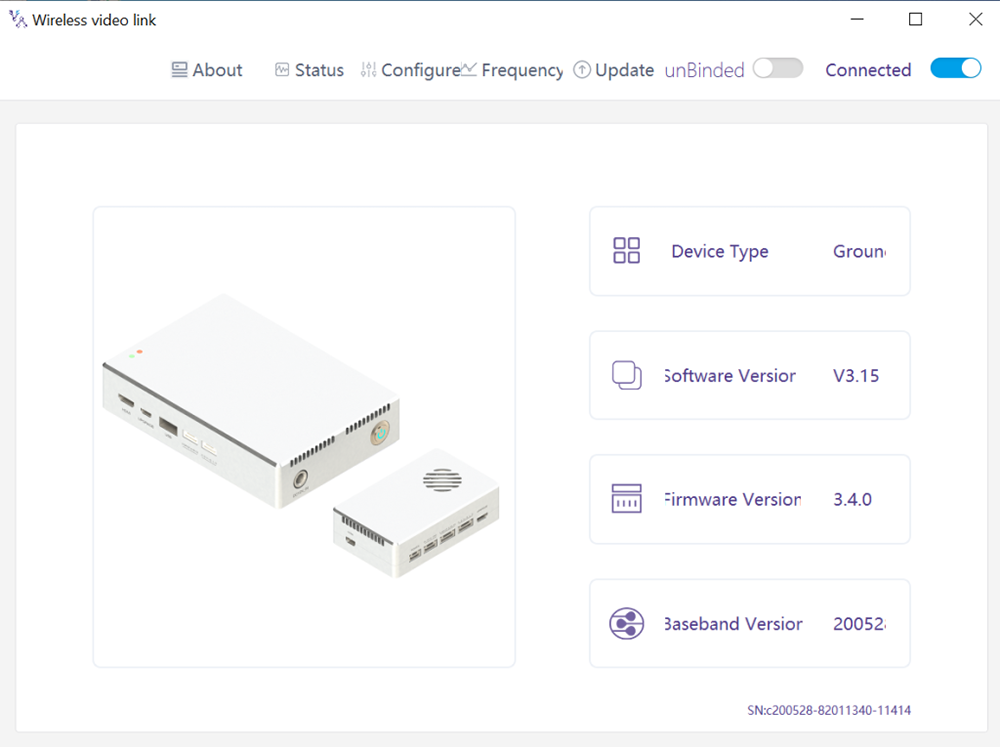
4.3. Device Info
Information on the homepage: device type, software version, 韌體版本, and baseband version.
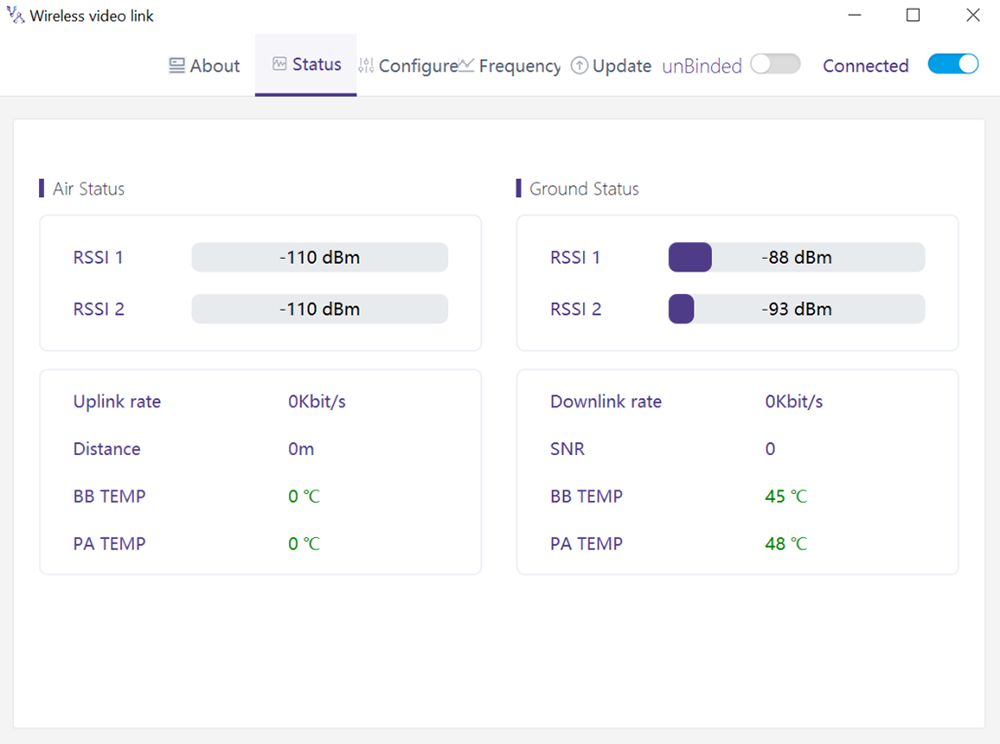
4.4. 地位
Read the status information of air unit and ground unit under “Status” page section:
空氣: 接收信號強度指數 1 & 接收信號強度指數 2, Uplink rate, 距離, BB TEMP, PA TEMP.
地面: 接收信號強度指數 1 & 接收信號強度指數 2, Downlink rate, SNR, BB TEMP, PA TEMP.
4.5. 組態
To change configuration, device need to be bound and wireless connection between air unit and ground unit needs to be established.
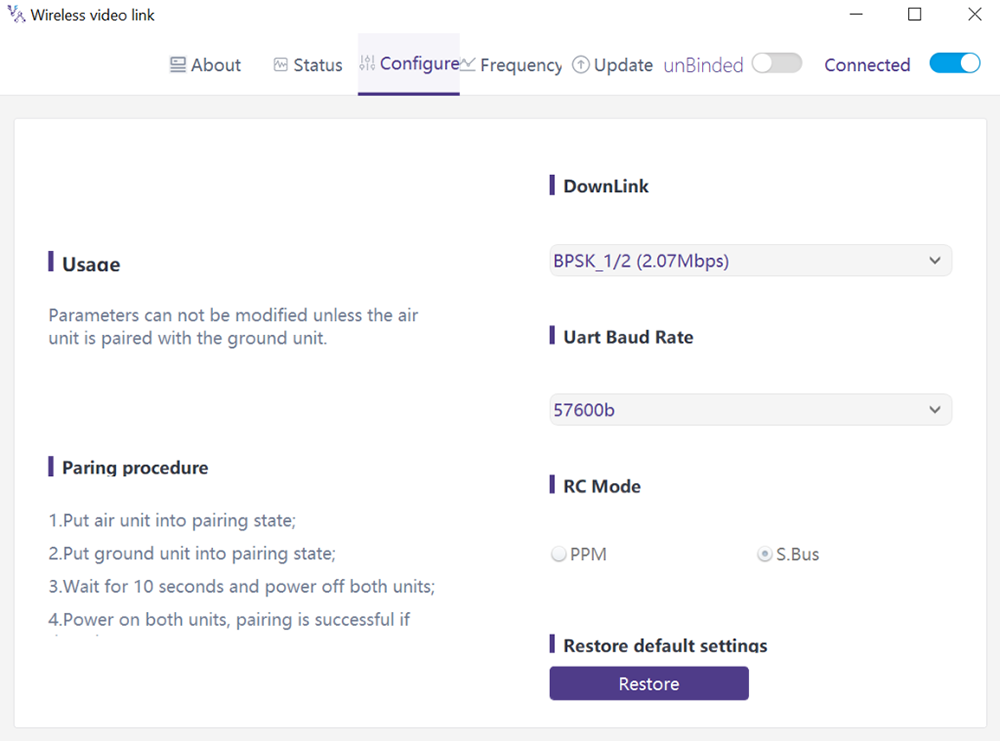
4.5.1. Downlink Mode configuration
To change downlink mode, device need to be bound and wireless connection between air unit and ground unit needs to be established
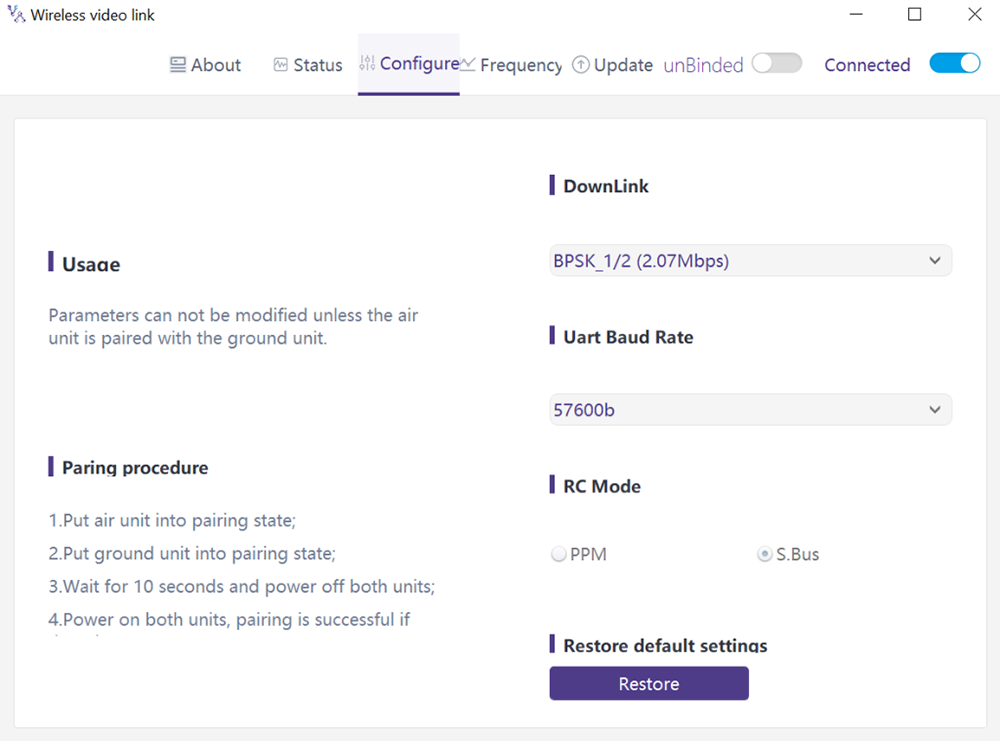
有 8 options for downlink mode from the drop-down menu (see the following screenshot):
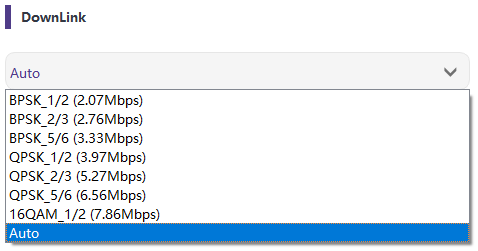
When it’s selected as Auto, modulation scheme will be dynamically adaptive based on real-time signal quality.
4.5.2. Baud rate configuration
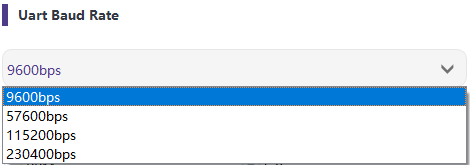
有 4 options for serial port baud rate (see the following screenshot).
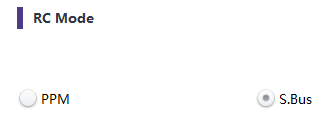
4.5.3. 遠程 control 模式 配置
遠程控制模式有兩種選擇, PPM 和 S.BUS (see the following screenshot).
4.5.4. 恢復 默認 設定
點擊“恢復”即可恢復默認設置.

4.6. 頻率
頻率相關信息/參數可在頻率頁面查看/設置.
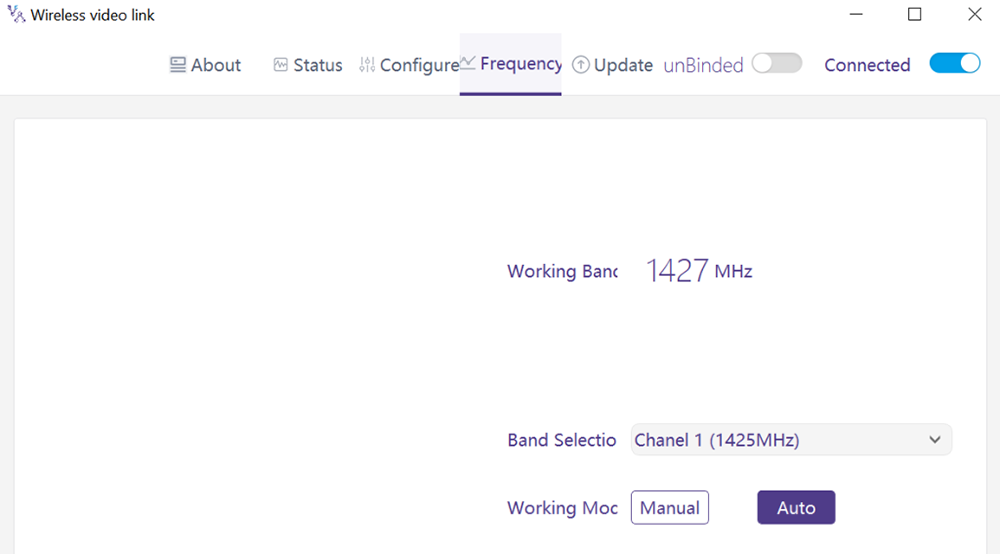
4.6.1. Frequency working mode
工作模式:手冊, 汽車.
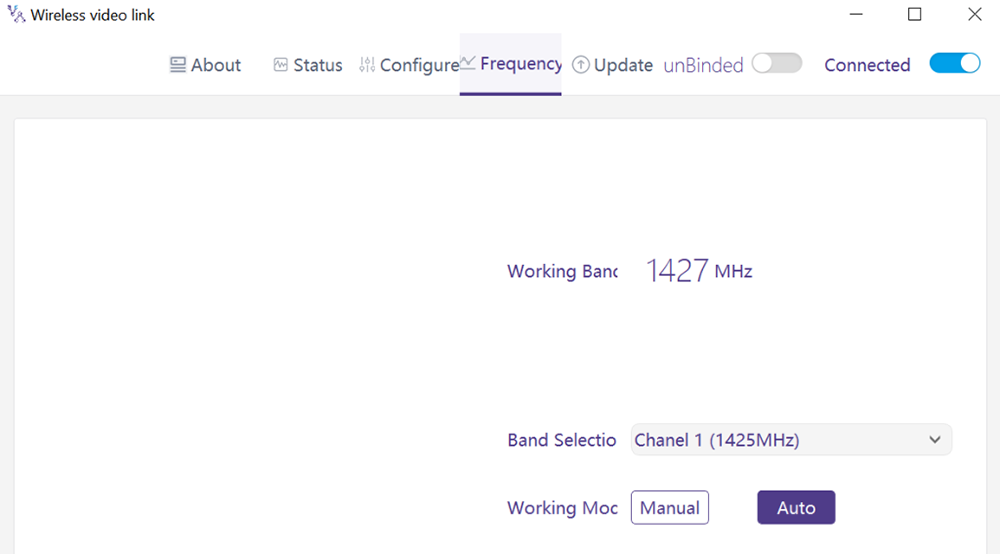
手動模式: 用戶手動選擇工作頻率.
汽車時尚: 系統根據頻率掃描選擇工作頻率.
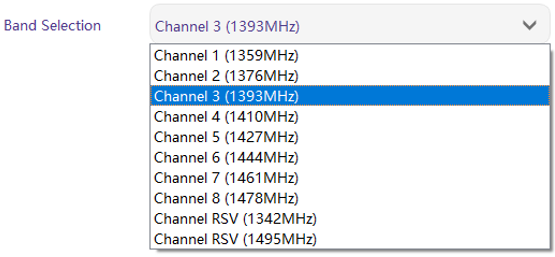
4.6.2. 頻率選擇
手動模式下, 工作頻率可以從下拉菜單中選擇. 請按照產品規格選擇和使用渠道 (1330~1450MHz).
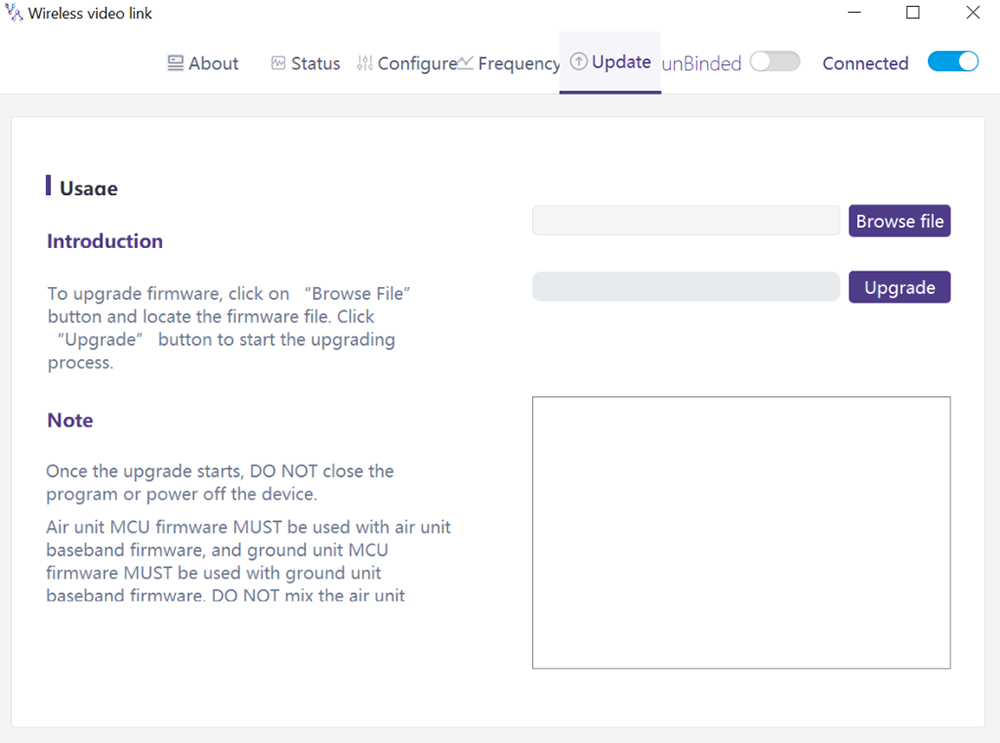
4.7. 升級
注意: 天空端和地面端需要分別升級使用USB線連接無線視頻聯上位機軟件.
進入升級頁面. 選擇升級文件, 點擊“升級”紫色按鈕進行升級.
4.8. 網頁管理
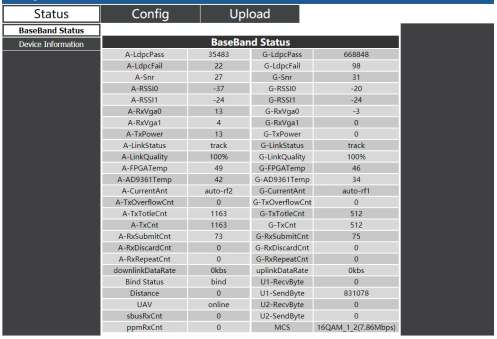
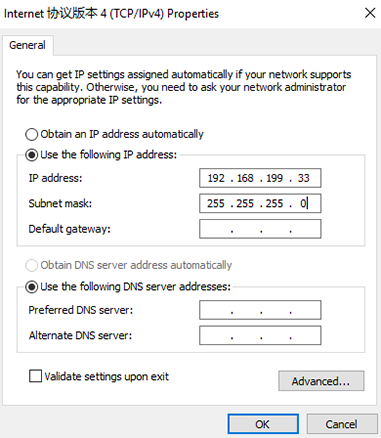
除了通過 USB 進行 PC 應用程序管理之外, 還支持通過以太網進行網頁管理. PC通過網線直接連接天空端/地面端, 將PC IP地址設置為 192.168.199.33/24, 並參觀 192.168.199.18 (空氣單元)/192.168.199.16 (地面單位) 通過網頁.
狀態à基帶狀態下, 有RSSI等詳細信息, SNR, 發射功率, LDPC 統計, 遙測統計, 等等.
在狀態設備信息下, 有SN和固件版本信息.

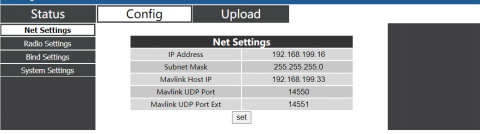
在 ConfigàNet 設置下, 有設備本身的IP地址, 遙測目標 IP 地址和 UDP 端口, 所有這些參數都可以根據用戶的要求進行更改.
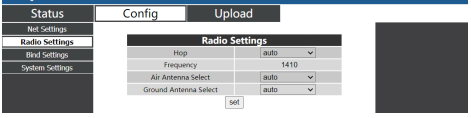
在 ConfigàRadio 設置下, 有跳, 頻率, 可設置天線選擇. 當跳躍為自動時, 用戶不需要/無法設置頻率, 系統動態選擇自己使用的最佳頻率, 換句話說, 當跳躍為手動時, 用戶可以手動設置頻率.
在配置綁定設置下, bind process can be triggered by clicking bind instead of physical bind button.

Under Config System settings, baud rate for U1/U2 two serial ports can be set. When QAM mode is set as adaptive, unit will dynamically change modulation scheme based on real-time signal quality. Role of pilot has bi-directional transmission while observer only has downlink data.
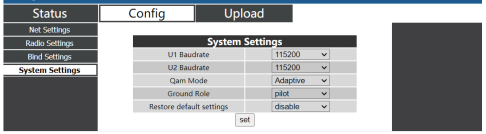
Under Upload Upload, browser and select file to be upgraded first, then click send to trigger the process.

5. 應用
5.1. 應用 的 遙控器
wireless video link modules support PPM and S. BUS protocol.
If PPM mode is used, please use wireless video link standard PPM cable to connect the ground unit and the remote controller’s trainer port.
If S. BUS mode is used, additional S.BUS receiver is needed. The ground unit is connected to the receiver. Then S. BUS接收器與遙控器建立無線通訊.
兩種模式都需要將遙控器配置為對應的工作模式.
If S. 使用BUS接收器, 請使用與無線視頻鏈路模塊工作頻率不同的接收器.
使用 PPM 模式時, 天空端需要連接飛控的PPM RC口.
當S. BUS mode is used, 天空端需要連接DSM/S. 飛控的BUS RC接口.
5.1.1. 飛天 偏僻的 控制器
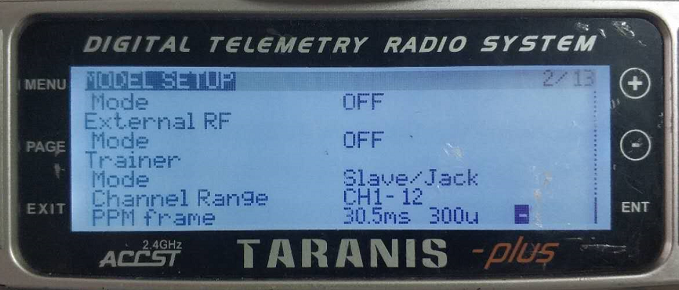
- PPM模式
模型設置 – 教練模式: 如果模式配置為 Slave/Jack, 此時遙控器處於PPM模式.
模型設置 – 內部射頻: 需要配置為關閉, 和S. 總線模式將被禁用.
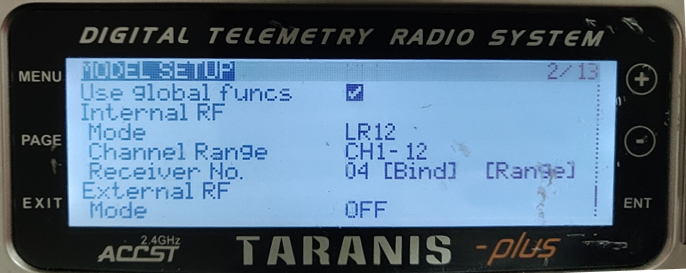
- S.BUS模式
模型設置 – 內部射頻: LR12、D8, D16, 離開。不同參數的配置遵循接收器的參數. 如果配置為關閉, 小號. 總線模式將被禁用.
5.1.2. 雙葉 偏僻的 控制器
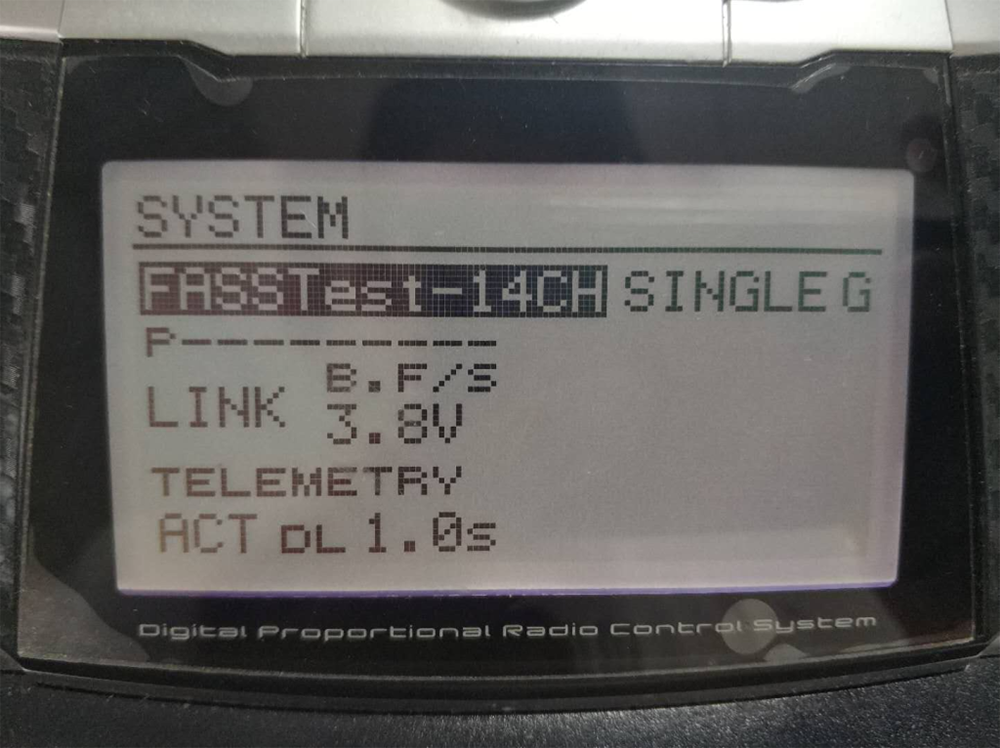
- S.BUS模式
Linkage menu – 系統: FASSTest-14CH, FASSTest 12CH, FASST MULTI, FASST 7CH, S-FHSS. Configuration of different parameters follow those of the receiver.
- PPM模式
wireless video link standard PPM cable is used to connect to Futaba trainer cable (one end is connected to the trainer port of Futaba controller, the other end is 3.5mm connector). PPM mode can be used directly without additional configuration.
5.2. 遙測 連接
The telemetry Port of air unit connects “TELEM1” Port of a flight control(像素鷹4).
5.3. Get 居住 視頻
Get real-time video through RTSP on media players like QGC/VLC. Make sure IP addresses of PC and camera are in the same subnet.
6. 筆記
6.1. 鏈接 表現
- RF cable connector/Antenna connector check
Before flight, check if the antennas are connected to the modules. Running module without antennas connected results in very short range and can potentially damage the module. It is recommended to check the connection of all RF connectors. Loose connection can degrade the range significantly.
- Antenna placement
Place the two air antennas so that no matter what position the drone is, at least one antenna is not blocked by the payload from the ground station.
If the drone will fly in full throttle, it will lean forward. Install the air antenna so that it is close to be vertical to the ground when the drone moves forward in full throttle.
- Battery level
The reception performance will degrade if the battery runs low, even though it might still power the units up.
6.2. RC 鏈接 & 偏僻的 控制器
The RC link of wireless video link module supports the PPM and S.BUS protocols. If the PPM protocol is used, 需要將遙控器配置為PPM模式並關閉遙控器的無線傳輸. 如果使用S.BUS協議, 與遙控器連接的接收器的無線工作頻率必須與無線視頻鏈路模塊的工作頻率工作在不同的頻段,並有一定的隔離度保證.
如果不使用無線視頻鏈接模塊的RC鏈接, 使用遙控器RC鏈路時應注意遙控器的遙控鏈路工作頻率. 是否與無線視頻鏈路模塊工作頻率在同一頻段, 會造成互相干擾.
使用無線圖傳系統時,避免遙控器或接收器的無線鏈路對無線圖傳模塊造成乾擾.
6.3. 固件更新
升級文件: 空中單元FPGA升級文件, 地面單元FPGA升級文件, 天空端MCU1升級文件, 地面單元MCU1升級文件, 天空端MCU2升級文件, 地面單元MCU2升級文件.
升級文件使用無線視頻鏈接PC軟件進行升級. 在升級過程中, 不能斷電,同時要保證USB線的正常連接. 如果升級失敗, 無法斷電, 請嘗試直接再次升級. 除此以外, 需要返回給我們使用專門的燒錄工具進行固件燒錄.
6.4. 綁定 該操作
“Bind”用於將空中單位與地面單位配對.
將空中裝置和地面裝置配對:
- 天空端和地面端均已上電.
- 連接空中和地面單元.
- 按天空端物理綁定按鈕, 最後 5 秒以上。綁定按鈕旁邊的 LED 燈呈綠色閃爍, 表明處於綁定狀態.
- 按地面端物理綁定按鈕, 最後 5 秒以上。綁定按鈕旁邊的 LED 燈呈綠色閃爍, 表明處於綁定狀態.
- 當地面端鏈路指示燈常亮時, 表示空中和地面單位已綁定.
注意:
(1) 如果模塊綁定不同的固件版本, 綁定操作可能會失敗.
(2) 如果空中單元或地面單元的程序燒錄錯誤, 比如把空中單位燒到地面單位, 並進行錯誤的空中單元與地面單元的綁定操作, 綁定操作將會失敗.
(3) 單位在工廠交貨前已綁定, 客戶開箱後無需再次綁定.
(4) 如果設備恢復出廠設置, 需要再次綁定.
6.5. PC Windows 防火牆
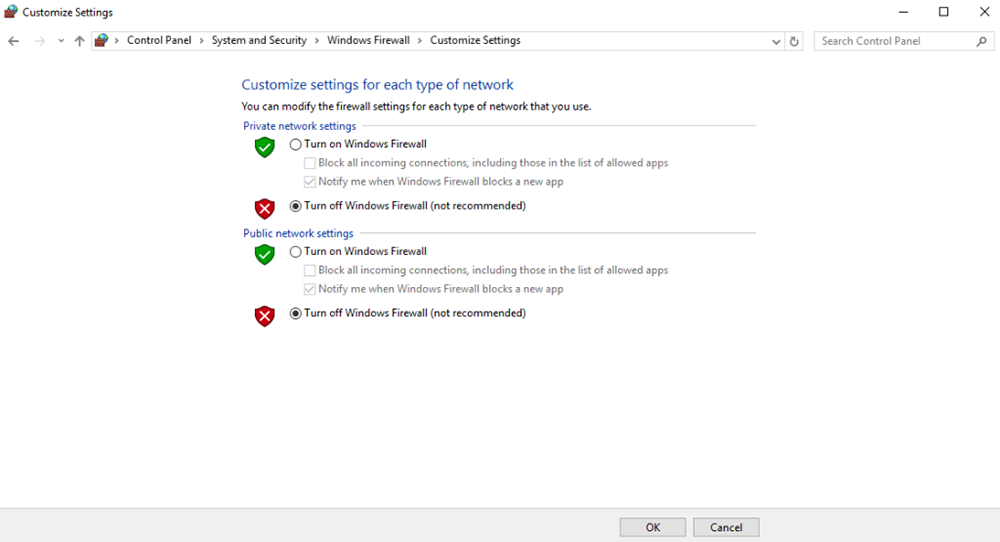
確保禁用 PC 防火牆,以防視頻和/或遙測被阻止. 這里以Windows10操作系統為參考. 小路: Control Panel\System and Security\Windows Firewall\Customize Settings.
將私人/公共網絡設置設置為“關閉 Windows 防火牆”’ 如下, 單擊“確定”.
6.6. 設置電腦IP地址
在PC上觀看視頻時應正確設置PC IP地址, IP地址可以按照以下步驟設置:
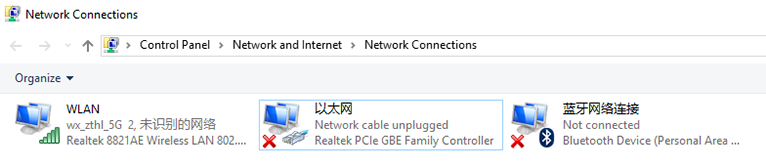
Double click ‘Ethernet’ at Control Panel\Network and Internet\Network Connections,
雙擊“Internet 協議版本” 4(TCP/IPv4)’, 設置PC IP地址如下, 單擊“確定”’ 結束.
6.7. J30J-37連接器引腳定義
| 名稱 | 銷 |
| 功率 | 1,2,20 |
| GND | 3,10,15,21,22,29,31 |
| 以太網1 TX+ | 7 |
| 以太網1 TX- | 26 |
| 以太網1 RX+ | 6 |
| 以太網1 接收- | 25 |
| 以太網2 TX+ | 5 |
| 以太網2發射機- | 24 |
| 以太網2 RX+ | 4 |
| 以太網2接收- | 23 |
| 以太網3 TX+ | 8 |
| 以太網3 TX- | 27 |
| 以太網3 RX+ | 9 |
| 以太網3接收- | 28 |
| SBUS_V | 11 |
| 生產計劃管理 | 12 |
| GPS_SYNC | 13 |
| 預訂的 | 14 |
| 232TX1或422Y2 | 16 |
| 232RX1 或 422A2 | 17 |
| 232TX2或422Y1 | 18 |
| 232RX2或422A1 | 19 |
| 總線總線1 | 30 |
| SBUS2 | 32 |
| 預訂的 | 33 |
| 422Z2 或 TTLTX1 | 34 |
| 422B2 或 TTLRX1 | 35 |
| 422Z1 或 TTLTX2 | 36 |
| 422B1 或 TTLRX2 | 37 |
7. F空氣質量
| Q1: 如何 wireless video link 模塊供電電源? |
| 空中單位: DC, 電源範圍: 9-26V, 建議使用24V. |
| 地面單元: DC, 電源範圍: 9-26V, 建議使用24V. |
| Q2: 可以嗎 wireless video link 安裝天線前先給模塊上電? |
| 上電前必須安裝好天線. |
| Q3: 有多少根天線 wireless video link需要安裝空氣裝置? |
| 需要安裝兩根天線. |
| Q4: 有多少根天線 wireless video link需要安裝地面裝置? |
| 需要安裝兩根天線. |
| Q5: 不同類型的遙控器可以控制無人機嗎? |
| 是, 只需通過教練端口輸出標準PPM信號, 或使用S. 總線接收器. |
| Q6: 無人機上可以安裝兩個空中裝置嗎? |
| 沒有, 一架無人機只能有一個空中單位. |
| Q7: 接收端可以安裝兩個地面單元嗎? |
| ptp系統只能安裝一台地面單元; ptmp系統支持多個地面單位. |
| Q8: 如果上行鏈路怎麼辦/下行鏈路 LED 指示燈不亮? |
| 請按照以下步驟操作: |
| 1) 請檢查空中、地面單元供電是否正常. |
| 2) 請檢查空中和地面單元的天線安裝是否正常: 天線是否被遮擋; 天線連接是否鬆動; 射頻線及端口是否緊固; |
| 3) 通過Taiysnc PC App檢查地面端的TX頻率與空中端的RX頻率是否一致. |
| 4) 使用Taiysnc PC App檢查地面端發射功率. |
| 5) 如果以上步驟不能解決問題, 請聯繫無線視頻鏈接技術支持人員. |
| Q9: 無法設置遙測連接 適當地? |
| 請按照以下步驟操作: |
| 1) 請檢查鏈接狀態是否正常. |
| 2) 請檢查飛控與天空端、地面端與地面站之間的串口遙測線連接是否正確. |
| 3) 檢查波特率是否相同. |
| 4) 如果以上步驟不能解決問題, 請聯繫無線視頻鏈接技術支持人員. |
| Q10: 無法建立 RC 連接 適當地? |
| 請按照以下步驟操作: |
| 1) 請檢查鏈接狀態是否正常; |
| 2) 請檢查飛控與天空端、地面端與遙控器的遙控連接是否正確; |
| 3) 如果使用 PPM 模式, 檢查遙控器模式配置; 如果使用S. 總線模式, 檢查接收機和遙控器的配置; |
| 4) 請檢查天空端和地面端的RC連接是否正確. 我們提供標準電纜. 如果你自己做的話, 請檢查引腳; |
| 5) 請檢查無線視頻鏈接應用中RC模式是否配置正確; |
| 6) 如果以上步驟不能解決問題, 請聯繫無線視頻鏈接技術支持人員. |
| Q11: 如果沒有視頻輸出怎麼辦? |
| 請按照以下步驟操作: |
| 1) 請檢查鏈接狀態是否正常; |
| 2) 請檢查網線和攝像頭是否正常; |
| 3) 請檢查RTSP地址是否正確; |
| 4) 請檢查PC IP地址和攝像機IP地址是否在同一子網; |
| 4) 如果以上步驟不能解決問題, 請聯繫無線視頻鏈接技術支持人員. |
| Q12: 如果視頻出現失真怎麼辦? |
| 請按照以下步驟操作: |
| 1) 請確認下行模式配置是否大於視頻碼率; |
| 2) 請檢查天空端網線以太網連接是否可靠; |
| 3) 地面單元網線連接是否可靠; |
| 4) 請檢查是否存在干擾, 如果需要改變工作頻率; |
| 5) 如果沒有乾擾的話, 是否達到通訊鏈路的限制距離; |
| 6) 如果以上步驟不能解決問題, 請聯繫無線視頻鏈接技術支持人員. |
| Q13: 如果模塊的傳輸距離比預期短怎麼辦? |
| 請按照以下步驟操作: |
| 1) 請檢查天線和射頻線是否安裝正確,並檢查是否隨Falcon配件提供. |
| 2) 請確保空中天線不被負載遮擋, 天線附近地面單元無明顯遮擋, 空中和地面單元的天線垂直於地面. |
| 3) 請檢查模塊是否工作在全射頻功率輸出狀態. |
| 4) 請檢查下行模式配置是否正確, 高吞吐量下行模式可以顯著縮短傳輸距離. |
| 5) 請檢查工作頻率是否受到明顯干擾. |
| 6) 請檢查飛行過程中空中與地面之間是否存在嚴重障礙物, 而且複雜的地理環境也會影響傳輸距離. |
| 7) 如果以上步驟不能解決問題, 請聯繫無線視頻鏈接技術支持人員. |
問一個問題
感謝你的回應。 ✨