






1. Փաթեթի պարունակությունը
Օդը միավոր & Գետնին միավոր
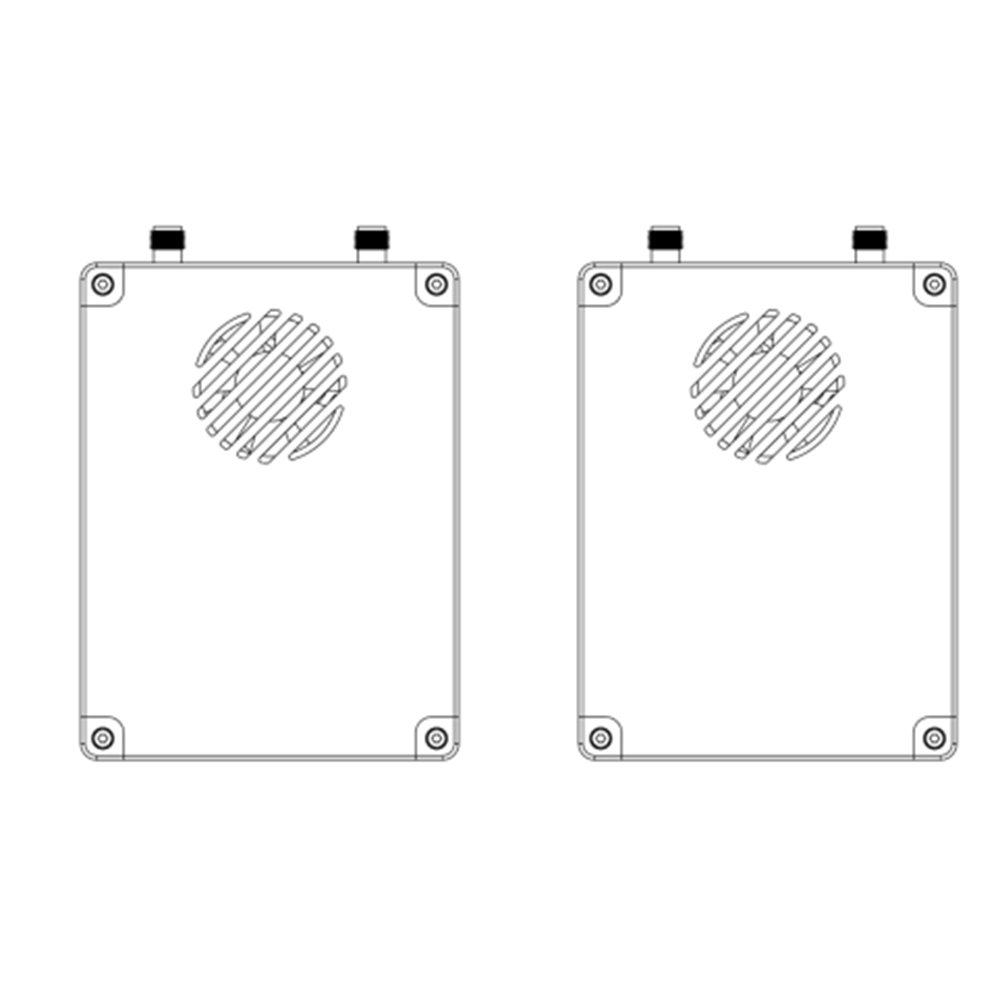
AIR միավորի ալեհավաք × 2
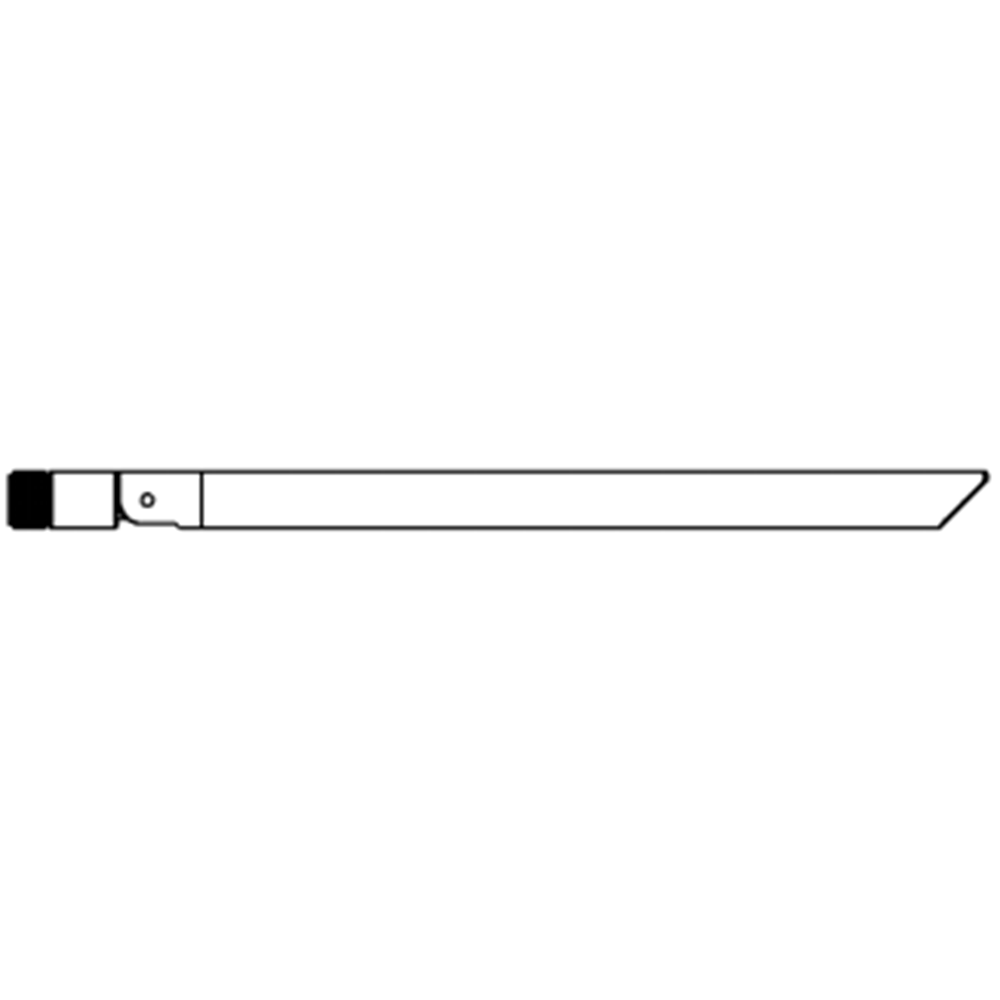
GԿլոր միավորի ալեհավաք 2

Օդը միավոր մալուխներ
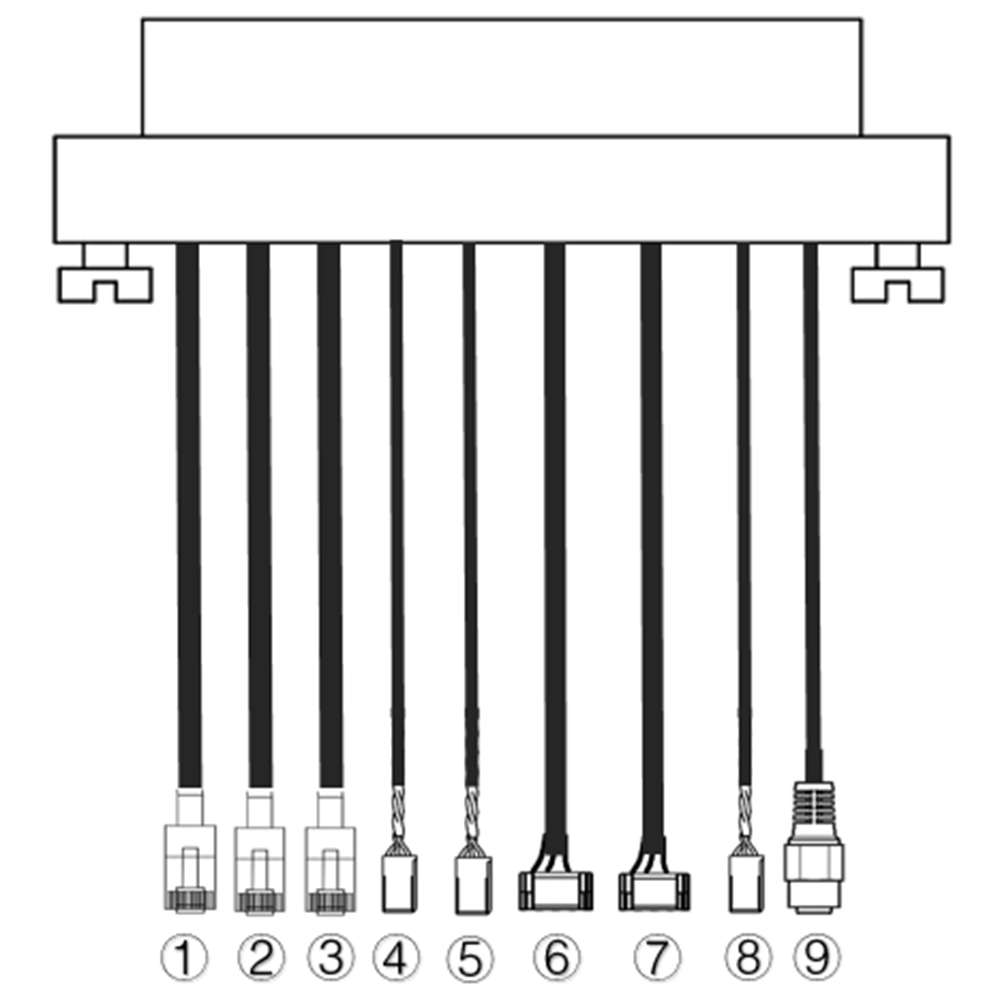
| ոչ. | ինտերֆեյս |
| 1,2,3 | Ethernet |
| 4,5 | S.BUS, Ինչպես ցույց է տրված նկարում, որ 1սբ Dupont միակցիչի ձախից PIN- ը S.BUS ազդանշան է, որ 3կեց է. |
| 6,7 | Հեռուստաչափության սերիան, Ինչպես ցույց է տրված նկարում, որ 2նիդ PIN- ից PIN- ը GH1.25 միակցիչի RX- ն է, որ 3կեց tx է, որ 6րդ է. (Ttl ըստ լռելյայն, RS232 / 422 Այլընտրանք) |
| 8 | PPM, Ինչպես ցույց է տրված նկարում, որ 1սբ ձախից PIN- ը PPM ազդանշան է, որ 3կեց է. |
| 9 | Ուժ |
Վերգետնյա միավորի մալուխներ
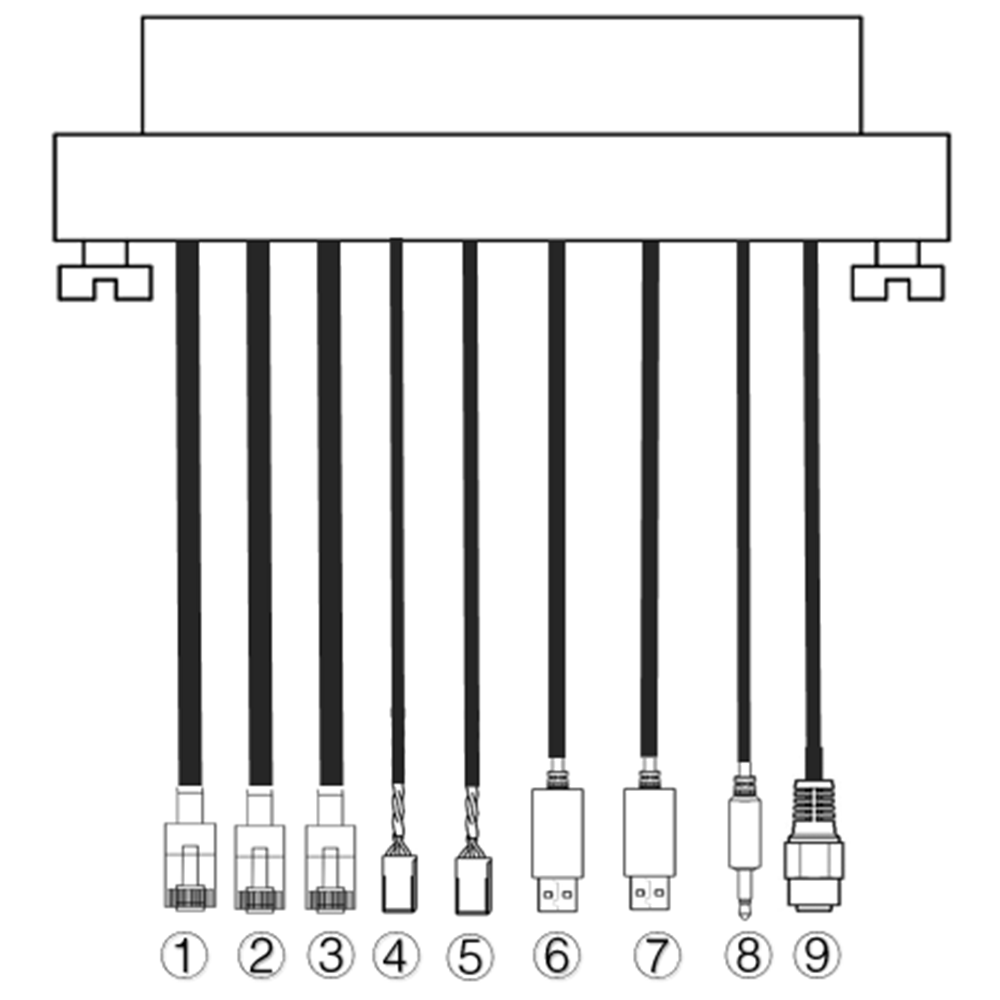
| ոչ. | ինտերֆեյս |
| 1,2,3 | Ethernet |
| 4,5 | S.BUS, Ինչպես ցույց է տրված նկարում, որ 1սբ ձախից PIN- ը s.bus ազդանշան է, որ 2նիդ 5V + է, որ 3կեց է. |
| 6,7 | Սերիան-USB(TTL-USB- ը լռելյայն, RS232 / 422 Այլընտրանք) |
| 8 | PPM |
| 9 | Ուժ |
2. արդյունք նկարագրություն
2.1. Parameters
| Պարամետրեր | Արժեք |
| հաճախականություն | 1330~ 1450 ՄՀց |
| Band լայնությունը | 10MHz (վերահղում), 10MHz (ներքև հղում) |
| Ուժ | 33dBm |
| ելլէջում | OFDM |
| համաստեղություն | BPSK, QPSK, 16QAM |
| FEC | LDPC(1/2, 2/3, 3/4, 5/6) |
| Դուպլեքս | TDD |
| Ներքևի կապի թողունակությունը | 2.3MBPS ~ 8bps |
| Uplink թողունակությունը | 600կբիթ / վրկ |
| կոդավորման | AES 256 |
| ինտերֆեյս | Ethernet, USB, TTL, RS232, RS422, PPM/S.BUS |
| Էլեկտրաէներգիայի սպառում | 18W(ավիազորամաս); 10W(հիմք միավոր) |
| latency | <300MS (Կախված տեսախցիկից) |
| չափ | 92.5*70.3*25մմ |
| քաշ | 198G |
| Գնահատված լարում/հոսանք | DC24V/1.2A (կամ 6S լիթիումի մարտկոց) |
| Աշխատանքային ջերմաստիճանը | -40° C ~ 60 ° C |
2.2. Օդը միավոր Ինտերֆեյսեր
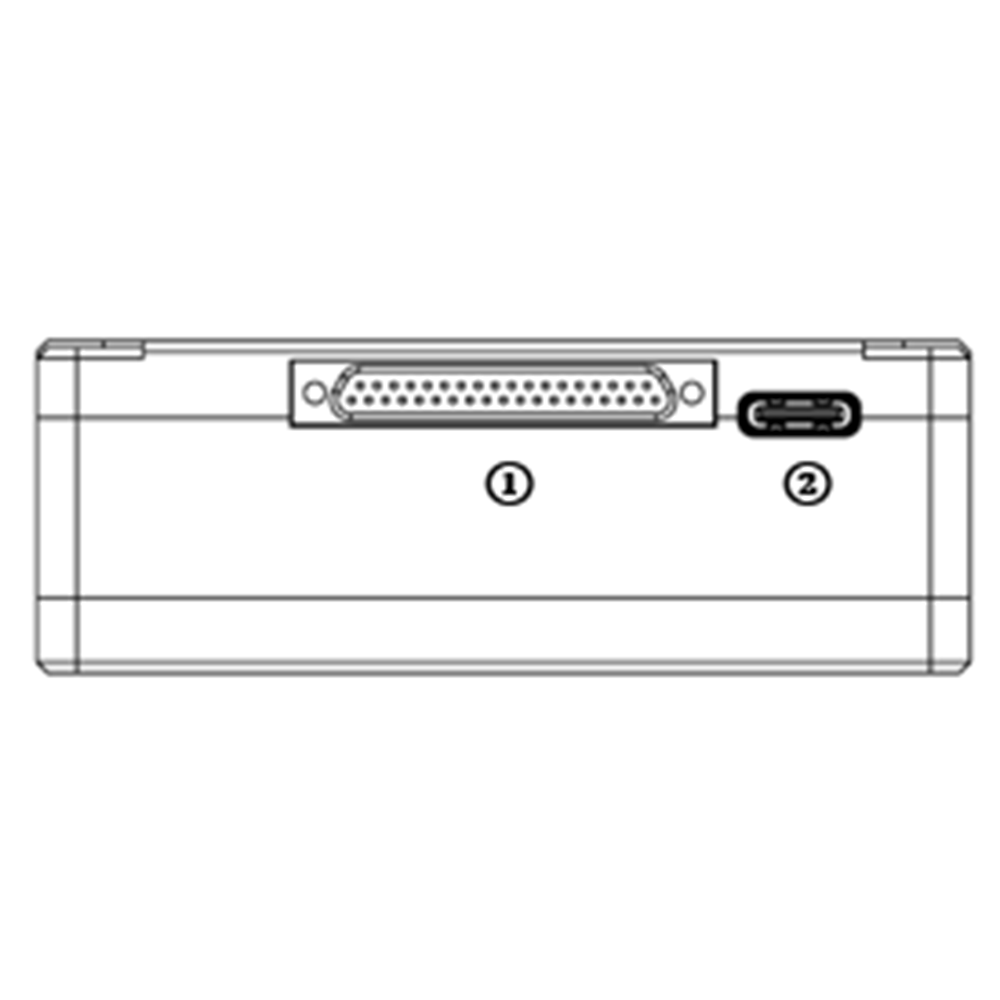
- J30J միակցիչ
Դա J30J-37 PIN միակցիչ է, որն ապահովում է ուժ / Ethernet / Serial / PPM / S.BUS.
- USB Port
Միացրեք այս պորտը համակարգչի USB պորտին, եւ օգտագործեք անլար տեսանյութի հղման համակարգչային ծրագիրը `օդային միավորի որոնվածը թարմացնելու եւ տեղադրելու համար.
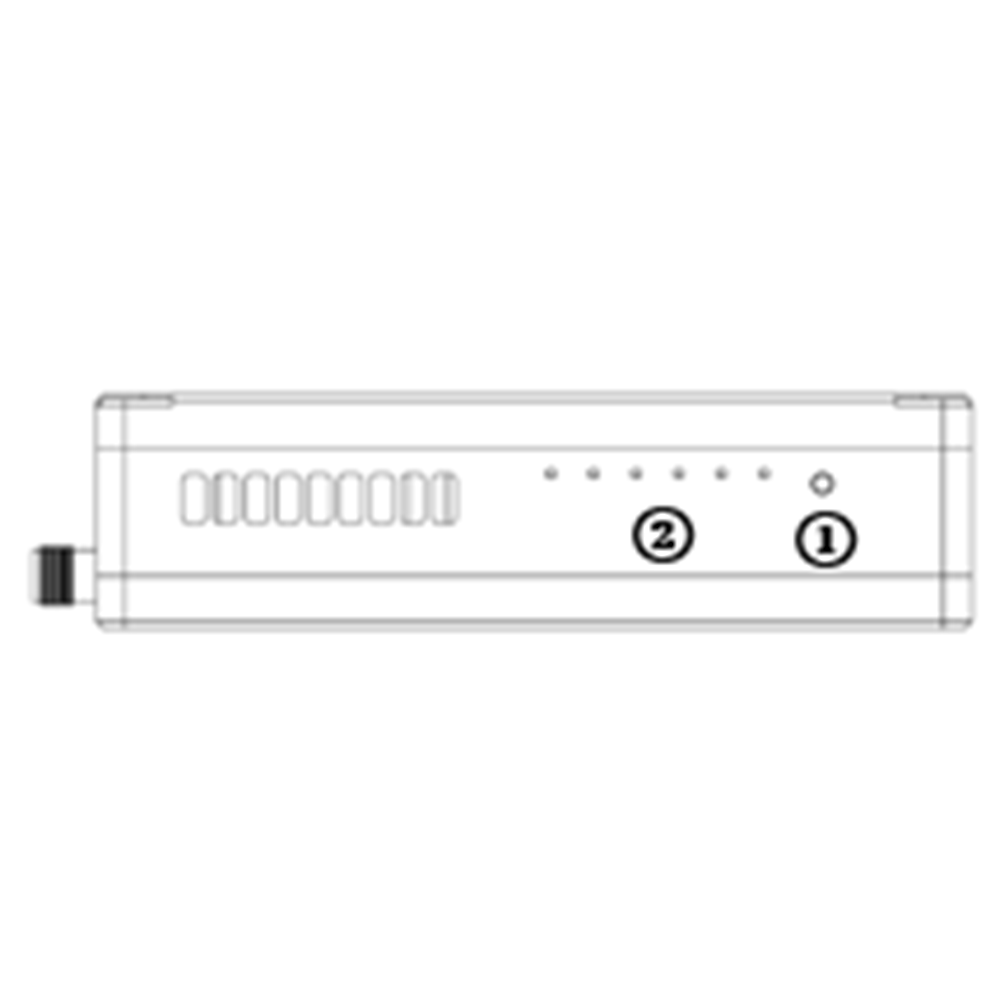
- Պարտադիր կոճակ
Պարտադիր գործողությունը կատարելու համար սեղմեք եւ պահեք այս կոճակը. Արդեն կապված է գործարանի առաքումից առաջ, Կարիք չկա նորից կապել օգտագործողի կողմից.
- LED-ներ
Ձախից աջ: իշխանությունը ցուցանիշը (1), Ethernet link indicator (2~ 4), UL/DL radio link indicator (5~ 6) not used for air unit. LED6 will be flashing during bind process.
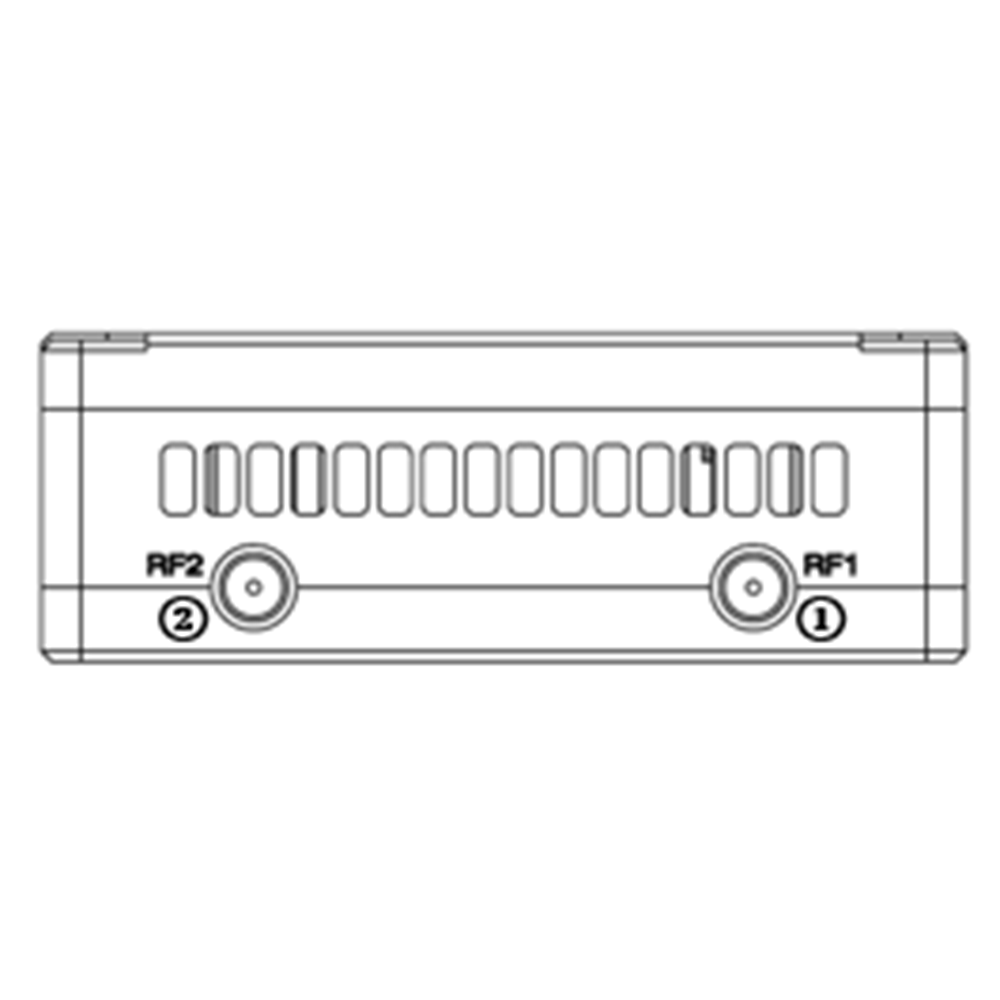
- RF1 Port
Միացրեք 1սբ air unit antenna to this port.
- RF2 Port
Connect the 2nd air unit antenna to this port.
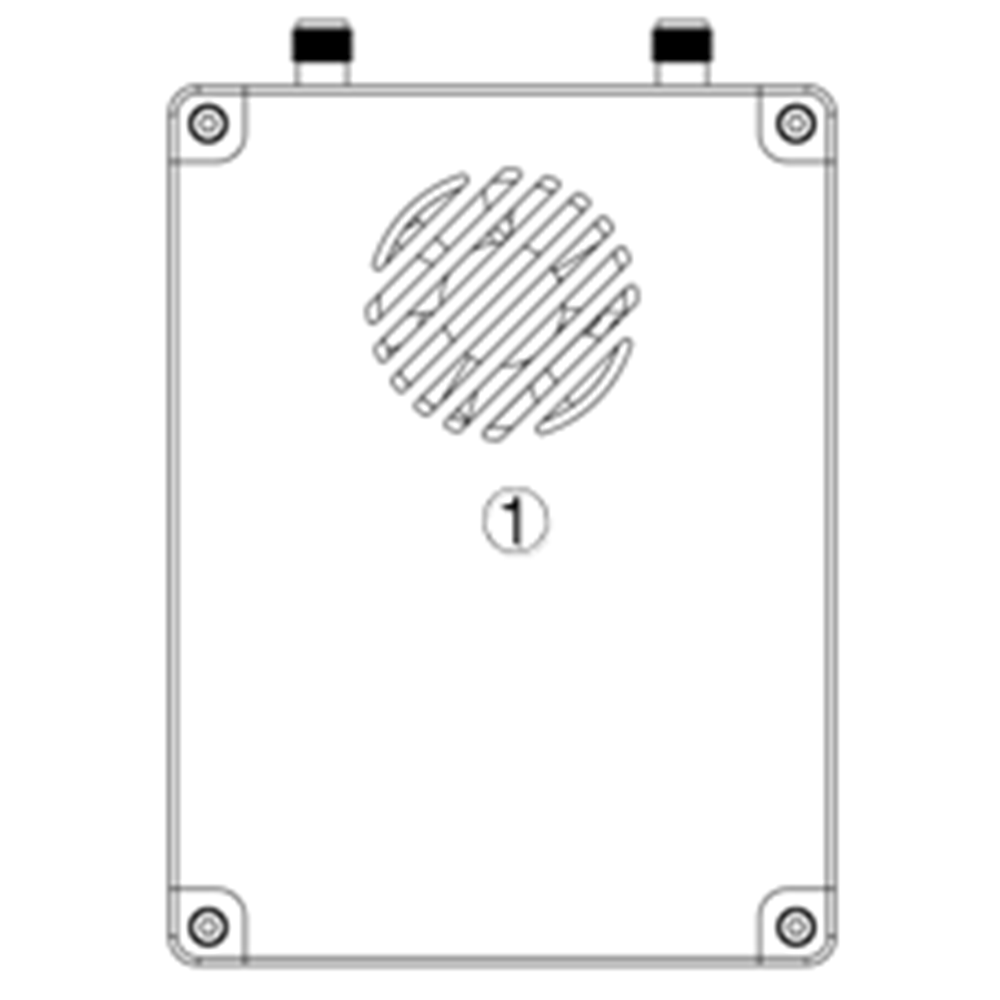
- Fan Ventilation Outlet
Don’t block this fan ventilation outlet to ensure effective cooling.
2.3. Գետնին միավոր Ինտերֆեյսեր
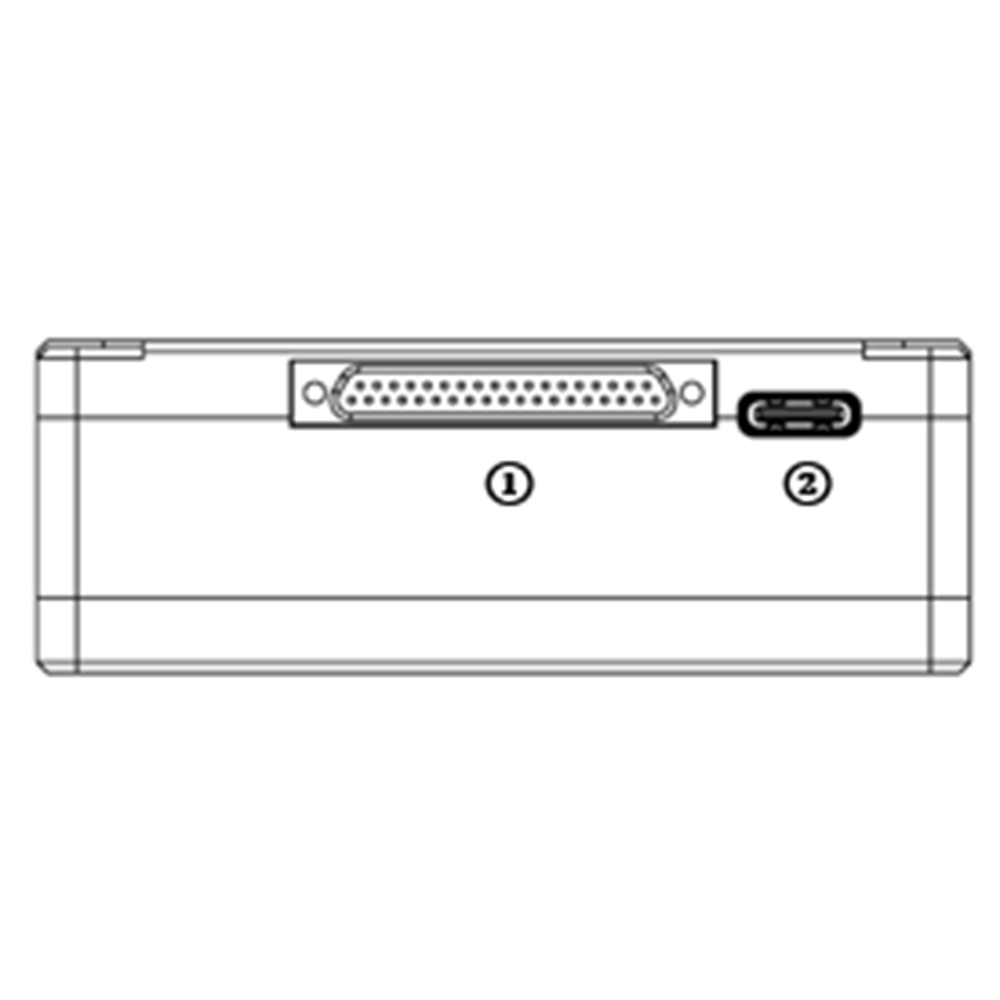
- J30J միակցիչ
Դա J30J-37 PIN միակցիչ է, որն ապահովում է ուժ / Ethernet / Serial / PPM / S.BUS.
- USB Port
Միացրեք այս պորտը համակարգչի USB պորտին, եւ օգտագործեք անլար տեսանյութի հղման համակարգչային ծրագիրը `օդային միավորի որոնվածը թարմացնելու եւ տեղադրելու համար.
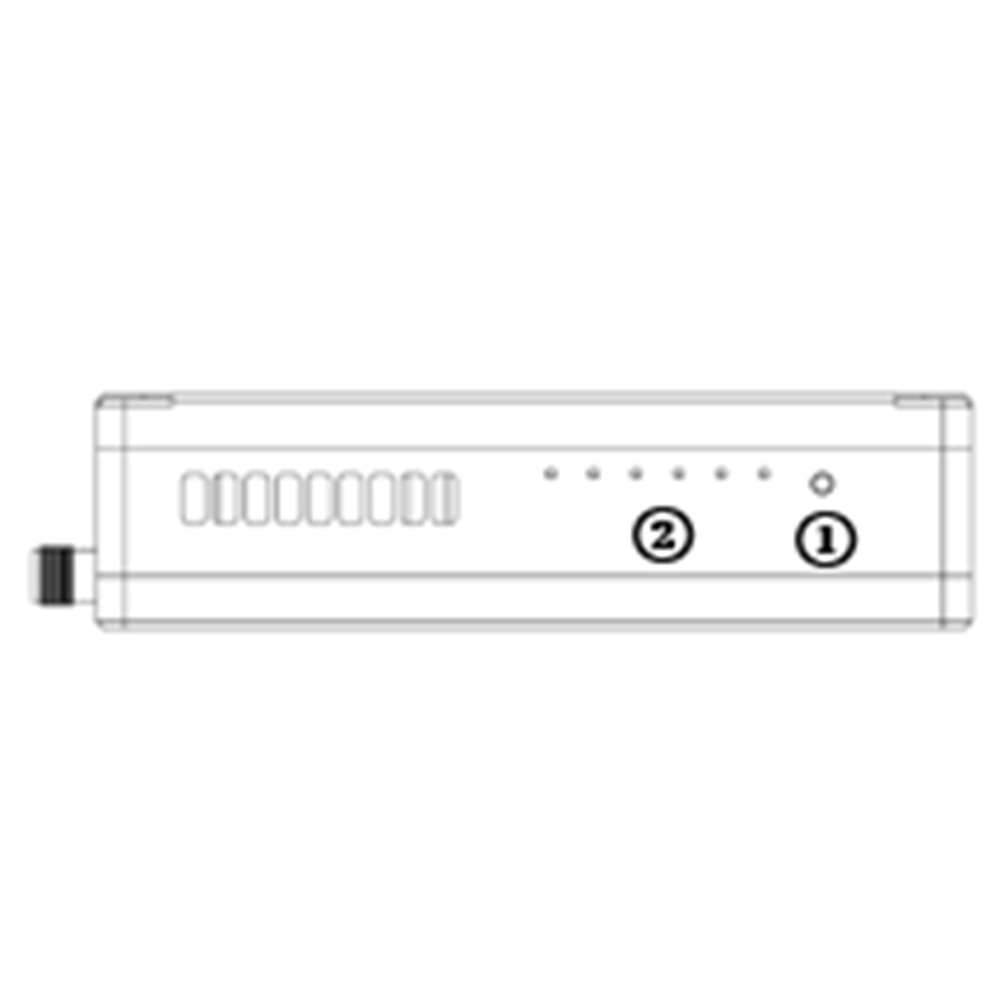
- Պարտադիր կոճակ
Պարտադիր գործողությունը կատարելու համար սեղմեք եւ պահեք այս կոճակը. Արդեն կապված է գործարանի առաքումից առաջ, Կարիք չկա նորից կապել օգտագործողի կողմից.
- LED-ներ
Ձախից աջ: իշխանությունը ցուցանիշը (1), Ethernet link indicator (2~ 4), UL/DL radio link indicator (5~ 6). LED6 will be flashing during bind process.
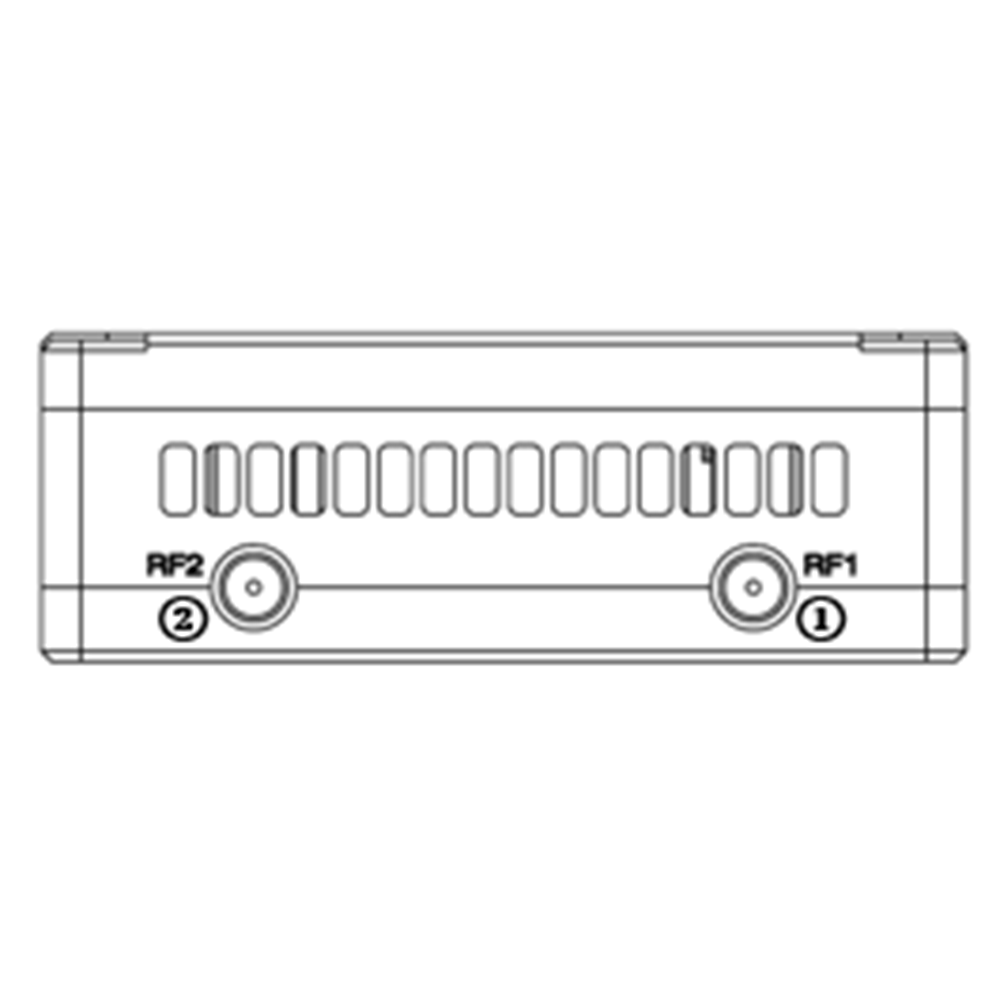
- RF1 Port
Միացրեք 1սբ air unit antenna to this port.
- RF2 Port
Connect the 2nd air unit antenna to this port.
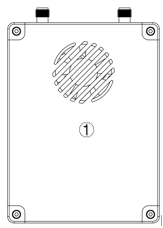
- Fan Ventilation Outlet
Don’t block this fan ventilation outlet to ensure effective cooling.
3. System կարգավորում
3.1. Օդը միավոր տեղակայում
Բովանդակություն
3.1.1. Antenna տեղադրում
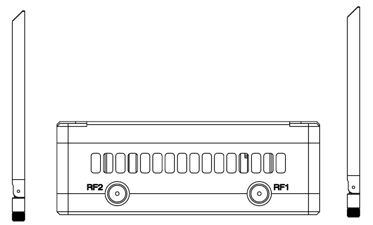
Screw the air unit antennas on the RF ports.
Նշում:
- To avoid equipment damage, install antennas before powering on the units.
- When mount air unit to drone, make sure the antennas are not both blocked by any part of the drone.
- Both antennas need to be installed.
3.1.2. Power supply
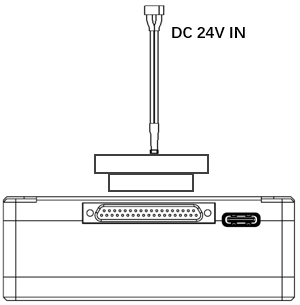
Insert the J30J connector to the J30J port of air unit and connect battery/power source to the power port at the other end.
Նշում:
- To avoid equipment damage, install antennas before powering on the units.
- Recommended rated voltage/current is DC24V/1.2A (կամ 6S լիթիումի մարտկոց).
3.1.3. Connect camera
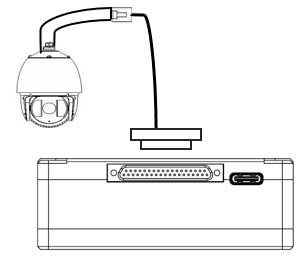
Connect the video output port of the IP camera to the Ethernet video input port of the air unit.
3.1.4. Connect flight controller (RC & հեռաչափություն)
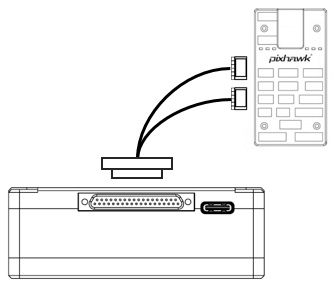
Insert the J30J connector to the J30J port of air unit and connect the other end of the serial cable to the telemetry port of a flight controller.
Insert the J30J connector to the J30J port of air unit and connect the other end of the RC cable to the PPM/S.BUS port of a flight controller.
3.2. Ground Unit Installation
3.2.1. Antenna installation
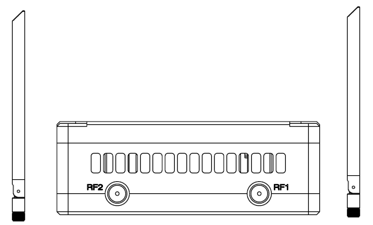
Պտուտակել գետնին միավորի ալեհավաքները ՌԴ նավահանգիստների վրա.
Նշում:
- To avoid equipment damage, install antennas before powering on the units.
- Both antennas need to be installed.
- Հանգստացեք ալեհավաքը, որպեսզի շահագործման ընթացքում ուղղահայաց լինի.
3.2.2. Power supply
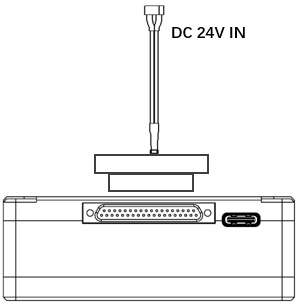
Տեղադրեք էլեկտրաէներգիայի աղբյուրի էլեկտրական միակցիչը գետնին միավորի էլեկտրաէներգիայի նավահանգստում
Նգդալ:
- Առաջարկվող գնահատված լարման / հոսանքը DC12V / 1.2A (կամ 3S լիթիումի մարտկոց).
- To avoid equipment damage, install antennas before powering on the units.
3.2.3. Telemetry connection
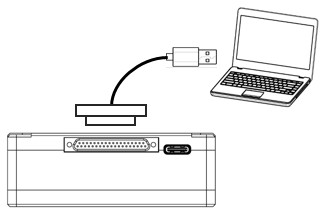
Տեղադրեք J30J միակցիչը J30J- ի ստորաբաժանումի ստորաբաժանումի վրա եւ միացրեք մատակարարվող սերիական մալուխի մյուս ծայրը գետնին կառավարման կայանի հեռակառավարման նավահանգստում.
Նշում:
- Համոզվեք, որ Boud Station Baud- ի փոխարժեքը եւ անլար վիդեո հղումների մոդուլի բադ-ի տոկոսադրույքը կազմաձեւված են նույնը.
- Համոզվեք, որ սերիական կաբելային հաջորդականությունը համընկնում է անլար վիդեո հղման մոդուլի միջերեսի սահմանմանը.
3.2.4. COnnect հեռակառավարիչ
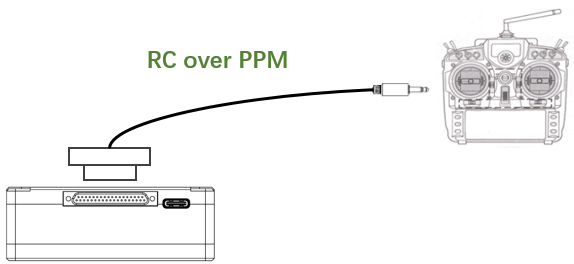
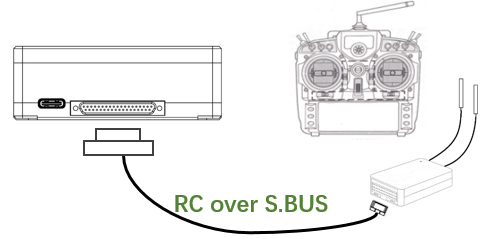
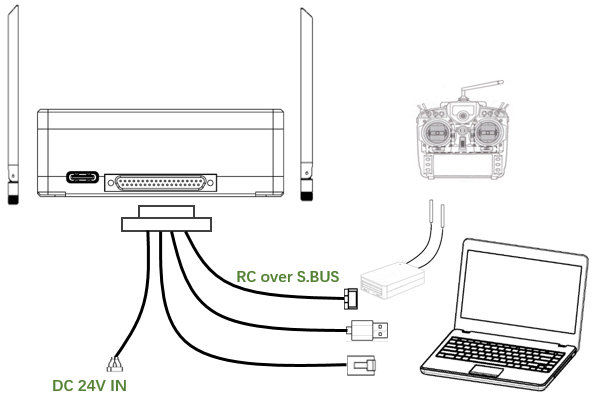
Օգտագործելով PPM ռեժիմը: Տեղադրեք մատակարարվող RC մալուխի մարզիչների նավահանգստի միակցիչը հեռակառավարիչի մարզիչին եւ տեղադրեք J30J միակցիչը J30J- ի գետնին ստորաբաժանում. Օգտագործելով S.BUS ռեժիմը: Տեղադրեք J30J միակցիչը G30J- ի գետնին ստորաբաժանում, Միացրեք մյուս ծայրը S.BUS- ի ստացողին, Իսկ S.BUS ստացողը շփվում է հեռակառավարիչի հետ անլար:
Նգդալ:
- Համոզվեք, որ RC Cable- ի Pin-Out- ը համընկնում է անլար վիդեո հղումների մոդուլից ինտերֆեյսի քորոցից.
- Եթե օգտագործվում է S.BUS ստացողը, Պետք է լինի բավարար պահակային խումբ, ստացողի աշխատանքային հաճախականության խմբի եւ անլար վիդեո հղումների մոդուլի աշխատանքային հաճախականության խմբի միջեւ:
3.2.5. SETUP վիդեո արտադրանք
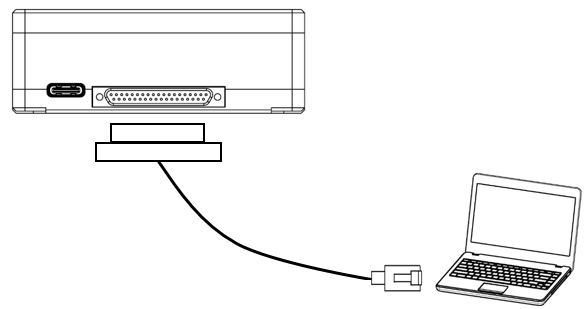
Տեղադրեք J30J միակցիչը J30J- ի գետնին ստորաբաժանումի վրա եւ միացրեք մատակարարված Ethernet մալուխի մյուս ծայրը համակարգչի կամ գետնի կառավարման կայանի համար. Համոզվեք, որ տեսախցիկի եւ համակարգչի IP հասցեները նույն ենթաբազմում են.
3.2.6. օգտագործում անլար վիդեո հղում համակարգ
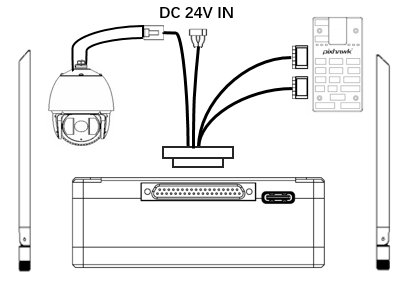
- Տեղադրեք ալեհավաքներ օդային միավորին.
- Միացրեք IP խցիկի ելքը օդային էներգաբլոկի Ethernet նավահանգստում.
- Թռիչքի վերահսկիչի PPM / S.BUS նավահանգիստը միացրեք Air Unit- ի RC նավահանգիստը.
- Թռիչքի վերահսկիչի հեռահաղորդակցման նավահանգիստը միացրեք օդային բաժանմունքի սերիական նավահանգիստը.
- Միացրեք 24V DC էներգիայի աղբյուրը օդային էներգաբլոկի էլեկտրաէներգիայի պորտին եւ միացրեք այն.
- Եթե անհրաժեշտ է վերջին որոնվածը, Միացրեք օդային միավորը համակարգչին `օգտագործելով USB մալուխ եւ գործարկել անլար տեսանյութերի հղման համակարգչային ծրագիր` միավորի որոնվածը թարմացնելու համար.
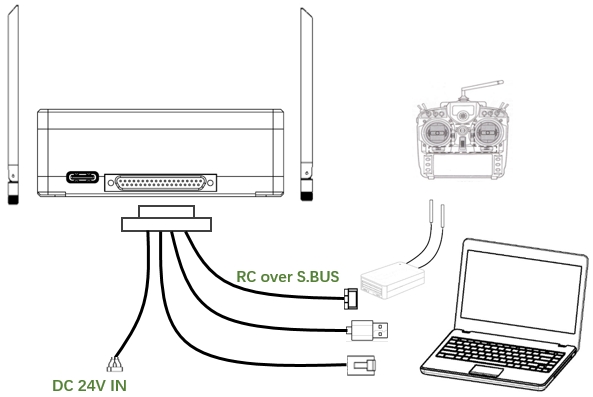
- Տեղադրեք ալեհավաքներ գետնին միավորի վրա.
- Configure the remote controller to be in trainer mode. If PPM mode is used, connect the remote controller interface of the ground unit to the trainer port of the remote control. If S.BUS mode is used, a S.BUS receiver needs to be connected to the ground unit using supplied cable, and the connection between the S.BUS receiver and the remote controller need to be established.
- Connect the USB port of a ground control station to the serial port of the ground unit through a Serial-2-USB adaptor to use telemetry link.
- Connect the Ethernet port of a GCS or PC to the RJ45 connector of ground unit to get IP video/telemetry (telemetry over Ethernet).
- Turn on the ground unit.
- Եթե անհրաժեշտ է վերջին որոնվածը, Միացրեք գետնին միավորը համակարգչին `օգտագործելով USB կաբելային եւ գործարկել անլար վիդեո հղում PC ծրագիրը` միավորի որոնվածը թարմացնելու համար.
- Downlink- ից հետո եւ վերբեռնեք, հողի ստորաբաժանման երկու LED- ները կլինեն.
4. ծրագրային ապահովման
4.1. տեղակայում
Անլար տեսանյութի հղումը տրամադրում է ծրագրի տեղադրման ֆայլեր, Ծրագրի ֆայլի անվանումը: Անլար վիդեո հղում անլար հավելվածի setup.exe. Տեղադրիչի պատկերակը հետեւյալն է:
Կրկնակի սեղմեք տեղադրիչը `ծրագրի տեղադրման տեղեկագիրը տեղադրելու եւ հարմարեցնելու համար. Կազմաձեւումից հետո, Կտտացրեք «Հաջորդը», հաջորդ քայլին անցնելու համար. Տեղադրումը չեղարկելու համար, Կտտացրեք «Չեղարկել».
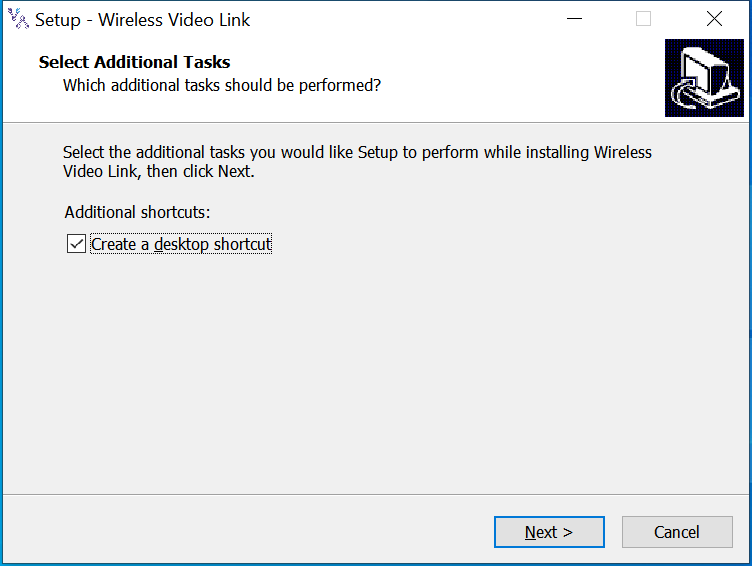
Ստուգեք «Ստեղծեք աշխատասեղանի դյուրանցումը», եթե անհրաժեշտ է աշխատասեղանի դյուրանցում. Եթե այն չի ստուգվում, աշխատասեղանի դյուրանցումը չի ստեղծվի. Կազմաձեւումից հետո, Կտտացրեք «Հաջորդը», հաջորդ քայլին անցնելու համար. Վերադառնալ նախորդ քայլին, Կտտացրեք «Վերադառնալ». Տեղադրումը չեղարկելու համար, Կտտացրեք «Չեղարկել».
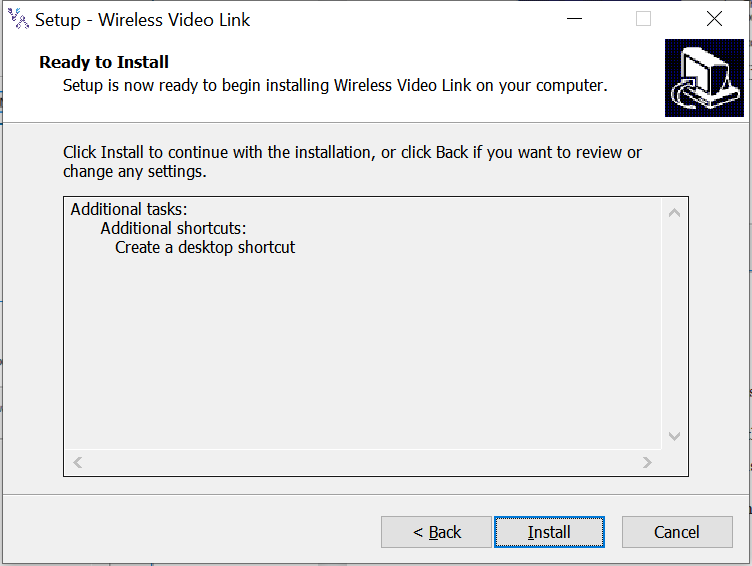
Կտտացրեք «Տեղադրեք», տեղադրումը շարունակելու համար. Վերադառնալ նախորդ քայլին, Կտտացրեք «Վերադառնալ». Տեղադրումը չեղարկելու համար, Կտտացրեք «Չեղարկել».
Նշում: Խնդրում ենք անջատել հակավիրուսային ծրագիրը, Հակառակ դեպքում հակավիրուսը կարող է խանգարել վարորդի տեղադրման ընթացքում տեղադրվելուց.
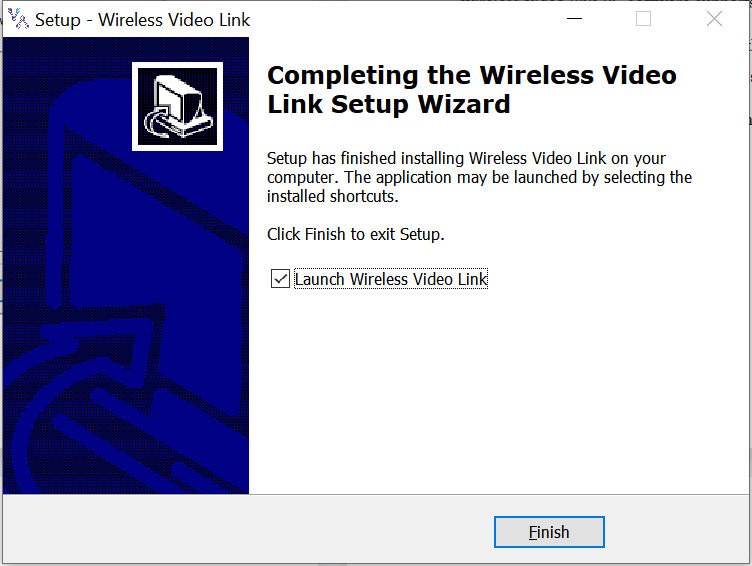
Այս պահին, Ծրագրաշարի տեղադրումը կատարվում է, եւ վարորդի տեղադրումը ավարտված է.
4.2. ծրագրային ապահովման Լեզու
Անլար տեսանյութերի հղման համակարգչային ծրագիրն ապահովում է ինչպես չինական, այնպես էլ անգլերեն.
Ծրագիրը ցուցադրվելու է չինարենով, եթե համակարգչի օպերացիոն համակարգը չինարեն է, Հակառակ դեպքում ծրագրակազմը ցուցադրում է անգլերեն.
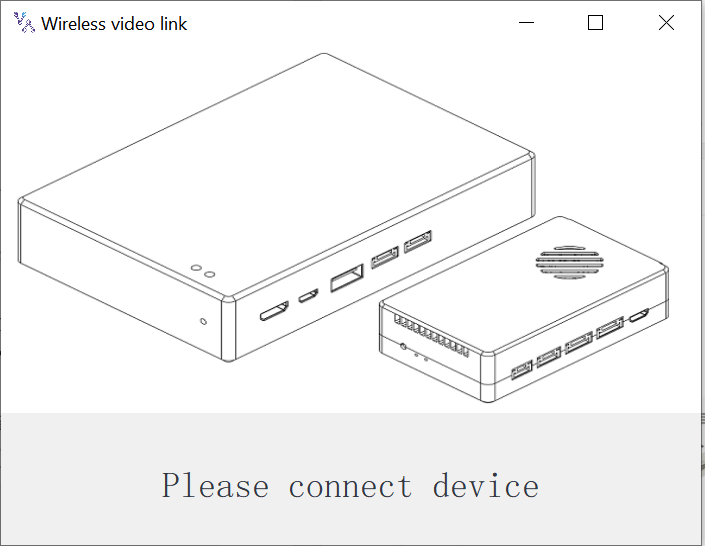
Եթե սարքը պատշաճ կերպով միացված չէ համակարգչին, Անլար տեսանյութերի հղման համակարգչային ծրագրակազմը ցույց է տալիս հետեւյալ պատկերը:
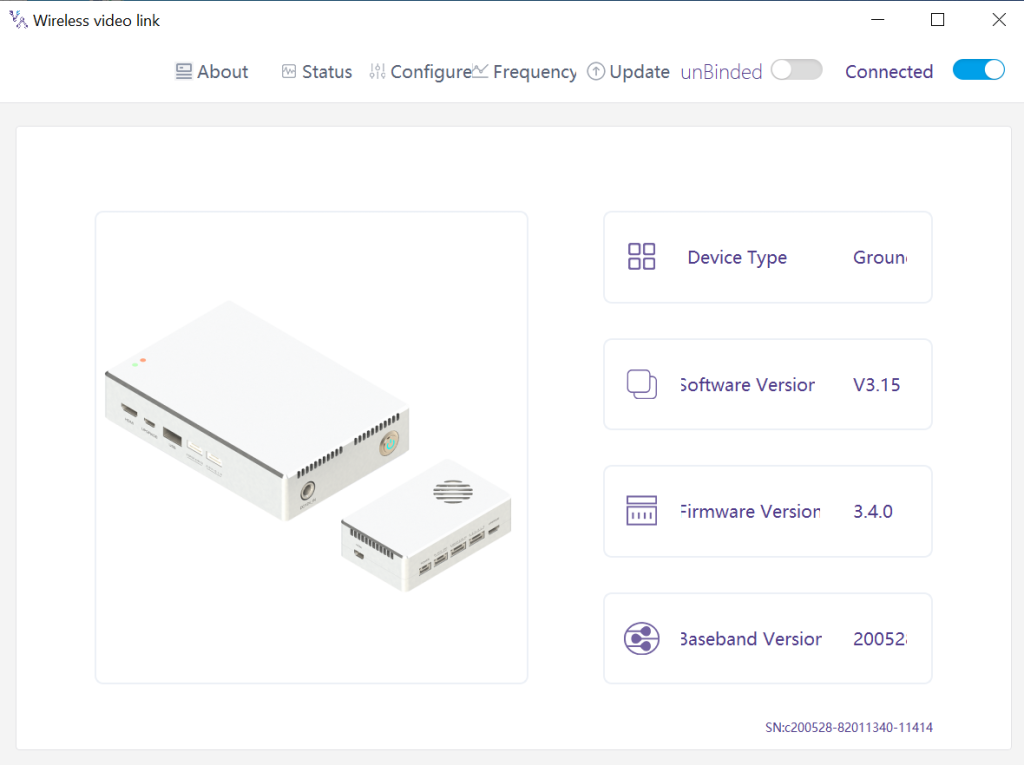
Եթե սարքը ճիշտ է միացված համակարգչին, Անլար տեսանյութերի հղման համակարգչային ծրագրակազմը ցույց է տալիս հետեւյալ պատկերը:
4.3. Սարքի մասին տեղեկատվություն
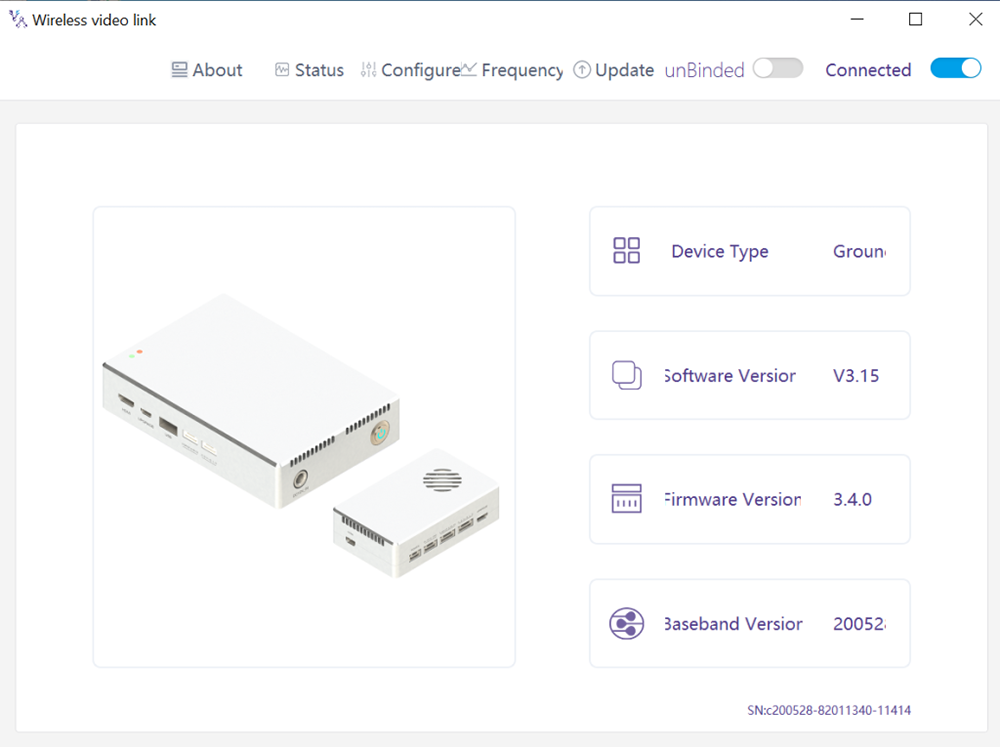
Տեղեկատվություն գլխավոր էջի վերաբերյալ: Սարքի տեսակը, Ծրագրային ապահովման տարբերակ, Firmware տարբերակը, եւ բազային տարբերակ.
4.4. Կարգավիճակ
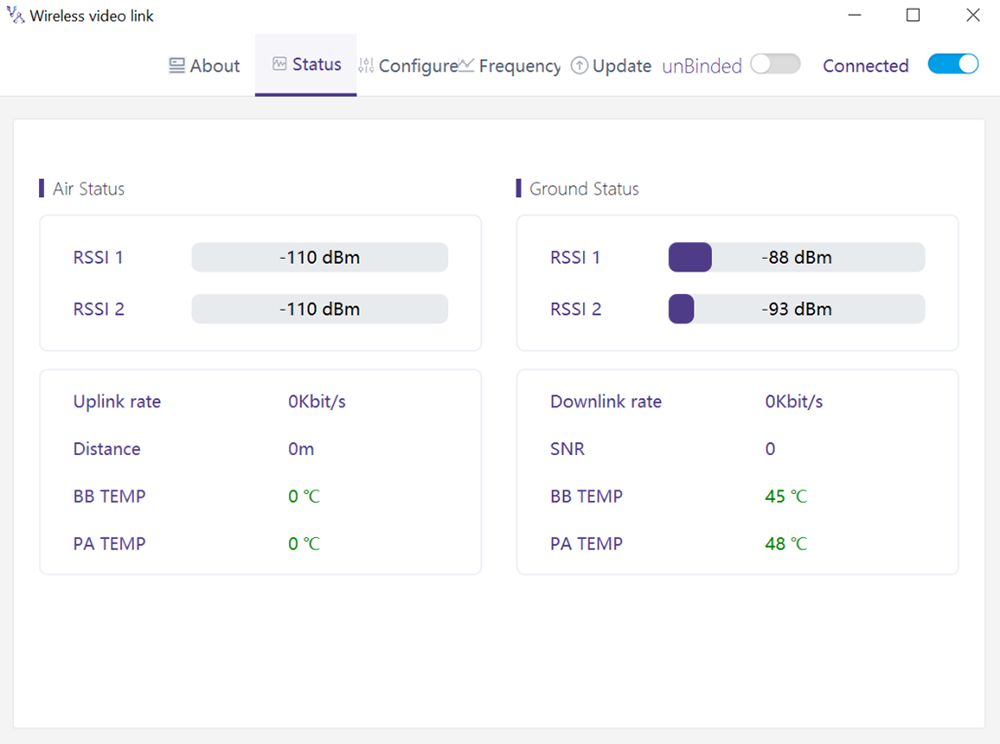
Read the status information of air unit and ground unit under “Status” page section:
Օդը: RSSI 1 & RSSI 2, Uplink rate, հեռավորություն, BB TEMP, PA TEMP.
Գետնին: RSSI 1 & RSSI 2, Downlink rate, SNR, BB TEMP, PA TEMP.
4.5. կոնֆիգուրացիա
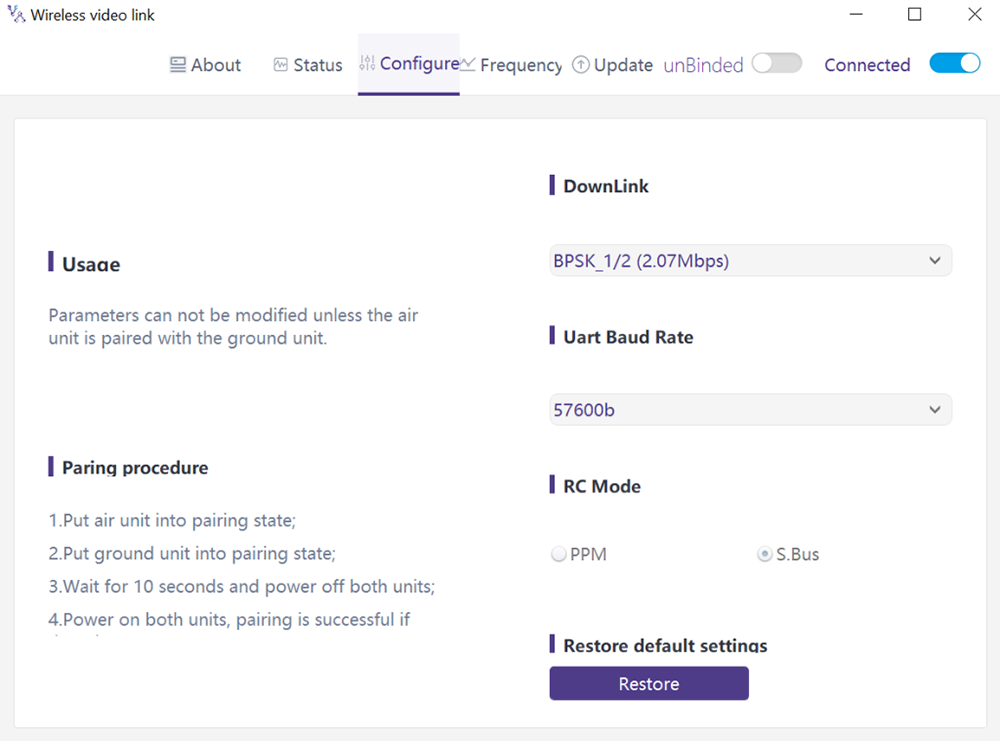
To change configuration, device need to be bound and wireless connection between air unit and ground unit needs to be established.
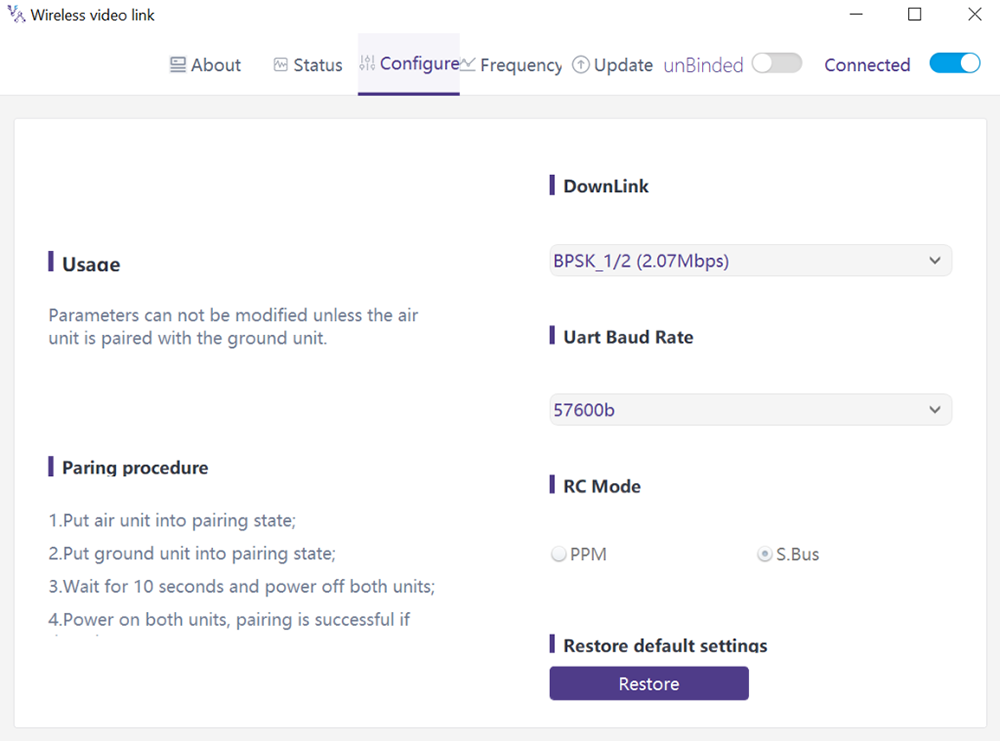
4.5.1. Downlink Mode configuration
To change downlink mode, device need to be bound and wireless connection between air unit and ground unit needs to be established
Կան 8 options for downlink mode from the drop-down menu (see the following screenshot):
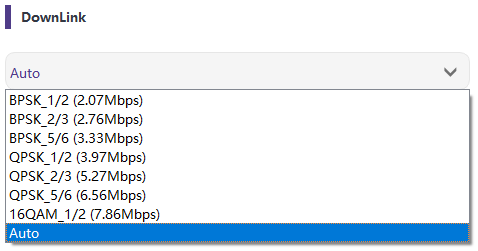
When it’s selected as Auto, modulation scheme will be dynamically adaptive based on real-time signal quality.
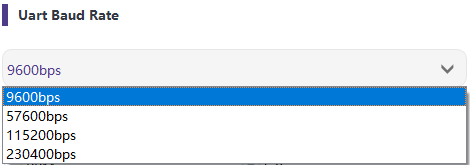
4.5.2. Baud rate configuration
Կան 4 options for serial port baud rate (see the following screenshot).
4.5.3. Հեռավոր control ռեժիմ կոնֆիգուրացիա
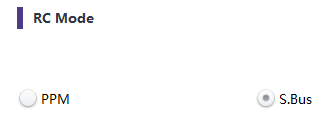
There are two options for remote control mode, PPM and S.BUS (see the following screenshot).
4.5.4. Restore լռելյայն կարգավորումները
Click “Restore” to restore default settings.

4.6. հաճախականություն
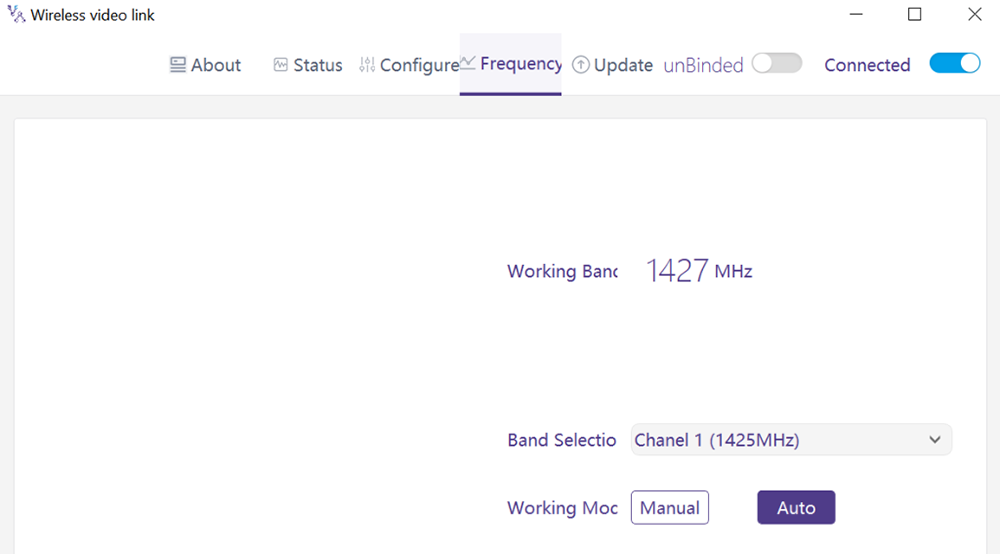
Frequency related information/parameters can be checked/set at page of frequency.
4.6.1. Frequency working mode
Աշխատանքային ռեժիմ:ձեռնարկ, ավտոմոբիլ.
Ձեռքով ռեժիմ: The user manually selects the working frequency.
Auto mode: The system selects the working frequency based on the frequency scanning.
4.6.2. Հաճախության ընտրություն
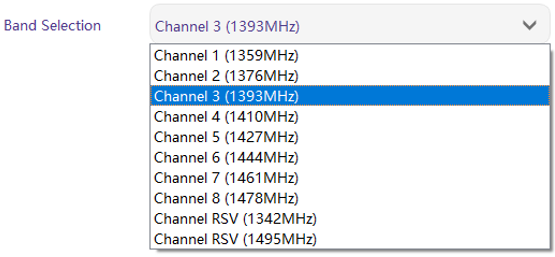
Under the manual mode, working frequency can be selected from the drop-down menu. Please select and use the channels in accordance with the product specification (1330~ 1450 ՄՀց).
4.7. բարելավում
Նշում: air unit and ground unit need to be upgraded separately using the USB cable to connect wireless video link PC software.
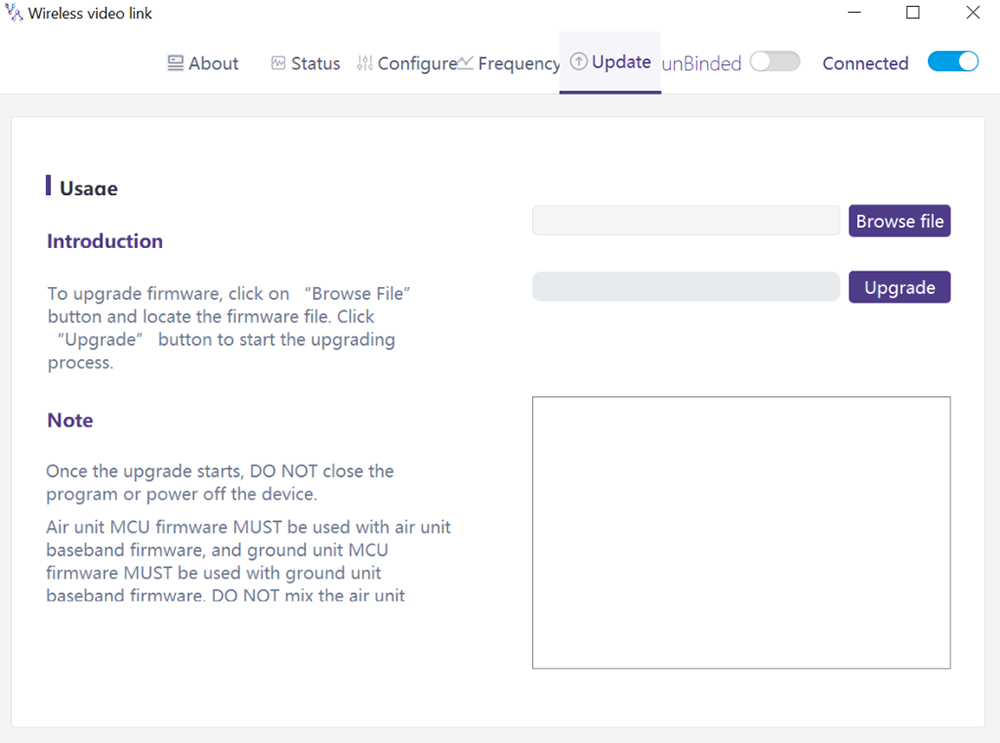
Goes to the Upgrade page. Ընտրեք արդիականացման ֆայլը, click the “Upgrade” purple button to upgrade.
4.8. Webpage Management
Besides PC app management via USB, webpage management via Ethernet is also supported. Directly connect PC to air unit/ground unit by Ethernet cable, set PC IP address as 192.168.199.33/24, and visit 192.168.199.18 (ավիազորամաս)/192.168.199.16 (հիմք միավոր) through webpage.
Under StatusàBaseband status, there’s detailed information like RSSI, SNR, TxPower, LDPC stats, telemetry stats, եւ այլն.
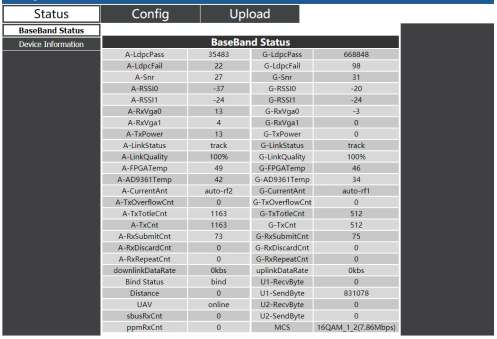
Under Status Device information, there’s information of SN and firmware version.

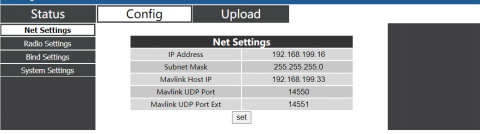
Under ConfigàNet settings, there’re IP address of unit itself, telemetry destination IP address and UDP ports, all of these parameters can be changed as per user’s request.
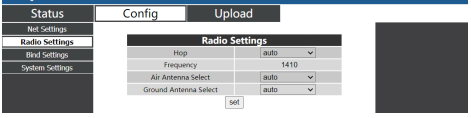
Under ConfigàRadio settings, there’re hop, հաճախականություն, antenna selection can be set. When hop is auto, user do not need to/cannot set frequency, system dynamically selects the best frequency to use by itself, in other words, when hop is manual, user can set frequency manually.
Under Config Bind setting, bind process can be triggered by clicking bind instead of physical bind button.

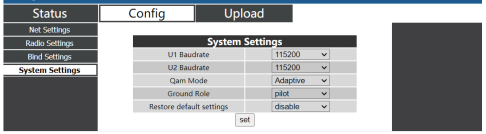
Under Config System settings, baud rate for U1/U2 two serial ports can be set. When QAM mode is set as adaptive, unit will dynamically change modulation scheme based on real-time signal quality. Role of pilot has bi-directional transmission while observer only has downlink data.
Under Upload Upload, browser and select file to be upgraded first, then click send to trigger the process.

5. Ծրագրեր
5.1. Ծրագրեր Հյուրատետր Հեռակառավարիչ
wireless video link modules support PPM and S. BUS protocol.
If PPM mode is used, please use wireless video link standard PPM cable to connect the ground unit and the remote controller’s trainer port.
If S. BUS mode is used, additional S.BUS receiver is needed. The ground unit is connected to the receiver. Then S. BUS receiver establishes wireless communication with the remote controller.
Both modes require the remote controller to be configured to the corresponding working mode.
If S. BUS receiver is used, please use a receiver whose working frequency is different from that of wireless video link module.
When PPM mode is used, the air unit needs to connect to the PPM RC port of a flight controller.
When S. BUS mode is used, the air unit needs to connect to the DSM/S. BUS RC port of a flight controller.
5.1.1. FRSKY հեռավոր controller
- PPM ռեժիմ
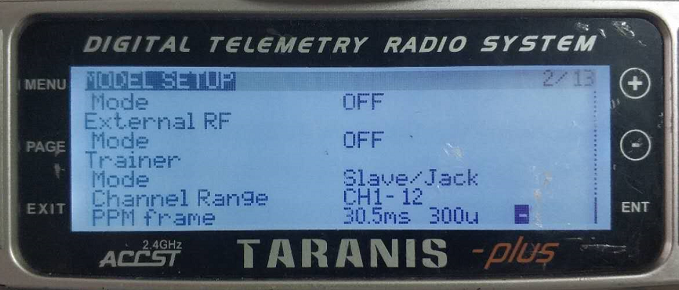
Model setup – Trainer – mode: If mode is configured to Slave/Jack, then the remote controller is in PPM mode.
Model setup – Internal RF: It needs to be configured to be off, and S. bus mode will be disabled.
- S.BUS ռեժիմ
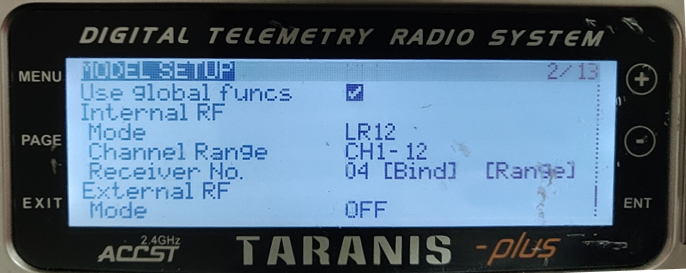
Model setup – Internal RF: LR12, D8, D16, OFF. Configuration of different parameters follow those of the receiver. If configured as OFF, S. bus mode will be disabled.
5.1.2. Futaba հեռավոր controller
- S.BUS ռեժիմ
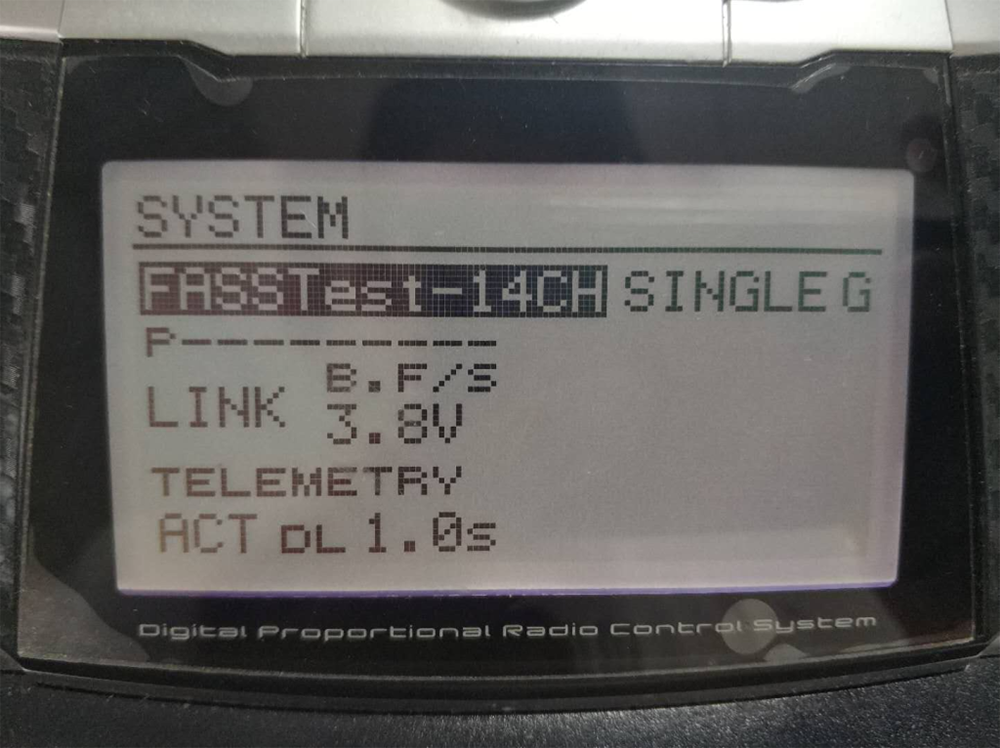
Linkage menu – համակարգ: FASSTest-14CH, FASSTest 12CH, ՊԱՀՈՒՄ Է ՄՈՒԼՏԻ, ՊԱՀՈՒՄ Է 7 CH, S-FHSS. Configuration of different parameters follow those of the receiver.
- PPM ռեժիմ
wireless video link standard PPM cable is used to connect to Futaba trainer cable (one end is connected to the trainer port of Futaba controller, the other end is 3.5mm connector). PPM ռեժիմը կարող է օգտագործվել ուղղակիորեն առանց լրացուցիչ կազմաձեւման.
5.2. Հեռուստաչափություն կապը
Հեռուստաչափիչ օդային ստորաբաժանումը միացնում է թռիչքի վերահսկման «Telem1» նավահանգիստը(Pixhawk4).
5.3. Ստացեք ապրել վիդեո
Ստացեք իրական ժամանակի տեսանյութեր RTSP- ի միջոցով Media Playings- ի նման QGC / VLC. Համոզվեք, որ PC- ի եւ ֆոտոխցիկի IP հասցեները նույն ենթահամակարգում են.
6. Նշումներ
6.1. Հղում կատարումը
- RF մալուխի միակցիչ / ալեհավաք միակցիչ ստուգում
Թռիչքից առաջ, Ստուգեք, արդյոք ալեհավաքները միացված են մոդուլների հետ. Առանց ալեհավաքների միացված մոդուլը միացված է շատ կարճ միջակայքում եւ կարող է վնասել մոդուլը. Առաջարկվում է ստուգել բոլոր RF միակցիչների միացումը. Չամրացված կապը կարող է զգալիորեն քայքայել միջակայքը.
- Ալեհավաքի տեղաբաշխում
Տեղադրեք երկու օդային ալեհավաքները, որպեսզի անկախ նրանից, թե ինչ դիրքում է անօդաչուն, Առնվազն մեկ ալեհավաքը չի արգելափակվում գետնանուշի ծանրաբեռնվածությամբ.
If the drone will fly in full throttle, it will lean forward. Install the air antenna so that it is close to be vertical to the ground when the drone moves forward in full throttle.
- Battery level
The reception performance will degrade if the battery runs low, even though it might still power the units up.
6.2. Ցեխոտել կապ & հեռավոր controller
The RC link of wireless video link module supports the PPM and S.BUS protocols. If the PPM protocol is used, you need to configure the remote controller to PPM mode and turn off the wireless transmission of the remote controller. Եթե օգտագործվում է S.BUS արձանագրությունը, the wireless working frequency of the receiver connected to the remote controller must work in different frequency bands with the working frequency of wireless video link module and have a certain isolation guarantee.
Եթե դուք չեք օգտագործում անլար վիդեո հղումների մոդուլի RC հղումը, Հեռակառավարիչի RC հղումը օգտագործելիս պետք է ուշադրություն դարձնեք հեռակառավարիչի հեռակառավարիչի աշխատանքային հաճախականությանը. Եթե այն գտնվում է նույն հաճախականության ժապավենի մեջ, որքան անլար վիդեո հղումների մոդուլի աշխատանքային հաճախականությունը, Դա իրար հետ միջամտելու է.
Անլար վերահսկիչի կամ ստացողի անլար հղում օգտագործելու դեպքում հեռակառավարիչի կամ ստացողի անլար հղումով խուսափեք անլար վիդեո հղումների մոդուլին միջամտությունից.
6.3. Որոնվածի թարմացում
Թարմացրեք ֆայլերը: FPGA արդիականացված ֆայլ օդային միավորի համար, FPGA արդիականացված ֆայլը ցամաքային միավորի համար, MCU1 արդիականացման ֆայլ օդային միավորի համար, MCU1 արդիականացման ֆայլը գետնին միավորի համար, MCU2 արդիականացման ֆայլ օդային միավորի համար, MCU2 արդիականացման ֆայլը հողային միավորի համար.
Արդիականացման ֆայլերը արդիականացվում են անլար վիդեո հղման համակարգչային ծրագրակազմ. Բարելավման ընթացքում, the power cannot be powered off and the normal connection of USB cable should be ensured at the same time. Եթե բարելավումը ձախողվի, the power cannot be powered off, խնդրում ենք փորձեք նորից թարմացնել ուղղակիորեն. այլապես, it will be necessary to return to us to use special burning tools for firmware burning.
6.4. Bind որperation
“Bind” is used to pair an air unit with ground unit.
To pair an air unit and a ground unit:
- Both air unit and ground unit are powered on.
- Connect the air and ground unit.
- Press the physical bind button of the air unit, last 5s+. The LED light next to the bind button flashes green, նշելով, որ այն գտնվում է պարտադիր վիճակում.
- Press the physical bind button of the ground unit, last 5s+. The LED light next to the bind button flashes green, նշելով, որ այն գտնվում է պարտադիր վիճակում.
- When the link indicator LEDs of ground unit are always on, it indicates that the air and ground unit is bound.
Նշում:
(1) If modules binding with different firmware version, the binding operation may fail.
(2) Եթե օդային միավորի կամ հողամասի ծրագիրը սխալ է այրվում, ինչպիսիք են օդային ստորաբաժանումը գետնին այրելը, եւ կատարելով պարտադիր գործողությունը սխալ օդային միավորի եւ հողամասի միջեւ, Պարտադիր գործողությունը ձախողվելու է.
(3) Միավորներն արդեն կապված են գործարանի առաքումից առաջ, Հաճախորդին հարկավոր չէ կրկին կապելուց հետո կապելուց հետո.
(4) Եթե միավորը վերականգնվի գործարանի պարամետրով, Կրկին անհրաժեշտ է.
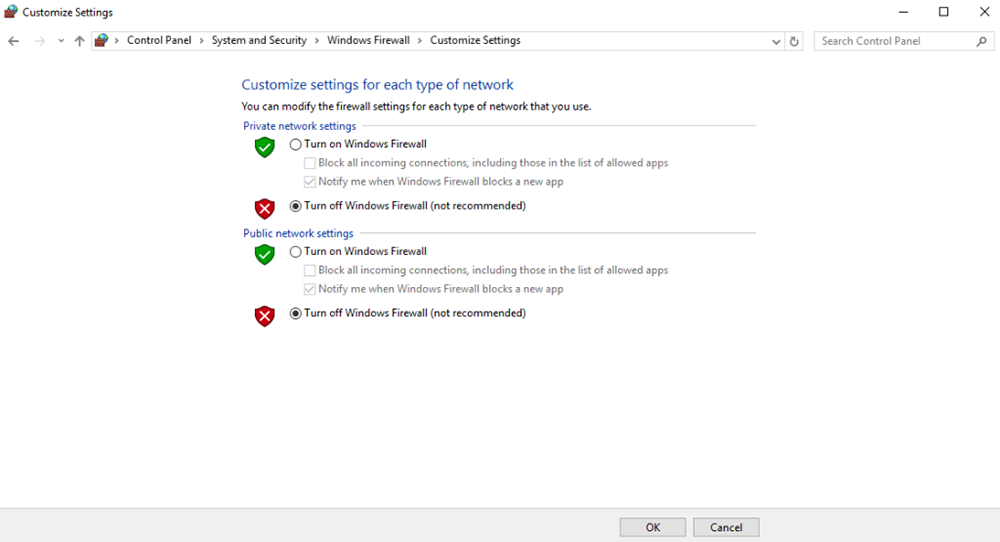
6.5. PC Windows Firewall
Համոզվեք, որ PC Firewall- ը անջատված է այն դեպքում, երբ տեսանյութը եւ / կամ հեռաչափությունը արգելափակված է. Այստեղ վերցրեք Windows10 գործողությունների համակարգը հղման համար. Ուղի: Control Panel\System and Security\Windows Firewall\Customize Settings.
Սահմանեք մասնավոր / հանրային ցանցի պարամետրերը, «Անջատեք Windows Firewall- ը’ Ինչպես ներքեւում, Կտտացրեք «Լավ».
6.6. Սահմանեք ԱՀ IP հասցեն
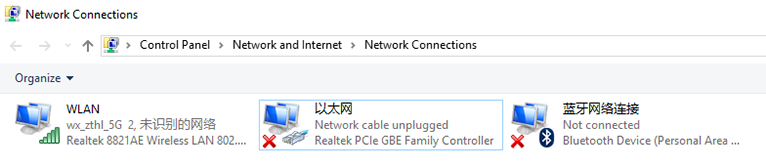
PC IP address should be set correctly when watch video in PC, IP address can be set following below steps:
Double click ‘Ethernet’ at Control Panel\Network and Internet\Network Connections,
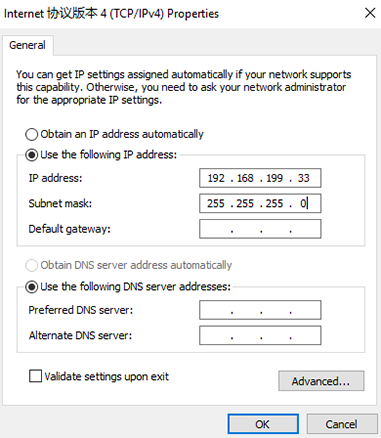
Double click ‘Internet protocol version 4(TCP / IPv4)’, set PC IP address like below, click ‘OK’ finish.
6.7. J30J-37 connector pin definition
| անուն | տակառիկ |
| Ուժ | 1,2,20 |
| GND | 3,10,15,21,22,29,31 |
| Ethernet1 TX+ | 7 |
| Ethernet1 TX- | 26 |
| Ethernet1 RX+ | 6 |
| Ethernet1 RX- | 25 |
| Ethernet2 TX+ | 5 |
| Ethernet2 TX- | 24 |
| Ethernet2 RX+ | 4 |
| Ethernet2 RX- | 23 |
| Ethernet3 TX+ | 8 |
| Ethernet3 TX- | 27 |
| Ethernet3 RX+ | 9 |
| Ethernet3 RX- | 28 |
| SBUS_V | 11 |
| PPM | 12 |
| GPS_SYNC | 13 |
| Վերապահված է | 14 |
| 232TX1 կամ 422Y2 | 16 |
| 232RX1 կամ 422A2 | 17 |
| 232TX2 կամ 422Y1 | 18 |
| 232RX2 կամ 422A1 | 19 |
| SBUS1 | 30 |
| SBUS2 | 32 |
| Վերապահված է | 33 |
| 422Z2 կամ TTLTX1 | 34 |
| 422B2 կամ TTLRX1 | 35 |
| 422Z1 կամ TTLTX2 | 36 |
| 422B1 կամ TTLRX2 | 37 |
7. FAQ
| Q1: How does the անլար վիդեո հղում module supply power? |
| Օդային միավոր: DC, power supply range: 9-26V, recommended to use 24V. |
| Հողամաս: DC, power supply range: 9-26V, recommended to use 24V. |
| Q2: Can the անլար վիդեո հղում module be powered on before antennas installation? |
| The antennas must be installed before power on. |
| Q3: How many antennas do անլար վիդեո հղում‘s air unit need to be installed? |
| Two antennas need to be installed. |
| Q4: How many antennas do անլար վիդեո հղում‘s ground unit need to be installed? |
| Two antennas need to be installed. |
| Q5: Can different types of remote controllers be used to control drone? |
| այո, just output standard PPM signals through the coach port, or use S. BUS receiver. |
| Q6: Կարող են երկու օդային միավորներ տեղադրել անօդաչու վրա? |
| ոչ, Անօդաչու սարքը կարող է ունենալ միայն մեկ օդային միավոր. |
| Q7: Կարող են ստացված երկու ստորաբաժանումներ տեղադրվել ստացման ավարտին? |
| PTP համակարգը կարող է տեղադրել միայն մեկ ցամաքային միավոր; PTMP համակարգը աջակցում է մեկից ավելի ցամաքային միավորներ. |
| Q8: Ինչ անել, եթե uplink- ը/ներքև հղում LED ցուցանիշը միացված չէ? |
| Խնդրում ենք հետեւել հետեւյալ քայլերին: |
| 1) Խնդրում ենք ստուգել օդի եւ հողի էներգաբլոկը նորմալ է. |
| 2) Խնդրում ենք ստուգել ալեհավաքների տեղադրում օդի եւ հողային միավորների տեղադրումը նորմալ է: Անտեսել, թե արդյոք արգելափակված է ալեհավաքները; Անկյունը չամրացված է; արդյոք RF մալուխը եւ նավահանգիստը չեն խստացվում; |
| 3) Ստուգեք, թե արդյոք գետնին միավորի TX հաճախականությունը համահունչ է Air Mec- ի RX հաճախականությանը TaiysNC PC ծրագրի հետ. |
| 4) Ստուգեք TX հզորությունը գետնին միավորի հզորությունը Taiysnc PC հավելվածով. |
| 5) If above steps cannot solve the problem, please contact wireless video link technical support staff. |
| Q9: Telemetry connection cannot be setup properly? |
| Խնդրում ենք հետեւել հետեւյալ քայլերին: |
| 1) Please check whether the link status is normal. |
| 2) Please check whether the serial telemetry cable connection between flight controller and air unit is correct and that between ground unit and ground station is correct. |
| 3) Check whether the baud rates are the same. |
| 4) If above steps cannot solve the problem, please contact wireless video link technical support staff. |
| Q10: RC connection cannot be setup properly? |
| Խնդրում ենք հետեւել հետեւյալ քայլերին: |
| 1) Please check whether the link status is normal; |
| 2) Please check whether the RC connecting between flight controller and air unit is correct and that between ground unit and remote controller is correct; |
| 3) Եթե օգտագործում եք PPM ռեժիմ, check the mode configuration of the remote controller; if using S. BUS mode, check the configuration of the receiver and remote controller; |
| 4) Please check whether the RC connection of the air and ground unit is correct. We provides standard cables. If you make it by yourself, please check the pin; |
| 5) Please check whether the RC mode is configured correctly in wireless video link app; |
| 6) If above steps cannot solve the problem, please contact wireless video link technical support staff. |
| Q11: What if there’s no video output? |
| Խնդրում ենք հետեւել հետեւյալ քայլերին: |
| 1) Please check whether the link status is normal; |
| 2) Please check whether the Ethernet cable and camera is normal; |
| 3) Please check whether the RTSP address is correct; |
| 4) Please check whether PC IP address and camera IP address are in the same subnet; |
| 4) If above steps cannot solve the problem, please contact wireless video link technical support staff. |
| Q12: What if the video suffers from distortion? |
| Խնդրում ենք հետեւել հետեւյալ քայլերին: |
| 1) Please confirm whether the downlink mode configuration is larger than the video bit rate; |
| 2) Please check whether the Ethernet connection of air unit cable is reliable; |
| 3) Whether the connection of Ethernet cable of ground unit is reliable; |
| 4) Please check If there is interference exists, change the working frequency if need; |
| 5) Եթե չկա միջամտություն, Արդյոք հասել է հաղորդակցման սահմանի սահմանը; |
| 6) If above steps cannot solve the problem, please contact wireless video link technical support staff. |
| Q13: Ինչ անել, եթե մոդուլի փոխանցման հեռավորությունը ավելի կարճ է, քան սպասումը? |
| Խնդրում ենք հետեւել հետեւյալ քայլերին: |
| 1) Խնդրում ենք ստուգել, թե արդյոք ալեհավաքի եւ ՌԴ մալուխը ճիշտ տեղադրված են եւ ստուգում են, արդյոք դրանք մատակարարվում են Falcon պարագաներ. |
| 2) Խնդրում ենք համոզվեք, որ օդային ալեհավաքները երկուսն էլ արգելափակված չեն բեռի կողմից, Ալեհավաքների մոտ գտնվող գետնին մի ակնհայտ արգելափակում չկա, Եվ օդի եւ հողային միավորների ալեհավաքները ուղղահայաց են գետնին. |
| 3) Խնդրում ենք ստուգել, արդյոք մոդուլն աշխատում է Full RF Power ելքով. |
| 4) Խնդրում ենք ստուգել, արդյոք Downlink Mode Configuration- ը պատշաճ է, թե ոչ, Բարձր թողունակության ներքեւի ռեժիմները կարող են զգալիորեն նվազեցնել փոխանցման հեռավորությունը. |
| 5) Խնդրում ենք ստուգել, թե արդյոք աշխատանքային հաճախականությունը ակնհայտորեն միջամտում է, թե ոչ. |
| 6) Please check whether there is serious obstruction between the air and the ground unit during flight, and the complex geographical environment will also affect the transmission distance. |
| 7) If above steps cannot solve the problem, please contact wireless video link technical support staff. |
Հարց տվեք
Ձեր հաղորդագրությունն ուղարկված է