






Analog CVBS PAL camera + USB UVC encoder to Ethernet stream
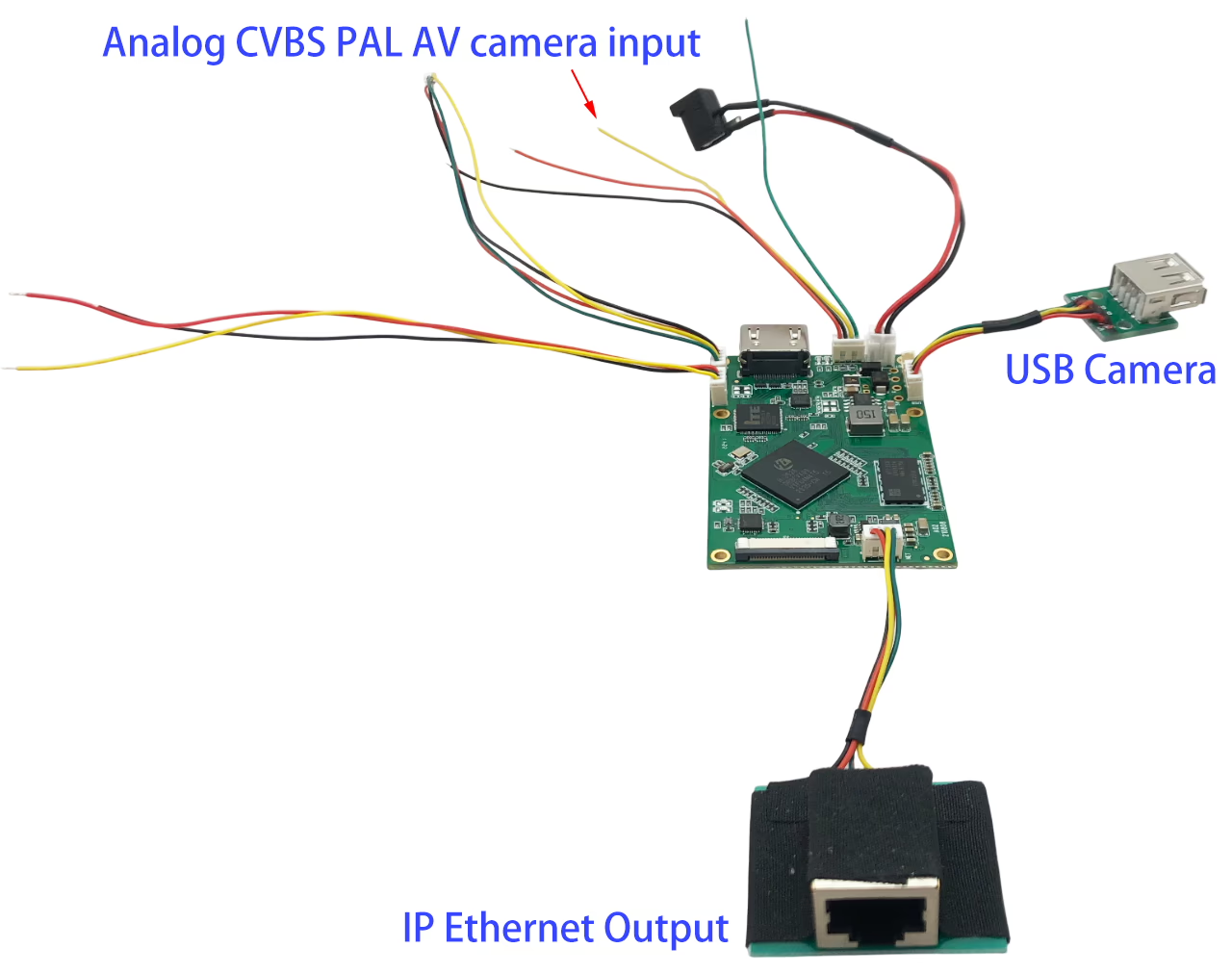
Table of Contents
Introduction
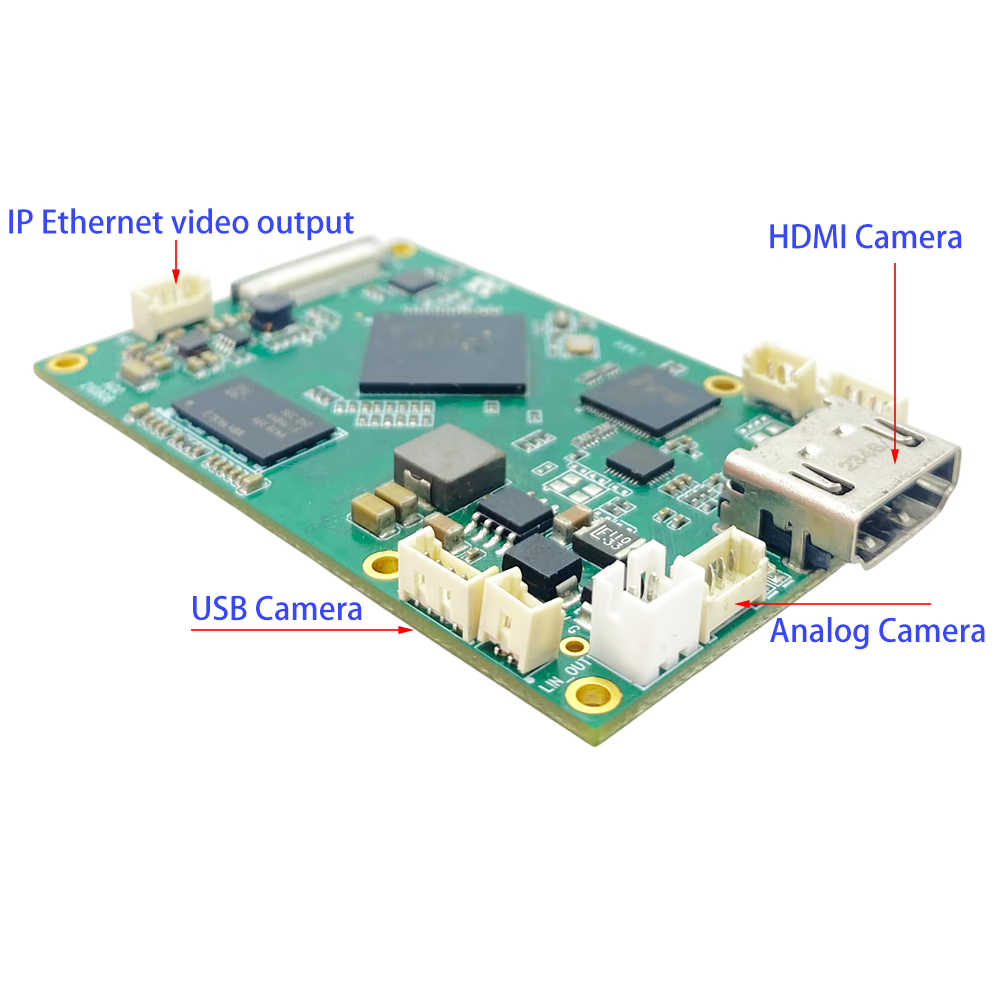
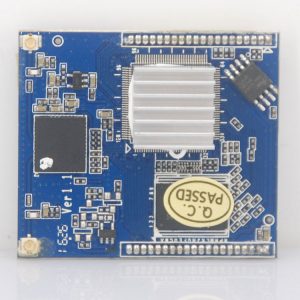
An Analog CVBS PAL camera + USB UVC camera encoder to Ethernet stream converter board is a specialized hardware module designed to take video signals from two different types of cameras (traditional analog and modern USB digital) and convert them into compressed digital streams for transmission over an Ethernet network.
UVC 720P30
UVC&CVBS: 720P30&PAL
rtsp://192.168.1.30/mainStream
rtsp://192.168.1.30/subStream
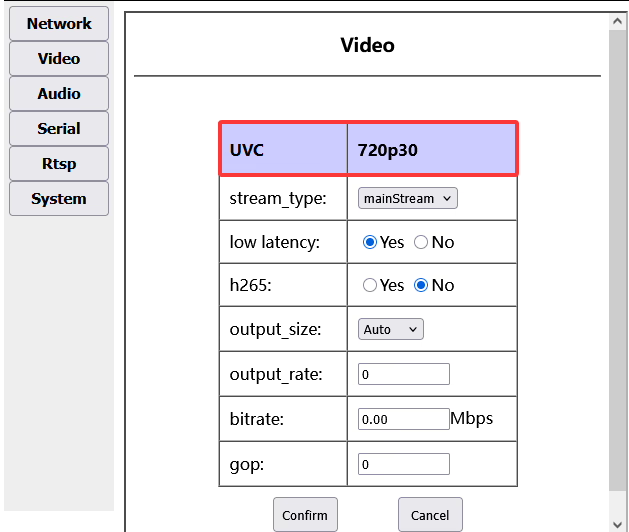
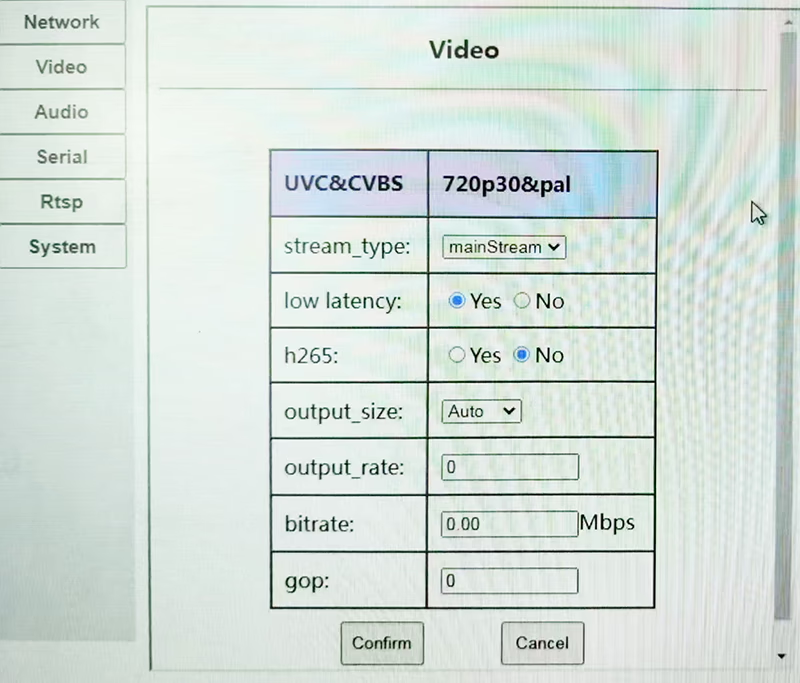
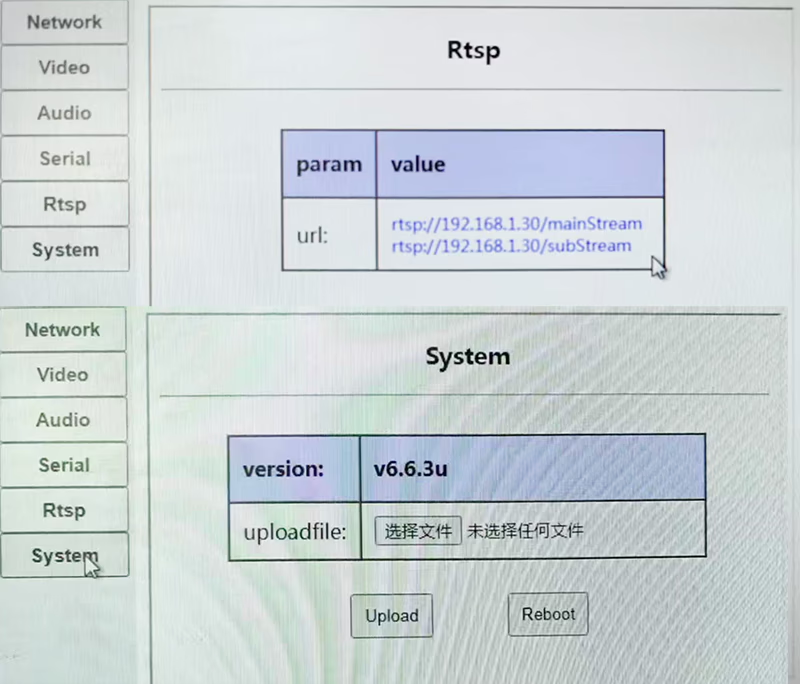
Overview
This compact encoder board is designed to integrate both legacy analog cameras and modern USB cameras into IP-based systems. It supports CVBS PAL video input and USB UVC camera input, encoding them into high-quality H.264/H.265 video streams for transmission over Ethernet. Ideal for surveillance, UAVs, robotics, and industrial applications, this board bridges traditional video sources with modern network video infrastructure.
Features
-
Dual Input Support
-
1× Analog CVBS PAL video input (composite signal)
-
1× USB UVC camera input (plug-and-play support)
-
-
Advanced Video Encoding
-
H.264/H.265 compression for efficient bandwidth usage
-
Adjustable bitrates and resolutions
-
Low-latency encoding for real-time applications
-
-
Network Streaming
-
Ethernet output (RJ45) for IP video streaming
-
Supports RTSP, RTP, UDP, HTTP, ONVIF (optional)
-
Compatible with NVRs, VMS software, and media players (VLC, OBS, etc.)
-
-
Flexible Integration
-
Compact board design for OEM projects
-
Web-based configuration interface or UART control
-
Supports multiple power supply options (e.g., 5V DC)
-
Applications
-
Converting analog PAL CCTV cameras to IP video
-
Streaming USB webcams over Ethernet networks
-
UAV / drone video transmission with mixed camera sources
-
Industrial inspection systems needing legacy + modern camera support
-
Remote monitoring, robotics, and research projects
Applications of USB to Network Video Streaming Converter Boards in UAVs
-
High-Definition Video Transmission
-
Converts USB camera (UVC) signals into IP streams (RTP/RTSP/ONVIF), enabling long-distance HD video transmission through COFDM, 4G/5G, or WiFi links.
-
-
Multi-Camera Integration
-
Supports multiple cameras (e.g., daylight + thermal imaging + wide-angle/zoom) by converting their USB outputs into standard network streams for simultaneous display and switching on the ground station.
-
-
Low-Latency Real-Time Monitoring
-
Provides MJPEG/H.264 encoding with RTSP/UDP output, ensuring smooth, low-latency video suitable for live monitoring, search and rescue, and security operations.
-
-
Compatibility with IP Systems
-
Generates standard IP video streams that are compatible with NVRs, VMS, and existing monitoring platforms, eliminating the need for special capture cards.
-
-
AI and Edge Processing
-
Facilitates integration with AI-powered platforms for object detection, tracking, or recognition, enhancing UAV capabilities in surveillance and inspection.
-
-
Remote Command and Video Backhaul
-
With 4G/5G connectivity, the converted network stream can be transmitted across regions, enabling remote UAV video monitoring and command operations.
-
engineer’s description of the USB camera’s resolution and frame rate detection mechanism
1. Core Challenge & Design Philosophy:
-
Challenge: Automatically probing a USB camera for all supported combinations of resolution and frame rate is complex, as it involves dealing with two vast sets of variables. This process can be time-consuming and unreliable.
-
Solution: The firmware employs a simplified yet highly reliable strategy: it fixes the resolution first and then probes for the maximum frame rate at that resolution.
2. Current Implementation Mechanism:
-
Default Resolution: The program is hardcoded to initially request 720p (1280×720) from any connected USB camera.
-
Reasoning: This resolution is a common denominator, supported by virtually all modern USB video class (UVC) cameras, ensuring maximum plug-and-play compatibility.
-
-
Frame Rate Probing: Once the resolution is fixed (e.g., 720p), the system probes the camera to determine the maximum frame rate (e.g., 30fps, 60fps) it can deliver at that specific resolution.
-
Final Operating Parameters: The system then uses this predefined resolution (720p) and the detected maximum frame rate for video capture and encoding.
3. Fallback Mechanism (AT Command):
-
The system includes a backup option for advanced users. The initial probe resolution can be changed via AT commands sent through a configuration serial port.
-
Supported Alternate Resolutions:
-
480p (640×480)
-
1080p (1920×1080)
-
-
Important Note: This is not a simple web interface setting. It requires access to the serial port and using a terminal tool, making it a more technical and less user-friendly process.
4. Recommendations for Clients/Users:
-
The engineering team strongly advises clients to accept the default 720p setting and avoid changing the resolution.
-
Reasons:
-
Optimal Compatibility: 720p guarantees the highest success rate for automatic camera initialization.
-
Performance over Spec: Based on empirical testing, many USB cameras that claim to support 1080p often do so at a very low frame rate (e.g., 15fps or less). This results in a choppy and unsatisfactory video stream. A smoother, more fluid video experience (e.g., 720p @ 60fps) is almost always preferable to a higher-resolution but sluggish one.
-
Simplicity: Using the default configuration eliminates the need for any complex additional setup.
-
The converter board’s firmware prioritizes reliability and compatibility over raw resolution. It uses a proven default resolution (720p) to quickly establish a stable connection and then optimizes for stream smoothness by selecting the highest possible frame rate at that resolution. While higher resolutions are available as an option for specific use cases, they require manual technical configuration, and the engineers’ practical experience indicates that they often provide an inferior user experience compared to the default 720p mode.
Accessory
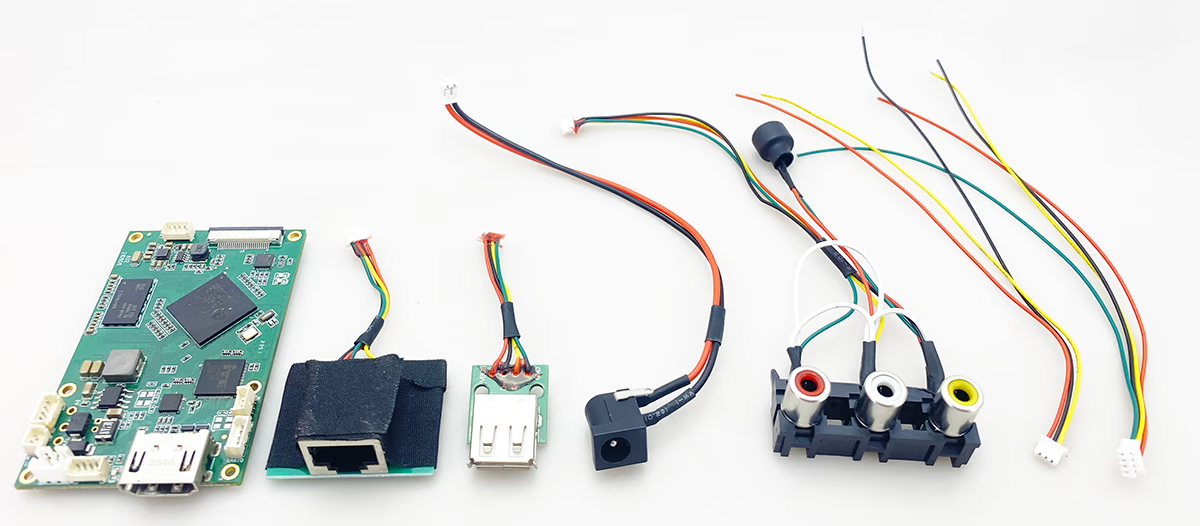
- CVBS + USB + HDMI camera video convert to IP ethernet video stream board
- RJ45 IP Ethernet port
- USB UVC camera port
- Power in connector
- Analog CVBS AV audio video input
- Data UART Cable
- Control UART Cable (connect to PC or parameter configuration board tool)
FAQ
Question: Analog CVBS PAL camera + USB UVC encoder to Ethernet stream, what formats of UVC webcam does the board support? Raw, MJPEG, H.264?
Answer: The converter board supports MJPEG format from UVC webcams. Other formats such as RAW or H.264 are not supported directly. MJPEG is widely compatible and ensures stable performance with low system overhead, making it the most reliable option for real-time video transmission.
For best results, we recommend using a UVC encoder that outputs MJPEG at standard resolutions (e.g., 480p, 720p, or 1080p). This guarantees smooth streaming over Ethernet and full compatibility with our transmission modules.
If you require H.264 compression, it is possible to add an external H.264 encoder module between the CVBS source and the Ethernet stream.
Question: Can I set the resolution of UVC USB to IP Ethernet to 1080p?
Answer: It is technically possible to change the resolution of a UVC camera by sending AT commands. In practice, most USB cameras running at 1080p resolution tend to have a relatively low frame rate, often only around 15fps, especially when connected via USB 2.0. This limitation is mainly due to bandwidth constraints and the processing load required for high-resolution video transmission.
If smooth and low-latency video is a priority, it may be better to select 720p at higher frame rates (such as 30fps) rather than forcing 1080p at lower frame rates. Choosing the right balance between resolution and frame rate ensures both clarity and fluid motion, which is particularly important in applications such as UAV video transmission, live streaming, or real-time monitoring.
Question: UDP can’t start GStreamer properly and the video quality is very poor with artifacts. What should I do?
Answer: Thanks for your feedback! To help us diagnose the issue, could you take a short video of your test setup and the problem you’re seeing? Please also let us know which player you are currently using for UDP playback.
If convenient, we recommend trying our own UDP player (SPlayer) to compare the result. This link includes the SPlayer download address and a step-by-step setting guide.
UDP player (we recommend to use Splayer) UDP stream player setting for stream protocol.
Question: Does the USB-to-IP Ethernet RTSP encoder board support two camera inputs? How is the Ethernet output handled, and how do I switch between cameras?
Answer: The encoder board supports up to two camera inputs, but it has only one Ethernet port for network output. Each camera input is assigned a separate RTSP URL. You can access each camera stream individually by entering its corresponding RTSP URL into any compatible RTSP player, such as UVC Player, EasyPlayer, or similar software. Switching between cameras is done by selecting the desired RTSP URL in your player.
Encoder Modules Boards









Decoder Modules Boards




Available for Customization
New Encoder Products
| No. | Product Name | Configuration | Key Features | Status |
|---|---|---|---|---|
| 1 | Dual-Channel USB UVC Visible Light Video Encoder | 2× USB input | Supports dual USB camera video encoding, and RTSP streaming; local CVBS/HDMI output; switchable display modes | Mass Production |
| 2 | Dual-Channel Encoder (1× USB Visible Light + 1× USB Thermal Imaging camera) | 2× USB input | Supports dual USB camera (visible + thermal) capture, encoding, and RTSP streaming; local CVBS/HDMI output; switchable display modes | Mass Production |
| 3 | RTSP Decoder HDMI/CVBS Display Module | HDMI + CVBS output | Supports up to 4×1080P@30fps RTSP stream decoding; Support video streaming protocol forwarding; HDMI/CVBS output display | Sample Available |
| 4 | RTSP Decoder HDMI/CVBS Display Module with 4.3"/5" LCD | HDMI output + LCD screen | Supports up to 4×1080P@30fps RTSP stream decoding; protocol forwarding; HDMI/CVBS output display | Debugging |
| 5 | Dual-Channel Encoder (1× USB Visible Light + 1× CVBS Analog) | 1× CVBS + 1× USB UVC input | Dual video (USB + CVBS), encoding and RTSP streaming; local CVBS/HDMI output; switchable display modes | Debugging |
| 6 | Dual-Channel Encoder (1× USB UVC + 1× AHD Analog) | 1× AHD + 1× USB UVC input | Dual video capture (USB + AHD), encoding and RTSP streaming; local CVBS/HDMI output; switchable display modes | Debugging |
| 7 | Dual-Channel Encoder (1× CVBS + 1× AHD Analog Video) | CVBS + AHD 2 video input | Dual analog video capture, encoding and RTSP streaming; local CVBS/HDMI output; switchable display modes | Debugging |
| 8 | Dual-Channel Encoder (1× CMOS Camera + 1× USB Thermal Imaging camera) | 1× USB interface | Supports CMOS + USB thermal camera capture, encoding and RTSP streaming; local CVBS/HDMI output; switchable display modes | Mass Production |
For customized video input/output conversion solutions not listed in our products, please contact us for OEM/ODM support. We can develop tailored products based on your requirements.

iVcan.com –
I’ve been using this dual-camera encoder board for mixed analog and USB cameras, and it’s impressively reliable. The default 720p resolution for USB cameras ensures smooth, high-frame-rate video, while the CVBS input seamlessly converts legacy analog signals to IP streams. H.264/H.265 encoding delivers efficient bandwidth usage with minimal latency, and the web interface makes configuration easy. It integrates perfectly into UAVs, industrial inspection systems, and remote monitoring setups. Overall, it bridges traditional and modern cameras effortlessly, providing a stable and high-quality dual-stream solution for professional video applications.