






We need devices, to receive the information on Full HD camera videos with SDI (Serial Data Interface) on the line and Encode information in H.265 standard. Compressed data must be transmitted in either DVB-T (Digital Video Broadcasting terrestrial) or DVB-S standard. The analog output of the designed module can accept both I and Q signals, as well as modulated signals.
Table of Contents
Q: Does your SDI Video Encoder support TSI Input / Output?

A: Our existing encoding board to modulation board transmits data through the network port. Rather than the TSI interface you mentioned. This does not affect the use of the transmitter to the receiver. This is an internal interface of the transmitter.
Q: Do your encoder decoder boards support 525 i50 to 1080 P60 on the video format?
A: Now our SDI video encoder boards support HD: 720p @ 23.98Hz/24Hz/25Hz/29.97Hz/30Hz/ 50Hz59.94Hz/60Hz and 1080p @ 23.98Hz/24Hz/25Hz/29.97Hz/30Hz/50Hz/59.94Hz/60Hz. It does not support 525 i50 video format, is it ok?
Q: Does your SDI COFDM DVB-T H265 SDI Encoder RF output power support 0~10dBm?

A: Your output frequency point from 400Mhz to 2800Mhz required is very wide.
It is difficult to achieve 0~10dBm output under such a wide frequency point, and adding a Power Amplifier on the board will increase power consumption and heat (you also mentioned that there is no need for a fan for heat dissipation).
Are you willing to agree to our existing -3 to -10dBm output and then add your own PA (power amplifier)?
Q: What is the dimension of your COFDM DVB-T H265 SDI Encoder?

Do you have a special dimension request? Our existing size is 70x45mm.
A: Our existing video encoder and decoder boards can meet your project needs.
My engineer’s biggest worry is that your company, as a member of the broadcast and television industry has relatively high requirements for image video quality.
Our video encoding board will perform lossy compression for low latency. Can you take a set of existing samples to test and confirm the image quality? If you think our samples can meet your company’s requirements, we will redesign and draw the board according to your company’s requirements.
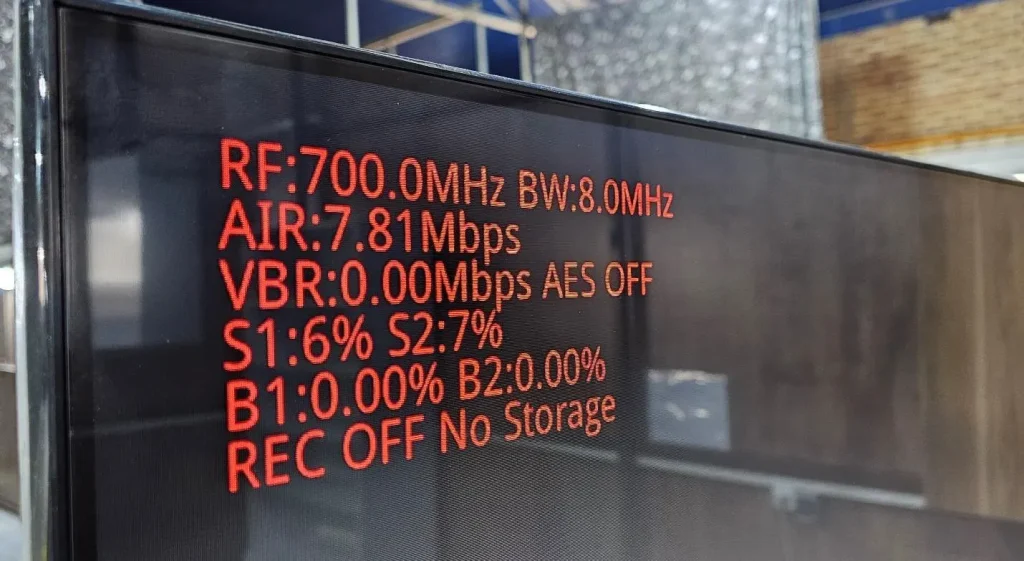
Q: Could you provide more information about VBR?
By applying video to the TX, the VBR parameter will change over time and is not a static value. Could you provide more information about this?
A: VBR is the video encoding bit rate at the transmitter. Since the video picture changes dynamically, VBR is of course variable, but it fluctuates around the encoding bit rate set by the transmission system: 7.81*0.8=6.248Mbps.
Q: Despite having flash storage on my receiver, REC OFF and No Storage are displayed on the screen. Why is this happening?
You said in the description: Key2: switch button for video recording, short press to change its status. The receiver will automatically check the storage device (micro SD card or USB disk, priority SD card) after powering on and start to record video when the storage device is inserted. Just press the button to stop or record again.
A: The receiving system fails to detect the USB flash drive. The USB flash drive needs to be formatted to a format that our system can recognize.
Q: Both B1 and B2 are zero. This indicates that there is a 0 % Bite error rate!!! Which range of these parameters is acceptable?
A: The occurrence of a bit error rate may cause problems with the video image. When the bit error rate is very small, it will not affect the video image effect.
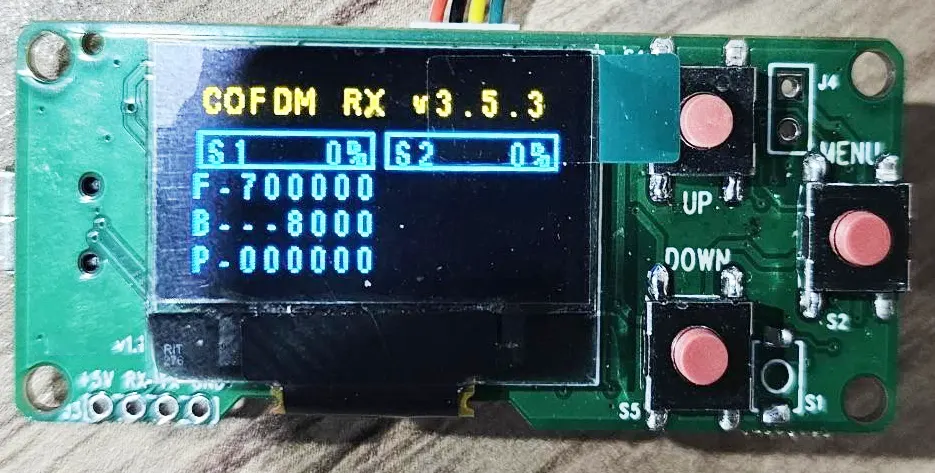
Q: Can I customize the programmer screen contents?
A: The display content of the configuration panel (programmer) is not open to customers for modification.
Q: Why isn’t the S2 channel programmed? It appears that the second tuner is not functioning at the moment.
A: S2 refers to receiving antenna 2, which can work normally. Frequency and bandwidth are the same s1 and s2.
Q: Why the latency I calculated is huge? It’s around 470 ms.
In your description coming: The default normal features of our receiver module can be paired with our H.265 transmitter module. The HD video latency from its inputting of the transmitter to the HDMI screen displaying of the receiver is about 200ms to 250ms.
A: The delay we tested was around 250ms. How did you test it? The delay way we tested, please check the Youtube video link.
Q: How much latency does your SDI encoder transmitter and decoder receiver module have?
I remember you said you optimized the protocol for better latency. As I do not use your fast H.264 latency (130 ms) how much latency should we have on my setup?
A: You confirmed that you needed to support H265, but not H264 low latency mode. To achieve low latency mode, the receiver must be changed to another receiver hardware, and the corresponding firmware must be burned before shipment.
Q: Can I use your COFDM receiver to get the normal DVB-T TV channel?
You said you changed the video protocol for better latency in TX. Can I use your RX as a commercial DVB-T? how can I receive the normal DVB-T channel?
A: If you really want to use it as a normal DVB-T receiver, we have to upgrade another firmware. (remove the encryption on the encoder and decryption on the decoder).
Q: How can I use your OSD menu function on the COFDM receiver?
In your description coming:
The receiver module also includes DVR record functionality with a Micro SD card or USB disk. The receiver module also enables video streaming over USB for remote Android device decoders like Smartphones or Android PAD. This allows multiple remote viewers to monitor the same video
simultaneously. The receiver module also supports display characters string on the video display screen with the video together in OSD mode.
A: See OSD online documentation.
Q: How can I turn on the AES encryption? Where should I enter the key?
A: The configuration panel can edit and change the password.
Q: Indicate the bow text picture question:
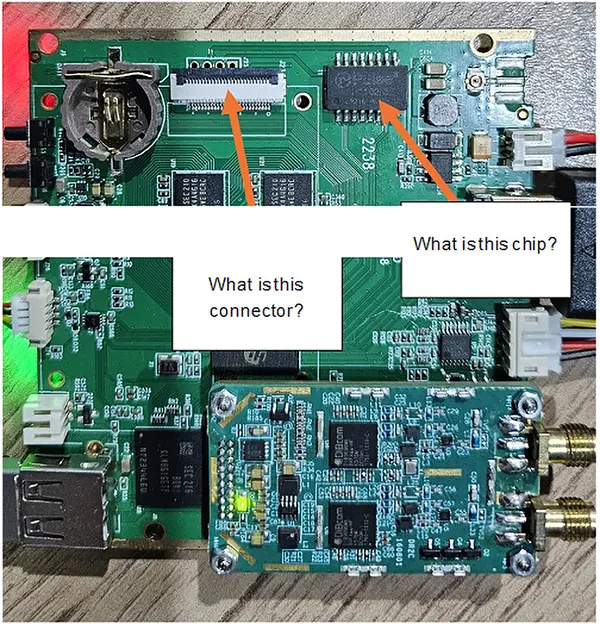
A: This optional function is required by other products (the network port function is used to connect to a two-way wireless link). Please ignore it in your application.
Q: What is the time delay of the UART data on the one-way transmission?
For UART data from TX to RX, is the data processed through the encoding process or transmitted in real-time? I require real-time data transfer.
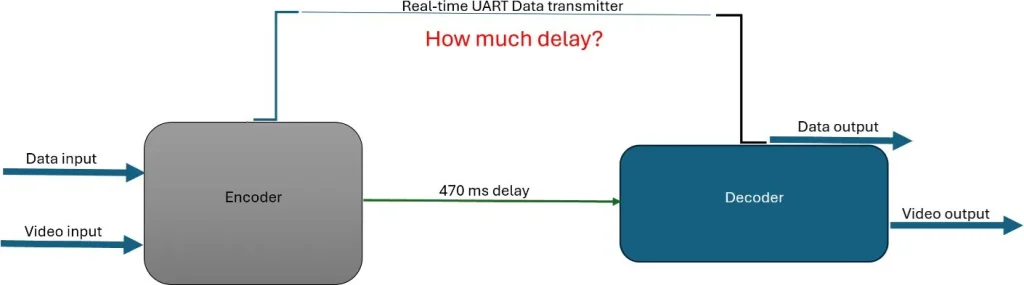
A: The data and video are sent together via wireless cofdm package. So the delay is the same as with video.
Q: For transmitter. Is possible to change GI and FEC and another parameter according to your table in the description?
A: Yes.
Q: What is the exact power at this point from 1350 to 1450 MHz? I need this information to design a PA.
The maximum output of the 1350~1450 frequency band is around -10±2dBm. It is recommended to design the PA based on -15dBm input. Our transmitter can be adjusted down to -15dBm.
Q: Does your programmer have the function of resetting the factory restore?
If I change any parameters of any side like frequency GI or FEC or video bandwidth, how can I reset all parameters in reset factory mode? I am new to this board, and I need to change some parameters to achieve my desire. But I’m afraid of changing the default pieces of information.
A: Our TX / RX programmer doesn’t have a factory reset feature.
Q: Does your SDI Video input encoder support 1080i25/1080i30?
It supports 1080i50 and 1080i60, it does not support 1080i25 or 1080i30.
Q: Can you offer me some technical files for the repair of the power part of the Vcan1731 SDI video encoder board?
A: Please check the files at the below link.
- https://ivcan.com/wp-content/uploads/Vcan1731-Component-Part-Number-Map-1.pdf
- https://ivcan.com/wp-content/uploads/Vcan1731-Component-Part-Number-Map-2.pdf
- https://ivcan.com/wp-content/uploads/vcan1731_A01_power.pdf
Our maintenance idea is to first rule out whether there is a short circuit and where the short circuit is. For example, disconnect the magnetic bead or 0-ohm resistor between the power IC and the subsequent circuit, and then use a multimeter to measure whether the power IC is broken or the subsequent circuit is short-circuited. If the power IC is broken, replace the power IC; if the subsequent circuit is short-circuited, you have to check the subsequent circuit.
Q: Can the encoder board receive and forward UART data through UDP communication (IP:Port)?
A: Yes, UART data transmission is supported under our default custom protocol, with some important considerations:
1. Custom Protocol (Default Firmware)
Our default shipping firmware uses a custom multiplexed protocol that supports UART transparent transmission (serial passthrough).
- UART data is multiplexed together with audio/video streams.
- Therefore, the receiving side must use the corresponding custom protocol demux library to separate UART data from the media stream.
- When used together with our decoder board, UART transparent transmission works properly and can be forwarded/received as expected.
Note for PC Players
Our current PC player software only demuxes and processes:
- Video data
- Audio data
At present, it does not process or output UART serial data.
2. Standard MPEG-TS Protocol
If the encoder board is flashed with the standard MPEG-TS firmware/protocol:
- Only audio and video streams are supported.
- UART/serial data transmission is not supported under MPEG-TS mode.
Please take this into consideration when selecting the firmware/protocol solution.
| Protocol Type | Audio/Video | UART Transparent Transmission |
|---|---|---|
| Custom Protocol (Default) | Supported | Supported |
| Standard MPEG-TS | Supported | Not Supported |
Q: Do you have firmware that supports raw H.264 or RTP instead of MPEG-TS for UDP streaming?
A: Our UDP firmware does not transmit raw H.264 elementary streams. UDP streaming is supported in two formats depending on firmware version:
- A custom proprietary format, or
- The standard MPEG-TS (MPEG Transport Stream) format
These correspond to different firmware builds (typically distinguished by a suffix such as “T” or non-“T” versions).
Q: Do you support RTP as a standalone streaming protocol?
A: We do not provide a separate “raw RTP streaming mode.” However, RTP is already used internally within RTSP streaming. In RTSP mode, audio and video are transmitted over RTP packets as part of the RTSP/RTP/RTCP stack. Therefore, RTP is supported indirectly through RTSP rather than as an independent UDP streaming format.
Q: Can the system output raw H.264 over UDP?
A: No. Raw H.264 elementary stream transmission is not supported over UDP. This is due to packet size and network constraints. A single I-frame can be very large and cannot be reliably transmitted in a single IP packet.
For stable transmission, video streams must be encapsulated using a transport format such as:
- MPEG-TS, or
- RTP (via RTSP)
Q: How is the key frame (GOP) interval configured?
A: The key frame interval is controlled by the GOP parameter in the web interface (video settings page).
- If GOP is set to 0 (default/auto mode), the system automatically aligns the I-frame interval with the input frame rate.
- Example: If the input is 1080p60, then the I-frame interval will be 60 frames (1 second GOP).
This ensures adaptive encoding behavior based on input source characteristics.
Q: Why can’t raw H.264 be transmitted directly over IP/UDP?
A: Because H.264 frames (especially I-frames) can be very large and exceed the maximum transmission unit (MTU) of network packets. Without encapsulation, reliable delivery cannot be guaranteed. Therefore, video must be packetized using standardized streaming formats such as MPEG-TS or RTP for proper segmentation, timing, and reassembly.
Q: My system latency is ~230 ms total. Decoder and display take ~45 ms, leaving ~185 ms for camera and encoder. I expect the camera contributes ~60 ms (4 frames at 60 fps), so the encoder seems to be ~120 ms. Is there a way to reduce encoder latency? I understand MPEG-TS mainly affects decoding, not encoding.
A: Latency Breakdown and Optimization Guidance
To accurately optimize system latency, it is important to first validate each stage independently before assuming bottlenecks.
1. Verify Camera Latency First (Critical Step)
Before optimizing encoding, you should confirm the actual camera contribution.
A practical measurement method:
- Connect the camera HDMI output directly to a display
- Point the camera at a high-precision stopwatch displayed on a separate PC monitor
- Capture both the live scene and HDMI output simultaneously
- Compare frame timestamps to calculate end-to-end camera latency
Notes:
- Use a high-precision stopwatch (smaller tick interval improves accuracy)
- Camera ISP processing is often a major contributor
- In our experience:
- 1080p cameras typically introduce ~100 ms latency
- Some models may exceed this due to heavier ISP pipelines
2. Camera Configuration Has a Major Impact
If camera latency is high, optimization should start there:
- Lower resolution (e.g., 720p vs 1080p) → reduces ISP and pipeline delay
- Higher frame rate (e.g., 60 fps vs 30 fps) → reduces frame buffering latency
- Simpler image processing pipeline → reduces ISP load
These changes often reduce latency more effectively than encoder tuning.
3. Encoder Latency Is Likely Overestimated
A 120 ms encoding delay is generally unlikely for typical hardware encoders.
Based on internal measurements:
- A hardware encoder + decoder + transmission + display pipeline over Ethernet typically results in:
- ~80–100 ms total end-to-end latency
This implies:
- Encoder-only latency is significantly lower than 120 ms
- Encoding is usually not the dominant contributor in a properly configured system
4. Transmission Method Matters (Especially Wireless)
Please verify whether the system uses:
- Wired Ethernet
- Wireless transmission
If wireless is used:
- Low bandwidth (<20 Mbps) can introduce significant delay
- Large I-frame transmission may cause buffering and queueing delays
- This can noticeably increase end-to-end latency even if encoding is efficient
5. MPEG-TS and Protocol Overhead Clarification
Your understanding is generally correct:
- MPEG-TS does not significantly add latency at the encoding stage
- Most protocol overhead is related to packetization and decoding behavior, not encoding itself
- Mux/demux operations are primarily memory operations and have negligible delay in typical systems
6. Recommended Debugging Approach
To precisely locate latency sources:
- Add internal timestamps at each pipeline stage:
- Camera capture time
- Encoder input/output
- Network send/receive
- Decoder output
- Display refresh
- Ensure logging is lightweight and does not affect performance
- Monitor buffer depth in real time to detect queue buildup
Summary our answer
- Camera ISP delay is often a major hidden contributor (~100 ms at 1080p is common)
- Encoder latency is usually much lower than assumed
- Wireless transmission and buffering can significantly increase delay
- Systematic timestamp measurement is the most reliable way to identify the real bottleneck
Ask A Question
Thank you for your response. ✨