






We need devices, to receive the information on Full HD camera videos with SDI (Serial Data Interface) on the line and Encode information in H.265 standard. Compressed data must be transmitted in either DVB-T (Digital Video Broadcasting terrestrial) or DVB-S standard. The analog output of the designed module can accept both I and Q signals, as well as modulated signals.
Πίνακας περιεχομένων
Q: Does your SDI Video Encoder support TSI Input / Output?

ΕΝΑ: Our existing encoding board to modulation board transmits data through the network port. Rather than the TSI interface you mentioned. This does not affect the use of the transmitter to the receiver. This is an internal interface of the transmitter.
Q: Do your encoder decoder boards support 525 i50 to 1080 P60 on the video format?
ΕΝΑ: Now our SDI video encoder boards support HD: 720p @ 23.98Hz/24Hz/25Hz/29.97Hz/30Hz/ 50Hz59.94Hz/60Hz and 1080p @ 23.98Hz/24Hz/25Hz/29.97Hz/30Hz/50Hz/59.94Hz/60Hz. It does not support 525 i50 video format, is it ok?
Q: Does your SDI COFDM DVB-T H265 SDI Encoder RF output power support 0~10dBm?

ΕΝΑ: Your output frequency point from 400Mhz to 2800Mhz required is very wide.
It is difficult to achieve 0~10dBm output under such a wide frequency point, and adding a Power Amplifier on the board will increase power consumption and heat (you also mentioned that there is no need for a fan for heat dissipation).
Are you willing to agree to our existing -3 to -10dBm output and then add your own PA (ενισχυτής ισχύος)?
Q: What is the dimension of your COFDM DVB-T H265 SDI Encoder?

Do you have a special dimension request? Our existing size is 70x45mm.
ΕΝΑ: Our existing video encoder and decoder boards can meet your project needs.
My engineer’s biggest worry is that your company, as a member of the broadcast and television industry has relatively high requirements for image video quality.
Our video encoding board will perform lossy compression for low latency. Can you take a set of existing samples to test and confirm the image quality? If you think our samples can meet your company’s requirements, we will redesign and draw the board according to your company’s requirements.
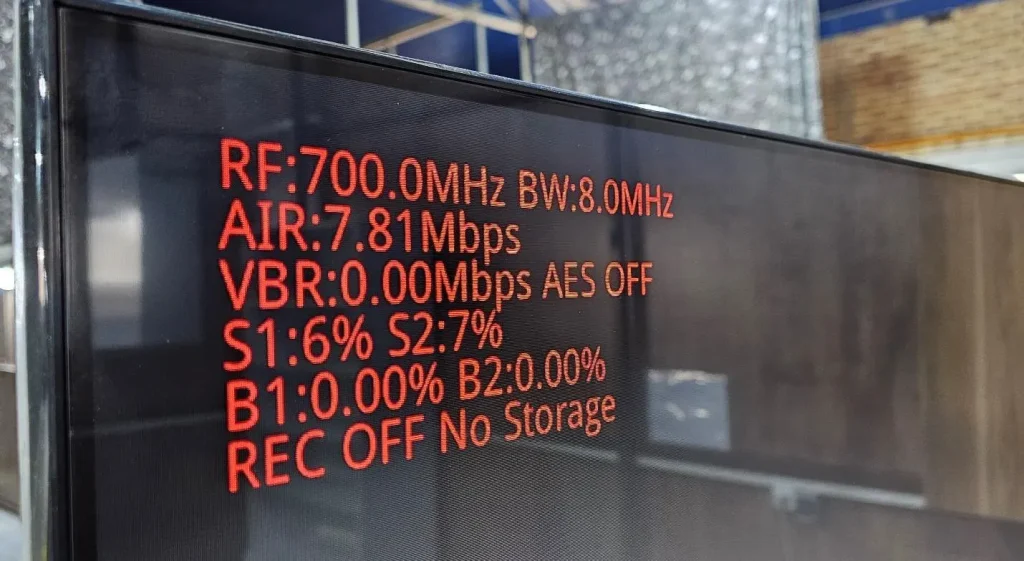
Q: Could you provide more information about VBR?
By applying video to the TX, the VBR parameter will change over time and is not a static value. Could you provide more information about this?
ΕΝΑ: VBR is the video encoding bit rate at the transmitter. Since the video picture changes dynamically, VBR is of course variable, but it fluctuates around the encoding bit rate set by the transmission system: 7.81*0.8=6.248Mbps.
Q: Despite having flash storage on my receiver, REC OFF and No Storage are displayed on the screen. Why is this happening?
You said in the description: Key2: switch button for video recording, short press to change its status. The receiver will automatically check the storage device (micro SD card or USB disk, priority SD card) after powering on and start to record video when the storage device is inserted. Just press the button to stop or record again.
ΕΝΑ: The receiving system fails to detect the USB flash drive. The USB flash drive needs to be formatted to a format that our system can recognize.
Q: Both B1 and B2 are zero. This indicates that there is a 0 % Bite error rate!!! Which range of these parameters is acceptable?
ΕΝΑ: The occurrence of a bit error rate may cause problems with the video image. When the bit error rate is very small, it will not affect the video image effect.
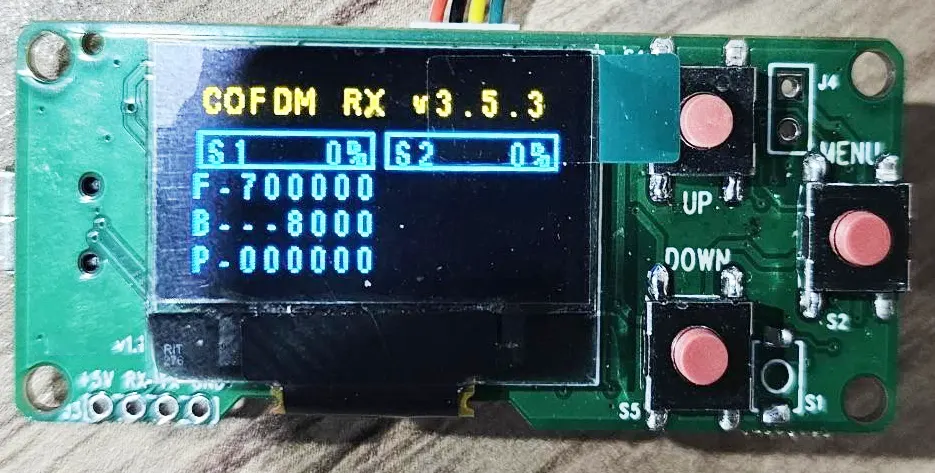
Q: Can I customize the programmer screen contents?
ΕΝΑ: The display content of the configuration panel (programmer) is not open to customers for modification.
Q: Why isn’t the S2 channel programmed? It appears that the second tuner is not functioning at the moment.
ΕΝΑ: S2 refers to receiving antenna 2, which can work normally. Frequency and bandwidth are the same s1 and s2.
Q: Why the latency I calculated is huge? It’s around 470 Κυρία.
In your description coming: The default normal features of our receiver module can be paired with our H.265 transmitter module. The HD video latency from its inputting of the transmitter to the HDMI screen displaying of the receiver is about 200ms to 250ms.
ΕΝΑ: The delay we tested was around 250ms. How did you test it? The delay way we tested, please check the Youtube video link.
Q: How much latency does your SDI encoder transmitter and decoder receiver module have?
I remember you said you optimized the protocol for better latency. As I do not use your fast H.264 latency (130 Κυρία) how much latency should we have on my setup?
ΕΝΑ: You confirmed that you needed to support H265, but not H264 low latency mode. To achieve low latency mode, the receiver must be changed to another receiver hardware, and the corresponding firmware must be burned before shipment.
Q: Can I use your COFDM receiver to get the normal DVB-T TV channel?
You said you changed the video protocol for better latency in TX. Can I use your RX as a commercial DVB-T? how can I receive the normal DVB-T channel?
ΕΝΑ: If you really want to use it as a normal DVB-T receiver, we have to upgrade another firmware. (remove the encryption on the encoder and decryption on the decoder).
Q: How can I use your OSD menu function on the COFDM receiver?
In your description coming:
The receiver module also includes DVR record functionality with a Micro SD card or USB disk. The receiver module also enables video streaming over USB for remote Android device decoders like Smartphones or Android PAD. This allows multiple remote viewers to monitor the same video
simultaneously. The receiver module also supports display characters string on the video display screen with the video together in OSD mode.
ΕΝΑ: See OSD online documentation.
Q: How can I turn on the AES encryption? Where should I enter the key?
ΕΝΑ: The configuration panel can edit and change the password.
Q: Indicate the bow text picture question:
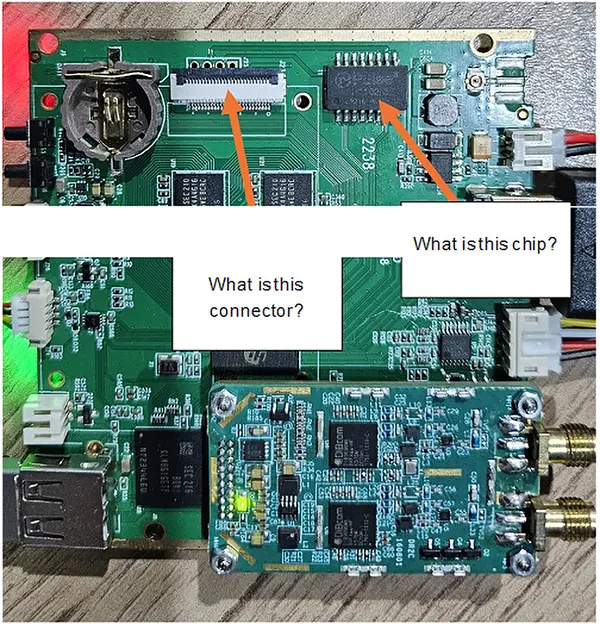
ΕΝΑ: This optional function is required by other products (the network port function is used to connect to a two-way wireless link). Please ignore it in your application.
Q: What is the time delay of the UART data on the one-way transmission?
For UART data from TX to RX, is the data processed through the encoding process or transmitted in real-time? I require real-time data transfer.
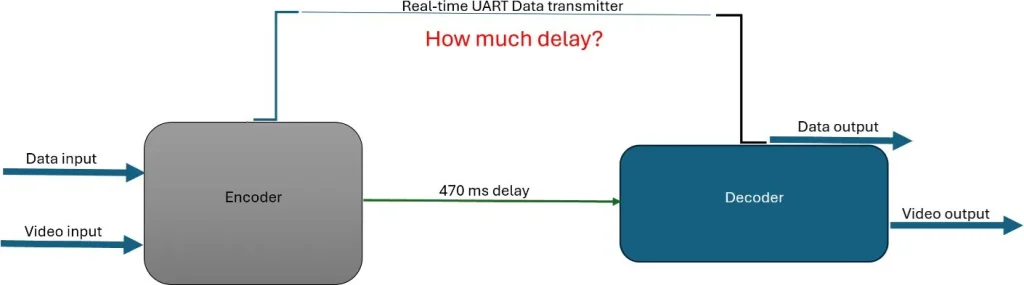
ΕΝΑ: The data and video are sent together via wireless cofdm package. So the delay is the same as with video.
Q: For transmitter. Is possible to change GI and FEC and another parameter according to your table in the description?
ΕΝΑ: Ναί.
Q: What is the exact power at this point from 1350 προς την 1450 MHz? I need this information to design a PA.
The maximum output of the 1350~1450 frequency band is around -10±2dBm. It is recommended to design the PA based on -15dBm input. Our transmitter can be adjusted down to -15dBm.
Q: Does your programmer have the function of resetting the factory restore?
If I change any parameters of any side like frequency GI or FEC or video bandwidth, how can I reset all parameters in reset factory mode? I am new to this board, and I need to change some parameters to achieve my desire. But I’m afraid of changing the default pieces of information.
ΕΝΑ: Our TX / RX programmer doesn’t have a factory reset feature.
Q: Does your SDI Video input encoder support 1080i25/1080i30?
It supports 1080i50 and 1080i60, it does not support 1080i25 or 1080i30.
Q: Can you offer me some technical files for the repair of the power part of the Vcan1731 SDI video encoder board?
ΕΝΑ: Please check the files at the below link.
- https://ivcan.com/wp-content/uploads/Vcan1731-Component-Part-Number-Map-1.pdf
- https://ivcan.com/wp-content/uploads/Vcan1731-Component-Part-Number-Map-2.pdf
- https://ivcan.com/wp-content/uploads/vcan1731_A01_power.pdf
Our maintenance idea is to first rule out whether there is a short circuit and where the short circuit is. Για παράδειγμα, disconnect the magnetic bead or 0-ohm resistor between the power IC and the subsequent circuit, and then use a multimeter to measure whether the power IC is broken or the subsequent circuit is short-circuited. If the power IC is broken, replace the power IC; if the subsequent circuit is short-circuited, you have to check the subsequent circuit.
Q: Μπορεί η πλακέτα κωδικοποιητή να λάβει και να προωθήσει δεδομένα UART μέσω επικοινωνίας UDP (IP:Λιμάνι)?
ΕΝΑ: Ναί, Η μετάδοση δεδομένων UART υποστηρίζεται από εμάς προεπιλεγμένο προσαρμοσμένο πρωτόκολλο, με ορισμένες σημαντικές εκτιμήσεις:
1. Custom Protocol (Προεπιλεγμένο υλικολογισμικό)
Το προεπιλεγμένο υλικολογισμικό αποστολής μας χρησιμοποιεί α προσαρμοσμένο πολυπλεξικό πρωτόκολλο που υποστηρίζει Διαφανής μετάδοση UART (σειριακή διέλευση).
- Τα δεδομένα UART πολυπλέκονται μαζί με ροές ήχου/βίντεο.
- Επομένως, η πλευρά λήψης πρέπει να χρησιμοποιεί το αντίστοιχο προσαρμοσμένη βιβλιοθήκη demux πρωτοκόλλου για να διαχωρίσετε τα δεδομένα UART από τη ροή πολυμέσων.
- Όταν χρησιμοποιείται μαζί με την πλακέτα αποκωδικοποιητή μας, Η διαφανής μετάδοση UART λειτουργεί σωστά και μπορεί να προωθηθεί/ληφθεί όπως αναμένεται.
Σημείωση για συσκευές αναπαραγωγής υπολογιστή
Το τρέχον λογισμικό αναπαραγωγής υπολογιστών που διαθέτουμε μόνο αποσυμφορεί και επεξεργάζεται:
- Δεδομένα βίντεο
- Audio data
Επί του παρόντος, it does δεν επεξεργασία ή έξοδος σειριακών δεδομένων UART.
2. Τυπικό πρωτόκολλο MPEG-TS
Εάν η πλακέτα κωδικοποιητή αναβοσβήνει με το τυπικό υλικολογισμικό/πρωτόκολλο MPEG-TS:
- Υποστηρίζονται μόνο ροές ήχου και βίντεο.
- UART/σειριακή μετάδοση δεδομένων είναι not supported σε λειτουργία MPEG-TS.
Λάβετε αυτό υπόψη όταν επιλέγετε τη λύση υλικολογισμικού/πρωτοκόλλου.
| Τύπος πρωτοκόλλου | Audio/Video | Διαφανές κιβώτιο ταχυτήτων UART |
|---|---|---|
| Custom Protocol (Default) | Supported | Supported |
| Τυπικό MPEG-TS | Supported | Δεν υποστηρίζεται |
Q: Έχετε υλικολογισμικό που υποστηρίζει raw H.264 ή RTP αντί για MPEG-TS για ροή UDP?
ΕΝΑ: Το υλικολογισμικό μας UDP δεν μεταδίδει πρωτογενείς στοιχειώδεις ροές H.264. Η ροή UDP υποστηρίζεται σε δύο μορφές ανάλογα με την έκδοση υλικολογισμικού:
- ΕΝΑ προσαρμοσμένη ιδιόκτητη μορφή, ή
- ο πρότυπο MPEG-TS (MPEG Transport Stream) format
Αυτά αντιστοιχούν σε διαφορετικές εκδόσεις υλικολογισμικού (τυπικά διακρίνεται από ένα επίθημα όπως εκδόσεις "T" ή μη "T".).
Q: Υποστηρίζετε το RTP ως αυτόνομο πρωτόκολλο ροής;?
ΕΝΑ: Δεν παρέχουμε ξεχωριστή "ακατέργαστη λειτουργία ροής RTP". Ωστόσο, Το RTP χρησιμοποιείται ήδη εσωτερικά στη ροή RTSP. Σε λειτουργία RTSP, ήχος και βίντεο μεταδίδονται μέσω πακέτων RTP ως μέρος της στοίβας RTSP/RTP/RTCP. Επομένως, Το RTP υποστηρίζεται έμμεσα μέσω του RTSP και όχι ως ανεξάρτητη μορφή ροής UDP.
Q: Μπορεί το σύστημα να εξάγει ακατέργαστο H.264 μέσω UDP?
ΕΝΑ: Οχι. Η στοιχειώδης μετάδοση ροής Raw H.264 δεν υποστηρίζεται μέσω UDP. Αυτό οφείλεται στο μέγεθος των πακέτων και στους περιορισμούς δικτύου. Ένα μεμονωμένο πλαίσιο I μπορεί να είναι πολύ μεγάλο και δεν μπορεί να μεταδοθεί αξιόπιστα σε ένα μόνο πακέτο IP.
Για σταθερή μετάδοση, Οι ροές βίντεο πρέπει να ενθυλακώνονται χρησιμοποιώντας μια μορφή μεταφοράς, όπως π.χ:
- MPEG-TS, ή
- RTP (μέσω RTSP)
Q: Πώς είναι το πλαίσιο κλειδιού (GOP) ρυθμίστηκε το διάστημα?
ΕΝΑ: Το διάστημα κλειδιού καρέ ελέγχεται από το Παράμετρος GOP in the web interface (σελίδα ρυθμίσεων βίντεο).
- Εάν το GOP έχει ρυθμιστεί σε 0 (προεπιλεγμένη/αυτόματη λειτουργία), το σύστημα ευθυγραμμίζει αυτόματα το διάστημα I-frame με τον ρυθμό καρέ εισόδου.
- Example: Εάν η είσοδος είναι 1080p60, τότε το διάστημα I-frame θα είναι 60 frames (1 δεύτερο GOP).
Αυτό εξασφαλίζει προσαρμοστική συμπεριφορά κωδικοποίησης με βάση τα χαρακτηριστικά της πηγής εισόδου.
Q: Γιατί το ακατέργαστο H.264 δεν μπορεί να μεταδοθεί απευθείας μέσω IP/UDP?
ΕΝΑ: Επειδή H.264 καρέ (ειδικά I-frames) μπορεί να είναι πολύ μεγάλο και να υπερβαίνει τη μέγιστη μονάδα μετάδοσης (MTU) των πακέτων δικτύου. Χωρίς ενθυλάκωση, Η αξιόπιστη παράδοση δεν είναι εγγυημένη. Επομένως, Το βίντεο πρέπει να πακετοποιηθεί χρησιμοποιώντας τυποποιημένες μορφές ροής όπως MPEG-TS ή RTP για σωστή τμηματοποίηση, timing, και επανασυναρμολόγηση.
Q: Η καθυστέρηση του συστήματός μου είναι συνολικά ~230 ms. Ο αποκωδικοποιητής και η οθόνη χρειάζονται ~45 ms, αφήνοντας ~185 ms για κάμερα και κωδικοποιητή. Αναμένω ότι η κάμερα συνεισφέρει ~60 ms (4 πλαίσια στο 60 fps), οπότε ο κωδικοποιητής φαίνεται να είναι ~120 ms. Υπάρχει τρόπος να μειωθεί η καθυστέρηση του κωδικοποιητή? Καταλαβαίνω ότι το MPEG-TS επηρεάζει κυρίως την αποκωδικοποίηση, δεν κωδικοποιεί.
ΕΝΑ: Καθοδήγηση ανάλυσης λανθάνοντος χρόνου και βελτιστοποίησης
Για να βελτιστοποιήσετε με ακρίβεια την καθυστέρηση του συστήματος, Είναι σημαντικό πρώτα να επικυρώσετε κάθε στάδιο ανεξάρτητα πριν υποθέσουμε ότι υπάρχουν σημεία συμφόρησης.
1. Επαληθεύστε πρώτα τον λανθάνοντα χρόνο της κάμερας (Κρίσιμο Βήμα)
Πριν βελτιστοποιήσετε την κωδικοποίηση, θα πρέπει να επιβεβαιώσετε την πραγματική συνεισφορά της κάμερας.
Μια πρακτική μέθοδος μέτρησης:
- Συνδέστε την έξοδο HDMI της κάμερας απευθείας σε μια οθόνη
- Στρέψτε την κάμερα σε ένα χρονόμετρο υψηλής ακρίβειας που εμφανίζεται σε ξεχωριστή οθόνη υπολογιστή
- Καταγράψτε ταυτόχρονα τη ζωντανή σκηνή και την έξοδο HDMI
- Συγκρίνετε χρονικές σημάνσεις καρέ για να υπολογίσετε τον λανθάνοντα χρόνο της κάμερας από άκρο σε άκρο
Σημειώσεις:
- Χρησιμοποιήστε ένα χρονόμετρο υψηλής ακρίβειας (μικρότερο διάστημα κροτώνων βελτιώνει την ακρίβεια)
- Η επεξεργασία ISP της κάμερας είναι συχνά ένας σημαντικός παράγοντας
- Από την εμπειρία μας:
- 1080Οι κάμερες p συνήθως εισάγουν καθυστέρηση ~100 ms
- Ορισμένα μοντέλα ενδέχεται να υπερβαίνουν αυτό το ποσό λόγω των βαρύτερων αγωγών ISP
2. Η διαμόρφωση της κάμερας έχει σημαντικό αντίκτυπο
Εάν η καθυστέρηση της κάμερας είναι υψηλή, Η βελτιστοποίηση πρέπει να ξεκινήσει από εκεί:
- Lower resolution (π.χ., 720p έναντι 1080p) → μειώνει την καθυστέρηση του ISP και του αγωγού
- Υψηλότερος ρυθμός καρέ (π.χ., 60 fps vs 30 fps) → μειώνει την καθυστέρηση της προσωρινής αποθήκευσης πλαισίου
- Απλούστερη διοχέτευση επεξεργασίας εικόνας → μειώνει το φορτίο ISP
Αυτές οι αλλαγές συχνά μειώνουν τον λανθάνοντα χρόνο πιο αποτελεσματικά από τον συντονισμό κωδικοποιητή.
3. Η καθυστέρηση του κωδικοποιητή είναι πιθανό να υπερεκτιμηθεί
ΕΝΑ 120 Η καθυστέρηση κωδικοποίησης ms είναι γενικά απίθανη για τυπικούς κωδικοποιητές υλικού.
Με βάση εσωτερικές μετρήσεις:
- Ένας κωδικοποιητής υλικού + αποκρυπτογράφος + μετάδοση + Ο αγωγός εμφάνισης μέσω Ethernet έχει συνήθως ως αποτέλεσμα:
- ~80–100 ms συνολική καθυστέρηση από άκρο σε άκρο
Αυτό συνεπάγεται:
- Η καθυστέρηση μόνο για κωδικοποιητή είναι σημαντικά χαμηλότερη από 120 Κυρία
- Η κωδικοποίηση συνήθως δεν είναι ο κυρίαρχος παράγοντας σε ένα σωστά διαμορφωμένο σύστημα
4. Σημασία Μέθοδος Μετάδοσης (Ειδικά ασύρματη)
Επαληθεύστε εάν το σύστημα χρησιμοποιεί:
- Wired Ethernet
- Wireless transmission
Εάν χρησιμοποιείται ασύρματη:
- Χαμηλό εύρος ζώνης (<20 Mbps) μπορεί να προκαλέσει σημαντική καθυστέρηση
- Η μετάδοση μεγάλου καρέ I μπορεί να προκαλέσει καθυστερήσεις στην προσωρινή μνήμη και στην ουρά
- Αυτό μπορεί να αυξήσει αισθητά τον λανθάνοντα χρόνο από άκρο σε άκρο ακόμα κι αν η κωδικοποίηση είναι αποτελεσματική
5. MPEG-TS και Διευκρίνιση γενικών επιβαρύνσεων πρωτοκόλλου
Η κατανόησή σας είναι γενικά σωστή:
- Το MPEG-TS δεν προσθέτει σημαντικά καθυστέρηση στο στάδιο της κωδικοποίησης
- Οι περισσότερες επιβαρύνσεις πρωτοκόλλου σχετίζονται με τη συμπεριφορά πακετοποίησης και αποκωδικοποίησης, δεν κωδικοποιεί τον εαυτό του
- Οι λειτουργίες Mux/demux είναι κυρίως λειτουργίες μνήμης και έχουν αμελητέα καθυστέρηση σε τυπικά συστήματα
6. Συνιστώμενη προσέγγιση εντοπισμού σφαλμάτων
Για τον ακριβή εντοπισμό των πηγών λανθάνοντος χρόνου:
- Προσθέστε εσωτερικές χρονικές σημάνσεις σε κάθε στάδιο του αγωγού:
- Χρόνος λήψης με κάμερα
- Είσοδος/έξοδος κωδικοποιητή
- Αποστολή/λήψη δικτύου
- Έξοδος αποκωδικοποιητή
- Ανανέωση οθόνης
- Βεβαιωθείτε ότι η καταγραφή είναι ελαφριά και δεν επηρεάζει την απόδοση
- Παρακολούθηση βάθους buffer σε πραγματικό χρόνο για ανίχνευση συσσώρευσης ουρών
Συνοψίστε την απάντησή μας
- Η καθυστέρηση ISP της κάμερας είναι συχνά ένας σημαντικός κρυφός παράγοντας (Τα ~100 ms στα 1080p είναι συνηθισμένα)
- Η καθυστέρηση του κωδικοποιητή είναι συνήθως πολύ χαμηλότερη από την υποθετική
- Η ασύρματη μετάδοση και η αποθήκευση στην προσωρινή μνήμη μπορούν να αυξήσουν σημαντικά την καθυστέρηση
- Η συστηματική μέτρηση χρονικής σφραγίδας είναι ο πιο αξιόπιστος τρόπος για τον εντοπισμό της πραγματικής συμφόρησης
Κάνε μια ερώτηση
Το μήνυμά σας έχει σταλεί