






စက်တွေလိုတယ်။, SDI ဖြင့် Full HD ကင်မရာဗီဒီယိုများဆိုင်ရာ အချက်အလက်များကို ရယူရန် (အမှတ်စဉ်ဒေတာ interface) လိုင်းပေါ်တွင်နှင့် H.265 စံအတွက်သတင်းအချက်အလက် encode. ချုံ့ထားသောဒေတာများကို DVB-T တွင်ကူးစက်ရမည် (ဒစ်ဂျစ်တယ်ဗီဒီယိုထုတ်လွှင့်ခြင်းမြေပြင်) သို့မဟုတ် DVB-S စံ. ဒီဇိုင်းပြုလုပ်ထားသော module ၏ analog output သည် i နှင့် q အချက်ပြမှုများကိုလက်ခံနိုင်သည်, အဖြစ် modulated အချက်ပြမှုများအဖြစ်.
မာတိကာ
မေး: သင်၏ SDI Video Encoder Support Tsi Input ကိုထောက်ပံ့ပါသလား / output?

တစ်ဦးက: ကျွန်ုပ်တို့၏လက်ရှိ encoding board to modulation ဘုတ်အဖွဲ့သည်ကွန်ယက်ဆိပ်ကမ်းမှအချက်အလက်များကိုထုတ်လွှင့်သည်. သင်ဖော်ပြခဲ့တဲ့ Tsi interface ကိုထက်. ဤသည်ကိုလက်ခံရန် transmitter ၏အသုံးပြုမှုကိုမထိခိုက်ပါဘူး. ဤသည် transmitter ၏ internal interface တစ်ခုဖြစ်သည်.
မေး: သင်၏ encoder decoder boards ဘုတ်အဖွဲ့ထောက်ခံမှုကိုလုပ်ပါ 525 i50 1080 ဗွီဒီယို format နဲ့ P60?
တစ်ဦးက: ယခုကျွန်ုပ်တို့၏ SDI ဗီဒီယို encoder ဘုတ်အဖွဲ့များ Support HD: 720P @ 23.98Hz / 24Hz / 25Hz / 29.9.9.9.9.9.9.94Hz / 50Hz / 50HZ / 25HZ / 25HZ / 25HZ / 25HZ / 29.9.9.9.9.9.9.9.9.9.9.9.9.9.9.9.9.9.9.9.9.9.9.9.9.9.9.9.9.9.9.9.9.9.9.9.9.9.9.9.9.9.9.9.9.9.9.9.97Hz / 30Hz. မထောက်ခံဘူး။ 525 i50 ဗီဒီယို ဖော်မတ်, အဆင်ပြေလား?
မေး: သင်၏ SDI cofdm dvb-t h265 sdi encoder rf output ကို Support 0 ~ 10dBm?

တစ်ဦးက: သင့် output frequency point 400Mhz မှ 2800Mhz လိုအပ်သည် အလွန်ကျယ်ပြန့်သည်.
ကျယ်ပြန့်သောကြိမ်နှုန်းအမှတ်အောက်တွင် 0~10dBm အထွက်ကိုရရှိရန် ခက်ခဲသည်။, ဘုတ်ပေါ်တွင် Power Amplifier ထည့်ခြင်းဖြင့် ပါဝါသုံးစွဲမှုနှင့် အပူကို တိုးစေမည်ဖြစ်သည်။ (အပူပျံ့စေရန် ပန်ကာ မလိုအပ်ကြောင်းလည်း သင်ပြောခဲ့ပါသည်။).
ကျွန်ုပ်တို့၏ ရှိရင်းစွဲကို သဘောတူရန် ဆန္ဒရှိပါသလား။ -3 -10dBm output သို့ သင့်ကိုယ်ပိုင် PA ကိုထည့်ပါ။ (ပါဝါအသံချဲ့စက်)?
မေး: သင်၏ cofdm dvb-t h265 sdi encoder ၏ရှုထောင့်ကဘာလဲ?

သင့်တွင် အထူးအတိုင်းအတာ တောင်းဆိုမှု ရှိပါသလား။? ကျွန်ုပ်တို့၏လက်ရှိအရွယ်အစားမှာ 70x45mm ဖြစ်သည်။.
တစ်ဦးက: ကျွန်ုပ်တို့၏ လက်ရှိဗီဒီယိုကုဒ်ဒါနှင့် ဒီကုဒ်ဒါဘုတ်များသည် သင့်ပရောဂျက်လိုအပ်ချက်များကို ဖြည့်ဆည်းပေးနိုင်ပါသည်။.
ကျွန်တော့် အင်ဂျင်နီယာရဲ့ အကြီးမားဆုံး ပူပန်မှုက မင်းရဲ့ ကုမ္ပဏီပါ။, ထုတ်လွှင့်မှုနှင့်ရုပ်မြင်သံကြားလုပ်ငန်းအဖွဲ့ 0 င်အနေဖြင့်ရုပ်ပုံသည်ရုပ်ပုံအရည်အသွေးအတွက်လိုအပ်ချက်များစွာရှိသည်.
ကျွန်ုပ်တို့၏ဗွီဒီယို encoding board သည်အနိမ့်အကန့်အသတ်ဖြင့်အ 0 တ်အစားဆုံးရှုံးမှုကိုပြုလုပ်လိမ့်မည်. image အရည်အသွေးကိုစစ်ဆေးရန်နှင့်အတည်ပြုရန်ရှိပြီးသားနမူနာများကိုသင်ယူနိုင်ပါသလား? အကယ်. သင်ထင်လျှင်ကျွန်ုပ်တို့၏နမူနာများသည်သင်၏ကုမ္ပဏီ၏လိုအပ်ချက်များနှင့်ကိုက်ညီနိုင်သည်, ကျွန်ုပ်တို့သည်သင်၏ကုမ္ပဏီ၏လိုအပ်ချက်များနှင့်အညီဘုတ်အဖွဲ့ကိုဆွဲယူပါမည်.
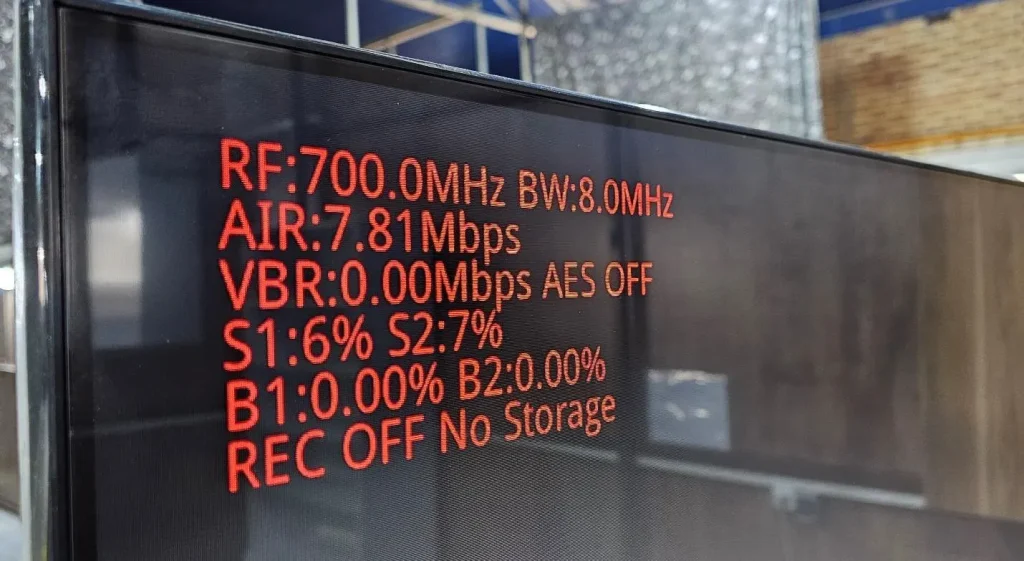
မေး: VBR အကြောင်းပိုမိုသိရှိလိုပါ?
TX မှဗွီဒီယိုကိုလျှောက်ထားခြင်းအားဖြင့်, VBR Parameter သည်အချိန်ကြာလာသည်နှင့်အမျှပြောင်းလဲလိမ့်မည်. ဒီအကြောင်းအသေးစိတ်အချက်အလက်တွေပေးနိုင်မလား?
တစ်ဦးက: VBR သည် transmitter တွင်ဗီဒီယို encoding bit rate bit rate ဖြစ်သည်. ဗီဒီယိုရုပ်ပုံများပြောင်းလဲခြင်းကတည်းက, VBR သည်သင်တန်း variable ကိုဖြစ်ပါတယ်, သို့သော်ဂီယာစနစ်မှသတ်မှတ်ထားသော encoding bit rate န်းကျင်ကိုအတက်အကျ: 7.81*0.8= 6.248Mbps.
မေး: ငါ၏အလက်ခံအပေါ် flash သိုလှောင်မှုရှိခြင်းနေသော်လည်း, REC OFF နှင့်သိုလှောင်ခြင်းမရှိပါ. ဘာကြောင့် ဒီလိုဖြစ်နေတာလဲ။?
သင်ဖော်ပြချက်၌ကပြောသည်: Key2: ဗီဒီယိုရိုက်ကူးရန်အတွက်ခလုတ်ကိုပြောင်းပါ။, ၎င်း၏ အခြေအနေကို ပြောင်းလဲရန် အတိုချုံ့ နှိပ်ပါ။. လက်ခံသူသည် သိုလှောင်မှုကိရိယာကို အလိုအလျောက် စစ်ဆေးမည်ဖြစ်သည်။ (micro SD ကတ် သို့မဟုတ် USB ဒစ်ခ်, ဦး စားပေး SD ကဒ်) ပါဝါဖွင့်ပြီးနောက် သိုလှောင်မှုကိရိယာကို ထည့်သွင်းသောအခါတွင် ဗီဒီယိုကို စတင်မှတ်တမ်းတင်ပါ။. ရပ်ရန် သို့မဟုတ် ထပ်မံမှတ်တမ်းတင်ရန် ခလုတ်ကို နှိပ်ပါ။.
တစ်ဦးက: လက်ခံရရှိသောစနစ်သည် USB flash drive ကိုရှာဖွေရန်ပျက်ကွက်သည်. USB flash drive ကိုကျွန်ုပ်တို့၏စနစ်ကိုအသိအမှတ်ပြုသည့်ပုံစံသို့ format လုပ်ထားရန်လိုအပ်သည်.
မေး: B1 နှင့် B2 နှစ်ခုလုံးသည် သုညဖြစ်သည်။. ရှိတယ်လို့ ထောက်ပြတယ်။ 0 % အမှားအယွင်းကိုက်နှုန်း!!! ဤဘောင်များ၏ မည်သည့်အတိုင်းအတာကို လက်ခံနိုင်သနည်း။?
တစ်ဦးက: နည်းနည်းအမှားနှုန်း၏ဖြစ်ပျက်မှုသည်ဗီဒီယိုပုံနှင့်ပြ problems နာများဖြစ်ပေါ်စေနိုင်သည်. bit အမှားနှုန်းအလွန်သေးငယ်သောအခါ, ၎င်းသည်ဗီဒီယိုပုံရိပ်အကျိုးသက်ရောက်မှုကိုအကျိုးသက်ရောက်လိမ့်မည်မဟုတ်ပါ.
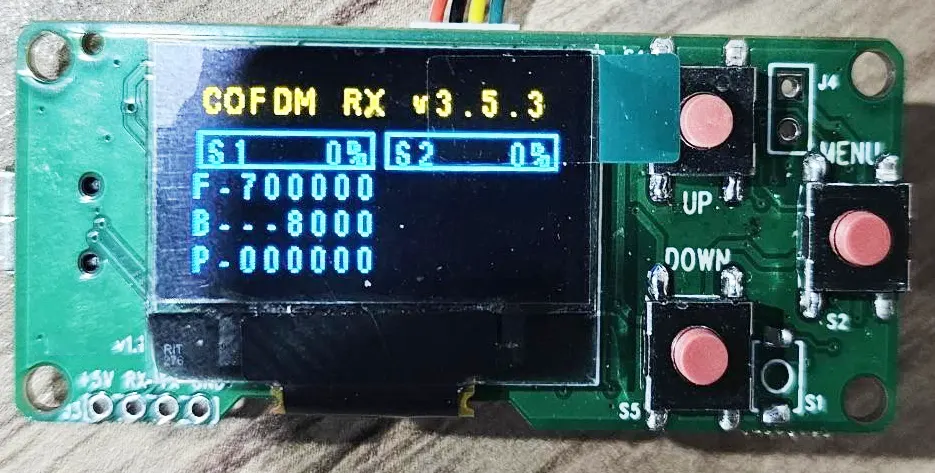
မေး: ပရိုဂရမ်မာစခရင်မှ အကြောင်းအရာများကို စိတ်ကြိုက်ပြင်ဆင်နိုင်ပါသလား။?
တစ်ဦးက: configuration panel ၏ display ကိုအကြောင်းအရာ (ပရိုဂရီဒါမင်း) ပြုပြင်မွမ်းမံများအတွက်ဖောက်သည်များအတွက်ဖွင့်လှစ်မပေးပါ.
မေး: S2 ချန်နယ်ကို ဘာကြောင့် အစီအစဉ်မချတာလဲ။? ဒုတိယ tuner သည် လောလောဆယ်တွင် အလုပ်မလုပ်တော့သည်ကို တွေ့ရပါသည်။.
တစ်ဦးက: S2 သည်အင်တင်နာကိုလက်ခံခြင်းကိုရည်ညွှန်းသည် 2, အရာပုံမှန်အလုပ်လုပ်နိုင်ပါတယ်. ကြိမ်နှုန်းနှင့် bandwidth အတူတူပင် S1 နှင့် S2 ဖြစ်ကြသည်.
မေး: ငါတွက်ချက်ထားတဲ့ latency က ဘာကြောင့် ကြီးမားတာလဲ။? အနီးတဝိုက်မှာ ရှိပါတယ်။ 470 ဒေါ်.
မင်းရဲ့ဖော်ပြချက်ထဲမှာ လာမယ်။: ကျွန်ုပ်တို့၏လက်ခံသည့် module ၏ပုံမှန်ပုံမှန်အင်္ဂါရပ်များကိုကျွန်ုပ်တို့၏ H.265 Transmitter Module နှင့်တွဲဖက်နိုင်သည်. လက်ခံသူ၏ HDMI ဖန်သားပြင်သို့ transmitter ထည့်သွင်းခြင်းမှ HD ဗီဒီယို latency သည် 200ms မှ 250ms ခန့်ဖြစ်သည်။.
တစ်ဦးက: ကျွန်ုပ်တို့စမ်းသပ်ထားသော နှောင့်နှေးမှုသည် 250ms ဝန်းကျင်ဖြစ်သည်။. သင်မည်သို့စမ်းသပ်ခဲ့သနည်း? နှောင့်နှေးတဲ့နည်းလမ်းကို ကျွန်တော်တို့ စမ်းသပ်ခဲ့ပါတယ်။, ကျေးဇူးပြု၍ စစ်ဆေးပါ။ Youtube ဗီဒီယိုလင့်ခ်.
မေး: သင်၏ SDI ကုဒ်ပြောင်းကိရိယာထုတ်လွှင့်သူနှင့် ဒီကုဒ်ဒါလက်ခံသူ မော်ဂျူးတွင် latency မည်မျှရှိသနည်း။?
ပိုကောင်းတဲ့ latency အတွက် ပရိုတိုကောကို အကောင်းဆုံးဖြစ်အောင် လုပ်ထားတယ်လို့ မင်းပြောခဲ့တာ မှတ်မိတယ်။. မင်းရဲ့ မြန်ဆန်တဲ့ H.264 latency ကို ငါ အသုံးမချဘူး (130 ဒေါ်) ကျွန်ုပ်၏စဖွင့်သတ်မှတ်မှုတွင် ကျွန်ုပ်တို့သည် latency မည်မျှရှိသင့်သနည်း။?
တစ်ဦးက: H265 ကို ပံ့ပိုးရန် လိုအပ်ကြောင်း သင်အတည်ပြုခဲ့သည်။, သို့သော် H264 low latency mode မဟုတ်ပါ။. ကြာမြင့်ချိန်နည်းသောမုဒ်ကို ရရှိရန်, လက်ခံသူအား အခြားလက်ခံသူ ဟာ့ဒ်ဝဲသို့ ပြောင်းရပါမည်။, တင်ပို့ခြင်းမပြုမီ သက်ဆိုင်ရာ firmware ကို မီးရှို့ရပါမည်။.
မေး: ပုံမှန် DVB-T တီဗီချန်နယ်ကို ရယူရန် သင်၏ COFDM လက်ခံကိရိယာကို သုံးနိုင်ပါသလား။?
TX တွင် latency ပိုကောင်းစေရန် ဗီဒီယိုပရိုတိုကောကို သင်ပြောင်းထားသည်ဟုဆိုသည်။. သင်၏ RX ကို စီးပွားဖြစ် DVB-T အဖြစ် သုံးနိုင်ပါသလား။? ပုံမှန် DVB-T ချန်နယ်ကို ဘယ်လိုရနိုင်မလဲ။?
တစ်ဦးက: သင်အမှန်တကယ် dvb-t လက်ခံသူအဖြစ်၎င်းကိုအမှန်တကယ်အသုံးပြုလိုပါက, ကျွန်ုပ်တို့သည် အခြား firmware ကို အဆင့်မြှင့်ရန် လိုအပ်သည်။. (ကုဒ်ဒါပေါ်ရှိ ကုဒ်ဝှက်ခြင်းနှင့် ကုဒ်ဒါပေါ်ရှိ ကုဒ်ဝှက်ခြင်းတို့ကို ဖယ်ရှားပါ။).
မေး: သင်၏ OSD မီနူးလုပ်ဆောင်ချက်ကို COFDM လက်ခံသူတွင် မည်သို့အသုံးပြုနိုင်မည်နည်း။?
မင်းရဲ့ဖော်ပြချက်ထဲမှာ လာမယ်။:
လက်ခံသည့် မော်ဂျူးတွင် Micro SD ကတ် သို့မဟုတ် USB ဒစ်ခ်ဖြင့် DVR မှတ်တမ်း လုပ်ဆောင်နိုင်စွမ်းလည်း ပါဝင်သည်။. လက်ခံသည့် မော်ဂျူးသည် စမတ်ဖုန်း သို့မဟုတ် Android PAD ကဲ့သို့သော အဝေးထိန်း Android စက်ပစ္စည်း ကုဒ်ဒါများ အတွက် USB မှ ဗီဒီယို ထုတ်လွှင့်မှုကိုလည်း လုပ်ဆောင်နိုင်သည်. ၎င်းသည် အဝေးမှကြည့်ရှုသူအများအပြားကို တူညီသောဗီဒီယိုကို စောင့်ကြည့်ရန် ခွင့်ပြုသည်။
တပြိုင်နက်တည်း. လက်ခံသူ မော်ဂျူးသည် OSD မုဒ်တွင် အတူတကွ ဗီဒီယိုဖြင့် ဗီဒီယိုပြသသည့် မျက်နှာပြင်ရှိ ဇာတ်ကောင်များကို ပြသပေးပါသည်။.
တစ်ဦးက: မြင် OSD အွန်လိုင်းစာရွက်စာတမ်း.
မေး: AES ကုဒ်ဝှက်ခြင်းကို မည်သို့ဖွင့်နိုင်မည်နည်း။? သော့ကို ဘယ်မှာထည့်ရမလဲ?
တစ်ဦးက: ဖွဲ့စည်းမှုဘောင်သည် စကားဝှက်ကို တည်းဖြတ်နိုင်ပြီး ပြောင်းလဲနိုင်သည်။.
မေး: မေးခွန်းလေးကို စာသားပုံမှာ ဖော်ပြပါ။:
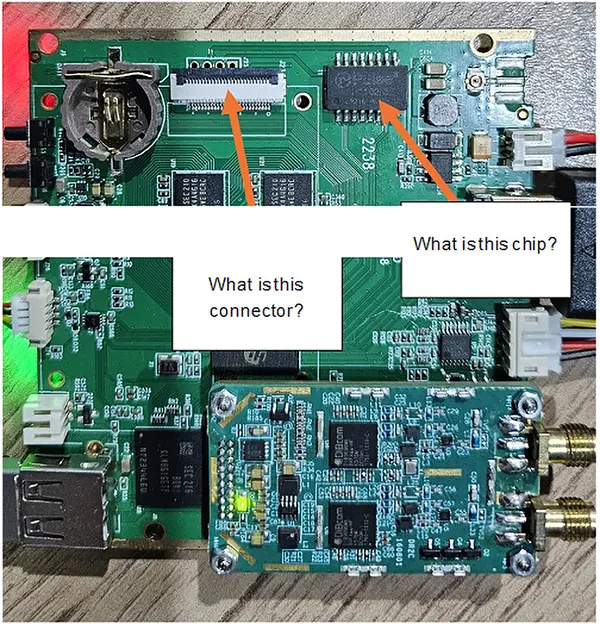
တစ်ဦးက: ဤရွေးချယ်နိုင်သောလုပ်ဆောင်ချက်ကို အခြားထုတ်ကုန်များမှ လိုအပ်ပါသည်။ (network port function ကို two-way wireless link တစ်ခုသို့ ချိတ်ဆက်ရန် အသုံးပြုပါသည်။). သင့်လျှောက်လွှာတွင် ၎င်းကိုလျစ်လျူရှုပါ။.
မေး: တစ်လမ်းမောင်း ထုတ်လွှင့်မှုတွင် UART ဒေတာ၏ အချိန်ကြန့်ကြာမှုကား အဘယ်နည်း?
TX မှ RX မှ UART ဒေတာအတွက်, ဒေတာသည် encoding လုပ်ငန်းစဉ်မှတဆင့်သို့မဟုတ် real-time အတွက်မှတဆင့် procked? အချိန်နှင့်တစ်ပြေးညီ ဒေတာလွှဲပြောင်းမှု လိုအပ်ပါသည်။.
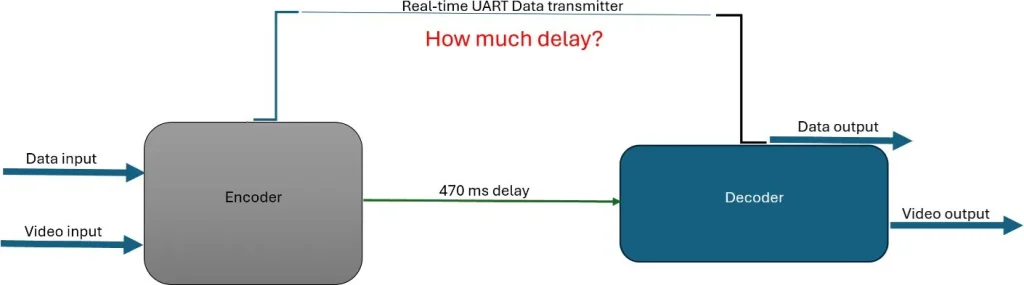
တစ်ဦးက: Data နှင့် video ကို wireless cofdm package မှတဆင့်အတူတကွပို့သည်. ဒါကြောင့်နှောင့်နှေးဗီဒီယိုနှင့်အတူတူပါပဲ.
မေး: transmitter အတွက်. ဖော်ပြချက်အရ Gi နှင့် FEC နှင့်အခြား parameter ကိုပြောင်းလဲရန်ဖြစ်နိုင်သည်?
တစ်ဦးက: ဟုတ်ကဲ့.
မေး: ဤအချက်ကိုဤအချက်မှာအတိအကျပါဝါကဘာလဲ 1350 သို့ 1450 MHz? ငါ pa ဒီဇိုင်းဆွဲရန်ဤအချက်အလက်လိုအပ်ပါတယ်.
1350 ~ 1450 ကြိမ်မြောက်ကြိမ်နှုန်းဖြင့်အများဆုံး output ကို -10 ± 2DBM န်းကျင်ဖြစ်ပါတယ်. PA ကို -15DBM input အပေါ်အခြေခံပြီးဒီဇိုင်းဆွဲရန်အကြံပြုသည်. ကျွန်ုပ်တို့၏ transmitter ကို -15dbm သို့ချိန်ညှိနိုင်သည်.
မေး: သင်၏ပရိုဂရမ်မာတွင်စက်ရုံပြန်လည်ထူထောင်ရေးကိုပြန်လည်သတ်မှတ်ခြင်း၏လုပ်ဆောင်မှုရှိသည်?
အကယ်. ကျွန်ုပ်သည်မည်သည့်အရာမဆို parameteters များကိုအကြိမ်ရေ gi သို့မဟုတ် fec သို့မဟုတ် video bandwidth နှင့်တူသည်, reset စက်ရုံ mode မှာ parameters တွေကိုဘယ်လို reset နိုင်မလဲ? ငါဒီဘုတ်အဖွဲ့မှအသစ်ဖြစ်၏, ငါဆန္ဒရှိဖို့အချို့သော parameters တွေကိုပြောင်းလဲရန်လိုအပ်သည်. သို့သော်လည်းငါသည်သတင်းအချက်အလက်များ၏ပုံမှန်အပိုင်းအစများပြောင်းလဲခြင်းကိုကြောက်တယ်.
တစ်ဦးက: ကျွန်ုပ်တို့၏ TX / RX ပရိုဂရမ်မာတွင်စက်ရုံပြန်လည်တည်ဆောက်ခြင်းတွင်မရှိပါ.
မေး: သင်၏ SDI video input encoder ပံ့ပိုးမှု 1080i25 / 1080i30?
1080I50 နှင့် 1080i60 ကိုထောက်ပံ့သည်, 1080i25 သို့မဟုတ် 1080i30 ကိုမထောက်ပံ့ပါ.
မေး: ငါ့ကိုနည်းပညာဆိုင်ရာဖိုင်အချို့ပေးနိုင်မလား ၏ပါဝါအစိတ်အပိုင်း၏ပြုပြင်ခြင်းသည် VCAN1731 SDI ဗီဒီယို encoder ဘုတ်အဖွဲ့?
တစ်ဦးက: ကျေးဇူးပြု. ဖိုင်များကိုအောက်ပါလင့်ခ်တွင်စစ်ဆေးပါ.
- https://ivcan.com/wp-content/uploads/Vcan1731-Component-Part-Number-Map-1.pdf
- https://ivcan.com/wp-content/uploads/Vcan1731-Component-Part-Number-Map-2.pdf
- https://ivcan.com/wp-content/uploads/vcan1731_A01_power.pdf
ကျွန်ုပ်တို့၏ပြုပြင်ထိန်းသိမ်းမှုစိတ်ကူးသည်အတိုတောင်းသော circuit တစ်ခုရှိ,. ဥပမာ, Power IC နှင့်နောက်ဆက်တွဲ circuit အကြားသံလိုက်ပုတီးသို့မဟုတ် 0-ohm redror ကိုဖြုတ်လိုက်ပါ, ထို့နောက် Power IC သည်ကျိုးပဲ့နေသလားသို့မဟုတ်နောက်ဆက်တွဲ circuit ကိုတိုင်းတာသည်ကိုတိုင်းတာရန် multimeter ကိုအသုံးပြုပါ. Power IC ကျိုးသည်ဆိုပါက, Power IC ကိုအစားထိုးပါ; အဆိုပါနောက်ဆက်တွဲ circuit ကိုတိုတောင်းသော - circuited လျှင်, သင်နောက်ဆက်တွဲ circuit ကိုစစ်ဆေးရန်ရှိသည်.
မေး: Can the encoder board receive and forward UART data through UDP communication (အိုင်ပီ:ဆိပ်ကမ်း)?
တစ်ဦးက: ဟုတ်ကဲ့, UART data transmission is supported under our default custom protocol, with some important considerations:
1. စိတ်ကြိုက် protocol (Default Firmware)
Our default shipping firmware uses a custom multiplexed protocol that supports UART transparent transmission (serial passthrough).
- UART data is multiplexed together with audio/video streams.
- ထိုကွောငျ့, the receiving side must use the corresponding custom protocol demux library to separate UART data from the media stream.
- When used together with our decoder board, UART transparent transmission works properly and can be forwarded/received as expected.
Note for PC Players
Our current PC player software only demuxes and processes:
- Video data
- အသံဒေတာ
လက်ရှိအချိန်မှာ, အဲဒါ မဟုတ် process or output UART serial data.
2. Standard MPEG-TS Protocol
If the encoder board is flashed with the standard MPEG-TS firmware/protocol:
- Only audio and video streams are supported.
- UART/serial data transmission is မထောက်ခံပါ။ under MPEG-TS mode.
Please take this into consideration when selecting the firmware/protocol solution.
| Protocol Type | audio / ဗီဒီယို | UART Transparent Transmission |
|---|---|---|
| စိတ်ကြိုက် protocol (ပျက်ကွက်) | ထောက်ပံ့သည်။ | ထောက်ပံ့သည်။ |
| Standard MPEG-TS | ထောက်ပံ့သည်။ | Not Supported |
မေး: Do you have firmware that supports raw H.264 or RTP instead of MPEG-TS for UDP streaming?
တစ်ဦးက: Our UDP firmware does not transmit raw H.264 elementary streams. UDP streaming is supported in two formats depending on firmware version:
- တစ်ဦးက custom proprietary format, သို့မဟုတ်
- အဆိုပါ standard MPEG-TS (MPEG Transport Stream) ပုံစံ
These correspond to different firmware builds (typically distinguished by a suffix such as “T” or non-“T” versions).
မေး: Do you support RTP as a standalone streaming protocol?
တစ်ဦးက: We do not provide a separate “raw RTP streaming mode.” However, RTP is already used internally within RTSP streaming. In RTSP mode, audio and video are transmitted over RTP packets as part of the RTSP/RTP/RTCP stack. ထိုကွောငျ့, RTP is supported indirectly through RTSP rather than as an independent UDP streaming format.
မေး: Can the system output raw H.264 over UDP?
တစ်ဦးက: အဘယ်သူမျှမ. Raw H.264 elementary stream transmission is not supported over UDP. This is due to packet size and network constraints. A single I-frame can be very large and cannot be reliably transmitted in a single IP packet.
For stable transmission, video streams must be encapsulated using a transport format such as:
- MPEG-TS, သို့မဟုတ်
- RTP (via RTSP)
မေး: How is the key frame (GOP) interval configured?
တစ်ဦးက: The key frame interval is controlled by the GOP parameter ဝဘ်အင်တာဖေ့စ်တွင် (video settings page).
- If GOP is set to 0 (default/auto mode), the system automatically aligns the I-frame interval with the input frame rate.
- ဥပမာ: If the input is 1080p60, then the I-frame interval will be 60 ဘောင်များ (1 second GOP).
This ensures adaptive encoding behavior based on input source characteristics.
မေး: Why can’t raw H.264 be transmitted directly over IP/UDP?
တစ်ဦးက: Because H.264 frames (especially I-frames) can be very large and exceed the maximum transmission unit (လူယောကျ်ား) of network packets. Without encapsulation, reliable delivery cannot be guaranteed. ထိုကွောငျ့, video must be packetized using standardized streaming formats such as MPEG-TS or RTP for proper segmentation, အချိန်က, and reassembly.
မေး: My system latency is ~230 ms total. Decoder and display take ~45 ms, leaving ~185 ms for camera and encoder. I expect the camera contributes ~60 ms (4 frames at 60 fps), so the encoder seems to be ~120 ms. Is there a way to reduce encoder latency? I understand MPEG-TS mainly affects decoding, not encoding.
တစ်ဦးက: Latency Breakdown and Optimization Guidance
To accurately optimize system latency, it is important to first validate each stage independently before assuming bottlenecks.
1. Verify Camera Latency First (Critical Step)
Before optimizing encoding, you should confirm the actual camera contribution.
A practical measurement method:
- Connect the camera HDMI output directly to a display
- Point the camera at a high-precision stopwatch displayed on a separate PC monitor
- Capture both the live scene and HDMI output simultaneously
- Compare frame timestamps to calculate end-to-end camera latency
မှတ်စုများ:
- Use a high-precision stopwatch (smaller tick interval improves accuracy)
- Camera ISP processing is often a major contributor
- In our experience:
- 1080p cameras typically introduce ~100 ms latency
- Some models may exceed this due to heavier ISP pipelines
2. Camera Configuration Has a Major Impact
If camera latency is high, optimization should start there:
- ကြည်လင်ပြတ်သားမှု နည်းပါးသည်။ (e.g., 720p vs 1080p) → reduces ISP and pipeline delay
- Higher frame rate (e.g., 60 fps vs 30 fps) → reduces frame buffering latency
- Simpler image processing pipeline → reduces ISP load
These changes often reduce latency more effectively than encoder tuning.
3. Encoder Latency Is Likely Overestimated
တစ်ဦးက 120 ms encoding delay is generally unlikely for typical hardware encoders.
Based on internal measurements:
- A hardware encoder + ဒီကုဒ်ဒါ + ကူးစက်ခြင်း + display pipeline over Ethernet typically results in:
- ~80–100 ms total end-to-end latency
This implies:
- Encoder-only latency is significantly lower than 120 ဒေါ်
- Encoding is usually not the dominant contributor in a properly configured system
4. Transmission Method Matters (Especially Wireless)
Please verify whether the system uses:
- Wired Ethernet
- ကြိုးမဲ့ဂီယာ
If wireless is used:
- Low bandwidth (<20 Mbps) can introduce significant delay
- Large I-frame transmission may cause buffering and queueing delays
- This can noticeably increase end-to-end latency even if encoding is efficient
5. MPEG-TS and Protocol Overhead Clarification
Your understanding is generally correct:
- MPEG-TS does not significantly add latency at the encoding stage
- Most protocol overhead is related to packetization and decoding behavior, not encoding itself
- Mux/demux operations are primarily memory operations and have negligible delay in typical systems
6. Recommended Debugging Approach
To precisely locate latency sources:
- Add internal timestamps at each pipeline stage:
- Camera capture time
- Encoder input/output
- Network send/receive
- Decoder output
- Display refresh
- Ensure logging is lightweight and does not affect performance
- Monitor buffer depth in real time to detect queue buildup
Summary our answer
- Camera ISP delay is often a major hidden contributor (~100 ms at 1080p is common)
- Encoder latency is usually much lower than assumed
- Wireless transmission and buffering can significantly increase delay
- Systematic timestamp measurement is the most reliable way to identify the real bottleneck
မေးခွန်းတစ်ခုမေး
သင့်စာကို ပို့ပြီးပါပြီ။