






We offer two methods for modifying the color and zoom settings on the FPV thermal imaging camera.
- Via the keypad serial port board parameter configuration board. Vcan2023-tool.
- Click the Mode (zoom) button once to change the color of the thermal imaging camera.
- Click the Mode (zoom) button twice to change the zoom in or out in 1x 2x 4x of the thermal imaging camera.
- Via the UART AT commands. Please read this port.
This method applies to the following FPV thermal imaging cameras.
Table of Contents
Commonly used commands
Change Iron Red: F0053678200002D0FF
Zoom-in X1: F0053670120000B8FF
Zoom-in X2: F0053670120001B9FF
Zoom-in X4: F0053670120002BAFF
Zoom-in X8: F0053670120003BAFF
Save: F0053674100000BAFF
1. Module Interface Definition
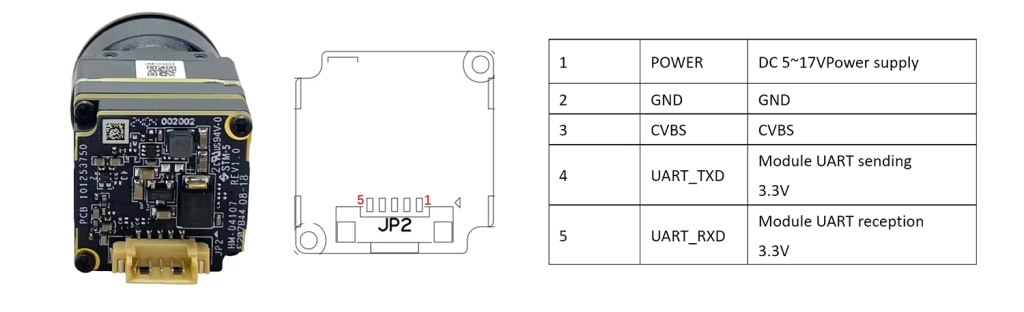
Pin definition
| 1 | Power supply | DC 6~16V Power supply |
| 2 | GND | land / Ground |
| 3 | CVBS | CVBS video signal |
| 4 | UART_TXD | module UART send 3.3V |
| 5 | UART_RXD | moduleUART take over 3.3V |
2. Communication method
2.1. Serial communication format
Before establishing communication with the host, the communication parameters need to be set on the host according to the following table.
Thermal imaging camera serial port communication format
| Name | definition |
| baud rate | 115200 bps |
| start bit | 1 bit |
| data bits | 8 bits |
| Stop bit | 1 bit |
| Verification method | NONE |
2.2. Description of serial port data transmission method
Communication send packet
Fields included in the FPV thermal imaging camera core serial communication data packet
| BEGIN | SIZE | Device address | Class Command Address | Subclass command address | Read and write flags | DATE0 | DATA(N-1) | CHK | END |
| (N+4) |
]
Data transfer communication example
This example is “Set the current color to Fusion 1 mode”。
Step 1 Query the device address command, class command address, subclass command address, and read-write flag.
Query the serial port command table in Appendix A to obtain the device address command(0x36) and the class command address (0x78), subclass command address (0x20), and flag bit (write: 0x00).
Step 2 Calculate SIZE, DATA, and CHK values.
SIZE: N+4. The color setting is N=1 and SIZE is 0x05.
DATA: Color fusion mode, corresponding hexadecimal value is 0x02.
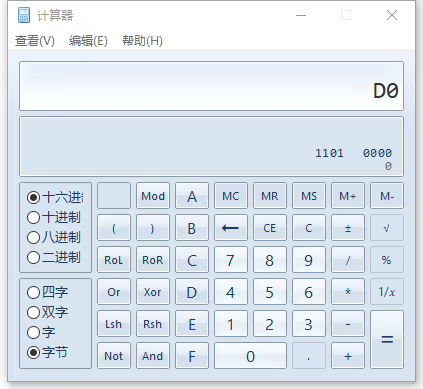
CHK: The fields are 0x36, 0x78, 0x02, 0x00 and 0x02. After accumulation, the result of taking the lower 8 bits is 0XD0.
It can be calculated using the calculator that comes with your PC.
Combined with the above parameters, the host sends the command F0 05 36 78 20 00 02 D0 FF to the camera.
| Command Direction | BEGIN | SIZE | Device Address | class command address | subcategory life Order address | Flag bit | DATA | CHK | END |
| Host Send | 0xF0 | 0x05 | 0x36 | 0x78 | 0x20 | 0x00 | 0x00 | 0xD0 | 0xFF |
| Camera feedback | 0xF0 | 0x05 | 0x36 | 0x78 | 0x20 | 0x03 | 0x01 | 0xD3 | 0xFF |
Specific definitions of each field in communication data packets
| Field | Number of bytes | describe | numerical value | Location | |
| BEGIN | 1 | command package start | 0xF0 | 1 | |
| SIZE | 1 | The length is N+4 | 2 | ||
| Device address | 1 | Device address | 0x36 | 3 | |
| Class command address | 1 | Class command address | 4 | ||
| Subclass command address | 1 | Subclass command address | 5 | ||
| Flag bit | 1 | Host sends packet | Read and write flag | Write as 0x0Reads as 0x1 | 6 |
| Camera feedback data packet | Correct return flag | 0x03 | |||
| Error code return flag | 0x04 | ||||
| DATA (data content) | N | Host sends packet | Pass data content | Default 0x00 | 7- (N+6) |
| Camera feedback data packet | Feedback normal command status | ||||
| Feedback error command status | |||||
| Data content | |||||
| CHK | 1 | sum check | Valid check bit range: After adding up the device address + class command address + subclass command address + return flag + DATA, take the lower 8 bits | (N+7) | |
| END | 1 | End of command package | FF | (N+8) | |
Communication receiving the data packet
In the command format returned by the thermal imaging core to the host, DATA0 is the high byte, and DATA (N-1) is the low byte.
| BEGIN | SIZE | Device address | class command address | subclass command address | Read and write flag | DATE0 | DATA(N-1) | CHK | END |
| (N+4) |
Specific definitions of each field in communication data packets
| Field | Number of bytes | describe | numerical value | Location | |
| BEGIN | 1 | command package start | 0xF0 | 1 | |
| SIZE | 1 | command length | The length is N+4 | 2 | |
| Device address | 1 | Device address | 0x36 | 3 | |
| Class command address | 1 | Class command address | 4 | ||
| Subclass command address | 1 | Subclass command address | 5 | ||
| returnlogoBit | 1 | Host sends packet | Read and write flag | 0x03 | 6 |
| DATA | N | Host sends packet | Pass data content | Default 0x00 | 7- (N+6) |
| CHK | 1 | sum check | Valid check digit range: After accumulating device address + class command address + subclass command address + return flag + DATA, take the lower 8 bits | (N+7) | |
| END | 1 | End of command package | FF | (N+8) | |
Color Settings
Thermal imaging is based on infrared radiation intensity and has no color information. The image algorithm maps a set of colors based on the grayscale value, namely pseudo color. The camera supports multiple pseudo-color modes for users to choose from. The default is white hot 0x00.
Commands and parameters
Set the pseudo-color type displayed by the camera:
| Command Direction | SIZE | Device Address | Class Command Address | 0x00: White heat 0x01: Black heat 0x02: Fusion 1 0x03: Rainbow 0x04: Fusion 2 0x05: Iron red 1 0x06: Iron red 2 0x07: Dark brown 0x08: Color 1 0x09: Color 2 0x0A: Ice Fire 0x0B: Rain 0x0C: Green heat 0x0D: Red heat 0x0E: Dark blue | Flag bit | DATA | CHK |
| Host Send | Calculated based on actual data | 0x36 | 0x78 | 0x20 | 0x00 | 0x00: White heat 0x01: Black heat 0x02: Fusion 1 0x03: Rainbow 0x04: Fusion 2 0x05: Iron red 1 0x06: Iron red 2 0x07: Dark brown 0x08: Color 1 0x09: Color 2 0x0A: Ice fire 0x0B: Rain 0x0C: Green heat 0x0D: Red heat 0x0E: Dark blue | Calculated based on actual data |
| Camera feedback | 0x05 | 0x36 | 0x78 | 0x20 | 0x03 | 0x01 | Calculated based on actual data |
Read the current pseudo-color mode of the camera
| Command Direction | SIZE | Device Address | Class Command Address | Sub Class Command Address | Flag bit | DATA | CHK |
| Host send | 0x05 | 0x36 | 0x78 | 0x20 | 0x01 | 0x00 | Calculated based on actual data |
| Camera feedback | Calculated based on actual data | 0x36 | 0x78 | 0x20 | 0x03 | 0x00: White heat 0x01: Black heat 0x02: Fusion 1 0x03: Rainbow 0x04: Fusion 2 0x05: Iron red 1 0x06: Iron red 2 0x07: Dark brown 0x08: Color 1 0x09: Color 2 0x0A: Ice and fire 0x0B: Rain 0x0C: Green heat 0x0D: Red heat 0x0E: Dark blue | Calculated based on actual data |
Example:
Read the current pseudo-color mode of the camera:
F0 05 36 78 20 01 00 CF FF
Set the current pseudo color toFusion 1 Mode
F0 05 36 78 20 00 02 D0 FF
Save current settings
Issue this command to save the current settings of the camera.
Commands and parameters
| Command Direction | SIZE | Device Address | Class Command Address | SubClass Command Address | Flag bit | DATA | CHK |
| Under the host send | 0x05 | 0x36 | 0x74 | 0x10 | 0x00 | 0x00 | Calculated based on actual data |
| Camera feedback | 0x05 | 0x36 | 0x74 | 0x10 | 0x03 | 0x01 | Calculated based on actual data |
Example:
Save the current color mode of the camera F0 05 36 74 10 00 00 BA FF camera returns
F0 05 36 74 10 03 01 BE FF
3. Serial port software
sscom32.win7.exe
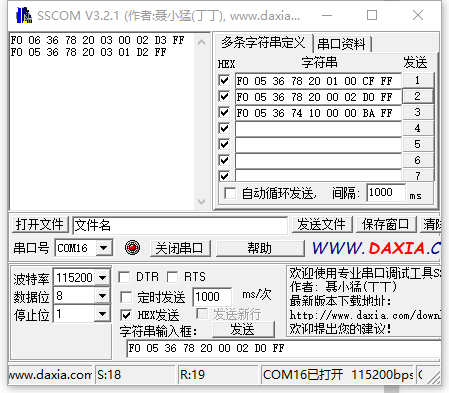
Set the camera zoom-in commands
zoom in 1: F0053670120000B8FF X1
zoom in 2: F0053670120001B9FF X2
zoom in 4: F0053670120002BAFF X4
zoom in 8: F0053670120003BAFF X8
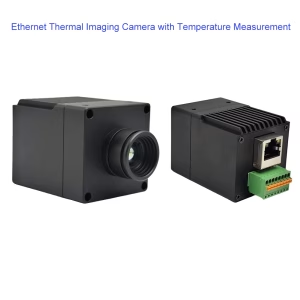
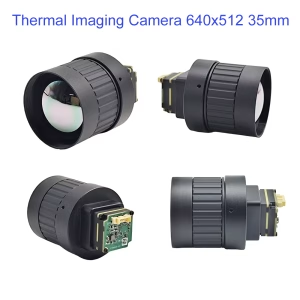
Regarding the FPV Thermal imaging camera.
This is the night test result of the Analog thermal imaging camera.
It can be installed on FPV drones and quadcopters
This is a good infrared night vision camera.
It can detect animals, cars, or humans hiding at night that are emitting heat.
It is a miniaturized integrated product characterized by small size and low power consumption.
It can be installed on various types of equipment.
such as drone gimbals, robot gimbals, individual helmets, Pods, etc.
It supports analog signal cvbs output to replace your FPV camera.
It supports automatic and manual calibration and background.
It also supports receiving serial port commands and can support 1x, 2x, 4x, and 8x zoom-in.
It contains 15 different display colors, which can be switched at any time by sending AT commands.
There is also a mobile phone interface version, which can help with safety checks at night.
Especially when hiking or hunting at night, open the third eye.
The entire camera weighs only 25 grams and is very light.
Now let’s look at this camera’s appearance and what interfaces it has.
As a professional drone accessories supplier, we provide free customization, production, and sales.
If you have any project needs, please get in touch with us and we will provide you with free solutions.

FPV camera
FPV Analog video scrambler and descrambler module for video encryption and decryption board


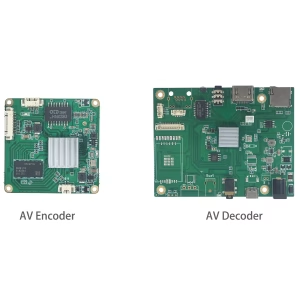
CVBS HDMI to IP Encoder

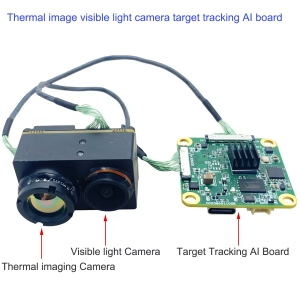


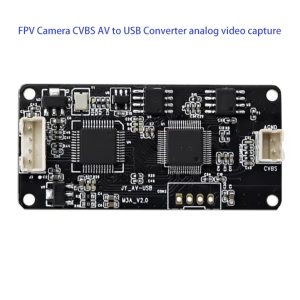
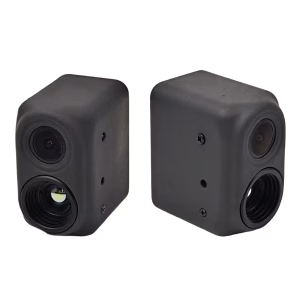
FPV camera
fpv dual lens night thermal imaging and daylight camera for drones, HD vision, low-light real-time





Ask A Question
Thank you for your response. ✨