






Version 2.2
Table of Contents
Version update record
| Version | Update date | describe |
|---|---|---|
| 1.0 | 2016-10-24 | initial version |
| 1.1 | 2016-11-1 | ATDR reply differentiation |
| 1.2 | 2016-12-26 | module |
| 1.3 | 2017-2-14 | ATSE and ATGE add audio |
| 1.4 | 2017-2-28 | switches |
| 1.5 | 2017-3-27 | Add ATSP protocol |
| 1.6 | 2017-4-19 | Add ATST and ATGT protocols |
| 1.7 | 2017-5-18 | ATGE instruction adds AES status |
| 1.8 | 2017-9-12 | acquisition |
| 1.9 | 2018-3-15 | Add ATGB protocol |
| 2.0 | 2019-6-25 | Add AV and HDMI output control to the receiving end. Supports obtaining the current AV output format Added ATSU and ATGU instructions Added ATOSD, ATSIP, ATGIP instructions |
| 2.1 | 2020-3-23 | Modify ATSE and ATSR instructions Added ATSTS and ATGTS instructions |
| 2.2 | 2023-11-22 | Added ATSAI and ATGAI commands Added ATSAE and ATGAE instructions Add ATSF command |
When using our COFDM transceiver module, users may need to modify the configuration parameters of the module. In order to simplify the user’s operation, we design the parameter configuration into a few simple AT commands. The user only needs to use the specified AT command and pass the corresponding parameters to complete the parameter setting of the COFDM module.


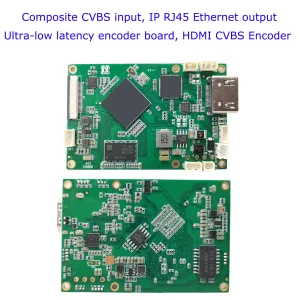
CVBS HDMI to IP Encoder

1.1 Command introduction
The AT command to configure COFDM module parameters starts with AT and ends with an underscore _. Each AT command has several or no parameters, and each AT command has a return value.
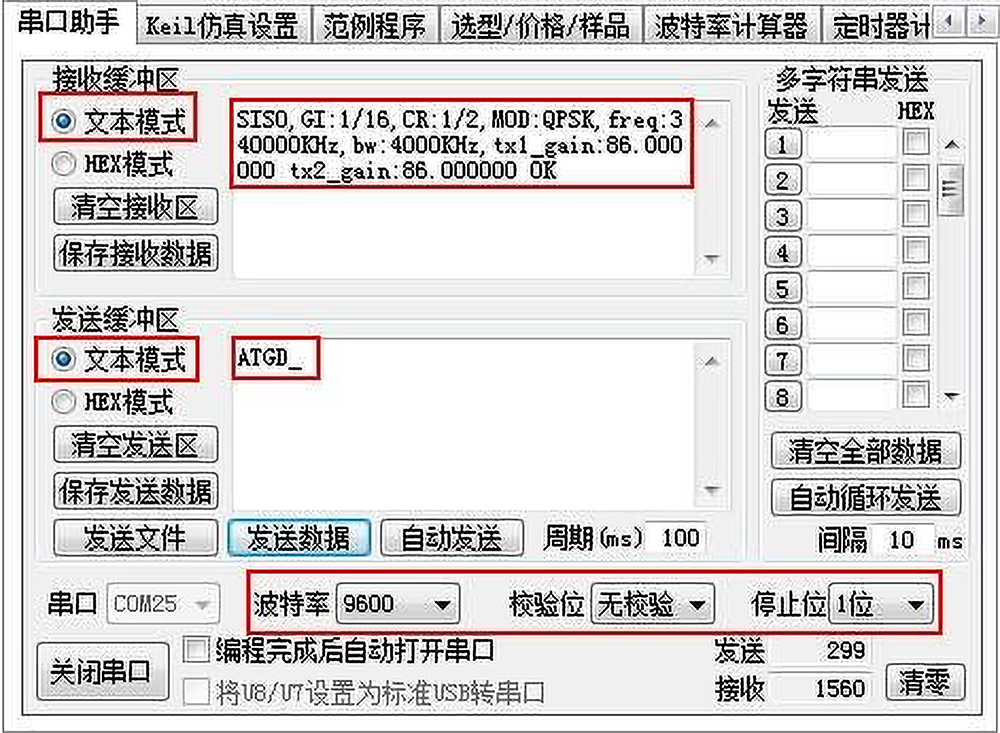
Users can configure the serial port of the COFDM module (TTL level, 3.3V) and the module parameters. Use Serial port debugging assistant (text mode) to send AT commands, the default serial port configuration:
- Serial Port: COM25
- Baud Rate: 9600
- Parity: None
- Stop Bit: 1 bit
- Sending Mode: Text Mode
- Example Command: ATGD_
1.2 Command classification
1.2.1 By function
| Type | AT Commands |
|---|---|
| Query command | ATDR, ATGD, ATGE, ATGI, ATGR, ATGT, ATGB, ATGU, ATGIP, ATGTS, ATGAI, ATGAE |
| Setup instructions | ATSD, ATSF, ATSG, ATSM, ATSE, ATSI, ATSO, ATSR, ATSP, ATST, ATSU, ATOSD, ATSIP, ATSTS, ATSAI, ATSAE |
1.2.2 By power-off save
| Type | AT Commands |
|---|---|
| Power-off save command | ATSD, ATSE, ATSI, ATSO, ATSR, ATSP, ATST, ATSU, ATSIP, ATSTS, ATSAI, ATSAE |
| Commands are not saved when power is off | ATSF, ATSG, ATSM, ATOSD |
1.2.3 By configuration objects
| Type | AT Commands |
|---|---|
| Sender configuration command | ATDR、ATSD、ATGD、ATSF、ATSG、ATSM、ATSE、ATGE、ATSI、ATGI、ATSO、ATSP、ATST、ATGT、ATSU、ATGU、ATOSD、ATSTS、ATSAI、ATGAI、ATSAE、ATGAE |
| Receiver configuration command | ATDR、ATSR、ATGR、ATSP、ATST、ATGT、ATGB、ATSIP、ATGIP、ATSTS |
1.3 Command details
1. 3.1 ping command
| Format | ATDR_ |
| parameter | none |
| use | Used for integrated systems to do device self-tests and identify connected modules. |
| return value | Transmitter returns the “device profile” string |
| Receiver-SUE1 returns “ATDRSUE1 OK” string | |
| Receiver-SHD1 returns “ATDRSHD1 OK” string | |
| Remark | Query command |
1.3. 2 set device command
| Format | ATSD$(mimo),$(gi),$(code_rate),$(constellation),$(freq(KHz)),$(bw(KHz)),$(tx1_gain), $(tx2_gain)_ For example: ATSD0,1,0,0,800000,8000,86.0,86.0_ |
| parameter | Single antenna/dual antenna mimo: 0 mimo disable; 1 mimo enable |
| Guard interval GI: 0 1/32; 1 1/16; 2 1/8; 3 1/4 | |
| Convolution code rate code rate: 0 1/2; 1 2/3; 2 3/4; 3 5/6; 4 7/8; | |
| Constellation constellation: 0 QPSK; 1 QAM16; 2 QAM64; | |
| Transmitter carrier center frequency freq (KHz) 70000~3000000 (70MHz~3GHz, 1KHz step) | |
| Transmitter channel bandwidth bw (KHz) 2000~8000 (2MHz~8MHz, 1KHz step) | |
| Transmitting antenna 1 gain tx1_gain 0.0~89.75dB, 0.25dB step | |
| Turn off antenna 2 gain tx2_gain 0.0~89.75dB, 0.25dB step | |
| use | Used to set various parameters of the device (sender) |
| return value | For example: ATSD0,1,0,0,800000,8000,86.0,86.0_ SISO,GI:1/16,CR:1/2,MOD:QPSK,freq:800000KHz,bw:8000KHz,tx1_gain:86.000000 tx2_gain:86.000000 OK |
| Remark | Set the command and save it after power off. Data rate calculation formulas corresponding to different bandwidths, guard intervals, convolutional code rates, and constellations. Air interface rate Rate(MBps) = (BandWidth(MHz) * 8.0/7.0) / (1+GI) * 1512/2048 * log2(constellation point) * code_rate * 188/204. Taking 8MHz bandwidth as an example, different guard intervals, convolutional code rates, constellation corresponding data rates, and required receiving signal-to-noise ratios. 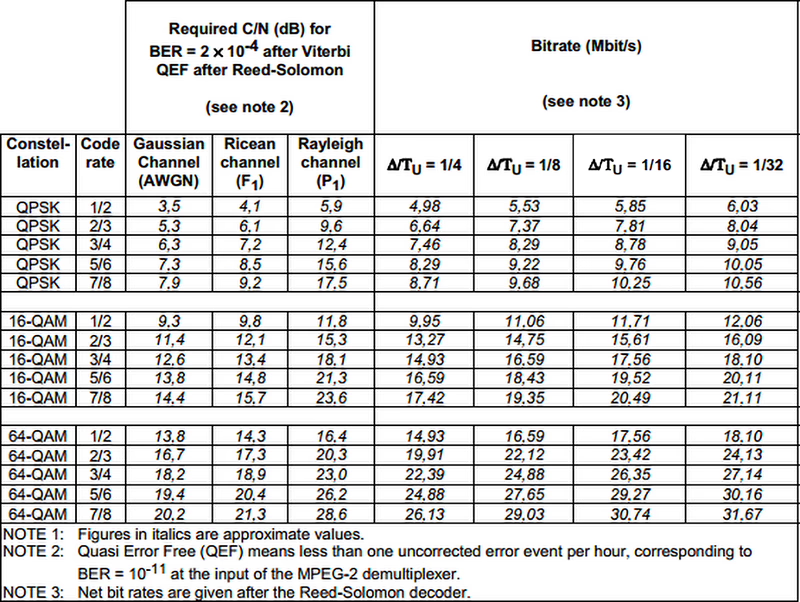 |
1.3.3 set gain command
| Format | ATSG$( tx1_gain),$( tx1_gain)_ For example: ATSG85.0,85.0_ |
| parameter | tx1_gain: Transmitter 1 gain |
| tx2_gain: Transmitter 2 gain | |
| use | Used to dynamically adjust the output power. For example, when the SNR/RSSI of the receiving end signal is high, the output power can be reduced through the remote control link. When the SNR/RSSI of the receiving end signal is low, the output power can be increased (transmitter). |
| return value | For example: ATSG85.0,85.0_ set gain 85.000000 85.000000 OK |
| Remark | The setting command will not be saved when the power is turned off. |
1.3.4 set modulation mode command
| Format | ATSM$(gi), $(code_rate), $(constellation)_ For example: ATSM1,1,2_ |
| parameter | Guard interval GI: 0 1/32; 1 1/16; 2 1/8; 3 1/4; |
| Convolution code rate code rate: 0 1/2; 1 2/3; 2 3/4; 3 5/6; 4 7/8; | |
| Constellation constellation: 0 QPSK; 1 QAM16; 2 QAM64; | |
| use | Dynamically adjust the air interface rate. You can adjust the air interface rate to a higher rate when at a short distance, and lower the air interface rate at a long distance (sending end). |
| return value | For example: ATSM1,1,2_ GI:1/16,CR:2/3,MOD:QAM64,OK |
| Remark | The setting command will not be saved when the power is turned off. |
1.3.5 get device status command
| Format | ATGD_ |
| parameter | none |
| use | Used to query the current number of transmitting antennas, guard interval, convolutional code rate, number of constellations, transmitting frequency, bandwidth, and gain parameters (transmitter) |
| return value | For example: ATGD_ SISO,GI:1/16,CR:1/2,MOD:QPSK,freq:800000KHz,bw:8000KHz,tx1_gain:86.000000 tx2_gain:86.000000 OK |
| Remark | Query command |
1.3.6 set encoder command
| Format | ATSE$(mode),$(rt),$(bitrate),$(gop),$(audio)_ For example: ATSE0,0,0.0,0,0_ |
| parameter | Mode options mode: 0 h264; 1 h265 |
| Low latency option rt: 0 normal latency; 1 low latency; (requires the receiving end to also turn on this option at the same time for paired use) | |
| bitrate: 0 let system decide; >0 specify bitrate(float) | |
| I frame interval gop: 0 let system decide; >0 specify gop | |
| Audio encoding options audio: 0 disable; 1 enable | |
| use | Used to set encoding parameters (sender) |
| return value | For example: ATSE0,0,0.0,0,0_ MODE:0,RT:0,bitrate: 0.0Mbps,gop:0,audio:0,OK |
| Remark | Set the command and save it after power off. Only some models support low-latency option settings (please consult the supplier for details) |
1.3.7 get encoder command
| Format | ATGE_ |
| parameter | none |
| use | Used to query encoding parameters (sender) |
| return value | For example: ATGE_ MODE:0,RT:0,bitrate:4.0Mbps,gop:10,audio:0,aes:0,OK |
| Remark | 1. Query command 2. The aes parameter indicates the current encryption status: 0 disable; 1 enable1 |
1.3.8 get input command
| Format | ATGI_ |
| parameter | none |
| use | Used to query the current camera input parameters (sender) |
| return value | For example: ATGI_ input_size:1080p,input_rate: 60fps,sensor_type:hdmi,OK |
| Remark | Query command |
1.3.9 set input command
| Format | ATSI$(input_size),$(input_rate)_ For example: ATSI1080,25_ |
| parameter | Input resolution input_size: 0 let system detect; >0 specify input size |
| Input frame rate input_rate: 0 let system detect; >0 specify input fps | |
| use | Used to specify input resolution and frame rate to meet some special signal sources or some special application needs (sending end) |
| return value | For example: ATSI1080,25_ input_size:1080p,input_rate: 25fps,OK |
| Remark | 1、 After the user specifies the input resolution and frame rate through this command, the system will no longer detect the signal source (Use with caution) 2、 Users can restore the default through the following command: ATSI0,0_ 3. Set the command and save it after power off. |
1.3.10 set output command
| Format | ATSO$(output_size),$(output_rate)_ For example: ATSO720,30_ |
| parameter | Sender: encoding output resolution output_size: 0 equal to input_size; >0 specify output size Receiving end: HDMI output resolution (720, 1080) |
| Sender: encoding output frame rate output_rate: 0 equal to input_rate; >0 specify output_rate( fps) Receiving end: HDMI output frame rate 720p supports frame rate (50, 60); 1080p supports frame rate (24, 25, 30, 50, 60) | |
| use | Sending end: used to specify the encoding output resolution and frame rate to meet the scaling and frame reduction requirements of certain applications. Receiver: used to configure the resolution and frame rate of HDMI output |
| return value | For example: ATSO720,30_ output_size:720p,output_rate: 30fps,OK |
| Remark | 1. For HDMI input, this command is invalid when AV input 2、output_size <= input_size;output_rate<=input_rate 3. Set the command and save it after power off. |
1.3.11 set user command
| Format | ATSU$(vin),$(ain)_ For example: ATSU0,1_ |
| parameter | Video input selection vin: 0 let the system detect;1 force cvbs input;2 force hdmi/sdi input Audio input selection ain: 0 let system detect; 1 force analog input |
| use | Used to meet specific application requirements (for example: HDMI/SDI input video, MIC input audio) |
| return value | For example: ATSU0,1_ ATSU0,1 OK |
| Remark | 1、 Set the command and save it after power off. |
1.3.12 get user command
| Format | ATGU _ For example: ATGU_ |
| paramet er | none |
| use | Used to query user-specific configuration |
| return value | For example: ATGU_ ATGU0,1 OK |
| Remark | 1、 Query command 2、 Please refer to ATSU command for return parameter description. |
1.3.13 set audio input command
| Format | ATSAI$(lin),$(ain_vol) _ For example: ATSAI0,50_ |
| parameter | Analog audio input mode selection lin: 0 mic in; 1 line in Analog audio input volume control ain_vol: mic_in recommended 50; line in recommended 0 |
| use | Used to set analog audio input parameters |
| return value | For example: RELEASED0.50_ FREE 0.50 OK |
| Remark | 1、 Set the command and save it after power off. 2、 ain_vol setting range [-78, 80] 3、 Not all models support this command |
1.3.14 get audio input command
| Format | ATGAI _ For example: ATGAI_ |
| parameter | none |
| use | Used to query analog audio input configuration |
| return value | For example: ATGAI_ ATGAI0.50 OK |
| Remark | 1、 Query command 2、 Please refer to ATSA command for return parameter description. 3、 Not all models support this command |
1.3.15 set receiver command
| Format | ATSR$(freq), $(bw), $(rt), $(cvbs)_ For example: ATSR320000,6000,0,0_ |
| parameter | DR2C carrier center frequency freq (KHz) 161000~860000 (161MHz~860MHz, 1KHz step) |
| DR2C channel bandwidth bw (KHz) 2000~8000(2MHz~8MHz, 1KHz step) | |
| Low latency option rt: 0 normal latency; 1 low latency; (requires the transmitter to also turn on this option at the same time for paired use) | |
| AV output format cvbs: 0 pal; 1 ntsc | |
| use | Used to set receiver parameters |
| return value | For example: ATSR320000,6000,0,0_ ATSR320000,6000,0,0 OK |
| Remark | 1、 Set the command and save it after power off. 2. Only some models support low-latency option settings (please consult the supplier for details) |
1.3.16 get receiver command
| Format | ATGR_ |
| parameter | none |
| use | Used to query the receiving end parameters |
| return value | For example: ATGR_ ATGR320000,6000,0,aes:0,cvbs:0 OK |
| Remark | 1、 Query command 2、 The aes parameter indicates the current encryption status: 0 disable; 1 enable 3、 The cvbs parameter indicates the current AV output format: 0 pal; 1 ntsc |
1.3.17 get bit error rate command
| Format | ATGB_ |
| parameter | none |
| use | Used to query the bit error rate and signal strength of the dual antennas at the receiving end |
| return value | For example: ATGB_ ATGB ber1:0.00% ber2:0.00% RSSI1:54 RSSI2:53 Lock1:1 Lock2:1 OK |
| Remark | 1、 Query command 2、 ber1 and ber2 respectively represent the bit error rate of each antenna, ranging from 0.0% to 100.0% 3、 RSSI1 and RSSI2 respectively represent the signal strength of each antenna, ranging from 0 to 100. 4、 Lock1 and Lock2 respectively represent the signal locking status of each antenna (1 represents signal locking) |
1.3.18 set ip address command
| Format | ATSIP$(ip), $(ip) _ For example: ATSIP192.168.1.215,192.168.1.215_ |
| parameter | Local IP address |
| Local IP address (repeat to confirm) | |
| use | Used to set the receiving IP address |
| return value | For example: ATSIP192.168.1.215,192.168.1.215_ ATSIP192.168.1.215 OK |
| Remark | After setting the IP address, the receiving end needs to be restarted to take effect.Set the command and save it after power off. |
1.3.19 Get IP address command
| Format | ATGIP_ For example: ATGIP_ |
| parameter | none |
| use | Used to query the current IP address of the receiving end |
| return value | For example: ATGIP_ ATGIP192.168.0.215 OK |
| Remark | Query command |
1.3.20 set password command
| Format | ATSP$(password), $(password) _ For example: ATSP123456,123456_ |
| parameter | AES key password: 6-digit password (ASCII) |
| AES key password: 6-digit password (ASCII) (repeat to confirm) | |
| use | Used to set the AES key of the transceiver and receiver |
| return value | For example: ATSP123456,123456_ ATSP123456 OK |
| Remark | When the password is all 0s, turn off AES encryption.Set the command and save it after power off. |
1.3.21 set data transfer command
| Format | ATST$(baud rate), $( parity) _ For example: ATST115200,0_ |
| parameter | baud rate: 1200、2400、4800、9600、19200、38400、57600、115200 |
| Check parity: 0: None; 1:Odd; 2:Even | |
| use | Used to set the baud rate and check bit of the data transparent transmission serial port |
| return value | For example: ATST115200,0_ ATST115200,0 OK |
| Remark | Set command |
1.3.22 get data transfer command
| Format | Traffic safety_ |
| parameter | none |
| use | Used to query the baud rate and check digit of the data transparent transmission serial port |
| return value | For example: Traffic safety_ ATGT115200,0 OK |
| Remark | Query command |
1.3.23 OSD overlay protocol
| Format | ATOSD$(idx),$(x),$(and),$(str)_ For example: ATOSD0,40,20,height: 100m_ |
| parameter | idx index: 0~7 (supports OSD overlay of 8 areas) x coordinate: 0~1919 y coordinate:0~1079 str: string to be displayed at the corresponding coordinates (The space symbol is used to clear the display) |
| use | Used to overlay user OSD information on the video screen |
| return value | none |
| Remark | 1. The user specifies the x and y coordinates of the OSD display according to the maximum 1920×1080 pixels, and the system will correct the coordinates according to the actual display situation. 2、The str parameter cannot contain the ‘_’ character |
1.4 Customer project customization commands
The following commands are AT commands added for customer-customized projects, commands that must be supported by non-conventional shipping firmware.
1.4.1 set frequency command
| Format | ATSF$(freq)_ For example: ATSF750000_ |
| parameter | Transmitter carrier center frequency freq (KHz) 200000~2700000 (200MHz~2.7GHz, 1KHz step) |
| use | Dynamically modify the center frequency, effective immediately (sender) |
| return value | For example: ATSF750000_ set freq 750000 OK |
| Remark | 1、 Setting command will not be saved after power off |
1.4.2 set audio encoder command
| Format | FALSE$(audio_bitrate) _ For example: ATSAE64.0_ |
| parameter | Audio bitrate audio_bitrate: unit Kbps (float) |
| use | Used to set the audio encoding bit rate |
| return value | For example: ATSAE64.0_ ATSAE64.0Kbps OK |
| Remark | 1、 Set the command and save it after power off. |
1.4.3 get audio encoder command
| Format | ATGAE_ For example:ATGAE_ |
| parameter | none |
| use | Used to query the audio encoding bit rate |
| return value | For example: ATGAE_ ATGAE64.0Kbps OK |
| Remark | 1、 Query command |
1.4.4 set channel command
| Format | ATSC$(chn), $( disp_num) _ For example: ATSC0,1_ |
| parameter | Display channel number 0~3(When displaying in four-split screen, it is used to specify the starting display channel.) |
| Display mode 1: single-channel full-screen display; 4: four-split screen display | |
| use | Used to set the receiving end display mode and display channel (Quad-screen display or corresponding channel full-screen display) |
| return value | For example: ATSC0,1_ ATSC0,1 OK |
| Remark | Set command |
1.4.5 get channel command
| Format | ATGC_ |
| parameter | none |
| use | Used to query the receiving end display mode and display channel |
| return value | For example: ATGC_ ATGC0,1 OK |
| Remark | Query command |
1.4.6 get status command
| Format | ATGS_ |
| parameter | none |
| use | Used to query the status of the receiver |
| return value | For example: ATGS_ ATGS RF:800.0MHz BW:4.0MHz MOD:QPSK CR:2/3 GI:1/16 AIR:3.90Mbps AES:OFF SIG1:20 SIG2:0 BER1:0.00% BER2:22.03% Lock1:1 Lock2:1 REC OFF No Storage OK |
| Remark | 1. Query command 2. AIR represents the air interface rate calculated based on the current wireless parameters (The actual transmission data bit rate shall not be higher than it) 3. SIG1 and SIG2 respectively represent the signal strength of each antenna, ranging from 0 to 100. 4. BER1 and BER2 respectively represent the bit error rate of each antenna, ranging from 0.0% to 100.0%. 5、 Lock1 and Lock2 respectively represent the signal locking status of each antenna (1 represents signal locking) |
1.4.7 dson command
| Format | ATDSON$(on) _ For example: ATDSON1_ |
| parameter | Receiver OSD display switch |
| use | Instead of using OSD buttons, use AT commands to control the receiving end OSD display. |
| return value | For example: ATDSON1_ ATDSON1 OK |
| Remark | 1、 Set the command and save it after power off. |
- set rec command
| Format | ATSREC$(rec)_ For example: ATSREC1_ |
| parameter | Receiver recording initiation action 0: Close recording; 1: Start recording |
| use | Replaces the REC button to initiate recording action |
| return value | For example: ATSREC1_ ATSREC1 OK |
| Remark | 1、 The setting command will not be saved when the power is turned off. |
1.4.8 get rec command
| Format | ATGREC _ For example: ATGREC_ |
| parameter | none |
| use | Used to query the last recording initiation action and the current recording status. For example, when the storage device is not connected, the current recording status may be inconsistent with the recording initiation action. |
| return value | For example: ATGREC_ ATGREC1,1 OK |
| Remark | 1、 Query command 2、 For the description of return parameters, please refer to the introduction of the purpose. |
1.4.9 set ts command
| Format | ATSTS$(ts) _ For example: ATSTS1_ |
| parameter | Transport stream protocol ts: 0 our private protocol; 1 mpegts protocol |
| use | Set transport stream protocol (Compatible with other people’s product needs) |
| return value | For example: ATSTS1_ ATSTS1 OK |
| Remark | 1、 Set the command and save it after power off. |
1.4. 10 get ts command
| Format | ATGTS_ For example: ATGTS_ |
| parameter | none |
| use | Used to query the currently used transport stream protocol |
| return value | For example: ATGTS_ ATGTS1 OK |
| Remark | 1. Query command 2. Please refer to the ATSTS command for return parameter description. |
1.4. 11 set key command
| Format | ATSK$(ckey)_ For example: ATSK12345678abcdefghIJKLMNOP!@#$%^&*_ |
| parameter | Aes key ckey:32 ascii characters,All ‘0’ means disabling aes encryption and decryption |
| use | Used to set the key for aes encryption and decryption |
| return value | For example: ATSK12345678abcdefghIJKLMNOP!@#$%^&*_ ATSK12345678abcdefghIJKLMNOP!@#$%^&* OK |
| Remark | After setting the key,Requires a reboot to take effectSet the command and save it after power off. |
1.4.12 get sn command
| Format | ATGSN_ For example: ATGSN_ |
| parameter | none |
| use | Used to obtain unique serial number |
| return value | For example: ATGSN_ SN:e461c4518f221e2c OK |
| Remark | Query command |
1.4.13 set reset command
| Format | ATSRST$(reset)_ For example: ATSRST1_ |
| parameter | Receiver software reset command 0: No action; 1: Software reset |
| use | Software restart system |
| return value | For example: ATSRST1_ ATSRST1 OK |
| Remark | 1、 The setting command will not be saved when the power is turned off. |
2. Download PDF commands list
CVBS HDMI to IP Encoder
Ask A Question
Thank you for your response. ✨