Using IP-Based Wireless Video Links for Drone Broadcast Applications: What You Need to Know
Using IP-Based Wireless Video Links for Drone Broadcast Applications: What You Need to Know
As drone platforms are increasingly adopted in broadcast television and live production, system designers are often challenged to balance image quality, latency, payload weight, and transmission range. A common question we receive is whether IP-based UAV wireless video links can be integrated into broadcast-style SDI workflows, especially for professional cameras used in live TV production.
This article is based on a real customer inquiry and our technical response, summarized here to help other users better understand what is possible—and what should be carefully evaluated—when using security-grade IP wireless links in broadcast-oriented drone systems.
Table of Contents
Customer Application Overview
The customer is developing a drone platform intended for broadcast television use, with the following key requirements:
Camera output: HD-SDI
Video format: 1080p59.94, HLG HDR, 10-bit 4:2:2
Camera control: RCP shading via RS485
Operating range: within 10 km
Total airborne wireless payload: ≤100 g
Ground station integration with existing SDI-based production infrastructure
Based on these requirements, our team suggested a solution using:
Vcan2122 – IP wireless video transmitter (air unit)
Vcan2122 – IP wireless video receiver (ground station)
Important Clarification: Broadcast vs Security-Grade Video Links
Before going deeper into system architecture, it is essential to clarify a key point:
Our UAV wireless video transmission systems are designed for security, industrial, and professional monitoring applications, not certified broadcast-grade transmission systems.
While our products:
Support 1080p60 and even 4K resolution
Are widely used in UAV, robotics, and long-range real-time video applications
They have not been fully tested or validated with:
Broadcast cameras using 10-bit 4:2:2 HDR workflows
Specific broadcast control protocols or shading systems
End-to-end SDI broadcast production chains
For this reason, customers must independently evaluate whether our solution meets their broadcast compliance and quality expectations.
Ground Station Connectivity: What Interfaces Are Available?
Question: What connectivity is available at the ground station? RJ45? Cat6?
Answer: The Vcan2122 provides a standard RJ45 Ethernet output interface by default.
At the ground station, the receiver can be connected via:
Cat5e or Cat6 Ethernet cable
A PC or laptop, using software players such as:
VLC
EAZY Player
Any RTSP-compatible IP video software
Or a network switch, depending on system design
This makes the Vcan2122 easy to integrate into IP-based monitoring or control networks.
Video Output Format: How to Return to SDI?
Question: What is the output format of the Vcan2122, and how can IP be converted back to SDI?
Answer: The Vcan2122 outputs IP video streams (typically RTSP over Ethernet). There is no native SDI output on the ground station unit.
If HD-SDI output is required for integration into a broadcast production unit, the following external conversion chain is recommended:
IP-to-HDMI hardware decoder
Converts the IP stream into an HDMI signal
HDMI-to-SDI converter
Converts HDMI into HD-SDI for production equipment
While this adds additional devices, it is currently the practical solution for customers who require SDI output from an IP-based wireless link.
Is This Solution Right for Your Broadcast Drone?
This type of system may be suitable if:
You are comfortable working with IP-based video workflows
Your production pipeline allows external IP decoding and format conversion
You understand that the system is not certified broadcast-grade, even though it supports high resolutions and frame rates
It may not be ideal if:
You require native SDI input/output throughout the entire chain
Your workflow demands strict broadcast certification and validation
You need guaranteed support for specific HDR and color sampling standards
Final Thoughts
IP-based wireless video transmission offers a lightweight, flexible, and cost-effective solution for long-range UAV video applications. For broadcast-oriented drone projects, it can serve as a bridge solution between airborne cameras and ground-based production systems—provided its limitations are clearly understood.
We always recommend early-stage testing and system validation before final deployment.
If you would like to learn more about system architecture, latency performance, payload optimization, or alternative configurations, feel free to contact our technical team.
$380.00–$650.00Price range: $380.00 through $650.00
Clients’ Inquiry
I am interested in a TX/RX Cofdm pairing for a drone with associated ground station. The drone is carrying a micro broadcast camera operating up to 1080p60 in HLG HDR which also supports RCP commands via RS485 serial control.
The TX unit on the drone would need to operate in the 1.4ghz spectrum, be 100g or less (not including antenna) with an HDSDI or MicroBNC input. Flight distance would not exceed 2 Kilometers. I would also like to inquire about a data channel return supporting RS485 camera control.
The ground station should support diversity reception and data return if possible.
Our reply
Based on your requirements, we would like to recommend our Vcan2122 OFDM TX/RX solution, which is well suited for drone-based broadcast and camera control applications:
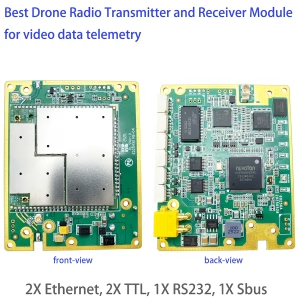
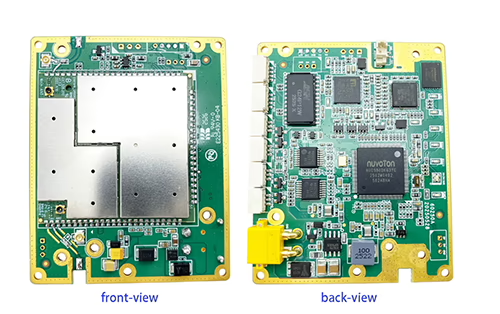
Ultra-lightweight airborne module The single airborne module weighs 33.7 grams (antenna not included), making it ideal for UAV platforms with strict payload limitations.
Operating frequency – 1.4 GHz band The system supports 1.4 GHz operation (1420–1530 MHz), fully matching your requested frequency range.
Video input format (IP-based) Vcan2122 natively supports IP Ethernet video input (IP cameras). Although it does not directly accept HD-SDI, this can be easily addressed by adding a 3G-SDI to IP video stream converter board, allowing seamless connection to your micro broadcast camera with SDI output. https://ivcan.com/p/low-latency-sdi-ahd-cvbs-in-video-encoder-ip-ethernet/ (53 grams)
Video resolution support The system supports video transmission up to 1080p60. HLG HDR compatibility has not yet been specifically tested, so this cannot be formally confirmed at this stage, although the link itself is transparent to the video payload.
Transmission distance With appropriate antennas and line-of-sight conditions, the link supports up to 10 km, which provides ample margin for your stated 2 km operational range.
Bidirectional data channel – RS485 An integrated transparent data channel is supported, enabling RS485 return communication. This allows RCP command control of the camera from the ground station.
Ground station capabilities The ground receiver supports dual-antenna diversity reception, significantly improving link stability and resistance to multipath and interference. Data return via RS485 is also supported on the ground side.
Typical system configuration: Micro broadcast SDI camera → 3G-SDI to IP converter → Vcan2122 airborne TX → COFDM wireless link → Vcan2122 ground RX (dual-antenna diversity) → IP video output + RS485 camera control (RCP).
Support control your camera via our link from ground unit to air unit.
FAQ
On the drone I would need a Vcan2122 module and an SDI->IP encoder. At the ground station I would need another Vacan2122 module for RX but I’m not sure how I turn the IP Signal back to SDI for broadcast integration? Do you have a recommendation?
We don’t have an IP to SDI device at the moment.
My application must be delivered via SDI. Camera control, while desirable, is not a must-have.
if you don’t need to control the camera, then please consider the below model. https://ivcan.com/p/cofdm-tx-rx-transmitter-encoder-modulator-and-decoder/ SDI video-> TX encoder modulator board-> wireless link-> RX demodulator decoder ->HDMI output ->hdmi input to SDI output converter board. Now, the RX support HDMI and IP Ethernet video output. No SDI output. It is also one-way directional transmission, it does not support to control the camera.
Understanding Design Priorities Before Choosing the Right Solution
When selecting a wireless video transmission system, many users focus on headline specifications such as resolution (1080P or 4K), latency, or transmission distance. However, one of the most critical—and often overlooked—factors is the original design priority of the system.
In real-world applications, security-grade / drone-grade wireless systems and broadcast-grade wireless systems are designed with very different assumptions and priorities. Understanding these differences can help you make a more informed decision and avoid mismatched expectations.
1. Design Philosophy: Reliability vs. Absolute Image Quality
Security-grade and drone-grade wireless video systems are typically designed for environments where:
The link may be non-line-of-sight (NLOS)
Obstacles, interference, and signal fading are common
Continuous situational awareness is more important than perfect image fidelity
In these scenarios, the primary goal is maintaining a live video connection under challenging RF conditions. When signal quality degrades, the system is often designed to dynamically trade image clarity for link stability, ensuring that the operator still has video rather than losing the signal entirely.
By contrast, broadcast-grade wireless video systems are usually designed for:
Controlled RF environments
Clear line-of-sight (LOS) whenever possible
Professional production workflows where image quality is the highest priority
In broadcast applications, even small degradations in image quality—such as compression artifacts, reduced bitrates, or dynamic resolution changes—may be unacceptable. As a result, broadcast systems often prioritize consistent, high-fidelity video output, sometimes at the expense of link robustness in more difficult RF conditions.
2. Resolution Support vs. Practical Usage
Many modern security-grade wireless systems support Full HD (1920×1080) and even 4K video formats. However, it is important to understand how these resolutions are used in practice.
In security and drone applications:
High resolution is supported and available
The system may adapt bitrate, compression, or image detail when the wireless environment worsens
Users generally accept temporary quality reduction if it means retaining a live feed
In broadcast applications:
The expectation is that resolution, bitrate, and visual quality remain consistent
Any visible degradation may impact production quality
Systems are often used with stricter RF planning and shorter, cleaner links
3. Latency Considerations
Both system types can achieve low latency, but the definition of “acceptable latency” may differ:
Security/drone users often prioritize predictable and stable latency for control, navigation, and decision-making.
Broadcast users may prioritize glass-to-glass latency tightly synchronized with other production equipment.
The internal processing pipelines and error-handling strategies of these systems reflect these different priorities.
4. Weight, Power, and Integration
Security-grade and drone-grade systems are commonly optimized for:
Low weight
Low power consumption
Compact form factors
Easy integration with cameras, gimbals, and control systems
Broadcast-grade systems, on the other hand, may accept:
Larger and heavier hardware
Higher power consumption
More complex setup and calibration
This trade-off is often acceptable in broadcast environments but can be a limiting factor in airborne or mobile platforms.
5. Choosing the Right Solution
There is no universally “better” system—only a system that better matches your application.
If your priority is maintaining a live video link in difficult wireless environments, even when obstacles or interference are present, a security-grade or drone-grade solution may be the better fit.
If your priority is maximum and consistent image quality for professional production, and your environment allows for careful RF control, a broadcast-grade solution may be more appropriate.
Before making a decision, we strongly recommend defining your priority order:
Link stability
Image quality
Latency
Weight and power
Environment (LOS vs. NLOS)
Understanding these priorities will help you choose a solution that aligns with your real-world needs rather than just headline specifications.








Ask A Question
Thank you for your response. ✨