






FAQ: 175 MHz Video System and GPS Interference on Drones

Table of Contents
Q1: Can a 175 MHz video system interfere with my drone’s GPS?
Yes, it’s possible. Drones integrate multiple electronic systems into a compact space, and strong RF signals from devices like a 175 MHz video transmitter can sometimes affect sensitive GPS reception if installation or shielding isn’t optimized.
Q2: How can I check if my GPS is being affected?
You can perform a simple test:
- Turn on the 175 MHz video system and observe GPS performance: satellite count, signal strength, and positioning stability.
- Turn off the video system and compare GPS performance.
If GPS works normally with the video system off but degrades when it’s on, interference is likely.
Q3: What can I do to reduce interference?
There are three effective solutions:
1. Reduce the transmitter power
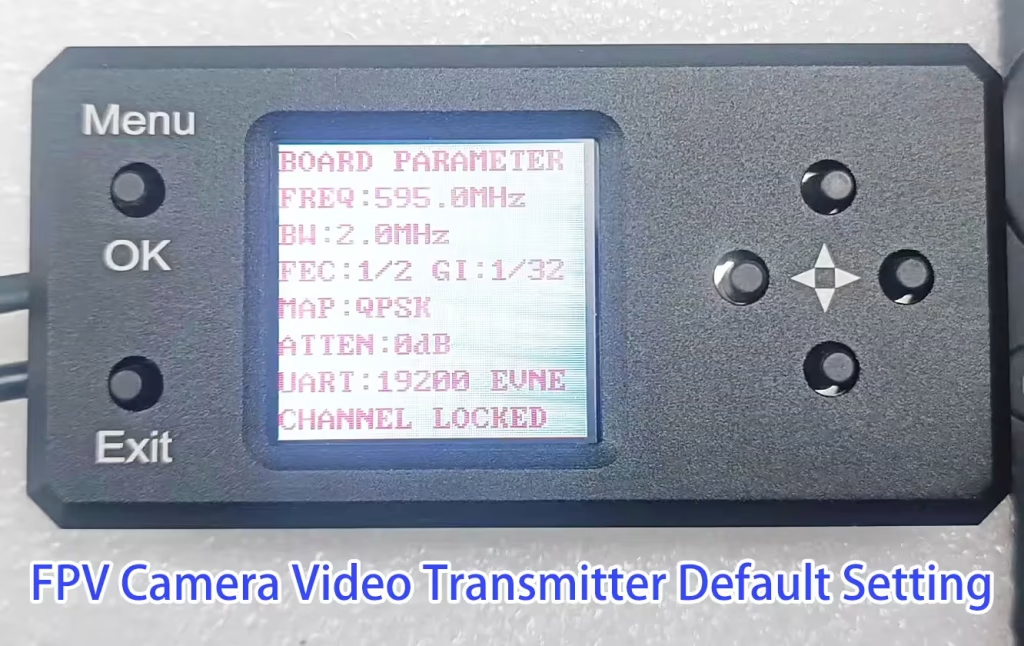
- Set the 175 MHz video transmitter to 1 W if it’s higher.
- How to do it?
- How do I adjust the transmit power via the transmitter parameter configuration board?
- Please modify the ATTEN (Attenuation) parameter in the transmitter settings. (see above picture). Power levels correspond to the following attenuation values:
- 0 dB ≈ 3-watt PA (maximum power)
- –2 dB ≈ 2-watt PA
- –4 dB ≈ 1-watt PA
- Lower power can reduce interference while maintaining sufficient video range.
2. Increase physical separation between antennas
- Use an RF extension cable to place the video transmitter antenna farther from the GPS antenna.
- Recommended layout:
- GPS antenna on the top of the drone to receive satellite signals.
- Video transmitter antenna on the bottom, pointing to the ground.
- The drone body can act as shielding to reduce interference.
3. Install a band-pass filter
- Adding a band-pass filter on the RF antenna line ensures only 175 MHz is transmitted.
- This suppresses harmonics or spurious emissions that could affect GPS.
Q4: What should I do next?
Try these steps in order: test GPS with the video system on/off, reduce power, optimize antenna placement, and consider a band-pass filter. If GPS issues persist, further adjustments or professional RF isolation may be needed.

Wireless Video Transmission
FPV 175Mhz COFDM Digital VTX VRX wireless video transmitter and receiver
FAQ: Will a 175 MHz Video Transmitter Interfere with GPS Frequencies via Harmonics?
Q1: What are the GPS frequencies?
Modern civilian GPS satellites operate on the following bands:
- L1: 1575.42 MHz
- L2: 1227.60 MHz
- L5: 1176.45 MHz
GPS receivers are most sensitive around 1.2–1.6 GHz.
Q2: What is the second harmonic of a 175 MHz transmitter?
The second harmonic of a signal is twice its frequency:f2nd=2×175 MHz=350 MHz
The third harmonic would be:f3rd=3×175 MHz=525 MHz
Q3: Could this harmonic interfere with GPS?
- The second harmonic at 350 MHz and third harmonic at 525 MHz are far below GPS frequencies (1.2–1.6 GHz).
- Direct interference from the second harmonic is extremely unlikely.
Q4: Could there be indirect interference?
Yes, but only under special circumstances:
- If a GPS receiver or antenna has strong nonlinear components (e.g., low-quality amplifiers), high-power signals might generate intermodulation products that fall into GPS bands.
- Poor shielding or inadequate front-end filtering in the GPS receiver could theoretically allow some energy from the harmonics, but this is rare.
Q5: Summary
- A 175 MHz video transmitter will not directly interfere with GPS via its second harmonic.
- Any observed GPS interference is more likely due to receiver nonlinearity, poor shielding, or intermodulation effects rather than the transmitter’s harmonics.
Ask A Question
Thank you for your response. ✨