






Table of Contents
Transparent IP Transmission, Video Streaming & Network Topology Explained
As more customers deploy our wireless data link solutions for robotics, unmanned systems, racing vehicles, and industrial automation, we frequently receive technical questions regarding network transparency, latency, topology, and bandwidth.
Below is a detailed FAQ to help clarify how our system works.
1️⃣ Does your module act as a transparent Layer 2 or Layer 3 Ethernet bridge?
Can I transmit custom UDP/RTP video streams from a Raspberry Pi through your link?
Yes.
Our wireless data link supports transparent transmission over:
- IP
- Ethernet
- RS232
- SBUS
- TTL
This means you can transmit custom UDP, RTP, or other IP-based video streams directly from your Raspberry Pi’s Ethernet port to a central PC without modifying your protocol.
The link behaves as a transparent network bridge, allowing you to send video streams or data exactly as if connected by a wired Ethernet cable.
2️⃣ What is the typical “glass-to-glass” latency when using the Ethernet port for video transmission?
Does the module introduce additional buffering or packet inspection delays?
Latency depends on several factors, including:
- Transmission distance
- Wireless signal strength
- Electromagnetic interference in the environment
- Camera encoding delay
- Display decoding delay
In a typical short-distance indoor office test environment, using the ping command, measured latency is approximately:
20–60 ms
Our wireless module does not introduce heavy buffering or deep packet inspection. However, total end-to-end latency will always depend on the full system pipeline (camera → encoder → wireless link → decoder → display).
For ultra-low-latency applications, we recommend optimizing both encoding and decoding configurations in addition to the wireless link.
3️⃣ How is bandwidth allocated when running 30 vehicles simultaneously?
Does your system support Master/Slave (Star) topology?
What is the maximum aggregate throughput of a Ground Station?
We offer two networking architectures:
⭐ Master/Slave (Star Topology)
- One central Ground Station
- Multiple remote nodes (vehicles)
- Recommended when all video streams must be received by a single Ground Station
🔗 Mesh (Decentralized Topology)
- Nodes communicate with each other
- Suitable for distributed or collaborative applications
For your racing scenario (30 vehicles transmitting to one central Ground Station), we recommend the Master/Slave star topology.
The exact maximum aggregate throughput of the Ground Station depends on:
- Selected model
- Channel bandwidth configuration
- Modulation scheme
- RF conditions
Please contact us with your required bitrate per vehicle, and we will recommend the appropriate model and configuration.
4️⃣ Does your system support Multicast UDP or only Unicast?
What is the maximum supported MTU size?
Our system primarily supports RTSP streaming.
Regarding:
- Multicast UDP vs. Unicast UDP
- Maximum MTU size (e.g., 1400–1450 bytes)
We need to confirm the precise technical specifications with our engineering team to provide an accurate answer.
Please share your intended network architecture and packet configuration, and we will provide a detailed technical confirmation.
FAQs
5 Does your module’s “Invisible Network Cable” support standard UDP, RTSP, and TCP traffic without requiring any proprietary SDKs or modifications to our Linux/Pi networking stack?
We have not specifically tested UDP, RTSP, or TCP in your exact application scenario, so we cannot officially confirm compatibility.
However, our system functions as a transparent Layer 2 wireless Ethernet bridge. If two computers or IP devices can communicate over a standard wired Ethernet connection and successfully run UDP, RTSP, or TCP traffic, then our wireless link should be able to transmit the same traffic transparently.
We do not require any proprietary SDKs or modifications to your Linux or Raspberry Pi networking stack. The link operates at the IP/Ethernet layer and is protocol-agnostic.
6 Since we are using static IPs on our Pi-based cars, will your mesh network pass this traffic through seamlessly (Layer 2 bridge) so that our software doesn’t know the difference between a Wi-Fi connection and your transceiver?
In theory, yes.
Our system is designed as a transparent bridge, so devices on both ends should behave as if connected via a standard Ethernet cable. Static IP configurations should pass through without modification.
However, we have not conducted validation testing in your specific setup, so we cannot provide a definitive guarantee. We recommend that you perform integration testing in your environment to confirm full compatibility.
7 If we prove our single-car logic on Wi-Fi, is it correct that the only change required for the 30-car race will be switching the physical “pipe” from Wi-Fi to your module’s Ethernet port?
From a networking perspective, yes.
We provide an IP-based wireless transport link. What applications, protocols, or signals run over that link is determined by your system design and software architecture.
If your system functions correctly over a standard IP network (such as Wi-Fi), then in principle the only required change would be replacing the physical network connection with our Ethernet-based wireless link.
That said, scaling from a single device to 30 devices introduces additional factors such as bandwidth, latency, interference, and network topology. These aspects should be validated in your full deployment scenario.
Summary
Our wireless data link provides:
✔ Transparent Ethernet/IP transmission
✔ Support for custom UDP/RTP video streams
✔ 20–60 ms typical short-range latency
✔ Master/Slave (Star) and Mesh networking options
✔ RTSP streaming support
✔ Scalable deployment for multi-vehicle scenarios
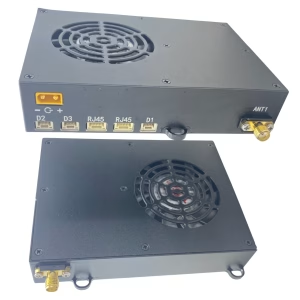
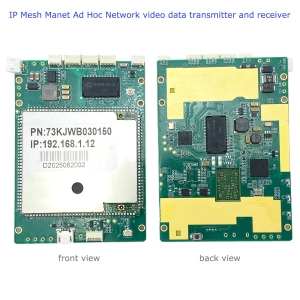
We recommended the below model
Ask A Question
Thank you for your response. ✨