






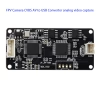
FPV CVBS AV video in to USB out converter board for computer raspberry pc phone
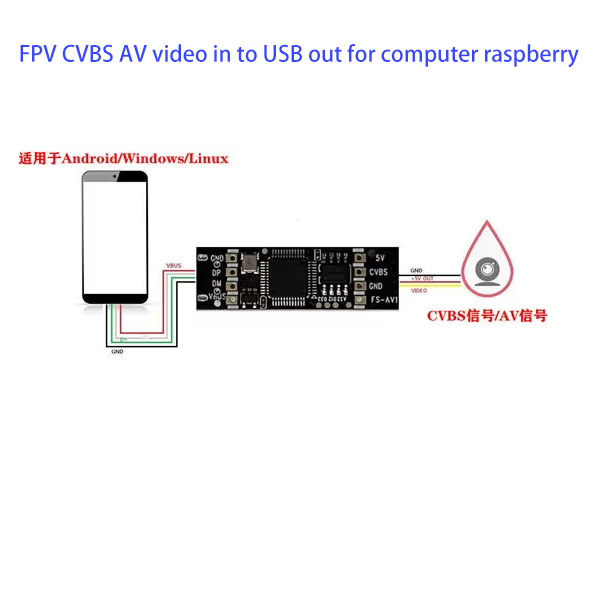
1. Technical Specifications
-
Video Standard: PAL / NTSC
-
Frame Rate: 30 fps
-
Input Video Format: CVBS (Composite Video)
-
Operating Temperature: -40°C to +85°C
-
Storage Temperature: -40°C to +95°C
3. Product Parameters
-
Adjustable image size with maximum resolution up to 720×480, supporting 24-bit true color
-
Customizable brightness, contrast, saturation, and hue for flexible image adjustment
-
Captures high-quality dynamic and still images, ensuring smooth, uninterrupted performance
-
CVBS input interface, enabling video preview on mobile phones or computers
-
Wide compatibility: works with Windows OS and OTG-enabled mobile phones
-
USB 2.0 interface for fast and stable transmission
-
Supports image capture in BMP and JPG formats
-
Adjustable video brightness, contrast, saturation, and grayscale (customizable on request)
-
Plug & Play: no driver installation required, fully compliant with standard USB UVC/UAC protocols
-
Compatible with any video playback software that supports audio and video streaming
5. Applications
-
Real-time mobile monitoring
-
Vehicle-mounted video monitoring
-
Video conferencing systems
-
ID card production
-
Computer-based photography
-
Fingerprint recognition and analysis
-
Medical imaging and diagnostic analysis
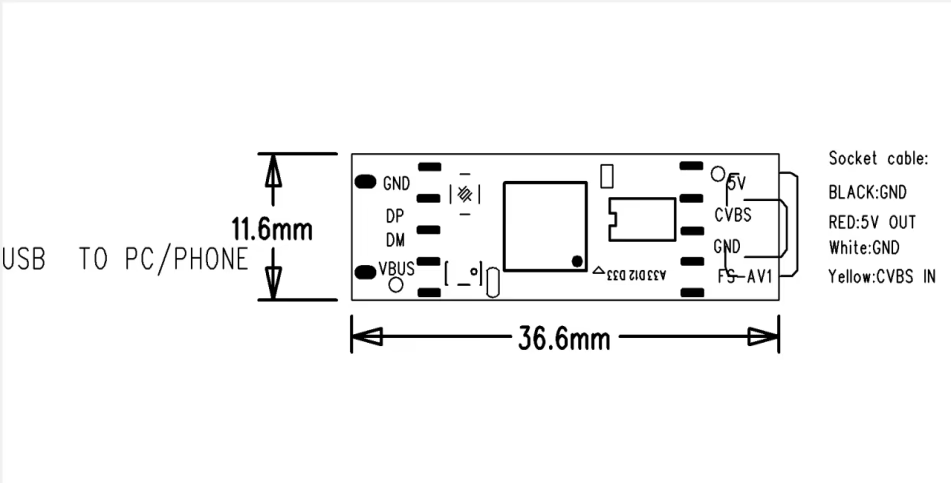
6. Wiring Definition
FAQ
1. What is the FPV CVBS AV video in to USB out converter board used for?
This device converts analog CVBS AV video signals into digital USB output, allowing you to preview and record video on a computer, Raspberry Pi, or OTG-enabled phone.
2. Does this USB video converter support PAL and NTSC formats?
Yes, the board fully supports both PAL and NTSC video standards for wide compatibility.
3. Can I use this converter board with Windows PC?
Absolutely. It works on Windows systems without requiring additional drivers.
4. Is the FPV CVBS AV to USB board compatible with Raspberry Pi?
Yes, it works seamlessly with Raspberry Pi, making it ideal for DIY projects and video streaming.
5. Can I connect my FPV camera to this USB converter board?
Yes, the board supports FPV CVBS AV video input and outputs directly to USB for live monitoring.
6. Does the board require driver installation?
No, it is fully plug-and-play and complies with standard UVC/UAC USB video protocols.
7. What is the maximum supported resolution?
The converter supports up to 720×480 resolution with 24-bit true color.
8. Can I capture still images using this video capture board?
Yes, you can capture images in BMP or JPG formats directly.
9. Is this converter board good for real-time video monitoring?
Yes, it provides smooth and stable real-time video for FPV, surveillance, and monitoring applications.
10. What frame rate does this converter support?
It supports a frame rate of 30 fps for clear and fluid video.
11. Does this USB converter support audio capture?
Yes, it supports both video and audio streaming with compatible devices.
12. Can I adjust image brightness and contrast?
Yes, brightness, contrast, saturation, and hue can all be customized.
13. Is the converter board compatible with Mac OS?
It mainly supports Windows and Linux (including Raspberry Pi). Mac OS compatibility may vary depending on the software.
14. Can I use this for vehicle-mounted monitoring systems?
Yes, it is suitable for car cameras and vehicle video monitoring applications.
15. Does it support Android phones?
Yes, it works with OTG-enabled Android phones for mobile video preview.
16. Can I use this USB video converter for ID card production?
Yes, it can be integrated into ID card production systems that require video capture.
17. What kind of connector does the input support?
The input supports standard CVBS AV video signals (RCA or pin connections depending on setup).
18. Can this converter board be used for fingerprint recognition systems?
Yes, it is compatible with biometric imaging applications like fingerprint recognition.
19. Is this suitable for medical imaging and diagnostics?
Yes, it can be used for medical video imaging where CVBS video sources are required.
20. Can it record long video sessions without interruption?
Yes, the converter provides stable USB transmission for continuous recording.
21. What software can I use with this video capture device?
It works with any UVC-compatible video playback or recording software.
22. Does the converter support grayscale image capture?
Yes, grayscale image adjustments are available on request.
23. Can this board handle extreme temperatures?
Yes, it operates from -40°C to +85°C and can be stored from -40°C to +95°C.
24. Is this converter good for video conferencing?
Yes, it can be used in video conferencing setups where CVBS sources need to connect via USB.
25. Can I preview analog video on my phone with this board?
Yes, with OTG support, you can preview analog video on your Android phone.
26. Does it support USB 3.0 ports?
Yes, it works on USB 3.0 ports but operates as USB 2.0 for compatibility.
27. Can I use this device with OBS Studio?
Yes, the converter works perfectly with OBS Studio for recording and streaming.
28. Is this converter board suitable for drones?
Yes, FPV drone users can capture and preview live video through this USB board.
29. Does the device introduce latency in video transmission?
Latency is minimal, making it suitable for real-time monitoring.
30. Can I connect multiple boards to one computer?
Yes, multiple USB capture devices can be connected if the software supports it.
31. Is this converter board durable for outdoor use?
Yes, its wide temperature range makes it reliable for outdoor FPV and monitoring.
32. Can I use this for security surveillance?
Yes, it is widely used for analog CCTV surveillance upgrades.
33. What power source does the board use?
It is powered directly through the USB interface, no external power required.
34. Can I customize the firmware or settings?
Yes, customization options for brightness, contrast, and saturation are available.
35. Is it compatible with Linux systems?
Yes, it supports Linux-based systems like Ubuntu and Raspberry Pi OS.
36. Can I use this device for recording gameplay from retro consoles?
Yes, it works with CVBS video from retro gaming systems via USB.
37. What image formats are supported for capture?
BMP and JPG image formats are supported.
38. Can I use this with DVR systems?
Yes, it can act as a USB capture interface for DVR setups.
39. Does this converter board need additional cooling?
No, it is designed to run efficiently without extra cooling.
40. Is it portable for field use?
Yes, it is compact, lightweight, and easy to carry for field monitoring.
41. Can I live stream video using this converter?
Yes, it supports live streaming when paired with software like OBS, VLC, or Zoom.
42. How stable is the USB transmission?
It provides fast and stable USB 2.0 transmission with no frame drops.
43. Can I use this converter with Arduino projects?
Yes, developers often integrate it into embedded projects requiring analog video capture.
44. Does it work with infrared cameras?
Yes, as long as the camera outputs CVBS analog video.
45. Can it be used for education and research purposes?
Yes, it’s useful for lab experiments, training, and teaching video signal processing.
46. Is this converter board suitable for live presentations?
Yes, you can connect analog sources to projectors or PCs via USB for presentations.
47. Can I record both video and audio from my camera?
Yes, it supports audio/video capture if the source provides both signals.
48. Does this product require technical expertise to use?
No, it is designed for beginners as well as professionals with easy plug-and-play use.
49. Is this converter board reliable for continuous 24/7 operation?
Yes, it is stable and durable enough for continuous monitoring applications.
50. Why should I choose this FPV CVBS AV to USB converter board?
Because it’s versatile, plug-and-play, supports multiple platforms (PC, Raspberry Pi, phone), and ensures high-quality, stable video capture for FPV, surveillance, medical, and multimedia use.






iVcan.com –
I recently started using the FPV CVBS AV video in to USB out converter board, and I am very impressed with its performance. The plug-and-play feature makes it super convenient, and I didn’t need to install any drivers at all. The video quality is smooth, clear, and stable, even during long recording sessions. I also like that I can easily adjust brightness, contrast, and saturation to match different lighting conditions. It works perfectly with both my Windows computer and my Raspberry Pi, and the compatibility with mobile phones via OTG is a huge bonus. This converter board has made video capture and monitoring much easier for me, and I highly recommend it to anyone needing a reliable CVBS to USB solution.