






Table of Contents
Do you know if there is any software or tool available that I can use to transmit video through the radio?
Our wireless video radio is like an invisible net cable to connect two IP devices. For example, please connect to your ip camera on the radio rj45 (transmitter), and PC to connect to another radio (receiver).
Every ip camera has an ip address, then you use the IP camera player to watch the video on the computer.
A Client sent us a video and asked the wireless video radio IP MESH transceiver about the frequency range and if it supports a frequency hopping function.
Hi, I am transmitting data between the radios and managed to change settings to 20dBm [30 dBm] power.
I am currently transmitting and receiving an MP4 video between two computers and it is successful.
But, we have a problem with the frequencies of the data transfer. We used a spectrum analyzer to check the frequency we were using, but the spectrum analyzer showed that the frequency was all over the place.
May I get your help to know if the radio is by any chance frequency hopping/ changing dynamically? Why the radio is transmitted at different frequencies?
Here is the reply from our engineer.
This is the system self-test import frequency point. When no transmission signal or data is received, it will always self-check the search status.
When the transmission signal and data are received, the frequency waveform will be normal.
Application of the wireless video, radio ip mesh transceiver
I want to explain our working scenario. Two drones will be in the air with an HD camera and one modem will be on the ground connected to the display. The modem in the air will send videos from the air to the ground + some more useful information. They will also receive some camera control and PTT commands from the ground.
A modem on the ground will receive videos from the air, display them on some LCD, or send them on ethernet. It will also send camera control + PTT commands to drones in the air.
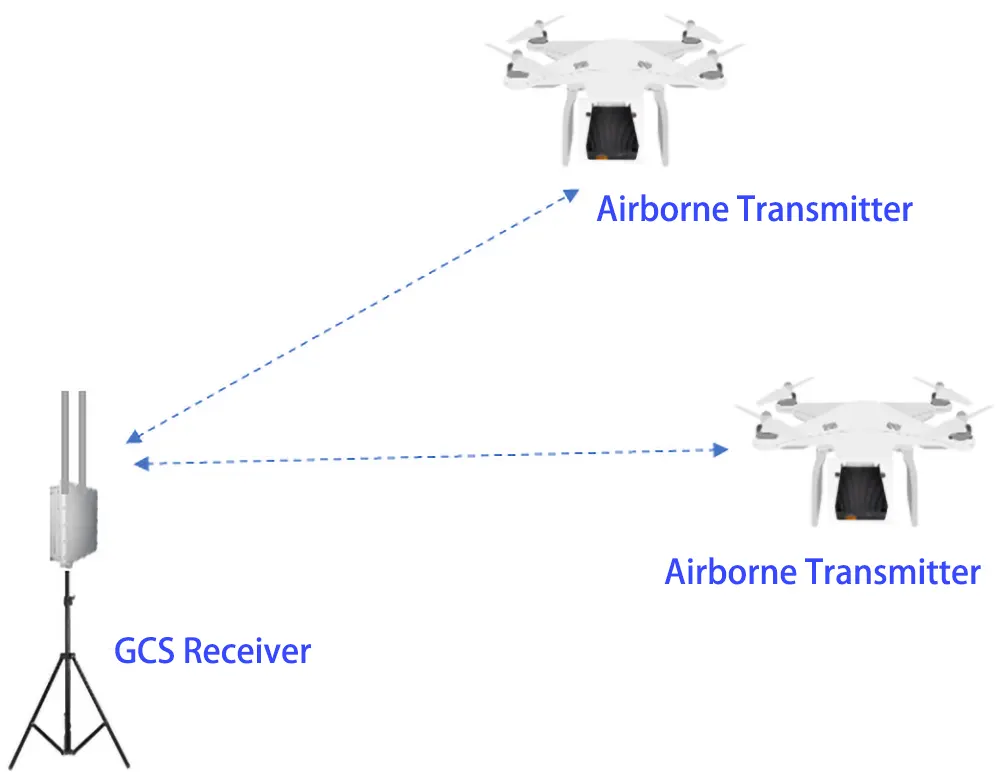
two-way mesh wireless video data link and Power Amplifier
The output of Vcan1401 is 5W in the ad hoc network mode and 10W in the point-to-point mode. Because the two modes require different indicators, the indicators required in the ad hoc network mode are much higher, so the output power will be deliberately adjusted downward.
TX900-mesh is different.
The hardware of ad hoc, point-to-point, and point-to-point multipoint star networking modes are the same (the output power is the same), but the software and firmware are different.
Vcan1401 is a WiFi frequency conversion solution, and TX900 is an SDR solution. The performance is very different.
Is the UART sent to all nodes in TX900 star-networking?
Yes.
The star network can work in point-to-point mode, point-to-multipoint mode, and relay mode. The Mesh version is a self-organizing network and can be self-organized in various ways.
TX900-Mesh is available in 3, 10, and 50km versions.
Can you share the user manual of tx900?
The web UI of TX900-2W and 10W is the same. This is the web UI usage instructions.
Can you show me the latest firmware version of your mesh version?
Please check the picture below.

Question: Why does the video stream freeze after one hour? Is it a setting issue?
I am working on streaming video through radios and I am able to create and stream video.
However, the video stream is good and live for approximately 1 hour and then I see the video stream lagging/freezing frequently. So, I am trying to understand why it is okay at the start and then the video freezes/lags after an hour. Are there any settings on the Radio that I am missing?
Is there any setting related to buffering on the radio? Is the buffer getting filled up after some time and then the video starts to lag?
Do I need to clear any buffer or reset any settings after each hour? Or Is there a setting to increase the buffer size so that the video doesn’t lag/freeze?
Answer: In this case, the first thing to consider is the heat dissipation of the module, and the second thing to consider is the problem of your video codec. Our radio does not have a large buffer, as long as the bandwidth is sufficient (the wireless rate is greater than the video bit rate), it is sent directly.
Question: How to avoid interference between two sets of equipment when used in the same space?
We are trying to use two sets of 1401 radios with our robots, and we are getting interference when we use them in a straight line. One set of radios is knocking the other set out. The data stops transmitting on one pair. They have different passwords. And are on different channels. One is on channel 1 and the other is on Channel 9. Any ideas on why this is happening? Basically, we are using two robots. When they are in the same room, we get a signal on both robots. It is no problem.
Answer: Engineers gave three suggestions:
- Channel bandwidth should set 5Mhz
- Different channels, one set should work at 1407Mhz, and another set should work at 1497Mhz
- Two Sets use different password
Because it is impossible to completely avoid interference when using products in the same frequency range, please refer to the suggestions given by the engineer, use 5Mhz bandwidth, narrow the respective frequency ranges, and try to use the smallest frequency channel for one set and the largest frequency channel for the other. If you want to completely avoid interference, you can consider adding a cavity band-pass filter or a high-pass or low-pass filter.
Ask A Question
Thank you for your response. ✨