






Converting IP Video Streams to USB: Why H.264/H.265 Support Matters
In many modern projects, there’s a common request: convert an IP video stream into a USB output, while supporting H.264 or H.265 video streams. At first glance, this might seem like a niche requirement—but in reality, this kind of product is highly practical and widely applicable.
A client asked, “We have a request in an big project to convert IP video stream into USB and supports H.264/H.265 streams. I need to convert onvif ip cam to usb to connect to pc and record the stream 24/7 on the pc HDD.”
Table of Contents
Why Such a Device Is Useful
Essentially, a device that converts a network (IP) video stream into a USB output acts as a virtual USB camera. This allows devices that don’t natively support network video protocols to access the video stream as if it were a standard webcam.
1. Use IP Cameras as Standard USB Cameras
Many software platforms and legacy systems only support USB camera input—they don’t support RTSP, RTMP, WebRTC, or other network protocols. By converting an IP camera’s H.264/H.265 stream into a USB video source, you can:
- Integrate network cameras with Windows, Linux, or embedded systems that only recognize USB devices
- Enable legacy systems to view IP camera streams without complex network setups
- Use live streaming software that only supports UVC capture
2. Integrate with Video Conferencing Systems
Popular video conferencing platforms such as Zoom, Microsoft Teams, and Webex only recognize USB webcams by default. Converting an IP stream to USB makes it possible to use network cameras as conference video sources—a huge advantage for enterprises and remote healthcare systems.
3. Feed AI and Smart Analysis Devices
Edge computing boxes, AI NVRs, NVIDIA Jetson devices, and other intelligent processing units often accept only UVC video input. IP cameras output H.264/H.265 streams that these devices cannot directly interpret. Converting them to USB allows easy integration for AI analysis, object detection, and other intelligent applications.
4. Replace Traditional Video Capture Cards
Traditional capture cards mostly accept HDMI or DVI inputs. Many modern applications require capturing network video streams for surveillance, analytics, or demonstration purposes. A network-to-USB converter provides a simpler, plug-and-play solution.
5. On-Site Display and Testing
This type of device is perfect for live demonstrations, troubleshooting, or validation:
- Display IP camera feeds directly on a laptop without additional software
- Test and debug multiple cameras quickly
- Showcase network camera streams in trade shows or educational setups
Technical Advantages
| Feature | Benefit |
|---|---|
| H.264/H.265 support | Compatible with most modern IP cameras |
| USB output (UVC) | Plug-and-play with no additional drivers needed |
| Broad compatibility | Works with Windows, Linux, macOS |
| Instant integration | Makes network cameras usable like standard webcams |
Typical Customers and Applications
- Security camera manufacturers
- Smart conference system providers
- Education and live-streaming solutions
- Automotive video systems
- Medical imaging and endoscopy systems
- Remote monitoring and control solutions
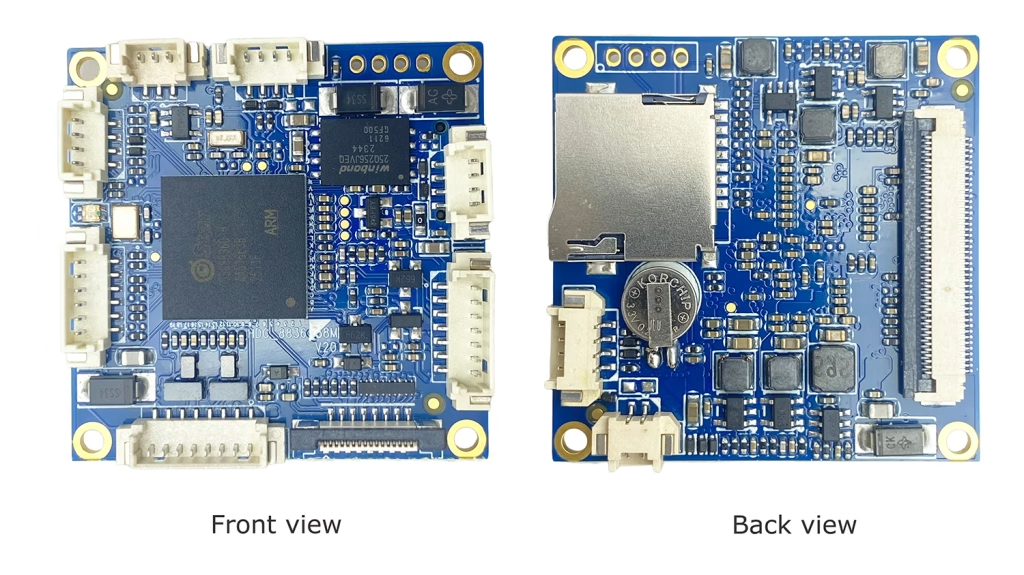
This model already comes equipped with Ethernet, USB, and CVBS interfaces. By modifying the firmware, it can be enabled to support converting IP video streams to USB, thereby achieving the functionality the client requires.
Conclusion
Devices that convert IP video streams to USB are not just useful—they are highly practical and versatile. Their main value is simple but powerful:
Turn network video into a universal USB camera stream, making it compatible with a wide range of software and devices.
Whether for enterprise, healthcare, education, or AI applications, these converters solve a real integration problem with minimal setup and maximum compatibility.
Ask A Question
Thank you for your response. ✨