





CVBS to Ethernet IP Encoder stable in weak Signal proof, Low Signal lock
Table of Contents
Overview
The Professional CVBS AV to IP Encoder Low Signal Stable is an upgraded industrial-grade video encoding board designed to solve a common problem in analog video transmission systems: when the RF signal quality drops, many conventional converters or capture boards freeze, disconnect, or stop streaming entirely.
This new generation encoder is specially engineered to maintain stable IP streaming output even when the analog CVBS input signal becomes weak, noisy, or unstable. It intelligently handles degraded video conditions without system crash, stream interruption, or reboot.
It is ideal for applications where analog video is transmitted wirelessly via a video receiver (VRX) and then converted into IP for monitoring, recording, or network distribution. Even when signal quality fluctuates due to interference, distance, or environment, the encoder continues working and keeps the stream alive.
This board converts standard CVBS composite video input into real-time Ethernet IP video stream (H.264/H.265 optional), supporting RTSP, RTMP, HTTP, and UDP protocols. It is suitable for UAV ground stations, wireless video transmission systems, mobile surveillance, remote monitoring, and industrial video integration.
Features
1. Low Signal Stability Technology
- Continues streaming even when CVBS signal quality drops
- No crash or freeze under weak RF reception
- Intelligent video synchronization recovery
- Designed for unstable analog wireless video systems
2. Professional Video Encoding
- H.264 (default), H.265 optional
- Adjustable bitrate control
- CBR / VBR modes supported
- Low latency encoding
3. Standard CVBS Input
- PAL / NTSC auto detection
- 75Ω impedance
- Compatible with common analog video receivers (VRX)
4. Network Streaming Support
- RTSP
- RTMP
- HTTP
- UDP
- ONVIF optional
5. Ethernet Interface
- 10/100Mbps RJ45
- Supports LAN and internet streaming
- Web browser configuration interface
6. Industrial-Grade Design
- Wide voltage power input
- Stable operation for 24/7 use
- Compact PCB board design
- Low power consumption
Specifications
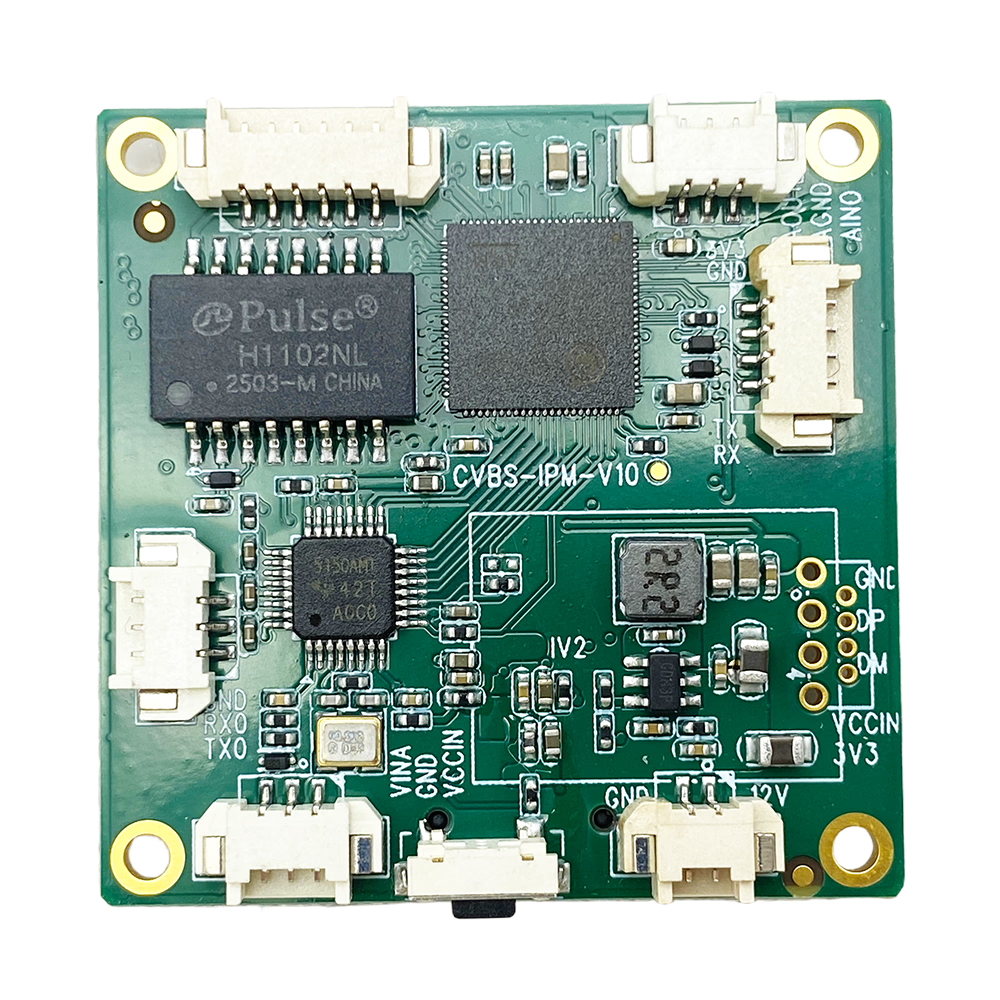
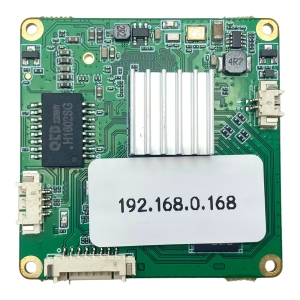
CVBS to Ethernet IP Encoder stable in weak Signal board silk print “CVBS-IPM-1.0”
Video Input
- Interface: CVBS (RCA or pin header optional)
- Video Standard: PAL / NTSC auto-detection
- Resolution:
- PAL: 720×576
- NTSC: 720×480
- Input impedance: 75Ω
Video Encoding
- Compression: H.264 / H.265 (optional)
- Bitrate: 32Kbps ~ 8Mbps adjustable
- Frame rate: 1–30fps adjustable
- GOP setting configurable
- CBR / VBR selectable
Network
- Ethernet: 10/100Mbps
- Protocols: RTSP / RTMP / HTTP / UDP
- Unicast / Multicast support
- Web configuration interface
Audio (Optional)
- Audio input: Line-in
- Compression: AAC / G.711
- Audio bitrate adjustable
Power
- DC 7V–24V input
- Typical consumption: <3W
Operating Environment
- Operating temperature: -20°C to +70°C
- Storage temperature: -40°C to +85°C
- Humidity: 5%–95% non-condensing
Physical
- PCB board size: customizable
- Net weight: depends on configuration
Customization Options
We support flexible OEM/ODM customization according to project requirements.
Hardware Customization
- Add HDMI output
- Add SD card recording
- Add WiFi module
- Add 4G / 5G LTE module
- Add metal enclosure
- Customized PCB size
- Extended temperature version
Software Customization
- Private protocol integration
- Customized firmware UI
- Fixed bitrate or dynamic bitrate tuning
- SDK integration
- ONVIF support
- Cloud platform integration
Branding Customization
- Logo printing
- Customized packaging
- Private label firmware
Applications
This low-signal stable encoder is ideal for systems where analog wireless video signal is not always perfect.
1. UAV Ground Station
Analog FPV receiver output → Encoder → IP streaming to monitoring center.
2. Wireless Video Receiver Systems
VRX output converted to Ethernet for NVR or PC monitoring.
3. Mobile Surveillance Vehicles
Maintain streaming even when wireless link fluctuates.
4. Industrial Monitoring
Factory or construction sites using analog camera transmission.
5. Remote Video Transmission
Long-distance RF analog transmission converted to IP network.
6. Legacy System Upgrade
Upgrade traditional analog system to IP without replacing cameras.
FAQ
Q: How can I change the default IP address of the CVBS to IP encoder board?
A: Please download the Windows configuration tool from the link below. https://drive.google.com/file/d/13juxfwvqjsFaRCv7XUkWE2XFSz6sE5kf/view?usp=sharing
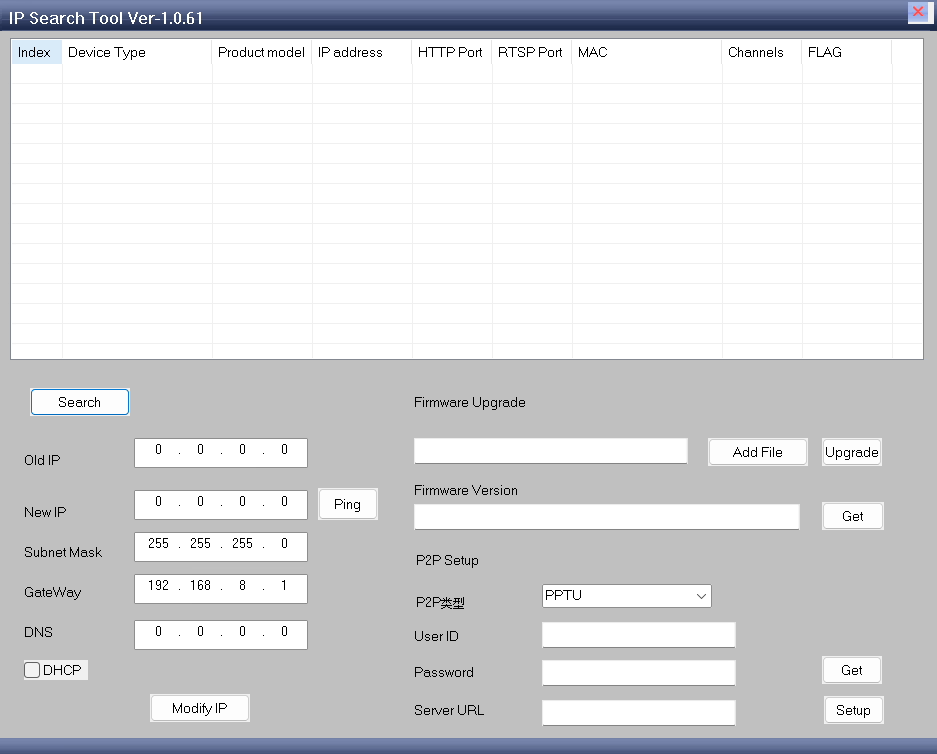
After installing and opening the program, follow these steps:
- Click “Search Device” to scan for available encoder boards on the network.
- Select the encoder board whose IP address you want to modify.
- In the lower part of the program window, confirm the Old IP address displayed.
- Enter the New IP address you want to assign.
- Click the “Modify IP” button to apply the change.
Once completed, the encoder board will use the new IP address.
Note: Make sure your computer and the encoder board are connected to the same network during configuration.
Q: Why does the old converter stop working when signal quality drops?
A: Most conventional CVBS to IP encoders rely on stable video synchronization signals. When the RF signal becomes weak, video sync may be lost temporarily, causing system crash, freeze, or stream interruption. Our upgraded design includes improved video sync detection and buffering logic, allowing the encoder to continue operating under unstable input conditions.
Q: Where can I find the viewer and setup program?
A: You can use our recommended low-latency PC video player:
- Software: R380_V1.25.0604.exe
- Download Link:
https://drive.google.com/file/d/1of2KGOrESTaa6pIXoOlldhAfRSyydDEp/view
Alternatively, you may also use third-party media players such as VLC Player or EasyPlayer to view the video stream via RTSP.
Q: How do I access the encoder setup page?
A: Please follow the steps below:
- The default IP address of the encoder is: 192.168.1.188
- Set your PC’s IP address to the same subnet, for example: 192.168.1.100
- Open a web browser on your PC and enter: http://192.168.1.188
- User ID and password is admin You will then be able to access the encoder’s configuration interface.
Q: How do I access the encoder setup page?
A: The default RTSP stream URL is:
rtsp://192.168.1.188:554/0
You can enter this URL into:
- VLC Player
- EasyPlayer
- R380 low-latency player
to view the live video stream.
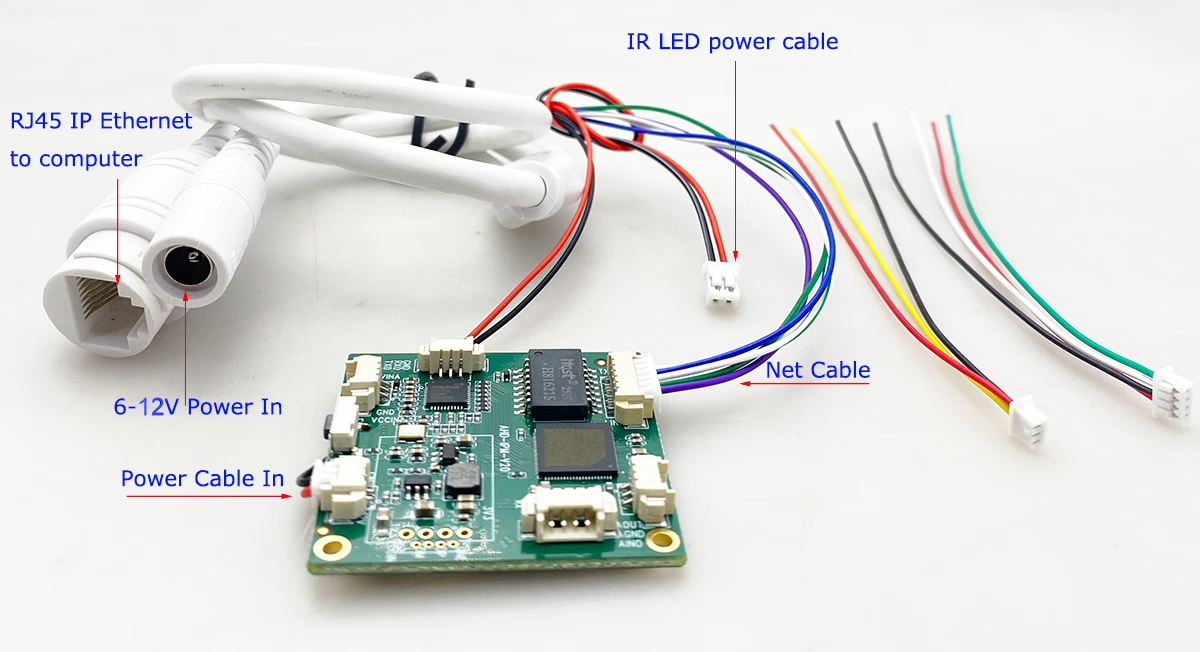
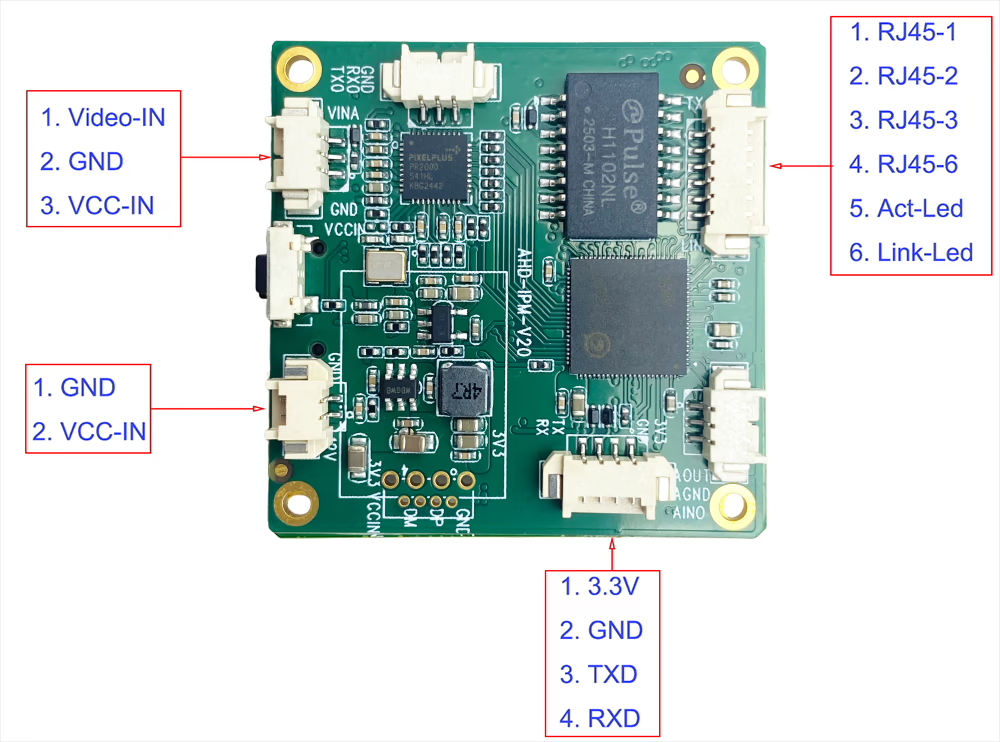
Q: How to install the encoder board with my camera and computer?
A: Please refer to the attached images for the board pin definition, which provide detailed guidance for proper connection and installation.
Make sure:
- All pins are connected according to the diagram
- Power supply and signal lines are correctly matched
- Connections are secure before powering on the device
Q: What should I do if I cannot access the device?
A: Please check the following:
- Ensure your PC and the encoder are in the same network segment (192.168.1.xxx)
- Confirm the Ethernet cable is properly connected
- Disable any firewall or network restrictions that may block access
- Try pinging 192.168.1.188 to verify connectivity
Q: Does the encoder improve video quality?
A: No. It does not enhance RF signal quality. It ensures stable streaming output even if the analog video becomes noisy or distorted.
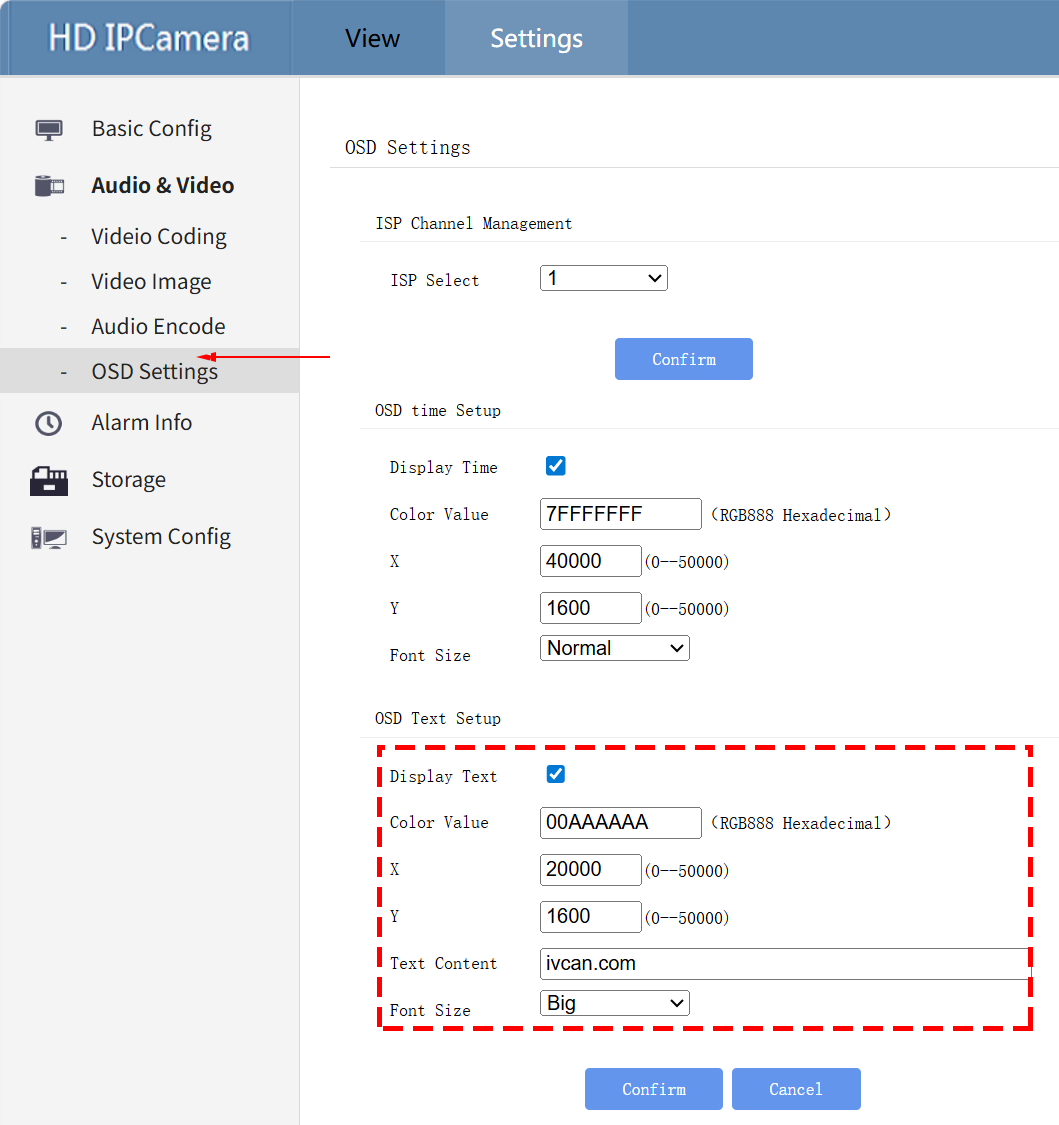
Q: Does this encoder board support adding OSD text?
A: Yes, the encoder board supports customizable OSD (On-Screen Display) text. You can configure the OSD text through the web interface by following these steps:
- Open a web browser and enter the default IP address:
http://192.168.1.188 - Log in to the encoder’s configuration page
- Navigate to:
Setting → Audio Video → OSD Text Setup - Enable and configure Display Text
Within this menu, you can customize: Text content / Text color / Display position / Font size. Make sure to save/apply the settings after configuration so the changes take effect.
Q3: Will the stream disconnect when video signal disappears completely?
If the signal disappears temporarily, the encoder keeps the stream alive. When signal returns, video resumes automatically without reboot.
Q4: Is this compatible with all analog VRX receivers?
Yes. As long as the receiver provides standard CVBS composite output (PAL or NTSC), it is compatible.
Q5: Can it support internet live streaming?
Yes. It supports RTMP protocol and can stream to platforms or private servers.
Q6: Can I customize bitrate and frame rate?
Yes. Bitrate, resolution, GOP, and frame rate are adjustable via web interface.
Q7: What makes this version different from standard encoder boards?
The major improvement is low signal stability design, specifically optimized for unstable analog wireless transmission systems. It prevents freezing, crashing, and stream interruption when signal quality becomes poor.
Q8: Does the device display a blue screen (or black screen/NO SIGNAL screen) when there is no video signal at the AV input port, or when the signal is too weak? Will I see white noise or snowflakes instead?
When the input signal is very weak, the device will still process the video rather than showing a static “NO SIGNAL” screen. This version has been optimized compared to previous versions. We recommend ordering a sample of this version to test its performance with your specific setup.
Q9: What does the network video stream display if no video signal is connected?
If there is no video signal input at all, the network video stream will display a black screen.
Q: We need a converter board with 4 input channels for Analog CVBS video. Do you have this model?
A: Currently, we do not have a 4-channel CVBS input board. Our available model supports 1-channel CVBS input only. If you need 4-channel support, there are two options:
- Use four 1-channel boards together – This is the recommended approach. You can stack the four boards using pillars, and each board will handle one CVBS input. This solution is fast, in stock, cost-effective, and allows you to start immediately.
- Custom 4-channel board development – We can design a new board with four encoder chips on a single PCB and one network output.
- Benefits: Fully integrated, single-board solution.
- Drawbacks: Longer development time and additional custom production costs.
For most customers, using four existing 1-channel boards is the most practical and immediate solution. All current models are in stock and ready for same-day shipment once confirmed. We can also provide guidance for proper integration of multiple boards for a clean, stacked setup.
Q: Do you have any 3D printable enclosures for the CVBS-to-IP boards?
A: At the moment, we do not provide 3D design files or printable enclosure models. However, detailed 2D dimension drawings of the board are available for reference. You can use these drawings to design and create a custom enclosure that fits your specific requirements.




iVcan.com –
I’ll share your store link with my friends; they’re also looking to buy a few to test. I really liked that your converter doesn’t lose image quality at specific video sync pulses. It works almost like an analog monitor, which is excellent!
iVcan.com –
We integrated this CVBS to IP encoder into our FPV VTX wireless analog video transmitter-receiver system, and it has completely solved the freezing issue we used to experience when the analog signal became weak. Previously, whenever the RF signal fluctuated, our old converter would stop streaming or show black screen. With this upgraded low-signal stable encoder, the stream stays online even when the video becomes noisy. Recovery is automatic once the signal improves. The setup was simple, latency is low, and the performance has been very reliable in real-world field testing. Highly recommended for unstable wireless environments.