






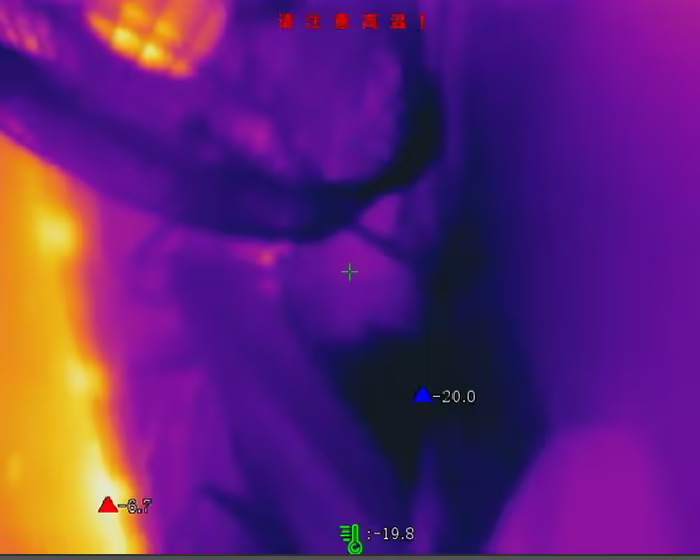
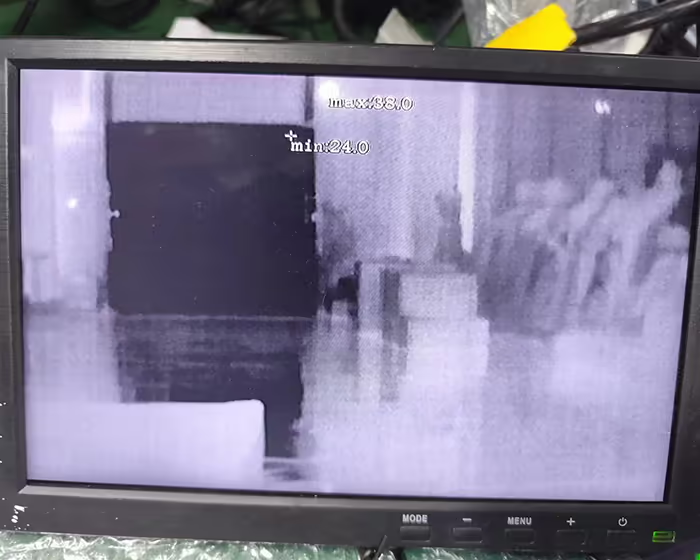
Někteří zákazníci se ptají, zda naše termovizní kamery dokážou na videu zobrazit teplotu pozorovaných objektů. Odpověď je ano.
Následující obrázky ukazují nejvyšší, nejnižší, a průměrné teploty ve videu z termovizní kamery.
Obsah
termovizní kamera teplotní komunikační protokol dokovací příručka
Identifikace komunikace
Podle vlastního vývojového prostředí, dokončit přístup k zařízení a realizovat komunikaci(Pokud je třeba časové razítko zarovnat do plánu, je třeba jej opravit při každém zapnutí počítače, a je potřeba to alespoň jednou denně korigovat);
Časová kalibrace
Chcete-li najít data měření teploty na celé obrazovce určitého snímku pohybu, je nutné přistupovat k zařízení pro provedení časové kalibrace na modulu, aby byl zajištěn výkon v reálném čase;
Je třeba poznamenat, že tento pohyb podporuje pouze hodiny, minut, sekundy, a milisekundy pro časová razítka, a nepodporuje roky, měsíce, dny, a dny v týdnu (zobrazen jako 0 v odpovídajícím datovém formátu).
Získávání dat
Modul poskytuje různé způsoby streamování videa a měření teploty. Podle vlastních potřeb, můžete vybrat odpovídající typ dat a proces a prezentovat je na hostiteli;
Podpěra, podpora
- Údaje o měření teploty v reálném čase na celé obrazovce;
- YUV streamovaná data v reálném čase;
- Celoobrazovkové měření teploty + YUV streamovaná data v reálném čase;
(podrobnosti viz přiložená stránka)
Kalibrace měření teploty
Po integraci a nasazení do celého stroje, nárůst teploty může ovlivnit přesnost měření teploty pohybu měření teploty. Modul měření teploty je nutné umístit do zařízení po stabilizaci tepelného motoru, a poté proveďte kalibraci měření teploty, abyste zajistili přesnost celého strojního produktu.
[Kalibrace jedním kliknutím]
Elektrický topný motor
Zařízení je integrováno do celého stroje. Elektrický topný motor je potřeba před kalibrací stabilizovat. Doporučuje se užívat více než 2 hodiny. Ve stabilním procesním prostředí, obal nebude ovlivněn zdroji tepla, vítr, atd.;
Pro nastavení čtyř teplot 35°C je nutné použít černé těleso, 60C, 100C, a 200°C jako následné kalibrační body měření teploty;
Nastavte parametry kalibrace
Nastavte kalibrační parametry pohybu, vzdálenost, emisivita černého tělesa, teplota kalibračního bodu
Kalibrační měření teploty
Vezměte kompletní produkt, v nastavené vzdálenosti, zarovnejte střed termovizní obrazovky s černým tělesem v různých bodech teploty, abyste získali teplotu, a počkejte na dokončení návratu (jednou pro každý teplotní bod);
Oprava jedním kliknutím
Po získání kalibračního bodu, provést operaci opravy jedním kliknutím;
Kontrola přesnosti
Po dokončení opravy, zkontrolujte každý bod kalibrační teploty, abyste zjistili, zda je přesnost měření v rozmezí ±1,5 °C nebo ±1,5 % odečtu (kteroukoli je větší hodnota). Pokud je mimo rozsah, opakujte kroky ③, ④, a ⑤.
teplota termovizní kamery Integrační komunikační protokol výběr
Doplněk protokolu UVC
1. Údaje o měření teploty v reálném čase na celé obrazovce
| Offset | Pole | Velikost(byte) | Hodnota | Popis | Poznámka |
| 0 | u32MagicNo | 4 | pořadové číslo snímku,Pořadové číslo snímku nahrané v reálném čase je neustále rostoucí sudé číslo.10001002, 1004, 1006 | 0x70827773 “FRMI”ofascllcode*/ | |
| 4 | u32Velikost záhlaví | 4 | Délka HLAVY*/ | ||
| 8 | u32StreamType | 4 | datový typRTData:VizSTREAM_TYPE_E*/ | ||
| 12 | u32StreamLen | 4 | DATAlength(Včetně front4byte) */ | ||
| 16 | u32RTDataType | 4 | 1-14bitNaked data; 2-Údaje o výsledku měření teploty na celé obrazovce; 3-YUVdata*/ | ||
| 20 | u32FrmNum | 4 | Není podporováno zobrazeno jako 0 | ||
| 24 | u32StdStamp | 4 | DSPrelativní časové razítko*/ | NepodporovánoZobrazeno jako 0 | |
| 28 | rok | 2 | Rok*/ | Není podporováno zobrazeno jako 0 | |
| 30 | měsíc | 2 | měsíc*/ | Není podporováno zobrazeno jako 0 | |
| 32 | den v týdnu | 2 | 0:Neděle ~ 6:sobota | Není podporováno zobrazeno jako 0 | |
| 34 | den | 2 | den*/ | Není podporováno zobrazeno jako 0 | |
| 36 | hodina | 2 | Hodina*/ | ||
| 38 | minuta | 2 | minuta*/ | ||
| 40 | druhý | 2 | Druhý*/ | ||
| 42 | milisekunda | 2 | milisekunda*/ | ||
| 44 | u32 Šířka | 4 | Šířka nezpracovaných dat | ||
| 48 | u32Výška | 4 | Vysoká nahá data | ||
| 52 | u32Len | 4 | 98304 | Číslo kanálu opraveno 0 | |
| 56 | u 32 snímků za sekundu | 4 | 25 | Snímková frekvence nahrávání v reálném čase – aktuálně opravena25 | |
| 60 | u32Kan | 4 | 0 | Číslo kanálu, opravené 0 | |
| 64 | u32TmDataMode | 4 | 1 | 0za 4 bajty, 1for2byte*/ | |
| 68 | u32TmScale | 4 | Poměr měřítka měření teploty | ||
| 72 | u32TmOffset | 4 | 0 | Offset měření teploty, Aktuálně opraveno na 0 | |
| 76 | bylsFreezedata | 4 | Ať už se jedná o zmrazená data, 1-zmrazit, 0Nezmrzlé | ||
| 124 | res[12] | 48 | 0 | rezervované bajty | |
| 128 | u32CrcVal | 4 | Kontrolní kód struktury ověřuje data před strukturou |
2. YUV streamovaná data v reálném čase
| Objednat | Pole | Velikost | Typ hodnoty | Popis | Poznámka |
| 0 | YUV_Data_Magic_Head | 4 | Číslo | Magické slovo na hlavě je specifikováno jako 0x050508e7 | |
| 1 | HeaderLen | 4 | Číslo | Délka dat záhlaví, v bajtech, fixováno na maximální výpočet | |
| 2 | TotalDataLen | 4 | Číslo | Všechny datové délky, včetně dat hlavičky, jsou v bajtech a jsou pevně stanoveny na maximální výpočet. | |
| 3 | Číslo kanálu opraveno 0 | 1 | Číslo | Číslo kanálu, opravené 0 | |
| 4 | Rezervováno | 3 | 0 | vyhrazené 3 bajty | |
| 5 | Rok | 2 | 0 | Rok | Není podporováno, zobrazen jako 0 |
| 6 | Měsíc | 2 | 0 | měsíc 1-12 | Není podporováno, zobrazen jako 0 |
| 7 | Den v týdnu | 2 | 0 | den v týdnu | Není podporováno, zobrazen jako 0 |
| 0-Neděle 1-pondělí | Není podporováno, zobrazen jako 0 | ||||
| 2-úterý 3-středa | Není podporováno, zobrazen jako 0 | ||||
| 4-Čtvrtek 5-pátek | Není podporováno, zobrazen jako 0 | ||||
| 6-sobota | Není podporováno, zobrazen jako 0 | ||||
| 8 | Den | 2 | 0 | den 1-31 | Není podporováno, zobrazen jako 0 |
| 9 | Hodina | 2 | 0 | Hodina 0-23 | |
| 10 | Minuta | 2 | 0 | minuta 0-59 | |
| 11 | Druhý | 2 | 0 | Druhý 0-59 | |
| 12 | milisekunda | 2 | 0 | milisekunda 0-999 | |
| 13 | TMInfoPosition | 1 | Bool | Umístění zobrazení informací o měření teploty: | |
| 0-dodržovat pravidla(výchozí hodnota) | |||||
| 1-Zobrazení v levém horním rohu | |||||
| 14 | bShowMaxTemp | 1 | Bool | Zda se má zobrazit nejvyšší teplota: 0-Nezobrazovat(výchozí hodnota),1-show | |
| 15 | bShowMinTemp | 1 | Bool | Zda zobrazit nejnižší teplotu: 0-Nezobrazovat(výchozí hodnota),1-show | |
| 16 | bShowAvgTemp | 1 | Bool | 0 stupně Celsia (standardní) | |
| 17 | tempUnit | 1 | Číslo | jednotka teploty | |
| teplotní režim | |||||
| 1-Fahrenheita | |||||
| 2-Kelvin | |||||
| 18 | tempMode | 1 | Číslo | Režim měření teploty:0-Odborné měření teploty,1-Běžné měření teploty | |
| Počet oblastí měření teploty | |||||
| 19 | bodTmpNum | 1 | Číslo | Počet bodů měření teploty, max.10 | |
| 20 | boxTmpNum | 1 | Číslo | Počet měření teploty rámu, max.10 | |
| 21 | lineTmpNum | 1 | Číslo | Počet linek měření teploty, max.1 pásek | |
| 22 | celkový | 1 | Číslo | Součet výše uvedených tří aktuálně podporuje nejvíce21V zájmu následného rozšíření, neomezujte rozsah tohoto čísla. | |
| 23 | rezervováno1 | 18 | Číslo | rezervováno 18 bajtů | |
| Seznam výsledků oblasti měření teploty se zobrazí ve smyčce. V současné době, podporuje až 21, a počet je určen součtem výše. | |||||
| 24 | ID regionu | 1 | Číslo | Seznam výsledků oblasti měření teploty se zobrazí ve smyčce. V současné době, podporuje až 21, který je určen součtem výše. | |
| 25 | RegionEnabled | 1 | Bool | Povolení zóny | |
| 0-uzavření | |||||
| 1-zapnout | |||||
| 26 | typ regionu | 1 | Číslo | Typ oblasti | |
| 0-Žádný typ zóny | |||||
| 1-Typ oblasti polygonu | |||||
| 2-Lineární typ oblasti | |||||
| 3-typ bodové oblasti | |||||
| 27 | Point_Num | 1 | Číslo | počet platných vrcholů, Nejvíce podporovaných 10 souřadnic platných vrcholů | |
| V rámci jednoho pravidla měření teploty, vrcholové souřadnice pravidla měření teploty, zde podle výše uvedenéhoPoint_NumUrčete, kolik souřadnic vrcholu odeslat | |||||
| 28 | Bod_X | 4 | Číslo | Souřadnice osy X na úrovni aktuálního vrcholu, normalizováno na 0-1000 | |
| 29 | Bod_Y | 4 | Číslo | aktuální vrchol je svislý Y A souřadnice osy, normalizováno na 0-1000 | |
| 30 | emisní sazba | 4 | Číslo | Emisivita—-Čísla s pohyblivou řádovou čárkou:[0.00, 1.00] | |
| 31 | vzdálenost | 4 | Číslo | vzdálenost | |
| 0.3-3m | |||||
| Protokol se přenáší v centimetrech, a uživatelé jej interpretují v centimetrech. | |||||
| 32 | reflexní teplota | 4 | Číslo | Odražená teplota: | |
| -100.0~1000,0 ℃ (s přesností na desetinnou čárku 1 bit, při vysílání(skutečná hodnota + 100)*10Převést na nezáporné celé číslo | |||||
| 33 | min Tmp | 4 | Číslo | minimální teplota: [-40.0, 1000.0], jednotka Celsia | |
| 34 | minTmp_X | 4 | Číslo | minimální úroveň teploty Souřadnice osy X, normalizováno na 0-1000 | |
| 35 | minTmp_Y | 4 | Číslo | svisle s nejnižší teplotou a souřadnice osy, normalizováno na 0-1000 | |
| 36 | max. Tmp | 4 | Číslo | maximální teplota: [-40.0, 1000.0], jednotka Celsia | |
| 37 | maxTmp_X | 4 | Číslo | maximální úroveň teploty Souřadnice osy X, normalizováno na 0-1000 | |
| 38 | maxTmp_Y | 4 | Číslo | maximální teplota vertikální ANDAxisové souřadnice, normalizováno na 0-1000 | |
| 39 | avrTmp | 4 | Číslo | průměrná teplota: [-40.0, 1000.0], jednotka Celsia | |
3.Celoobrazovkové měření teploty + YUV streamovaná data v reálném čase
| Pole | Velikost(byte) | Hodnota | Popis | Poznámka | |
| u32MagicNo | 4 | 0x70827773 “FRMI”ofascllcode*/ | |||
| u32Velikost záhlaví | 4 | Délka HLAVY*/ | |||
| u32StreamType | 4 | datový typRTData:VizSTREAM_TYPE_E | |||
| u32StreamLen | 4 | DATAlength(Včetně front4byte) */ | |||
| bIFRYuv | 4 | Zda nosit YUVpicture*/ | |||
| STREAM_FS_SUPPLE_INFO_TEMP Struktura doplňkových informací o teplotě v reálném čase | u32TmDataMode | 4 | 1 | 0za 4 bajty, 1for2byte*/ | |
| u32TmScale | 4 | Poměr měřítka měření teploty | |||
| u32TmOffset | 4 | 0 | Offset měření teploty,Aktuálně opraveno na 0 | ||
| bylsFreezedata | 4 | Ať už se jedná o zmrazená data, 1-zmrazit, 0Nezmrzlé | |||
| STREAM_RT_DATA_INFO_S Struktura výstupu dat o teplotě v reálném čase | u32RTDataType | 4 | 1-14bitNaked data; 2-Údaje o výsledku měření teploty na celé obrazovce; 3-YUVdata*/ | ||
| u32FrmNum | 4 | pořadové číslo snímku,Pořadové číslo snímku nahrané v reálném čase je neustále rostoucí sudé číslo.10001002, 1004, 1006 | |||
| u32StdStamp | 4 | 0 | DSPrelativní časové razítko*/ | Není podporováno zobrazeno jako 0 | |
| rok | 2 | 0 | Rok*/ | Není podporováno zobrazeno jako 0 | |
| měsíc | 2 | 0 | měsíc*/ | Není podporováno zobrazeno jako 0 | |
| den v týdnu | 2 | 0 | 0:Neděle ~ 6:sobota | Není podporováno zobrazeno jako 0 | |
| den | 2 | 0 | den*/ | Není podporováno zobrazeno jako 0 | |
| hodina | 2 | 0 | Hodina*/ | ||
| minuta | 2 | 0 | minuta*/ | ||
| druhý | 2 | 0 | Druhý*/ | ||
| milisekunda | 2 | 0 | milisekunda*/ | ||
| u32 Šířka | 4 | Šířka nezpracovaných dat*/ | |||
| u32Výška | 4 | Vysoká holá data*/ | |||
| u32Len | 4 | 98304 | Délka matice měření teploty v reálném čase,v bajtech,Plus 4 bajty,jako4BytesfloatTermometrická matice: 256*192*2 | ||
| u 32 snímků za sekundu | 4 | 25 | Snímková frekvence nahrávání v reálném čase – aktuálně opravena25 | ||
| u32Kan | 4 | 1 | Číslo kanálu, opraveno1 | ||
| RT_YUV_DATA_INFO_S reálný časYUV výstupní struktura | u32FrmNum | 4 | pořadové číslo snímku,Pořadové číslo snímku nahrané v reálném čase je neustále rostoucí sudé číslo.1000, 1002, 1004, 1006 | ||
| u32 Šířka | 4 | Šířka YUVData | |||
| u32Výška | 4 | YUVHigh data | |||
| u32Len | 4 | Délka YUVData(DATA2) | |||
| u32StdStamp | 4 | 0 | DSPrelativní časové razítko*/ | Není podporováno zobrazeno jako 0 | |
| rok | 2 | 0 | Rok*/ | Není podporováno zobrazeno jako 0 | |
| měsíc | 2 | 0 | měsíc*/ | Není podporováno zobrazeno jako 0 | |
| den v týdnu | 2 | 0 | 0:Neděle ~ 6:sobota | Není podporováno zobrazeno jako 0 | |
| den | 2 | 0 | den*/ | Není podporováno zobrazeno jako 0 | |
| hodina | 2 | 0 | Hodina*/ | ||
| minuta | 2 | 0 | minuta*/ | ||
| druhý | 2 | 0 | Druhý*/ | ||
| milisekunda | 2 | 0 | milisekunda*/ | ||
| IFR_REALTIME_TM_OUTCOME_UPLOAD_INFOVýstupní struktura informací o měření teploty v reálném čase | tempUnit | 4 | jednotka teploty,Výchozí Celsia,Používá se hlavně pro nahrávání | ||
| refTempkey | 1 | Reflexní teplotní spínač | |||
| res[3] | 3 | rezervovat | |||
| f32Vzdálenost | 4 | Změřte vzdálenost | |||
| refTemp | 4 | Odražená teplota,Přepínání na základě odražené teploty | |||
| emisní míra | 4 | Emisivita, [0.00, 1.0] | |||
| envTemp | 4 | teplota okolí,Když není smysl pro teplotu, získává se z knihovny algoritmů měření teploty. | |||
| minTmp | 4 | Minimální teplota celé obrazovky | |||
| maxTmp | 4 | Maximální teplota celé obrazovky | |||
| avrTmp | 4 | Průměrná teplota celé obrazovky | |||
| IFR_POINT*3(Do výsledků testu uložte souřadnice nejvyšší a nejnižší teploty,normalizováno na 0-1000, dolní index pole: 0-maximální teplota, 1-nejnižší teplota, 2-průměrná teplota) | |||||
| x | 4 | ||||
| a | 4 | ||||
| u32TempMode | 4 | 0:Odborné měření teploty, 1:Běžné měření teploty | |||
| resv[5] | 20 | rezervovat | |||
| pointNum | 4 | Počet bodů měření teploty,maximálně 10 jednotlivců | |||
| boxNum | 4 | Počet měření teploty rámu,maximálně 10 jednotlivců | |||
| lineNum | 4 | Počet linek měření teploty,most1pás | |||
| celkový | 4 | Součet tří stran | |||
| Rezervováno[8] | 32 | rezervovat | |||
| IFR_OUTCOME_INFO*21(výsledek měření teploty) | |||||
| umožnit | 1 | //<Zda povolit: 0-Ne,1-Ano | |||
| regionld | 1 | //<ID oblasti | |||
| Rezervováno[2] | 2 | //<vyhrazená pole | |||
| reftemp | 4 | ||||
| vyhrazenýex[20] | 1 | //<vyhrazená pole | |||
| f32Vzdálenost | 4 | //<vzdálenost | |||
| u8res | 1 | //<vyhrazená pole | |||
| u8maxTmpStat | 1 | //Viz stav maximální teplotyTM_TEMP_STAT_E | |||
| u8minTmpStat | 1 | //Podívejte se na stav nejnižší teplotyTM_TEMP_STAT_E | |||
| u8avgTmpStat | 1 | //Stav průměrné teploty teploty vizTM_TEMP_STAT_E | |||
| typ regionu | 4 | Typ oblasti | |||
| název[32] | 32 | název oblasti | |||
| emisní míra | //<Emisivita: [0.00, 1.00] | ||||
| minTmp | //<minimální teplota: [-40.0, 1000.0],Jednotka Celsia | ||||
| maxTmp | //<maximální teplota: [-40.0, 1000.0],Jednotka Celsia | ||||
| avrTmp | //<průměrná teplota: [-40.0, 1000.0],Jednotka Celsia | ||||
| diffTmp | //<teplotní rozdíl: [0.0, 1040.0],Jednotka Celsia | ||||
| IFR_POINT*2(Do výsledků testu uložte souřadnice nejvyšší a nejnižší teploty,normalizováno na 0-1000, dolní index pole:0-maximální teplota, 1-nejnižší teplota) | |||||
| x | 4 | ||||
| a | 4 | ||||
| pointNum | 4 | Skutečný počet vrcholů polygonu (oblast polygonu) | |||
| IFR_POINT*12(oblast polygonu) souřadnice | |||||
| x | 4 | ||||
| a | 4 | ||||
| uploadType | 1 | 1 | Typ nahrávání dat v reálném čase – měření teploty na celé obrazovce – typ nahrávání dat v reálném čase 0-JPEG;1-YUV | ||
| res[11] | 44 | 0 | Rezervováno | ||
| u32CrcVal | 4 | Kontrolní kód struktury ověřuje data před strukturou | |||
Termovizní kamery se nyní používají i na dronech.
Nacházejí cíle skryté v noci, v trávě, nebo v lese.
Existují tři hlavní typy pixelů: 256 x 192, 384 x 288, a 640 x 512.
Detekční vzdálenost je 150 metrů a 300 metry.
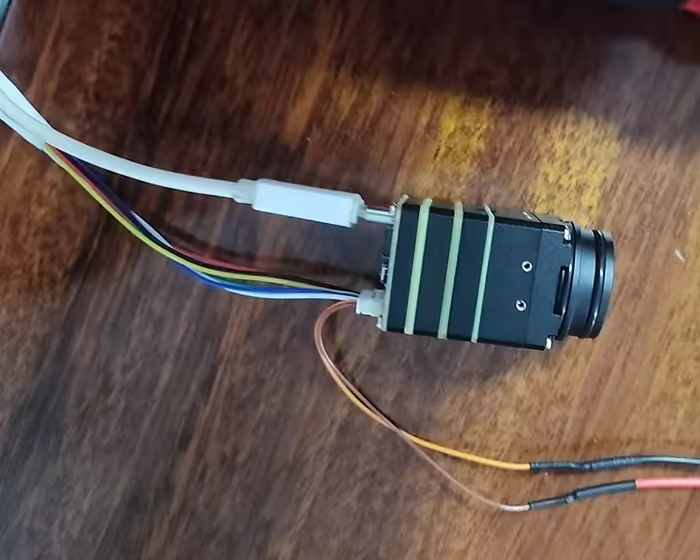
Termokamera má také běžné rozhraní pro výstup videa a výstupní rozhraní USB.
K dispozici je obvykle také rozhraní sériového portu pro odesílání příkazů do kamery pro úpravu parametrů. jako je přiblížení, oddálit, a barvu videa.
Má malé rozměry a může nahradit běžné kamery pro viditelné světlo.
Příspěvek ze souboru VF-202401
Položit otázku
Děkujeme za Vaši odpověď. ✨