







目录
版本历史记录
| 日期 | 版 | 修改描述 |
| 20241020 | V1.0 | 初始版本 |
笔记
- Install the antenna before powering on the device to avoid circuit damage. Place the two antennas of the device at a distance greater than 15cm away from large metal structures to avoid communication obstruction caused by the preceding reasons.
- Make sure that other electronic devices are not placed too close to the antenna. To avoid affecting the ground noise of the device.
- Pull distance as far as possible to make the ground end antenna without obstacles. The height of the ground antenna is greater than 3 米.
- 使用前, please ensure that all the connections are tight and reliable, and all the components work normally.
- Please do not disassemble or modify, otherwise there will be no warranty. If the failure occurs during installation or testing. To solve the problem, please contact the original technical support.
1 Product overview
Vcan2149 is a miniaturized and self-developed TDD bidirectional graph integrated wireless transmission device. The product has the functions of real-time interference detection, 自适应频率选择, 自适应流, automatic retransmission and automatic power control, 这极大地提高了抗杀伤和反干扰的能力, 并具有高可靠性的特征, good stability and low delay.
该产品适合进行消防, 检查, 监控, 以及其他场景. In the case of good air-to-ground visibility, the transmission distance is up to 15KM+.
2 Product accessories
| VCAN2149 Product list (2) | |||
| 没有 | 产品 | 指示 | num |
| 1 | VCAN2149 | TDD wireless transmission radio | 2 |
| 2 | J30J-15pin | 30cm cable | 2 |
| 3 | Little glue stick antenna | 获得: 2.5dBi的 | 2 |
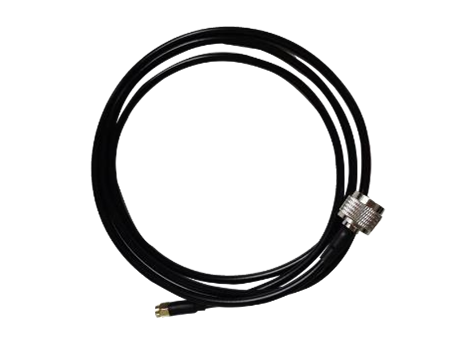
| 4 | Small antenna extension cable | 30cm cable | 2 |
| 5 | All-in-one ground terminal antenna kit (可选的) | 6dBi Omnidirectional antennas | 1 |
| 6 | Omnidirectional antenna 3m extension cable | 1 | |
| 7 | 3dBi flat directional antenna | 1 | |
| 8 | Directional antenna 4m extension cable | 1 | |
| 9 | 3m bracket + hand crank + 该- shaped piece | 1 | |

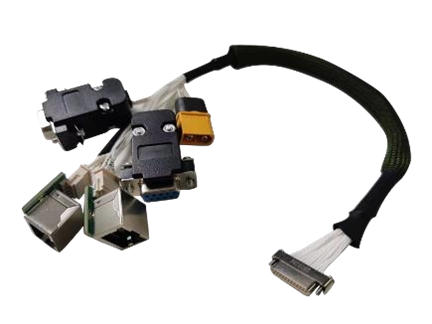

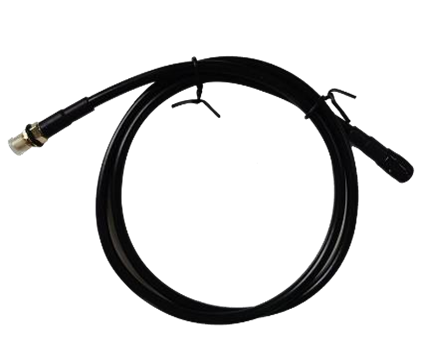
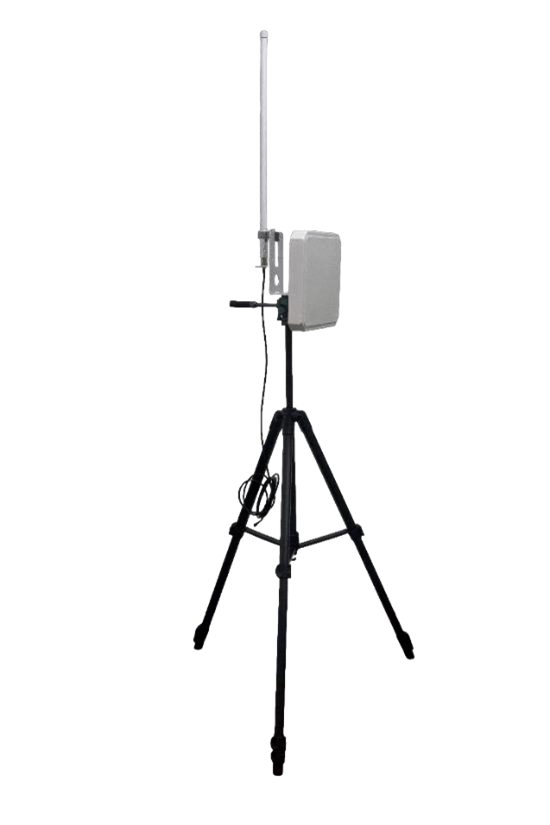
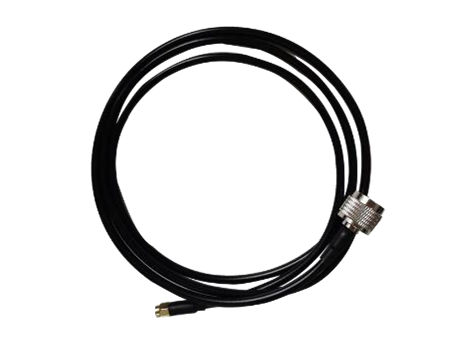
3 Product connection
3.1 Connection diagram(空气)

3.2 Air Connection
步骤1: Connect antenna
The distance between the two antennas must be greater than
15cm.The tail is connected to the J30J-15PIN.
第2步: Connect serial port
It can be connected to flight control equipment or other serial
设备. Note the serial port level.
第三步: Connect network port
A single or dual network port will be used to connect the camera.
步骤4: Connect power
Power the equipment DC9~26V, 典型值: +12V.
Step5: STS light
When the secondary terminal is powered on but not
同步的, the STS displays a blue blinking indicator. 什么时候
the connection to the main terminal is normal, the STS light
displays evergreen/yellow/red based on the signal quality
strength.
3.3 Connection diagram(地面)
3.4 Ground Connection
步骤1: Connect antenna
The distance between the two antennas must be greater than
15cm.The tail is connected to the J30J-15PIN.
第2步: Connect serial port
It can be connected to the computer serial port tool or other serial port devices.
第三步: Connect network port
Connect the network to the computer, configure the IP address of the computer
to be in the same network segment as the IP address of the device. Then use the WEB or host computer for parameter configuration and status query
步骤4: Connect power
Power the equipment DC9~26V, 典型值: +12V.
Step5: STS light
When the primary device is powered on but not synchronized,
the STS displays a steady blue indicator. When the connection to the slave is normal, the STS light displays evergreen/yellow/red depending on the signal quality strength.
Step6: Play video
Open the video player software. View live transmission video.
4 Product use
4.1 电源
The device uses DC 9~26V power supply, the typical value is +12V@3A. Under different voltages, the average current of the master and slave terminals working normally is shown in the following table. Slave power consumption ≤25W, master power consumption ≤10W
| 电源电压 | 空气(奴隶) 工作电流 (一个) | 地面(掌握) 工作电流 (一个) |
| 12V | 1.80一个 | 0.80一个 |
| 24V | 0.90一个 | 0.40一个 |
| 26V | 0.75一个 | 0.37一个 |
| 备注:It is recommended that customers use the 12V@3A power supply for power supply. | ||
4.2 Wiring definition

The interface of the Vcan2149 device adopts J30J-15PIN, and the default interface consists of 1 电源, 1 网口, 1 RS232, 1 TTL, 要么 2 系统总线.
| 线性顺序 | 引脚名称 | 接口定义 | 接口描述 | 信号方向 |
| 1 | 电压控制电路 | Power DC 9~26V | 电源正极 | 一世 |
| 2 | 电压控制电路 | 电源正极 | 一世 | |
| 3 | GND | Power Negative | 一世 | |
| 4 | GND | Power Negative | 一世 | |
| 5 | TX1P+ | 以太网端口 *1 | TX+ | 该 |
| 6 | TX1M- | TX- | 该 | |
| 7 | RX1P+ | 接收+ | 一世 | |
| 8 | RX1M- | RX- | 一世 | |
| 9 | 5V | 5输出电压 | SBUS 5V输出 | 该 |
| 10 | txd_a | 串行端口 1 RS232/TTL | 串行端口 1 TX | 该 |
| 11 | RXD_A | 串行端口 1 RX | 一世 | |
| 12 | SBUS/TXD_B | 串行端口 2 SBUS/TTL/RS232 (笔记 4,5) | SBUS Output (空气) SBUS Input (地面) | IO |
| 13 | SBUS/RXD-B | IO | ||
| 14 | GND | 串行端口 2 地面 | 该 | |
| 15 | GND | 地面 | 串行端口 1 地面 | 该 |
注意 1: Signal direction I indicates radio signal input and direction O indicates radio signal output.
注意 2: 串行端口 1 只能与 RS232/TTL 一起使用, 引脚10,11,15. The factory is determined by the hardware, the default is RS232.
注意 3: 串行端口 2 可用作RS232/TTL/SBUS. 工厂由硬件决定. TTL和SBUS可通过软件切换.
注意 4: 当串口 2 is SBUS, SBUS12 and 13pin of the ground end are in, and SBUS12 and 13pin of the sky end are out.
注意 5: If dual SBuses are used, set the sky SBUS to Line12->Line12. line13->line13.
4.3 Product indicator meaning

电源灯PWR(绿色)
当PWR灯打开时, 该设备已上电动机. Network port LAN (绿色)
The network port light blinks when data is being sent or received.
Status light STS (Four-color light)
Different colored lights indicate the current signal quality strength.
| STS灯代表接收信号的SNR大小 | |
| STS颜色 | SNR |
| 蓝色 | 未建立连接 |
| 绿色 | SNR>10dBm的 |
| 黄色 | 6dBm的<SNR<10dBm的 |
| 红色 | SNR<6dBm的 |
| 模块 | 模式 | PWR led | LAN led | STS led |
| 掌握 | 不同步 | 绿灯常亮 | 正在传输数据并闪烁 | The blue light is steady on |
| 掌握 | 同步 | 绿灯常亮 | 正在传输数据并闪烁 | (green/yellow/red) Proportional to the strength of the received signal |
| 奴隶 | 不同步 | 绿灯常亮 | 正在传输数据并闪烁 | Blue light flashing |
| 奴隶 | 同步 | 绿灯常亮 | 正在传输数据并闪烁 | (green/yellow/red) Proportional to the strength of the received signal |
当主从设备不同步时, 主、从设备电源PWR指示灯常亮, 主设备STS蓝色指示灯常亮. 设备 STS 发出的蓝光闪烁. 当主从同步时, the master and slave’s STS light becomes a three-color light, 如果信号质量良好则显示绿灯. A yellow light indicates moderate communication quality. 红灯表示通讯质量差. 当网络端口发送或接收数据时, 主备设备LAN指示灯闪烁.
5 WEB Parameter configuration
5.1 Device IP
The default IP address of the master (地面) device is 192.168.10.250, the default IP address of the trunk device is 192.168.10.251, and the default IP address of the slave (空降) device is 192.168.10.252. The alternate IP addresses are 192.192.192.192. The default IP address is the one that can be used and modified by the user. The alternate IP, 192.192.192.192, 无法修改. If you forget the IP address, you can use the standby IP address to log in to the WEB page for parameter query and configuration.
⚫ Configure the network segment of the PC(192.168.10.xxx)
Open computer network connection and right-click properties. Open the TCP/IPv4 properties as shown in the following figure. Click Advanced, add IP, computer IP can add multiple IP at the same time. The same computer can work in different network segments. 例如, add IP address 192.168.10.123 和IP地址 192.168.1.123 同时. Complete the PC IP configuration and click OK to save the configuration.

5.2 WEB Account number and password
The default WEB address of the primary (地面单位) device is 192.168.10.250. The default Web input is 192.168.10.251 on the trunk (relay unit)device and 192.168.10.252 on the secondary (空气单元) 设备.
帐户: 行政; 密码: 123456

5.3 系统设置
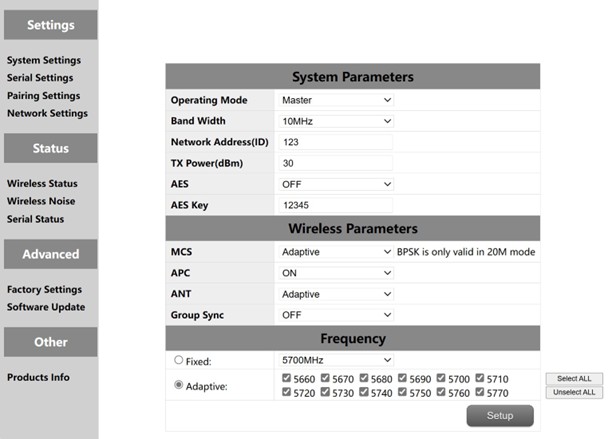
| 没有. | 功能 | 指示 |
| 1 | 操作模式 | Configure the device as the master or slave end |
| 2 | 带宽 | 信道带宽: 10/20兆赫 |
| 3 | 网络ID | Network ID number: The same ID number is used for the same group. |
| 4 | 发射功率(dBm的) | Up to 30dBm |
| 5 | AES | AES Encryption switch |
| 6 | AES Key | AES Secret key |
| 7 | MCS | Automatic stream control (optional adaptive mode or fixed mode) |
| 8 | APC | 自动功率控制 (optional on or off) |
| 9 | 蚂蚁 | Automatic selection of two antennas (fixed antenna 1 或天线 2) |
| 10 | Multiple sets coexist | Multiple sets of coexisting switches enable multiple sets of devices to be used simultaneously |
| 11 | 频率 | 自动频率选择 (optional adaptive or fixed) |
Multiple sets of coexistence: When the switch is turned on, a maximum of six pairs of devices can work at the same time, but they need to be used at a fixed frequency. 频率选择: Fixed frequency or adaptive frequency can be selected. The adaptive frequency points can be selected all, or you can select any of the frequency points to use.
5.4 Serial Settings
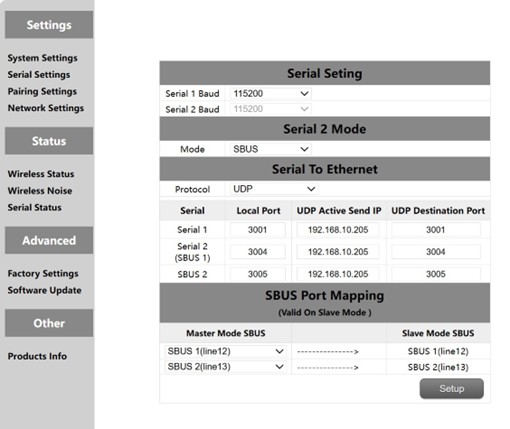
The Vcan2149 device has two serial ports, among which the level of serial ports 1 和 2 is RS232 or TTL level. The level of serial port is determined by the factory hardware, and the customer cannot modify it by himself. 当串口 2 is TTL. 串行端口 2 can also be used as two SBUS. The SBUS pins at the ground end are input IN, and the SBUS pins at the sky end are output OUT. SBUS also supports 5V output.
The serial port of the Vcan2149 supports the serial-to-network function. TCP and UDP can be used for serial transmission. The default port number of serial port 1 是 3001, and that of serial port 2 是 3004.
5.4.1 Serial-to-Serial
The mapping between the remote serial port and the local serial port is one-to-one. 默认, remote serial port 1 corresponds to local serial port 1, and remote serial port 2 corresponds to local serial port 2.
5.4.2. SBUS Configuration
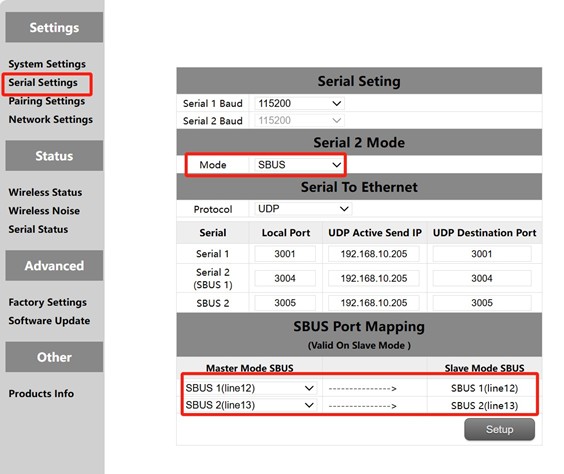
- Open the sky side and the ground side of the WEB, click the left serial port configuration.
- Change the serial port 2 mode on both the primary and secondary ends to SBUS mode.
- Change the SBUS mapping of the sky side to PIN12 input corresponding to PIN12 output, PIN13 input corresponding to PIN13 output. The SBUS mapping configuration on the ground end is invalid.
第一, you need to configure serial ports 2 of the primary and secondary stations as SBUS. The module supports two SBUS. 此外, 销 12 和 13 at the ground end are SBUS inputs. 销 12 and Pin 13 at the sky end are SBUS outputs. 该 12 pins at the sky end correspond to the 12 pins at the ground end. 该 13 pins at the sky end correspond to the 13 pins at the ground end
5.4.3. Serial port to network port/Network port to serial port
The function of serial switching, or network switching is mainly serial port input, 网口输出或网口输入, serial port output, 等等. The serial port on the sky end is configured as TCP or UDP for transmission. The following is an example of a Mission Planner ground station performing TCP/UDP protocol transmission.
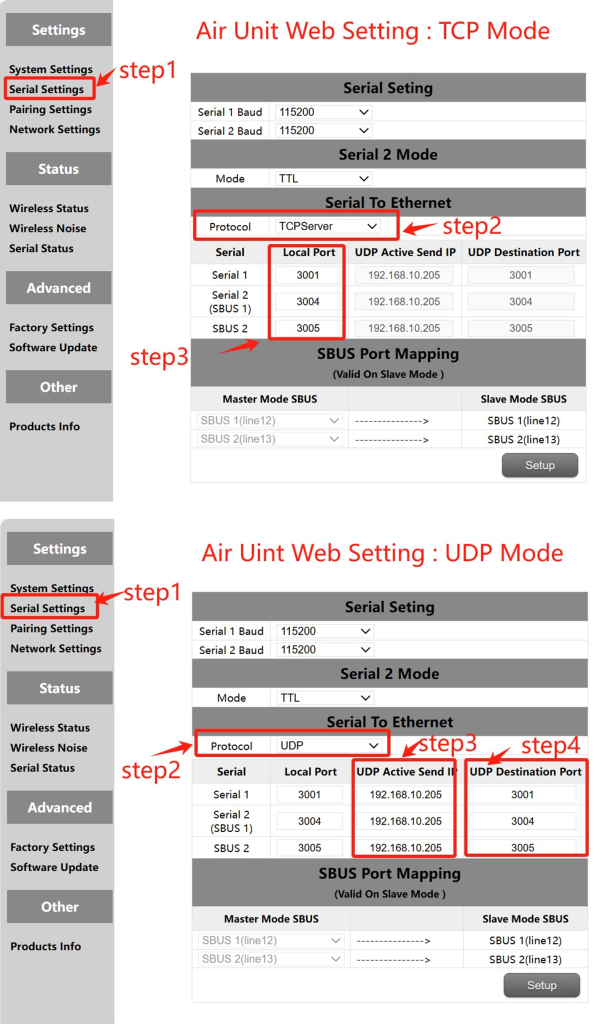
MissionPlanner (TCP模式)
TCP配置 (空中串口)
步 1: 打开 – Serial Settings bar of the sky side web page
步 2: 将串口转网络协议改为TCP服务器
步 3: Determine the port number. The default port number of serial port 1 是 3001, 串行端口 2 是 3004. 最后点击设置按钮.
MissionPlaner TCP configuration
步 1: 打开任务规划器
步 2: MP 选择 TCP 模式, 不使用串口波特率, 单击连接按钮. Enter host name/IP: 192.168.10.252(天端默认IP地址). 输入远程端口: 3001 (串行端口 1). 3004 (串行端口 2).
⚫ MissionPlanner (UDP方式)
UDP配置 (空中串口)
步 1: 打开 – Serial Settings bar of the sky side web page.
步 2: 将串口转网络协议改为UDP服务器.
步 3: 输入串口的主动UDP IP地址. 这是安装MP的计算机的IP地址.
步 4: 确定UDP目标端口号. 串口默认目标端口号 1 至 2 是 3001-3004. 您也可以根据客户需求将目标端口号设置为不同的端口号. 最后点击设置按钮.
任务规划器 UDP 配置
步 1: Open the Mission Planner ground statio
步 2: MP选择UDP模式, 串口波特率不需要, click the Connect button. Enter Local port: 3001 (串行端口 1). 3004 (串行端口 2).
5.5. Pairing Settings
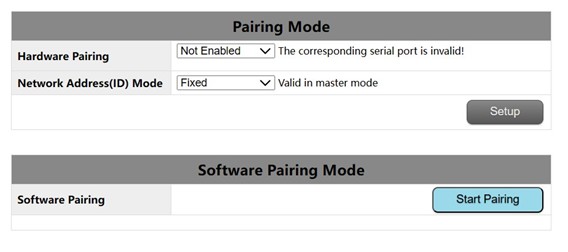
The pairing function can be realized by hardware configuration and software configuration. The ID number can be configured on the primary end to determine whether to use the random ID number or the fixed ID number of the original primary end for automatic pairing. This parameter is invalid for configuring ID mode on the secondary end.
Pairing premise:
The pair device can be paired only when it is a primary device and a secondary device. If both devices are primary devices or secondary devices, the pair cannot be paired.
Hardware pairing conditions:
- Effective within 60 seconds after starting, invalid after 60 秒.
- Invalid in connected (同步的) 状态.
- The pairing mode has been entered once after startup, and it is invalid even if
the time is still within 60s.
Hardware pairing Settings:(The Air unit and the ground unit are configured independently)
- Web configuration: Select serial port 1 or serial port 2 or serial port 4 作为
paired serial port.
- 配置后, short connect the TX and RX of the corresponding serial port for at least 2 秒. Customers can solder a switch button themselves by long pressing it for more than 2 秒. TX and RX can also be
looped together.
- If the RSSI indicator blinks and turns off, the device enters the pairing mode.
Wait until the peer device also enters the pairing mode.
Software pairing Settings:
点击 “Start Pairing” button inside the page to start pairing. 后 2 分钟, 如果
the pairing fails, the device displays the status before the pairing again.
5.6 IP configuration(Network Settings)

1.The default local IP address of the primary node is 192.168.10.250.
2.The default local IP address of the repeater node is 192.168.10.251.
3.The default local IP address of the slave node is 192.168.10.252.
4.The Alternate IP address is 192.192.192.192.(cannot be changed)
5.7 Wireless Status
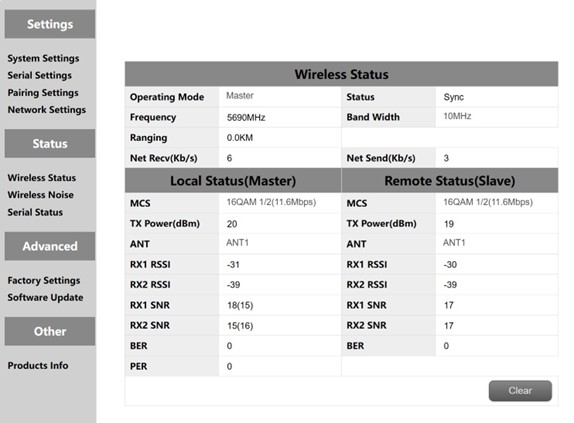
Wireless status is mainly to display channel information, such as master and slave nodes, whether to synchronize, working frequency points, distance display and network data volume statistics. It also displays the status of the local device and some information about the remote device. 例如, MCS (stream mode), 发射功率, twochannel received energy, two-channel received signal-to-noise ratio and error packet PER display.
The distance display can only be displayed by the master. The detection of background noise is carried out when the master is powered on. The slave does not detect background noise before synchronization. The slave detects background noise only after synchronization.
The network transmission of the master indicates the amount of data sent by the master to the PC. The network reception of the slave indicates the amount of data received by the slave from the camera.
5.8 Wireless Noise
Background noise detection is mainly used to detect ambient interference of master and slave equipment. The red line represents the bottom noise at the primary end and the blue line represents the bottom noise at the secondary end. And the lower the absolute value, the cleaner the floor noise, 那是, the smaller the interference source. 例如, -100dBm is better than -90dBm. Floor noise detection can quickly help customers determine whether there is interference in the test environment.
- Floor noise detection in clean environments
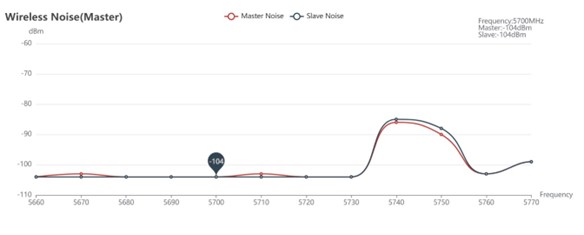
- Floor noise detection when there is interference

5.9 恢复出厂设置
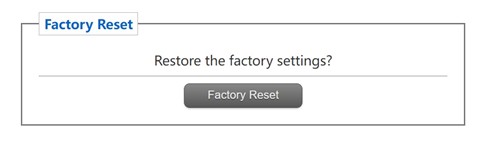
The default factory Settings of the device are the secondary (空降) 参数, and the default network IP address after factory restoration is 192.168.10.250.
5.10 软件升级
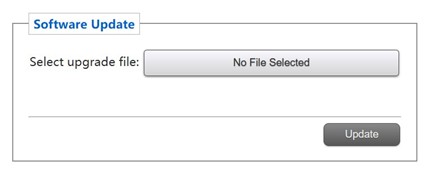
System update, for customers to update the firmware, click select file, select the corresponding burn file, after the successful upgrade, please power on again. Do not power off during the upgrade to avoid firmware loss.
5.11 Products Info

This section describes the serial number, 软件, and hardware version number of the device.
问一个问题
感谢您的回复。 ✨