






How to set serial to Ethernet from Flight Control to Mission Planner or QGroundControl or Pixhawk, Ethernet to Serial. How to Serial-to-network or network-to- serial on drone radio link?


Transmissão de vídeo sem fio
Firmware versions after 202404 configure the Air unit serial port. The operation guid is for Van1933 e VCan1933-8W.
The function of serial switching or network switching mainly includes serial port input, saída de porta de rede ou entrada de porta de rede, serial port output and so on. Firmware versions after 202404 use the serial port configuration of the configuration sky for TCP or UDP transmission. The following is an example of TCP/UDP transmission from two ground stations, Mission Planner and QGC.
Índice
Planejador de Missão (Modo TCP)
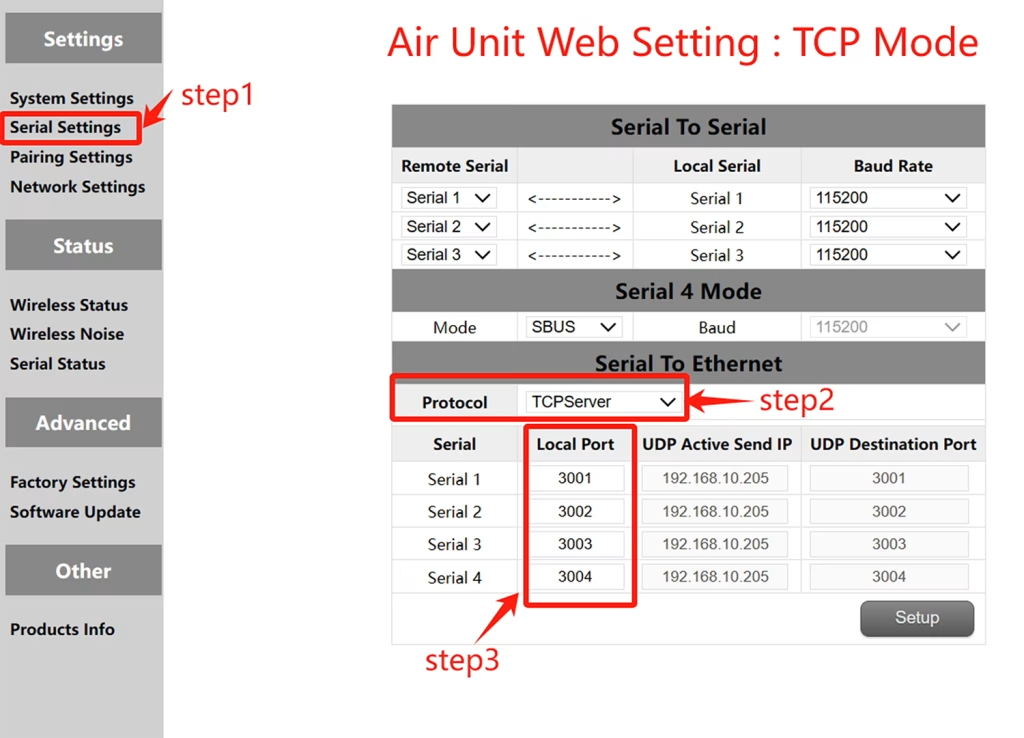
Configuração do TCP (Air unit serial port )
- Degrau 1: Abra o – Serial Settings bar of the air unit web page.
- Degrau 2: Altere o protocolo de serial para rede para servidor TCP.
- Degrau 3: Determine the local port number. The default port number of serial ports 1 para 3 é 3001-3003. Click Set.
Mission Planer TCP configuration
- Degrau 1: Abra o planejador da missão.
- Degrau 2: MP SELECIMENTO MODO TCP, Não use a taxa de transmissão de porta serial, Clique no botão Connect. Enter host name/IP: 192.168.10.252 (Endereço IP padrão do fim do céu). Digite a porta remota: 3001 /3002/3003. The port number depends on which serial port is connected to the sky serial port
Planejador de Missão (modo UDP)
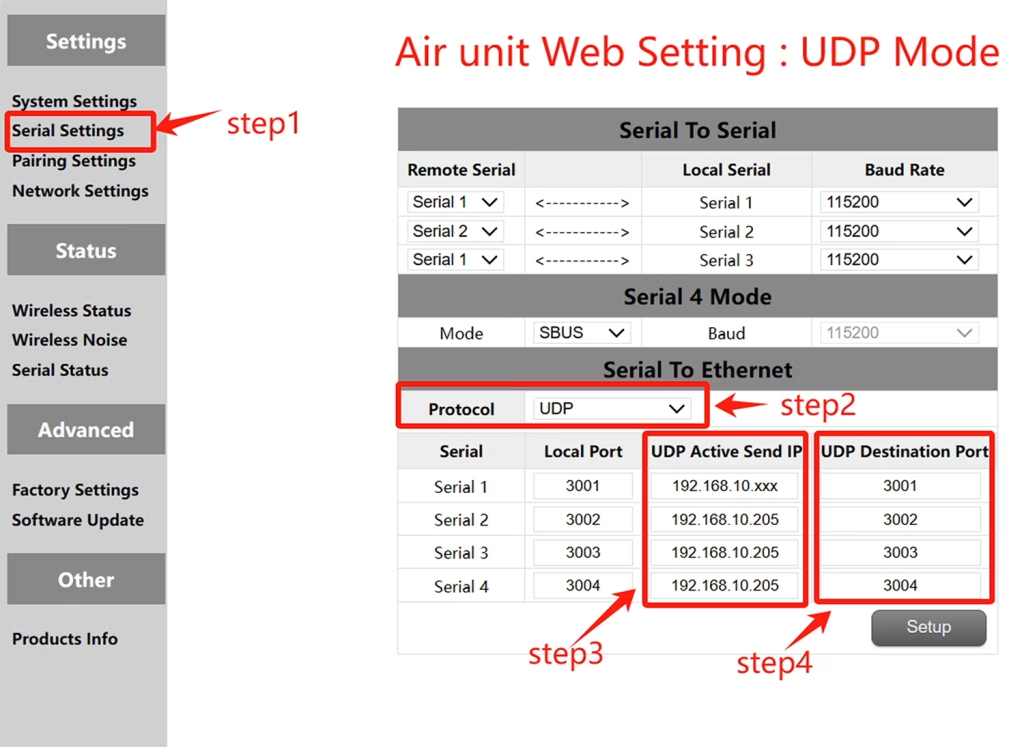
Configuração UDP (Porta serial aérea)
- Degrau 1: Abra o – Serial Settings bar of the air unit web page.
- Degrau 2: Altere o protocolo serial para rede para servidor UDP.
- Degrau 3: Digite o endereço IP UDP ativo da porta serial. É o endereço IP do computador no qual MP está instalado.
- Degrau 4: Determine o número da porta de destino UDP. O número de portas de destino padrão 1 para 3 é 3001-3003. Você também pode definir o número da porta de destino para diferentes com base nos requisitos do cliente. Finalmente clique no botão de configurações.
Configuração UDP da plaina de missão
- Degrau 1: Open the Mission Planner ground station.
- Degrau 2: MP Selecione o modo UDP, A taxa de transmissão em série não é necessária, Clique no botão Connect.
Enter Local port: Enter the UDP destination port number of the sky port. The default value is 3001-3003.
QGroundControl adopts TCP mode
TCP configuration of the air serial port
- Degrau 1: Abra o – Serial Settings bar of the air unit web page。
- Degrau 2: Altere o protocolo de serial para rede para servidor TCP.
- Degrau 3: Determine the local port number. The default port number of serial ports 1 para 3 é 3001-3003. Click Set.
QGroundControl TCP configuration
- Degrau 1: Open the QGroundControl ground station and click the icon in the top left corner.
- Degrau 2: Click Application Settings, select Communication connection, and click Add Option.
- Degrau 3: Type Select the TCP mode and enter Server Address: 192.168.10.252(IP address of the sky end).
Porta de entrada: 3001 (porta serial 1); 3002 (porta serial 2); 3003 (Porta serial 3).
QGroundControl adopts UDP mode
UDP configuration of the air serial port
- Degrau 1: Abra o – Serial Settings bar of the air unit web page.
- Degrau 2: Altere o protocolo serial para rede para servidor UDP.
- Degrau 3: Digite o endereço IP UDP ativo da porta serial. É o endereço IP do computador no qual MP está instalado.
- Degrau 4: Determine o número da porta de destino UDP. O número de portas de destino padrão 1 para 3 é 3001-3003. Você também pode definir o número da porta de destino para diferentes com base nos requisitos do cliente. Finalmente clique no botão de configurações.
QGroundControl UDP configuration
- Degrau 1: Open the QGroundControl ground station and click the icon in the top left corner.
- Degrau 2: Click Application Settings, select Communication connection, and click Add Option.
- Degrau 3: Type Select the UDP mode and enter port: The default UDP destination port number 3001-3003.
Enter Server Address (opcional) : 192.168.10.252(the default IP address of the air unit).
Transmissão de vídeo sem fio
View or Download the operation of serial-to-network or network-to-serial on drone radio link.
Faça uma pergunta
Sua mensagem foi enviada