





How to set serial to Ethernet from Flight Control to Mission Planner or QGroundControl or Pixhawk, Ethernet to Serial. How to Serial-to-network or network-to- serial on drone radio link?


无线视频传输
Firmware versions after 202404 configure the Air unit serial port. The operation guid is for Vcan1933 和 Vcan1933-8W.
The function of serial switching or network switching mainly includes serial port input, 网口输出或网口输入, serial port output and so on. Firmware versions after 202404 use the serial port configuration of the configuration sky for TCP or UDP transmission. The following is an example of TCP/UDP transmission from two ground stations, Mission Planner and QGC.
目录
任务规划师 (TCP模式)
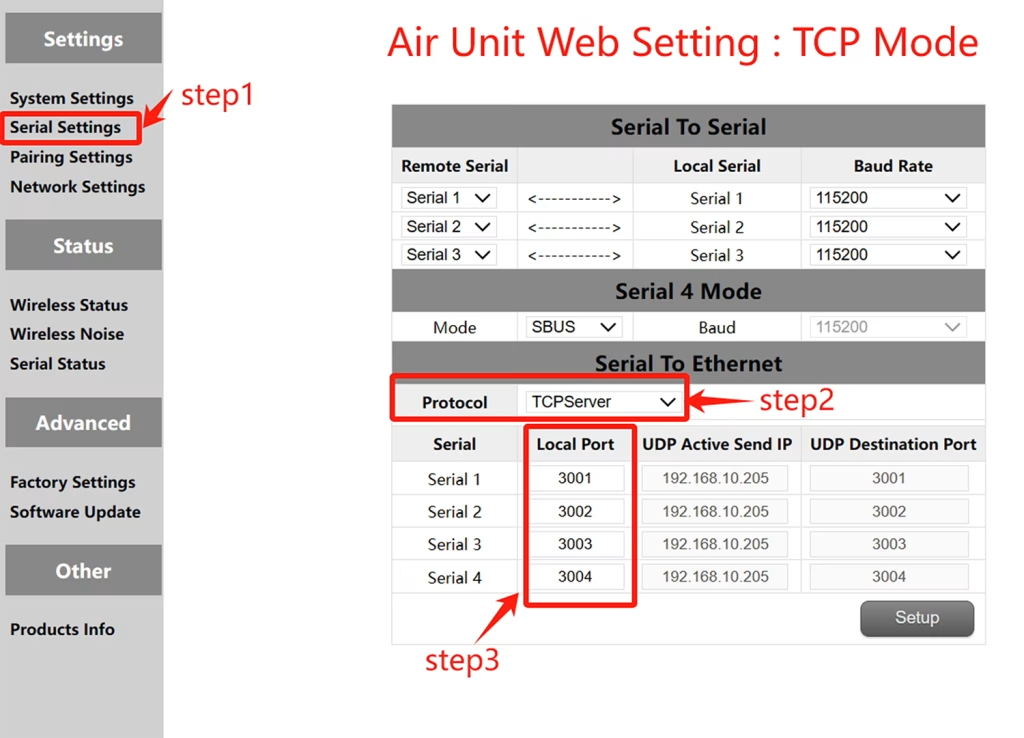
TCP配置 (Air unit serial port )
- 步 1: 打开 – Serial Settings bar of the air unit web page.
- 步 2: 将串口转网络协议改为TCP服务器.
- 步 3: Determine the local port number. The default port number of serial ports 1 至 3 是 3001-3003. Click Set.
Mission Planer TCP configuration
- 步 1: 打开任务规划器.
- 步 2: MP 选择 TCP 模式, 不使用串口波特率, 单击连接按钮. Enter host name/IP: 192.168.10.252 (天端默认IP地址). 输入远程端口: 3001 /3002/3003. The port number depends on which serial port is connected to the sky serial port
任务规划师 (UDP模式)
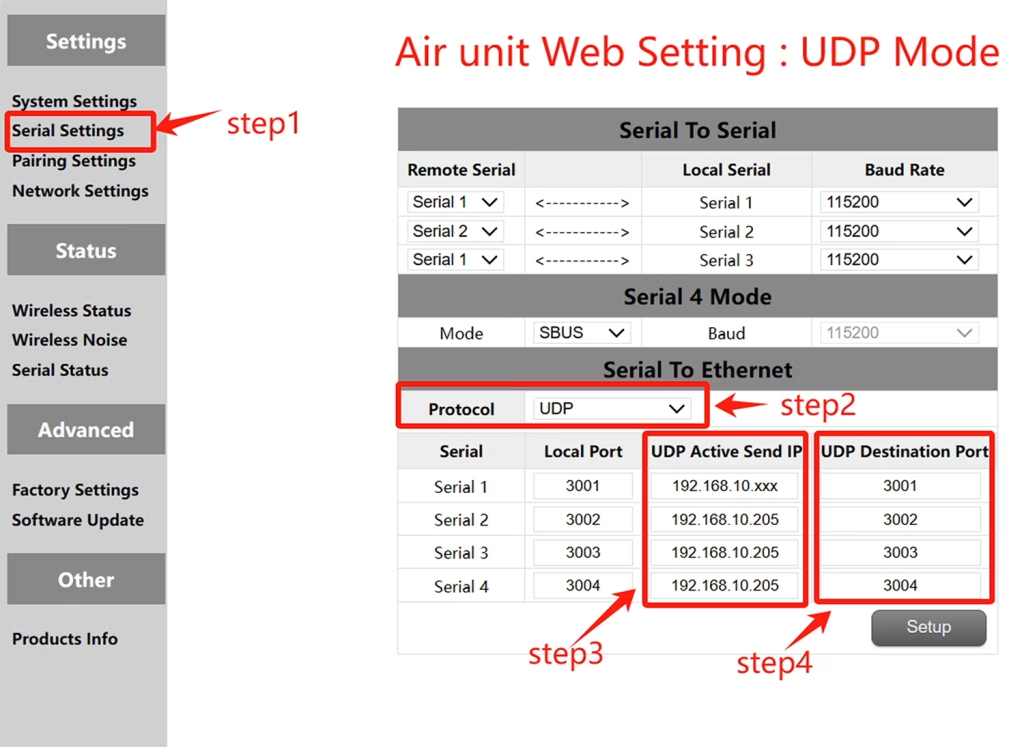
UDP配置 (空中串口)
- 步 1: 打开 – Serial Settings bar of the air unit web page.
- 步 2: 将串口转网络协议改为UDP服务器.
- 步 3: 输入串口的主动UDP IP地址. 这是安装MP的计算机的IP地址.
- 步 4: 确定UDP目标端口号. 串口默认目标端口号 1 至 3 是 3001-3003. 您也可以根据客户需求将目标端口号设置为不同的端口号. 最后点击设置按钮.
任务规划器 UDP 配置
- 步 1: Open the Mission Planner ground station.
- 步 2: MP选择UDP模式, 串口波特率不需要, 单击连接按钮.
Enter Local port: Enter the UDP destination port number of the sky port. The default value is 3001-3003.
QGroundControl adopts TCP mode
TCP configuration of the air serial port
- 步 1: 打开 – Serial Settings bar of the air unit web page。
- 步 2: 将串口转网络协议改为TCP服务器.
- 步 3: Determine the local port number. The default port number of serial ports 1 至 3 是 3001-3003. Click Set.
QGroundControl TCP configuration
- 步 1: Open the QGroundControl ground station and click the icon in the top left corner.
- 步 2: Click Application Settings, select Communication connection, and click Add Option.
- 步 3: Type Select the TCP mode and enter Server Address: 192.168.10.252(IP address of the sky end).
Input port: 3001 (串口 1); 3002 (串口 2); 3003 (串口 3).
QGroundControl adopts UDP mode
UDP configuration of the air serial port
- 步 1: 打开 – Serial Settings bar of the air unit web page.
- 步 2: 将串口转网络协议改为UDP服务器.
- 步 3: 输入串口的主动UDP IP地址. 这是安装MP的计算机的IP地址.
- 步 4: 确定UDP目标端口号. 串口默认目标端口号 1 至 3 是 3001-3003. 您也可以根据客户需求将目标端口号设置为不同的端口号. 最后点击设置按钮.
QGroundControl UDP configuration
- 步 1: Open the QGroundControl ground station and click the icon in the top left corner.
- 步 2: Click Application Settings, select Communication connection, and click Add Option.
- 步 3: Type Select the UDP mode and enter port: The default UDP destination port number 3001-3003.
Enter Server Address (可选的) : 192.168.10.252(the default IP address of the air unit).
无线视频传输
View or Download the operation of serial-to-network or network-to-serial on drone radio link.
问一个问题
感谢您的回复。 ✨