






Նշում: Նախ ալեհավաքը միացնելուց հետո, միացրեք հոսանքը և սկսեք ծրագրակազմի կազմաձևումը և վրիպազերծումը. Անտենայի միացումից հետո, պարամետրերը կարող են վերահսկվել իրական ժամանակում.
Վերգետնյա կայան (DC10~30V էլեկտրամատակարարում)
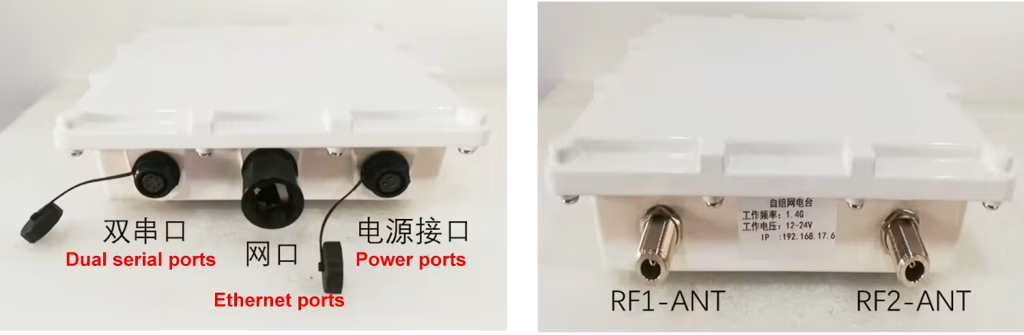
Օդային միջերեսի նկարագրությունը
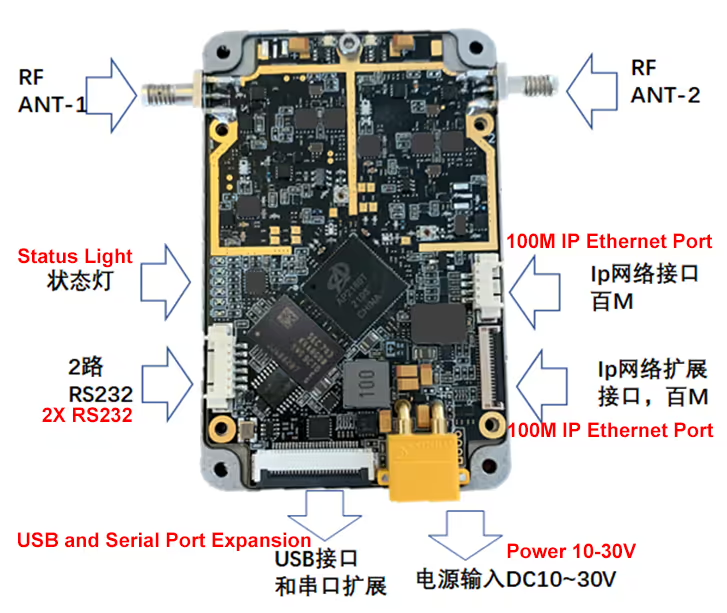
Բովանդակություն
1. Համակարգչի կարգավորումներ
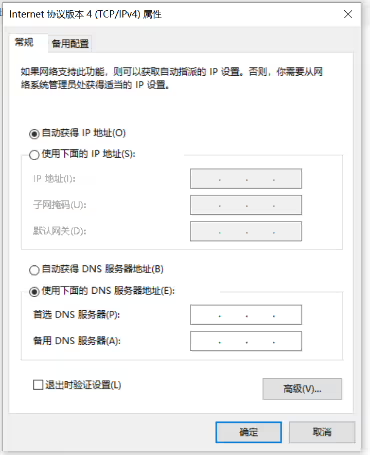
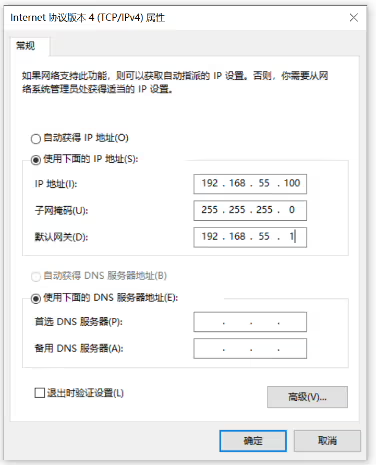
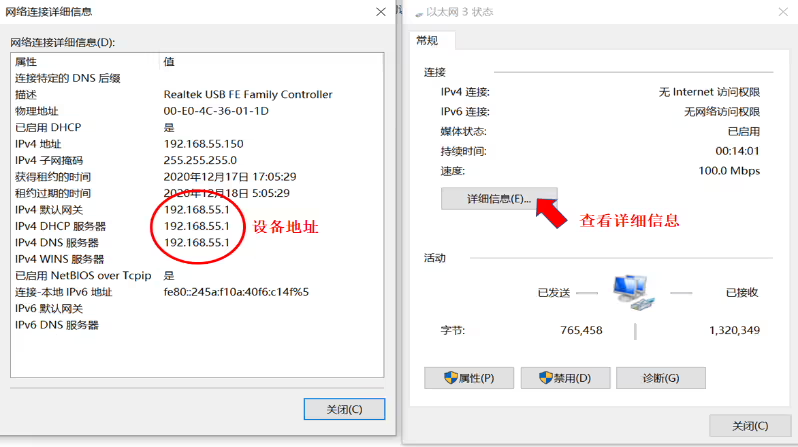
Սարքը միացրեք համակարգչին, ստուգեք սարքի IP հասցեն համակարգչի ցանցային միացումում և նույն ցանցի հատվածը, ինչ սարքի հասցեն (ստորև նկարները). Եթե չգիտեք սարքի համակարգիչը, կարող եք համակարգչին կարգավորել, որպեսզի ավտոմատ կերպով IP ստանա, ապա ստուգեք համակարգչային ցանցի միացման կարգավիճակը սարքի IP հասցեի համար, և այնուհետև դրեք նույն ցանցի հատվածում, ավելի լավ է անջատել Windows Firewall-ը համակարգիչների վրա.
2. Գործարկեք պարամետրերի կազմաձևման ծրագրակազմը
Բացելուց հետո 1400_TDD_COFDM_ConfigV3.3 ծրագրային ապահովում, հայտնվում է հիմնական ինտերֆեյսը:
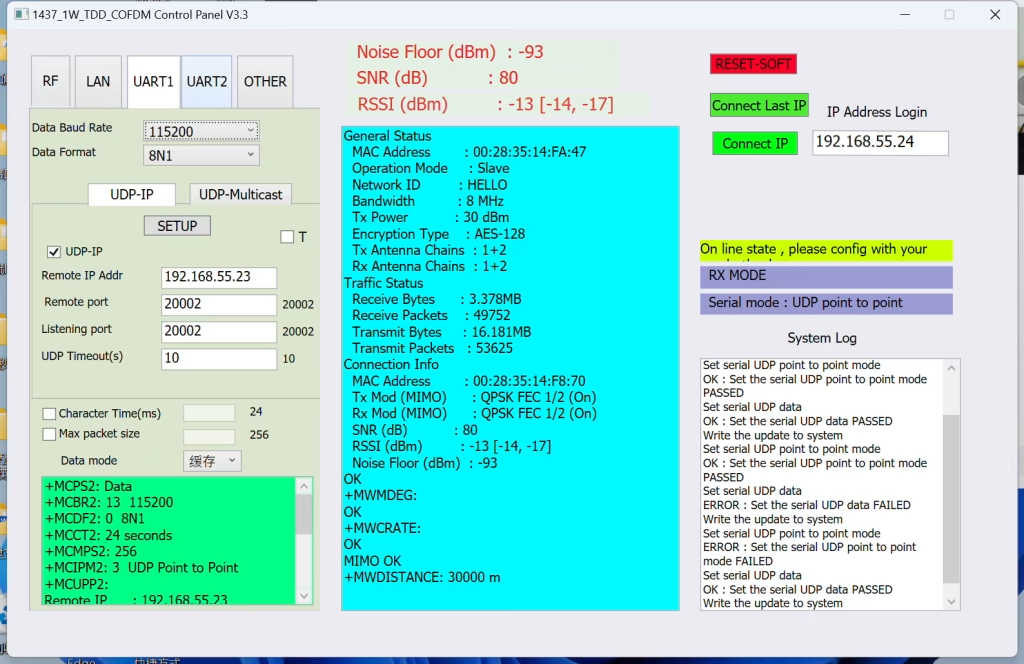
2.1 Միացրեք սարքը և միացրեք այն համակարգչին
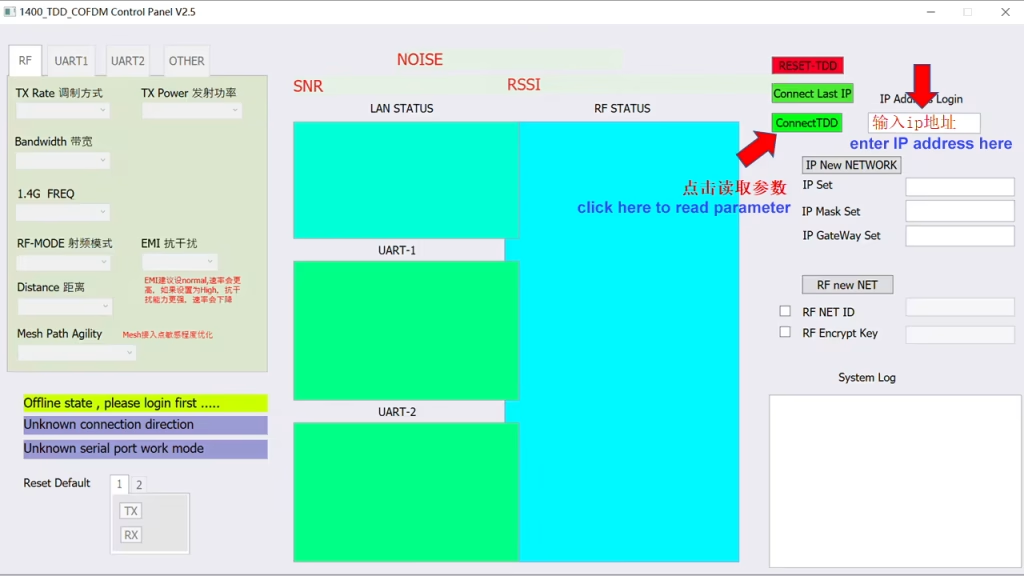
Մուտքագրեք սարքի IP հասցեն աջ կողմում գտնվող IP հասցեի մուտքի պատուհանում:
Այստեղ կարող եք մուտքագրել տեղական սարքի IP հասցեն կամ հեռավոր սարքի IP հասցեն. Մի քանի սարքերի հաջող միացումից հետո, ցանկացած տերմինալի IP-ն կարող է օգտագործվել.
Միանալու համար սեղմեք ConnectTDD. Կամ ուղղակիորեն սեղմեք Միացնել վերջին IP-ն՝ արագ մուտք գործելու համար.
Մուտք գործելուց հետո կարդացեք ալիքի պարամետրերը
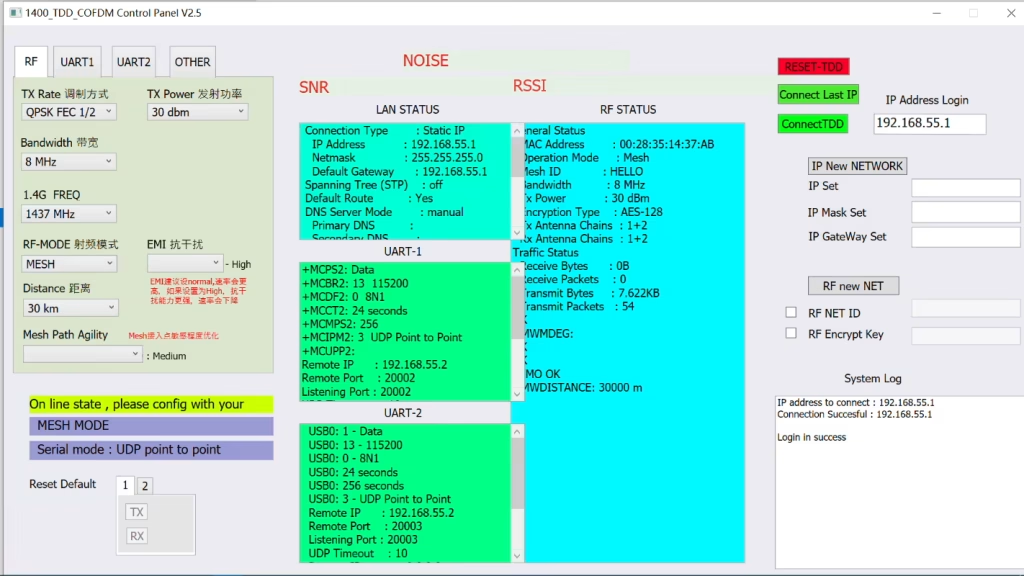
2.2 Մուտք և ցանցի կարգավորումներ
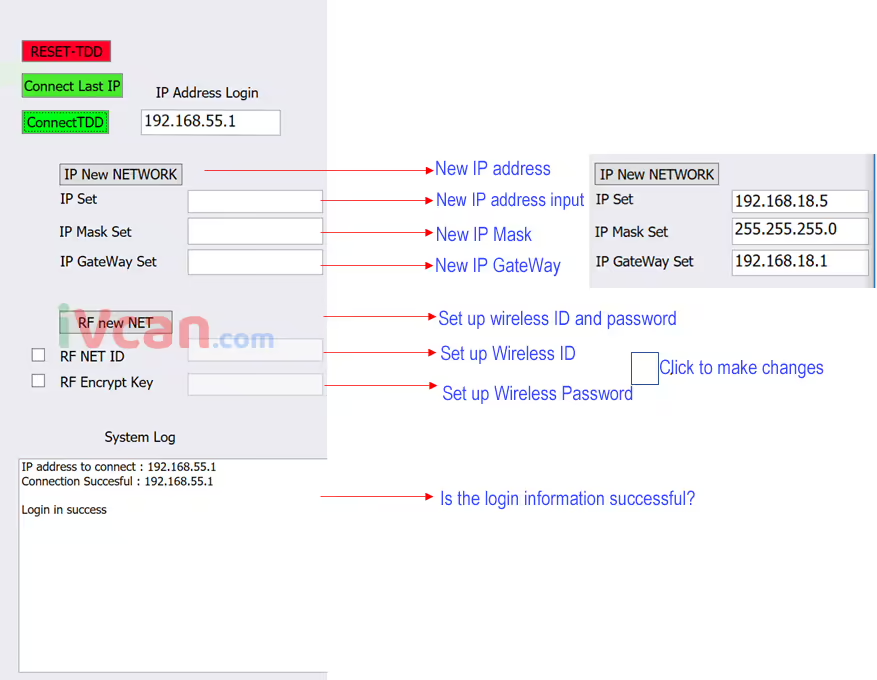
Նշում: Միացնելուց հետո սարքը գործարկելու համար տևում է մոտ 3-5 վայրկյան. Կտտացնելուց հետո միացնելTDD,
| Մուտք գործելու հաջողության մասին տեղեկատվություն | Մուտքի ձախողման մասին տեղեկատվություն |
| IP հասցե միանալու համար : 192.168.55.1 | զգուշացում , հիմա նորից միանալու կարիք չկա , համակարգը աշխատում է …. |
| Միացումը հաջողվեց: 192.168.55.1 | IP հասցե միանալու համար : 192.168.55.1,Սարքը միացված չէ |
| Login in success |
Red font REST-TDD, restart the program
2.3 Մոնիտորինգի տեղեկատվություն
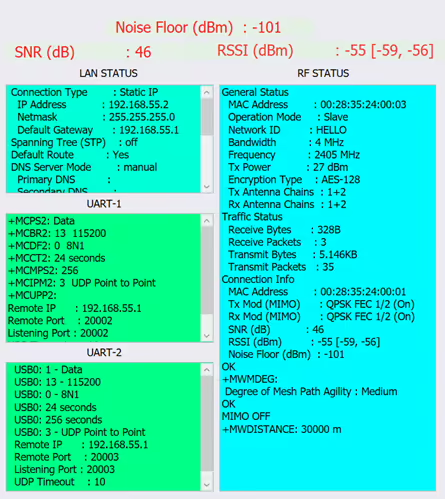
- Before setting parameters, you need to look at the frequency electromagnetic environment. The lower the noise floor, ավելի լավ. The terminal access field strength and signal-to-noise ratio.
- After the parameters are successfully set, they will be displayed in the corresponding column. You can check whether the setting mode is correct.
- Displays the signal-to-noise ratio of the connection, ազդանշանի ուժգնություն (անտեննա 1, անտեննա 2) and background noise.
- If the background noise is too loud, it means the interference is serious and you need to change the frequency band.
- You can carry a spectrum analyzer with you to test interference on site.
- Note that the data here is one-to-one, data in master-slave mode. For detailed data on each terminal in one-to-many or MESH mode, please refer to RF STATUS related data.
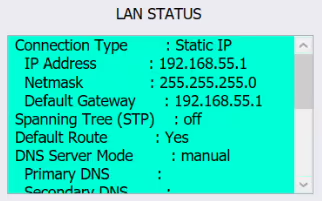
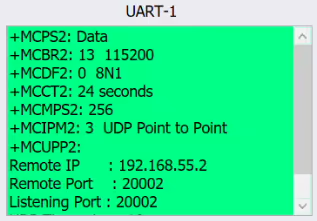
Display wireless related data:
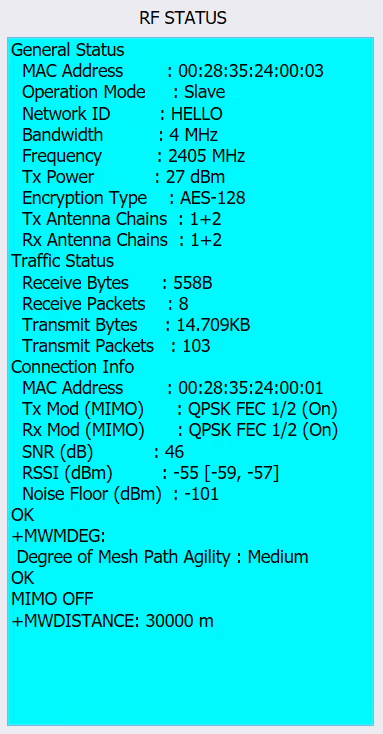
ռեժիմ, ID number, թողունակություն, հաճախականություն, power and other data. Data related to the connected device, device number, SNR, RSSI, Noise Floor and other data.

- Displays the signal-to-noise ratio of the connection, ազդանշանի ուժգնություն (անտեննա 1, անտեննա 2) and background noise.
- If the background noise is too loud, it means the interference is serious and you need to change the frequency band.
- You can carry a spectrum analyzer with you to test interference on site.
- Note that the data here is one-to-one, data in master-slave mode. For detailed data on each terminal in one-to-many or MESH mode, please refer to RF STATUS related data.
3. Պարամետրերի կարգավորումներ

After logging in, you can display and set device-related data.
- Set the modulation method, ուժ, թողունակություն, հաճախականություն, հեռավորությունը, and mode.
- Մոդուլյացիայի թողունակություն: 2, 4, 8MHz
- Frequency setting: 1430-1444
- մոդուլյացիան մեթոդը: BPSK FEC 1/2, QPSK FEC 1/2, QPSK FEC 3/4, 16-QAM 1/2, 16QAM 3/4, 64QAM 2/3, 64QAM 3/4, 64QAM 5/6, AUTO (usually set to BPSK FEC 1/2, QPSK FEC during movement 1/2)
- Setting a higher modulation method will transmit a larger amount of data, but the sensitivity will be lower. If the host sends a large amount of data and the slave has a small amount of data, the host can set 16-QAM, the slave BPSK, and asymmetric settings. If the data amount is not known, How big can be set to AUTO. It may be more stable if you specify the modulation method.
- Wireless Distance: The distance between terminals. This value is very important, especially for long-distance transmission. The corresponding value should be filled in. If the SNR and other data are normal but the rate is low, you can increase this value.
- RF-MODE: Վարպետ (հյուրընկալող) Ստրուկ (ստրուկ) ՍՐԱՆ (ռելե) ԱՐՏ (no center networking)
- Master-slave mode: One master corresponds to one slave (one-to-one mode) or one master can correspond to multiple slaves (one-to-many mode).
- AD-HOC mode: One host corresponds to multiple AD-HOC slaves. AD-HOC slaves can also communicate with each other. The number of standbys is more than that of MESH mode, and the delay and amount of data transmitted are less than that of MESH mode.
- One host corresponds to multiple AD-HOC slaves, and then corresponds to multiple slaves, forming a mixed network.
- MESH mode: Center-less networking, multiple MESH terminal networking (many-to-many mode)
- MESH Path Agility: Network path stability optimization, can be set to High; Միջին; Ցածր,
- When a network node discovers a new network path, յուրաքանչյուր հանգույցում կստեղծվի ուղու աղյուսակ և ավտոմատ կերպով օպտիմիզացված.
- սակայն, Հանգույցների ավելացումը կամ կրճատումը որոշակի խնդիրներ կառաջացնի, ինչպես, օրինակ,: կապը պետք է վերականգնվի և ուղու աղյուսակը թարմացվի, և հղումը կարող է ժամանակավորապես ընդհատվել.
- Մի կողմից, ամբողջ հղումը պետք է պահպանի սկզբնական հղման կայունությունը, իսկ մյուս կողմից, ուղիների աղյուսակը պետք է թարմացվի փոփոխվող ցանցին հարմարվելու համար. ուստի, այս պարամետրն օգտագործվում է, երբ նոր ցանց է ավելացվում կամ մեկ ցանցի ազդանշանը վատ է. Ուղու թարմացման ուղիների աղյուսակի զգայունությունը. Միջին ընդհանուր առմամբ սահմանված է, և իրականում սահմանվում է ըստ ինժեներական փորձի. Ներքին պարամետրերը կարելի է տեսնել ՌԴ ԿԱՐԳԱՎԻՃԱԿԻ աջ կողմում.
- Նեղ շղթայի տվյալներ (սերիական պորտի տվյալներ) կարգավորումները
UART կարգավորումների էջ, Այստեղ սահմանեք UART սերիական նավահանգստի տվյալները:
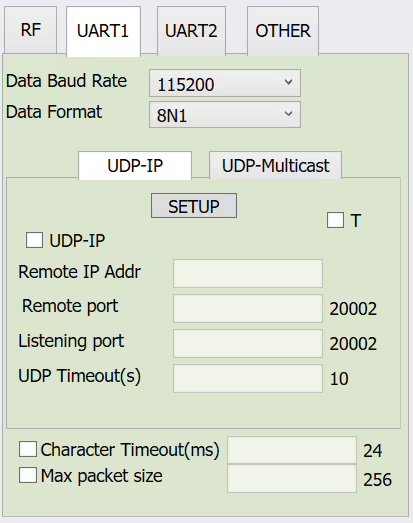
Տվյալների Baud Rate: Set the baud rate of the serial port, -ից 300 դեպի 921600
Here is the data to set COM1
Տվյալների ձևաչափ: 8N1 8E1 8O1, verification parameters
Serial UDP-IP transmission mode: (This mode is one-to-one, unicast mode, suitable for point-to-point transmission)
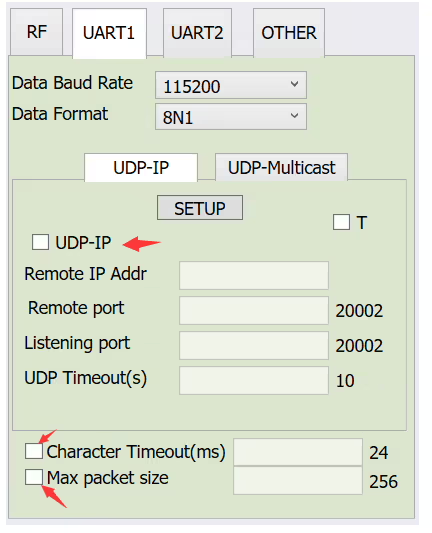
- Tick the box and select the parameters for the corresponding settings
- Remote IP Addr: The other party’s IP address (օրինակ, 192.168.55.2)
- Remote port: Նավահանգստի համարը (fill in the following 20002, or you can customize it)
- Listening port: Նավահանգստի համարը (fill in the following 20002, or you can customize it)
- UDP Timeout: timeout (fill in the default value 10 ստորև)
- Character Timeout: Data timeout (fill in the default value 24 later)
- Max packet size: Data packet size (fill in the following default value of 256)
- After filling in, click SETUP.
- Relevant internal parameters can be viewed in the right window UART-1
Serial UDP-Multicast transmission mode: (one-to-many multicast mode)
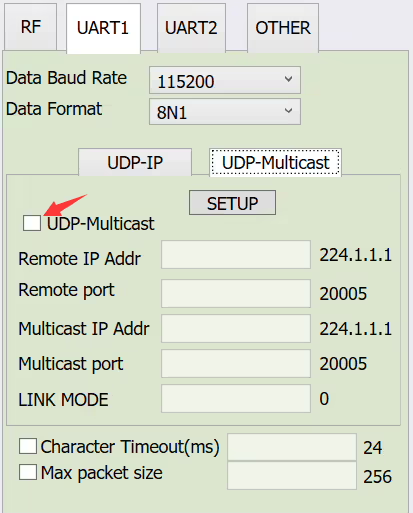
- Tick the box and select the parameters for the corresponding settings
- Remote IP Addr: IP address for receiving (listening) multicast
- Remote port: port for receiving (listening) multicast
- Multicast IP Addr: IP address for sending (listening) multicast
- Multicast port: Port for sending (listening) multicast
- LINK MODE: Mode selection, 0 is the default value, 1 is bridge mode. Just use the default value
- Նշում: UART2 settings are the same as UART1, some motherboards do not have UART2
- The serial port data of this product is loaded on the network port for transmission, and supports serial port to network port and network port to serial port.
Հարց տվեք
Ձեր հաղորդագրությունն ուղարկված է