






目录
COFDM HDMI 无线视频发射器和接收器上的 UDP 流播放器设置
UDP流播放器是最低延迟CVBS模拟视频编码器的最佳解决方案. COFDM无线视频接收器Vcan1776-RX默认固件支持RTSP播放器. 部分客户端需要使用UDP协议.
IP地址和端口号可在网页上配置, HTTP://192.168.0.215 (默认)
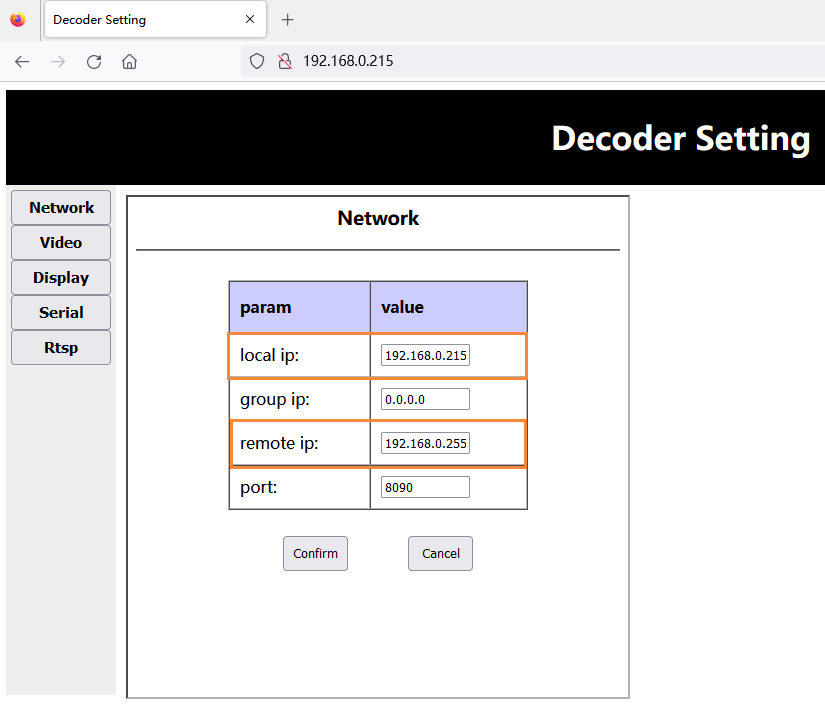
- 升级固件后, 接收端将恢复出厂默认参数 (中心频率: 320兆赫, 无线带宽: 6兆赫, 网口IP地址: 192.168.0.215), 客户需要通过修改中心频率和带宽 参数配置板工具, 和发射器一致保存.
- 客户通过网页访问接收方Web服务器 (HTTP://192.168.0.215), 并修改自身IP地址以及接收器连接的Windows PC端IP地址的设置:
注意: 他们之中, 本地IP是接收者自己的IP, 远程IP为对接Windows PC端ip. 客户可以根据自己的实际情况进行配置. 注意修改需要重启接收器后才会生效.
下载UDP播放器 斯佩尔
- 下载UDP播放器 斯佩尔.
- Splayer_v4.2_2020.6.6
- https://drive.google.com/file/d/1ihzUhfnx2Wo3zLO8UAs1aUQeLswonJD-/view?usp=sharing
- Splayer_v4.3_2022.10.22
- https://drive.google.com/file/d/1PQc-LZ55qGnjeMsjkHYSloHfY3NEUsGH/view?usp=drive_link
- Splayer_v4.3.1_2024.4.16
- https://drive.google.com/file/d/1uv7GqP8P4r6qGOWJ5gYn0b8bZ4ptL8H6/view?usp=drive_link
- Splayer_QT_V1.0 适用于 Win10 或 Win11
- https://drive.google.com/file/d/1VAegQjd-PmIL2XbJf7K8dnujMxhoIuhd/view?usp=drive_link
- splayer_qt_v1.1.1 适用于 Win10 或 Win11
- https://drive.google.com/file/d/1YMr2xxurGnbIBjFihc7f77afrdbOcc6l/view?usp=drive_link
- splayer_qt_v2.0
- https://drive.google.com/file/d/1sASbARCL1lXAIsVKqkmEObRGPREbaSES/view?usp=drive_link
- 在Windows PC上打开Splayer播放器, 点击右下角的设置按钮, 然后会弹出设置页面:
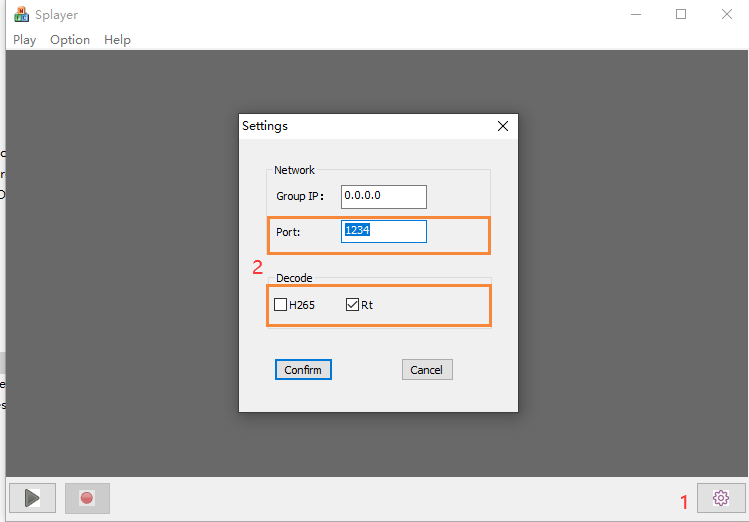
注意:
- 可以看到Port端口号设置为 1234, 由接收方UDP流程序硬编码,不可修改;
- 在解码栏, 根据当前视频流属性进行配置, 比如上面的H264低延迟视频流配置;
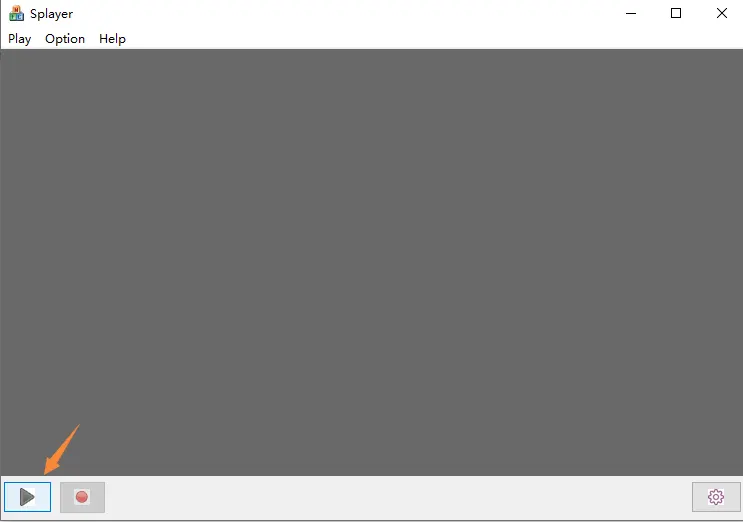
- 设置好后点击 “确认” 按钮保存参数, 点击左下角的播放按钮. Windows PC收到UDP推流后, 它将立即解码并播放.
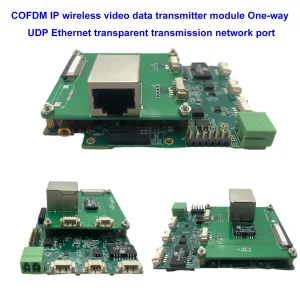
以上UDP流播放器设置适用于以下机型.

它如何支持Linux VLC播放器? Linux下播放低延迟流?
题: 现在 UDP 流无法使用 VLC 播放器播放. 我需要在Linux下播放这个UDP流,我尝试了解这个流的细节. 任何脚本或密钥或其他东西?
我想在Linux下制作自己的播放器,我想了解解调器中这个UDP视频流的细节.
如果是普通的UDP视频流, 然后质疑为什么它不能与 VLC 或 OBS studio 一起播放.
回答: 适用于型号 Vcan1726-RX, 我们有两个固件可供选择, RTSP播放器的第一个固件支持VLC播放器, 但有些客户提到它的延迟很长, 所以我们制作了第二个固件, Splayer 上的 UDP 广播, 支持更低的延迟.
这个UDP音视频流是我们自定义的格式, 所以VLC无法解释它. 如果您的客户想打开自己的播放器 (Linux下), 目前有两种选择:
- 更新为默认 RTSP 流访问 (RTSP 播放器的第一个固件)
- 我们提供相应的DEMUX库和例程 (我们需要了解客户的Linux环境才能编译出合适的库文件)
- 这是 “DEMUX 库和例程” 由我们的工程师在Ubuntu下编写 14.04 64位系统
第二种对于普通客户来说太难了, 而且我们不知道您客户自己的播放器的开发能力.
由于部分客户端在Windows操作系统VLC播放器上遇到低延迟问题, 不管我们在这里如何测试, 我们没有发现这个问题. 当时, 你使用Windows来测试. 如果换成Linux也许可以, 不会有RTSP流媒体问题. 请尝试在 Linux 上使用第一版固件测试 Vcan1726 示例. 也许这在 Linux 操作系统上不是问题.
题: 你能为这个应用程序构建一个 docker 镜像吗? 哪一个端口用于传入流, 另一个用于输出流的端口,带有一些广泛使用的编解码器 (h264)?
什么是 Splayer 和 UDP 流播放器?
SPlayer是一款支持多种视频格式的媒体播放器, 包括 UDP 流.
UDP 流是一种使用用户数据报协议通过互联网发送视频数据的方法 (UDP), 这是一种快速而简单的协议,不保证数据包的传送或顺序.
UDP流可用于实时视频广播或低延迟视频传输, 但也可能会出现数据包丢失或损坏的情况.
根据网络搜索结果, SPlayer可以通过以下步骤播放UDP流:
- 打开 SPlayer 并单击 “打开网址” 右上角的按钮.
- 以 udp 格式输入 UDP 流的 URL://@ip: 港口, 其中 ip 是服务器的 IP 地址,port 是流的端口号. 例如, UDP协议://@224.0.0.1:1234.
- 单击 “好” 按钮并等待流加载.
Splayer如何在Win10上运行良好?
题: 我们无法启动 Splayer 4.2 和 4.3 在Windows下 10. 您能为我们提供适用于 Windows 的 Splayer 的正确版本吗 10 和 11?
4.2 此刻开始并关闭. 4.3 从错误消息开始.
应用程序名称错误: 播放器, 版: 1.0.0.1, 时间戳: 0x646d83e2
故障模块名称: dvb_demux.dll, 版: 1.0.0.1, 时间戳: 0x5fe5bdbf
异常代码: 0xc0000005
故障偏移: 0x0001484a
错误进程 ID: 0x3888
应用程序启动时间错误: 0x01da1164b89c78eb
应用程序路径错误: C:\用户管理下载Splayer_v4.3_2022.10.22Splayer.exe
故障模块路径: C:\用户管理下载Splayer_v4.3_2022.10.22dvb_demux.dll
报告编号: 4af19407-045e-48e5-a0f7-86fc90c6b3d3
错误包全名:
错误包相关应用程序 ID:
回答: 请尝试使用我们的Splayer_qt_v1.0.zip (103.5MB).
回馈: 新版SPlayer在Win下的问题站点上运行良好 10! 谢谢你!
题: 我们发现从 Reciver by Splayer 程序播放视频时时间延迟增加 (UDP流).
如果详细讲一下 – 接收器通过以太网电缆直接连接到 PC. PC和接收器在同一个本地网络. 当我们启动 Splayer 时,时间延迟是正常的,并且精确的计数显示了我们 330 毫秒, 这比我们观察到的 HDMI 输出多一点点 270 毫秒. 这很好. 但是,如果我们在工作场所没有任何变化的情况下等待几分钟,我们就会观察到时间延迟持续增加,达到 1-1,5 秒,这在客户应用程序中是不可接受的.
昨天我在Win上亲自测试了一下 10, 和 Win11 在不同的 PC 上,具有复杂的关闭 Win Brandmauer 和 Splayer qt (你的最后一个版本), 和斯佩尔 4.3 (旧版). 我每次在任何配置中都会重复这个问题.
请帮我解决这个问题. 我们需要 Splayer 播放时的恒定时间延迟,该延迟不能超过 350 毫秒.
回答: 这样的问题不应该出现, 因为低延迟模式下播放器没有缓存, 而延迟完全取决于PC的解码能力. 工程师将于下周一搭建环境并进行测试.
另一点是要求客户检查笔记本电脑显示器的刷新率设置. 例如, 如果相机输入1080p60, 那么客户笔记本电脑显示器的刷新率也必须是60Hz. 除此以外, 显示速度会太慢, 这也会导致数据拥塞并引入延迟.
Slayer播放器延迟较大, 要么解码慢,要么显示慢, 都是PC造成的.
HDMI 摄像头编码 HDMI 接收器解码, 输出到显示器, Splayer播放器及电脑播放延迟测试
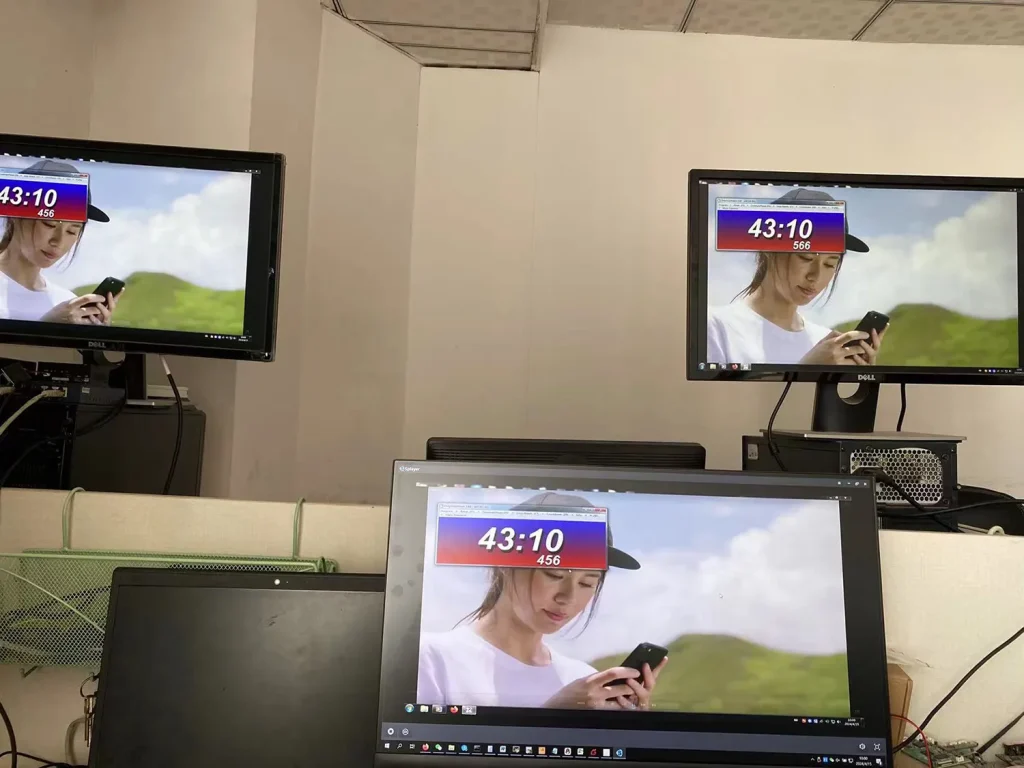
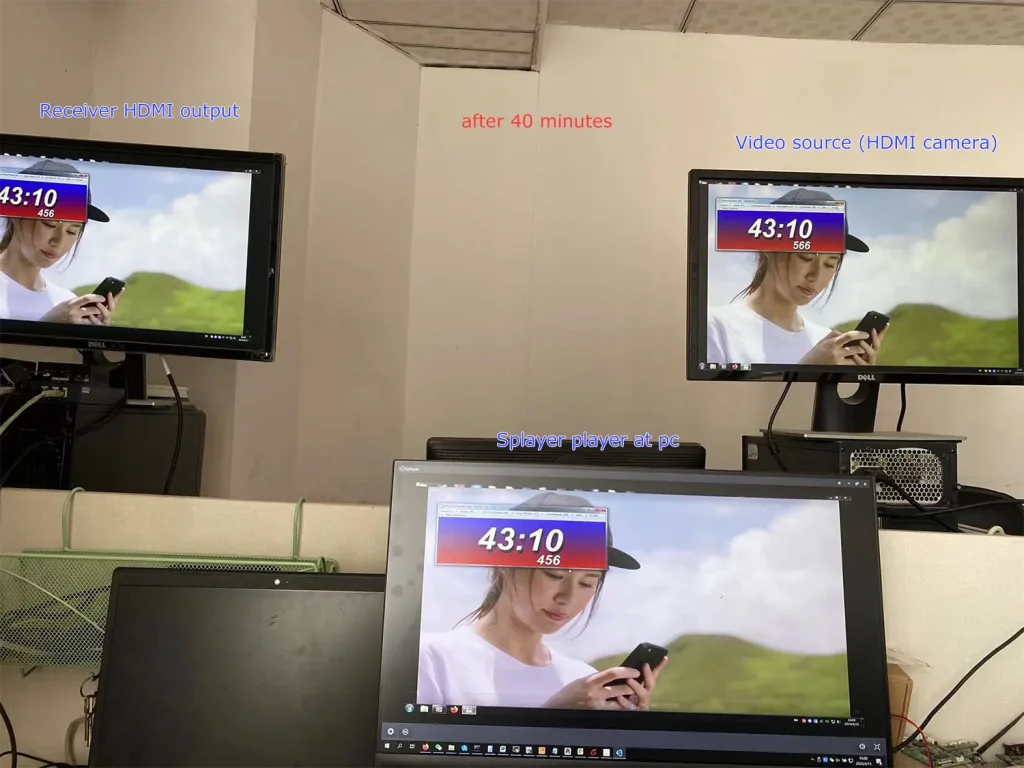
我们没有发现您提到的问题.
可以看到当前Splayer播放器屏幕和接收器HDMI输出是一致的, 并且它们之间的延迟非常低.
可以请问一下顾客吗, 相机输入的分辨率和帧速率是多少? 假设客户的相机是1080p60, 您还可以执行以下两个步骤来进一步排查问题:
- 让客户将相机更改为较低帧率进行测试, 例如1080p50/30;
- 可以设置编码段参数,让它降帧编码. 例如, 通过参数口发送ATSO0,30_命令, 编码输出1080p30用于测试.
注意:
- Splayer is specifically developed for our proprietary/custom streaming protocol and currently does not support parsing or playback of standard MPEG-TS protocols.
- Splayer is currently available only on Windows. Linux and Android versions have not been developed yet and are not supported at this stage.
- 此外, it is not the mpeg-ts protocol that causes the delay to increase. Even if it is switched to our custom protocol, the delay will not be reduced (our custom protocol mainly performs CRC checks on all data packets, while the mpeg-ts protocol does not, which is the biggest difference between the protocols). The biggest impact on latency is the processing of video decoding and display in the player. Our own player Splayer will be optimized for image transmission application scenarios.
- Even if the customer gets our demux library and extracts the audio and video streams, it still has to do the video decoding and display by itself. This ordinary customer does not have this ability. Most customers will only use open source players (such as based on gstreamer), and the video delay of these open source players will not be good. If you want good video delay, you basically have to develop your own player.
- If the customer insists on the demux library and says that he has the ability to deal with the subsequent video decoding and playback, I can also cooperate with you (but we only provide the demux library and routines under Linux/android, and do not provide subsequent decoding and display-related support)
- Our custom protocol mainly enhances CRC verification to better handle transmission errors, which helps prevent unexpected video decoding issues or even player crashes caused by corrupted data packets. The demuxing protocol itself does not introduce significant latency, whether it is our custom protocol or the standard MPEG-TS protocol. The main factors affecting latency are actually the decoding and rendering stages afterward. 一般来说:
- Since UDP streaming and player decoding/rendering are asynchronous processes, most players introduce a certain amount of buffering before starting playback. The larger the buffer, the higher the latency.
例如, VLC media player typically uses relatively large buffering, and its buffer size may even increase dynamically during playback. 相比之下, Splayer keeps the playback buffer intentionally very small to minimize latency. - Video decoding and frame rendering are also asynchronous processes. If rendering cannot keep up in time, decoded video frames may accumulate in the rendering queue, which introduces additional latency similar to pre-decoding buffering. Splayer is also optimized in this area to reduce frame accumulation and maintain low-latency playback.
- Since UDP streaming and player decoding/rendering are asynchronous processes, most players introduce a certain amount of buffering before starting playback. The larger the buffer, the higher the latency.
- Our custom protocol also includes several additional optimizations, which is why we ultimately decided to adopt it instead of continuing with the standard MPEG-TS protocol (which we originally used at the beginning):
- Compared with the standard MPEG-TS protocol, our custom protocol reduces redundant protocol overhead and improves wireless bandwidth utilization. This is particularly important for bandwidth-constrained wireless links such as COFDM video transmission systems.
- Our custom protocol provides greater flexibility for multiplexing different types of data. In addition to video and audio, it can conveniently encapsulate serial port data and other user-defined data streams, making it more flexible and easier to extend than standard MPEG-TS.
- Our custom protocol supports integrated AES encryption and decryption directly within the protocol layer. This is especially useful for wireless links that do not natively support AES encryption, such as standard Wi-Fi connections.
- 此外, our custom protocol is designed specifically for low-latency and high-reliability transmission scenarios, allowing tighter optimization across the entire transmission and playback pipeline compared with a general-purpose standard protocol.
相对的
Q: 系统是否支持组播? 我可以将一个流输出到多个IP吗?
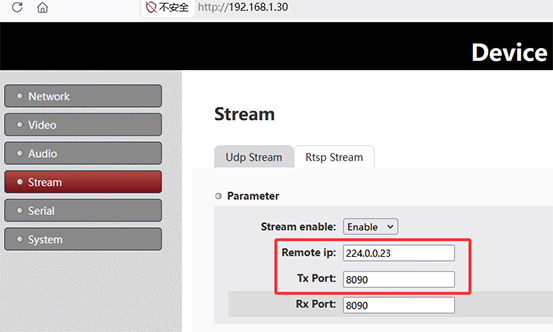
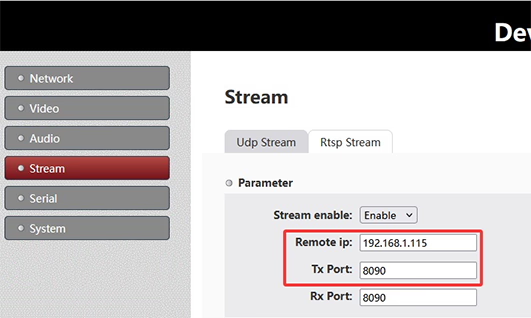
一个: 是. The system supports UDP multicast, allowing one stream to be delivered to multiple receivers simultaneously without duplicating the stream per IP.To use multicast, 设置远程 IP on the sender side to a multicast address, 例如224.0.0.23. All receivers join the same multicast group using the same address. 在接收端, configure the same multicast IP:
- 斯佩尔: set Group IP to
224.0.0.23 - VLC: 打开
udp://@224.0.0.23:8090
Multicast enables one-to-many streaming within the same network. The actual device IP is not critical; 反而, delivery depends on network multicast support and devices joining the same group.注意: Network conditions may affect performance. Environments with VPNs, virtual machines, multiple network adapters, or switches without IGMP support may impact multicast reception.
组播

单播
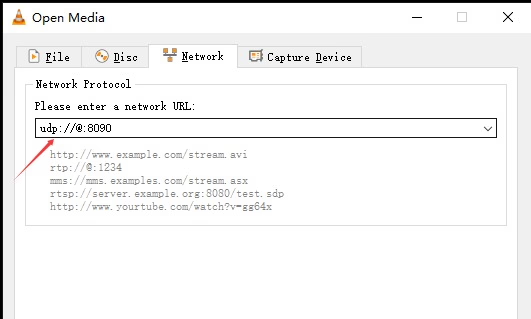
Q: If there are multiple encoder multicast boards in the same network, should we change the port on each board to avoid conflict?
一个: 未必. There are two valid ways to ensure that multiple encoder streams do not conflict on the same network:
- Use different UDP multicast IP addresses for each encoder stream.
- Use different UDP port numbers for each encoder stream.
UDP streaming is distinguished by the combination of IP地址 (unicast or multicast) 和 port number. 一起, they define a unique UDP stream identity on the network.
On the encoder board, 该 UDP Stream settings 包括:
- 远程 IP: Defines the destination IP address (if a multicast address is used, the stream becomes a UDP multicast stream).
- Tx Port: Defines the transmission port number.
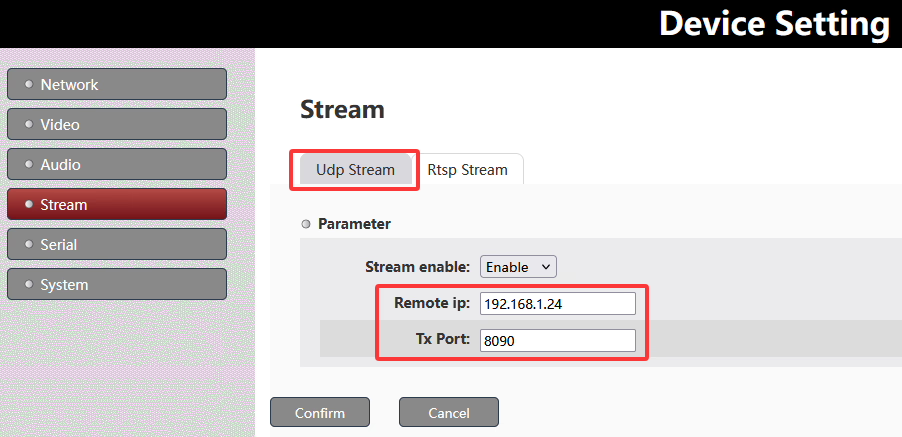
结合 远程 IP + Tx Port determines a unique UDP stream.
To avoid conflicts when multiple encoder multicast boards are deployed in the same network, you can either assign different multicast IP addresses, different UDP ports, or use both depending on the network design requirements.
Q: How do I obtain multicast IP addresses for my system?
一个: Multicast IP addresses are not automatically assigned; they are selected from the standard multicast range 224.0.0.0 至 239.255.255.255. 实践, these addresses should be planned and allocated by the network administrator to ensure there are no conflicts with existing multicast services or devices on the network.
Q: The encoder board needs to output video over both HDMI and AV interfaces, but both streams use the same UDP address. How can we play or switch between them?
一个: When HDMI and AV streams are transmitted over the same UDP address, they are typically not separated by network ports, 但是通过 internal stream identifiers, similar to an MPEG-TS (传输流) 结构.
它是如何运作的
- Both HDMI and AV inputs are multiplexed into a single UDP stream
- Each video source is assigned a unique stream ID (例如, PID / service ID)
- The receiver performs demultiplexing based on these IDs, rather than separating by IP or port
- This allows multiple video channels to coexist in one UDP stream
How Splayer handles this
跟我们 斯佩尔 2.0 UDP播放器, the system supports this architecture natively:
- Simultaneous decoding of multiple video streams from a single UDP address
- Stream separation based on internal IDs (MPEG-TS PID/service mapping)
- Real-time switching between HDMI and AV sources without changing network settings
- Flexible multi-channel playback using a single UDP input source
This design simplifies deployment by keeping one UDP configuration, while still enabling multi-input video handling and seamless switching.
You can download 斯佩尔 2.0 UDP播放器 这里: 斯佩尔 2.0 UDP Player Download
问一个问题
感谢您的回复。 ✨