






VCAN1878 User Manual
900MHz Data Transmission Module
Змест
1. Агляд прадукту
VCAN1878-10W is one of the digital radio stations in the 1878 серыял. It is mainly used for the transmission of high-power long-distance industrial data. It has the characteristics of small volume, добрая інтэграцыя, і высокая адчувальнасць. The VCAN1878-10W operates in the 902~928MHz band. The VCAN1878-10W comes in two models, the VCAN1878A-10W and the VCAN1878B-SMA. The only difference is the transmission distance. У добрым асяроддзі, максімальная адлегласць перадачы VCAN1878-40A-SMA складае 100 км, і максімальная адлегласць перадачы VCAN1878-40B-SMA складае 200 км.
2. тэхнічныя параметры
- дыяпазон частот: 902-928МГц
- Рэжым пашыранага спектру: Гэтая мадэль была распрацавана для бесправадной перадачы відэа і даных з двухбаковым бесправадным каналам перадачы дадзеных
- Шыфраванне даных: 256-бітавае шыфраванне фізічнага ўзроўню
- Дыяпазон сувязі: Да 100/200 км
- Выхадная магутнасць: 10Вт (40 дБм)
- Хуткасць адтуліны: Да 276,4 кбіт/с
- Хуткасць перадачы паслядоўнага порта: Да 921,6 кбіт/с
- працоўная тэмпература: -40℃ +85 ℃
- Напружанне крыніцы харчавання: DC15~26V, Тыповае значэнне +24В
| Напружанне крыніцы харчавання | 100% дадзеныя поўны пік току (А) | 100% дадзеныя поўная магутнасць сярэдні ток (А) |
| 15V | 3.20А | 2.10А |
| 18V | 2.80А | 1.74А |
| 24V | 2.00А | 1.30А |
| 26V | 1.85А | 1.20А |
- адчувальнасць:
| Хуткасць адтуліны | 10-7 BER | 100KM Максімальная карыстацкая хуткасць | 200Максімальная карыстацкая хуткасць км |
| 276.4kbps | -106 дБм | 136kbps | 128kbps |
| 230.4kbps | -107 дБм | 116kbps | 104kbps |
| 172.8kbps | -108 дБм | 82kbps | 74kbps |
| 115.2kbps | -109 дБм | 48kbps | 42kbps |
| 57.6kbps | -110 дБм | 14kbps | 10kbps |
3. Mechanical Drawings
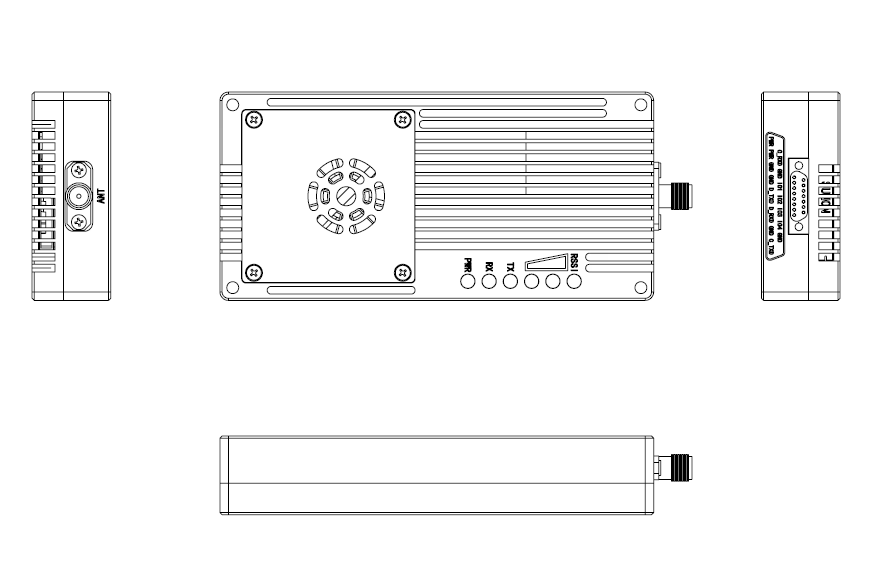
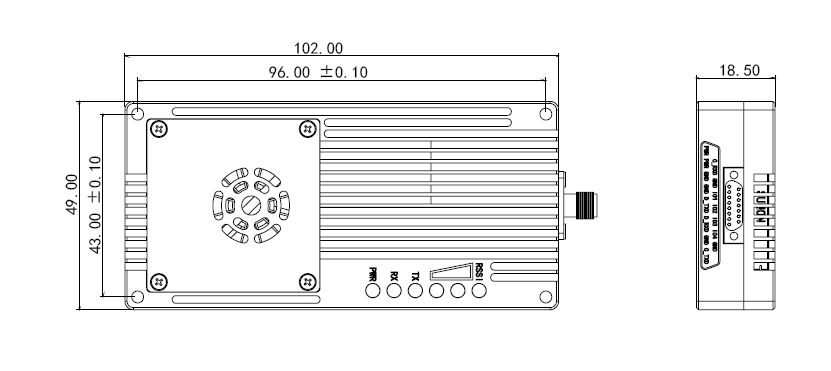
VCAN1878-SMA памерная дыяграма
- Памер VCAN1878-SMA: 111мм*49мм*18,5мм (з кіраўніком SMA).
- VCAN1878-SMA Вага:137г
4. Product Connector
4.1 J30J-15pin Schematic Diagram
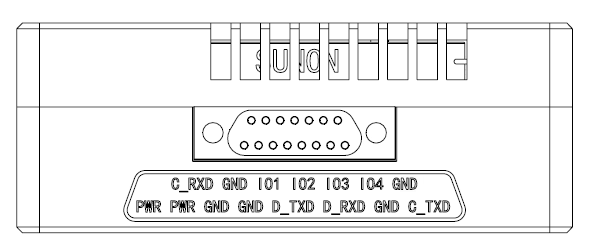
4.2 J30J-15pin Pin Definition
| няма. | Назва шпількі | апісанне | Напрамак |
| 1 | PWR | Клема харчавання плюсавая | Я |
| 2 | PWR | Клема харчавання плюсавая | Я |
| 3 | GND | Клема харчавання адмоўная | Я |
| 4 | GND | Клема харчавання адмоўная | Я |
| 5 | D_TXD | Паслядоўны порт перадае даныя TX | O |
| 6 | D_RXD | Паслядоўны порт дадзеных прымае дадзеныя RX | Я |
| 7 | GND | Паслядоўны порт перадачы дадзеных зазямлены GND | O |
| 8 | C_TXD | Паслядоўны порт кіравання перадае дадзеныя TX | Я |
| 9 | C_RXD | Паслядоўны порт кіравання прымае дадзеныя RX | O |
| 10 | GND | Паслядоўны порт кіравання зазямлены GND | O |
| 11 | IO1 | * рэзерв * | IO |
| 12 | IO2 | * рэзерв * | IO |
| 13 | IO3 | * рэзерв * | IO |
| 14 | IO4 | * рэзерв * | IO |
| 15 | GND | зазямленне | O |
| Нататка: Калі ласка, пацвердзіце, ці з'яўляецца паслядоўны порт модуля ўзроўню TTL або RS232. | |||
5. Product Indicator Meaning
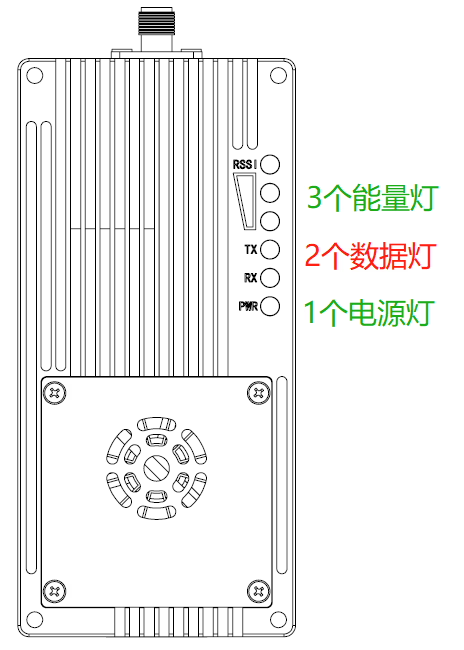
Магутнасць PWR(Зялёны)
Індыкатар харчавання загараецца, паказваючы, што прылада ўключана.
Лямпа перадачы TX(чырвоная)
Калі загараецца TX, гэта паказвае, што модуль адпраўляе дадзеныя.
Прыёмная лямпа RX(чырвоная)
Калі RX загараецца, гэта паказвае, што модуль атрымлівае дадзеныя.
Лямпа індыкатара сігналу (RSSI). 3 зялёныя лямпы)
Большая колькасць лямпачак энергіі паказвае на большую сілу прыёму сігналу.
| Лямпа RSSI паказвае сілу прыманага сігналу | |
| Лічбы RSSI індыкатары энергіі гараць | Атрыманая энергія дБм |
| Усе 3 Індыкатары RSSI гараць | Каля -50 дБм |
| 2 Індыкатары RSSI гараць | Каля -80 дБм |
| 1 Індыкатары RSSI гараць | Каля -95 дБм |
| Тып модуля | рэжым | VCAN1878-40-SMA Індыкатар Статус | ||
| RX | Тэхас | RSSI 123 | ||
| Усе | Рэжым канфігурацыі AT-каманды | Выключыць | Выключыць | Выключыць |
| Майстар | Нармальная праца | Мігае пры атрыманні даных | Уключыце (роўнае святло) | Прапарцыйна сіле прыманага сігналу |
| Раб | Несінхранізацыя | Выключыць | Выключыць | Пераключайце святло кожныя 860 мс |
| Раб | сінхранізацыя | Уключыце (роўнае святло) | Мігае пры адпраўцы дадзеных | Прапарцыйна сіле прыманага сігналу |
| Рэтранслятар | Несінхранізацыя | Мігае па чарзе з пасылаючым святлом | Мігае па чарзе з прыёмным святлом | Пераключайце святло кожныя 860 мс |
| Рэтранслятар | сінхранізацыя | Мігае пры атрыманні даных У адваротным выпадку гарыць | Мігае пры адпраўцы даных У адваротным выпадку гарыць | Прапарцыйна сіле прыманага сігналу |
6. AT Command/ Register Description
6.1 AT камандаванне
| AT каманда (прымаюцца як верхні, так і малы рэгістр) | апісанне |
| ATI1 | Запытайце нумар версіі абсталявання |
| ATI2 | Запытайце нумар версіі прашыўкі |
| ATI3 | 234234 Запытайце нумар версіі праграмнага забеспячэння |
| ATI4 | Запытайце нумар SN |
| AT&V | Адлюстраванне бягучага спісу параметраў |
| AT&W | Захавайце бягучую табліцу параметраў |
| ATA | Выйдзіце з рэжыму канфігурацыі AT-каманды і ўвайдзіце ў рэжым дадзеных |
| ATSxxx? | Запытаць значэнне рэгістра Sxxx |
| ATSxxx=yyy | Запісаць у рэгістр Sxxx значэнне yyy |
| ATSxxx /? | Display the help documentation for register Sxxx |
| AT&Fn | Load the factory default configuration:7 :Factory default settings for point-to-multipoint master8 :Factory default settings for point-to-multipoint slave9 :Factory default settings for point-to-multipoint repeater10:Factory default settings for point-to-point master11:Factory default settings for point-to-point slave12:Factory default settings for point-to-point repeater |
Нататка: All register changes must be saved using the AT&W command to take effect.
6.2 AT Command Register List
| Register Number | апісанне |
| S101 | Рэжым працы |
| S102 | Частата серыйнай перадачы |
| S103 | Wireless Link Rate |
| S104 | Network Address (ID) |
| S105 | Unit Address |
| S108 | Output Power(dBm) |
| S110 | Serial Data Format |
| S113 | Packet Retransmissions |
| S114 | Repeater Index |
| S118 | Sync Address |
| S123 | RSSI From Master RSSI(dBm) |
| S124 | RSSI From Slave RSSI(dBm) |
| S133 | Тып сеткі |
| S140 | Destination Address |
| S141 | Repeater Y/N |
| S142 | Serial Channel Mode |
| S143 | Індэкс рэтранслятара Выкарыстоўвайце GPIO |
| S159 | Уключыць шыфраванне |
| S160 | Ключ шыфравання |
6.2.1 S101 Operating Mode
| Каштоўнасці |
| 0 – Майстар1 – Рэтранслятар2 – Раб |
Рэжым працы вызначае ролю кожнай прылады ў сетцы. Кожны модуль VCAN1878 можна канфігураваць у любым рэжыме і выконваць любую ролю ў сетцы.
- Майстар: У кожнай сетцы ёсць адзін майстар. У сетках кропка-кропка і кропка-шматкропка, ён выкарыстоўваецца для сінхранізацыі ўсёй сеткі.
- Рэтранслятар: У сетцы, ён выкарыстоўваецца для павелічэння адлегласці перадачы, павялічыць пакрыццё сеткі, і злучыцца з галоўным або рэтранслятарам.
- Раб: Падпарадкаваны непасрэдна падлучаны да галоўнага або рэтранслятара.
| Значэнні (біт/с) |
| 0- 230400 6 – 144001- 115200 7 – 9600(Па змаўчанні)2- 57600 8 – 72003- 38400 9 – 48004- 28800 15 – 4608005- 19200 16 – 921600 |
6.2.2 S102 Serial Baud Rate
S102 выкарыстоўваецца для ўстаноўкі хуткасці паслядоўнага порта перадачы дадзеных. Пры змене хуткасці паслядоўнага порта, звярніце ўвагу, што хуткасць перадачы паслядоўнага порта прылады, падлучанай да VCAN1878, павінна быць зменена.
6.2.3 S103 Orifice Speed
| Значэнні (біт/с) |
| 0 – 172800( Па змаўчанні )1 – 2304002 – 2764803 – 576004 – 115200 |
S103 вызначае хуткасць сувязі ўсёй сеткі. Кожная прылада ў сетцы павінна быць настроена на аднолькавую хуткасць. Чым вышэй стаўка, тым вышэй прапускная здольнасць сеткі, але тым горш адчувальнасць. Розніца ў адчувальнасці паміж сумежнымі рэжымамі складае каля 1 дБ.
6.2.4 S104 Network Address (ID)
| Значэнні(0~4294967295) |
| дэфолт 1234567890 |
Усе прылады ў сетцы павінны мець аднолькавы сеткавы адрас. Прылады з рознымі сеткавымі адрасамі не звязваюцца адзін з адным. Калі некалькі сетак працуюць адначасова ў адной вобласці, сеткавы адрас кожнай сеткі павінен быць гарантавана унікальным.
6.2.5 S105 Unit Address
| Значэнні(0~65535) |
| дэфолт 0 |
У той жа сетцы, адрас прылады выкарыстоўваецца для ідэнтыфікацыі ў сетцы, і кожная прылада павінна мець унікальны адрас прылады.
Для сеткі кропка-кропка, значэнне па змаўчанні 0. Прылада аўтаматычна прысвойвае адрас прылады. Карыстальнікам не трэба ўсталёўваць гэты параметр. Карыстальнікі таксама могуць уручную прызначыць non-0 адрасы блокаў. У той жа сетцы, калі выкарыстоўваецца аўтаматычнае размеркаванне, адрас адзінкі ўсіх прылад усталяваны 0. Калі выкарыстоўваецца ручное прызначэнне, вы можаце ўсталяваць адрас прылады S105, сінхронны адрас S118, і мэтавы адрас S140 для кожнай прылады, каб пераканацца, што тапалогія сеткі правільная.
Для сетак кропка-шматкропка, кожная прылада павінна быць уручную прызначана non-0 адрас прылады. Для дэталяў, гл. Раздзел 8.7.
6.2.6 S108 Output Power(dBm)
| Значэнні (дБм) |
| 30- 3W 33- 5W 35- 7W40 – 10W (па змаўчанні) |
S108 выкарыстоўваецца для ўстаноўкі магутнасці перадачы лакальнай прылады.
6.2.7 S110 Serial Data Format
| Каштоўнасці |
| 1 – 8N1(Па змаўчанні) |
The data format of the serial port supports only 8N1.
6.2.8 S113 Packet Retransmissions
| Values(0~255) |
| дэфолт 3 |
This register determines the maximum number of times the packet can be retransmitted. The number of the retransmission is used to ensure the robustness of the system in complex environment or weak signal. Retransmission can cause additional data transfer, which can reduce system throughput. The maximum number of packet transmissions is the number of data retransmissions plus one.
6.2.9 S114 Repeater Index
| Values(1~254) |
| дэфолт 1 |
In point-to-point mode, the register takes effect when the working mode is repeater and the unit address is 0. This register indicates the relative position of the repeater on the network. No additional configuration is required on the master and slaves to add or remove repeater devices on a point-to-point network. Пры запуску прылады рэтранслятара, ён аўтаматычна падключаецца да сеткі кропка-кропка, і калі ён выключаны, сетка аднаўляецца.
Пры выкарыстанні некалькіх рэтранслятараў, пераканайцеся, што серыйныя нумары рэтранслятараў ад галоўнага да падпарадкаванага павялічваюцца манатонна, якія могуць быць разрыўнымі.
6.2.10 S118 Sync Address
| Значэнні(0~65535) |
| дэфолт 0 |
Вы можаце задаць адрас сінхранізацыі галоўнай і падпарадкаванай прылады, каб указаць адрас сінхранізацыі бягучай прылады з лакальнай прылады (S105) да прылады (S118).
У сетцы кропка-кропка, калі мясцовы адрас (S105) усталяваны 0, адрас прысвойваецца аўтаматычна, і няма неабходнасці ўсталёўваць сінхронны адрас. Калі мясцовы адрас (S105) не з'яўляецца 0, сінхронны адрас павінен быць усталяваны для вызначэння тапалогіі сеткі.
У сетцы кропка-шматкропка, вы павінны ўручную ўсталяваць правільны адрас сінхранізацыі для кожнай прылады.
Для дэталяў, гл. Раздзел 8.7.
| Значэнні (дБм) |
| -255 ~ 0 (толькі чытанне) |
6.2.11 S123 RSSI From Master RSSI(dBm)
Паказвае сілу атрыманага сігналу ведомага або рэтранслятара. Значэнне адпавядае кантактам RSSI1, RSSI2, і RSSI3.
S123 рэтранслятара паказвае сілу сігналу верхняга прылады, і S124 паказвае сілу сігналу ніжняй прылады.
| Значэнні (дБм) |
| -255 ~ 0 (толькі чытанне) |
6.2.12 S124 RSSI From Slave RSSI(dBm)
Паказвае сілу атрыманага сігналу майстра або рэтранслятара. Значэнне адпавядае кантактам RSSI1, RSSI2, і RSSI3。
S123 рэтранслятара паказвае сілу сігналу верхняга прылады, і S124 паказвае сілу сігналу ніжняй прылады.
| Каштоўнасці |
| 0 – Кропка да шматкропка (пункт да шматкропка)1 – Ад кропкі да кропкі (кропка ў кропку) |
6.2.13 S133 Network Type
Гэты рэгістр выкарыстоўваецца для ўстаноўкі тыпу сеткі. У адной сетцы, тып сеткі ўсіх прылад павінен быць аднолькавым.
- Кропка-шматкропка:Майстар транслюе дадзеныя на ўсе прылады, і ўсе падпарадкаваныя прылады адпраўляюць дадзеныя назад галоўнаму. ( Можа быць 0 або больш рэтранслятараў)
- Кропка-кропка:Толькі галоўны і падпарадкаваны канчатковыя кропкі ўзаемадзейнічаюць адзін з адным. (Можа быць 0 або больш рэтранслятараў)
6.2.14 S140 Destination Address
| Значэнні(0~65535) |
| дэфолт 0 |
Галоўная прылада і рэтранслятар могуць задаць адрас прызначэння, які выкарыстоўваецца для ўказання адраса даччынай прылады, падлучанай да лакальнай прылады.
У сетцы кропка-кропка, калі ўсталяваны лакальны адрас 0, адрас прызначаецца аўтаматычна без усталявання мэтавага адраса. Калі мясцовага адраса няма 0, адрас прызначэння павінен быць усталяваны, каб вызначыць тапалогію сеткі.
У сетцы кропка-шматкропка, вы павінны ўручную ўсталяваць правільны адрас прызначэння для кожнай прылады.
Для дэталяў, гл. Раздзел 8.7.
6.2.15 S141 Repeater Y/N
| Значэнні(0~1) |
| 0 – без рэтранслятара(Дзейнічае толькі на галоўным баку)(Па змаўчанні)1 – з рэтранслятарам ( Дзейнічае толькі на галоўным баку ) |
Гэты рэестр несапраўдны ў сетцы "кропка-кропка", дзе адрасы прызначаюцца аўтаматычна (адрас прылады S105 0) але павінна быць усталявана 0. У гэтым выпадку, the network automatically identifies whether the repeater exists. You do not need to set this parameter.
When manually assigning addresses, this register is set based on whether a repeater exists in the current network.
6.2.16 S142 Serial Channel Mode
| Каштоўнасці |
| 0 – RS232( Default ) |
This register configures the working mode of the data serial port。The default is RS232 and currently only RS232 mode is supported. У будучыні, it will support RS485 full duplex, RS485 half- дуплекс, і SBUS。
6.2.17 S143 Repeater Index Use GPIO
| Каштоўнасці |
| Use the S114 register (Default)Use the GPIO[4:1] to indicate the relay serial number |
To make it easy for the repeater to change the sequence number, you can configure the repeater sequence number using GPIO [4:1].
When S143 is 0, the repeater sequence number is the value of S114, які вагаецца ад 1 у 254.
When S143 is 1, the repeater sequence number is GPIO [4:1]+1, які вагаецца ад 1 у 16.
If GPIO is used as the repeater number, нумар рэтранслятара вагаецца ад 1 у 16. таму, максімум 16 рэтранслятары можна наладзіць.
| Каштоўнасці |
| Адключыць шыфраванне (па змаўчанні)1 – Уключыце шыфраванне |
6.2.18 S159 Encryption Enable
VCAN1878 забяспечвае 256-бітнае шыфраванне даных, які ўключаецца або выключаецца праз рэестр S159.
| Каштоўнасці |
| 256біт сакрэтны ключ |
6.2.19 S160 Encryption Key
Пры выкарыстанні шыфравання, ўсталяваць 256-бітны ключ для шыфравання і дэшыфравання. Для атрымання правільных даных на абодвух канцах павінен быць настроены адзін і той жа сакрэтны ключ.
7. Point-to-Point Networks
У сетцы кропка-кропка, модуль VCAN1878 можна выкарыстоўваць для ўстанаўлення шляху перадачы даных паміж пунктам А і пунктам В. Кропка А можа быць гаспадаром, кропка B можа быць раб. Калі пункт А і пункт Б не могуць быць злучаныя непасрэдна, вы можаце дадаць вузел рэтранслятара. Рэгістр тыпу сеткі S133=1 неабходна наладзіць для сеткі "кропка-кропка"..
The point-to-point networks can also be used in some special cases: When multiple slaves or repeaters are deployed, the master selects the desired slaves for communication by configuring the destination address S140.


7.1 Configuration Preparations
Перад канфігурацыяй, you must use the development board or user-designed hardware to provide power supplies and serial ports for the VCAN1878 module. The data serial port can be configured with registers using AT commands, and the control serial port can be configured with registers using API protocols. For details about interfaces, see Chapter 3 Апісанне абсталявання.
7.2 Рэжым працы
The VCAN1878’s point-to-point network operates in three modes: гаспадар, раб, and repeater.
The master provides synchronization signals for the whole network to ensure that all devices can communicate normally.
The slave end is the final node of the network and communicates directly with the master or repeater. When there is no user data transfer in the point-to-point network, the slave device will only synchronize with the master and will not send any information in the network.
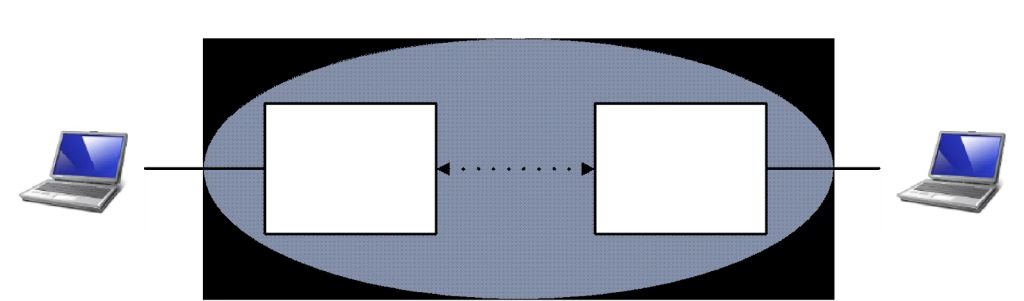
The repeater can extend the coverage area of the master and forward the data. The repeater synchronizes with the master or the upper-level repeater and sends synchronization signals to the lower-level devices. The repeater device can also be used as a slave to send and receive data through the data serial port。The output data is only the data sent by the upper-level device and does not output the data of the lower-level device. аднак, the input data will be confused with the data sent by the lower-level device and sent to the upper-level device.
Adding repeaters to the network reduces the total throughput of the network by half, but only by half and not as the number of repeaters increases. If a relay is required and the throughput is considered, another solution is to place two devices back-to-back at the repeater site. One is the slave of the upstream network and the other is the master of the downstream network. The serial ports of the two devices are connected in wired mode.
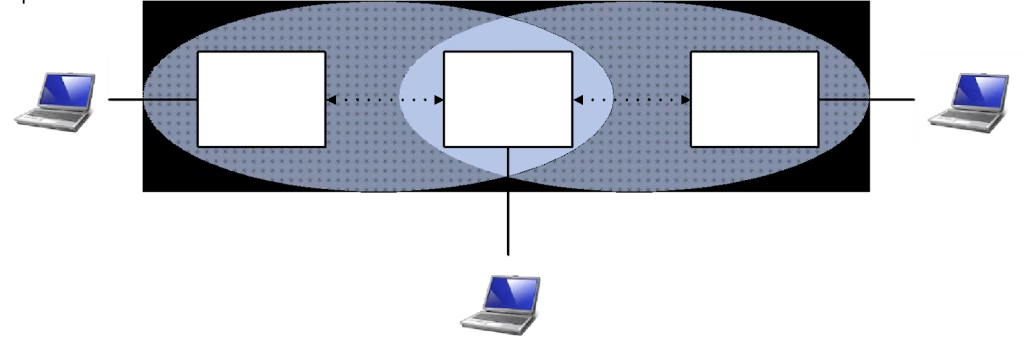


When the unit address is set to 0 on the P2P network of the VCAN1878, the IP address is automatically assigned. Users do not need to set the unit address, synchronous address, and destination address.
The VCAN1878’s point-to-point repeater mode is very flexible and easy to use. Adding a repeater device in a point-to-point network does not need additional configurations for the master and the slave. You only need to set the repeater to the same network ID, orifice rate, and set the repeater sequence number. After switching on, the existing network will automatically detect whether a repeater has joined. The repeater number must increase from the master to the slave in order but can be discontinuous. Pay attention to the repeater location to ensure link stability.
The working mode configuration register is S101. Run the following command:
- ATS101=0 — Майстар
- ATS101=1 — Рэтранслятар
- ATS101=2 — Раб
7.3 Use Factory Defaults
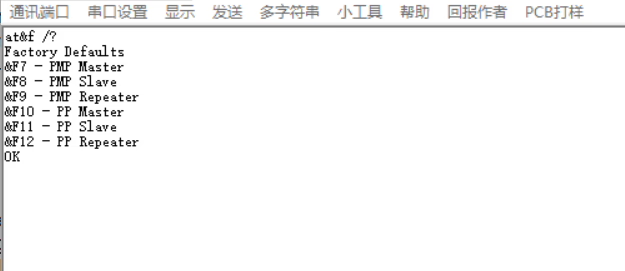
The factory default settings command can be used to quickly configure and deploy the VCAN1878 module, providing a fixed default configuration for each type of configuration. Using the factory defaults sets all registers to default values. Using the default settings has the following benefits:
- To speed up the configuration process. If there is no special requirement, use the default configuration.
- Troubleshoot issues. If communication cannot be established due to the adjustment of the settings, simply restore the factory defaults and any incorrect adjustments will be overwritten.
For most networking applications, the factory defaults are sufficient for all the functions required for point-to-point networking. No matter how complex the special requirements, you can start from the factory default settings configuration. All work modes and network types have corresponding factory default settings commands.
- AT&F10 — Factory default settings for the point-to-point master
- AT&F11 — Factory default settings for the point-to-point slave
- AT&F12 — Factory default settings for the point-to-point repeater
7.4 Master Setting
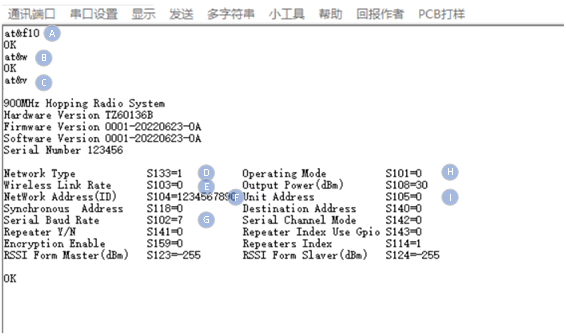
- AT&F10 – Restore the factory default settings for the point-to-point master.
- AT&W – Save setting parameters.
- AT&V – Display the current settings.
- S133 – The network type must be set to 1, corresponding to point-to-point network.
- S103 – The wireless link rate on all devices on the network must be set to the same. Чым вышэй стаўка, the greater the throughput, the lower the rate, and the better the sensitivity.
- S104 – The network addresses (IDS) of all devices on the network must be the same. It is strongly recommended not to use the default setting 1234567890. To change the network address, use ATS104=xxxxxxxx.
- S102 – The baud rate of the serial port matches that of the connected device.
- S101 – The working mode must be set to 0, corresponding to the master.
- S105 – The unit address is set to 0 to automatically assign the address.
Пасля завяршэння канфігурацыі, run the AT&W command to save the current settings. Run the ATA command to exit the AT command mode and the settings take effect.
7.5 Slave Setting
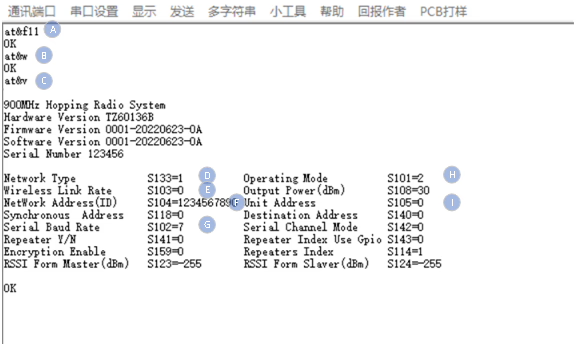
- AT&F11 – Restore the factory default settings for the point-to-point slave.
- AT&W – Save setting parameters.
- AT&V – Display the current settings.
- S133 – The network type must be set to 1, corresponding to point-to-point network.
- S103 – The wireless link rate on all devices on the network must be set to the same. Чым вышэй стаўка, the greater the throughput, the lower the rate, and the better the sensitivity.
- S104 – The network addresses (ids) of all devices on the network must be the same. It is strongly recommended not to use the default setting 1234567890. To change the network address, use ATS104=xxxxxxxx
- S102 – The baud rate of the serial port matches that of the connected device.
- S101 – The working mode must be set to 2, corresponding to the slave.
- S105 – The unit address is set to 0 to automatically assign the address.
After the configuration is complete, run the AT&W command to save the current Settings. Run the ATA command to exit the AT command mode and the settings take effect.
7.6 Repeater Setting
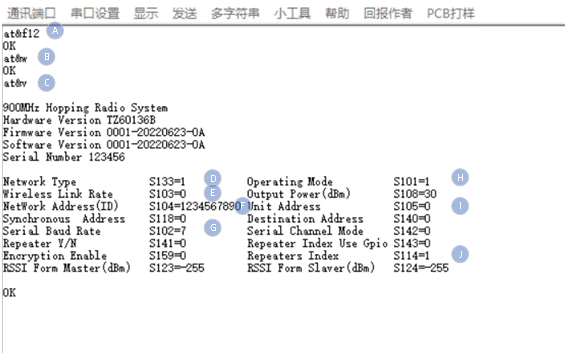
- AT&F12 – Restore the factory default settings for the point-to-point repeater.
- AT&W – Save setting parameters.
- AT&V – Display the current settings.
- S133 – The network type must be set to 1, corresponding to point-to-point network.
- S103 – The port rates of all devices on the network must be the same. Чым вышэй стаўка, the greater the throughput, the smaller the rate, and the better the sensitivity.
- S104 – The wireless link rate on all devices on the network must be set to the same. It is strongly recommended not to use the default setting 1234567890. To change the network address use ATS104=xxxxxxxx.
- S102 – The baud rate of the serial port matches that of the connected device.
- S101 – The working mode must be set to 1, corresponding to the repeater.
- S105 – The unit address is set to 0 to automatically assign the address.
- S114 – The repeater sequence number represents the position of the repeater in the network, the closer to the master, the smaller the sequence number, and it can be discontinuous.
Пасля завяршэння канфігурацыі, run the AT&W command to save the current Settings. Run the ATA command to exit the AT command mode and the settings take effect.
8.Point-to-Multipoint Networks
In a point-to-multipoint network, the master can directly connect to multiple slaves or connect to multiple slaves through repeaters. The repeater also has the function of the slave end and can communicate with the master, but its uplink data will be confused with that of the slave. The network type register S133=0 needs to be configured for point-to-multipoint networks.
The master can use the target address S140 to temporarily select a particular slave or repeater to communicate with and filter out data transmission requests from other devices.

点对多点网络拓扑图
8.1 Configuration Preparation
Перад канфігурацыяй, you must use the development board or user-designed hardware to provide power supplies and serial ports for the VCAN1878 module. The data serial port can be configured with registers using AT commands, and the control serial port can be configured with registers using API protocols. For details about interfaces, see Chapter 3 Апісанне абсталявання.
8.2 Рэжым працы
The VCAN1878 point-to-multipoint network operates in three modes: гаспадар, раб, and repeater.
The master provides synchronization signals for the entire network to ensure normal communication between all devices.
The slave is the final node of the network and communicates directly with the master or repeater. When there is no user data transfer in the point-to-multipoint network, the slave device will only synchronize the master and will not send any information on the network.
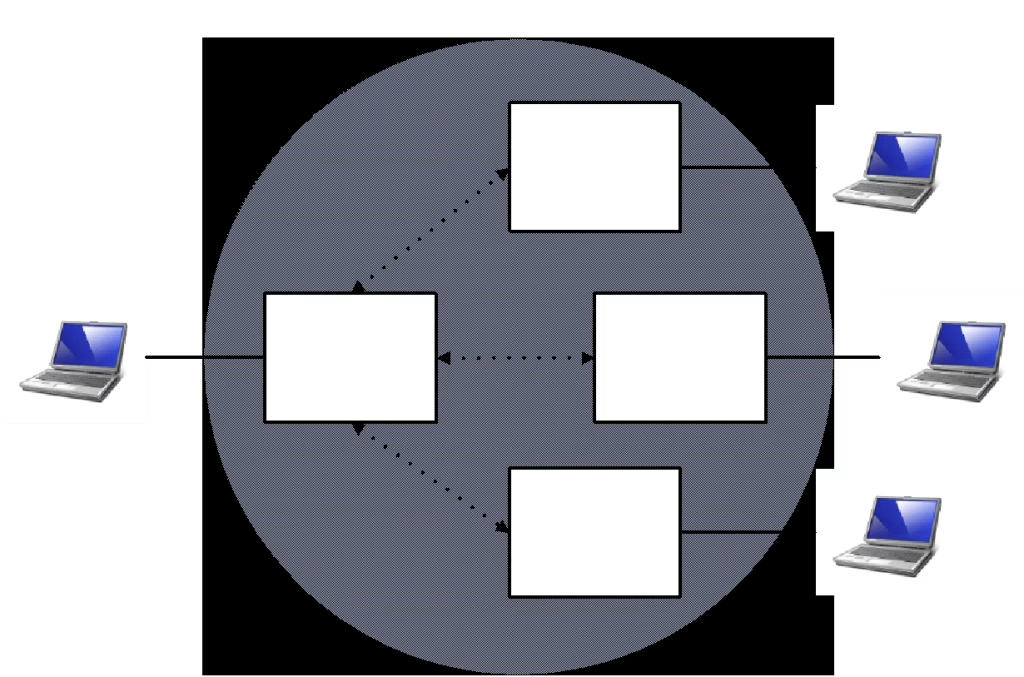
The repeater can extend the coverage area of the master and forward the data. The repeater synchronizes with the master or the upper-level repeater and sends synchronization signals to the lower-level devices. The repeater device can also be used as a slave to send and receive data through the data serial port. The output data is only the data sent by the upper-level device and does not output the data of the lower-level device. аднак, the input data will be confused with the data sent by the lower-level device and sent to the upper-level device.
Adding repeaters to the network reduces the total throughput of the network by half, but only by half and not as the number of repeaters increases. If a repeater is required and the throughput is considered, another solution is to place two devices back-to-back at the repeater site. One is the slave of the upstream network and the other is the master of the downstream network. The serial ports of the two devices are connected in wired mode.
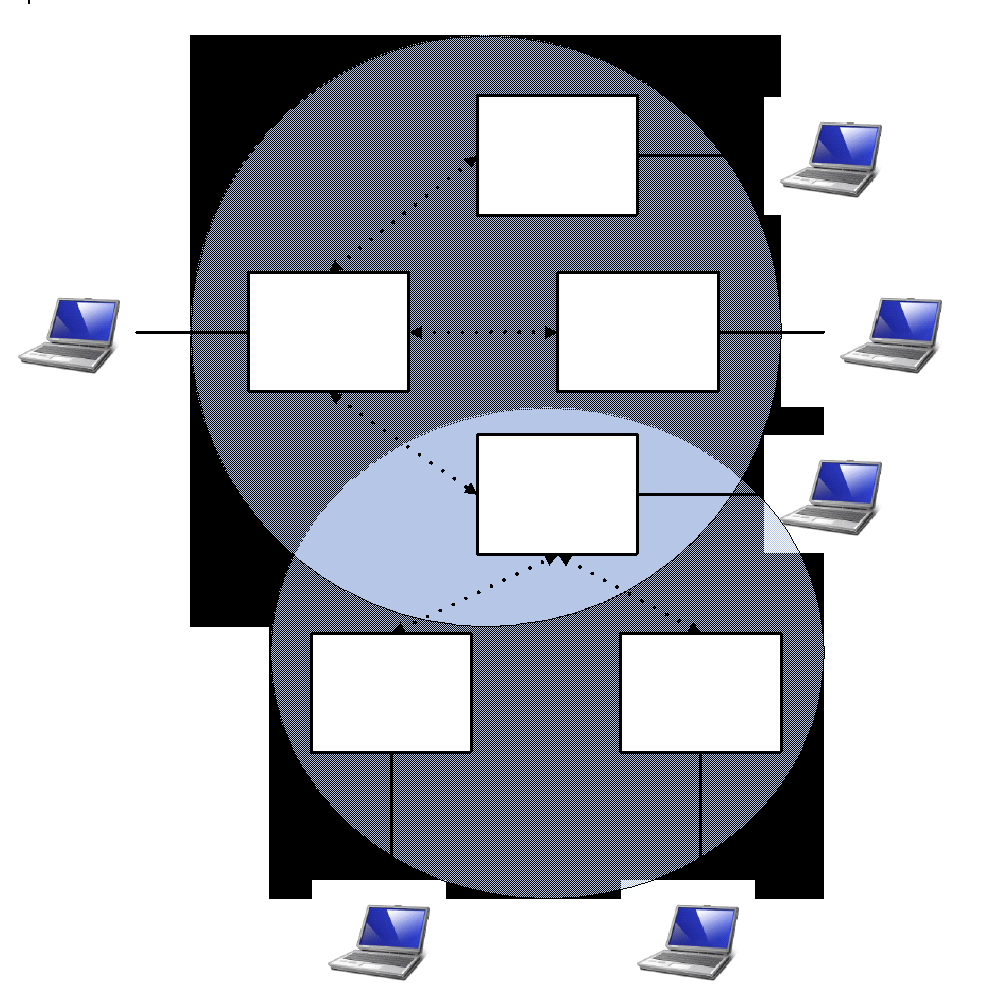
The repeater of a point-to-multipoint network cannot be automatically added like a point-to-multipoint network. You need to manually configure registers S105, S118, and S140 to determine the network topology.
The working mode configuration register is S101. Run the following command:
- ATS101=0 — Майстар
- ATS101=1 — Рэтранслятар
- ATS101=2 — Раб
8.3 Use Factory Defaults
The factory defaults settings command can be used to quickly configure and deploy the VCAN1878 module, providing a fixed default configuration for each type of configuration. Using factory defaults sets all registers to default values. Using the default settings has the following benefits:
1. To speed up the configuration process. If there is no special requirement, please use the default configuration.
2. Troubleshoot issue. If communication cannot be established due to adjustments to the settings, simply restore the factory defaults and any incorrect adjustments will be overwritten.
For most networking applications, the factory defaults provide all the functionality required for point-to-multipoint network. No matter how complex the special requirements are, you can start from the factory default settings configuration. All work modes and network types have corresponding factory default settings.
- AT&F7 — Factory default settings for the point-to-multipoint master
- AT&F8 — Factory default settings for the point-to-multipoint slave
- AT&F9 — Factory default settings for the point-to-multipoint repeater
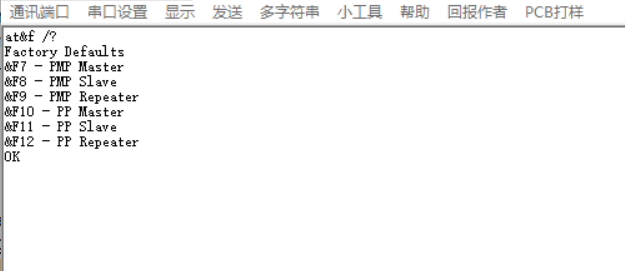
8.4 Master Setting
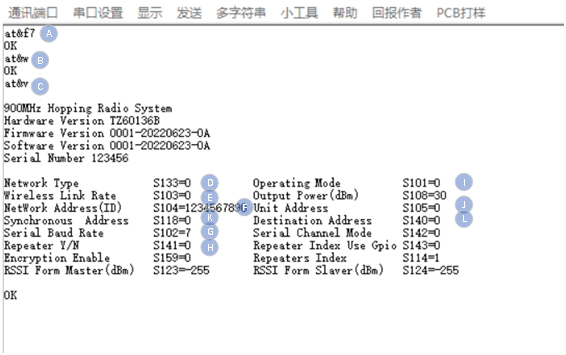
- AT&F7 – Restore the factory default Settings of the point-to-point master.
- AT&W – Save setting parameters.
- AT&V – Display the current settings.
- S133 – The network type must be set to 0, corresponding to point-to-multipoint network.
- S103 – The wireless link rate on all devices on the network must be set to the same. Чым вышэй стаўка, the greater the throughput. The lower the rate, the better the sensitivity.
- S104 – The network addresses (ids) of all devices on the network must be the same. It is strongly recommended not to use the default setting 1234567890. To change the network address use ATS104=xxxxxxxx.
- S102 – The baud rate of the serial port matches that of the connected device.
- S141 – Whether a repeater exists on the network.
- S101 – The working mode must be set to 0, corresponding to the master.
- S105 – For the unit address, гл. Раздзел 9.7 for an example.
- S118 – For the synchronize addresses, гл. Раздзел 9.7 напрыклад.
- S140 – For the target address, гл. Раздзел 9.7 напрыклад.
Пасля завяршэння канфігурацыі, run the AT&W command to save the current Settings. Run the ATA command to exit the AT command mode and the Settings take effect.
8.5 Slave Setting
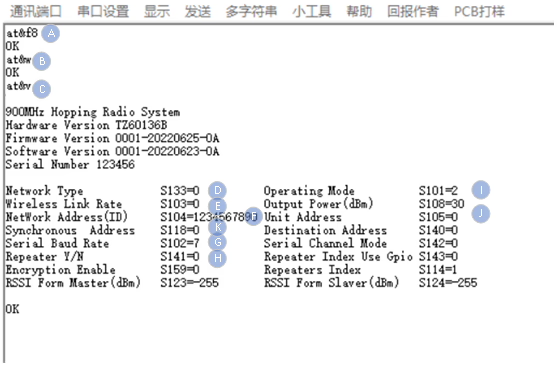
- AT&F8 – Restore the factory default settings for the point-to-multipoint slave.
- AT&W – Save setting parameters.
- AT&V – Display the current settings.
- S133 – The network type must be set to 0, corresponding to point-to-multipoint.
- S103 – T The wireless link rate on all devices on the network must be set to the same. Чым вышэй стаўка, the greater the throughput. The lower the rate, the better the sensitivity.
- S104 – The network addresses (ids) of all devices on the network must be the same. It is strongly recommended not to use the default setting 1234567890. To change the network address use ATS104=xxxxxxxx.
- S102 – The baud rate of the serial port matches that of the connected device.
- S141 – Whether a repeater exists on the network.
- S101 – The working mode must be set to 2, corresponding to the slave.
- S105 – For the local address, гл. Раздзел 9.7 for an example.
- S118 – For the synchronize addresses, гл. Раздзел 9.7 напрыклад.
- S140 – For the target address, гл. Раздзел 9.7 напрыклад.
Пасля завяршэння канфігурацыі, run the AT&W command to save the current Settings. Run the ATA command to exit the AT command mode and the settings take effect.
8.6 Repeater Setting

- AT&F9 – Restore the factory default settings for the point-to-multipoint repeater.
- AT&W – Save setting parameters.
- AT&V – Display the current settings.
- S133 – The network type must be set to 0, corresponding to point-to-multipoint.
- S103 – The wireless link rate on all devices on the network must be set to the same. Чым вышэй стаўка, the greater the throughput. The lower the rate, the better the sensitivity.
- S104 – The network addresses (ids) of all devices on the network must be the same. It is strongly recommended not to use the default setting 1234567890. To change the network address use ATS104=xxxxxxxx.
- S102 – The baud rate of the serial port matches that of the connected device.
- S141 – Whether a repeater exists on the network.
- S101 – The working mode must be set to 2, corresponding to the repeater.
- S105 – For the local address, гл. Раздзел 9.7 for an example.
- S118 – For the synchronize addresses, гл. Раздзел 9.7 напрыклад.
- S140 – For the target address, гл. Раздзел 9.7 напрыклад.
Пасля завяршэння канфігурацыі, run the AT&W command to save the current Settings. Run the ATA command to exit the AT command mode and the settings take effect.
8.7 Examples for Configuring Point-to-Multipoint Network Addresses.
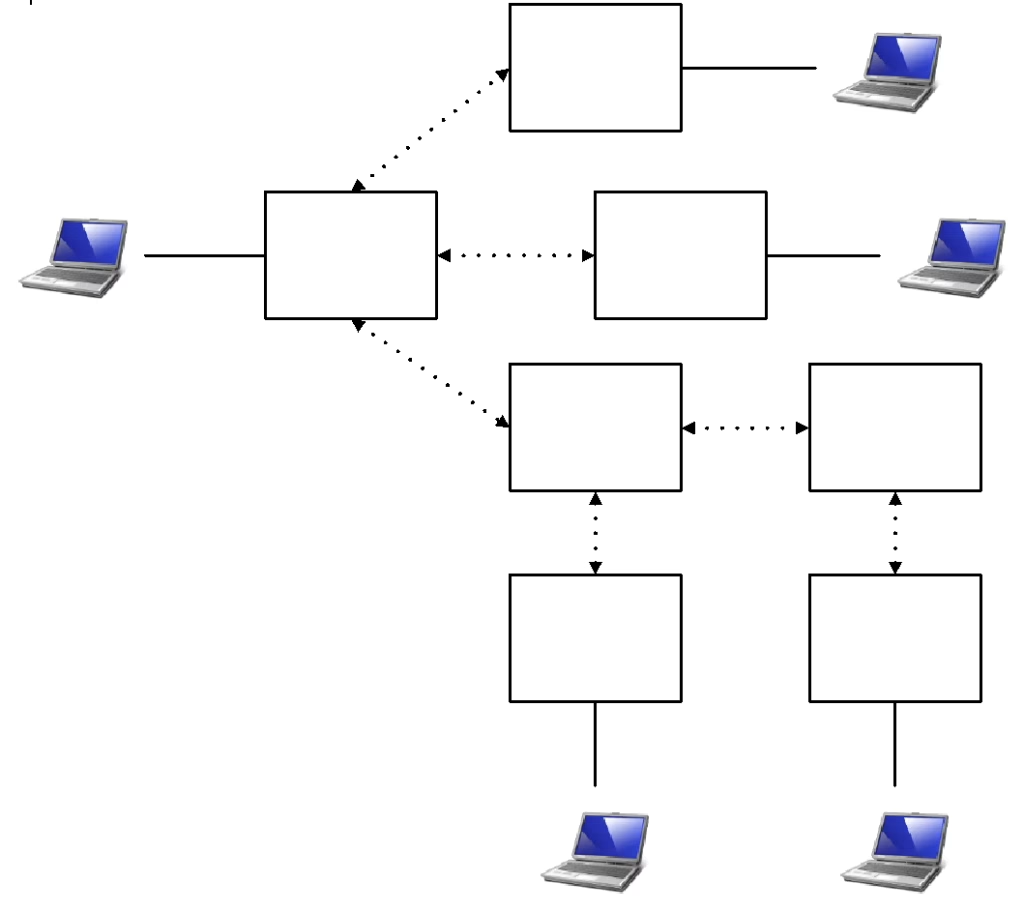
A point-to-multipoint network has one master, four slaves, and two repeaters. Раб 1, раб 2, and repeater 1 are synchronized to the master, рэтранслятар 2 is synchronized to repeater 1, раб 3 is synchronized to repeater 1, and slave 4 is synchronized at repeater 2. If S141 of the master is 1, there are repeaters on the network. The unit address and synchronization address of each device are set in the following table:
| Local address S105 | Synchronous addressS118 | Target address S140 | |
| Майстар | 1 | 0 | 0 |
| repeater1 | 2 | 1 | 0 |
| repeater2 | 3 | 2 | 0 |
| slave1 | 4 | 1 | 0 |
| slave2 | 5 | 1 | 0 |
| slave3 | 6 | 2 | 0 |
| slave4 | 7 | 3 | 0 |
On the same point-to-multipoint network, the unit address of each device must be unique and non-zero. The synchronization address is set to the unit address of its upper-level device. The destination address is usually set to 0, or the unit address of a device if you need to specify receiving a device.
9. Mesh With Center Networks
A central Mesh network is a special point-to-multipoint network. The center of the network is still the master, and all the slaves can exchange data with each other but do not forward data. The Mesh network with a center needs to be configured with the network type register S133=2. This network type does not support repeaters.
The master can use the target address S140 to temporarily select a particular slave to communicate with and filter out data transfer requests from other devices.

The Mesh with Center Network topology
9.1 Configuration Preparations
Перад канфігурацыяй, you must use the development board or user-designed hardware to provide power supplies and serial ports for the VCAN1878 module. The data serial port can be configured with registers using AT commands, and the control serial port can be configured with registers using API protocols. For details about interfaces, see Chapter 3 Апісанне абсталявання.
9.2 Рэжым працы
The VCAN1878’s centered Mesh network supports only two operating modes: master and slave. The repeater is not supported.
The master provides synchronization signals for the whole network to ensure that all devices can communicate normally.
The slave is the final node of the network and communicates directly with the master or the salve. When no user data is transmitted on the point-to-multipoint network, the slave device synchronizes with the master device and does not send any information on the network.

For a Mesh network with a center, registers S105, S118 and S140 need to be configured in advance to determine the network topology.
The working mode configuration register is S101. Run the following command:
- ATS101=0 — Майстар
- ATS101=2 — Раб
9.3 Use Factory Defaults
The factory default settings command can be used to quickly configure and deploy the VCAN1878 module, providing a fixed default configuration for each type of configuration. Using factory defaults sets all registers to default values. Using the default Settings has the following benefits:
1.To speed up the configuration process and use the default configuration if you don’t need it.
2. Troubleshoot issue. If communication cannot be established due to adjustments to the settings, simply restore the factory defaults and any incorrect adjustments will be overwritten.
For most web applications, the factory defaults are sufficient for all the functions required for a centralized Mesh network. No matter how complex the special requirements, you can start from the factory default settings configuration. All work modes and network types have corresponding factory default settings.
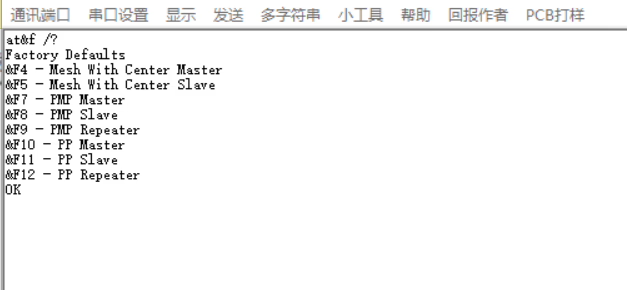
- AT&F4 — Factory default settings for the Mesh-with-Center master.
- AT&F5 — Factory default settings for the Mesh-with-Center slave.
9.4 Master Setting
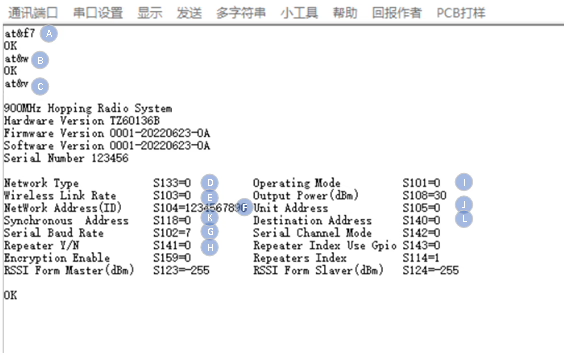
- AT&F7 – Restore the factory default settings for the mesh-with-center master.
- AT&W – Save setting parameters.
- AT&V – Display the current settings.
- S133 – The network type must be set to 2 with a central Mesh for pairs.
- S103 – The wireless link rate on all devices on the network must be set to the same. Чым вышэй стаўка, the greater the throughput. The lower the rate, the better the sensitivity.
- S104 – The network addresses (ids) of all devices on the network must be the same. It is strongly recommended not to use the default setting 1234567890. To change the network address use ATS104=xxxxxxxx
- S102 – The baud rate of the serial port matches that of the connected device.
- S141 – Whether a repeater exists on the network or not, the value must be set to 0.
- S101 – The working mode must be set to 0, corresponding to the master side.
- S105 – For the unit address, refer to the example in point-to-multipoint networks.
- S118 – For the sync address, refer to the example in point-to-multipoint networks.
- S140 – For the destination address, refer to the example in point-to-multipoint networks.
Пасля завяршэння канфігурацыі, run the AT&W command to save the current Settings. Run the ATA command to exit the AT command mode and the settings take effect.
9.5 Slave Setting
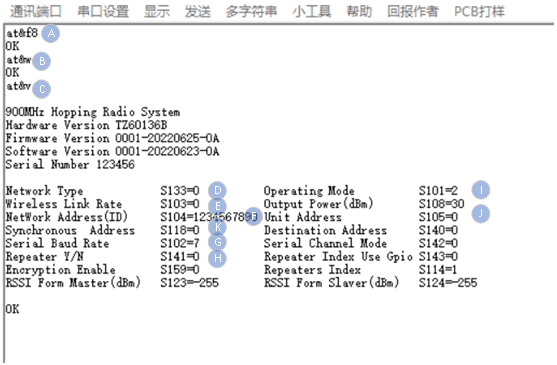
- AT&F8 – Restore the factory default settings for the mesh-with-center slave.
- AT&W – Save setting parameters.
- AT&V – Display the current settings.
- S133 – The network type must be set to 2 with a central Mesh for pairs.
- S103 – The wireless link rate on all devices on the network must be set to the same. Чым вышэй стаўка, the greater the throughput. The lower the rate, the better the sensitivity.
- S104 – The network addresses (ids) of all devices on the network must be the same. It is strongly recommended not to use the default setting 1234567890. To change the network address use ATS104=xxxxxxxx
- S102 – The baud rate of the serial port matches that of the connected device.
- S141 – Whether a repeater exists on the network or not, the value must be set to 0.
- S101 – The working mode must be set to 2, corresponding to the slave side.
- S105 – For the unit address, refer to the example in point-to-multipoint networks.
- S118 – For the sync address, refer to the example in point-to-multipoint networks.
- S140 – For the destination address, refer to the example in point-to-multipoint networks.
Пасля завяршэння канфігурацыі, run the AT&W command to save the current Settings. Run the ATA command to exit the AT command mode and the settings take effect.
9.6 Packet Length Limit
In the case of a central Mesh network, when the channel access mode is TDMA, each device communicates with the other. When multiple devices send data, the data output from serial ports will interleave with each other. To ensure the integrity of data packets, the length of data packets must be smaller than the maximum length sent by a single time slot. When the channel access mode is selected TDMA-AUTO, there is no limit on the packet length.
| Хуткасць адтуліны | Maximum length of a single packet |
| 276.4kbps | 175 байтаў |
| 230.4kbps | 140 байтаў |
| 172.8kbps | 100 байтаў |
| 115.2kbps | 55 байтаў |
| 57.6kbps | 15 байтаў |
задаваць пытанне
Ваша паведамленне адпраўлена