






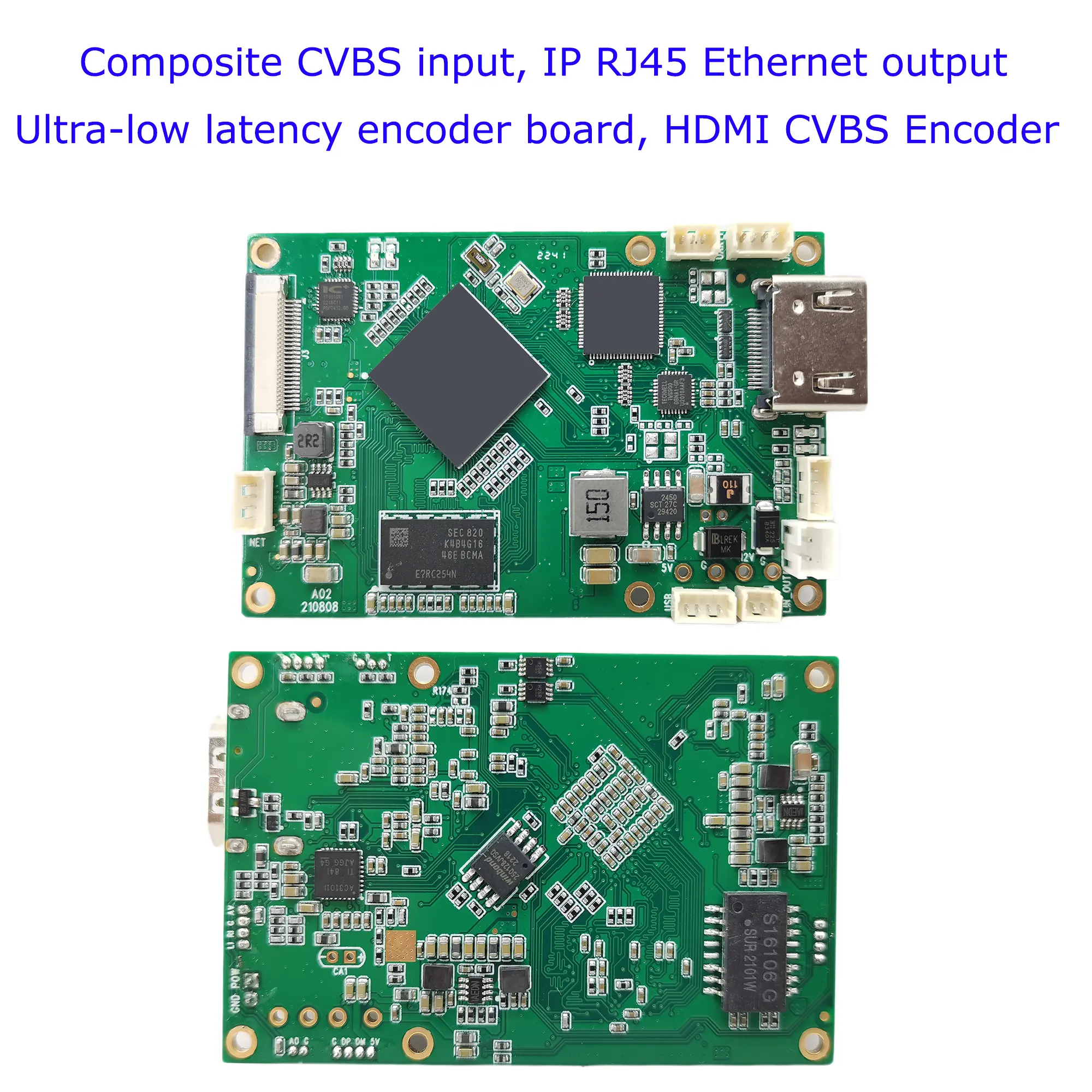
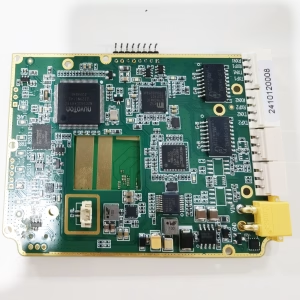
SDI 或 HDMI 轉 IP 編碼器調變器 CVBS H.265 H.264 編碼板 PCBA 乙太網路 RSTP UDP 適用於無人機無人機機器人
$399.00
SDI HDMI To IP encoder modulator CVBS H.265 H.264 encoding board PCBA Ethernet RTSP UDP for UAV Drone Robotic
目錄
介紹
There are many HDMI encoding boards on the market. Have you met these problems?
- The delay is too long
- The encoding format cannot be customized
- UART AT remote control or operation cannot be used.
- Can not support HDMI and CVBS dual video input encoding
This encoder board supports HDMI, SDI, CVBS video input, 和 IP ethernet RJ45 living stream output, most applications are for wireless video transmitters, which can encode the HDMI or CVBS video signal to the digital living stream by H.264 or H.265, and transfer it to the receiver, CVBS 到 IP 轉換器.
UART software modification can configure the HDMI and Composite CVBS video to the IP ethernet stream encoder modulator module board parameter. Please get in touch with us if you need to customize a similar function to meet your project.
優點:
Ultra-Low Latency
H265 或 H264 支持
HDMI 和 CVBS 雙編碼
Two Audio inputs can switch
Web UI 要么 serial port UART AT command configuration management
- Ultra-low latency H.265/H.264 audio and video encoding maximum support 1080P60 real-time video capture and encoding
- The HDMI or AV input is encoded and outputted to a wireless module through the Ethernet port. The video encoding bit rate can be adjusted dynamically.
- Support audio input and audio decoding output. (Remote operate by UART AT command choose HDMI or CVBS audio)
- You can choose between HDMI or AV encoding for two videos with the option to control the input source using an AT command.
特徵
The board implements H.265/H.264 audio and video compression encoding, supports up to 1080P@60fps encoding, and is backward compatible with other resolutions and frame rate encoding.
Audio and video input
- HDMI interface(audio+video):1080 60P,1080 50P,1080 30P,1080 25P,1080 60一世,1080 50一世, 720 60P,720 50P,720 30P, …, various modes adaptive (1080p, 1080一世, 720p, 1024×768, 1280×1024);
- AV in the interface (音頻 + 視頻):720×480 60一世(NTSC),720×576 50一世(朋友), mode adaptive. through the AV interface, it can be Line in Mic in.
- The default audio input is the same as the video input interface.
- The audio input interface can also be configured through the Web UI when the serial port detects audio.
- The audio and video source signals are encoded, and the audio and video source acquisition interface can also be configured through the configuration serial port.
- The audio and video source acquisition interface can be dynamically switched through serial port commands during system operation.
視頻編碼: H.265 or H.264 format, the encoding bit rate can be configured.
Audio encoding: AAC encoding. - By programming special firmware HDMI+AV the simultaneous capture and encoding of board Audio output(Audio out)
- The board has a built-in audio decoding output function(線路輸出), which can be connected to an external headphone or audio power amplifier. Audio is decoded and played.
乙太網路埠 (乙太網路介面)
supports our two-way wireless transmission modulator module, or other third-party two-way links.
Wireless transmission interface( FPC Main interface)
can be connected to our COFDM wireless transmission module, and can also be connected to our two-way wireless transmission link module.
數據UART
TTL 3.3V電平, parameters such as transmission baud rate can be configured. When the board is through a wireless link, the data serial port is used for transparent data transmission.
Control-UART
TTL 3.3V電平, which can be connected to our parameter configuration panel or another upper computer to configure the encoding board system.
USB Host interface
software upgrade and maintenance. (optional USB recorder function)
Power supply voltage
supports the reverse connection protection of the power input, and supports the power input range of 7~30V. Provides a 5V power output interface. The maximum working power consumption is 2.4W (1080P60 H.265 encoding), and the maximum current is 200mA.
Indicator
power indicator, video encoding work indicator.
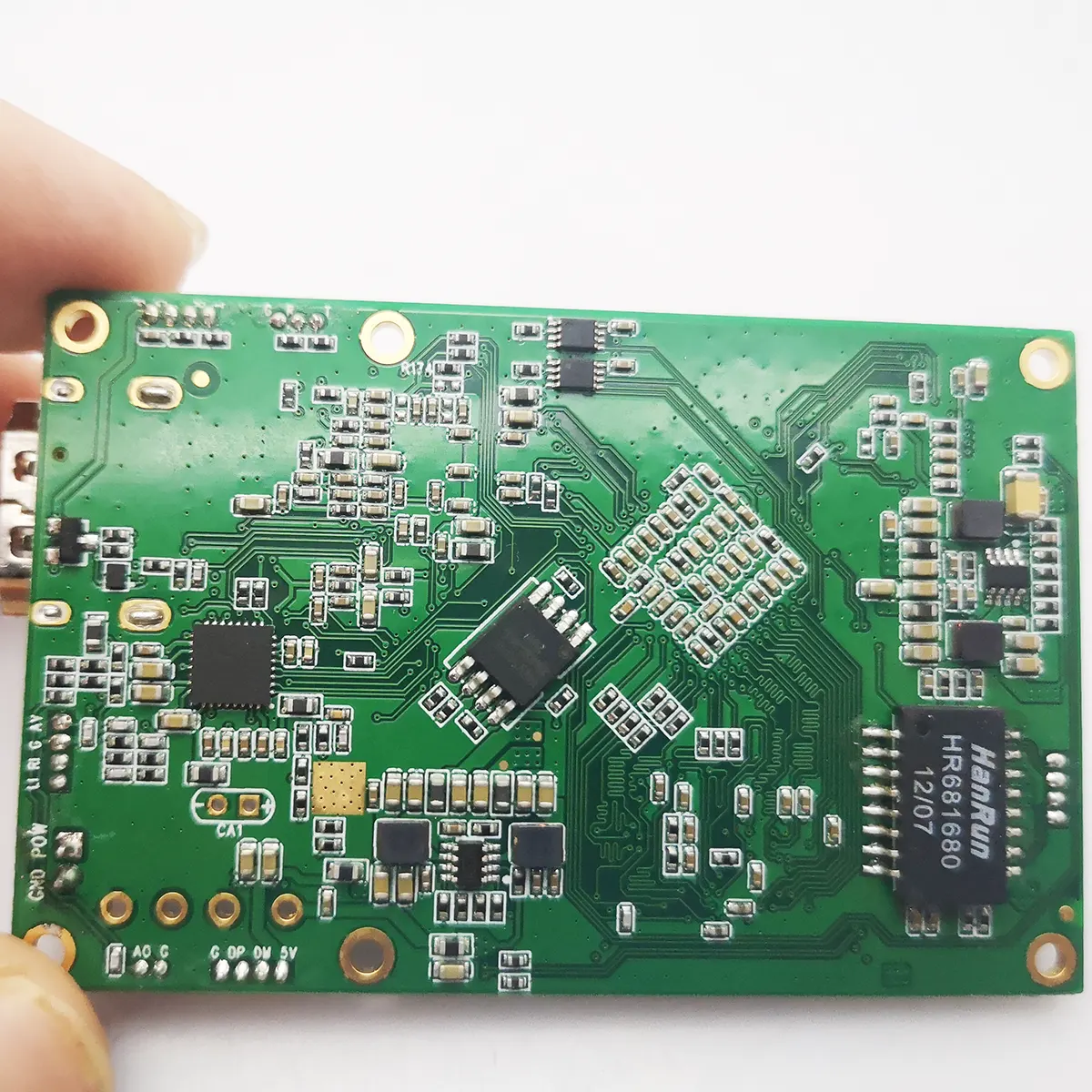
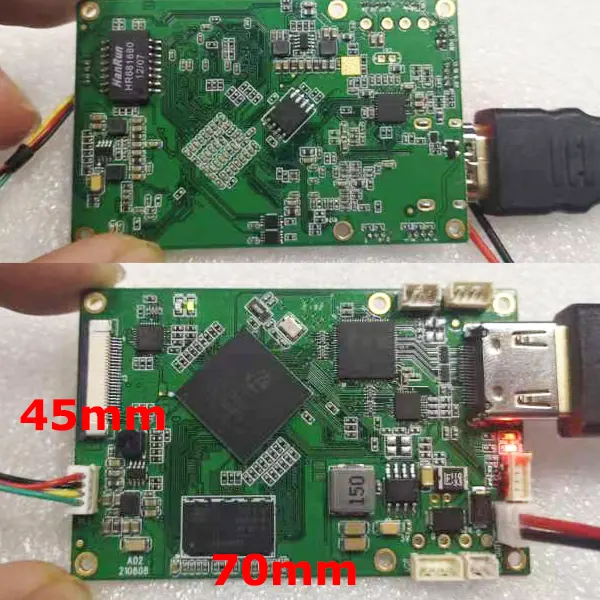
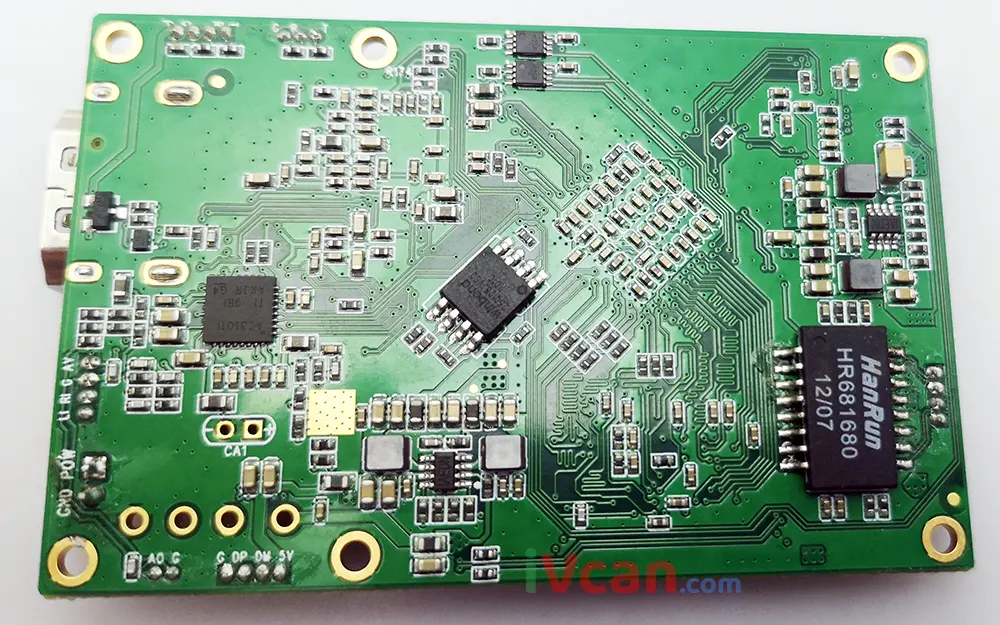
The HDMI to IP encoder board size 是 70x45x1.2mm (LWH)
The height of the back component is less than 2.5mm, and the height of the front component is less than 6.8mm.
Board weight
20.6 克.
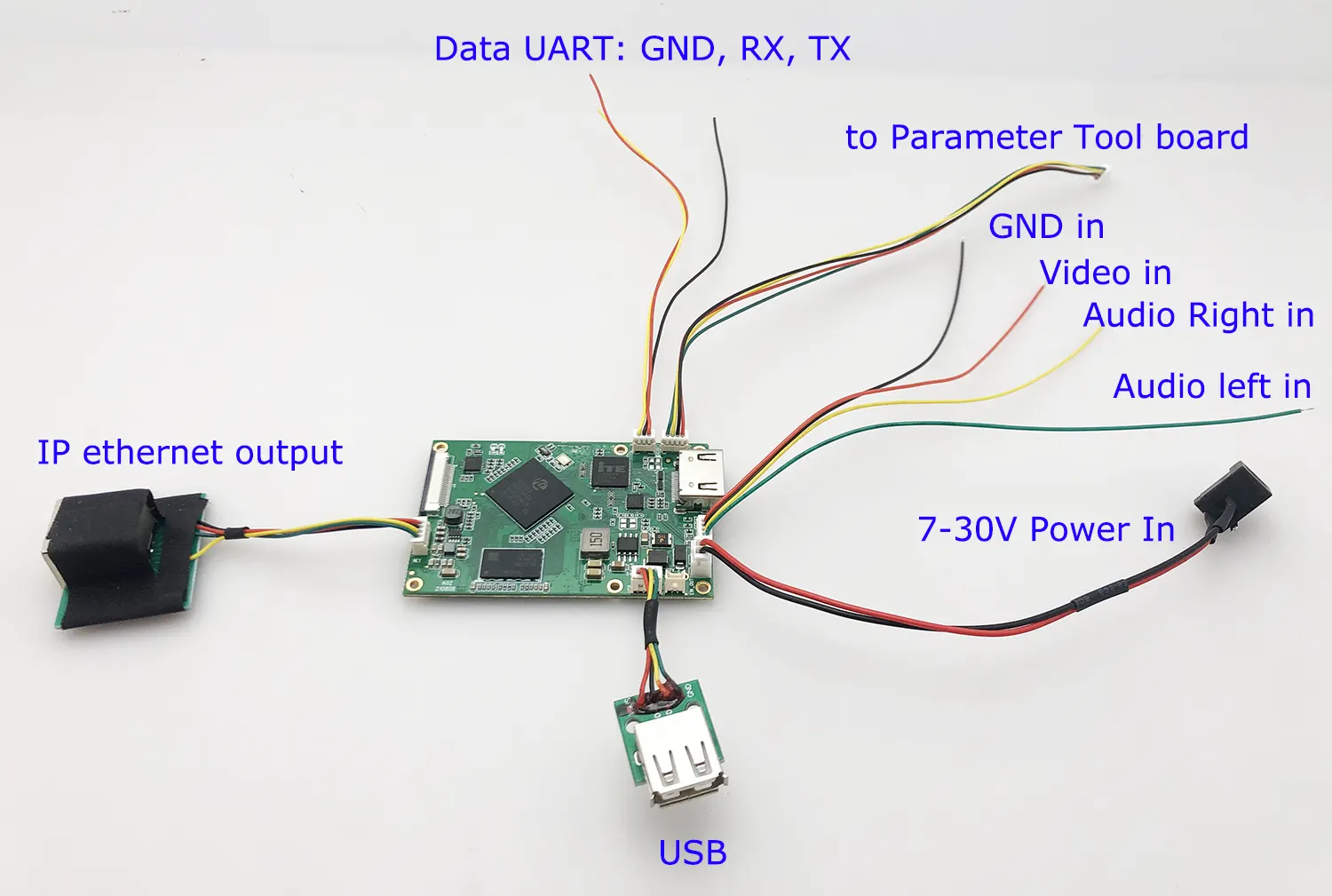
Interface Signal
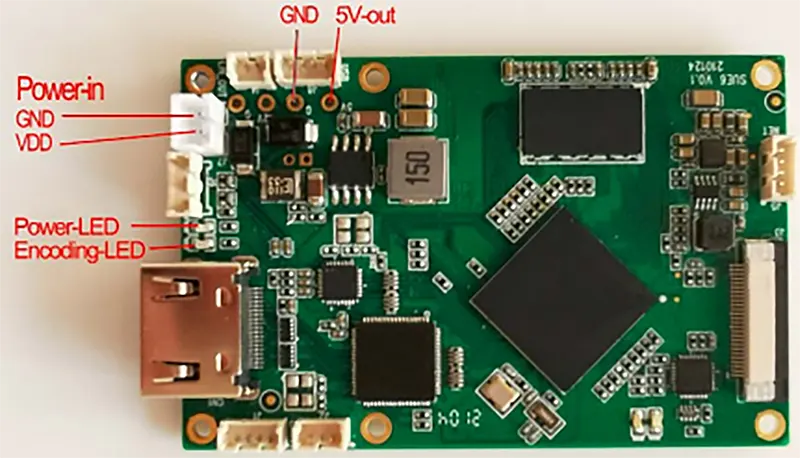
- AL (Audio in left), audio input left channel;
-
AR(Audio in right), audio input right channel;
-
GND, signal ground;
-
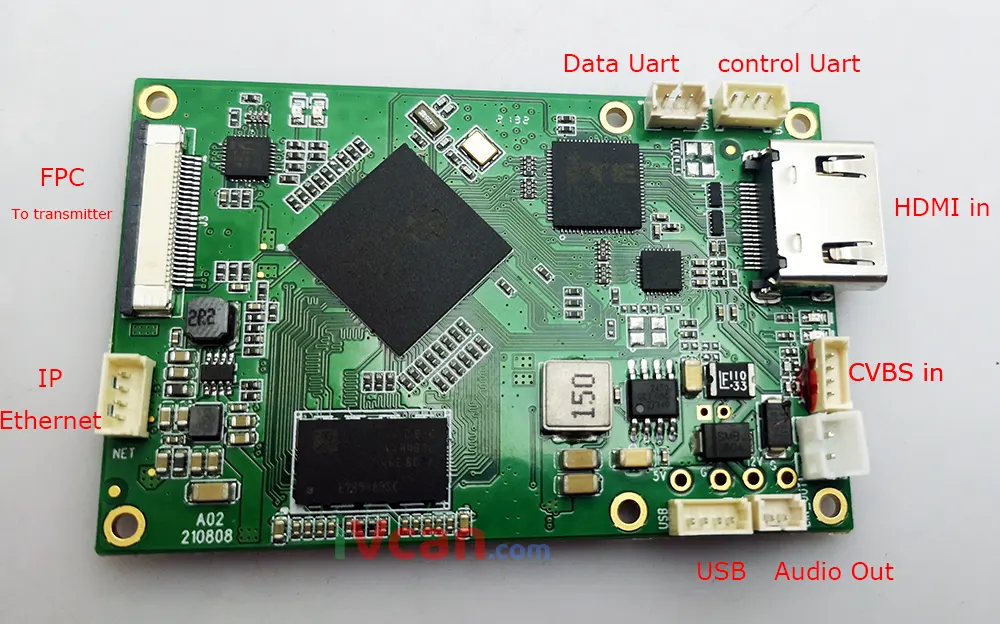
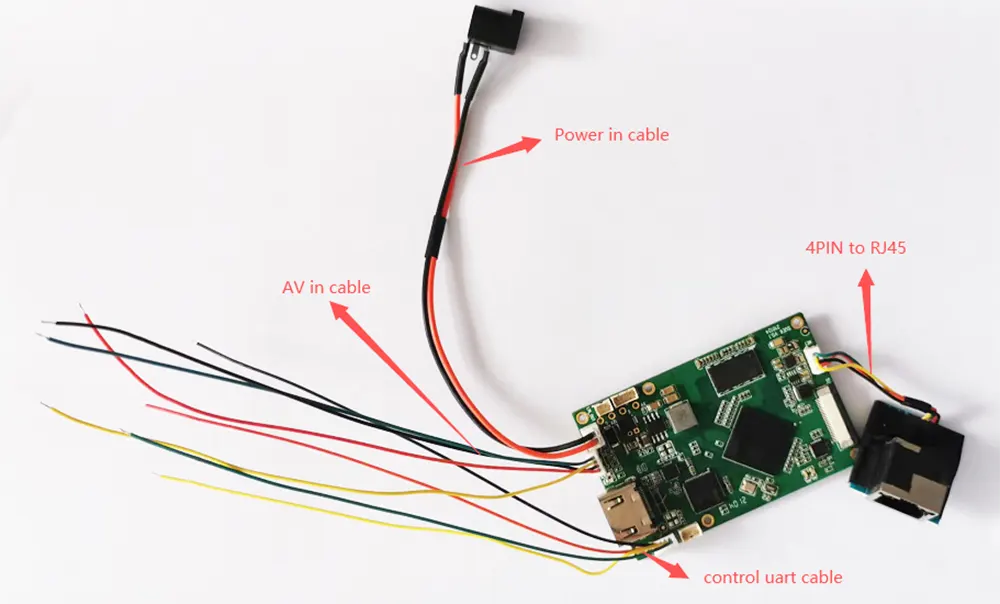
作者:, analog video input. (Please ignore the color of the wiring, make sure the fourth jack is CVBS Composite video input.)
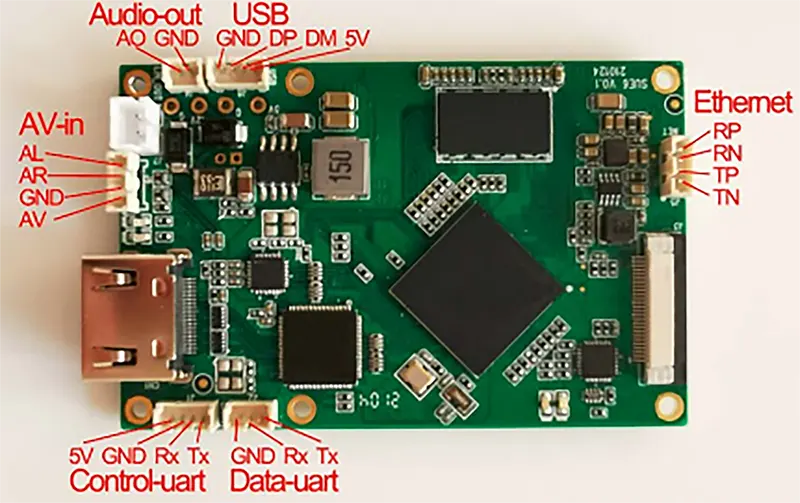
- HDMI to IP encoder modulator CVBS H.265 H.264 encoding board pcba Ethernet LAN HTTP RTSP UDP onvif TCP IP interface signal 2
控制串口: Equipped with serial port,4PIN 1.25mm 間距插座, TTL 3.3V電平, used for the board parameter configuration, can be connected to Sihaida parameter configuration panel or another host computer.
USB介面:4PIN 1.25mm 間距插座, used for the encoder board software upgrade and maintenance.
Audio-out interface:2PIN 1.25mm 間距插座, the board has a built-in audio decoding output function(線路輸出), which can be connected to an external headphone or audio power amplifier. Decode and play the audio input from the network port.
以太網絡: 乙太網路介面,4PIN 1.25mm 間距插座
應用
- Done or UAV video encoding
- Robotic or mini-control vehicle
- Unmanned Vehicles UAV
- Unmanned Submarine
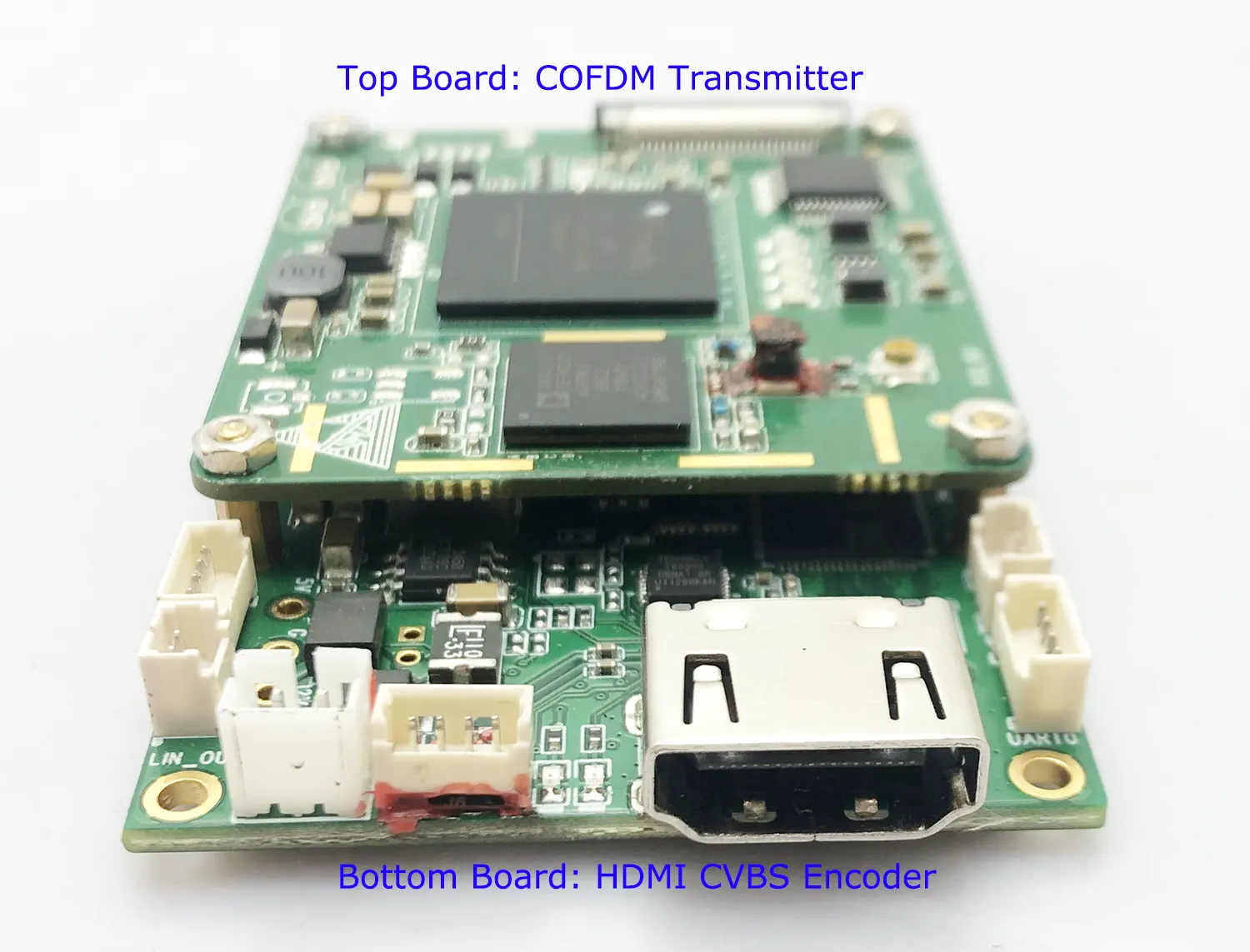
- The HDMI to IP board can be COFDM modulation module RCB stacked and assembled with a COFDM one-way transmission module. The connection interface is FPC Main (26PIN flat cable flexible cable interface). HDMI+AV encoder + COFDM Transmitter Module
- The HDMI to IP encoder board PCBA is connected to a two-way wireless link through the network port. 此時, the operating parameters can be configured through the network port Web UI. 例如, set the video encoding bit rate, H264/H265 encoding method, audio input method, serial port baud rate, 等等.
- The board can be connected to the Control-UART parameter configuration panel to set operating parameters.
- HDMI interface version: HDMI V1.4
- Ethernet Output Data rate: 100MBps
- Operating Temperature range: -40~85 degrees
- Compatible Operating System: Embedded Linux
Web UI management Parameter setting
常見問題
This HDMI video to IP encoding board can view the current parameter configuration through the network port Web UI and modify it according to application needs. through the network port browser http://192.168.1.30/ (the IP address of the encoding board)
1. Please check the Web UI from the browser, at the below picture, if the video source input is ok, then it will show the CVBS or HDMI at the red arrow.
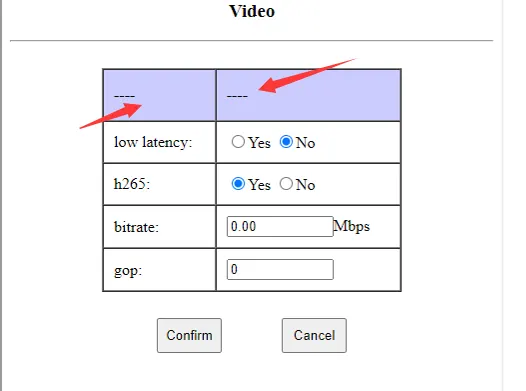
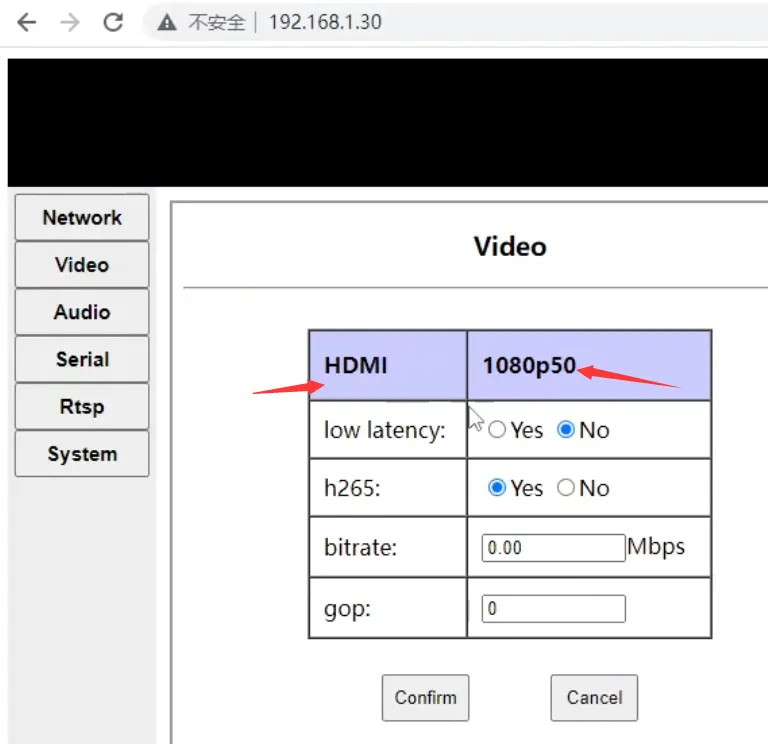
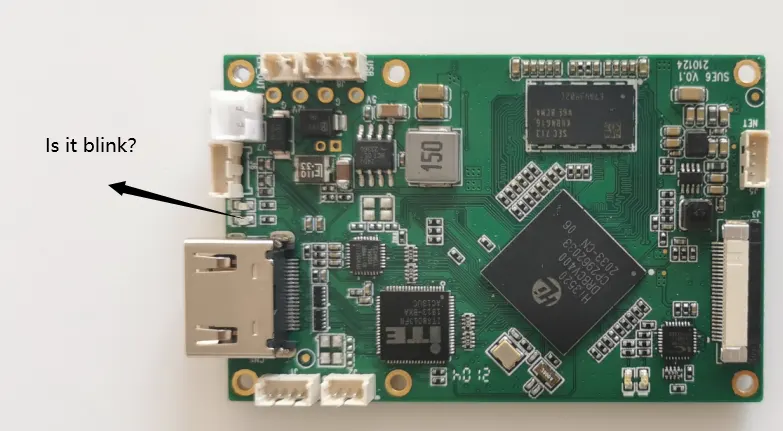
2. Please check the HDMI encoding board LED light is blink or not.
If it is green and blink, then the video input source is working well, if not blink, then please check the video input source is ok or not.
The encoding bitrate can be configured. The default web server is set to 0.0 to represent auto (3.12Mbps will be used internally). Customers can modify this value. 例如, it is possible to configure 1Mbps~2Mbps or even lower.
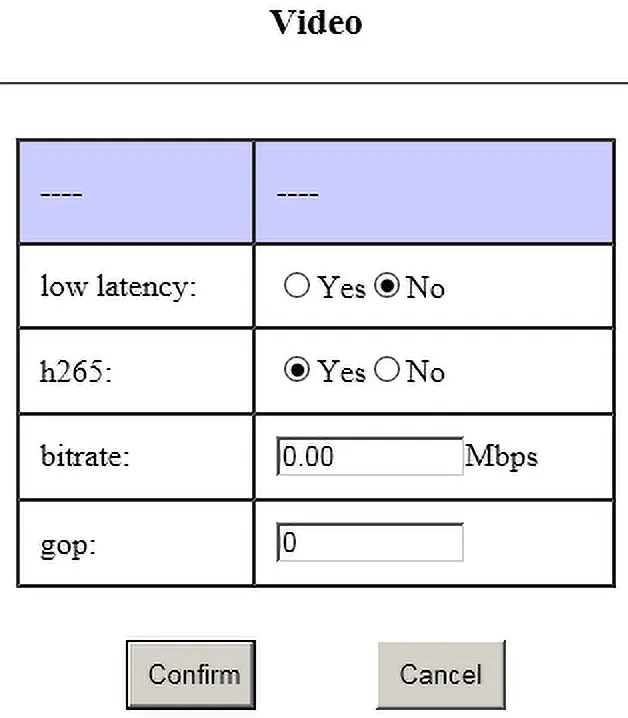
1. Large I-frames are prone to frame loss due to wireless transmission;
2. If the gop setting is large, the loss of the I frame will lead to a longer recovery time after the blurred screen;
3. The size difference between I frame and P frame is large, which will increase the transmission delay.
1、比如相机输入1080p60,那gop设置为60/120/180(不建議設定太大)
2、比如相机输入1080p25,那gop设置为25/50/75(不建議設定太大)
3、比如相机输入1080i60,由于需要去交织,所有实际编码是1080p30,那gop设置为30/60/90
从上面可以看到,由于输入相机帧率不确定,所以我们一般建议配置0(汽車)
cvbs分制式,pal是25fps,ntsc是30fps
假设是pal,那gop设置25/50/75
1、大的I帧容易因为无线传输的原因导致丢帧花屏;
2、gop设置大,I帧丢失导致花屏后恢复时间变长;
3、I帧和P帧大小差别大,会增加传输延迟
Please download at the below link.
Splayer_v4.2_2020.6.6
https://drive.google.com/file/d/1ihzUhfnx2Wo3zLO8UAs1aUQeLswonJD-/view?usp=sharing
Splayer_v4.3_2022.10.22
https://drive.google.com/file/d/1PQc-LZ55qGnjeMsjkHYSloHfY3NEUsGH/view?usp=drive_link
- We can modify the TS stream over UDP, but the TS stream is a non-standard TS stream that we have modified, which needs to be interpreted by our decoder board or special player (下載).
- If you agree with the RTSP protocol, VLC can play it; if you only agree with the TS stream (due to our non-standard modification), VLC cannot decode and play it, so we must use our special player. (下載).
- If you want to switch to the standard MPEG-2 TS stream to play with VLC, our software engineer can customize the firmware for you (this will take a few days) for an additional fee of USD500.
- We use non-standard mpeg-2 ts streams primarily for the following reasons:
- The standard mpeg-2 ts stream has too much overhead outside the effective data, making it unsuitable for use with cofdm;
- The standard mpeg-2 ts stream is difficult to implement the aes encryption function;
- The standard mpeg-2 ts stream is difficult to achieve serial port transparent transmission (used with our decoder board)
- If you don't need our decoder board, encryption and serial port transparent transmission, it is also possible to use standard mpeg-2 ts stream
- It is recommended that you try our player; in real-time performance, our player outperforms vlc.
The vlc player's algorithm does not take into account real-time performance; 反而, it will constantly adjust its cache (only increase but not shrink). 因此, the longer it is played, the longer the delay may be (especially when used with a wireless link)
1. SSL certificate is HTTPS protocol, our products do not support it now, only HTTP.
2. The default encoder board through the RTSP protocol, RTSP is not encrypted. You can set a longer password. And change it frequently.
3. If you want to encrypt, you need to use a pair of our codec boards (with encoder and decoder board as TX and RX), with UDP protocol, and they are using aes256 encryption. (Just like the bank level.)
是, Sure, 請聯絡我們. Let me list your demand at the below.
1. We need to take a composite analog PAL video signal and transmit it using h264 over MPEG2 TS. 好
2. The output must be playable through VLC. 好
3. UPD://@1030. 好
4. The output network stream packet should be 188 bytes standard mpeg2 TS. 好
5. Compression scheme is h. 264, CVBS PAL input and IP output. 好
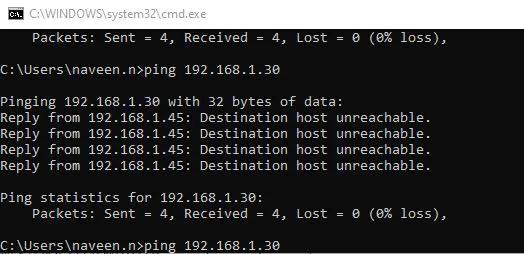
Please follow the checkpoints below to confirm.
- After connecting the encoder board with your computer by ethernet cable, the LED of RJ45 connector should be blinking or not. (to check the ethernet connection is ok or not)
- Is your computer configured with 192.168.1.x network segment ip?
- Have you modified the default IP address of the encoding board? If the IP address changed, maybe you can download and use the below software to find what IP address now.
Or google search LANsee tool software. 下載
- Or Directly connect the UART cable of the encoding board to the computer, and use the serial port debugging assistant to send the ATGIP_ command.get ip address command Operation Video at Youtube
格式
ATGIP_
例子: ATGIP_
範圍
沒有
使用
to query the current IP address of the receiving end
Return value
例子:
ATGIP_
ATGIP192.168.0.215 OK
Remark
- query command
- More COFDM UART AT commands, please check this link. https://ivcan.com/encoder-modulator-decoder-demodulator-module-parameter/
These parameters are determined by the camera, only the sensor has it.
One more question: In the future is there any possibility to incorporate these features in the output side of encoder (if we get volume orders) ?
Our Answer: These are the parameters of the isp, and our current encoding boards are all bypass isp (because we don't connect the sensor, we don't need and can't use the isp), so we can't add these parameters.
是, CVBS input support NTSC and PAL, Automatic detection and adaptation
- 該 parameter configuration board tool is mainly used for the COFDM module function. If you buy this HDMI / CVBS to IP encoder Vcan1746 separately, you don’t need to buy a parameter configuration board tool, you can adjust the parameters through the Web UI.
- Of course, if you want to use the parameter configuration board tool to adjust some parameters of the encoder board, it is also possible.
- 例如, the video encoding bit rate can be configured through the Web UI or changed through the extra parameter configuration board tool. The Web UI can configure all the parameters, and the parameter configuration board tool can only adjust some of them.
是, if you need, we can offer you the special firmware to have USB recorder function.
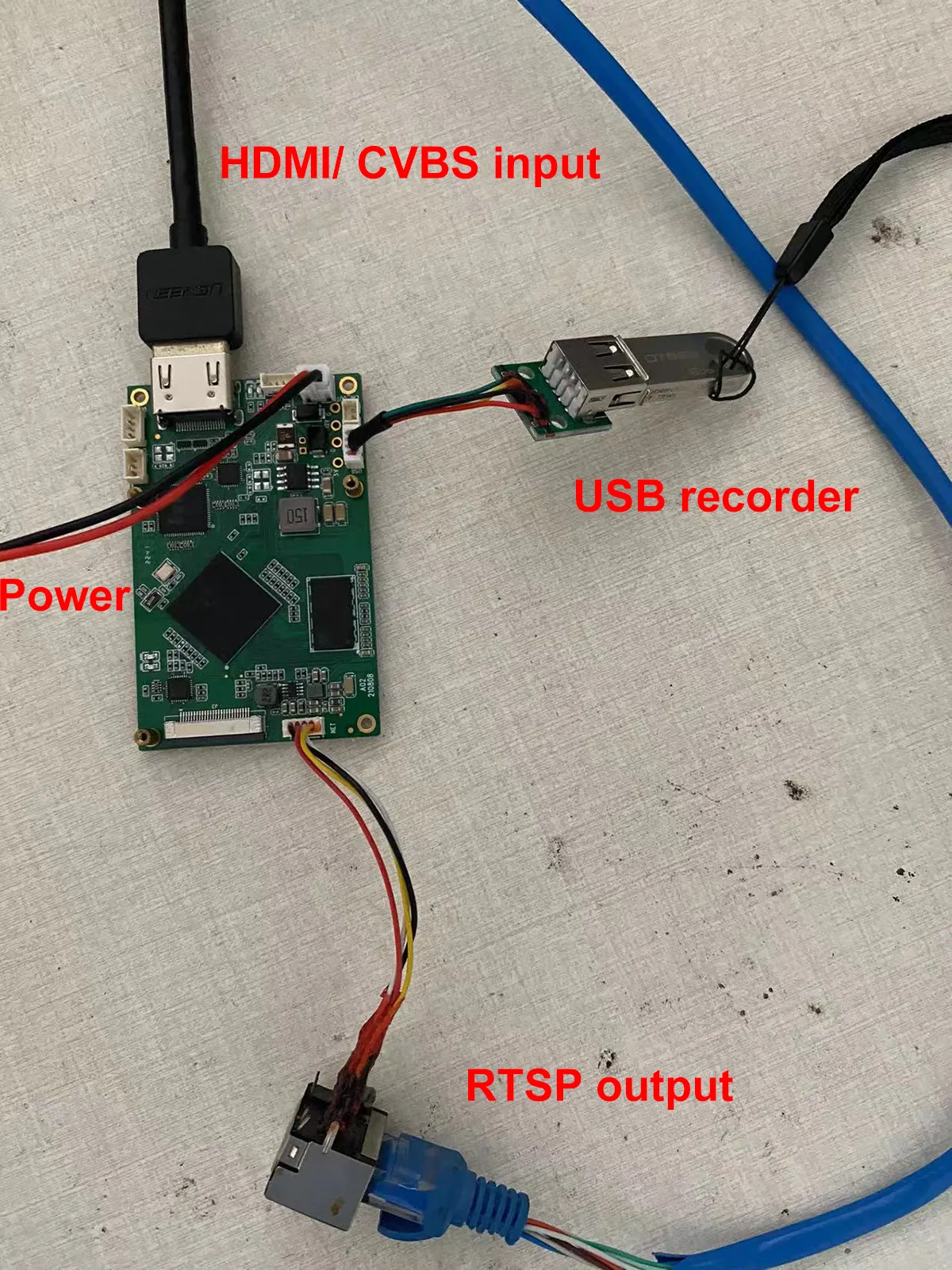
題: Does your USB DVR support playback on the encoded video?
回答: 沒有, The USB has the record function. You need to play it on a computer, it can not playback on the encoder board directly.
- Do you mean HDMI or AV input, or do you need HDMI and AV to support two simultaneous inputs?
- Currently it supports either HDMI or AV input.
-
Vcan1746 can only choose one of HDMI/AV at present, other boards can meet the firmware you need, but this board only supports SDI + AV/AHD output.
-
If necessary, you can evaluate the board with SDI + AV/AHD input to see if it meets your requirements. If yes, our HDMI + AV input Vcan1746 can be made the same later.
-
If you really need to evaluate the HDMI + AV interface, please first buy Vcan746 and burn the default shipping firmware for testing. HDMI and AV can be selected for use. If there is a certain amount of follow-up orders, we can develop a special firmware to support HDMI+AV input at the same time.
-
The display of HDMI and CVBS video input by two channels at the same time is similar to Hikvision IPC, which is divided into main bit rate and sub bit stream. The main stream corresponds to HDMI, and the sub stream corresponds to CVBS.
- Now we can develop a new firmware to support HDMI and CVBS to live streaming at the same time, but the audio can only be selected from one of the two (the system selects HDMI audio/analog audio according to the video access situation).
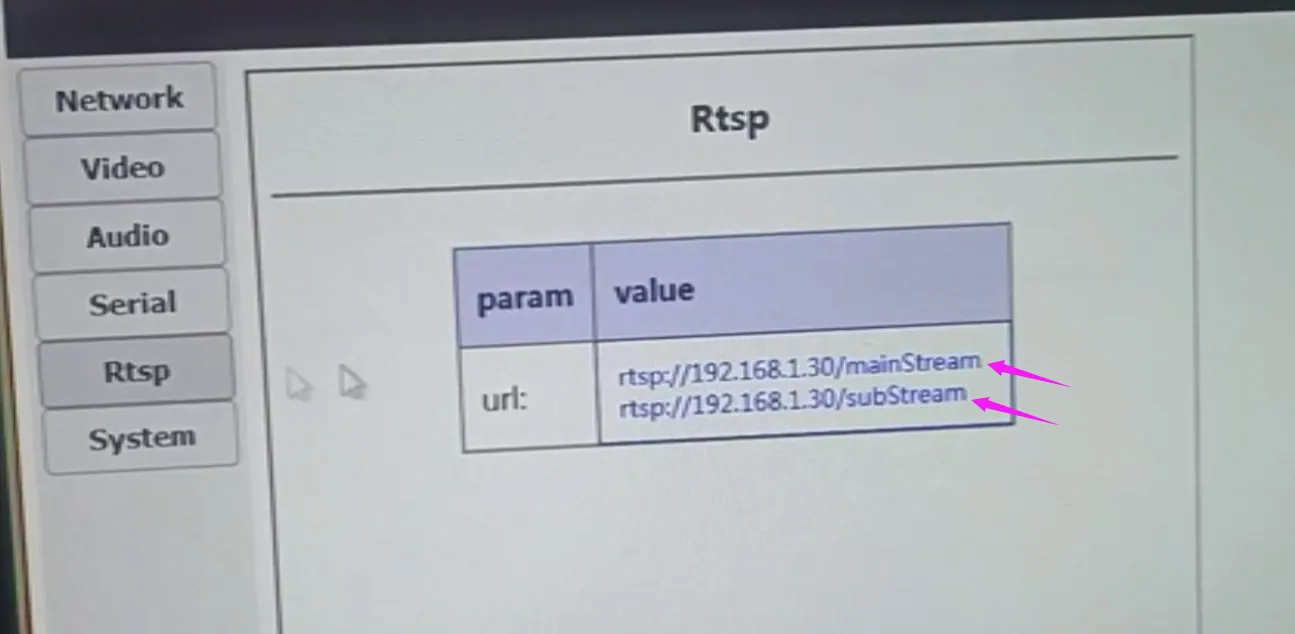
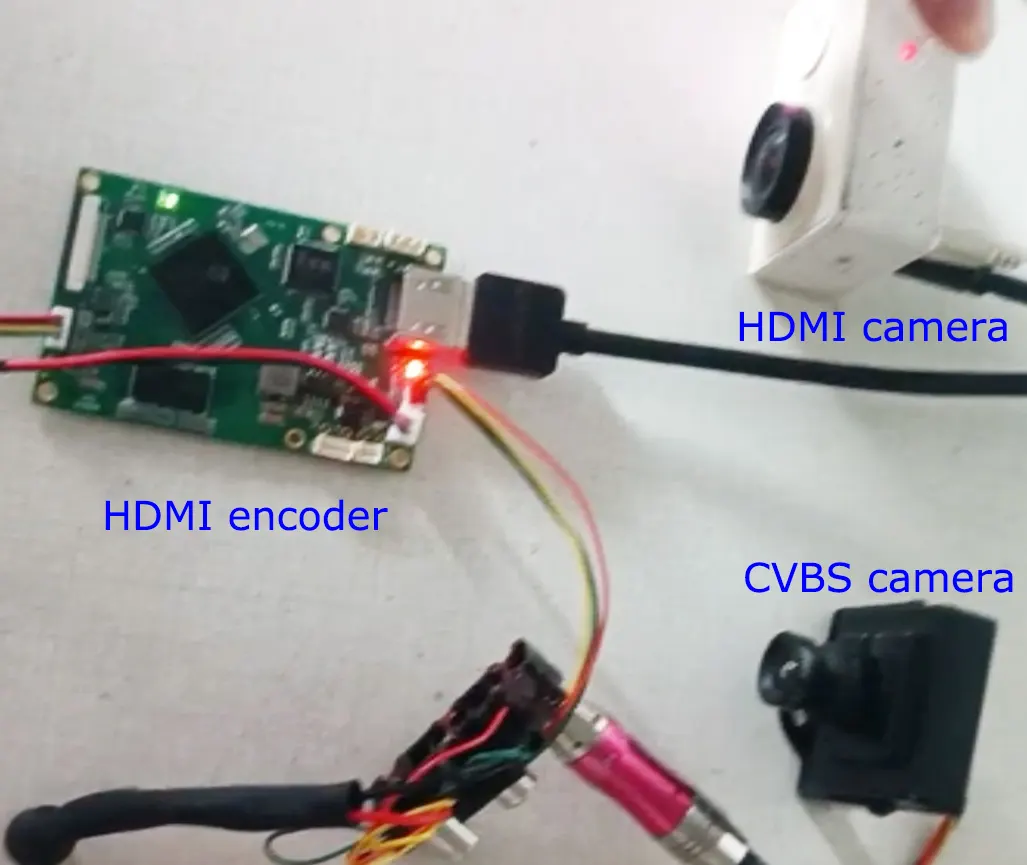
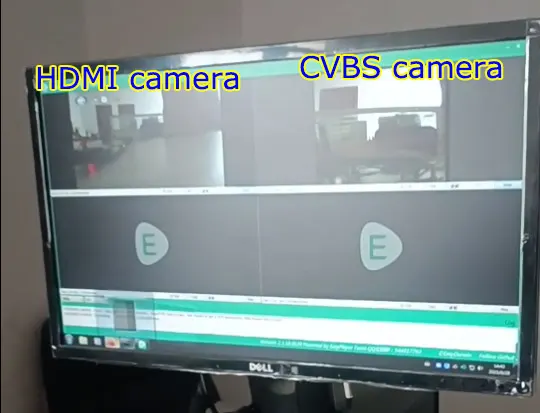
Supported.
Our HDMI and CVBS input video encoding board has a USB interface, which can be used for USB recording. It can also be used as the input interface of a USB web camera.
In this way, our video encoding board can convert the signal of your USB web camera into a network interface, while supporting ultra-low latency and supporting h264 and h265 encoding.
Please download the exact dimension size at the below DXF file. (most opened by AutoCAD or DXF viewer software)
https://drive.google.com/file/d/1PAKwv2oBGHYQyul9EMRc5ccbbaU-wp7O/view?usp=drive_link
Q: To clarify, we need HDMI, 作者:, and date ports. The date port should be TTL 3.3V.
一個: 沒問題, 支援.
Q: Is it possible to receive serial data on a computer without a DECODER device?
一個:
- For the players on the computer, we have RTSP (VLC or Easy player) and UDP (斯佩爾)
- RTSP protocol only supports audio and video decoding. There is no serial port data decoding.
- UDP (our custom protocol) has audio, 視頻, and serial port transparent transmission data, but currently, Splayer only decodes the audio and video. If the customer needs serial port transparent transmission data, you must conduct secondary development based on the Splayer. (We can provide Splayer SDK)
- If serial port data is very important for your project, then you also can use our decoder board, which support video, 音頻, UART serial data.
Q: Now it is working well on the VLC player by RTSP protocol. How can I use UDP at the VLC player?
一個: UDP is a private and customized protocol. It can only be played at the Splayer.
Q: 是, serial data is important to us. We can independently develop a UDP server for serial data if you provide the data format or api.
一個:
- VLC 播放器或 Easyplayer: Obtain audio and video through RTSP streaming by a universal player (VLC 播放器或 Easyplayer);
- Special software: Interpret the data stream pushed by the encoding board UDP (including audio and video and serial port transparent transmission data) and get the serial port transparent transmission data from it.
就是客户需要通过两个途径,分别获取音视频流和串口透传数据:
1、通过通用播放器,rtsp拉流获取音视频数据;
2、通过解释编码板udp推送的数据流(含音视频和串口透传数据),从里面解释出串口透传数据
Q: How can we see that transmitted data is working well?
一個: 請檢查以下鏈接.
how to test data transmission on HDMI to ethernet encoder board?
I will list them:
Regular shipping firmware
- Support HDMI/AV input (you can also connect both and switch through AT commands)
- Support custom protocols and RTSP protocols or Both
- Support H264/H265, support normal delay and low delay mode
- Support USB recording (not turned on by default, you can modify the internal parameters when shipping)
- Support two-way transparent serial port (need to be used with our decoder board)
- Support two-way analog language intercom (need to be used with our decoder board)
客製化韌體
- Support HDMI+AV dual camera input, RTSP access through main/sub stream (similar to IPC)
- Support USB camera/HDMI/AV three-choice input (can be considered as regular shipping firmware with USB camera support added)
- Firmware that supports standard mpegts protocol (not our custom protocol)
注意:
- Customized firmware is not the standard shipped firmware. If the customer needs it, it must be replaced with the corresponding firmware when shipping.
- The customized firmware listed above (1~3 points) corresponds to different customized firmware, not one customized firmware that contains all functions.
We also listed in Chinese.
- 支持HDMI/AV二选一输入(也可以都接上,然后通过AT指令切换)
- 支持自定义协议和RTSP协议或者Both
- 支持H264/H265,支持普通延迟和低延迟模式
- 支持U盘录像(默认不打开,可以出货的时候修改内部参数打开)
- 支持双向透传串口(需要搭配我们的解码板使用才有)
- 支持双向模拟语言对讲(需要搭配我们的解码板使用才有)
- 支持HDMI+AV双摄像头输入,RTSP通过主/子码流来访问(类似IPC)
- 支持USB摄像头/HDMI/AV三选一输入(可以认为是常规出货固件增加USB摄像头支持)
- 支持标准mpegts协议(而非我们的自定义协议)的固件
- 定制固件非常规出货固件,如客户需要,出货的时候要更换成对应的固件
- 上面列的定制固件(1~3点),分别对应不同的定制固件,而非一个定制固件包含所有功能

HDMI Video Sources Input IP Ethernet Output encoder, VLC RTSP operation
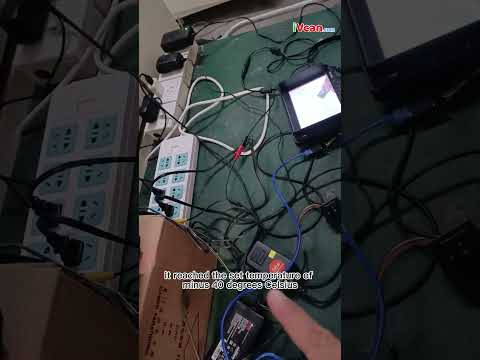
Industrial-grade temperature range from -40°C to 70°C Celsius test

Support HDMI and CVBS 2 video streams at the same time

How to get the IP address of the encoder back if you forget

How to test data transmission on HDMI to ethernet encoder board
更多常見問題解答
HS Code
8517629900, Some of our customers use this HS code for your reference.
Special Function Custom Development
-
HDMI and CVBS Dual Video Encoding
-
USB has a video recording function.
-
Special handling of encoding formats to match your custom decoder board
скачать видеокодер
相關貼文
- Lower latency HDMI CVBS UVC USB to IP Ethernet RTSP UDP video encoder converter board test by webcam.
- How to upgrade the encoder board firmware?
- How to upgrade the encoder firmware via USB?
- HDMI AV 2 input Video Encoder 2 Stream channels same time.
- How to set gateway ip on the HDMI cvbs to ip video encoder
編碼器模塊板









解碼器模塊板




Available for Customization
New Encoder Products
| 沒有. | 產品名稱 | 組態 | 主要特徵 | 地位 |
|---|---|---|---|---|
| 1 | Dual-Channel USB UVC Visible Light Video Encoder | 2× USB 輸入 | 支援雙USB攝影機視訊編碼, 和 RTSP 串流媒體; 本地CVBS/HDMI輸出; 可切換顯示模式 | 量產 |
| 2 | 雙通道編碼器 (1× USB 可見光 + 1× USB熱像儀) | 2× USB 輸入 | 支援雙USB攝影機 (可見的 + 熱的) 捕獲, 編碼方式, 和 RTSP 串流媒體; 本地CVBS/HDMI輸出; 可切換顯示模式 | 量產 |
| 3 | RTSP 解碼器 HDMI/CVBS 顯示模組 | HDMI + CVBS輸出 | Supports up to 4×1080P@30fps RTSP stream decoding; Support video streaming protocol forwarding; HDMI/CVBS輸出顯示 | 提供樣品 |
| 4 | RTSP Decoder HDMI/CVBS Display Module with 4.3"/5" 液晶顯示 | HDMI輸出 + 液晶屏 | Supports up to 4×1080P@30fps RTSP stream decoding; 協議轉發; HDMI/CVBS輸出顯示 | 偵錯 |
| 5 | 雙通道編碼器 (1× USB 可見光 + 1× CVBS 模擬) | 1× CVBS + 1× USB UVC 輸入 | 雙視頻 (USB + CVBS), 編碼和 RTSP 串流媒體; 本地CVBS/HDMI輸出; 可切換顯示模式 | 偵錯 |
| 6 | 雙通道編碼器 (1× USB UVC + 1× AHD 模擬) | 1× AHD + 1× USB UVC 輸入 | Dual video capture (USB + AHD), 編碼和 RTSP 串流媒體; 本地CVBS/HDMI輸出; 可切換顯示模式 | 偵錯 |
| 7 | 雙通道編碼器 (1× CVBS + 1× AHD 類比視頻) | CVBS + AHD 2 視頻輸入 | 雙類比視訊擷取, 編碼和 RTSP 串流媒體; 本地CVBS/HDMI輸出; 可切換顯示模式 | 偵錯 |
| 8 | 雙通道編碼器 (1× CMOS 相機 + 1× USB熱像儀) | 1× USB 接口 | 支援CMOS + USB熱像儀捕捉, 編碼和 RTSP 串流媒體; 本地CVBS/HDMI輸出; 可切換顯示模式 | 量產 |
For customized video input/output conversion solutions not listed in our products, 請聯絡我們以取得 OEM/ODM 支持. We can develop tailored products based on your requirements.
| 視頻輸入 | 4HDMI, HDMI+CVBS, SDI+AHD( or CVBS) |
|---|
1 審查 SDI 或 HDMI 轉 IP 編碼器調變器 CVBS H.265 H.264 編碼板 PCBA 乙太網路 RSTP UDP 適用於無人機無人機機器人
我要點評
你一定是 登入 發表評論.
SDI 或 HDMI 轉 IP 編碼器調變器 CVBS H.265 H.264 編碼板 PCBA 乙太網路 RSTP UDP 適用於無人機無人機機器人
$399.00
SDI HDMI To IP encoder modulator CVBS H.265 H.264 encoding board PCBA Ethernet RTSP UDP for UAV Drone Robotic
介紹
There are many HDMI encoding boards on the market. Have you met these problems?
- The delay is too long
- The encoding format cannot be customized
- UART AT remote control or operation cannot be used.
- Can not support HDMI and CVBS dual video input encoding
This encoder board supports HDMI, SDI, CVBS video input, 和 IP ethernet RJ45 living stream output, most applications are for wireless video transmitters, which can encode the HDMI or CVBS video signal to the digital living stream by H.264 or H.265, and transfer it to the receiver, CVBS 到 IP 轉換器.
UART software modification can configure the HDMI and Composite CVBS video to the IP ethernet stream encoder modulator module board parameter. Please get in touch with us if you need to customize a similar function to meet your project.
優點:
Ultra-Low Latency
H265 或 H264 支持
HDMI 和 CVBS 雙編碼
Two Audio inputs can switch
Web UI 要么 serial port UART AT command configuration management
- Ultra-low latency H.265/H.264 audio and video encoding maximum support 1080P60 real-time video capture and encoding
- The HDMI or AV input is encoded and outputted to a wireless module through the Ethernet port. The video encoding bit rate can be adjusted dynamically.
- Support audio input and audio decoding output. (Remote operate by UART AT command choose HDMI or CVBS audio)
- You can choose between HDMI or AV encoding for two videos with the option to control the input source using an AT command.
特徵
The board implements H.265/H.264 audio and video compression encoding, supports up to 1080P@60fps encoding, and is backward compatible with other resolutions and frame rate encoding.
Audio and video input
- HDMI interface(audio+video):1080 60P,1080 50P,1080 30P,1080 25P,1080 60一世,1080 50一世, 720 60P,720 50P,720 30P, …, various modes adaptive (1080p, 1080一世, 720p, 1024×768, 1280×1024);
- AV in the interface (音頻 + 視頻):720×480 60一世(NTSC),720×576 50一世(朋友), mode adaptive. through the AV interface, it can be Line in Mic in.
- The default audio input is the same as the video input interface.
- The audio input interface can also be configured through the Web UI when the serial port detects audio.
- The audio and video source signals are encoded, and the audio and video source acquisition interface can also be configured through the configuration serial port.
- The audio and video source acquisition interface can be dynamically switched through serial port commands during system operation.
視頻編碼: H.265 or H.264 format, the encoding bit rate can be configured.
Audio encoding: AAC encoding. - By programming special firmware HDMI+AV the simultaneous capture and encoding of board Audio output(Audio out)
- The board has a built-in audio decoding output function(線路輸出), which can be connected to an external headphone or audio power amplifier. Audio is decoded and played.
乙太網路埠 (乙太網路介面)
supports our two-way wireless transmission modulator module, or other third-party two-way links.
Wireless transmission interface( FPC Main interface)
can be connected to our COFDM wireless transmission module, and can also be connected to our two-way wireless transmission link module.
數據UART
TTL 3.3V電平, parameters such as transmission baud rate can be configured. When the board is through a wireless link, the data serial port is used for transparent data transmission.
Control-UART
TTL 3.3V電平, which can be connected to our parameter configuration panel or another upper computer to configure the encoding board system.
USB Host interface
software upgrade and maintenance. (optional USB recorder function)
Power supply voltage
supports the reverse connection protection of the power input, and supports the power input range of 7~30V. Provides a 5V power output interface. The maximum working power consumption is 2.4W (1080P60 H.265 encoding), and the maximum current is 200mA.
Indicator
power indicator, video encoding work indicator.
The HDMI to IP encoder board size 是 70x45x1.2mm (LWH)
The height of the back component is less than 2.5mm, and the height of the front component is less than 6.8mm.
Board weight
20.6 克.
Interface Signal
- AL (Audio in left), audio input left channel;
-
AR(Audio in right), audio input right channel;
-
GND, signal ground;
-
作者:, analog video input. (Please ignore the color of the wiring, make sure the fourth jack is CVBS Composite video input.)
- HDMI to IP encoder modulator CVBS H.265 H.264 encoding board pcba Ethernet LAN HTTP RTSP UDP onvif TCP IP interface signal 2
控制串口: Equipped with serial port,4PIN 1.25mm 間距插座, TTL 3.3V電平, used for the board parameter configuration, can be connected to Sihaida parameter configuration panel or another host computer.
USB介面:4PIN 1.25mm 間距插座, used for the encoder board software upgrade and maintenance.
Audio-out interface:2PIN 1.25mm 間距插座, the board has a built-in audio decoding output function(線路輸出), which can be connected to an external headphone or audio power amplifier. Decode and play the audio input from the network port.
以太網絡: 乙太網路介面,4PIN 1.25mm 間距插座
應用
- Done or UAV video encoding
- Robotic or mini-control vehicle
- Unmanned Vehicles UAV
- Unmanned Submarine
- The HDMI to IP board can be COFDM modulation module RCB stacked and assembled with a COFDM one-way transmission module. The connection interface is FPC Main (26PIN flat cable flexible cable interface). HDMI+AV encoder + COFDM Transmitter Module
- The HDMI to IP encoder board PCBA is connected to a two-way wireless link through the network port. 此時, the operating parameters can be configured through the network port Web UI. 例如, set the video encoding bit rate, H264/H265 encoding method, audio input method, serial port baud rate, 等等.
- The board can be connected to the Control-UART parameter configuration panel to set operating parameters.
- HDMI interface version: HDMI V1.4
- Ethernet Output Data rate: 100MBps
- Operating Temperature range: -40~85 degrees
- Compatible Operating System: Embedded Linux
Web UI management Parameter setting
常見問題
This HDMI video to IP encoding board can view the current parameter configuration through the network port Web UI and modify it according to application needs. through the network port browser http://192.168.1.30/ (the IP address of the encoding board)
1. Please check the Web UI from the browser, at the below picture, if the video source input is ok, then it will show the CVBS or HDMI at the red arrow.
2. Please check the HDMI encoding board LED light is blink or not.
If it is green and blink, then the video input source is working well, if not blink, then please check the video input source is ok or not.
The encoding bitrate can be configured. The default web server is set to 0.0 to represent auto (3.12Mbps will be used internally). Customers can modify this value. 例如, it is possible to configure 1Mbps~2Mbps or even lower.
1. Large I-frames are prone to frame loss due to wireless transmission;
2. If the gop setting is large, the loss of the I frame will lead to a longer recovery time after the blurred screen;
3. The size difference between I frame and P frame is large, which will increase the transmission delay.
1、比如相机输入1080p60,那gop设置为60/120/180(不建議設定太大)
2、比如相机输入1080p25,那gop设置为25/50/75(不建議設定太大)
3、比如相机输入1080i60,由于需要去交织,所有实际编码是1080p30,那gop设置为30/60/90
从上面可以看到,由于输入相机帧率不确定,所以我们一般建议配置0(汽車)
cvbs分制式,pal是25fps,ntsc是30fps
假设是pal,那gop设置25/50/75
1、大的I帧容易因为无线传输的原因导致丢帧花屏;
2、gop设置大,I帧丢失导致花屏后恢复时间变长;
3、I帧和P帧大小差别大,会增加传输延迟
Please download at the below link.
Splayer_v4.2_2020.6.6
https://drive.google.com/file/d/1ihzUhfnx2Wo3zLO8UAs1aUQeLswonJD-/view?usp=sharing
Splayer_v4.3_2022.10.22
https://drive.google.com/file/d/1PQc-LZ55qGnjeMsjkHYSloHfY3NEUsGH/view?usp=drive_link
- We can modify the TS stream over UDP, but the TS stream is a non-standard TS stream that we have modified, which needs to be interpreted by our decoder board or special player (下載).
- If you agree with the RTSP protocol, VLC can play it; if you only agree with the TS stream (due to our non-standard modification), VLC cannot decode and play it, so we must use our special player. (下載).
- If you want to switch to the standard MPEG-2 TS stream to play with VLC, our software engineer can customize the firmware for you (this will take a few days) for an additional fee of USD500.
- We use non-standard mpeg-2 ts streams primarily for the following reasons:
- The standard mpeg-2 ts stream has too much overhead outside the effective data, making it unsuitable for use with cofdm;
- The standard mpeg-2 ts stream is difficult to implement the aes encryption function;
- The standard mpeg-2 ts stream is difficult to achieve serial port transparent transmission (used with our decoder board)
- If you don't need our decoder board, encryption and serial port transparent transmission, it is also possible to use standard mpeg-2 ts stream
- It is recommended that you try our player; in real-time performance, our player outperforms vlc.
The vlc player's algorithm does not take into account real-time performance; 反而, it will constantly adjust its cache (only increase but not shrink). 因此, the longer it is played, the longer the delay may be (especially when used with a wireless link)
1. SSL certificate is HTTPS protocol, our products do not support it now, only HTTP.
2. The default encoder board through the RTSP protocol, RTSP is not encrypted. You can set a longer password. And change it frequently.
3. If you want to encrypt, you need to use a pair of our codec boards (with encoder and decoder board as TX and RX), with UDP protocol, and they are using aes256 encryption. (Just like the bank level.)
是, Sure, 請聯絡我們. Let me list your demand at the below.
1. We need to take a composite analog PAL video signal and transmit it using h264 over MPEG2 TS. 好
2. The output must be playable through VLC. 好
3. UPD://@1030. 好
4. The output network stream packet should be 188 bytes standard mpeg2 TS. 好
5. Compression scheme is h. 264, CVBS PAL input and IP output. 好
Please follow the checkpoints below to confirm.
- After connecting the encoder board with your computer by ethernet cable, the LED of RJ45 connector should be blinking or not. (to check the ethernet connection is ok or not)
- Is your computer configured with 192.168.1.x network segment ip?
- Have you modified the default IP address of the encoding board? If the IP address changed, maybe you can download and use the below software to find what IP address now.
Or google search LANsee tool software. 下載
- Or Directly connect the UART cable of the encoding board to the computer, and use the serial port debugging assistant to send the ATGIP_ command.get ip address command Operation Video at Youtube
格式
ATGIP_
例子: ATGIP_
範圍
沒有
使用
to query the current IP address of the receiving end
Return value
例子:
ATGIP_
ATGIP192.168.0.215 OK
Remark
- query command
- More COFDM UART AT commands, please check this link. https://ivcan.com/encoder-modulator-decoder-demodulator-module-parameter/
These parameters are determined by the camera, only the sensor has it.
One more question: In the future is there any possibility to incorporate these features in the output side of encoder (if we get volume orders) ?
Our Answer: These are the parameters of the isp, and our current encoding boards are all bypass isp (because we don't connect the sensor, we don't need and can't use the isp), so we can't add these parameters.
是, CVBS input support NTSC and PAL, Automatic detection and adaptation
- 該 parameter configuration board tool is mainly used for the COFDM module function. If you buy this HDMI / CVBS to IP encoder Vcan1746 separately, you don’t need to buy a parameter configuration board tool, you can adjust the parameters through the Web UI.
- Of course, if you want to use the parameter configuration board tool to adjust some parameters of the encoder board, it is also possible.
- 例如, the video encoding bit rate can be configured through the Web UI or changed through the extra parameter configuration board tool. The Web UI can configure all the parameters, and the parameter configuration board tool can only adjust some of them.
是, if you need, we can offer you the special firmware to have USB recorder function.
題: Does your USB DVR support playback on the encoded video?
回答: 沒有, The USB has the record function. You need to play it on a computer, it can not playback on the encoder board directly.
- Do you mean HDMI or AV input, or do you need HDMI and AV to support two simultaneous inputs?
- Currently it supports either HDMI or AV input.
-
Vcan1746 can only choose one of HDMI/AV at present, other boards can meet the firmware you need, but this board only supports SDI + AV/AHD output.
-
If necessary, you can evaluate the board with SDI + AV/AHD input to see if it meets your requirements. If yes, our HDMI + AV input Vcan1746 can be made the same later.
-
If you really need to evaluate the HDMI + AV interface, please first buy Vcan746 and burn the default shipping firmware for testing. HDMI and AV can be selected for use. If there is a certain amount of follow-up orders, we can develop a special firmware to support HDMI+AV input at the same time.
-
The display of HDMI and CVBS video input by two channels at the same time is similar to Hikvision IPC, which is divided into main bit rate and sub bit stream. The main stream corresponds to HDMI, and the sub stream corresponds to CVBS.
- Now we can develop a new firmware to support HDMI and CVBS to live streaming at the same time, but the audio can only be selected from one of the two (the system selects HDMI audio/analog audio according to the video access situation).
Supported.
Our HDMI and CVBS input video encoding board has a USB interface, which can be used for USB recording. It can also be used as the input interface of a USB web camera.
In this way, our video encoding board can convert the signal of your USB web camera into a network interface, while supporting ultra-low latency and supporting h264 and h265 encoding.
Please download the exact dimension size at the below DXF file. (most opened by AutoCAD or DXF viewer software)
https://drive.google.com/file/d/1PAKwv2oBGHYQyul9EMRc5ccbbaU-wp7O/view?usp=drive_link
Q: To clarify, we need HDMI, 作者:, and date ports. The date port should be TTL 3.3V.
一個: 沒問題, 支援.
Q: Is it possible to receive serial data on a computer without a DECODER device?
一個:
- For the players on the computer, we have RTSP (VLC or Easy player) and UDP (斯佩爾)
- RTSP protocol only supports audio and video decoding. There is no serial port data decoding.
- UDP (our custom protocol) has audio, 視頻, and serial port transparent transmission data, but currently, Splayer only decodes the audio and video. If the customer needs serial port transparent transmission data, you must conduct secondary development based on the Splayer. (We can provide Splayer SDK)
- If serial port data is very important for your project, then you also can use our decoder board, which support video, 音頻, UART serial data.
Q: Now it is working well on the VLC player by RTSP protocol. How can I use UDP at the VLC player?
一個: UDP is a private and customized protocol. It can only be played at the Splayer.
Q: 是, serial data is important to us. We can independently develop a UDP server for serial data if you provide the data format or api.
一個:
- VLC 播放器或 Easyplayer: Obtain audio and video through RTSP streaming by a universal player (VLC 播放器或 Easyplayer);
- Special software: Interpret the data stream pushed by the encoding board UDP (including audio and video and serial port transparent transmission data) and get the serial port transparent transmission data from it.
就是客户需要通过两个途径,分别获取音视频流和串口透传数据:
1、通过通用播放器,rtsp拉流获取音视频数据;
2、通过解释编码板udp推送的数据流(含音视频和串口透传数据),从里面解释出串口透传数据
Q: How can we see that transmitted data is working well?
一個: 請檢查以下鏈接.
how to test data transmission on HDMI to ethernet encoder board?
I will list them:
Regular shipping firmware
- Support HDMI/AV input (you can also connect both and switch through AT commands)
- Support custom protocols and RTSP protocols or Both
- Support H264/H265, support normal delay and low delay mode
- Support USB recording (not turned on by default, you can modify the internal parameters when shipping)
- Support two-way transparent serial port (need to be used with our decoder board)
- Support two-way analog language intercom (need to be used with our decoder board)
客製化韌體
- Support HDMI+AV dual camera input, RTSP access through main/sub stream (similar to IPC)
- Support USB camera/HDMI/AV three-choice input (can be considered as regular shipping firmware with USB camera support added)
- Firmware that supports standard mpegts protocol (not our custom protocol)
注意:
- Customized firmware is not the standard shipped firmware. If the customer needs it, it must be replaced with the corresponding firmware when shipping.
- The customized firmware listed above (1~3 points) corresponds to different customized firmware, not one customized firmware that contains all functions.
We also listed in Chinese.
- 支持HDMI/AV二选一输入(也可以都接上,然后通过AT指令切换)
- 支持自定义协议和RTSP协议或者Both
- 支持H264/H265,支持普通延迟和低延迟模式
- 支持U盘录像(默认不打开,可以出货的时候修改内部参数打开)
- 支持双向透传串口(需要搭配我们的解码板使用才有)
- 支持双向模拟语言对讲(需要搭配我们的解码板使用才有)
- 支持HDMI+AV双摄像头输入,RTSP通过主/子码流来访问(类似IPC)
- 支持USB摄像头/HDMI/AV三选一输入(可以认为是常规出货固件增加USB摄像头支持)
- 支持标准mpegts协议(而非我们的自定义协议)的固件
- 定制固件非常规出货固件,如客户需要,出货的时候要更换成对应的固件
- 上面列的定制固件(1~3点),分别对应不同的定制固件,而非一个定制固件包含所有功能
HDMI Video Sources Input IP Ethernet Output encoder, VLC RTSP operation
Industrial-grade temperature range from -40°C to 70°C Celsius test
Support HDMI and CVBS 2 video streams at the same time
How to get the IP address of the encoder back if you forget
How to test data transmission on HDMI to ethernet encoder board
更多常見問題解答
HS Code
8517629900, Some of our customers use this HS code for your reference.
Special Function Custom Development
-
HDMI and CVBS Dual Video Encoding
-
USB has a video recording function.
-
Special handling of encoding formats to match your custom decoder board
скачать видеокодер
相關貼文
- Lower latency HDMI CVBS UVC USB to IP Ethernet RTSP UDP video encoder converter board test by webcam.
- How to upgrade the encoder board firmware?
- How to upgrade the encoder firmware via USB?
- HDMI AV 2 input Video Encoder 2 Stream channels same time.
- How to set gateway ip on the HDMI cvbs to ip video encoder
編碼器模塊板
解碼器模塊板
Available for Customization
New Encoder Products
| 沒有. | 產品名稱 | 組態 | 主要特徵 | 地位 |
|---|---|---|---|---|
| 1 | Dual-Channel USB UVC Visible Light Video Encoder | 2× USB 輸入 | 支援雙USB攝影機視訊編碼, 和 RTSP 串流媒體; 本地CVBS/HDMI輸出; 可切換顯示模式 | 量產 |
| 2 | 雙通道編碼器 (1× USB 可見光 + 1× USB熱像儀) | 2× USB 輸入 | 支援雙USB攝影機 (可見的 + 熱的) 捕獲, 編碼方式, 和 RTSP 串流媒體; 本地CVBS/HDMI輸出; 可切換顯示模式 | 量產 |
| 3 | RTSP 解碼器 HDMI/CVBS 顯示模組 | HDMI + CVBS輸出 | Supports up to 4×1080P@30fps RTSP stream decoding; Support video streaming protocol forwarding; HDMI/CVBS輸出顯示 | 提供樣品 |
| 4 | RTSP Decoder HDMI/CVBS Display Module with 4.3"/5" 液晶顯示 | HDMI輸出 + 液晶屏 | Supports up to 4×1080P@30fps RTSP stream decoding; 協議轉發; HDMI/CVBS輸出顯示 | 偵錯 |
| 5 | 雙通道編碼器 (1× USB 可見光 + 1× CVBS 模擬) | 1× CVBS + 1× USB UVC 輸入 | 雙視頻 (USB + CVBS), 編碼和 RTSP 串流媒體; 本地CVBS/HDMI輸出; 可切換顯示模式 | 偵錯 |
| 6 | 雙通道編碼器 (1× USB UVC + 1× AHD 模擬) | 1× AHD + 1× USB UVC 輸入 | Dual video capture (USB + AHD), 編碼和 RTSP 串流媒體; 本地CVBS/HDMI輸出; 可切換顯示模式 | 偵錯 |
| 7 | 雙通道編碼器 (1× CVBS + 1× AHD 類比視頻) | CVBS + AHD 2 視頻輸入 | 雙類比視訊擷取, 編碼和 RTSP 串流媒體; 本地CVBS/HDMI輸出; 可切換顯示模式 | 偵錯 |
| 8 | 雙通道編碼器 (1× CMOS 相機 + 1× USB熱像儀) | 1× USB 接口 | 支援CMOS + USB熱像儀捕捉, 編碼和 RTSP 串流媒體; 本地CVBS/HDMI輸出; 可切換顯示模式 | 量產 |
For customized video input/output conversion solutions not listed in our products, 請聯絡我們以取得 OEM/ODM 支持. We can develop tailored products based on your requirements.
| 視頻輸入 | 4HDMI, HDMI+CVBS, SDI+AHD( or CVBS) |
|---|
1 審查 SDI 或 HDMI 轉 IP 編碼器調變器 CVBS H.265 H.264 編碼板 PCBA 乙太網路 RSTP UDP 適用於無人機無人機機器人
我要點評
你一定是 登入 發表評論.
目錄
什麼是用於直播的 CVBS HDMI 編碼器?
CVBS HDMI encoder for live streaming is a device that supports CVBS analog TV composite video input and HDMI 1080P high-definition video input; The board output is IP RJ45 and supports RTSP player and UDP player, which means it connects the board to the internet. Your video sources will become the stream and play on the internet.
常問問題
Q1: Does your 用於直播的 CVBS HDMI 編碼器 support MPEG-2 TS over UDP supported?
A1: 是. Our CVBS HDMI encoder for live streaming supports MPEG-2 TS over UDP.
https://ivcan.com/p/hdmi-to-ip-encoder-modulator-cvbs-h-265-h-264-encoding-board-pcba-ethernet-lan-http-rtsp-udp-onvif-tcp-ip/
Q2: Instead of RSTP, I need an MPEG-2 Transport stream
A2: Do you need DVB-t RF out, which supports the Transport Stream?
Q3: 沒有, just CVBS input and Ethernet out, Ethernet protocol: H.264. For compression, MPEG-2 TS on UDP broadcast, I need a quote for 5 qty and a complete datasheet.
A3: Vcan1746 can output the TS stream over UDP, but the output TS stream is a non-standard Transport Stream that we have modified, which needs to be interpreted by our decoder board or player.
Q5: What should I do if I can’t ping the encoder board from my computer?
Directly connect the UART cable of the encoding board to the computer, and use the serial port debugging assistant to send the ATGIP_ command. Get IP address command Operation Video at Youtube
1. I can get the sub-stream quickly, but the mainstream needs to get it after reboot. What should I do?
I have tested your encoder multiple times with our system. It is working fine overall.
But we have one big issue to validate its usage :
Whenever we turn on the system camera and the encoder at the same time, we cannot read the “mainstream”, we can only read the “sub-stream”.
We have to “Reboot” the encoder via the web interface to make it work: after the reboot, we can directly read the mainstream.
We tried with both VLC and Gstreamer.
What could we try to have both streams readable on startup?
iVcan reply: In the opinion of our engineers, it is either a problem with camera recognition or a problem with customer use.
I suspect that the board card did not recognize the customer’s HDMI camera.
This is easy to verify (if you cannot access the sub-stream, it will be difficult to verify).
Log in to the web server of the encoder board and you can see the camera recognition status on the video page.
The video page will only display the recognition status of one camera. If HDMI and AV cameras are connected and recognized at the same time, the video page will display the recognition status of the HDMI camera (such as 1080p60):
As long as the HDMI camera can recognize it normally, Mainstream can be accessed normally.
If the HDMI camera is not recognized normally, please check the HDMI wiring and power on the board again (note that this is a power cycle, not a software restart on the web page)
此外, the board uses a random Mac address, so the Mac address will change every time we restart it.
For devices with an ARP cache (such as a PC), after restarting, it will be temporary (a few seconds) unable to access the board from the network. , We cannot access it until the arp request is re-initiated after timeout (the performance is that the coding board cannot be pinged for several seconds after restarting)
因此, I guess another possibility is that when the customer accesses the mainstream, it cannot be accessed due to the above reasons. Then when the customer accesses sub-stream, the arp cache refreshes and the customer can access it, but the customer does not revisit the main-stream.
Whenever we turn on the system camera and the encoder at the same time, we cannot read the “Mainstream”, we can only read the “subStream”.
Judging from your description here, it seems that your camera is started after our encoding board. Please start your camera first, and then power on and start our encoding board to try it. Maybe it is not powered on at the same time. The powered-on order also matters. 例如, your camera startup needs 10 秒, but our encoder board startup needs only 5 秒.
Because I am not sure whether your camera is very slow to initialize after power-on.
Because our encoder board starts very quickly, it may be that the camera has not been initialized after it started our encoder board, which may lead to some unexpected problems. This can also explain why “We have to “Reboot” the encoder via the web interface to make it work: after the reboot we can directly read the mainStream.”, because when your web page restarts the encoder board, the camera has already been initialized.
因此, the final suggestions are as follows (I tried my best to list everything that came to mind and let you test them separately);
- Look at the video page of the web server and confirm whether the HDMI camera is recognized normally (you can send a screenshot to us). As long as the camera is recognized normally, Mainstream can be accessed;
- It is recommended that you ping the coding board under cmd first, and then access mainStream and subStream under vlc to avoid mistakenly thinking that Mainstream cannot be accessed due to random mac issues.
- Let you start your camera first (for a few seconds), then power on and start our encoding board to try (see the reasons described above)
- Follow your original operation of “turn on the system camera and the encoder at the same time”. When the problem “we are unable to read the “mainStream”, we can only read the “subStream”.” is reproduced, Do not restart the encoding board through the web page, but hot-swap the HDMI cable between your camera and the encoding board. I think it is only a hot-swap operation (because I suspect it is a plug-in detection problem that causes the camera not to connect to the encoding board. Send HDMI signal)
相關產品




編碼器模塊板
解碼器模塊板
Available for Customization
New Encoder Products
| 沒有. | 產品名稱 | 組態 | 主要特徵 | 地位 |
|---|---|---|---|---|
| 1 | Dual-Channel USB UVC Visible Light Video Encoder | 2× USB 輸入 | 支援雙USB攝影機視訊編碼, 和 RTSP 串流媒體; 本地CVBS/HDMI輸出; 可切換顯示模式 | 量產 |
| 2 | 雙通道編碼器 (1× USB 可見光 + 1× USB熱像儀) | 2× USB 輸入 | 支援雙USB攝影機 (可見的 + 熱的) 捕獲, 編碼方式, 和 RTSP 串流媒體; 本地CVBS/HDMI輸出; 可切換顯示模式 | 量產 |
| 3 | RTSP 解碼器 HDMI/CVBS 顯示模組 | HDMI + CVBS輸出 | Supports up to 4×1080P@30fps RTSP stream decoding; Support video streaming protocol forwarding; HDMI/CVBS輸出顯示 | 提供樣品 |
| 4 | RTSP Decoder HDMI/CVBS Display Module with 4.3"/5" 液晶顯示 | HDMI輸出 + 液晶屏 | Supports up to 4×1080P@30fps RTSP stream decoding; 協議轉發; HDMI/CVBS輸出顯示 | 偵錯 |
| 5 | 雙通道編碼器 (1× USB 可見光 + 1× CVBS 模擬) | 1× CVBS + 1× USB UVC 輸入 | 雙視頻 (USB + CVBS), 編碼和 RTSP 串流媒體; 本地CVBS/HDMI輸出; 可切換顯示模式 | 偵錯 |
| 6 | 雙通道編碼器 (1× USB UVC + 1× AHD 模擬) | 1× AHD + 1× USB UVC 輸入 | Dual video capture (USB + AHD), 編碼和 RTSP 串流媒體; 本地CVBS/HDMI輸出; 可切換顯示模式 | 偵錯 |
| 7 | 雙通道編碼器 (1× CVBS + 1× AHD 類比視頻) | CVBS + AHD 2 視頻輸入 | 雙類比視訊擷取, 編碼和 RTSP 串流媒體; 本地CVBS/HDMI輸出; 可切換顯示模式 | 偵錯 |
| 8 | 雙通道編碼器 (1× CMOS 相機 + 1× USB熱像儀) | 1× USB 接口 | 支援CMOS + USB熱像儀捕捉, 編碼和 RTSP 串流媒體; 本地CVBS/HDMI輸出; 可切換顯示模式 | 量產 |
For customized video input/output conversion solutions not listed in our products, 請聯絡我們以取得 OEM/ODM 支持. We can develop tailored products based on your requirements.
iVcan.com –
This industrial-grade encoder board is a revelation for our drone operations! It effortlessly converts SDI/HDMI/CVBS feeds into ultra-efficient H.265/H.264 streams over IP with zero lag. The Ethernet/RSTP/UDP support delivers buttery-smooth, low-latency video to our ground station, even during high-speed maneuvers. We’ve tested it across demanding UAV and robotic applications – the rugged PCBA withstands vibrations while maintaining flawless 1080p encoding. Setup was plug-and-play via Ethernet, and the bandwidth savings from H.265 are massive. An absolute essential for reliable aerial telemetry and real-time robotic vision!