





Was ist ein CVBS-HDMI-Encoder für Live-Streaming??
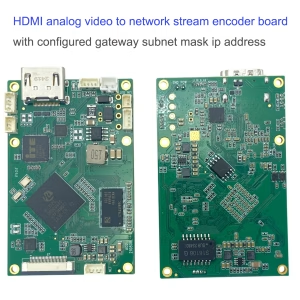
CVBS HDMI encoder for live streaming is a device that supports CVBS analog TV composite video input and HDMI 1080P high-definition video input; The board output is IP RJ45 and supports RTSP player and UDP player, which means it connects the board to the internet. Your video sources will become the stream and play on the internet.
FAQ
Q1: Does your CVBS-HDMI-Encoder für Live-Streaming support MPEG-2 TS over UDP supported?
A1: Ja. Our CVBS HDMI encoder for live streaming supports MPEG-2 TS over UDP.
https://ivcan.com/p/hdmi-to-ip-encoder-modulator-cvbs-h-265-h-264-encoding-board-pcba-ethernet-lan-http-rtsp-udp-onvif-tcp-ip/
Q2: Anstelle von RSTP, I need an MPEG-2 Transport stream
A2: Do you need DVB-t RF out, which supports the Transport Stream?
Q3: Nein, just CVBS input and Ethernet out, Ethernet protocol: H.264. For compression, MPEG-2 TS on UDP broadcast, I need a quote for 5 qty and a complete datasheet.
A3: Vcan1746 can output the TS stream over UDP, but the output TS stream is a non-standard Transport Stream that we have modified, which needs to be interpreted by our decoder board or player.
F5: What should I do if I can’t ping the encoder board from my computer?
Directly connect the UART-Kabel der Kodierplatine an den Computer, and use the serial port debugging assistant to send the ATGIP_ Befehl. Get IP address command Operationsvideo auf Youtube


1. I can get the sub-stream quickly, but the mainstream needs to get it after reboot. Was soll ich tun??
I have tested your encoder multiple times with our system. It is working fine overall.
But we have one big issue to validate its usage :
Whenever we turn on the system camera and the encoder at the same time, we cannot read the “mainstream”, we can only read the “sub-stream”.
We have to “Reboot” the encoder via the web interface to make it work: after the reboot, we can directly read the mainstream.
We tried with both VLC and Gstreamer.
What could we try to have both streams readable on startup?
iVcan reply: In the opinion of our engineers, it is either a problem with camera recognition or a problem with customer use.
I suspect that the board card did not recognize the customer’s HDMI camera.
This is easy to verify (if you cannot access the sub-stream, it will be difficult to verify).
Log in to the web server of the encoder board and you can see the camera recognition status on the video page.
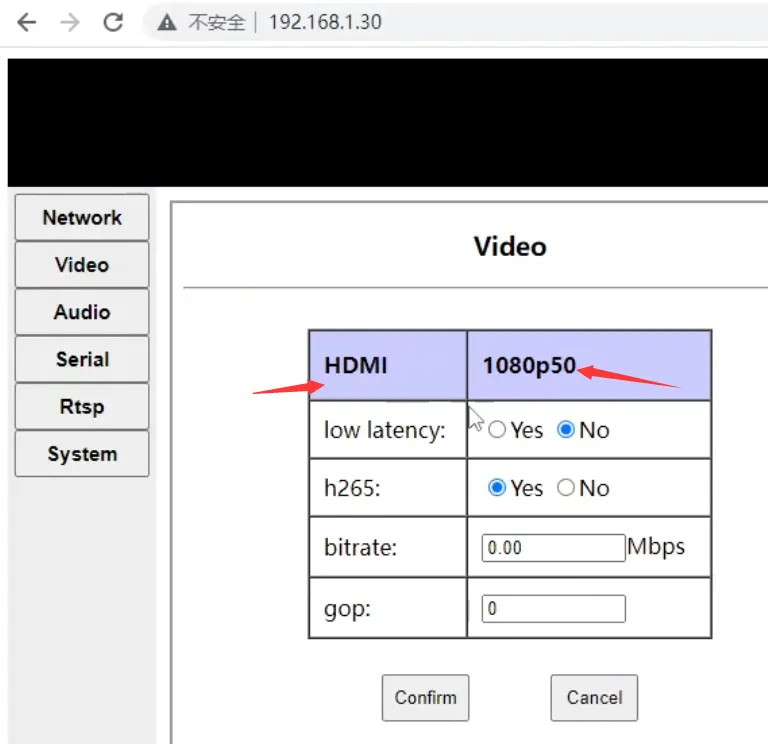
The video page will only display the recognition status of one camera. If HDMI and AV cameras are connected and recognized at the same time, the video page will display the recognition status of the HDMI camera (such as 1080p60):
As long as the HDMI camera can recognize it normally, Mainstream can be accessed normally.
If the HDMI camera is not recognized normally, please check the HDMI wiring and power on the board again (note that this is a power cycle, not a software restart on the web page)
Zusätzlich, the board uses a random Mac address, so the Mac address will change every time we restart it.
For devices with an ARP cache (such as a PC), after restarting, it will be temporary (a few seconds) unable to access the board from the network. , We cannot access it until the arp request is re-initiated after timeout (the performance is that the coding board cannot be pinged for several seconds after restarting)
daher, I guess another possibility is that when the customer accesses the mainstream, it cannot be accessed due to the above reasons. Then when the customer accesses sub-stream, the arp cache refreshes and the customer can access it, but the customer does not revisit the main-stream.
Whenever we turn on the system camera and the encoder at the same time, we cannot read the „Mainstream“, we can only read the „subStream“.
Judging from your description here, it seems that your camera is started after our encoding board. Please start your camera first, and then power on and start our encoding board to try it. Maybe it is not powered on at the same time. The powered-on order also matters. Zum Beispiel, your camera startup needs 10 Sekunden, but our encoder board startup needs only 5 Sekunden.
Because I am not sure whether your camera is very slow to initialize after power-on.
Because our encoder board starts very quickly, it may be that the camera has not been initialized after it started our encoder board, which may lead to some unexpected problems. This can also explain why „We have to „Reboot“ the encoder via the web interface to make it work: after the reboot we can directly read the mainStream.“, because when your web page restarts the encoder board, the camera has already been initialized.
daher, the final suggestions are as follows (I tried my best to list everything that came to mind and let you test them separately);
- Look at the video page of the web server and confirm whether the HDMI camera is recognized normally (you can send a screenshot to us). As long as the camera is recognized normally, Mainstream can be accessed;
- It is recommended that you ping the coding board under cmd first, and then access mainStream and subStream under vlc to avoid mistakenly thinking that Mainstream cannot be accessed due to random mac issues.
- Let you start your camera first (for a few seconds), then power on and start our encoding board to try (see the reasons described above)
- Follow your original operation of „turn on the system camera and the encoder at the same time“. When the problem „we are unable to read the „mainStream“, we can only read the „subStream“.“ is reproduced, Do not restart the encoding board through the web page, but hot-swap the HDMI cable between your camera and the encoding board. I think it is only a hot-swap operation (because I suspect it is a plug-in detection problem that causes the camera not to connect to the encoding board. Send HDMI signal)
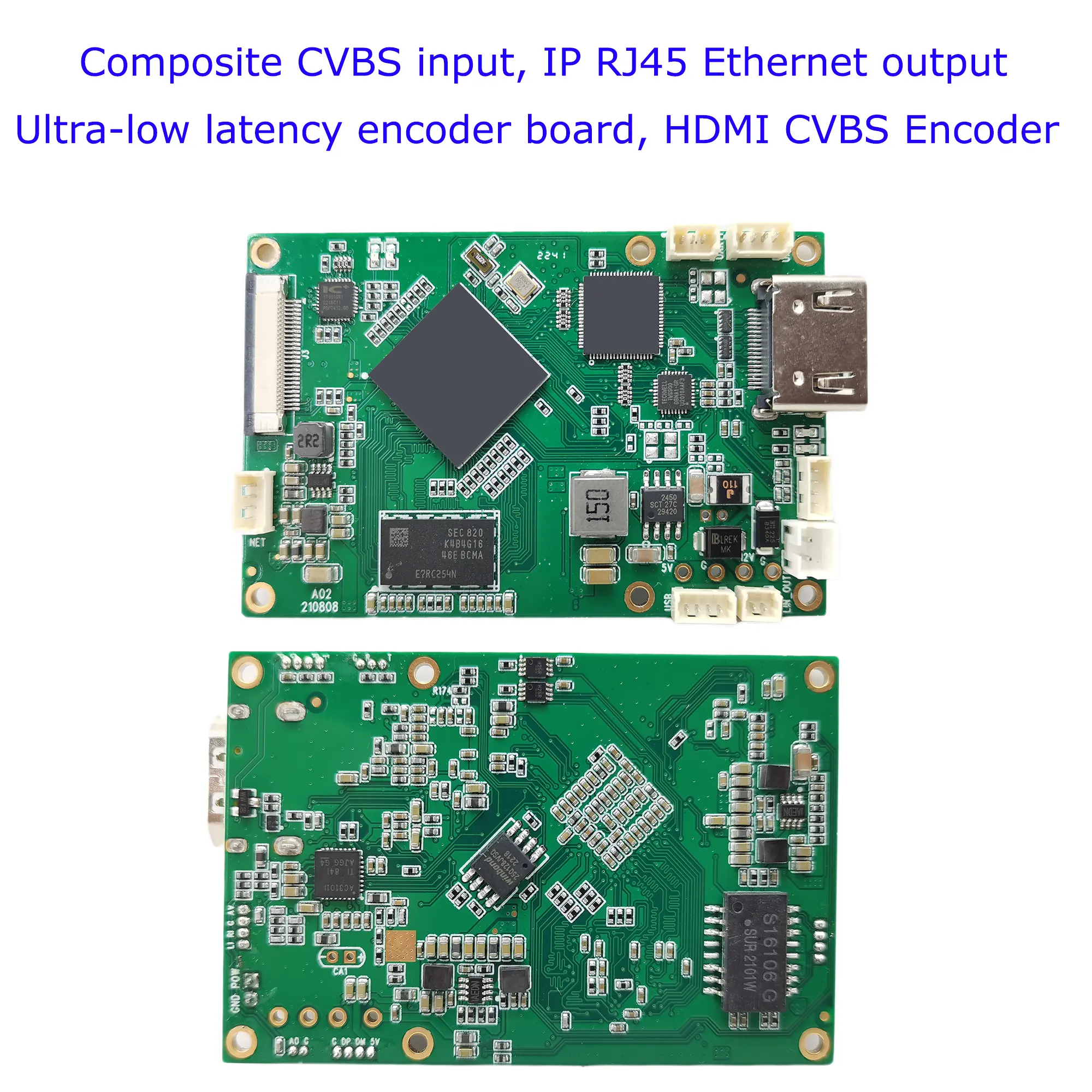
SDI- oder HDMI-zu-IP-Encoder-Modulator CVBS H.265 H.264-Kodierungsplatine PCBA Ethernet RSTP UDP für UAV Drone Robotic
$399.00
SDI HDMI zu IP Encoder Modulator CVBS H.265 H.264 Kodierungsplatine PCBA Ethernet RTSP UDP für UAV Drone Robotic
Inhaltsverzeichnis
Einführung
Es gibt viele HDMI-Kodierungskarten auf dem Markt. Kennen Sie diese Probleme??
- Die Verzögerung ist zu lang
- Das Kodierungsformat kann nicht angepasst werden
- Die UART AT-Fernbedienung oder -Bedienung kann nicht verwendet werden.
- HDMI- und CVBS-Dual-Videoeingangskodierung wird nicht unterstützt
Diese Encoderplatine unterstützt HDMI, SDI, CVBS-Videoeingang, und IP-Ethernet-RJ45-Live-Stream-Ausgang, Die meisten Anwendungen betreffen drahtlose Videosender, der das HDMI- oder CVBS-Videosignal in den digitalen Live-Stream kodieren kann H.264 oder H.265, und übertragen Sie es an den Empfänger, CVBS-zu-IP-Konverter.
Durch die UART-Softwaremodifikation kann das HDMI- und Composite-CVBS-Video auf den Modulplatinenparameter des IP-Ethernet-Stream-Encoder-Modulators konfiguriert werden. Bitte kontaktieren Sie uns, wenn Sie eine ähnliche Funktion an Ihr Projekt anpassen müssen.
Vorteil:
Extrem niedrige Latenz
H265- oder H264-Unterstützung
HDMI- und CVBS-Dual-Kodierung
Zwei Audioeingänge können umgeschaltet werden
Web-Benutzeroberfläche oder UART AT-Befehl für die serielle Schnittstelle Konfigurationsmanagement
- Extrem niedrige Latenz H.265/H.264 Audio- und Videokodierung, maximale Unterstützung für 1080P60 Echtzeit-Videoerfassung und -kodierung
- Der HDMI- oder AV-Eingang wird kodiert und über den Ethernet-Anschluss an ein Funkmodul ausgegeben. Die Bitrate der Videokodierung kann dynamisch angepasst werden.
- Unterstützt Audioeingang und Audiodekodierungsausgang. (Fernbedienung per UART AT-Befehl: Wählen Sie HDMI- oder CVBS-Audio)
- Sie können zwischen HDMI- oder AV-Kodierung für zwei Videos wählen und die Eingangsquelle über einen AT-Befehl steuern.
Besonderheit
Das Board implementiert die Audio- und Videokomprimierungskodierung H.265/H.264, Unterstützt bis zu 1080P@60fps-Kodierung, und ist abwärtskompatibel mit anderen Auflösungen und Bildratenkodierungen.
Audio- und Videoeingang
- HDMI-Schnittstelle(Audio+Video):1080 60P,1080 50P,1080 30P,1080 25P,1080 60ICH,1080 50ICH, 720 60P,720 50P,720 30P, …, verschiedene Modi adaptiv (1080P, 1080ich, 720P, 1024×768, 1280×1024);
- AV im Interface (Audio- + Video):720×480 60ICH(NTSC),720×576 50ICH(KUMPEL), Modus adaptiv. über die AV-Schnittstelle, Es kann Line-In und Mic-In sein.
- Der Standard-Audioeingang ist derselbe wie die Videoeingangsschnittstelle.
- Die Audioeingangsschnittstelle kann auch über die Web-Benutzeroberfläche konfiguriert werden, wenn der serielle Port Audio erkennt.
- Die Audio- und Videoquellsignale sind kodiert, und die Audio- und Videoquellen-Erfassungsschnittstelle kann auch über den seriellen Konfigurationsanschluss konfiguriert werden.
- Die Audio- und Videoquellen-Erfassungsschnittstelle kann während des Systembetriebs dynamisch über Befehle der seriellen Schnittstelle umgeschaltet werden.
Videokodierung: H.265- oder H.264-Format, Die Kodierungsbitrate kann konfiguriert werden.
Audiokodierung: AAC-Kodierung. - Durch die Programmierung einer speziellen HDMI+AV-Firmware ist die gleichzeitige Erfassung und Kodierung der Audioausgabe der Platine möglich(Audioausgang)
- Das Board verfügt über eine integrierte Audio-Dekodierungs-Ausgabefunktion(Line-out), der an einen externen Kopfhörer oder Audio-Leistungsverstärker angeschlossen werden kann. Audio wird dekodiert und abgespielt.
Ethernet-Anschluss (Ethernet-Schnittstelle)
unterstützt unser bidirektionales drahtloses Übertragungsmodulatormodul, oder andere bidirektionale Links Dritter.
Drahtlose Übertragungsschnittstelle( FPC-Hauptschnittstelle)
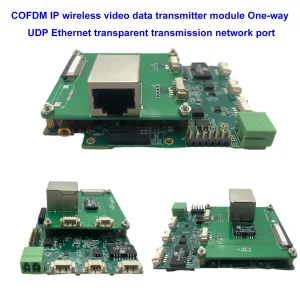
können an unser COFDM-Funkübertragungsmodul angeschlossen werden, und kann auch an unser bidirektionales drahtloses Übertragungsverbindungsmodul angeschlossen werden.
Daten-UART
TTL 3,3V-Pegel, Parameter wie die Übertragungsbaudrate können konfiguriert werden. Wenn das Board über eine drahtlose Verbindung verfügt, Die serielle Datenschnittstelle dient der transparenten Datenübertragung.
Control-UART
TTL 3,3V-Pegel, die an unser Parameterkonfigurationspanel oder einen anderen oberen Computer angeschlossen werden kann, um das Codierplatinensystem zu konfigurieren.
USB-Host-Schnittstelle
Software-Upgrade und Wartung. (optionale USB-Recorderfunktion)
Versorgungsspannung
unterstützt den Verpolungsschutz des Stromeingangs, und unterstützt den Leistungsaufnahmebereich von 7~30V. Bietet eine 5-V-Stromausgangsschnittstelle. Der maximale Arbeitsstromverbrauch beträgt 2,4 W (1080P60 H.265-Kodierung), und der maximale Strom beträgt 200mA.
Indikator
Betriebsanzeige, Arbeitsanzeige für die Videokodierung.
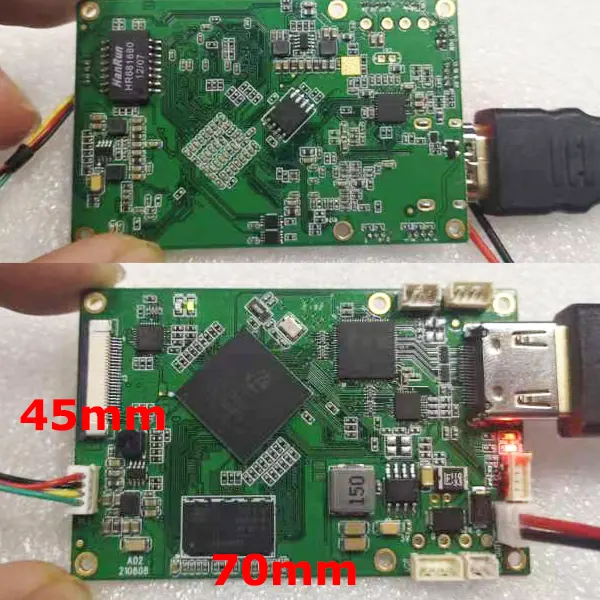
Die Größe der HDMI-zu-IP-Encoderplatine Ist 70x45x1,2mm (LWH)
Die Höhe der hinteren Komponente beträgt weniger als 2,5 mm, und die Höhe der vorderen Komponente beträgt weniger als 6,8 mm.
Gewicht des Boards
20.6 Gramm.
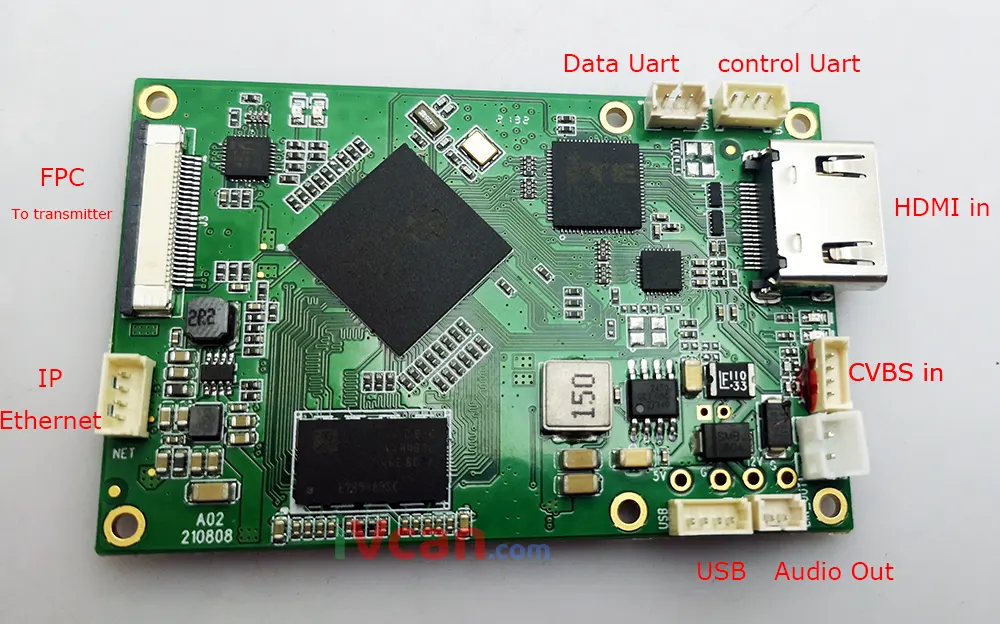
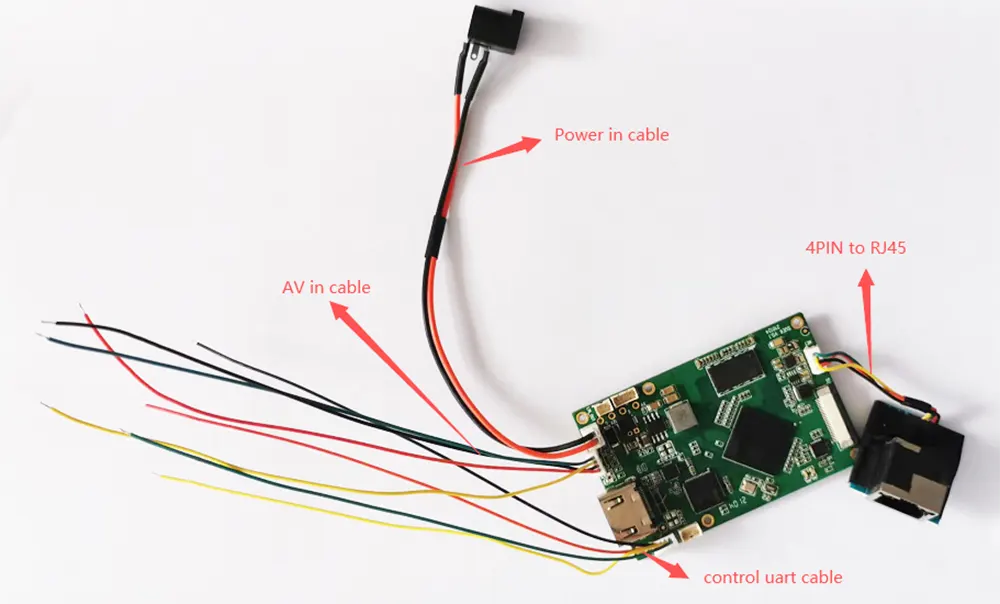
Schnittstellensignal
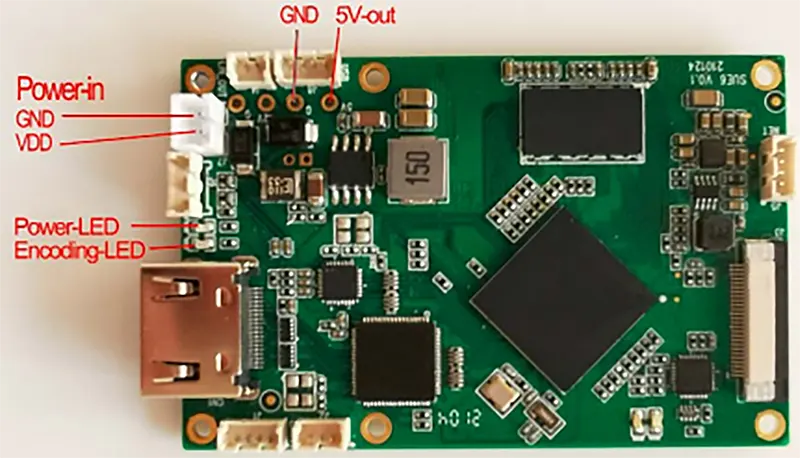
- AL (Audio links), Audioeingang linker Kanal;
-
AR(Audioeingang rechts), Audioeingang rechter Kanal;
-
GND, Signalmasse;
-
VON, analoger Videoeingang. (Bitte ignorieren Sie die Farbe der Verkabelung, Stellen Sie sicher, dass die vierte Buchse ein CVBS-Composite-Videoeingang ist.)
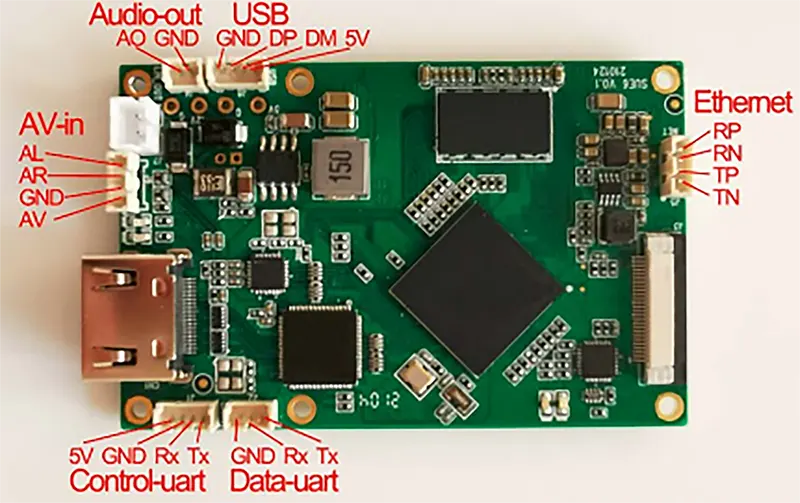
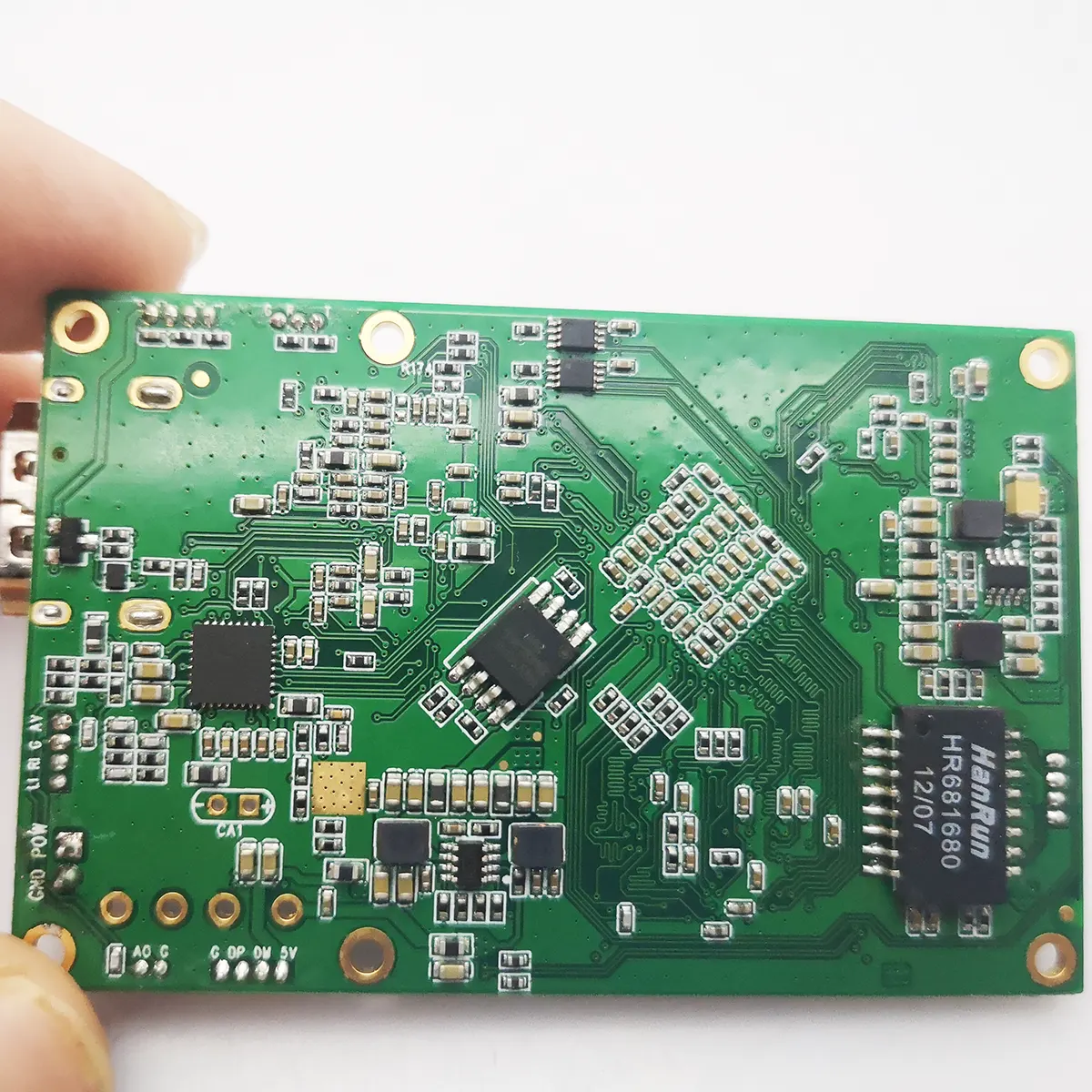
- HDMI-zu-IP-Encoder-Modulator CVBS H.265 H.264-Kodierungsplatine PCBA Ethernet LAN HTTP RTSP UDP Onvif TCP IP-Schnittstellensignal 2
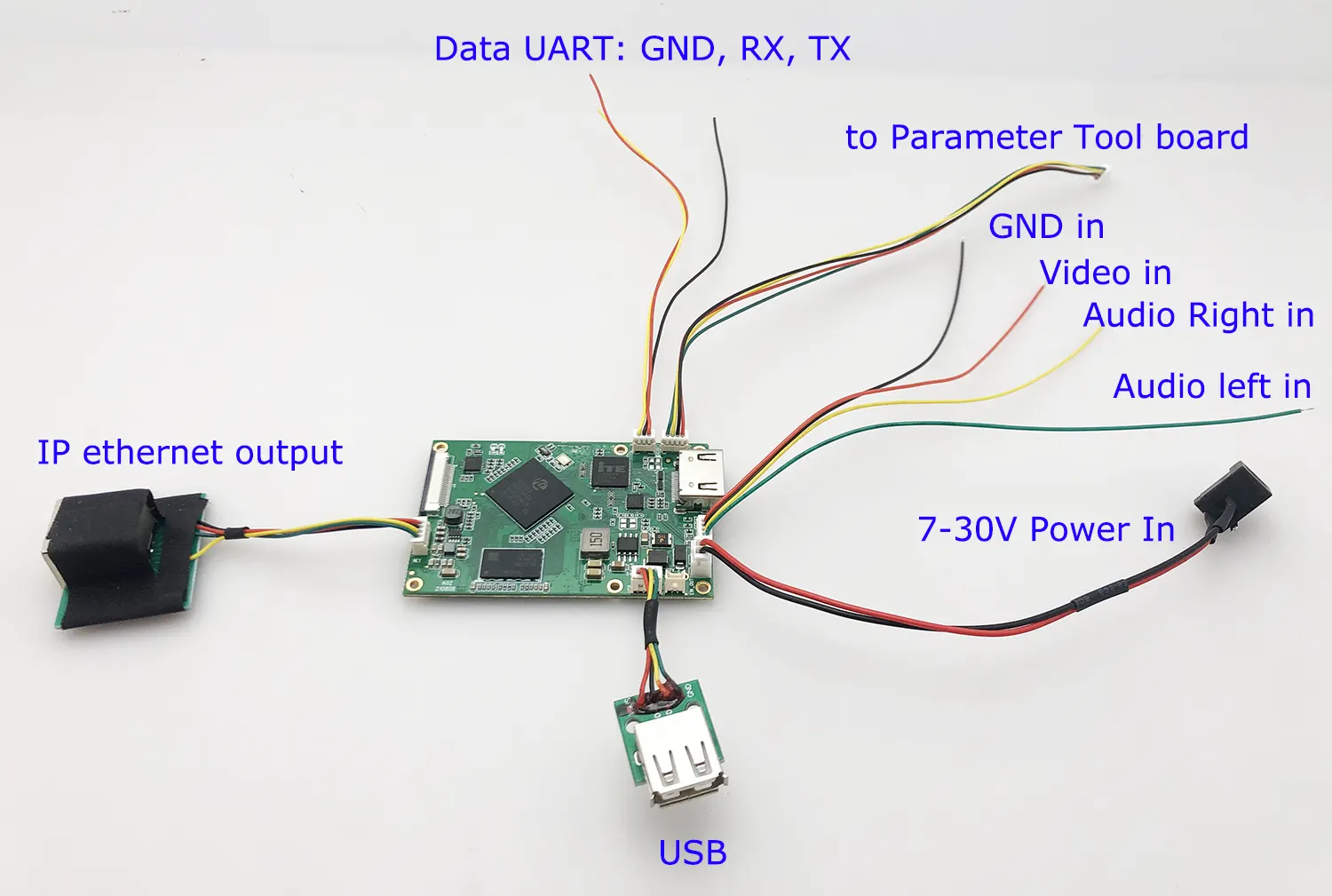
Steuern Sie UART: Ausgestattet mit serieller Schnittstelle,4PIN-Buchse mit 1,25 mm Rastermaß, TTL 3,3V-Pegel, Wird für die Konfiguration der Platinenparameter verwendet, Kann an das Sihaida-Parameterkonfigurationspanel oder einen anderen Host-Computer angeschlossen werden.
USB-Schnittstelle:4PIN-Buchse mit 1,25 mm Rastermaß, Wird für die Softwareaktualisierung und -wartung der Encoderplatine verwendet.
Audio-Out-Schnittstelle:2PIN-Buchse mit 1,25 mm Rastermaß, Das Board verfügt über eine integrierte Audio-Dekodierungs-Ausgabefunktion(Line-out), der an einen externen Kopfhörer oder Audio-Leistungsverstärker angeschlossen werden kann. Dekodieren und spielen Sie den Audioeingang vom Netzwerkanschluss ab.
Ethernet: Ethernet-Schnittstelle,4PIN-Buchse mit 1,25 mm Rastermaß
Anwendung
- Fertig oder UAV-Videokodierung
- Roboter- oder Mini-Kontrollfahrzeug
- Unbemannte Fahrzeuge UAV
- Unbemanntes U-Boot
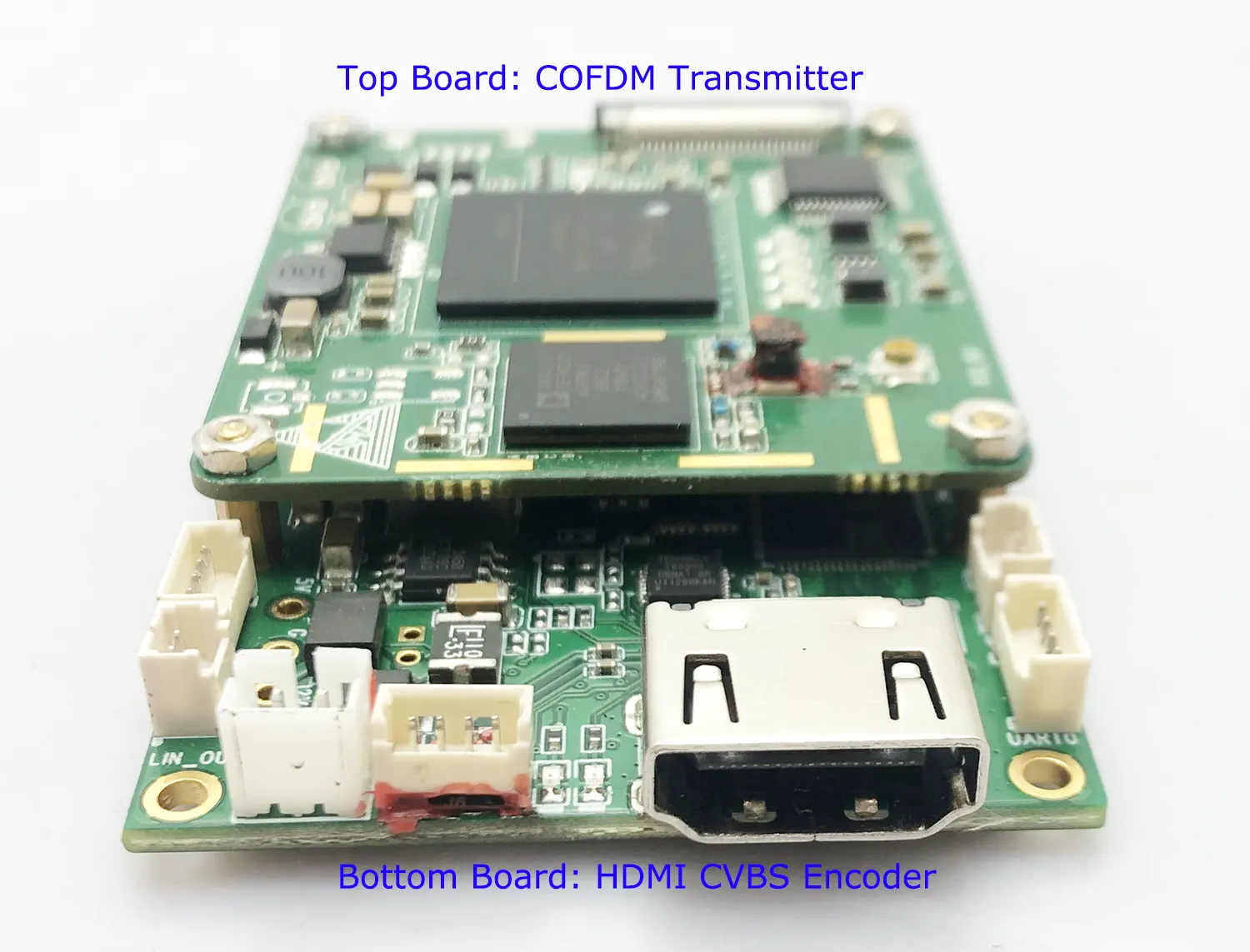
- Die HDMI-zu-IP-Karte kann mit einem COFDM-Modulationsmodul RCB gestapelt und mit einem COFDM-Einwegübertragungsmodul zusammengebaut werden. Die Verbindungsschnittstelle ist FPC Main (26PIN-Flachkabel, flexible Kabelschnittstelle). HDMI+AV-Encoder + COFDM-Sendermodul
- Die HDMI-zu-IP-Encoderplatine PCBA ist über den Netzwerkanschluss mit einer bidirektionalen drahtlosen Verbindung verbunden. Zu diesem Zeitpunkt, Die Betriebsparameter können über die Web-Benutzeroberfläche des Netzwerkanschlusses konfiguriert werden. Zum Beispiel, Legen Sie die Bitrate für die Videokodierung fest, H264/H265-Kodierungsmethode, Audio-Eingabemethode, Baudrate der seriellen Schnittstelle, usw.
- Die Karte kann mit dem Control-UART-Parameterkonfigurationspanel verbunden werden, um Betriebsparameter einzustellen.
- HDMI-Schnittstellenversion: HDMI V1.4
- Ethernet-Ausgangsdatenrate: 100MBit/s
- Betriebstemperaturbereich: -40~85 Grad
- Kompatibles Betriebssystem: Eingebettetes Linux
Parametereinstellung für die Web-UI-Verwaltung
FAQs
Diese HDMI-Video-zu-IP-Kodierungskarte kann die aktuelle Parameterkonfiguration über die Web-Benutzeroberfläche des Netzwerkanschlusses anzeigen und entsprechend den Anwendungsanforderungen ändern. über den Netzwerk-Port-Browser http://192.168.1.30/ (die IP-Adresse der Kodierkarte)
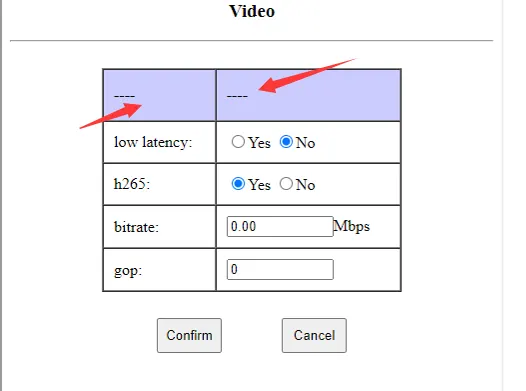
1. Bitte überprüfen Sie die Web-Benutzeroberfläche im Browser, auf dem Bild unten, ob der Videoquelleneingang in Ordnung ist, Dann wird CVBS oder HDMI am roten Pfeil angezeigt.
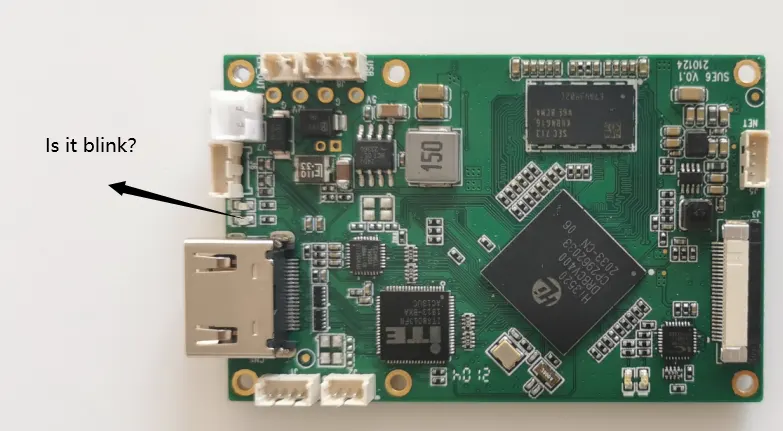
2. Bitte überprüfen Sie, ob die LED-Leuchte der HDMI-Kodierungsplatine blinkt oder nicht.
Wenn es grün ist und blinkt, Dann funktioniert die Videoeingangsquelle einwandfrei, wenn nicht blinken, Überprüfen Sie dann, ob die Videoeingangsquelle in Ordnung ist oder nicht.
Die Kodierungsbitrate kann konfiguriert werden. Der Standard-Webserver ist auf eingestellt 0.0 Auto darstellen (3.12Mbit/s werden intern verwendet). Kunden können diesen Wert ändern. Zum Beispiel, Es ist möglich, 1 Mbit/s bis 2 Mbit/s oder sogar weniger zu konfigurieren.
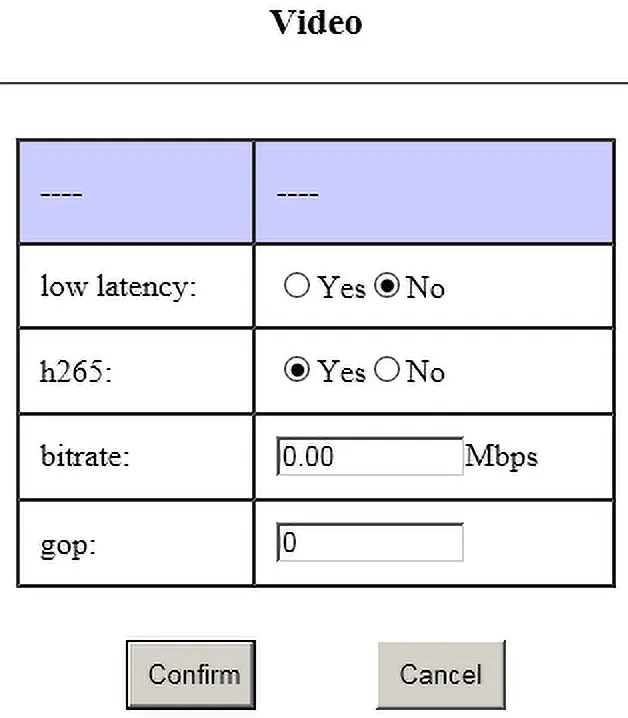
1. Bei großen I-Frames kann es aufgrund der drahtlosen Übertragung zu Frame-Verlusten kommen;
2. Wenn die Gop-Einstellung groß ist, Der Verlust des I-Frames führt zu einer längeren Erholungszeit nach dem unscharfen Bildschirm;
3. Der Größenunterschied zwischen I-Frame und P-Frame ist groß, Dadurch erhöht sich die Übertragungsverzögerung.
1、Der Kameraeingang ist beispielsweise 1080p60,Dieser Gop ist auf 60/120/180 eingestellt(Es wird nicht empfohlen, den Wert zu groß einzustellen)
2、Der Kameraeingang ist beispielsweise 1080p25,Dieser Gop ist auf 25/50/75 eingestellt(Es wird nicht empfohlen, den Wert zu groß einzustellen)
3、Der Kameraeingang ist beispielsweise 1080i60,Aufgrund der Notwendigkeit der Verflechtung,Alle tatsächlichen Kodierungen sind 1080p30,Dieser Gop ist auf 30/60/90 eingestellt
ist von oben zu sehen,Da die Bildrate der Eingabekamera ungewiss ist,Daher empfehlen wir grundsätzlich die Konfiguration 0(Auto)
CVBS geteiltes System,Kumpel ist 25fps,NTSC ist 30fps
Angenommen, es ist Kumpel,Diese Gop-Einstellung ist 25/50/75
1、Bei großen I-Frames kann es aufgrund der drahtlosen Übertragung zu Frame-Verlusten kommen.;
2、gop-Einstellung groß,Ein Bildverlust führt zu einer längeren Wiederherstellungszeit nach einer Bildschirmunschärfe;
3、Es gibt einen großen Größenunterschied zwischen I-Rahmen und P-Rahmen,Erhöht die Übertragungsverzögerung
Bitte laden Sie es unter dem folgenden Link herunter.
Splayer_v4.2_2020.6.6
https://drive.google.com/file/d/1ihzUhfnx2Wo3zLO8UAs1aUQeLswonJD-/view?usp=sharing
Splayer_v4.3_2022.10.22
https://drive.google.com/file/d/1PQc-LZ55qGnjeMsjkHYSloHfY3NEUsGH/view?usp=drive_link
- Wir können den TS-Stream über UDP ändern, aber der TS-Stream ist ein nicht standardmäßiger TS-Stream, den wir geändert haben, was von unserer Decoderplatine oder unserem speziellen Player interpretiert werden muss (Herunterladen).
- Wenn Sie mit dem RTSP-Protokoll einverstanden sind, VLC kann es abspielen; wenn Sie nur mit dem TS-Stream einverstanden sind (aufgrund unserer nicht standardmäßigen Modifikation), VLC kann es nicht dekodieren und abspielen, Also müssen wir unseren Spezialspieler einsetzen. (Herunterladen).
- Wenn Sie zum Abspielen mit VLC auf den Standard-MPEG-2-TS-Stream umsteigen möchten, Unser Softwareentwickler kann die Firmware für Sie anpassen (das wird ein paar Tage dauern) gegen eine zusätzliche Gebühr von 500 USD.
- Wir verwenden nicht standardmäßige MPEG-2-TS-Streams hauptsächlich aus den folgenden Gründen:
- Der Standard-MPEG-2-TS-Stream hat zu viel Overhead außerhalb der effektiven Daten, Dadurch ist es für die Verwendung mit cofdm ungeeignet;
- Beim Standard-MPEG-2-TS-Stream ist es schwierig, die AES-Verschlüsselungsfunktion zu implementieren;
- Mit dem Standard-MPEG-2-TS-Stream ist es schwierig, eine transparente Übertragung über die serielle Schnittstelle zu erreichen (Wird mit unserer Decoderplatine verwendet)
- Wenn Sie unsere Decoderplatine nicht benötigen, Verschlüsselung und transparente Übertragung über die serielle Schnittstelle, Es ist auch möglich, einen Standard-MPEG-2-TS-Stream zu verwenden
- Wir empfehlen Ihnen, unseren Player auszuprobieren; in Echtzeit-Performance, Unser Player übertrifft VLC.
Der Algorithmus des VLC-Players berücksichtigt nicht die Echtzeitleistung; stattdessen, Es wird seinen Cache ständig anpassen (nur vergrößern, aber nicht schrumpfen). Infolge, je länger es gespielt wird, desto länger kann die Verzögerung sein (insbesondere bei Verwendung mit einer drahtlosen Verbindung)
1. SSL-Zertifikat ist HTTPS-Protokoll, Unsere Produkte unterstützen es derzeit nicht, nur HTTP.
2. Die Standard-Encoder-Karte über das RTSP-Protokoll, RTSP ist nicht verschlüsselt. Sie können ein längeres Passwort festlegen. Und ändern Sie es häufig.
3. Wenn Sie verschlüsseln möchten, Sie müssen ein Paar unserer Codec-Karten verwenden (mit Encoder- und Decoderplatine als TX und RX), mit UDP-Protokoll, und sie verwenden AES256-Verschlüsselung. (Genau wie die Bankebene.)
Ja, Sicher, Bitte kontaktieren Sie uns. Lassen Sie mich unten Ihren Bedarf auflisten.
1. Wir müssen ein zusammengesetztes analoges PAL-Videosignal nehmen und es mit h264 über MPEG2 TS übertragen. OK
2. Die Ausgabe muss über VLC abspielbar sein. OK
3. UPD://@1030. OK
4. Das ausgegebene Netzwerk-Stream-Paket sollte sein 188 Bytes Standard mpeg2 TS. OK
5. Das Komprimierungsschema ist h. 264, CVBS PAL-Eingang und IP-Ausgang. OK
Sicher
Bitte überprüfen Sie den folgenden Link
COFDM UART AT-Befehl für den Sender und Empfänger.
Oder
Laden Sie die herunter COFDM-Sender UART AT-Befehl PDF.
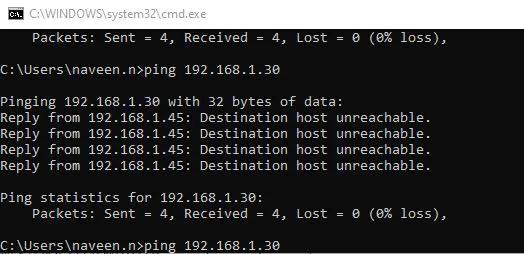
Bitte befolgen Sie zur Bestätigung die unten aufgeführten Kontrollpunkte.
- Nachdem Sie die Encoderplatine per Ethernet-Kabel mit Ihrem Computer verbunden haben, Die LED des RJ45-Anschlusses sollte blinken oder nicht. (um zu überprüfen, ob die Ethernet-Verbindung in Ordnung ist oder nicht)
- Ist Ihr Computer mit der Netzwerksegment-IP 192.168.1.x konfiguriert??
- Haben Sie die Standard-IP-Adresse der Kodierkarte geändert?? Wenn sich die IP-Adresse geändert hat, Vielleicht können Sie jetzt die folgende Software herunterladen und verwenden, um die IP-Adresse herauszufinden.
Oder Google-Suche nach LANsee-Tool-Software. Herunterladen
- Oder schließen Sie das direkt an UART-Kabel der Kodierplatine an den Computer, und verwenden Sie den Debugging-Assistenten für die serielle Schnittstelle, um den Befehl ATGIP_ zu senden.Befehl zum Abrufen der IP-Adresse Operationsvideo auf Youtube
Format
ATGIP_
Beispiel: ATGIP_
Parameter
Nein
Verwenden
um die aktuelle IP-Adresse des Empfängers abzufragen
Rückgabewert
Beispiel:
ATGIP_
ATGIP192.168.0.215 OK
Bemerkung
- Abfragebefehl
- Weitere COFDM UART AT-Befehle, Bitte überprüfen Sie diesen Link. https://ivcan.com/encoder-modulator-decoder-demodulator-module-parameter/
Diese Parameter werden von der Kamera bestimmt, Nur der Sensor hat es.
Noch eine Frage: Zukünftig besteht die Möglichkeit, diese Funktionen in die Ausgangsseite des Encoders zu integrieren (wenn wir Großaufträge erhalten) ?
Unsere Antwort: Dies sind die Parameter des ISP, und unsere aktuellen Codierungskarten sind alle Bypass-ISP (weil wir den Sensor nicht anschließen, Wir brauchen den ISP nicht und können ihn auch nicht nutzen), Daher können wir diese Parameter nicht hinzufügen.
Ja, CVBS-Eingang unterstützt NTSC und PAL, Automatische Erkennung und Anpassung
- Das Parameterkonfigurations-Board-Tool wird hauptsächlich für die COFDM-Modulfunktion verwendet. Wenn Sie dieses HDMI kaufen / CVBS zum IP-Encoder Vcan1746 separat, Sie müssen kein Parameterkonfigurations-Board-Tool kaufen, Sie können die Parameter über die Web-Benutzeroberfläche anpassen.
- Natürlich, wenn Sie das Parameterkonfigurationsplatinen-Tool verwenden möchten, um einige Parameter der Encoderplatine anzupassen, es ist auch möglich.
- Zum Beispiel, Die Bitrate der Videokodierung kann über die Web-Benutzeroberfläche konfiguriert oder über das zusätzliche Parameterkonfigurations-Board-Tool geändert werden. Über die Web-Benutzeroberfläche können alle Parameter konfiguriert werden, und das Parameterkonfigurations-Board-Tool kann nur einige davon anpassen.
OK, Bitte überprüfen Sie den folgenden Link
Ja, wenn Sie brauchen, Wir können Ihnen die spezielle Firmware für die USB-Recorder-Funktion anbieten.
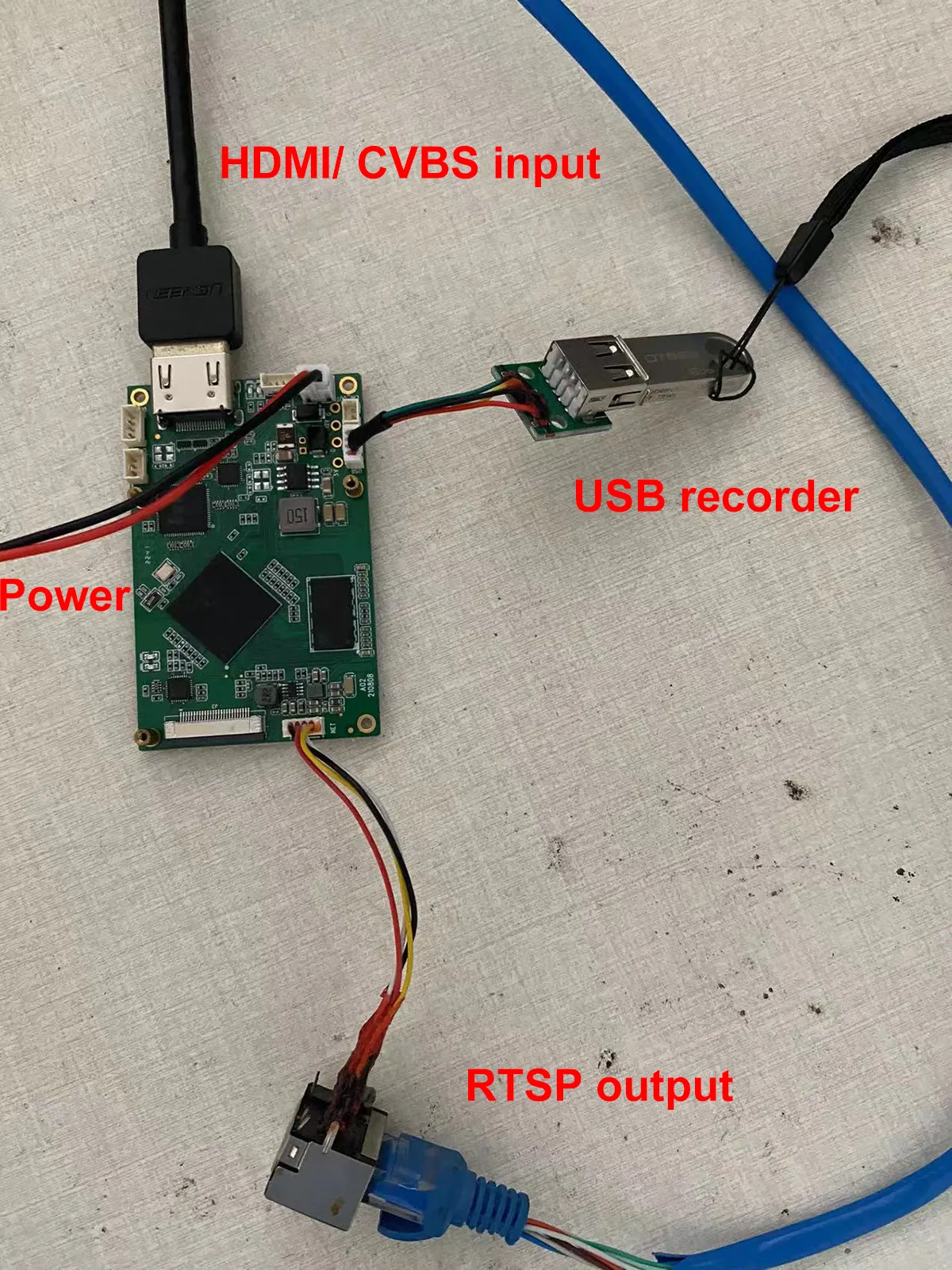
Frage: Unterstützt Ihr USB-DVR die Wiedergabe des codierten Videos??
Antworten: Nein, Der USB verfügt über die Aufnahmefunktion. Sie müssen es auf einem Computer spielen, Es kann nicht direkt auf der Encoderplatine wiedergegeben werden.
- Meinst du HDMI- oder AV-Eingang?, Oder benötigen Sie HDMI und AV, um zwei gleichzeitige Eingänge zu unterstützen??
- Derzeit unterstützt es entweder HDMI- oder AV-Eingang.
-
Vcan1746 kann derzeit nur zwischen HDMI/AV wählen, Andere Boards können die von Ihnen benötigte Firmware erfüllen, aber dieses Board unterstützt nur SDI + AV/AHD-Ausgang.
-
Bei Bedarf, Sie können das Board mit SDI auswerten + AV/AHD-Eingang, um zu sehen, ob er Ihren Anforderungen entspricht. Wenn ja, unser HDMI + Der AV-Eingang Vcan1746 kann später gleich gemacht werden.
-
Wenn Sie HDMI wirklich bewerten müssen + AV-Schnittstelle, Bitte kaufen Sie zuerst Vcan746 und brennen Sie die Standard-Firmware zum Testen. HDMI und AV können zur Verwendung ausgewählt werden. Sofern es eine bestimmte Anzahl an Folgeaufträgen gibt, Wir können eine spezielle Firmware entwickeln, um den HDMI+AV-Eingang gleichzeitig zu unterstützen.
-
Die gleichzeitige Anzeige von HDMI- und CVBS-Videoeingängen über zwei Kanäle ähnelt dem Hikvision IPC, der in Hauptbitrate und Subbitstrom unterteilt ist. Der Hauptstrom entspricht HDMI, und der Unterstrom entspricht CVBS.
- Jetzt können wir eine neue Firmware entwickeln, um HDMI und CVBS gleichzeitig für Live-Streaming zu unterstützen, Der Ton kann jedoch nur aus einem der beiden ausgewählt werden (Das System wählt HDMI-Audio/Analog-Audio entsprechend der Videozugriffssituation aus).
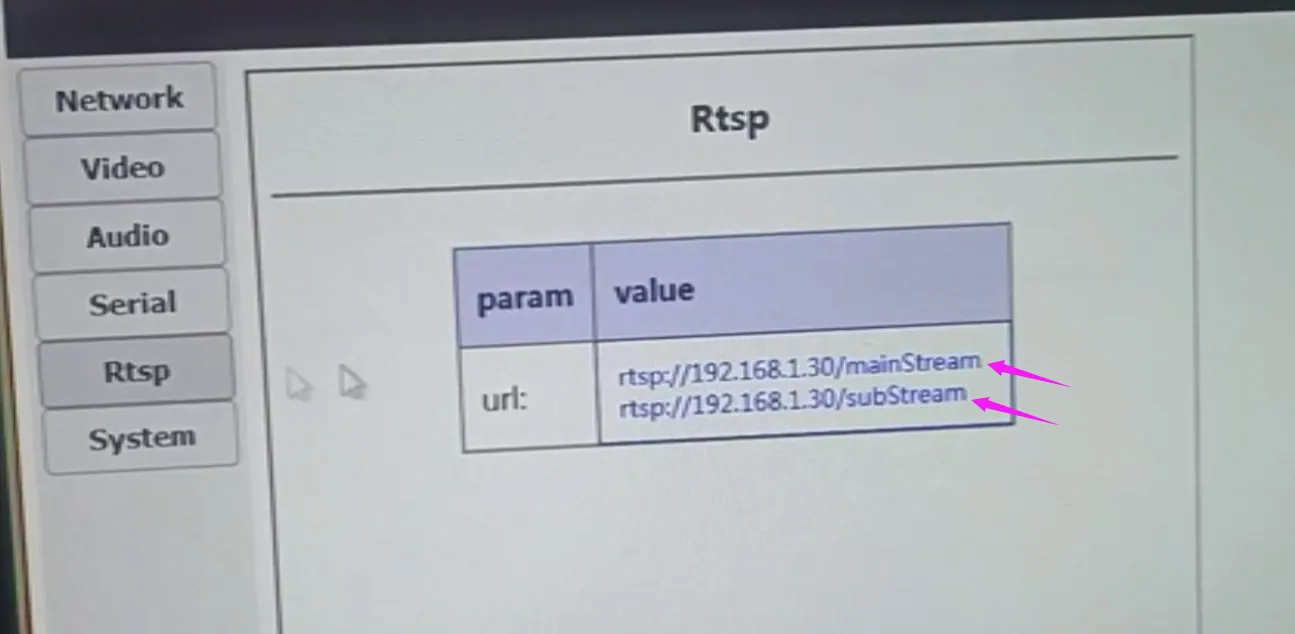
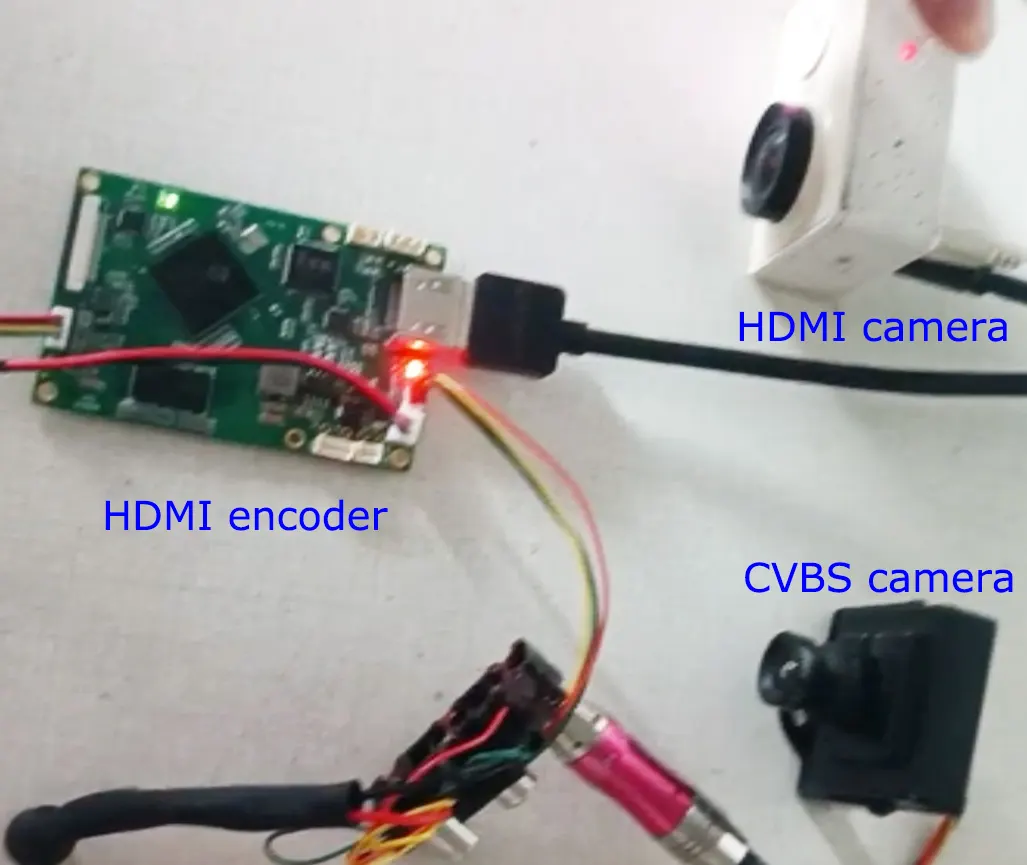
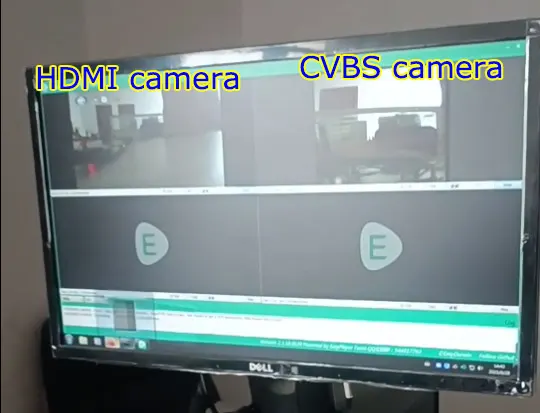
Unterstützt.
Unsere Videokodierungskarte mit HDMI- und CVBS-Eingang verfügt über eine USB-Schnittstelle, die für USB-Aufnahmen verwendet werden kann. Es kann auch als Eingabeschnittstelle einer USB-Webkamera verwendet werden.
Auf diese Weise, Unser Videokodierungsboard kann das Signal Ihrer USB-Webkamera in eine Netzwerkschnittstelle umwandeln, Gleichzeitig werden extrem niedrige Latenzzeiten und die h264- und h265-Kodierung unterstützt.
Bitte laden Sie die genaue Abmessung in der untenstehenden DXF-Datei herunter. (am häufigsten mit AutoCAD- oder DXF-Viewer-Software geöffnet)
https://drive.google.com/file/d/1PAKwv2oBGHYQyul9EMRc5ccbbaU-wp7O/view?usp=drive_link
Q: Zur Klarstellung, wir brauchen HDMI, VON, und Datumsanschlüsse. Der Datumsanschluss sollte TTL 3,3 V sein.
EIN: Kein Problem, unterstützt.
Q: Ist es möglich, serielle Daten auf einem Computer ohne ein DECODER-Gerät zu empfangen??
EIN:
- Für die Spieler am Computer, wir haben RTSP (VLC oder Easy Player) und UDP (Splayer)
- Das RTSP-Protokoll unterstützt nur Audio- und Videodekodierung. Es gibt keine Datendekodierung über die serielle Schnittstelle.
- UDP (unser benutzerdefiniertes Protokoll) hat Audio, Video, und transparente Übertragungsdaten der seriellen Schnittstelle, aber aktuell, Splayer dekodiert nur Audio und Video. Wenn der Kunde transparente Übertragungsdaten über die serielle Schnittstelle benötigt, Sie müssen eine sekundäre Entwicklung basierend auf dem Splayer durchführen. (Wir können das Splayer SDK bereitstellen)
- Wenn die Daten der seriellen Schnittstelle für Ihr Projekt sehr wichtig sind, Dann können Sie auch unsere Decoderplatine verwenden, die Video unterstützen, Audio-, Serielle UART-Daten.
Q: Jetzt funktioniert es mit dem RTSP-Protokoll gut auf dem VLC-Player. Wie kann ich UDP am VLC-Player nutzen??
EIN: UDP ist ein privates und angepasstes Protokoll. Es kann nur im Splayer gespielt werden.
Q: Ja, Seriendaten sind uns wichtig. Wir können unabhängig einen UDP-Server für serielle Daten entwickeln, wenn Sie das Datenformat oder die API angeben.
EIN:
- VLC-Player oder Easyplayer: Erhalten Sie Audio und Video über RTSP-Streaming von einem Universalplayer (VLC-Player oder Easyplayer);
- Spezielle Software: Interpretieren Sie den von der Kodierungskarte UDP übertragenen Datenstrom (einschließlich transparenter Übertragungsdaten für Audio und Video sowie serielle Schnittstelle) und holen Sie sich daraus die transparenten Übertragungsdaten der seriellen Schnittstelle.
Das heißt, Kunden müssen zwei Kanäle nutzen,Erhalten Sie Audio- und Videostreams bzw. transparente Übertragungsdaten über die serielle Schnittstelle:
1、über Universalplayer,RTSP-Pull-Stream zum Abrufen von Audio- und Videodaten;
2、Datenstrom, der von der Interpreter-Codierungsplatine UDP gepusht wird(Enthält transparente Übertragungsdaten für Audio, Video und serielle Schnittstelle),Erläutern Sie die transparente Übertragung von Daten über die serielle Schnittstelle von innen
Q: Wie können wir sehen, dass die übertragenen Daten gut funktionieren??
EIN: Bitte überprüfen Sie den folgenden Link.
So testen Sie die Datenübertragung über HDMI zur Ethernet-Encoderplatine?
Ich werde sie auflisten:
Regelmäßige Versand-Firmware
- Unterstützt HDMI/AV-Eingang (Sie können auch beide verbinden und über AT-Befehle umschalten)
- Unterstützt benutzerdefinierte Protokolle und RTSP-Protokolle oder beides
- Unterstützt H264/H265, Unterstützt den normalen Verzögerungs- und den niedrigen Verzögerungsmodus
- Unterstützt USB-Aufnahme (nicht standardmäßig aktiviert, Sie können die internen Parameter beim Versand ändern)
- Unterstützt bidirektionale transparente serielle Schnittstelle (müssen mit unserer Decoderplatine verwendet werden)
- Unterstützt bidirektionale Gegensprechanlage in analoger Sprache (müssen mit unserer Decoderplatine verwendet werden)
Angepasste Firmware
- Unterstützt HDMI+AV-Dual-Kamera-Eingang, RTSP-Zugriff über Haupt-/Sub-Stream (ähnlich wie IPC)
- Unterstützt USB-Kamera/HDMI/AV-Drei-Wahl-Eingang (kann als reguläre Versand-Firmware mit zusätzlicher USB-Kamera-Unterstützung betrachtet werden)
- Firmware, die das Standard-mpegts-Protokoll unterstützt (nicht unser benutzerdefiniertes Protokoll)
Notiz:
- Bei der angepassten Firmware handelt es sich nicht um die standardmäßig gelieferte Firmware. Wenn der Kunde es braucht, Beim Versand muss sie durch die entsprechende Firmware ersetzt werden.
- Die oben aufgeführte angepasste Firmware (1~3 Punkte) entspricht unterschiedlicher angepasster Firmware, keine maßgeschneiderte Firmware, die alle Funktionen enthält.
Wir haben auch auf Chinesisch gelistet.
- Unterstützt HDMI/AV-Zwei-Auswahl-Eingang(Sie können sie auch alle verbinden,Anschließend per AT-Befehl umschalten)
- Unterstützt benutzerdefinierte Protokolle und RTSP-Protokolle oder beides
- Unterstützt H264/H265,Unterstützt normale Latenz- und niedrige Latenzmodi
- Unterstützt U-Disk-Aufnahme(Standardmäßig nicht geöffnet,Wenn es versandbereit ist, ändern Sie die internen Parameter und öffnen Sie es.)
- Unterstützt bidirektionale transparente serielle Schnittstelle(Es muss mit unserer Decodierungsplatine verwendet werden)
- Unterstützt bidirektionale Gegensprechanlage in analoger Sprache(Es muss mit unserer Decodierungsplatine verwendet werden)
- Unterstützt HDMI+AV-Dual-Kamera-Eingang,Auf RTSP wird über Haupt-/Unterströme zugegriffen (ähnlich wie bei IPC).
- Unterstützt USB-Kamera/HDMI/AV-Drei-Auswahl-Eingang(Es kann als reguläre Firmware angesehen werden, die USB-Kameraunterstützung hinzufügt.)
- Unterstützt das Standard-MPEGTs-Protokoll(anstelle unseres benutzerdefinierten Protokolls)Firmware
- Benutzerdefinierte Firmware, unkonventionelle Versand-Firmware,Wenn Kunden es brauchen,Bei Auslieferung muss diese durch die entsprechende Firmware ersetzt werden.
- Benutzerdefinierte Firmware oben aufgeführt(1~3 Uhr),Entsprechend unterschiedlicher angepasster Firmware,statt einer benutzerdefinierten Firmware, die alle Funktionen enthält

HDMI-Videoquelleneingang, IP-Ethernet-Ausgangsencoder, VLC RTSP-Betrieb
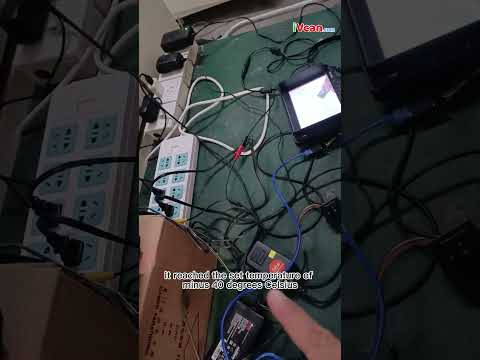
Temperaturbereich in Industriequalität von -40 °C bis 70 °C Celsius-Test
Unterstützt HDMI und CVBS 2 Videostreams gleichzeitig
So erhalten Sie die IP-Adresse des Encoders zurück, wenn Sie sie vergessen

So testen Sie die Datenübertragung über HDMI zur Ethernet-Encoderplatine
Weitere FAQ
Häufig gestellte Fragen zu Video-Encoder und -Decoder
HS-Code
8517629900, Einige unserer Kunden verwenden diesen HS-Code als Referenz.
Kundenspezifische Entwicklung von Sonderfunktionen
-
HDMI- und CVBS-Dual-Videokodierung
-
USB verfügt über eine Videoaufzeichnungsfunktion.
-
Spezielle Handhabung von Codierungsformaten passend zu Ihrer benutzerdefinierten Decoderplatine
Laden Sie den Video-Encoder herunter
Relativer Beitrag
- HDMI-CVBS-UVC-USB-zu-IP-Ethernet-RTSP-UDP-Video-Encoder-Konverterplatinentest mit geringerer Latenz per Webcam.
- So aktualisieren Sie die Firmware der Encoderplatine?
- So aktualisieren Sie die Encoder-Firmware über USB?
- HDMI OUT 2 Eingang Video-Encoder 2 Streamen Sie Kanäle gleichzeitig.
- So stellen Sie die Gateway-IP am HDMI-CVB auf den IP-Video-Encoder ein
Encoder-Modulplatinen









Decoder-Modulplatinen




Zur individuellen Anpassung verfügbar
Neue Encoder-Produkte
| Nein. | Produktname | Konfiguration | Hauptmerkmale | Status |
|---|---|---|---|---|
| 1 | Zweikanaliger USB-UVC-Video-Encoder für sichtbares Licht | 2× USB-Eingang | Unterstützt Dual-USB-Kamera-Videokodierung, und RTSP-Streaming; lokaler CVBS/HDMI-Ausgang; umschaltbare Anzeigemodi | Massenproduktion |
| 2 | Zweikanal-Encoder (1× USB-sichtbares Licht + 1× USB-Wärmebildkamera) | 2× USB-Eingang | Unterstützt Dual-USB-Kamera (sichtbar + Thermal-) erfassen, Codierung, und RTSP-Streaming; lokaler CVBS/HDMI-Ausgang; umschaltbare Anzeigemodi | Massenproduktion |
| 3 | RTSP-Decoder HDMI/CVBS-Anzeigemodul | HDMI + CVBS-Ausgabe | Unterstützt bis zu 4×1080P@30fps RTSP-Stream-Dekodierung; Unterstützt die Weiterleitung des Video-Streaming-Protokolls; HDMI/CVBS-Ausgangsanzeige | Muster verfügbar |
| 4 | RTSP-Decoder HDMI/CVBS-Anzeigemodul mit 4.3"/5" LCD | HDMI-Ausgang + LCD-Bildschirm | Unterstützt bis zu 4×1080P@30fps RTSP-Stream-Dekodierung; Protokollweiterleitung; HDMI/CVBS-Ausgangsanzeige | Debuggen |
| 5 | Zweikanal-Encoder (1× USB-sichtbares Licht + 1× CVBS-Analog) | 1× CVBS + 1× USB-UVC-Eingang | Duales Video (USB + CVBS), Kodierung und RTSP-Streaming; lokaler CVBS/HDMI-Ausgang; umschaltbare Anzeigemodi | Debuggen |
| 6 | Zweikanal-Encoder (1× USB-UVC + 1× AHD-Analog) | 1× AHD + 1× USB-UVC-Eingang | Duale Videoaufnahme (USB + AHD), Kodierung und RTSP-Streaming; lokaler CVBS/HDMI-Ausgang; umschaltbare Anzeigemodi | Debuggen |
| 7 | Zweikanal-Encoder (1× CVBS + 1× AHD-Analogvideo) | CVBS + AHD 2 Videoeingang | Duale analoge Videoaufnahme, Kodierung und RTSP-Streaming; lokaler CVBS/HDMI-Ausgang; umschaltbare Anzeigemodi | Debuggen |
| 8 | Zweikanal-Encoder (1× CMOS-Kamera + 1× USB-Wärmebildkamera) | 1× USB-Schnittstelle | Unterstützt CMOS + USB-Wärmebildkamera-Aufnahme, Kodierung und RTSP-Streaming; lokaler CVBS/HDMI-Ausgang; umschaltbare Anzeigemodi | Massenproduktion |
Für maßgeschneiderte Video-Ein-/Ausgabe-Konvertierungslösungen, die nicht in unseren Produkten aufgeführt sind, Bitte kontaktieren Sie uns für OEM/ODM-Unterstützung. Basierend auf Ihren Anforderungen können wir maßgeschneiderte Produkte entwickeln.
| Videoeingang | 4K HDMI, HDMI+CVBS, SDI+AHD( oder CVBS) |
|---|
1 Rezension für SDI- oder HDMI-zu-IP-Encoder-Modulator CVBS H.265 H.264-Kodierungsplatine PCBA Ethernet RSTP UDP für UAV Drone Robotic
Füge deine Rezension hinzu


Ähnliche Produkte

CVBS HDMI zu IP -Encoder
COFDM-Video- oder Datenübertragung in eine Richtung für UDP-Protokollsender und -empfänger
CVBS HDMI zu IP -Encoder

Bidirektional und bidirektional

PA Power Amplifier


Encoder-Modulplatinen
Decoder-Modulplatinen
Zur individuellen Anpassung verfügbar
Neue Encoder-Produkte
| Nein. | Produktname | Konfiguration | Hauptmerkmale | Status |
|---|---|---|---|---|
| 1 | Zweikanaliger USB-UVC-Video-Encoder für sichtbares Licht | 2× USB-Eingang | Unterstützt Dual-USB-Kamera-Videokodierung, und RTSP-Streaming; lokaler CVBS/HDMI-Ausgang; umschaltbare Anzeigemodi | Massenproduktion |
| 2 | Zweikanal-Encoder (1× USB-sichtbares Licht + 1× USB-Wärmebildkamera) | 2× USB-Eingang | Unterstützt Dual-USB-Kamera (sichtbar + Thermal-) erfassen, Codierung, und RTSP-Streaming; lokaler CVBS/HDMI-Ausgang; umschaltbare Anzeigemodi | Massenproduktion |
| 3 | RTSP-Decoder HDMI/CVBS-Anzeigemodul | HDMI + CVBS-Ausgabe | Unterstützt bis zu 4×1080P@30fps RTSP-Stream-Dekodierung; Unterstützt die Weiterleitung des Video-Streaming-Protokolls; HDMI/CVBS-Ausgangsanzeige | Muster verfügbar |
| 4 | RTSP-Decoder HDMI/CVBS-Anzeigemodul mit 4.3"/5" LCD | HDMI-Ausgang + LCD-Bildschirm | Unterstützt bis zu 4×1080P@30fps RTSP-Stream-Dekodierung; Protokollweiterleitung; HDMI/CVBS-Ausgangsanzeige | Debuggen |
| 5 | Zweikanal-Encoder (1× USB-sichtbares Licht + 1× CVBS-Analog) | 1× CVBS + 1× USB-UVC-Eingang | Duales Video (USB + CVBS), Kodierung und RTSP-Streaming; lokaler CVBS/HDMI-Ausgang; umschaltbare Anzeigemodi | Debuggen |
| 6 | Zweikanal-Encoder (1× USB-UVC + 1× AHD-Analog) | 1× AHD + 1× USB-UVC-Eingang | Duale Videoaufnahme (USB + AHD), Kodierung und RTSP-Streaming; lokaler CVBS/HDMI-Ausgang; umschaltbare Anzeigemodi | Debuggen |
| 7 | Zweikanal-Encoder (1× CVBS + 1× AHD-Analogvideo) | CVBS + AHD 2 Videoeingang | Duale analoge Videoaufnahme, Kodierung und RTSP-Streaming; lokaler CVBS/HDMI-Ausgang; umschaltbare Anzeigemodi | Debuggen |
| 8 | Zweikanal-Encoder (1× CMOS-Kamera + 1× USB-Wärmebildkamera) | 1× USB-Schnittstelle | Unterstützt CMOS + USB-Wärmebildkamera-Aufnahme, Kodierung und RTSP-Streaming; lokaler CVBS/HDMI-Ausgang; umschaltbare Anzeigemodi | Massenproduktion |
Für maßgeschneiderte Video-Ein-/Ausgabe-Konvertierungslösungen, die nicht in unseren Produkten aufgeführt sind, Bitte kontaktieren Sie uns für OEM/ODM-Unterstützung. Basierend auf Ihren Anforderungen können wir maßgeschneiderte Produkte entwickeln.
iVcan.com –
Dieses Encoder-Board in Industriequalität ist eine Offenbarung für unseren Drohnenbetrieb! Es wandelt SDI/HDMI/CVBS-Feeds mühelos und ohne Verzögerung in hocheffiziente H.265/H.264-Streams über IP um. Die Ethernet/RSTP/UDP-Unterstützung liefert butterweiche Ergebnisse, Video mit geringer Latenz an unsere Bodenstation, auch bei Hochgeschwindigkeitsmanövern. Wir haben es in anspruchsvollen UAV- und Roboteranwendungen getestet – die robuste PCBA hält Vibrationen stand und sorgt gleichzeitig für eine einwandfreie 1080p-Kodierung. Die Einrichtung erfolgte Plug-and-Play über Ethernet, und die Bandbreiteneinsparungen durch H.265 sind enorm. Ein absolutes Muss für zuverlässige Lufttelemetrie und Echtzeit-Robotersicht!