






How to set serial to Ethernet from Flight Control to Mission Planner or QGroundControl or Pixhawk, Ethernet to Serial. How to Serial-to-network or network-to- serial on drone radio link?


Transmisja bezprzewodowa Wideo
Firmware versions after 202404 configure the Air unit serial port. The operation guid is for Van1933 i VCAN1933-8W.
The function of serial switching or network switching mainly includes serial port input, Wyjście portu sieciowego lub wejście portu sieciowego, serial port output and so on. Firmware versions after 202404 use the serial port configuration of the configuration sky for TCP or UDP transmission. The following is an example of TCP/UDP transmission from two ground stations, Mission Planner and QGC.
Spis treści
Planista misji (Tryb TCP)
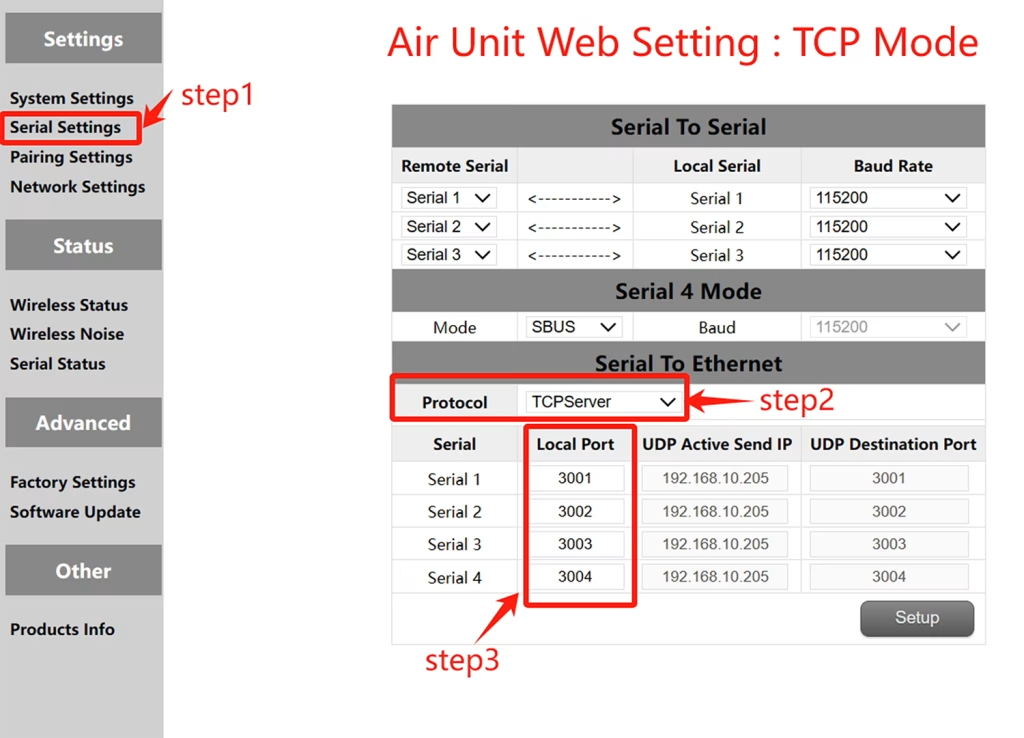
Konfiguracja TCP (Air unit serial port )
- Krok 1: Otwórz – Serial Settings bar of the air unit web page.
- Krok 2: Zmień protokół szeregowy na sieci na serwer TCP.
- Krok 3: Determine the local port number. The default port number of serial ports 1 do 3 jest 3001-3003. Click Set.
Mission Planer TCP configuration
- Krok 1: Otwórz planistę misji.
- Krok 2: MP Wybierz tryb TCP, Nie używaj stawki Baud Port Serial Port, Kliknij przycisk Połącz. Enter host name/IP: 192.168.10.252 (Domyślny adres IP nieba). Wprowadź port zdalny: 3001 /3002/3003. The port number depends on which serial port is connected to the sky serial port
Planista misji (Tryb UDP)
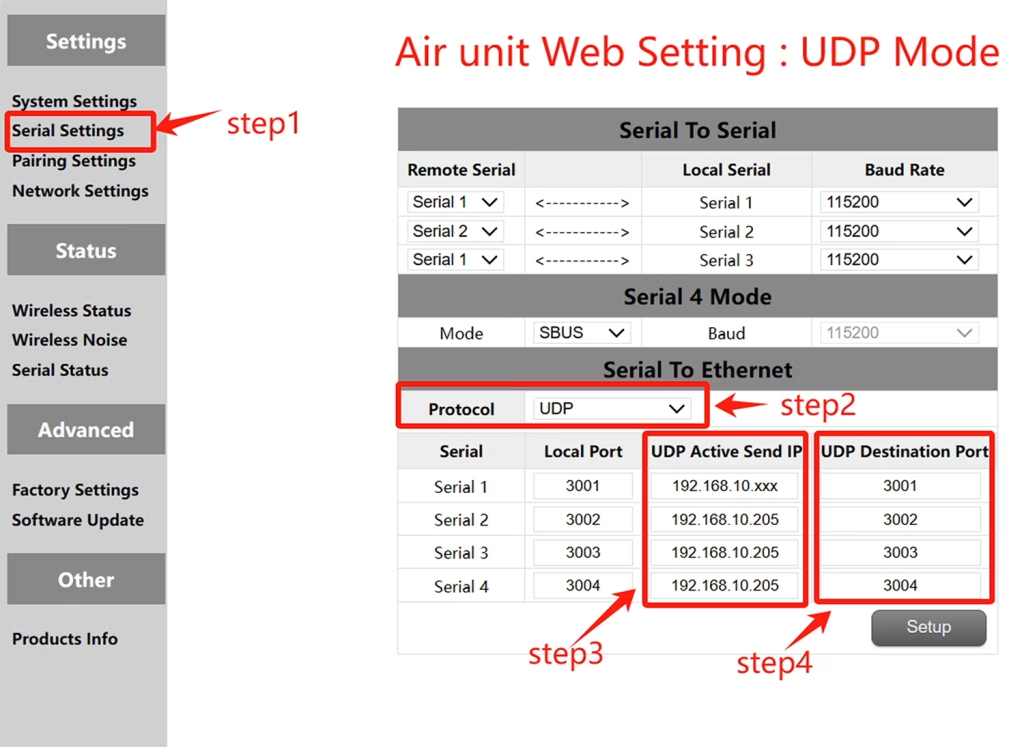
Konfiguracja UDP (Port szeregowy powietrza)
- Krok 1: Otwórz – Serial Settings bar of the air unit web page.
- Krok 2: Zmień protokół szeregowy na sieci na serwer UDP.
- Krok 3: Wprowadź aktywny adres IP UDP portu szeregowego. Jest to adres IP komputera, na którym instalowany jest MP.
- Krok 4: Określ numer portu docelowego UDP. Domyślny docelowy numer portów portów szeregowych 1 do 3 jest 3001-3003. Możesz także ustawić docelowy numer portu na różne na podstawie wymagań klientów. Wreszcie kliknij przycisk Ustawienia.
Konfiguracja UDP Mission Planer
- Krok 1: Open the Mission Planner ground station.
- Krok 2: MP Wybierz tryb UDP, Szybkość transmisji portu szeregowego nie jest wymagana, Kliknij przycisk Połącz.
Enter Local port: Enter the UDP destination port number of the sky port. The default value is 3001-3003.
QGroundControl adopts TCP mode
TCP configuration of the air serial port
- Krok 1: Otwórz – Serial Settings bar of the air unit web page。
- Krok 2: Zmień protokół szeregowy na sieci na serwer TCP.
- Krok 3: Determine the local port number. The default port number of serial ports 1 do 3 jest 3001-3003. Click Set.
QGroundControl TCP configuration
- Krok 1: Open the QGroundControl ground station and click the icon in the top left corner.
- Krok 2: Click Application Settings, select Communication connection, and click Add Option.
- Krok 3: Type Select the TCP mode and enter Server Address: 192.168.10.252(IP address of the sky end).
Port wejściowy: 3001 (Port szeregowy 1); 3002 (Port szeregowy 2); 3003 (Port szeregowy 3).
QGroundControl adopts UDP mode
UDP configuration of the air serial port
- Krok 1: Otwórz – Serial Settings bar of the air unit web page.
- Krok 2: Zmień protokół szeregowy na sieci na serwer UDP.
- Krok 3: Wprowadź aktywny adres IP UDP portu szeregowego. Jest to adres IP komputera, na którym instalowany jest MP.
- Krok 4: Określ numer portu docelowego UDP. Domyślny docelowy numer portów portów szeregowych 1 do 3 jest 3001-3003. Możesz także ustawić docelowy numer portu na różne na podstawie wymagań klientów. Wreszcie kliknij przycisk Ustawienia.
QGroundControl UDP configuration
- Krok 1: Open the QGroundControl ground station and click the icon in the top left corner.
- Krok 2: Click Application Settings, select Communication connection, and click Add Option.
- Krok 3: Type Select the UDP mode and enter port: The default UDP destination port number 3001-3003.
Enter Server Address (opcjonalny) : 192.168.10.252(the default IP address of the air unit).
Transmisja bezprzewodowa Wideo
View or Download the operation of serial-to-network or network-to-serial on drone radio link.
Zadać pytanie
Twoja wiadomość została wysłana