






How to set serial to Ethernet from Flight Control to Mission Planner or QGroundControl or Pixhawk, Ethernet to Serial. How to Serial-to-network or network-to- serial on drone radio link?


Wireless за видео предаване
Firmware versions after 202404 configure the Air unit serial port. The operation guid is for Van1933 и VCAN1933-8W.
The function of serial switching or network switching mainly includes serial port input, Изход на мрежов порт или вход на мрежовия порт, serial port output and so on. Firmware versions after 202404 use the serial port configuration of the configuration sky for TCP or UDP transmission. The following is an example of TCP/UDP transmission from two ground stations, Mission Planner and QGC.
Съдържание
Планиране на мисия (TCP режим)
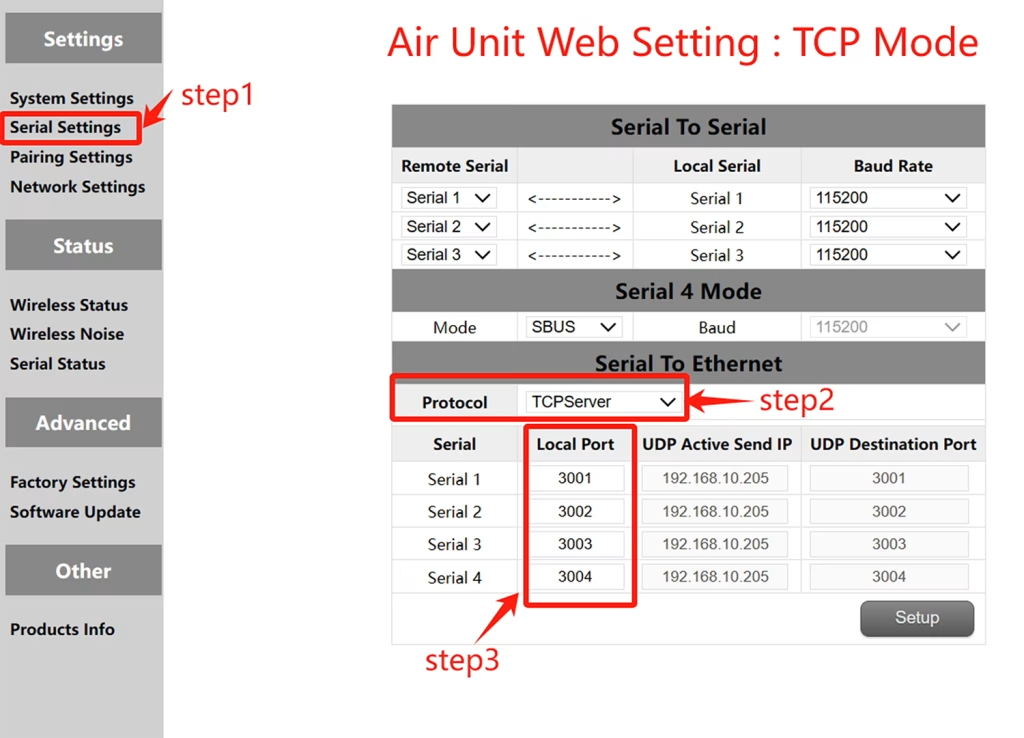
TCP конфигурация (Air unit serial port )
- Стъпка 1: Отворете – Serial Settings bar of the air unit web page.
- Стъпка 2: Променете протокола за сериен към мрежа на TCP сървър.
- Стъпка 3: Determine the local port number. The default port number of serial ports 1 да се 3 е 3001-3003. Click Set.
Mission Planer TCP configuration
- Стъпка 1: Отворете Mission Planner.
- Стъпка 2: MP SELECT TCP режим, Не използвайте серийния процент на пристанище, Щракнете върху бутона Connect. Enter host name/IP: 192.168.10.252 (IP адрес по подразбиране на края на небето). Въведете отдалечен порт: 3001 /3002/3003. The port number depends on which serial port is connected to the sky serial port
Планиране на мисия (UDP режим)
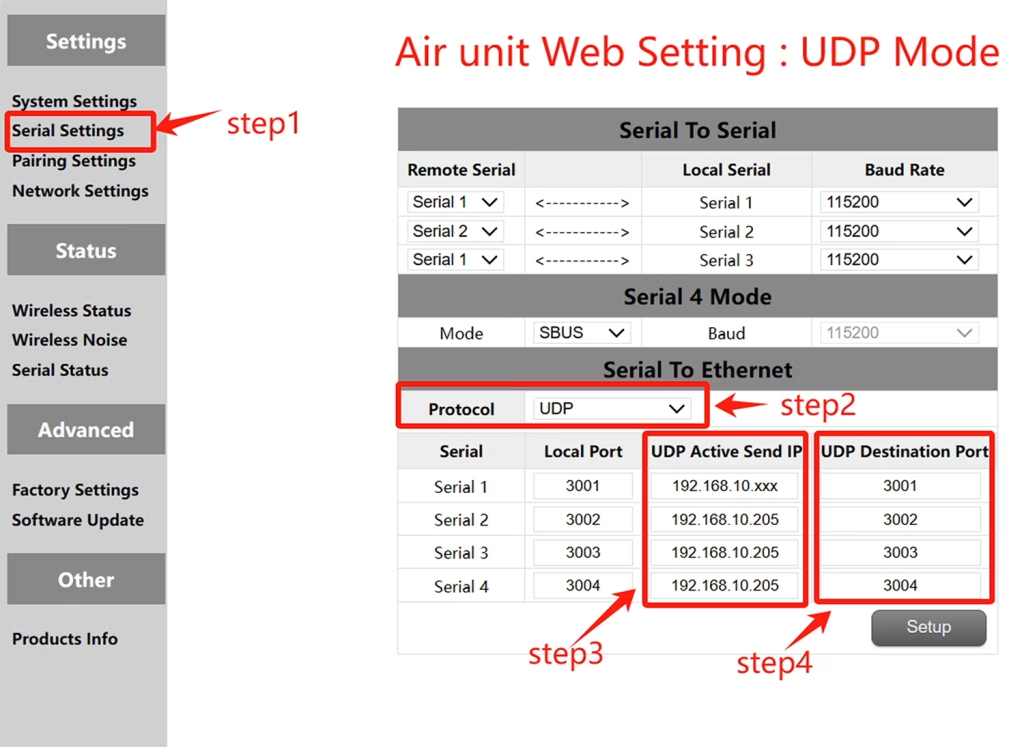
UDP конфигурация (Въздушен сериен порт)
- Стъпка 1: Отворете – Serial Settings bar of the air unit web page.
- Стъпка 2: Променете протокола за сериен към мрежа на UDP сървър.
- Стъпка 3: Въведете активния IP адрес на UDP на серийния порт. Това е IP адресът на компютъра, на който е инсталиран MP.
- Стъпка 4: Определете номера на целевия порт на UDP. Номерът на целевия порт по подразбиране на серийните портове 1 да се 3 е 3001-3003. Можете също да зададете целевия номер на порта на различни въз основа на изискванията на клиента. Накрая щракнете върху бутона Настройки.
UDP конфигурация на мисията Planer
- Стъпка 1: Open the Mission Planner ground station.
- Стъпка 2: MP изберете UDP режим, Серийният процент на пристанище не се изисква, Щракнете върху бутона Connect.
Enter Local port: Enter the UDP destination port number of the sky port. The default value is 3001-3003.
QGroundControl adopts TCP mode
TCP configuration of the air serial port
- Стъпка 1: Отворете – Serial Settings bar of the air unit web page。
- Стъпка 2: Променете протокола за сериен към мрежа на TCP сървър.
- Стъпка 3: Determine the local port number. The default port number of serial ports 1 да се 3 е 3001-3003. Click Set.
QGroundControl TCP configuration
- Стъпка 1: Open the QGroundControl ground station and click the icon in the top left corner.
- Стъпка 2: Click Application Settings, select Communication connection, and click Add Option.
- Стъпка 3: Type Select the TCP mode and enter Server Address: 192.168.10.252(IP address of the sky end).
с помощта на USB интерфейс: 3001 (сериен порт 1); 3002 (сериен порт 2); 3003 (Сериен порт 3).
QGroundControl adopts UDP mode
UDP configuration of the air serial port
- Стъпка 1: Отворете – Serial Settings bar of the air unit web page.
- Стъпка 2: Променете протокола за сериен към мрежа на UDP сървър.
- Стъпка 3: Въведете активния IP адрес на UDP на серийния порт. Това е IP адресът на компютъра, на който е инсталиран MP.
- Стъпка 4: Определете номера на целевия порт на UDP. Номерът на целевия порт по подразбиране на серийните портове 1 да се 3 е 3001-3003. Можете също да зададете целевия номер на порта на различни въз основа на изискванията на клиента. Накрая щракнете върху бутона Настройки.
QGroundControl UDP configuration
- Стъпка 1: Open the QGroundControl ground station and click the icon in the top left corner.
- Стъпка 2: Click Application Settings, select Communication connection, and click Add Option.
- Стъпка 3: Type Select the UDP mode and enter port: The default UDP destination port number 3001-3003.
Enter Server Address (по избор) : 192.168.10.252(the default IP address of the air unit).
Wireless за видео предаване
View or Download the operation of serial-to-network or network-to-serial on drone radio link.
Задай въпрос
Вашето съобщение е изпратено