






How to set serial to Ethernet from Flight Control to Mission Planner or QGroundControl or Pixhawk, Ethernet to Serial. How to Serial-to-network or network-to- serial on drone radio link?


ส่งวิดีโอไร้สาย
8 Watts Power Amplifier 100km Drone Video Data Data Radio ลิงค์
Firmware versions after 202404 configure the Air unit serial port. The operation guid is for VAN1933 และ VCAN1933-8W.
The function of serial switching or network switching mainly includes serial port input, เอาต์พุตพอร์ตเครือข่ายหรืออินพุตพอร์ตเครือข่าย, serial port output and so on. Firmware versions after 202404 use the serial port configuration of the configuration sky for TCP or UDP transmission. The following is an example of TCP/UDP transmission from two ground stations, Mission Planner and QGC.
สารบัญ
ผู้วางแผนภารกิจ (โหมด TCP)
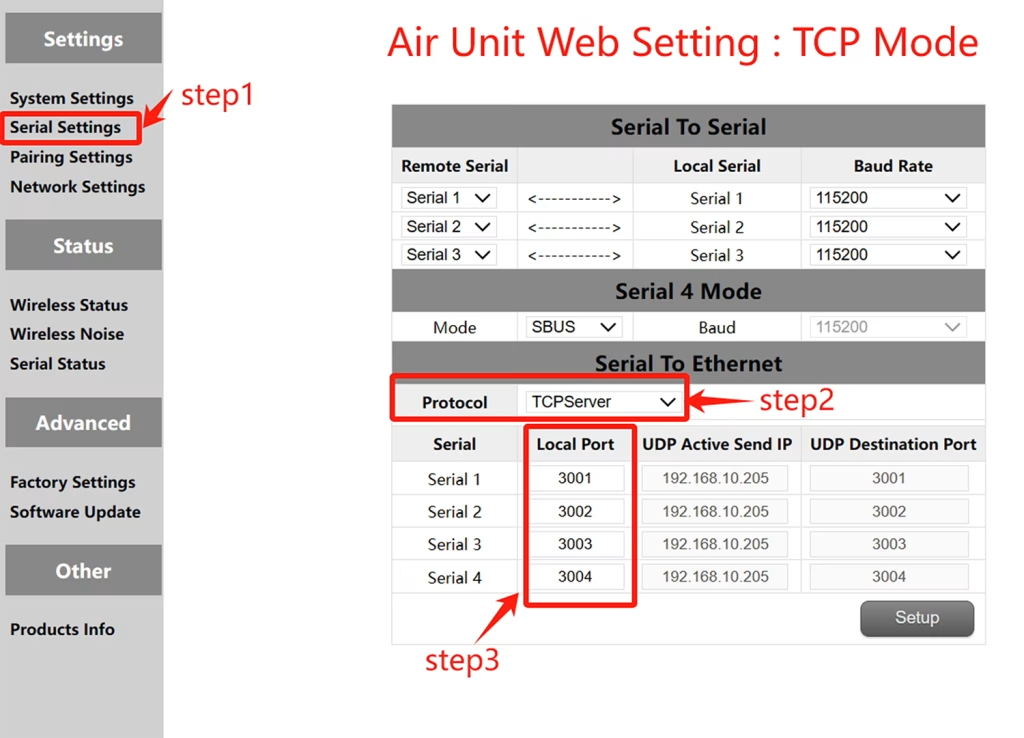
การกำหนดค่า TCP (Air unit serial port )
- ขั้นตอน 1: เปิด – Serial Settings bar of the air unit web page.
- ขั้นตอน 2: เปลี่ยนโปรโตคอลอนุกรมเป็นเครือข่ายเป็นเซิร์ฟเวอร์ TCP.
- ขั้นตอน 3: Determine the local port number. The default port number of serial ports 1 ไปยัง 3 คือ 3001-3003. Click Set.
Mission Planer TCP configuration
- ขั้นตอน 1: เปิด Mission Planner.
- ขั้นตอน 2: MP เลือกโหมด TCP, อย่าใช้อัตราการรับส่งพอร์ตอนุกรม, คลิกปุ่มเชื่อมต่อ. Enter host name/IP: 192.168.10.252 (ที่อยู่ IP เริ่มต้นของ Sky End). ป้อนพอร์ตระยะไกล: 3001 /3002/3003. The port number depends on which serial port is connected to the sky serial port
ผู้วางแผนภารกิจ (โหมด UDP)
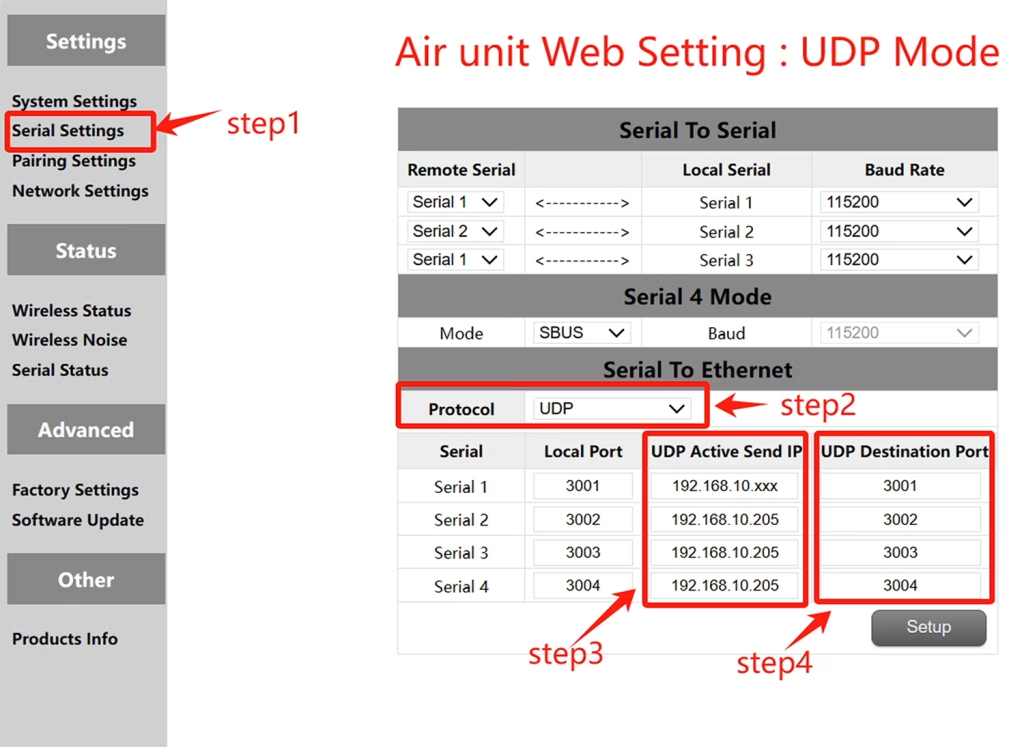
การกำหนดค่า UDP (พอร์ตอนุกรมอากาศ)
- ขั้นตอน 1: เปิด – Serial Settings bar of the air unit web page.
- ขั้นตอน 2: เปลี่ยนโปรโตคอลอนุกรมเป็นเครือข่ายเป็นเซิร์ฟเวอร์ UDP.
- ขั้นตอน 3: ป้อนที่อยู่ UDP IP ที่ใช้งานอยู่ของพอร์ตอนุกรม. เป็นที่อยู่ IP ของคอมพิวเตอร์ที่ติดตั้ง MP.
- ขั้นตอน 4: กำหนดหมายเลขพอร์ตเป้าหมาย UDP. หมายเลขพอร์ตเป้าหมายเริ่มต้นของพอร์ตอนุกรม 1 ไปยัง 3 คือ 3001-3003. นอกจากนี้คุณยังสามารถตั้งค่าหมายเลขพอร์ตเป้าหมายเป็นพอร์ตต่าง ๆ ตามความต้องการของลูกค้า. ในที่สุดคลิกปุ่มการตั้งค่า.
การกำหนดค่า Mission Planer UDP
- ขั้นตอน 1: Open the Mission Planner ground station.
- ขั้นตอน 2: MP เลือกโหมด UDP, ไม่จำเป็นต้องใช้อัตราพอร์ตพอร์ตอนุกรม, คลิกปุ่มเชื่อมต่อ.
Enter Local port: Enter the UDP destination port number of the sky port. The default value is 3001-3003.
QGroundControl adopts TCP mode
TCP configuration of the air serial port
- ขั้นตอน 1: เปิด – Serial Settings bar of the air unit web page。
- ขั้นตอน 2: เปลี่ยนโปรโตคอลอนุกรมเป็นเครือข่ายเป็นเซิร์ฟเวอร์ TCP.
- ขั้นตอน 3: Determine the local port number. The default port number of serial ports 1 ไปยัง 3 คือ 3001-3003. Click Set.
QGroundControl TCP configuration
- ขั้นตอน 1: Open the QGroundControl ground station and click the icon in the top left corner.
- ขั้นตอน 2: Click Application Settings, select Communication connection, and click Add Option.
- ขั้นตอน 3: Type Select the TCP mode and enter Server Address: 192.168.10.252(IP address of the sky end).
พอร์ตอินพุต: 3001 (พอร์ตอนุกรม 1); 3002 (พอร์ตอนุกรม 2); 3003 (พอร์ตอนุกรม 3).
QGroundControl adopts UDP mode
UDP configuration of the air serial port
- ขั้นตอน 1: เปิด – Serial Settings bar of the air unit web page.
- ขั้นตอน 2: เปลี่ยนโปรโตคอลอนุกรมเป็นเครือข่ายเป็นเซิร์ฟเวอร์ UDP.
- ขั้นตอน 3: ป้อนที่อยู่ UDP IP ที่ใช้งานอยู่ของพอร์ตอนุกรม. เป็นที่อยู่ IP ของคอมพิวเตอร์ที่ติดตั้ง MP.
- ขั้นตอน 4: กำหนดหมายเลขพอร์ตเป้าหมาย UDP. หมายเลขพอร์ตเป้าหมายเริ่มต้นของพอร์ตอนุกรม 1 ไปยัง 3 คือ 3001-3003. นอกจากนี้คุณยังสามารถตั้งค่าหมายเลขพอร์ตเป้าหมายเป็นพอร์ตต่าง ๆ ตามความต้องการของลูกค้า. ในที่สุดคลิกปุ่มการตั้งค่า.
QGroundControl UDP configuration
- ขั้นตอน 1: Open the QGroundControl ground station and click the icon in the top left corner.
- ขั้นตอน 2: Click Application Settings, select Communication connection, and click Add Option.
- ขั้นตอน 3: Type Select the UDP mode and enter port: The default UDP destination port number 3001-3003.
Enter Server Address (ไม่จำเป็น) : 192.168.10.252(the default IP address of the air unit).
ส่งวิดีโอไร้สาย
8 Watts Power Amplifier 100km Drone Video Data Data Radio ลิงค์
View or Download the operation of serial-to-network or network-to-serial on drone radio link.
ถามคำถาม
ข้อความของคุณถูกส่งแล้ว