






İçindekiler
COFDM HDMI Kablosuz video vericisi ve alıcısındaki UDP Stream oynatıcı ayarı
UDP akış oynatıcısı, en düşük gecikme süreli CVBS analog video kodlayıcı için en iyi çözümdür. COFDM Kablosuz Video Alıcısı Vcan1776-RX varsayılan ürün yazılımı RTSP oynatıcıyı destekler. Bazı istemcilerin UDP protokolünü kullanması gerekir.
IP adresi ve port numarası web sayfasında yapılandırılabilir, http://192.168.0.215 (varsayılan)
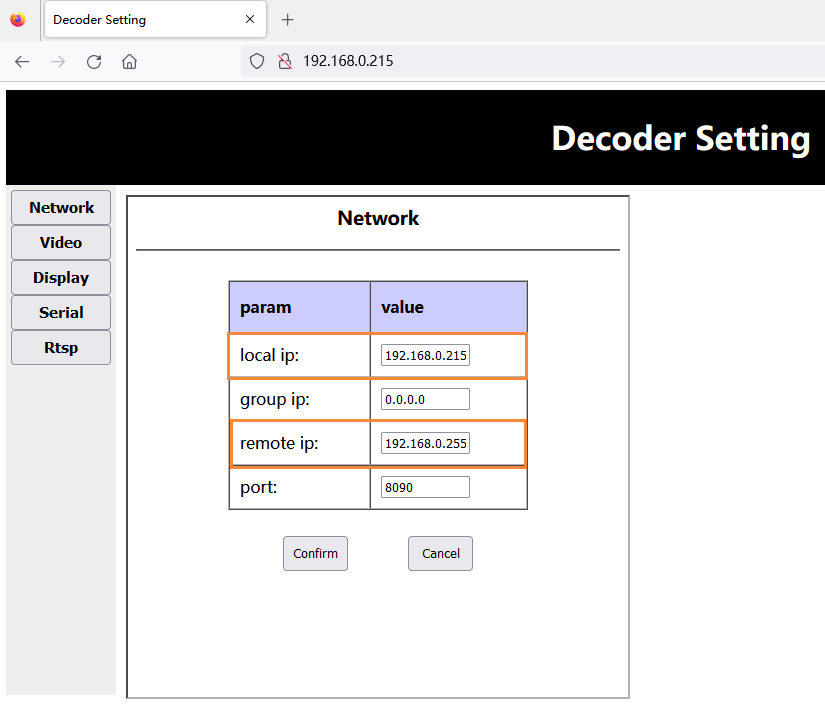
- Ürün yazılımını yükselttikten sonra, alıcı uç fabrika varsayılan parametrelerini geri yükleyecektir (merkez frekansı: 320MHz, kablosuz bant genişliği: 6MHz, ağ bağlantı noktası IP adresi: 192.168.0.215), customers need to modify the center frequency and bandwidth through the Parameter Configuration Board Tool, and Transmitter saves consistently.
- The customer accesses the receiver web server through the web page (HTTP://192.168.0.215), and modifies its own IP address and the setting of the IP address of the Windows PC end connected to the receiver:
Not: Aralarında, the local IP is the receiver’s own ip, and the remote IP is the docking Windows PC end ip. The customer can configure it according to his actual situation. Note that the modification will only take effect after restarting the receiver.
Download the UDP player Yayıcı
- Download the UDP player Yayıcı.
- Splayer_v4.2_2020.6.6
- https://drive.google.com/file/d/1ihzUhfnx2Wo3zLO8UAs1aUQeLswonJD-/view?usp=sharing
- Splayer_v4.3_2022.10.22
- https://drive.google.com/file/d/1PQc-LZ55qGnjeMsjkHYSloHfY3NEUsGH/view?usp=drive_link
- Splayer_v4.3.1_2024.4.16
- https://drive.google.com/file/d/1uv7GqP8P4r6qGOWJ5gYn0b8bZ4ptL8H6/view?usp=drive_link
- Splayer_QT_V1.0 for Win10 or Win11
- https://drive.google.com/file/d/1VAegQjd-PmIL2XbJf7K8dnujMxhoIuhd/view?usp=drive_link
- Splayer_QT_V1.1.1 for Win10 or Win11
- https://drive.google.com/file/d/1YMr2xxurGnbIBjFihc7f77afrdbOcc6l/view?usp=drive_link
- Splayer_QT_V2.0
- https://drive.google.com/file/d/1sASbARCL1lXAIsVKqkmEObRGPREbaSES/view?usp=drive_link
- Open the Splayer player on the Windows PC, click the setting button in the lower right corner, and the setting page will pop up:
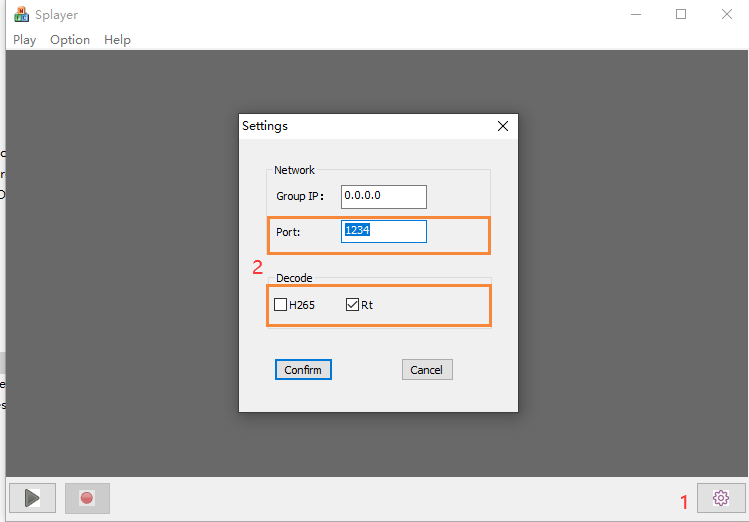
Not:
- Bağlantı noktası bağlantı noktası numarasının şu şekilde ayarlandığı görülebilir: 1234, alıcının UDP akış programı tarafından sabit kodlanmıştır ve değiştirilemez;
- Kod Çözme sütununda, geçerli video akışı özelliklerine göre yapılandırın, yukarıdaki gibi H264 düşük gecikmeli video akışı yapılandırması gibi;
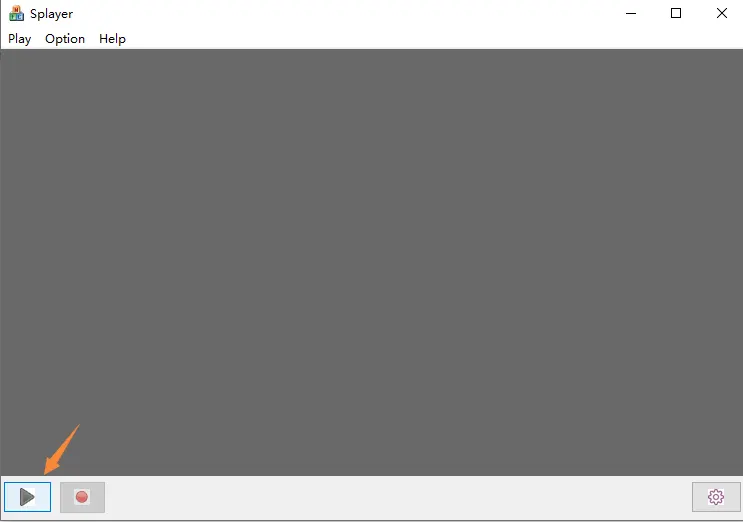
- Ayarlayıp tıkladıktan sonra “Onaylamak” Parametreleri kaydetmek için düğme, sol alt köşedeki oynat butonuna tıklayın. Windows PC UDP push akışını aldıktan sonra, hemen kodunu çözecek ve oynatacak.
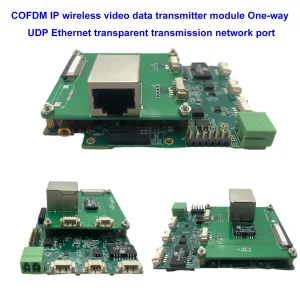
Yukarıdaki UDP akış oynatıcı ayarı aşağıdaki model için uygundur.

Linux VLC oynatıcısını nasıl destekliyor?? Linux altında düşük gecikmeli akışı oynatma?
Soru: Artık UDP akışı VLC oynatıcıyla oynatılmıyor. Bu UDP akışını Linux altında oynatmam gerekiyor ve bu akışın ayrıntılarını anlamaya çalışıyorum. Any scripting or keys or other things?
I want to make my own player under Linux and I want to understand the details of this UDP video stream from the demodulator.
If it is a regular UDP video stream, then question why it doesn’t play with VLC or OBS studio.
Cevap: For model Vcan1726-RX, We have two firmware for optional, The first firmware for the RTSP player supports VLC player, but some clients mentioned it has a long latency, so we made the second firmware, UDP broadcast at the Splayer, which supports lower latency.
This UDP audio and video stream is our custom format, so VLC can’t explain it. If your customer wants to open their own player (under Linux), there are currently two options:
- Update to the default RTSP stream access (first firmware for RTSP player)
- We provide the corresponding DEMUX library and routines (we need to understand the customer’s Linux environment in order to compile a suitable library file)
- Bu “DEMUX library and routines” written by our engineers under the Ubuntu 14.04 64bit system
The second type is too difficult for ordinary customers, and we don’t know the development capabilities of your customer’s own player.
Because some clients meet the low latency problem at Windows OS VLC player, no matter how we tested here, we didn’t find this problem. O zaman, you used Windows to test. Maybe if it was changed to Linux, there would be no RTSP streaming problem. Please try to test the Vcan1726 sample with the first version of firmware on Linux. Maybe this is not a problem on Linux OS.
Soru: Bu uygulama için bir liman işçisi görüntüsü oluşturabilir misiniz?? Gelen akış için hangi bağlantı noktası kullanılıyor?, ve yaygın olarak kullanılan codec'lerin bulunduğu giden akış için başka bir bağlantı noktası (h264)?
Splayer ve UDP Stream Player nedir??
SPlayer, çeşitli video formatlarını destekleyen bir medya oynatıcısıdır, UDP akışı dahil.
UDP akışı, Kullanıcı Datagram Protokolünü kullanarak internet üzerinden video verileri gönderme yöntemidir (UDP), paketlerin teslimini veya sırasını garanti etmeyen hızlı ve basit bir protokoldür.
UDP akışı, canlı video yayını veya düşük gecikmeli video iletimi için kullanılabilir, ancak aynı zamanda paket kaybı veya bozulmasından da zarar görebilir.
Web arama sonuçlarına göre, SPlayer aşağıdaki adımları kullanarak UDP akışlarını oynatabilir:
- SPlayer'ı açın ve “URL'yi aç” sağ üst köşedeki düğme.
- UDP akışının URL'sini udp biçiminde girin://@ip: Liman, burada ip, sunucunun IP adresidir ve port, akışın port numarasıdır. Örneğin, udp://@224.0.0.1:1234.
- üzerine tıklayın “tamam” düğmesine basın ve akışın yüklenmesini bekleyin.
Splayer Win10'da nasıl iyi çalışır??
Soru: Splayer'ı başlatamıyoruz 4.2 ve 4.3 Windows altında 10. Bize Windows için Splayer'ın doğru sürümünü sağlayabilir misiniz? 10 ve 11?
4.2 şu anda başlıyor ve kapanıyor. 4.3 hata mesajıyla başlar.
Hatalı uygulama adı: Splayer.exe, versiyon: 1.0.0.1, zaman damgası: 0x646d83e2
Arızalı modül adı: dvb_demux.dll, versiyon: 1.0.0.1, zaman damgası: 0x5fe5bdbf
İstisna kodu: 0xc0000005
Arıza ofseti: 0x0001484a
Arızalı işlem kimliği: 0x3888
Hatalı uygulama başlangıç zamanı: 0x01da1164b89c78eb
Arızalı uygulama yolu: C:\Users\admin\Downloads\Splayer_v4.3_2022.10.22\Splayer.exe
Arızalı modül yolu: C:\Users\admin\Downloads\Splayer_v4.3_2022.10.22\dvb_demux.dll
Rapor Kimliği: 4af19407-045e-48e5-a0f7-86fc90c6b3d3
Arızalı paketin tam adı:
Hatalı pakete bağlı uygulama kimliği:
Cevap: Lütfen Splayer_qt_v1.0.zip dosyamızı kullanmayı deneyin (103.5Mb).
geri bildirim: SPlayer'ın yeni sürümü sorunlu sitede Win ile iyi çalışıyor 10! Teşekkür ederim!
Soru: Reciver by Splayer programından video oynatırken zaman gecikmesinin arttığını gördük (UDP akışı).
Detaylı konuşursak – Alıcı bir Ethernet kablosuyla doğrudan PC'ye bağlanır. PC ve alıcı aynı yerel ağdadır. Splayer'ı başlattığımızda zaman gecikmesi normaldir ve kesin sayım bize şunu gösterir: 330 msn, ki bu da gözlemlediğimiz HDMI çıkışından birden biraz daha fazla 270 msn. Bu iyi. Ancak işyerinde herhangi bir değişiklik yapmadan birkaç dakika beklersek, zaman gecikmesinde sürekli bir artış gözlemliyoruz. 1-1,5 Müşteri başvurusunda kabul edilmeyen sn..
Dün Win'de kendim test ettim 10, ve karmaşık kapatma özelliğine sahip farklı bilgisayarlarda Win11 Splayer qt ile Win Brandmauer (sizden son versiyon), ve Oynatıcı 4.3 (eski versiyon). Bu sorunu her konfigürasyonda her seferinde tekrarlıyorum.
Lütfen bu sorunu düzeltmeme yardım edin. Splayer'ın oynatılması sırasında sabit bir zaman gecikmesine ihtiyacımız var; bu süre en fazla olabilir. 350 msn.
Cevap: Böyle bir sorunun yaşanmaması gerekiyor, çünkü oynatıcının düşük gecikme modunda önbelleği yoktur, ve gecikme tamamen bilgisayarın kod çözme yeteneğine bağlıdır. Mühendisler ortamı ayarlayacak ve önümüzdeki Pazartesi test edecek.
Diğer bir nokta ise müşterilerden dizüstü bilgisayar monitörlerinin yenileme hızı ayarını kontrol etmelerini istemektir.. Örneğin, kamera 1080p60 girişi yapıyorsa, bu durumda müşterinin dizüstü bilgisayar monitörünün yenileme hızı da 60Hz olmalıdır. Aksi takdirde, ekran çok yavaş olacak, bu aynı zamanda veri tıkanıklığına neden olacak ve gecikmelere neden olacaktır.
Slayer oynatıcısında büyük bir gecikme var, either the decoding is slow or the display is slow, it is all caused by the PC.
HDMI camera encoding HDMI receiver decoding, output to the display, and computer playback delay test of the Splayer player
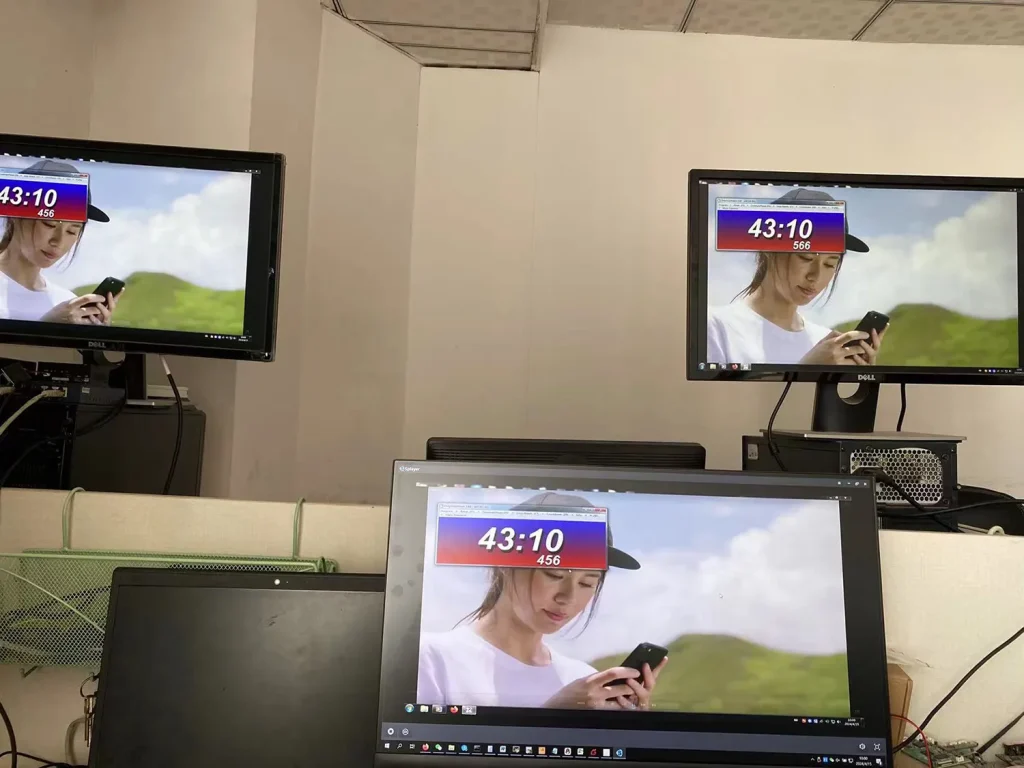
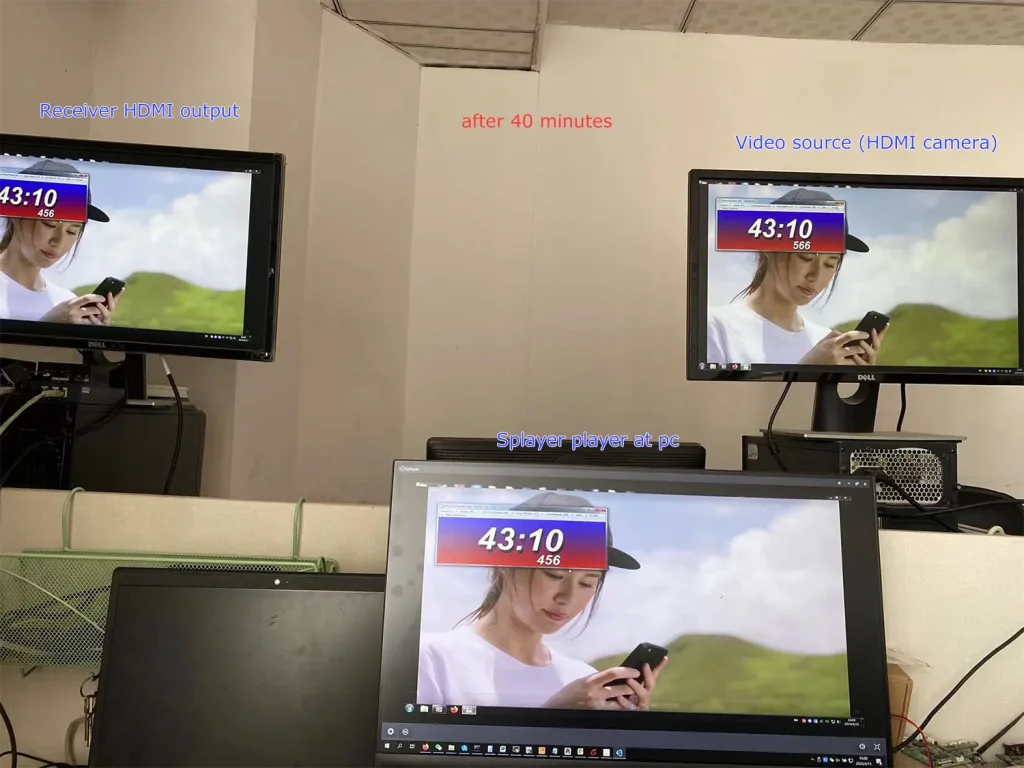
We don’t find the problem you mentioned.
It can be seen that the current Splayer player screen and the receiver HDMI output are consistent, and the delay between them is very low.
Could you please ask the customer, what is the resolution and frame rate of the camera input? Assuming that the customer’s camera is 1080p60, you can also do the following two steps to further troubleshoot the problem:
- Let the customer change the camera to a lower frame rate for testing, such as 1080p50/30;
- You can set the encoding segment parameters to let it down-frame encoding. Örneğin, send the ATSO0,30_ command through the parameter port, and the encoding outputs 1080p30 for testing.
Akraba
Bir soru sor
Yanıtınız için teşekkür ederiz. ✨