






How to add add a wireless video relay into a drone video data air uinit and ground unit
پرسش و پاسخ: یک رله ویدیویی بیسیم برای پیوند ارتباطی پهپاد با زمینهای دوربرد یا مسدود اضافه کنید
مشتری پرسید, می خواستم امکان استفاده از یک واحد به عنوان رله را بررسی کنم. در مکانی که می خواهیم پهپاد خود را به پرواز در آوریم, زمین مرتفع وجود دارد, که ارتباط را مختل می کند. آیا می توانیم از واحد سوم برای عمل به عنوان رله استفاده کنیم؟?


انتقال بی سیم ویدیو
1740-1840MHz 2WPA 30 کیلومتر فرستنده ویدیویی هواپیمای بدون سرنشین با برد طولانی با SBUS TTL

انتقال بی سیم ویدیو
8 آمپلی فایر قدرت واتس 100 کیلومتر صفحه هواپیماهای بدون سرنشین پیوند رادیویی
Q1: آیا یکی از واحدها می تواند به عنوان رله برای غلبه بر موانع زمین و گسترش دامنه ارتباط استفاده شود?
آ: بله, می توان یکی از واحدها را به عنوان یک گره رله پیکربندی کرد تا ارتباطات را در مناطقی با زمین های بلند یا موانع دیگری که خط دید مستقیم بین پهپاد و ایستگاه کنترل زمینی را مسدود می کند بهبود بخشد..
Q2: راه اندازی رله چگونه کار می کند?
آ: The relay setup method depends on the software version installed on your device. There are two different versions:
- Point-to-Point Version
- Point-to-Multipoint Version
Each version uses a different configuration method for relay setup.
To determine which version your device is using, لطفا بررسی کنید Web UI interface style of your firmware. The layout and design of the Web UI will indicate whether your firmware is the درجه فاصله اختیاری یا درجه فاصله اختیاری نسخه.
Once you identify the firmware version through the Web UI style, follow the corresponding relay setup instructions for that version.
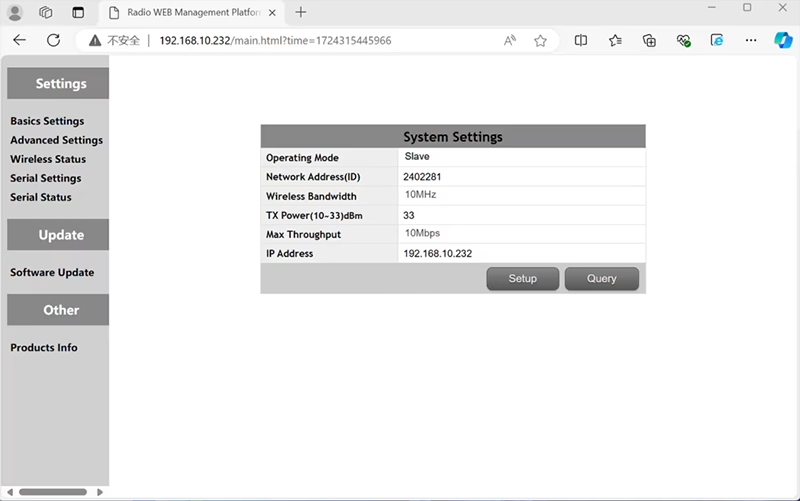

In the standard Point to Point (P2P) پیکربندی:
- این ایستگاه کنترل زمینی (GCS) به عنوان عمل می کند گره اصلی (استاد).
- این پهپاد (واحد هوا) به عنوان عمل می کند گره فرعی (برده).
برای فعال کردن عملکرد رله, توپولوژی شبکه باید اصلاح شود:
- را تبدیل کنید ایستگاه کنترل زمینی اصلی (گره اصلی) به یک گره رله.
- اضافه کردن یک گره فرعی دیگر برای خدمت به عنوان ترمینال جدید ایستگاه کنترل زمینی.
بنابراین راه اندازی جدید خواهد بود سه گره:
- گره 1 (وزوز) - Slave node (مروارید)
- گره 2 (رله) - Repeater node (روی زمین ثابت شده است, معمولا در زمین های مرتفع یا نقطه میانی قرار می گیرد)
- گره 3 (ایستگاه کنترل زمینی) - گره اصلی گره (سمت اپراتور)
- Drone Unit 8W – 192.168.10.252 (برده)
- Relay Unit 8W- 192.168.10.250 (تکرار کننده)
- Ground Unit 2W – 192.168.10.124 (استاد)
In the standard Point to Multi-Points configuration:
- این ایستگاه کنترل زمینی (GCS) به عنوان عمل می کند گره اصلی (استاد).
- این پهپاد (واحد هوا) به عنوان عمل می کند گره فرعی (برده).
برای فعال کردن عملکرد رله, توپولوژی شبکه باید اصلاح شود:
- را تبدیل کنید ایستگاه کنترل زمینی اصلی (گره اصلی) به یک گره رله.
- اضافه کردن یک گره فرعی دیگر برای خدمت به عنوان ترمینال جدید ایستگاه کنترل زمینی.
بنابراین راه اندازی جدید خواهد بود سه گره:
- گره 1 (وزوز) - Slave node (مروارید)
- گره 2 (رله) - گره اصلی (روی زمین ثابت شده است, معمولا در زمین های مرتفع یا نقطه میانی قرار می گیرد)
- گره 3 (ایستگاه کنترل زمینی) - Slave node (سمت اپراتور)
این پیکربندی به سیگنال ها اجازه می دهد تا از پهپاد به رله منتقل شوند, و سپس از رله به اپراتور, تضمین یک پیوند پایدار و پیوسته حتی زمانی که مسیر مستقیم توسط تپه ها یا ساختمان ها مسدود شده باشد.
Q3: مزایای این راه اندازی رله چیست؟?
- فاصله انتقال موثر را افزایش می دهد.
- پیوند ارتباطی پهپاد را حتی در زمین های پیچیده حفظ می کند.
- از دست دادن سیگنال و وقفه های ویدئویی را کاهش می دهد.
- امکان قرار دادن انعطاف پذیر رله را برای بهینه سازی پوشش فراهم می کند.
Q4: چه تغییرات یا تنظیمات مورد نیاز است?
حالت کار را به رله تغییر دهید. شناسه هر سه دستگاه باید یکسان باشد. تیم مهندسی ما می تواند سیستم عامل و پارامترها را برای فعال کردن عملکرد رله تنظیم کند. شما فقط باید ما را از تنظیمات مورد نظر خود مطلع کنید (به عنوان مثال, فاصله ها, نوع زمین, ارتفاع نصب), و ما فایل های پیکربندی مناسب و نمودار اتصال را ارائه خواهیم داد.
Q5: آیا واحد رله می تواند قابل حمل باشد یا روی وسیله نقلیه نصب شود?
بله. گره رله می تواند باشد:
- ثابت نصب شده (به عنوان مثال, روی یک تپه یا برج), یا
- قابل حمل (توسط وسیله نقلیه حمل می شود, یا روی سه پایه با منبع تغذیه نصب شده است).
ما می توانیم پوشش رله و رابط برق را مطابق با سناریوی برنامه شما سفارشی کنیم.
Q6: آیا رله تاخیر اضافی ایجاد می کند؟?
تأخیر اضافی حداقل است (معمولا کمتر از 10-20 میلی ثانیه است) و تاثیر کمی بر عملکرد ویدئو و کنترل بلادرنگ دارد.
Q7: آیا می توانم خودم حالت رله را تنظیم یا تغییر دهم؟?
توصیه می کنیم برای پیکربندی اولیه برای اطمینان از آدرس دهی صحیح گره و برنامه ریزی فرکانس، با تیم پشتیبانی فنی ما تماس بگیرید. پس از راه اندازی, جابجایی بین حالت عادی و حالت رله می تواند از طریق نرم افزار پیکربندی یا پروفایل های از پیش تعریف شده انجام شود.
Q8: Why can’t I connect to the relay node?
آ: If the relay and slave nodes are roughly the same distance from the master node, and the master node receives roughly the same amount of power, the relay node might not be able to join the network. When the master node determines that the received power of the two nodes is similar, it will prioritize connecting directly to the slave node.
Q9: The three nodes cannot connect to each other. It is necessary to check the wireless transmit/receive status of each node to identify potential issues.
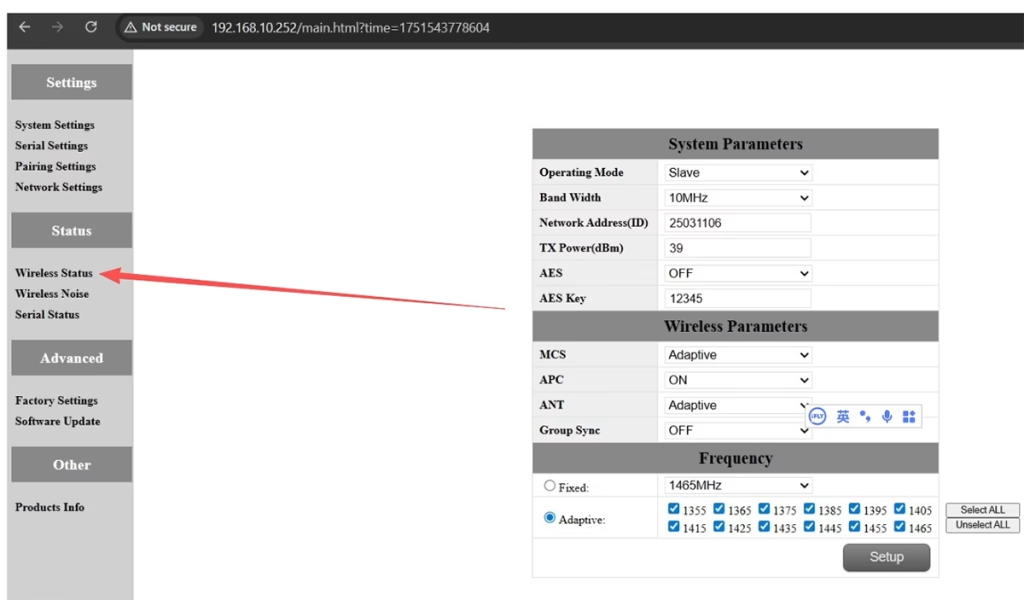
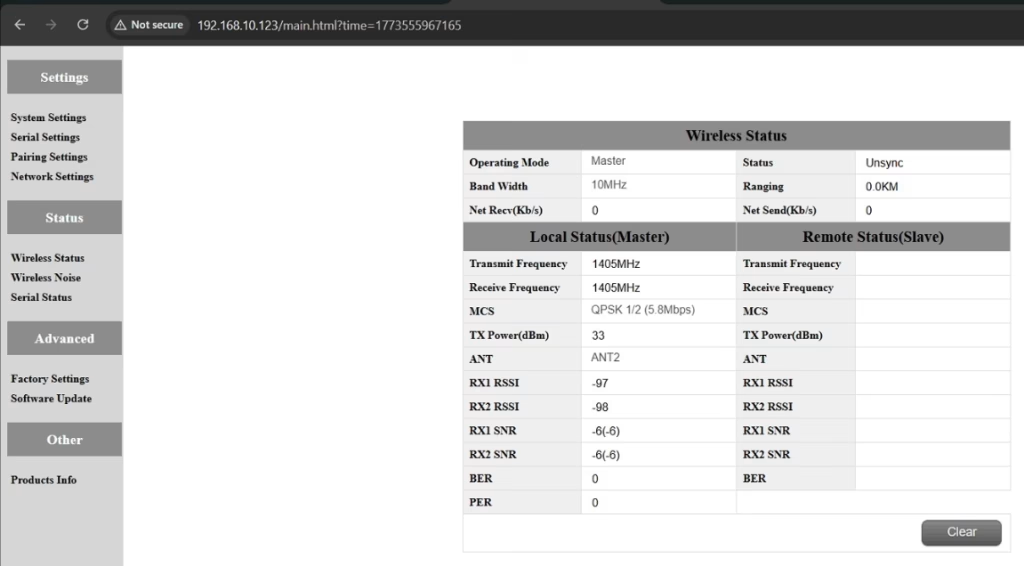
آ: Please do the below test firstly.
Attempt Remote Access
Try to access each node through the management interface or remote tool to check the wireless status.
If remote access fails, proceed to step 2.
Connect Directly via Ethernet
Use an Ethernet cable to connect your computer directly to each node.
Access the node’s management interface or wireless status page.
Check Wireless Transmit/Receive Status
Review the current wireless transmit/receive status, including signal strength, وضعیت پیوند, and any error indicators.
Take a screenshot of the current status for each node, ensuring all relevant information is visible.
Send Screenshots to Engineers
Organize the screenshots and send them to the engineering team.
Engineers will analyze the wireless transmit/receive data to determine which node may have an issue.
یادداشت:
Label each screenshot with the corresponding node for easy comparison.
Ensure screenshots include key data such as signal strength, connection status, و اطلاعات کانال.
Q10: Does the relay unit only require antennas and power to operate? Is an Ethernet connection necessary?
آ: خیر. The relay unit only requires the antennas and a power supply to operate. این کار را انجام می دهد نه require an Ethernet connection. The relay automatically forwards data between the aircraft side and the ground side, enabling seamless communication without the need for a network port connection.
Q11: what is this sync unsync on the wireless status?
آ: These are the parameters seen on the relay node. این “همگام سازی” at the beginning indicates the connection status between the master node and the relay node, which is currently connected. این “unsync” at the end indicates the connection status between the relay node and the slave node, which is currently not connected.
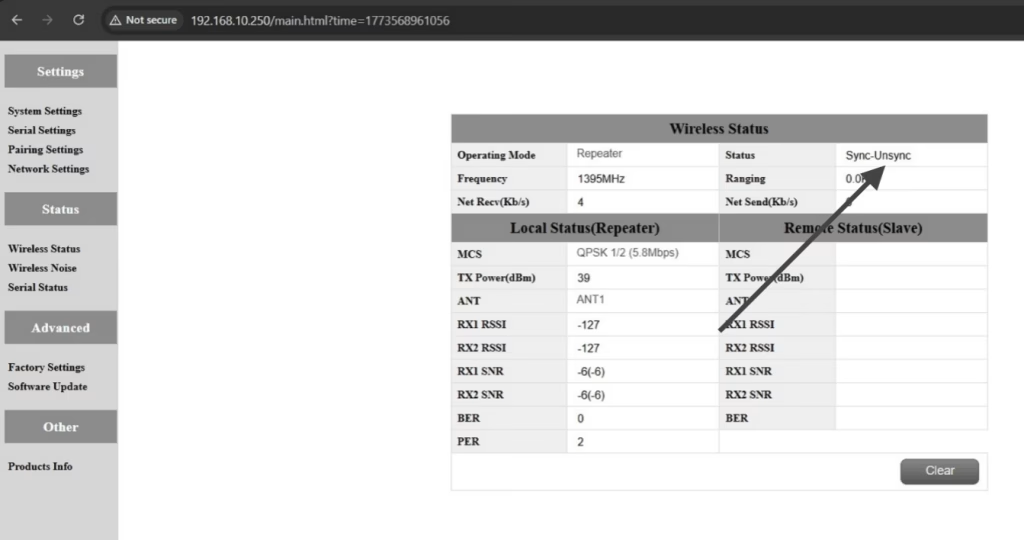
Q12: Why can’t my Slave, تکرار کننده, or Master nodes connect? How to fix it?
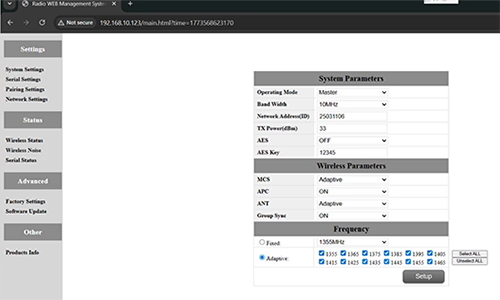
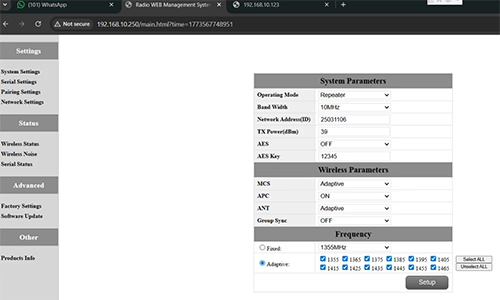
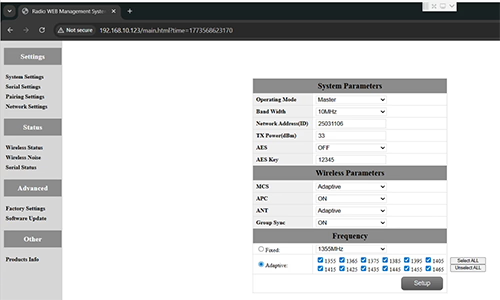
آ: This usually happens when nodes are not properly configured or the Group Sync settings are inconsistent.
- Connect each node directly to a computer using an Ethernet cable.
- Open the system parameter settings page and take a screenshot to share with technical support if needed.
- بررسی کنید Group Sync تنظیمات:
- اگر Group Sync Master is On, و Slave Node و تکرار کننده are Off, تنظیم Group Sync به خاموش for all nodes.
- After all nodes are connected successfully, you can enable Master / برده / Repeater Group Sync as needed.
نتیجه:
Following these steps has successfully resolved connection issues for other customers.
Q13: In what order should these three devices be powered on?
آ: The correct power-on sequence is critical to ensure proper system connectivity and prevent equipment damage. Follow these steps:
- Power on the Ground Unit first
- This includes the master control station or ground control equipment.
- Ensure all communication interfaces and power supplies are stable.
- بعد, power on the Repeater Node (Relay Unit)
- Wait for the repeater to complete self-checks and establish a connection with the ground unit.
- Verify connection success via status indicators or LEDs.
- سرانجام, power on the Drone or Slave Node
- Make sure the ground unit and repeater node are fully ready before powering the drone.
- بعد از برق, check the communication status between the drone and the repeater/ground units.
⚠️ Notes:
- Always follow the sequence Ground → Repeater → Drone to avoid initialization failures.
- If there are multiple slave nodes or repeaters, power on one at a time and confirm each connection before proceeding.
- Avoid powering all nodes simultaneously to prevent bus conflicts or voltage spikes.
خلاصه:
✅ عملکرد رله – پشتیبانی
✅ نیاز به اصلاح دارد – بله, یک گره دوباره به عنوان رله پیکربندی شد
✅ تعداد گره های توصیه شده – 3 (وزوز / رله / GCS)
✅ اضافه شدن تاخیر – <20 خانم
✅ مناسب برای – مناطق کوهستانی, عملیات از راه دور, یا شرایط NLOS
سوال بپرسید
از پاسخ شما سپاسگزاریم. ✨