






目次
COFDM モジュールの動作モードを変更する方法
にリリースされました 2021-6-15
特記事項: このドキュメントは、次のソフトウェア バージョンの COFDM モジュールにのみ適用されます。:
- ターゲット VCAN1726-HDMI+CVBS TX 送信モジュール:
- ソフトウェアファームウェアバージョン: v6.6.1_2021.4.7
- ターゲット VCAN1726-SDI+AHD+CVBS TX トランスミッター モジュール
- ソフトウェアファームウェアバージョン: v6.6.1_2021.4.7
- ターゲット VCAN1726-RX レシーバーモジュール
- ソフトウェアファームウェアバージョン: v4.1.0_2021.3.11
(VCAN1776 は、VCAN1726 モジュールと PA およびメタルを使用して、通常のエンドユーザー向けの完全なフルセットを組み立てます。)
当社の COFDM モジュールのこれら 3 つのバージョンの出荷時にプログラムされたファームウェアは、すでにサポートされています。:
- 標準DVB-Tプロトコル
- COFDMプロトコル
- COFDM H.264 低遅延プロトコル
3 つの異なる動作モードがあります. これら 3 つの動作モードを切り替えるには、シリアル ポート AT コマンドのみを使用する必要があります。.
1. COFDM モジュールのソフトウェア ファームウェア バージョンを確認します。:
方法 1: パラメータ設定パネルからファームウェアのバージョンを確認します.
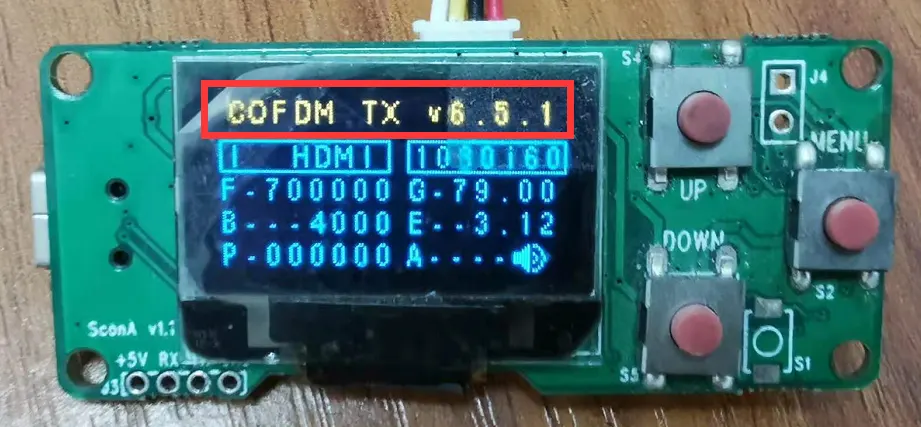
方法 2: モジュールのシリアル ポート経由で AT コマンドを送信し、ファームウェアのバージョンを確認します。.
ATコマンド: ATDR_, このコマンドはモジュールのファームウェアのバージョンを返します.
COFDM モジュール モデルとファームウェア バージョンがこのドキュメントに適用できるモジュール バージョンであることを問い合わせて確認した後でのみ、以下で紹介するシリアル ポート AT コマンドに従って 3 つの動作モードを切り替えることができます。.
2. COFDM モジュールの動作モードを切り替える:
シリアル ポート AT コマンドを使用してモジュールの動作モードを切り替える次の操作は、モジュールの再起動後に有効にするために再起動する必要があります。.
1. TX モジュールと Rx モジュールが標準 DVB-T プロトコル動作モードに切り替わります:
- シリアルポートコマンドを送信してください”ATSTS1_」, 標準の DVB-T プロトコル動作モードを使用するように TX モジュールと RX モジュールを設定します。
- シリアルポートコマンドをTXモジュールに送信します “ATSE0,0,0.0,0,1_“, 低遅延モードを無効にする
- シリアルポートコマンドをRXモジュールに送信 “ATSR470000,6000,0,0_“, 低遅延モードを無効にする
2. TX モジュールと Rx モジュールは COFDM H.264 低遅延プロトコル動作モードに切り替わります:
- シリアルポートコマンドを送信します”ATSTS0_“, COFDM プロトコルの動作モードを使用するように TX モジュールと RX モジュールを設定します。
- シリアルポートコマンドをTXモジュールに送信します”ATSE0,1,0.0,0,1_“, COFDM H.264 低遅延プロトコル動作モードを有効にする
- シリアルポートコマンドをRxモジュールに送信します”ATSR470000,6000,1,0_“, COFDM H.264 低遅延プロトコル動作モードを有効にする
3. TX モジュールと RX モジュールが COFDM プロトコル動作モードに切り替わります (通常の遅延, 非 H.264 低遅延):
- シリアルポートコマンドを送信する”ATSTS0_“, COFDM プロトコル動作モードを使用するように TX モジュールと Rx モジュールを設定します
- シリアルポートコマンドをTXモジュールに送信します “ATSE0,0,0.0,0,1_“, 低遅延モードを無効にする
- シリアルポートコマンドをRXモジュールに送信 “ATSR470000,6000,0,0_“, 低遅延モードを無効にする
この操作は、以下の cofdm モデルに適しています。.


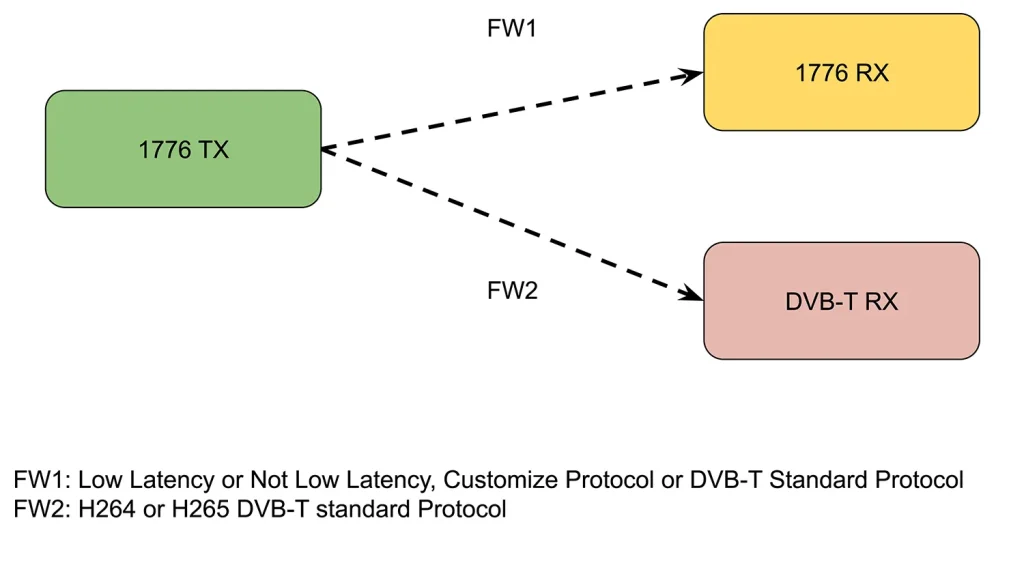
動画内のテキスト
ビデオの中で, h264 低遅延の送信機ファームウェアを標準 DVB-T ファームウェアに切り替える方法を説明します。.
ハードウェアを見てみましょう, COFDMトランスミッタ, 受信機ボード, およびユニバーサル DVB-T レシーバー. ここで、2 つの受信機を使用して送信信号を同時に取得します。. 左側のモデルは低遅延受信機です。, 右側は標準の DVB-T レシーバーです.
次に、このシリアル ポートを介してこの送信機のファームウェアを制御します。. コンピュータ上のシリアル ポート ツールは主に 2 つのコマンドを送信します。.
次にこのコマンドを実行します, ATGE_, このコマンドは、現在の送信機のエンコード設定を問い合わせます。. 最初のパラメータ, 0 表現します 264 エンコーディング, そして 1 表現します 265 エンコーディング.
2 番目のパラメータ 0 低遅延が必要かどうかを表します. 今 0 低遅延ではないことを意味します. 通常のDVB-T受信機は受信する必要があるため、, 私たちは設定します 0. 制御するコマンドは主にこの2つ 264 若しくは 265 低遅延かどうかを選択します.
次に、別のコマンドを見てみましょう, ATGTS_. このコマンドは制御プロトコルです: もしそうなら 0, これは当社のカスタム COFDM プロトコルです, もしそうなら 1, これは標準の DVB-T プロトコルです. これで、このパラメータが 0, したがって、現在のファームウェアはカスタムプロトコルです.
それでは、超低遅延レシーバーを振り返ってみましょう. うまくデコードできる. このライトは正常に点滅していることがわかります, ビデオ表示は良好です. この場合、この DVB-T レシーバーはデコードできません, だから彼のディスプレイは真っ黒です. ビデオ出力がありません.
次に、デコードプロトコルを変更しましょう. 別のコマンド ATSTS1_ を実行します. 次に、プロトコルパラメータを変更します。 1, そうなる前に 0
ATSTS1_ を実行して入力します. 上を見てみろ, パラメータは次のように変更されます 1
もう一度ここを見てください, プロトコル変更後, 送信機を再起動する必要があります, 現在の受信機は変更されません. 送信機だけ改造した. その後、電源を切って再起動してください. これで送信機が起動して動作します. この受信機はビデオを受信できなくなりました. 分かりますか, 緑色のライトが点滅していない. 彼のモニターにもビデオはありません.
これで、このユニバーサル DVB-T レシーバーが信号を受信します。, 接続モニターにはビデオもあります. その他のコマンドの場合, 弊社の技術文書を参照してください。.
質問する
ご回答をありがとうございました。 ✨