






فهرست مطالب
RTSP real-time audio and video stream address:
- Format: rtsp://ip:port/stream number
- Default port: 554
- Stream ID: 0 (main stream), 1 (secondary stream)
- مثلا, to retrieve the substream from device address 192.168.1.188, the URL is:
- rtsp://192.168.1.1 8 8 :554 / 1
The client (mobile app) obtains and sets camera parameters via the TCP protocol;
The camera acts as a TCP server, with the default TCP port being 8866.
TCP communication data format:
pure JSON string
Get camera status:
Data structure:
typedef struct
{
char s8DevId[64]; // Device ID, defaults to IP if no ID is set.
u32 u32TfRecord; // Recording status of the TF card, 0: no recording; 1: recording in progress
}JSON_DEV_STATUS_INFO_S;
Command characters:
#define JS_CMD _ GET_DEV_STATUS “GetDevStatus”
Assuming the device’s IP address is 192.168.1.188, the client sends the following JSON data:
{
” GetDevStatus “: { }
}
After the camera successfully received the data, it returned the following JSON data:
{
” GetDevStatus “: {
” s8DevId ” : ” 192.168.1.188 ” ,
“ u32TfRecord ” : 0
}
}
Video encoding parameter acquisition/setting:
Data structure:
typedef struct
{
u8 u8VideoEncChn; //0 : main stream; 1: secondary stream;
u8 u8VideoCodecType; // 1:h264 ; 2:h265
u16 u16VideoWidth; // Video width
u16 u16VideoHeight; // Video height
u16 u8FrameRate; // Frame rate (1-30)
u16 u8IframeInterval; // من- frame interval size (1-100)
u8 u8BitrateControlMode; //Bitrate control mode: 0: CBR 1: VBR
u16 u16BitRateKps; // Bitrate size
char s8VideoSizeName[256]; // List of supported resolutions }JSON_VIDEO_ENC_PARAM_S;
Command characters:
Get parameters:
#define JS_CMD_GET_VIDEO_ENC_PARAM “getVideoEncParam”
Setting parameters:
#define JS_CMD_SET_VIDEO_ENC_PARAM “setVideoEncParam”
مثلا:
The client retrieves the following JSON data containing the encoding parameters of the camera’s main bitstream:
{
” getVideoEncParam “: {
” u8VideoEncChn “: 0
}
}
The JSON data returned by the camera is as follows;
{
” getVideoEncParam “: {
” u8VideoEncChn “: 0,
“ u8VideoCodecType ” : 1,
“ u16VideoWidth ” : 3840,
” u16VideoHeight ” : 1080,
“ u8FrameRate ” : 30,
” u8IframeInterval ” : 60,
” u8BitrateControlMode ” : 0,
“ u16BitRateKps ” : 4096,
” s8VideoSizeName ” : ” 3840×1080,1920×540 “
}
}
The client sets the camera’s secondary stream frame rate to 15 and the bitrate to 1024K in JSON format, as follows:
{
” setVideoEncParam “: {
” u8VideoEncChn “: 1,
” u8FrameRate “: 15,
” u16BitRateKps “: 1024
}
}
After successful setup, the camera returns TRUE.
Audio encoding parameter acquisition/setting:
Data structure:
typedef struct
{
u8 u8Enable; //0: Disable; 1: Enable;
u32 u32ChnNum; // 1 : Mono; 2: استریو
u8 u8EncodeType; //6 : AAC; 8: G711A; 9: G711U; u32 u32SampleRate; // Sampling rate: 8000, 16000, 24000, 32000, 48000
u8 u8AoutVolume; // Volume size: [0–100] }JSON_VIDEO_ENC_PARAM_S;
Command characters:
Get parameters:
#define JS_CMD_GET_AUDIO_PARAM “getAudioParam”
Setting parameters:
#define JS_CMD_SET_AUDIO_PARAM “setAudioParam”
مثلا:
The client retrieves the following JSON data of the camera audio encoding parameters:
{
” getAudioParam “: { }
}
The JSON data returned by the camera is as follows;
{
” getAudioParam “: {
” u8Enable “: 1,
“ u32ChnNum ” : 1,
“ u8EncodeType ” : 8,
“ u32SampleRate ” : 8000,
“ u8AoutVolume ” : 80,
}
}
The client-side settings for camera audio encoding are AAC, استریو, and a sampling rate of 48kHz. The JSON data is as follows:
{
” setAudioParam “: {
“ u32ChnNum ” : 2,
“ u8EncodeType ” : 6,
“ u32SampleRate ” : 48000
}
}
After successful setup, the camera returns TRUE.
Video image parameter acquisition/setting:
Data structure:
typedef struct
{
u8 u8VideoIspChn; //ISP channel; [0-4]
u8 u8Brightness; // روشنایی: [0~100]
u8 u8Contrast; // Contrast ratio: [0~100]
u8 u8Hue; // Chromaticity: [0~100]
u8 u8Saturation; // Saturation level: [0~100]
u8 u8Sharpness; // Sharpness: [0~100]
}JSON_IMAGE_PARAM_S;
Command characters:
Get parameters:
#define JS_CMD_GET_IMAGE_PARAM “getImageParam”
Setting parameters:
#define JS_CMD_SET_IMAGE_PARAM “setImageParam”
مثلا:
The client retrieves the following JSON data of the image parameters for channel 0 of the camera’s ISP:
{
” getImageParam “: {
“ u8VideoIspChn ” : 0
}
}
The JSON data returned by the camera is as follows;
{
” getImageParam “: {
” u8VideoIspChn “: 0,
“ u8Brightness ” : 50,
“ u8Contrast ” : 50,
“ u8Hue ” : 50,
“ u8Saturation ” : 50,
“ u8Sharpness ” : 50
}
}
The client-side JSON data setting for the camera’s brightness is 53, contrast is 60, and saturation is 56 is as follows:
{
” setImageParam “: {
“ u8VideoIspChn ” : 0,
“ u8Brightness ” : 53,
“ u8Contrast ” : 60,
“ u8Saturation ” : 56
}
}
After successful setup, the camera returns TRUE.
TF card information retrieval;
Data structure:
typedef struct
{
u32 u32TotalSize; // Total size in MB
u32 u32UsedSize; // Used capacity unit (MB)
u32 u32AvailableSize; // Available capacity in MB
}JSON_SD_CARD_INFO_S;
Get parameters:
#define JS_CMD_GET_SD_CARD_INFO “getSdCardInfo”
مثلا:
The client retrieves the following JSON data regarding the camera’s TF card information:
{
” getSdCardInfo “: { }
}
The JSON data returned by the camera is as follows;
{
” getSdCardInfo “: {
” u32TotalSize “: 31254,
“ u32UsedSize ” : 20000,
” u32AvailableSize ” : 11254
}
}
TF card recording configuration:
Data structure:
typedef struct
{
u8 u8AutoRecordEnable; //1: Enable recording; 0: Disable recording
u8 u8RecordStrChn; // Recording stream selection: 0: primary stream; 1: secondary stream
u8 u8PreRecordSeconds; // Pre-recording time [0-10] in seconds
u16 u16RecordSecondsPerFile; // Duration of a single recording file [10-1000] seconds
}JSON_RECORD_CONTROL_PARAM_S;
Get parameters:
#define JS_CMD_GET_RECORD_CONTROL_PARAM “getRecordControlParam”
Setting parameters:
#define JS_CMD_SET_RECORD_CONTROL_PARAM “setRecordControlParam”
مثلا:
The client retrieves the following JSON data regarding the camera’s TF card recording configuration:
{
” getRecordControlParam “: { }
}
The JSON data returned by the camera is as follows;
{
” getRecordControlParam “: {
” u8AutoRecordEnable “: 1,
“ u8RecordStrChn ” : 0,
” u8PrecordSeconds ” : 0,
” u16RecordSecondsPerFile ” : 300
}
}
Wired network IP configuration:
Data structure:
typedef struct
{
u8 u8DhcpEnable; // 0: Static IP; 1: DHCP;
char s8IP[16]; //IP address
char s8SubMask[16]; // Subnet mask
char s8GateWay[16]; // Gateway IP
char s8Dns[16]; //DNS address
}JSON_NET_PARAM_S;
Get parameters:
#define JS_CMD_GET_NET_IP_PARAM “getNetIpParam”
Setting parameters:
#define JS_CMD_SET_NET_IP_PARAM “setNetIpParam”
مثلا:
The client retrieves the camera’s IP information using JSON data as follows:
{
” getNetIpParam “: { }
}
The JSON data returned by the camera is as follows;
{
” getNetIpParam “: {
” u8DhcpEnable “: 0,
” s8IP ” : ” 192.168.1.188 ” ,
” s8SubMask ” : ” 255.255.255.0 ” ,
” s8GateWay ” : ” 192.168.1.1 ” ,
” s8Dns ” : ” 192.168.1.1 “
}
}
The client is configured with the camera’s IP address as 192.168.3.10, gateway as 192.168.3.1, and DNS as 192.168.3.1. The JSON data is as follows:
{
” setNetIpParam “: {
” s8IP ” : ” 192.168.3.10 ” ,
” s8GateWay ” : ” 192.168.3.1 ” ,
” s8Dns ” : ” 192.168.3.1 “
}
}
After successful setup, the camera does not return any data, and the client needs to reconnect to the device with the new IP address.
WiFi parameter configuration:
The client/app retrieves a list of SSIDs of the routers found by the device.
{
“getAPSsidList” :{ }
}
The device will return a list of SSIDs: Select a route SSID from the list to connect to.
Configure your device’s Wi-Fi to work in STA mode:
{
“setWifiSsidParam”:{
“u8Mode”: 0,
“s8Ssid”: ” yrsx8888 “,
“s8PassWd”: “987545598400
}
}
Configure the device’s Wi-Fi to work in hotspot AP mode:
{
“setWifiSsidParam”:{
“u8Mode”: 1
}
}
Get the device’s Wi-Fi status:
{
“getWifiSsidParam” : { }
}
Time synchronization:
Data structure:
typedef struct
{
u8 u8TimeZone; // Time zone value RT_TIMEZONE_E
char s8DateTime[64]; // Time format: “2019-06-12_12:56:59_3”
}JSON_DATE_TIME_INFO_S;
Definition of time zone value:
typedef enum
{
RT_TIMEZONE_InternationalDateLineWest = 0, /* UTC-12:00 */
RT_TIMEZONE_MidwayIslandSamoa = 1, /* UTC-11:00 */
RT_TIMEZONE_Hawaii = 2, /* UTC-10:00 */
RT_TIMEZONE_Alaska = 3, /* UTC-9:00 */
RT_TIMEZONE_TijuanaCalifornian = 4, /* UTC-8:00 */
RT_TIMEZONE_PacificTimeUSCanada = 5, /* UTC-8:00 */
RT_TIMEZONE_MountainTimeUSCanada = 6, /* UTC-7:00 */
RT_TIMEZONE_ChihuahuaLapazMazatlan = 7, /* UTC-7:00 */
RT_TIMEZONE_Arizona = 8, /* UTC-7:00 */
RT_TIMEZONE_Saskatchewan = 9, /* UTC-7:00 */
RT_TIMEZONE_GuaddlajaraMexicoCityMonterrey = 10, /* UTC-6:00 */
RT_TIMEZONE_CentralTimeUSCanada = 11, /* UTC-6:00 */
RT_TIMEZONE_CentralAmerica = 12, /* UTC-6:00 */
RT_TIMEZONE_BogotaLimaQuito = 13, /* UTC-5:00 */
RT_TIMEZONE_EasternTimeUSCanada = 14, /* UTC-5:00 */
RT_TIMEZONE_IndianaEast = 15, /* UTC-5:00 */
RT_TIMEZONE_Caracas = 16, /* UTC-4:30 */
RT_TIMEZONE_AtlanticTimeCanada = 17, /* UTC-4:00 */
RT_TIMEZONE_GeorgetownLapazSanJuan = 18, /* UTC-4:00 */
RT_TIMEZONE_Santiago = 19, /* UTC-4:00 */
RT_TIMEZONE_NenfoundLand = 20, /* UTC-3:30 */
RT_TIMEZONE_Brasilia = 21, /* UTC-3:00 */
RT_TIMEZONE_BuenosAiresGeorgentown = 22, /* UTC-3:00 */
RT_TIMEZONE_Greenland = 23, /* UTC-3:00 */
RT_TIMEZONE_MidAtlantic = 24, /* UTC-2:00 */
RT_TIMEZONE_CapeVerdeIs = 25, /* UTC-1:00 (Republic of Cape Verde) */
RT_TIMEZONE_Azores = 26, /* UTC-1:00 (Azores) */
RT_TIMEZONE_GreenwichMeanTimeDublinEdinburghLisbonLondon = 27, /* UTC-0:00 */
RT_TIMEZONE_Casablanca = 28, /* UTC-0:00 */
RT_TIMEZONE_Monrovia = 29, /* UTC-0:00 */
RT_TIMEZONE_AmsterdamBerlinBernRomeStockholmVienna = 30, /* UTC+1:00 */
RT_TIMEZONE_BelgradeBratislavaBudapestLjubljanaPrague = 31, /* UTC+1:00 */
RT_TIMEZONE_BrusselsCopenhagenMadridParis = 32, /* UTC+1:00 */
RT_TIMEZONE_SarajevoSkopjeWarsawZagreb = 33, /* UTC+1:00 */
RT_TIMEZONE_WestCentralAfrica = 34, /* UTC+1:00 */
RT_TIMEZONE_RarePretoria = 35, /* UTC+2:00 */
RT_TIMEZONE_HelsinkiKyivRigaSofiaTallinnVilnius = 36, /* UTC+2:00 */
RT_TIMEZONE_Cairo = 37, /* UTC+2:00 */
RT_TIMEZONE_Minsk = 38, /* UTC+2:00 */
RT_TIMEZONE_AthensBucharestIstanbul = 39, /* UTC+2:00 */
RT_TIMEZONE_Jerusalem = 40, /* UTC+2:00 */
RT_TIMEZONE_Baghdad = 41, /* UTC+3:00 */
RT_TIMEZONE_Tbilisi = 42, /* UTC+3:00 */
RT_TIMEZONE_KuwaitRiyadh = 43, /* UTC+3:00 */
RT_TIMEZONE_MoscowStPetersburgVolgograd = 44, /* UTC+3:00 */
RT_TIMEZONE_Nairobi = 45, /* UTC+3:00 */
RT_TIMEZONE_Tehran = 46, /* UTC+3:30 */
RT_TIMEZONE_AbuDhabiMuscat = 47, /* UTC+4:00 */
RT_TIMEZONE_BakuYerevan = 48, /* UTC+4:00 */
RT_TIMEZONE_Kabul = 49, /* UTC+4:30 */
RT_TIMEZONE_Tashkent = 50, /* UTC+5:00 */
RT_TIMEZONE_Ekaterinburg = 51, /* UTC+5:00 */
RT_TIMEZONE_IslamabadKarachi = 52, /* UTC+5:00 */
RT_TIMEZONE_ChennaiKolkataMumbaiNewDelhi = 53, /* UTC+5:30 */
RT_TIMEZONE_Kathmandu = 54, /* UTC+5:45 */
RT_TIMEZONE_AlmatyNovosibirsk = 55, /* UTC+6:00 */
RT_TIMEZONE_AstanaDhaka = 56, /* UTC+6:00 */
RT_TIMEZONE_Rangoon = 57, /* UTC+6:30 */
RT_TIMEZONE_Krasnoyarsk = 58, /* UTC+7:00 */
RT_TIMEZONE_BangkokHanoiJakarta = 59, /* UTC+7:00 */
RT_TIMEZONE_BeijingChongqingHongKongUrumqi = 60, /* UTC+8:00 */
RT_TIMEZONE_KualaLumpurSingapore = 61, /* UTC+8:00 */
RT_TIMEZONE_Perth = 62, /* UTC+8:00 */
RT_TIMEZONE_Taipei = 63, /* UTC+8:00 */
RT_TIMEZONE_IrkutskUlaanBataar = 64, /* UTC+8:00 */
RT_TIMEZONE_OsakaSapporoTokyo = 65, /* UTC+9:00 */
RT_TIMEZONE_Seoul = 66, /* UTC+9:00 */
RT_TIMEZONE_Yakutsk = 67, /* UTC+9:00 */
RT_TIMEZONE_Adelaide = 68, /* UTC+9:30 */
RT_TIMEZONE_Brisbane = 69, /* UTC+10:00 */
RT_TIMEZONE_Vladivostok = 70, /* UTC+10:00 */
RT_TIMEZONE_GuamMoresby = 71, /* UTC+10:00 */
RT_TIMEZONE_Hobart = 72, /* UTC+10:00 */
RT_TIMEZONE_CanberraMelbourneSydney = 73, /* UTC+10:00 */
RT_TIMEZONE_MagadanSolomonNewCaledonia = 74, /* UTC+11:00 */
RT_TIMEZONE_AucklandWellington = 75, /* UTC+12:00 */
RT_TIMEZONE_FijiKamchatkaMarshallIs = 76, /* UTC+12:00 */
RT_TIMEZONE_Nukualofa = 77, /* UTC+13:00 */
RT_TIMEZONE_BUTT
}RT_TIMEZONE_E;
Get parameters:
#define JS_CMD_GET_DEV_DATE_TIME “GetDevDateTime”
Setting parameters:
#define JS_CMD_SET_DEV_DATE_TIME “setDevDateTime”
Get the device time JSON data :
{
” GetDevDateTime ” : {}
}
The device returns JSON data:
{
” GetDevDateTime ” : {
“u8TimeZone” : 60,
“s8DateTime” : “2020-03-06_12:56:59_3”
}
}
The JSON data sets the device time to Thursday, March 12, 2020, at 3:38:30 PM:
{
” setDevDateTime ” : {
“s8DateTime” : “2020-03-12_15:38:30_4”
}
}
The device returned TRUE upon successful setup.
Equipment Management:
JSON data for restarting the device:
{
” setSysControlParam ” : {
“u8Restart” : 1
}
}
JSON data for restoring factory settings:
{
” setSysControlParam ” : {
“u8ResetDefault” : 1
}
}
Formatting SD card JSON data:
{
” setSysControlParam ” : {
“u8FormatSdCard” : 1
}
}
PTZ control:
Data structure:
typedef struct
{
u8 u8Cmd; // Command code PTZ_CONTROL_CODE
u8 u8Speed; // سرعت (1-64)
u8 u8Data1; // رزرو شده است; this will be used for preset positions.
u8 u8Data2; // رزرو شده است, this will be used for special PTZ commands.
}JSON_PTZ_CONTROL_S;
enum PTZ_CONTROL_CODE
{
PTZ_STOP = 0, // Stop
PTZ_UP=1, // بالا
PTZ_DOWN=2, // down
PTZ_LEFT=3, // Left
PTZ_RIGHT=4, // درست است
PTZ_LEFT_UP=5, // top left
PTZ_LEFT_DOWN=6, // bottom left
PTZ_RIGHT_UP=7, // top right
PTZ_RIGHT_DOWN=8, // 8 : bottom right
PTZ_ZOOM_IN=9, // 9 : Zoom in
PTZ_ZOOM_OUT=10, // 10: ZOOM OUT=10, // 10 : ZOOM OUT=10
PTZ_FOCUS_NEAR=11, // 11 : Focusing on near
PTZ_FOCUS_FAR=12, // 12 : Focus on far
PTZ_IRIS_ADD=13, // 13 : Aperture increase
PTZ_IRIS_REDUCE=14, // 14 : Aperture reduced
PTZ_GOTO_POINT = 15, // 15 : Call preset bit
PTZ_CLEAR_POINT = 16, // 16 : Clear preset bit
PTZ_PERSET_POINT = 17, // 17 : Set preset bit
PTZ_AUTO_RUN = 18, // 18 : Horizontal auto-scan
};
PTZ control:
#define JS_CMD_PTZ_CONTROL “PtzControlCmd”
JSON commands controlled by Ptz:
- Moving downwards at a speed of 30:
{
” PtzControlCmd “: {
” u8Cmd “: 2,
” u8Speed ” : 30
}
}
- 1. Set preset position 2:
{
” PtzControlCmd “: {
” u8Cmd “: 17,
“ u8Speed ” : 30,
“ u8Data1 ” : 2
}
}
TF card file search:
( 1) Command to search for all video files within a specific time period on the same day:
{
“searchRecordFileList”:{
“u32Year”:2020, // سال
“u8Month”:7, // Month
“u8Day”:14, // Day
“u8StartHour”:0, // Start time in hours
“u8StartMinute”:0, // Start time in minutes
“u8EndHour”:23, // End time in hours
“u8EndMinute”:59, // End time in minutes
“u8EncChn”:0, // 0 is the default value.
“u8RecordTye”:0, // File type: 0: All files, 1: Scheduled recording; 2: Alarm recording; 3: Images;
“u32StartIdx”:0, // The sequence number of the starting file
“u32ExpectedCount”: 10 // Number of files returned by the request, currently the maximum value is 32.
}
}
Data returned by the device:
{
“searchRecordFileList”: {
“u32RecordFileTotalCount”: 7, // Total number of files searched within this time period
“stRecordFileList”: [ // Filename with path, file size]
“/dev/disk/0/part0/rec-pic/20200714/0/000_180149_0_0300_2.mp4”, 251649649, “/dev/disk/0/part0/rec-pic/20200714/0/001_180644_0_0169_256.mp4”, 144935215, “/dev/disk/0/part0/rec-pic/20200714/0/002_181001_0_0300_2.mp4”, 251650689, “/dev/disk/0/part0/rec-pic/20200714/0/003_181458_0_0300_2.mp4”, 251657016, “/dev/disk/0/part0/rec-pic/20200714/0/004_181958_0_0300_2.mp4”, 301449467, “/dev/disk/0/part0/rec-pic/20200714/0/005_182458_0_0000_256.mp4”, 37801991, “/dev/disk/0/part0/rec-pic/20200714/0/006_182642_0_0244_256.mp4”, 200069913
]
}
}
Manually capture a JPG image:
Send the following command to the device.
{
“ManualSnapJpg”:{
}
}
Successfully returned:
{
“ManualSnapJpg”: true
}
PWM control adjusts LED brightness:
Get the current PWM value:
{
“getPwmParam”:{
“u32PwmChn”: 0
}
}
Successfully returned:
{
“getPwmParam”:{
“u32PwmChn”:0,
“u8Enable”:1,
“u8DutyValue”:20
}
}
- Set the PWM value:
{
“setPwmParam”:{
“u32PwmChn”: 0,
“u8Enable”: 1,
“u8DutyValue”: 60
}
}
Successfully returned:
{
“setPwmParam”:true
}
توجه داشته باشید : u32PwmChn defaults to 0 and should not be changed arbitrarily. u8Enable has a value of 0/1, کجا 0 disables PWM output and 1 enables PWM output. u8DutyValue has a value range of 0-100.
17. OSD Text Acquisition/Setting:
(1) Obtain the specified video channel, OSD text parameters:
{“getVideoOsdTextInfo”:{
“u8IspChn”:0,
“u8TextIdx”:1
}}
Successfully returned:
{
“getVideoOsdTextInfo”:{
“u8IspChn”:0, // Video channel 0, fill in 0 for one camera
“u8TextIdx”:1, // The number of the OSD text box, supporting multiple text boxes.
“u8Enable”:0, // Enable, 0: do not display; 1: نمایش داده شود
“u16XRatioBase50000”:40000, // Relative coordinates of the horizontal position, with a maximum value of 50000.
“u16YRatioBase50000”:1600, // Relative coordinates of the vertical position, with a maximum value of 50000.
“u8FgTransparency”:10, // Foreground transparency [0-255]
“u8BgTransparency”:255, // Background transparency value [0-255]
“u8SizeType”:1, // Text size, value range [0-3]
“u32TextColor_BGRA8888”:4294967295, // Text color ARGB888 value
“aszText”:”” // Text box displays the content string
}
}
(2) Set the specified video channel, OSD text parameters:
{
“setVideoOsdTextInfo”:{
“u8IspChn”:0,
“u8TextIdx”:1,
“u8Enable”:1,
“u16XRatioBase50000”:40000,
“u16YRatioBase50000”:1600,
“u8FgTransparency”:10,
“u8BgTransparency”:255,
“u8SizeType”:1,
“u32TextColor_BGRA8888”:4294967295,
“aszText”:”test 11111222233334444″
}
}
Successfully returned:
{
“setVideoOsdTextInfo”:true
}
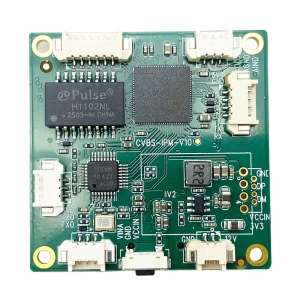
CVBS HDMI به IP رمزگذار
رمزگذار IP CVBS به اترنت در برابر سیگنال ضعیف پایدار است, قفل سیگنال کم

CVBS HDMI به IP رمزگذار
آنالوگ CVBS AV ویدئو به اترنت IP تبدیل جریان ویدئو رمزگذار برد پشتیبانی از UDP RTSP زمان کمتر
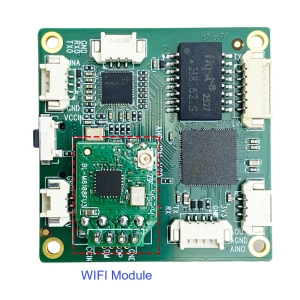
CVBS HDMI به IP رمزگذار
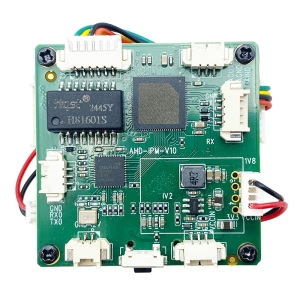
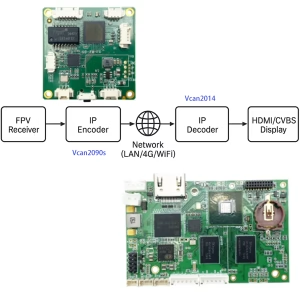
سوال بپرسید
از پاسخ شما سپاسگزاریم. ✨