






Daftar isi
Alamat streaming audio dan video real-time RTSP:
- Format: rtsp://aku p:nomor port/aliran
- Pelabuhan bawaan: 554
- ID aliran: 0 (aliran utama), 1 (aliran sekunder)
- Sebagai contoh, untuk mengambil substream dari alamat perangkat 192.168.1.188, URL-nya adalah:
- rtsp://192.168.1.1 8 8 :554 / 1
Klien (aplikasi seluler) memperoleh dan mengatur parameter kamera melalui protokol TCP;
Kamera bertindak sebagai server TCP, dengan port TCP default 8866.
Format data komunikasi TCP:
string JSON murni
Dapatkan status kamera:
Struktur data:
struktur typedef
{
karakter s8DevId[64]; // ID Perangkat, defaultnya adalah IP jika tidak ada ID yang disetel.
u32 u32TfRekam; // Merekam status kartu TF, 0: tidak ada rekaman; 1: perekaman sedang berlangsung
}JSON_DEV_STATUS_INFO_S;
Karakter perintah:
#tentukan JS_CMD _ GET_DEV_STATUS “DapatkanDevStatus”
Dengan asumsi alamat IP perangkat adalah 192.168.1.188, klien mengirimkan data JSON berikut:
{
” DapatkanDevStatus “: { }
}
Setelah kamera berhasil menerima data, itu mengembalikan data JSON berikut:
{
” DapatkanDevStatus “: {
” s8DevId ” : ” 192.168.1.188 ” ,
“ Catatan u32Tf ” : 0
}
}
Akuisisi/pengaturan parameter pengkodean video:
Struktur data:
struktur typedef
{
u8 u8VideoEncChn; //0 : aliran utama; 1: aliran sekunder;
u8 u8VideoCodecType; // 1:h264 ; 2:h265
u16 u16Lebar Video; // Lebar video
u16 u16Tinggi Video; // Tinggi video
u16 u8FrameRate; // Frame rate (1-30)
u16 u8IframeInterval; // saya- ukuran interval bingkai (1-100)
u8 u8BitrateControlMode; //Mode kontrol kecepatan bit: 0: CBR 1: VBR
u16 u16BitRateKps; // Ukuran kecepatan bit
char s8VideoSizeName[256]; // Daftar resolusi yang didukung }JSON_VIDEO_ENC_PARAM_S;
Karakter perintah:
Dapatkan parameter:
#tentukan JS_CMD_GET_VIDEO_ENC_PARAM “dapatkanVideoEncParam”
Pengaturan parameter:
#tentukan JS_CMD_SET_VIDEO_ENC_PARAM “setVideoEncParam”
Sebagai contoh:
Klien mengambil data JSON berikut yang berisi parameter pengkodean bitstream utama kamera:
{
” dapatkanVideoEncParam “: {
” u8VideoEncChn “: 0
}
}
Data JSON yang dikembalikan oleh kamera adalah sebagai berikut;
{
” dapatkanVideoEncParam “: {
” u8VideoEncChn “: 0,
“ u8VideoCodecType ” : 1,
“ u16Lebar Video ” : 3840,
” u16Tinggi Video ” : 1080,
“ u8 Kecepatan Bingkai ” : 30,
” u8IframeInterval ” : 60,
” u8BitrateControlMode ” : 0,
“ u16BitRateKps ” : 4096,
” s8VideoUkuranNama ” : ” 3840×1080,1920×540 “
}
}
Klien menyetel kecepatan bingkai streaming sekunder kamera ke 15 dan bitrate menjadi 1024K dalam format JSON, sebagai berikut:
{
” setVideoEncParam “: {
” u8VideoEncChn “: 1,
” u8FrameRate “: 15,
” u16BitRateKps “: 1024
}
}
Setelah pengaturan berhasil, kamera mengembalikan BENAR.
Akuisisi/pengaturan parameter pengkodean audio:
Struktur data:
struktur typedef
{
u8 u8Aktifkan; //0: Cacat; 1: Memungkinkan;
u32 u32ChnNum; // 1 : Mono; 2: Stereo
u8 u8Jenis Kode; //6 : AAC; 8: G711A; 9: G711U; u32 u32Tingkat Sampel; // Laju pengambilan sampel: 8000, 16000, 24000, 32000, 48000
u8 u8AkeluarVolume; // Ukuran volume: [0–100] }JSON_VIDEO_ENC_PARAM_S;
Karakter perintah:
Dapatkan parameter:
#tentukan JS_CMD_GET_AUDIO_PARAM “dapatkanAudioParam”
Pengaturan parameter:
#tentukan JS_CMD_SET_AUDIO_PARAM “setAudioParam”
Sebagai contoh:
Klien mengambil data JSON berikut dari parameter pengkodean audio kamera:
{
” dapatkanAudioParam “: { }
}
Data JSON yang dikembalikan oleh kamera adalah sebagai berikut;
{
” dapatkanAudioParam “: {
” u8Aktifkan “: 1,
“ u32ChnNum ” : 1,
“ u8Jenis Kode Encode ” : 8,
“ u32Tingkat Sampel ” : 8000,
“ u8AkeluarVolume ” : 80,
}
}
Pengaturan sisi klien untuk pengkodean audio kamera adalah AAC, stereo, dan kecepatan pengambilan sampel 48kHz. Data JSONnya adalah sebagai berikut:
{
” setAudioParam “: {
“ u32ChnNum ” : 2,
“ u8Jenis Kode Encode ” : 6,
“ u32Tingkat Sampel ” : 48000
}
}
Setelah pengaturan berhasil, kamera mengembalikan BENAR.
Akuisisi/pengaturan parameter gambar video:
Struktur data:
struktur typedef
{
u8 u8VideoIspChn; //saluran ISP; [0-4]
u8 u8 Kecerahan; // Kecerahan: [0~100]
u8 u8Kontras; // rasio kontras: [0~100]
u8 u8Hue; // Kromatisitas: [0~100]
u8 u8Saturasi; // Tingkat saturasi: [0~100]
u8 u8Ketajaman; // Ketajaman: [0~100]
}JSON_IMAGE_PARAM_S;
Karakter perintah:
Dapatkan parameter:
#tentukan JS_CMD_GET_IMAGE_PARAM “dapatkanImageParam”
Pengaturan parameter:
#tentukan JS_CMD_SET_IMAGE_PARAM “setImageParam”
Sebagai contoh:
Klien mengambil data JSON berikut dari parameter gambar untuk saluran 0 dari ISP kamera:
{
” dapatkanImageParam “: {
“ u8VideoIspChn ” : 0
}
}
Data JSON yang dikembalikan oleh kamera adalah sebagai berikut;
{
” dapatkanImageParam “: {
” u8VideoIspChn “: 0,
“ u8 Kecerahan ” : 50,
“ u8Kontras ” : 50,
“u8Hue” : 50,
“ u8Saturasi ” : 50,
“ u8 Ketajaman ” : 50
}
}
Pengaturan data JSON sisi klien untuk kecerahan kamera adalah 53, kontras adalah 60, dan saturasi adalah 56 adalah sebagai berikut:
{
” setImageParam “: {
“ u8VideoIspChn ” : 0,
“ u8 Kecerahan ” : 53,
“ u8Kontras ” : 60,
“ u8Saturasi ” : 56
}
}
Setelah pengaturan berhasil, kamera mengembalikan BENAR.
Pengambilan informasi kartu TF;
Struktur data:
struktur typedef
{
u32 u32Ukuran Total; // Ukuran total dalam MB
u32 u32Ukuran yang Digunakan; // Satuan kapasitas yang digunakan (MB)
u32 u32Ukuran yang Tersedia; // Kapasitas yang tersedia dalam MB
}JSON_SD_CARD_INFO_S;
Dapatkan parameter:
#tentukan JS_CMD_GET_SD_CARD_INFO “dapatkanSdCardInfo”
Sebagai contoh:
Klien mengambil data JSON berikut mengenai informasi kartu TF kamera:
{
” dapatkanSdCardInfo “: { }
}
Data JSON yang dikembalikan oleh kamera adalah sebagai berikut;
{
” dapatkanSdCardInfo “: {
” u32Ukuran Total “: 31254,
“ u32Ukuran yang Digunakan ” : 20000,
” u32Ukuran yang Tersedia ” : 11254
}
}
Konfigurasi perekaman kartu TF:
Struktur data:
struktur typedef
{
u8 u8AutoRecordEnable; //1: Aktifkan perekaman; 0: Nonaktifkan perekaman
u8 u8RekamStrChn; // Merekam pemilihan aliran: 0: aliran utama; 1: aliran sekunder
u8 u8PraRekamDetik; // Waktu pra-perekaman [0-10] dalam hitungan detik
u16 u16RekamDetikPerFile; // Durasi satu file rekaman [10-1000] detik
}JSON_RECORD_CONTROL_PARAM_S;
Dapatkan parameter:
#tentukan JS_CMD_GET_RECORD_CONTROL_PARAM “dapatkanRecordControlParam”
Pengaturan parameter:
#tentukan JS_CMD_SET_RECORD_CONTROL_PARAM “setRecordControlParam”
Sebagai contoh:
Klien mengambil data JSON berikut mengenai konfigurasi perekaman kartu TF kamera:
{
” dapatkanRecordControlParam “: { }
}
Data JSON yang dikembalikan oleh kamera adalah sebagai berikut;
{
” dapatkanRecordControlParam “: {
” u8AutoRecordEnable “: 1,
“ u8RekamStrChn ” : 0,
” u8Rekam Detik ” : 0,
” u16Rekam DetikPer File ” : 300
}
}
Konfigurasi IP jaringan kabel:
Struktur data:
struktur typedef
{
u8 u8Dhcp Aktifkan; // 0: IP statis; 1: DHCP;
karakter s8IP[16]; //alamat IP
char s8SubMask[16]; // Subnetmask
char s8GateWay[16]; // IP gerbang
karakter s8Dns[16]; //alamat DNS
}JSON_NET_PARAM_S;
Dapatkan parameter:
#tentukan JS_CMD_GET_NET_IP_PARAM “dapatkanNetIpParam”
Pengaturan parameter:
#tentukan JS_CMD_SET_NET_IP_PARAM “setNetIpParam”
Sebagai contoh:
Klien mengambil informasi IP kamera menggunakan data JSON sebagai berikut:
{
” dapatkanNetIpParam “: { }
}
Data JSON yang dikembalikan oleh kamera adalah sebagai berikut;
{
” dapatkanNetIpParam “: {
” u8DhcpEnable “: 0,
” s8IP ” : ” 192.168.1.188 ” ,
” s8SubMask ” : ” 255.255.255.0 ” ,
” s8GateWay ” : ” 192.168.1.1 ” ,
” s8Dns ” : ” 192.168.1.1 “
}
}
Klien dikonfigurasi dengan alamat IP kamera sebagai 192.168.3.10, gerbang sebagai 192.168.3.1, dan DNS sebagai 192.168.3.1. Data JSONnya adalah sebagai berikut:
{
” setNetIpParam “: {
” s8IP ” : ” 192.168.3.10 ” ,
” s8GateWay ” : ” 192.168.3.1 ” ,
” s8Dns ” : ” 192.168.3.1 “
}
}
Setelah pengaturan berhasil, kamera tidak mengembalikan data apa pun, dan klien perlu menyambung kembali ke perangkat dengan alamat IP baru.
Konfigurasi parameter WiFi:
Klien/aplikasi mengambil daftar SSID router yang ditemukan oleh perangkat.
{
“dapatkanDaftar APSsid” :{ }
}
Perangkat akan mengembalikan daftar SSID: Pilih SSID rute dari daftar untuk dihubungkan.
Konfigurasikan Wi-Fi perangkat Anda agar berfungsi dalam mode STA:
{
“setWifiSsidParam”:{
“u8Mode”: 0,
“s8Ss”: ” tahunx8888 “,
“s8PassWd”: “987545598400
}
}
Konfigurasikan Wi-Fi perangkat agar berfungsi dalam mode AP hotspot:
{
“setWifiSsidParam”:{
“u8Mode”: 1
}
}
Dapatkan status Wi-Fi perangkat:
{
“dapatkanWifiSsidParam” : { }
}
Sinkronisasi waktu:
Struktur data:
struktur typedef
{
u8 u8Zona Waktu; // Nilai zona waktu RT_TIMEZONE_E
char s8DateTime[64]; // Format waktu: “2019-06-12_12:56:59_3”
}JSON_DATE_TIME_INFO_S;
Definisi nilai zona waktu:
typedef enum
{
RT_TIMEZONE_InternationalDateLineWest = 0, /* UTC-12:00 */
RT_TIMEZONE_MidwayIslandSamoa = 1, /* UTC-11:00 */
RT_TIMEZONE_Hawaii = 2, /* UTC-10:00 */
RT_TIMEZONE_Alaska = 3, /* UTC-9:00 */
RT_TIMEZONE_TijuanaCalifornia = 4, /* UTC-8:00 */
RT_TIMEZONE_PacificTimeUSCanada = 5, /* UTC-8:00 */
RT_TIMEZONE_MountainTimeUSCanada = 6, /* UTC-7:00 */
RT_TIMEZONE_ChihuahuaLapazMazatlan = 7, /* UTC-7:00 */
RT_TIMEZONE_Arizona = 8, /* UTC-7:00 */
RT_TIMEZONE_Saskatchewan = 9, /* UTC-7:00 */
RT_TIMEZONE_GuaddlajaraMexicoCityMonterrey = 10, /* UTC-6:00 */
RT_TIMEZONE_CentralTimeUSCanada = 11, /* UTC-6:00 */
RT_TIMEZONE_Amerika Tengah = 12, /* UTC-6:00 */
RT_TIMEZONE_BogotaLimaQuito = 13, /* UTC-5:00 */
RT_TIMEZONE_EasternTimeUSCanada = 14, /* UTC-5:00 */
RT_TIMEZONE_IndianaTimur = 15, /* UTC-5:00 */
RT_TIMEZONE_Caracas = 16, /* UTC-4:30 */
RT_TIMEZONE_AtlanticTimeCanada = 17, /* UTC-4:00 */
RT_TIMEZONE_GeorgetownLapazSanJuan = 18, /* UTC-4:00 */
RT_TIMEZONE_Santiago = 19, /* UTC-4:00 */
RT_TIMEZONE_NenfoundTanah = 20, /* UTC-3:30 */
RT_TIMEZONE_Brasilia = 21, /* UTC-3:00 */
RT_TIMEZONE_BuenosAiresGeorgentown = 22, /* UTC-3:00 */
RT_TIMEZONE_Greenland = 23, /* UTC-3:00 */
RT_TIMEZONE_Atlantik Tengah = 24, /* UTC-2:00 */
RT_TIMEZONE_CapeVerdeIs = 25, /* UTC-1:00 (Republik Tanjung Verde) */
RT_TIMEZONE_Azores = 26, /* UTC-1:00 (Azores) */
RT_TIMEZONE_GreenwichMeanTimeDublinEdinburghLisbonLondon = 27, /* UTC-0:00 */
RT_TIMEZONE_Casablanca = 28, /* UTC-0:00 */
RT_TIMEZONE_Monrovia = 29, /* UTC-0:00 */
RT_TIMEZONE_AmsterdamBerlinBernRomeStockholmVienna = 30, /* UTC+1:00 */
RT_TIMEZONE_BelgradeBratislavaBudapestLjubljanaPraha = 31, /* UTC+1:00 */
RT_TIMEZONE_BrusselsCopenhagenMadridParis = 32, /* UTC+1:00 */
RT_TIMEZONE_SarajevoSkopjeWarsawZagreb = 33, /* UTC+1:00 */
RT_TIMEZONE_Afrika Tengah Barat = 34, /* UTC+1:00 */
RT_TIMEZONE_RarePretoria = 35, /* UTC+2:00 */
RT_TIMEZONE_HelsinkiKyivRigaSofiaTallinnVilnius = 36, /* UTC+2:00 */
RT_TIMEZONE_Kairo = 37, /* UTC+2:00 */
RT_TIMEZONE_Minsk = 38, /* UTC+2:00 */
RT_TIMEZONE_AthenaBucharestIstanbul = 39, /* UTC+2:00 */
RT_TIMEZONE_Yerusalem = 40, /* UTC+2:00 */
RT_TIMEZONE_Baghdad = 41, /* UTC+3:00 */
RT_TIMEZONE_Tbilisi = 42, /* UTC+3:00 */
RT_TIMEZONE_KuwaitRiyadh = 43, /* UTC+3:00 */
RT_TIMEZONE_MoscowStPetersburgVolgograd = 44, /* UTC+3:00 */
RT_TIMEZONE_Nairobi = 45, /* UTC+3:00 */
RT_TIMEZONE_Teheran = 46, /* UTC+3:30 */
RT_TIMEZONE_Abu Dhabi Muscat = 47, /* UTC+4:00 */
RT_TIMEZONE_BakuYerevan = 48, /* UTC+4:00 */
RT_TIMEZONE_Kabul = 49, /* UTC+4:30 */
RT_TIMEZONE_Tashkent = 50, /* UTC+5:00 */
RT_TIMEZONE_Ekaterinburg = 51, /* UTC+5:00 */
RT_TIMEZONE_IslamabadKarachi = 52, /* UTC+5:00 */
RT_TIMEZONE_ChennaiKolkataMumbaiNewDelhi = 53, /* UTC+5:30 */
RT_TIMEZONE_Kathmandu = 54, /* UTC+5:45 */
RT_TIMEZONE_AlmatyNovosibirsk = 55, /* UTC+6:00 */
RT_TIMEZONE_AstanaDhaka = 56, /* UTC+6:00 */
RT_TIMEZONE_Rangoon = 57, /* UTC+6:30 */
RT_TIMEZONE_Krasnoyarsk = 58, /* UTC+7:00 */
RT_TIMEZONE_BangkokHanoiJakarta = 59, /* UTC+7:00 */
RT_TIMEZONE_BeijingChongqingHongKongUrumqi = 60, /* UTC+8:00 */
RT_TIMEZONE_KualaLumpurSingapore = 61, /* UTC+8:00 */
RT_TIMEZONE_Perth = 62, /* UTC+8:00 */
RT_TIMEZONE_Taipei = 63, /* UTC+8:00 */
RT_TIMEZONE_IrkutskUlaanBataar = 64, /* UTC+8:00 */
RT_TIMEZONE_OsakaSapporoTokyo = 65, /* UTC+9:00 */
RT_TIMEZONE_Seoul = 66, /* UTC+9:00 */
RT_TIMEZONE_Yakutsk = 67, /* UTC+9:00 */
RT_TIMEZONE_Adelaide = 68, /* UTC+9:30 */
RT_TIMEZONE_Brisbane = 69, /* UTC+10:00 */
RT_TIMEZONE_Vladivostok = 70, /* UTC+10:00 */
RT_TIMEZONE_GuamMoresby = 71, /* UTC+10:00 */
RT_TIMEZONE_Hobart = 72, /* UTC+10:00 */
RT_TIMEZONE_CanberraMelbourneSydney = 73, /* UTC+10:00 */
RT_TIMEZONE_MagadanSolomonKaledonia Baru = 74, /* UTC+11:00 */
RT_TIMEZONE_AucklandWellington = 75, /* UTC+12:00 */
RT_TIMEZONE_FijiKamchatkaMarshallIs = 76, /* UTC+12:00 */
RT_TIMEZONE_Nukalofa = 77, /* UTC+13:00 */
RT_TIMEZONE_BUTT
}RT_TIMEZONE_E;
Dapatkan parameter:
#tentukan JS_CMD_GET_DEV_DATE_TIME “DapatkanDevDateTime”
Pengaturan parameter:
#tentukan JS_CMD_SET_DEV_DATE_TIME “setDevDateTime”
Dapatkan data JSON waktu perangkat :
{
” DapatkanDevDateTime ” : {}
}
Perangkat mengembalikan data JSON:
{
” DapatkanDevDateTime ” : {
“u8Zona Waktu” : 60,
“s8DateTime” : “2020-03-06_12:56:59_3”
}
}
Data JSON menyetel waktu perangkat ke hari Kamis, Maret 12, 2020, di 3:38:30 SORE:
{
” setDevDateTime ” : {
“s8DateTime” : “2020-03-12_15:38:30_4”
}
}
Perangkat mengembalikan TRUE setelah pengaturan berhasil.
Manajemen Peralatan:
Data JSON untuk memulai ulang perangkat:
{
” setSysControlParam ” : {
“u8Mulai ulang” : 1
}
}
Data JSON untuk memulihkan pengaturan pabrik:
{
” setSysControlParam ” : {
“u8ResetDefault” : 1
}
}
Memformat data JSON kartu SD:
{
” setSysControlParam ” : {
“u8FormatSdCard” : 1
}
}
kendali PTZ:
Struktur data:
struktur typedef
{
u8 u8Cmd; // Kode perintah PTZ_CONTROL_CODE
u8 u8Kecepatan; // Kecepatan (1-64)
u8 u8Data1; // Disimpan; ini akan digunakan untuk posisi preset.
u8 u8Data2; // Disimpan, ini akan digunakan untuk perintah PTZ khusus.
}JSON_PTZ_CONTROL_S;
enum PTZ_CONTROL_CODE
{
PTZ_BERHENTI = 0, // Berhenti
PTZ_UP=1, // Naik
PTZ_BAWAH=2, // turun
PTZ_LEFT=3, // Kiri
PTZ_KANAN=4, // kanan
PTZ_LEFT_UP=5, // kiri atas
PTZ_LEFT_DOWN=6, // kiri bawah
PTZ_RIGHT_UP=7, // kanan atas
PTZ_RIGHT_DOWN=8, // 8 : kanan bawah
PTZ_ZOOM_IN=9, // 9 : Perbesar
PTZ_ZOOM_OUT=10, // 10: PERBESAR=10, // 10 : PERBESAR=10
PTZ_FOCUS_DEKAT=11, // 11 : Berfokus pada dekat
PTZ_FOCUS_FAR=12, // 12 : Fokus pada jauh
PTZ_IRIS_ADD=13, // 13 : Peningkatan bukaan
PTZ_IRIS_REDUCE=14, // 14 : Bukaan berkurang
PTZ_GOTO_POINT = 15, // 15 : Panggil bit preset
PTZ_CLEAR_POINT = 16, // 16 : Hapus bit preset
PTZ_PERSET_POINT = 17, // 17 : Atur bit preset
PTZ_AUTO_RUN = 18, // 18 : Pemindaian otomatis horizontal
};
kendali PTZ:
#tentukan JS_CMD_PTZ_CONTROL “PtzControlCmd”
Perintah JSON dikendalikan oleh Ptz:
- Bergerak ke bawah dengan kecepatan 30:
{
” PtzControlCmd “: {
” u8Cmd “: 2,
” u8Kecepatan ” : 30
}
}
- 1. Atur posisi preset 2:
{
” PtzControlCmd “: {
” u8Cmd “: 17,
“u8Kecepatan” : 30,
“u8Data1” : 2
}
}
Pencarian file kartu TF:
( 1) Perintah untuk mencari semua file video dalam jangka waktu tertentu di hari yang sama:
{
“cariRecordFileList”:{
“u32Tahun”:2020, // tahun
“u8Bulan”:7, // Bulan
“u8Hari”:14, // Hari
“u8Jam Mulai”:0, // Waktu mulai dalam hitungan jam
“u8StartMinute”:0, // Waktu mulai dalam hitungan menit
“u8Jam Akhir”:23, // Waktu berakhir dalam hitungan jam
“u8Menit Akhir”:59, // Waktu berakhir dalam hitungan menit
“u8EncChn”:0, // 0 adalah nilai default.
“u8RekamTye”:0, // Jenis berkas: 0: Semua file, 1: Perekaman terjadwal; 2: Rekaman alarm; 3: Gambar;
“u32StartIdx”:0, // Nomor urut file awal
“u32Jumlah yang Diharapkan”: 10 // Jumlah file yang dikembalikan berdasarkan permintaan, saat ini nilai maksimumnya adalah 32.
}
}
Data dikembalikan oleh perangkat:
{
“cariRecordFileList”: {
“u32RecordFileTotalCount”: 7, // Jumlah total file yang dicari dalam jangka waktu ini
“stRecordFileList”: [ // Nama file dengan jalur, ukuran file]
“/dev/disk/0/part0/rec-pic/20200714/0/000_180149_0_0300_2.mp4”, 251649649, “/dev/disk/0/part0/rec-pic/20200714/0/001_180644_0_0169_256.mp4”, 144935215, “/dev/disk/0/part0/rec-pic/20200714/0/002_181001_0_0300_2.mp4”, 251650689, “/dev/disk/0/part0/rec-pic/20200714/0/003_181458_0_0300_2.mp4”, 251657016, “/dev/disk/0/part0/rec-pic/20200714/0/004_181958_0_0300_2.mp4”, 301449467, “/dev/disk/0/part0/rec-pic/20200714/0/005_182458_0_0000_256.mp4”, 37801991, “/dev/disk/0/part0/rec-pic/20200714/0/006_182642_0_0244_256.mp4”, 200069913
]
}
}
Ambil gambar JPG secara manual:
Kirim perintah berikut ke perangkat.
{
“PanduanSnapJpg”:{
}
}
Berhasil kembali:
{
“PanduanSnapJpg”: BENAR
}
Kontrol PWM menyesuaikan kecerahan LED:
Dapatkan nilai PWM saat ini:
{
“dapatkanPwmParam”:{
“u32PwmChn”: 0
}
}
Berhasil kembali:
{
“dapatkanPwmParam”:{
“u32PwmChn”:0,
“u8Aktifkan”:1,
“u8Nilai Tugas”:20
}
}
- Tetapkan nilai PWM:
{
“setPwmParam”:{
“u32PwmChn”: 0,
“u8Aktifkan”: 1,
“u8Nilai Tugas”: 60
}
}
Berhasil kembali:
{
“setPwmParam”:BENAR
}
Catatan : u32PwmChn defaultnya adalah 0 dan tidak boleh diubah secara sembarangan. u8Enable memiliki nilai 0/1, dimana 0 menonaktifkan output PWM dan 1 mengaktifkan keluaran PWM. u8DutyValue memiliki rentang nilai 0-100.
17. Akuisisi/Pengaturan Teks OSD:
(1) Dapatkan saluran video yang ditentukan, Parameter teks OSD:
{“dapatkanVideoOsdTextInfo”:{
“u8IspChn”:0,
“u8TextIdx”:1
}}
Berhasil kembali:
{
“dapatkanVideoOsdTextInfo”:{
“u8IspChn”:0, // saluran video 0, mengisi 0 untuk satu kamera
“u8TextIdx”:1, // Nomor kotak teks OSD, mendukung beberapa kotak teks.
“u8Aktifkan”:0, // Memungkinkan, 0: jangan tampilkan; 1: menampilkan
“u16XRatioBase50000”:40000, // Koordinat relatif dari posisi horizontal, dengan nilai maksimal sebesar 50000.
“u16YRatioBase50000”:1600, // Koordinat relatif dari posisi vertikal, dengan nilai maksimal sebesar 50000.
“u8FgTransparansi”:10, // Transparansi latar depan [0-255]
“u8BgTransparansi”:255, // Nilai transparansi latar belakang [0-255]
“u8TipeUkuran”:1, // Ukuran teks, rentang nilai [0-3]
“u32TextColor_BGRA8888”:4294967295, // Nilai ARGB888 warna teks
“aszTeks”:”” // Kotak teks menampilkan string konten
}
}
(2) Atur saluran video yang ditentukan, Parameter teks OSD:
{
“setVideoOsdTextInfo”:{
“u8IspChn”:0,
“u8TextIdx”:1,
“u8Aktifkan”:1,
“u16XRatioBase50000”:40000,
“u16YRatioBase50000”:1600,
“u8FgTransparansi”:10,
“u8BgTransparansi”:255,
“u8TipeUkuran”:1,
“u32TextColor_BGRA8888”:4294967295,
“aszTeks”:”tes 11111222233334444″
}
}
Berhasil kembali:
{
“setVideoOsdTextInfo”:BENAR
}
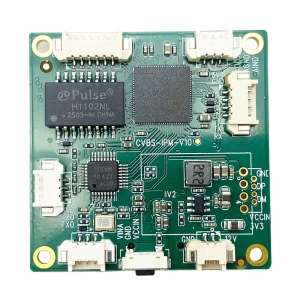
CVBS HDMI ke IP Encoder
CVBS ke Ethernet IP Encoder stabil dalam bukti Sinyal lemah, Kunci Sinyal Rendah

CVBS HDMI ke IP Encoder
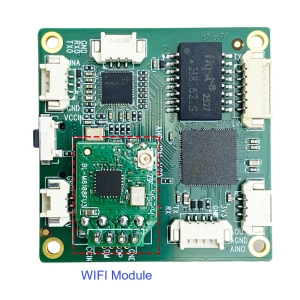
CVBS HDMI ke IP Encoder
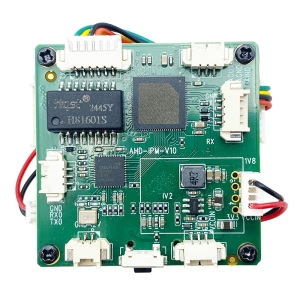
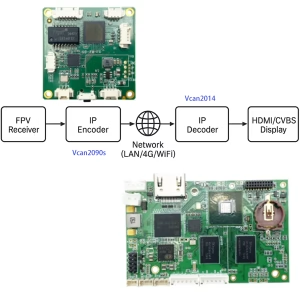
Berikan pertanyaan
Terima kasih atas tanggapan Anda. ✨