





Table of Contents
RTSP实时音视频流地址:
- 格式: 实时传输协议://ip:端口/流编号
- 默认端口: 554
- 码流ID: 0 (主流), 1 (次流)
- 例如, 从设备地址检索子流 192.168.1.188, 网址是:
- 实时传输协议://192.168.1.1 8 8 :554 / 1
客户 (移动应用程序) 通过TCP协议获取和设置相机参数;
相机充当 TCP 服务器, 默认 TCP 端口是 8866.
TCP通讯数据格式:
纯 JSON 字符串
获取相机状态:
数据结构:
类型定义结构
{
字符 s8DevId[64]; // 设备ID, 如果没有设置 ID,则默认为 IP.
u32 u32TfRecord; // TF卡录音状态, 0: 没有录音; 1: 录音正在进行中
}JSON_DEV_STATUS_INFO_S;
命令字符:
#定义 JS_CMD_GET_DEV_STATUS “获取开发状态”
假设设备的IP地址是 192.168.1.188, 客户端发送以下JSON数据:
{
” 获取开发状态 “: { }
}
相机成功接收数据后, 它返回以下 JSON 数据:
{
” 获取开发状态 “: {
” s8DevId ” : ” 192.168.1.188 ” ,
“u32TfRecord” : 0
}
}
视频编码参数获取/设置:
数据结构:
类型定义结构
{
u8 u8VideoEncChn; //0 : 主流; 1: 次流;
u8 u8VideoCodec类型; // 1:h264 ; 2:p265
u16 u16视频宽度; // 视频宽度
u16 u16视频高度; // 视频高度
u16 u8帧率; // 帧率 (1-30)
u16 u8IframeInterval; // 我- 帧间隔大小 (1-100)
u8 u8比特率控制模式; //码率控制方式: 0: 社区商业银行 1: 可变比特率
u16 u16BitRateKps; // 比特率大小
char s8VideoSizeName[256]; // 支持的分辨率列表 }JSON_VIDEO_ENC_PARAM_S;
命令字符:
获取参数:
#定义 JS_CMD_GET_VIDEO_ENC_PARAM “获取视频编码参数”
设置参数:
#定义 JS_CMD_SET_VIDEO_ENC_PARAM “设置视频编码参数”
例如:
客户端检索以下 JSON 数据,其中包含相机主码流的编码参数:
{
” 获取视频编码参数 “: {
” u8VideoEncChn “: 0
}
}
相机返回的JSON数据如下;
{
” 获取视频编码参数 “: {
” u8VideoEncChn “: 0,
“ u8VideoCodecType ” : 1,
“ u16VideoWidth ” : 3840,
” u16视频高度 ” : 1080,
“u8帧率” : 30,
” u8Iframe间隔 ” : 60,
” u8比特率控制模式 ” : 0,
“ u16BitRateKps ” : 4096,
” s8视频大小名称 ” : ” 3840×1080,1920×540 “
}
}
客户端将摄像机辅流帧率设置为 15 以及 JSON 格式的比特率 1024K, 如下:
{
” 设置视频编码参数 “: {
” u8VideoEncChn “: 1,
” u8帧率 “: 15,
” u16BitRateKps “: 1024
}
}
设置成功后, 相机返回 TRUE.
音频编码参数获取/设置:
数据结构:
类型定义结构
{
u8 u8启用; //0: 禁用; 1: 使能够;
u32 u32ChnNum; // 1 : 单核细胞增多症; 2: 立体声
u8 u8编码类型; //6 : 亚克力; 8: G711A; 9: G711U; u32 u32采样率; // 采样率: 8000, 16000, 24000, 32000, 48000
u8 u8Aout音量; // 体积大小: [0–100] }JSON_VIDEO_ENC_PARAM_S;
命令字符:
获取参数:
#定义 JS_CMD_GET_AUDIO_PARAM “获取音频参数”
设置参数:
#定义 JS_CMD_SET_AUDIO_PARAM “设置音频参数”
例如:
客户端检索摄像头音频编码参数如下JSON数据:
{
” 获取音频参数 “: { }
}
相机返回的JSON数据如下;
{
” 获取音频参数 “: {
” u8启用 “: 1,
“u32ChnNum” : 1,
“ u8EncodeType ” : 8,
“u32采样率” : 8000,
“ u8AoutVolume ” : 80,
}
}
客户端设置摄像头音频编码为AAC, 立体声, 采样率为 48kHz. JSON数据如下:
{
” 设置音频参数 “: {
“u32ChnNum” : 2,
“ u8EncodeType ” : 6,
“u32采样率” : 48000
}
}
设置成功后, 相机返回 TRUE.
视频图像参数获取/设置:
数据结构:
类型定义结构
{
u8 u8VideoIspChn; //ISP通道; [0-4]
u8 u8亮度; // 亮度: [0〜100]
u8 u8对比; // 对比度: [0〜100]
u8 u8色调; // 色度: [0〜100]
u8 u8饱和度; // 饱和度: [0〜100]
u8 u8锐度; // 清晰度: [0〜100]
}JSON_IMAGE_PARAM_S;
命令字符:
获取参数:
#定义 JS_CMD_GET_IMAGE_PARAM “获取图像参数”
设置参数:
#定义 JS_CMD_SET_IMAGE_PARAM “设置图像参数”
例如:
客户端检索通道图像参数的以下 JSON 数据 0 相机的ISP:
{
” 获取图像参数 “: {
“ u8VideoIspChn ” : 0
}
}
相机返回的JSON数据如下;
{
” 获取图像参数 “: {
” u8VideoIspChn “: 0,
“ u8亮度 ” : 50,
“u8对比” : 50,
“u8Hue” : 50,
“u8饱和度” : 50,
“ u8锐度 ” : 50
}
}
相机亮度的客户端 JSON 数据设置为 53, 对比是 60, 饱和度是 56 如下:
{
” 设置图像参数 “: {
“ u8VideoIspChn ” : 0,
“ u8亮度 ” : 53,
“u8对比” : 60,
“u8饱和度” : 56
}
}
设置成功后, 相机返回 TRUE.
TF卡信息检索;
数据结构:
类型定义结构
{
u32 u32总大小; // 总大小(MB)
u32 u32已用大小; // 使用容量单位 (MB)
u32 u32可用大小; // 可用容量(MB)
}JSON_SD_CARD_INFO_S;
获取参数:
#define JS_CMD_GET_SD_CARD_INFO “getSdCardInfo”
例如:
The client retrieves the following JSON data regarding the camera’s TF card information:
{
” getSdCardInfo “: { }
}
相机返回的JSON数据如下;
{
” getSdCardInfo “: {
” u32TotalSize “: 31254,
“ u32UsedSize ” : 20000,
” u32AvailableSize ” : 11254
}
}
TF卡录音配置:
数据结构:
类型定义结构
{
u8 u8AutoRecordEnable; //1: Enable recording; 0: Disable recording
u8 u8RecordStrChn; // Recording stream selection: 0: primary stream; 1: 次流
u8 u8PreRecordSeconds; // Pre-recording time [0-10] in seconds
u16 u16RecordSecondsPerFile; // Duration of a single recording file [10-1000] 秒
}JSON_RECORD_CONTROL_PARAM_S;
获取参数:
#define JS_CMD_GET_RECORD_CONTROL_PARAM “getRecordControlParam”
设置参数:
#define JS_CMD_SET_RECORD_CONTROL_PARAM “setRecordControlParam”
例如:
The client retrieves the following JSON data regarding the camera’s TF card recording configuration:
{
” getRecordControlParam “: { }
}
相机返回的JSON数据如下;
{
” getRecordControlParam “: {
” u8AutoRecordEnable “: 1,
“ u8RecordStrChn ” : 0,
” u8PrecordSeconds ” : 0,
” u16RecordSecondsPerFile ” : 300
}
}
有线网络IP配置:
数据结构:
类型定义结构
{
u8 u8DhcpEnable; // 0: 静态IP; 1: 动态主机配置协议;
char s8IP[16]; //IP地址
char s8SubMask[16]; // Subnet mask
char s8GateWay[16]; // Gateway IP
char s8Dns[16]; //DNS address
}JSON_NET_PARAM_S;
获取参数:
#定义 JS_CMD_GET_NET_IP_PARAM “获取网络IP参数”
设置参数:
#定义 JS_CMD_SET_NET_IP_PARAM “设置网络IP参数”
例如:
客户端使用JSON数据获取摄像机的IP信息如下:
{
” 获取网络IP参数 “: { }
}
相机返回的JSON数据如下;
{
” 获取网络IP参数 “: {
” u8Dhcp启用 “: 0,
” s8IP ” : ” 192.168.1.188 ” ,
” s8子掩码 ” : ” 255.255.255.0 ” ,
” s8网关 ” : ” 192.168.1.1 ” ,
” s8Dns ” : ” 192.168.1.1 “
}
}
客户端配置摄像机的IP地址为 192.168.3.10, 网关作为 192.168.3.1, 和 DNS 作为 192.168.3.1. JSON数据如下:
{
” 设置网络IP参数 “: {
” s8IP ” : ” 192.168.3.10 ” ,
” s8网关 ” : ” 192.168.3.1 ” ,
” s8Dns ” : ” 192.168.3.1 “
}
}
设置成功后, 相机不返回任何数据, 并且客户端需要使用新的IP地址重新连接到设备.
WiFi参数配置:
客户端/应用程序检索设备找到的路由器的 SSID 列表.
{
“获取APSsid列表” :{ }
}
设备将返回 SSID 列表: 从列表中选择要连接的路由 SSID.
将设备的 Wi-Fi 配置为在 STA 模式下工作:
{
“设置WifiSsid参数”:{
“u8模式”: 0,
“s8Ss”: ” yrsx8888 “,
“s8密码Wd”: “987545598400
}
}
配置设备Wi-Fi工作在热点AP模式:
{
“设置WifiSsid参数”:{
“u8模式”: 1
}
}
获取设备的 Wi-Fi 状态:
{
“获取WifiSsid参数” : { }
}
时间同步:
数据结构:
类型定义结构
{
u8 u8时区; // 时区值 RT_TIMEZONE_E
char s8DateTime[64]; // 时间格式: “2019-06-12_12:56:59_3”
}JSON_DATE_TIME_INFO_S;
时区值的定义:
类型定义枚举
{
RT_TIMEZONE_InternationalDateLineWest = 0, /* UTC-12:00 */
RT_TIMEZONE_中途岛萨摩亚 = 1, /* UTC-11:00 */
RT_TIMEZONE_夏威夷 = 2, /* UTC-10:00 */
RT_TIMEZONE_阿拉斯加 = 3, /* UTC-9:00 */
RT_TIMEZONE_TijuanaCalifornian = 4, /* UTC-8:00 */
RT_TIMEZONE_太平洋时间美国加拿大 = 5, /* UTC-8:00 */
RT_TIMEZONE_MountainTimeUS加拿大 = 6, /* UTC-7:00 */
RT_TIMEZONE_ChihuahuaLapazMazatlan = 7, /* UTC-7:00 */
RT_TIMEZONE_亚利桑那 = 8, /* UTC-7:00 */
RT_TIMEZONE_萨斯喀彻温省 = 9, /* UTC-7:00 */
RT_TIMEZONE_Guaddlajara墨西哥城蒙特雷 = 10, /* UTC-6:00 */
RT_TIMEZONE_CentralTime美国加拿大 = 11, /* UTC-6:00 */
RT_TIMEZONE_CentralAmerica = 12, /* UTC-6:00 */
RT_TIMEZONE_BogotaLimaQuito = 13, /* UTC-5:00 */
RT_TIMEZONE_EasternTime美国加拿大 = 14, /* UTC-5:00 */
RT_TIMEZONE_印第安纳东部 = 15, /* UTC-5:00 */
RT_TIMEZONE_加拉加斯 = 16, /* UTC-4:30 */
RT_TIMEZONE_大西洋时间加拿大 = 17, /* UTC-4:00 */
RT_TIMEZONE_GeorgetownLapazSanJuan = 18, /* UTC-4:00 */
RT_TIMEZONE_圣地亚哥 = 19, /* UTC-4:00 */
RT_TIMEZONE_NenfoundLand = 20, /* UTC-3:30 */
RT_TIMEZONE_巴西利亚 = 21, /* UTC-3:00 */
RT_TIMEZONE_布宜诺斯艾利斯乔治敦 = 22, /* UTC-3:00 */
RT_TIMEZONE_格陵兰 = 23, /* UTC-3:00 */
RT_TIMEZONE_MidAtlantic = 24, /* UTC-2:00 */
RT_TIMEZONE_佛得角= 25, /* UTC-1:00 (佛得角共和国) */
RT_TIMEZONE_亚速尔群岛 = 26, /* UTC-1:00 (亚速尔群岛) */
RT_TIMEZONE_格林威治平均时间都柏林爱丁堡里斯本伦敦 = 27, /* 世界标准时间-0:00 */
RT_TIMEZONE_卡萨布兰卡 = 28, /* 世界标准时间-0:00 */
RT_TIMEZONE_蒙罗维亚 = 29, /* 世界标准时间-0:00 */
RT_TIMEZONE_阿姆斯特丹柏林伯尔尼罗马斯德哥尔摩维也纳 = 30, /* 世界标准时间+1:00 */
RT_TIMEZONE_贝尔格莱德布拉迪斯拉发布达佩斯卢布尔雅那布拉格 = 31, /* 世界标准时间+1:00 */
RT_TIMEZONE_布鲁塞尔哥本哈根马德里巴黎 = 32, /* 世界标准时间+1:00 */
RT_TIMEZONE_萨拉热窝斯科普里华沙萨格勒布 = 33, /* 世界标准时间+1:00 */
RT_TIMEZONE_WestCentralAfrica = 34, /* 世界标准时间+1:00 */
RT_TIMEZONE_Rare比勒陀利亚 = 35, /* 世界标准时间+2:00 */
RT_TIMEZONE_赫尔辛基基辅里加索非亚塔林维尔纽斯 = 36, /* 世界标准时间+2:00 */
RT_TIMEZONE_开罗 = 37, /* 世界标准时间+2:00 */
RT_TIMEZONE_明斯克 = 38, /* 世界标准时间+2:00 */
RT_TIMEZONE_Athens布加勒斯特伊斯坦布尔 = 39, /* 世界标准时间+2:00 */
RT_TIMEZONE_耶路撒冷 = 40, /* 世界标准时间+2:00 */
RT_TIMEZONE_巴格达 = 41, /* 世界标准时间+3:00 */
RT_TIMEZONE_第比利斯 = 42, /* 世界标准时间+3:00 */
RT_TIMEZONE_Kuwait利雅得 = 43, /* 世界标准时间+3:00 */
RT_TIMEZONE_Moscow圣彼得堡伏尔加格勒 = 44, /* 世界标准时间+3:00 */
RT_TIMEZONE_内罗毕 = 45, /* 世界标准时间+3:00 */
RT_TIMEZONE_德黑兰 = 46, /* 世界标准时间+3:30 */
RT_TIMEZONE_阿布扎比马斯喀特 = 47, /* 世界标准时间+4:00 */
RT_TIMEZONE_巴库埃里温 = 48, /* 世界标准时间+4:00 */
RT_TIMEZONE_喀布尔 = 49, /* 世界标准时间+4:30 */
RT_TIMEZONE_塔什干 = 50, /* 世界标准时间+5:00 */
RT_TIMEZONE_叶卡捷琳堡 = 51, /* 世界标准时间+5:00 */
RT_TIMEZONE_Islamabad卡拉奇 = 52, /* 世界标准时间+5:00 */
RT_TIMEZONE_Chennai加尔各答孟买新德里= 53, /* 世界标准时间+5:30 */
RT_TIMEZONE_加德满都 = 54, /* 世界标准时间+5:45 */
RT_TIMEZONE_阿拉木图新西伯利亚 = 55, /* 世界标准时间+6:00 */
RT_TIMEZONE_阿斯塔纳达卡 = 56, /* 世界标准时间+6:00 */
RT_TIMEZONE_仰光 = 57, /* 世界标准时间+6:30 */
RT_TIMEZONE_克拉斯诺亚尔斯克 = 58, /* 世界标准时间+7:00 */
RT_TIMEZONE_曼谷河内雅加达 = 59, /* 世界标准时间+7:00 */
RT_TIMEZONE_BeijingChongqingHongKongUrumqi = 60, /* 世界标准时间+8:00 */
RT_TIMEZONE_KualaLumpur新加坡 = 61, /* 世界标准时间+8:00 */
RT_TIMEZONE_珀斯 = 62, /* 世界标准时间+8:00 */
RT_TIMEZONE_台北 = 63, /* 世界标准时间+8:00 */
RT_TIMEZONE_伊尔库茨克UlaanBataar = 64, /* 世界标准时间+8:00 */
RT_TIMEZONE_大阪札幌东京 = 65, /* 世界标准时间+9:00 */
RT_TIMEZONE_首尔 = 66, /* 世界标准时间+9:00 */
RT_TIMEZONE_雅库茨克 = 67, /* 世界标准时间+9:00 */
RT_TIMEZONE_阿德莱德 = 68, /* 世界标准时间+9:30 */
RT_TIMEZONE_布里斯班 = 69, /* 世界标准时间+10:00 */
RT_TIMEZONE_符拉迪沃斯托克 = 70, /* 世界标准时间+10:00 */
RT_TIMEZONE_关岛莫尔兹比 = 71, /* 世界标准时间+10:00 */
RT_TIMEZONE_霍巴特 = 72, /* 世界标准时间+10:00 */
RT_TIMEZONE_堪培拉墨尔本悉尼 = 73, /* 世界标准时间+10:00 */
RT_TIMEZONE_MagadanSolomon新喀里多尼亚 = 74, /* 世界标准时间+11:00 */
RT_TIMEZONE_奥克兰惠灵顿 = 75, /* 世界标准时间+12:00 */
RT_TIMEZONE_FijiKamchatkaMarshallIs = 76, /* 世界标准时间+12:00 */
RT_TIMEZONE_努库阿洛法 = 77, /* 世界标准时间+13:00 */
RT_TIMEZONE_BUTT
}RT_TIMEZONE_E;
获取参数:
#定义 JS_CMD_GET_DEV_DATE_TIME “获取开发日期时间”
设置参数:
#定义 JS_CMD_SET_DEV_DATE_TIME “设置DevDateTime”
获取设备时间JSON数据 :
{
” 获取开发日期时间 ” : {}
}
设备返回JSON数据:
{
” 获取开发日期时间 ” : {
“u8时区” : 60,
“s8日期时间” : “2020-03-06_12:56:59_3”
}
}
JSON 数据将设备时间设置为星期四, 行进 12, 2020, 在 3:38:30 下午:
{
” 设置DevDateTime ” : {
“s8日期时间” : “2020-03-12_15:38:30_4”
}
}
设置成功后设备返回 TRUE.
设备管理:
用于重启设备的 JSON 数据:
{
” 设置系统控制参数 ” : {
“u8重启” : 1
}
}
用于恢复出厂设置的 JSON 数据:
{
” 设置系统控制参数 ” : {
“u8重置默认” : 1
}
}
格式化SD卡JSON数据:
{
” 设置系统控制参数 ” : {
“u8FormatSdCard” : 1
}
}
云台控制:
数据结构:
类型定义结构
{
u8 u8Cmd; // 命令代码 PTZ_CONTROL_CODE
u8 u8速度; // 速度 (1-64)
u8 u8数据1; // 预订的; 这将用于预设位置.
u8 u8数据2; // 预订的, 这将用于特殊 PTZ 命令.
}JSON_PTZ_CONTROL_S;
枚举 PTZ_CONTROL_CODE
{
云台停止= 0, // 停止
云台_向上=1, // 向上
云台_向下=2, // 向下
云台_左=3, // 左边
云台_右=4, // 正确的
云台_左_上=5, // 左上角
云台_左_下=6, // 左下角
PTZ_RIGHT_UP=7, // 右上角
PTZ_RIGHT_DOWN=8, // 8 : 右下角
PTZ_ZOOM_IN=9, // 9 : 放大
PTZ_ZOOM_OUT=10, // 10: 缩小=10, // 10 : 缩小=10
PTZ_FOCUS_NEAR=11, // 11 : 聚焦于近处
PTZ_FOCUS_FAR=12, // 12 : 聚焦远方
PTZ_IRIS_ADD=13, // 13 : 光圈增大
PTZ_IRIS_REDUCE=14, // 14 : 光圈缩小
PTZ_GOTO_POINT = 15, // 15 : 调用预置位
PTZ_CLEAR_POINT = 16, // 16 : 清除预设位
PTZ_PERSET_POINT = 17, // 17 : 设置预设位
云台自动运行= 18, // 18 : 水平自动扫描
};
云台控制:
#定义 JS_CMD_PTZ_CONTROL “云台控制命令”
Ptz 控制的 JSON 命令:
- 以速度向下移动 30:
{
” 云台控制命令 “: {
” u8Cmd “: 2,
” u8速度 ” : 30
}
}
- 1. 设置预置位 2:
{
” 云台控制命令 “: {
” u8Cmd “: 17,
“u8极速” : 30,
“ u8Data1 ” : 2
}
}
TF卡文件搜索:
( 1) 命令搜索当天特定时间段内的所有视频文件:
{
“搜索记录文件列表”:{
“u32年”:2020, // 年
“u8月”:7, // 月
“u8日”:14, // 天
“u8开始时间”:0, // 开始时间(以小时为单位)
“u8开始分钟”:0, // 开始时间(分钟)
“u8结束时间”:23, // 结束时间(小时)
“u8结束分钟”:59, // 结束时间(分钟)
“u8EncChn”:0, // 0 是默认值.
“u8RecordTye”:0, // 文件类型: 0: 所有文件, 1: 预约录制; 2: 报警录音; 3: 图片;
“u32StartIdx”:0, // 起始文件的序号
“u32预期计数”: 10 // 请求返回的文件数, 目前最大值是 32.
}
}
Data returned by the device:
{
“搜索记录文件列表”: {
“u32RecordFileTotalCount”: 7, // Total number of files searched within this time period
“stRecordFileList”: [ // Filename with path, file size]
“/dev/disk/0/part0/rec-pic/20200714/0/000_180149_0_0300_2.mp4”, 251649649, “/dev/disk/0/part0/rec-pic/20200714/0/001_180644_0_0169_256.mp4”, 144935215, “/dev/disk/0/part0/rec-pic/20200714/0/002_181001_0_0300_2.mp4”, 251650689, “/dev/disk/0/part0/rec-pic/20200714/0/003_181458_0_0300_2.mp4”, 251657016, “/dev/disk/0/part0/rec-pic/20200714/0/004_181958_0_0300_2.mp4”, 301449467, “/dev/disk/0/part0/rec-pic/20200714/0/005_182458_0_0000_256.mp4”, 37801991, “/dev/disk/0/part0/rec-pic/20200714/0/006_182642_0_0244_256.mp4”, 200069913
]
}
}
手动捕捉 JPG 图像:
Send the following command to the device.
{
“ManualSnapJpg”:{
}
}
Successfully returned:
{
“ManualSnapJpg”: true
}
PWM控制调节LED亮度:
Get the current PWM value:
{
“getPwmParam”:{
“u32PwmChn”: 0
}
}
Successfully returned:
{
“getPwmParam”:{
“u32PwmChn”:0,
“u8启用”:1,
“u8DutyValue”:20
}
}
- Set the PWM value:
{
“setPwmParam”:{
“u32PwmChn”: 0,
“u8启用”: 1,
“u8DutyValue”: 60
}
}
Successfully returned:
{
“setPwmParam”:true
}
笔记 : u32PwmChn defaults to 0 and should not be changed arbitrarily. u8Enable has a value of 0/1, 在哪里 0 disables PWM output and 1 使能 PWM 输出. u8DutyValue 的取值范围为 0-100.
17. OSD 文本获取/设置:
(1) 获取指定视频通道, OSD 文本参数:
{“获取视频Osd文本信息”:{
“u8IspChn”:0,
“u8TextIdx”:1
}}
Successfully returned:
{
“获取视频Osd文本信息”:{
“u8IspChn”:0, // 视频频道 0, 填写 0 对于一台相机
“u8TextIdx”:1, // OSD文本框编号, 支持多个文本框.
“u8启用”:0, // 使能够, 0: 不显示; 1: 展示
“u16XRatioBase50000”:40000, // 水平位置相对坐标, 最大值为 50000.
“u16YRatioBase50000”:1600, // 垂直位置的相对坐标, 最大值为 50000.
“u8Fg透明度”:10, // 前景透明度 [0-255]
“u8Bg透明度”:255, // 背景透明度值 [0-255]
“u8尺寸类型”:1, // 文字大小, 取值范围 [0-3]
“u32TextColor_BGRA8888”:4294967295, // 文本颜色ARGB888值
“asz文本”:”” // 文本框显示内容字符串
}
}
(2) 设置指定视频通道, OSD 文本参数:
{
“设置视频Osd文本信息”:{
“u8IspChn”:0,
“u8TextIdx”:1,
“u8启用”:1,
“u16XRatioBase50000”:40000,
“u16YRatioBase50000”:1600,
“u8Fg透明度”:10,
“u8Bg透明度”:255,
“u8尺寸类型”:1,
“u32TextColor_BGRA8888”:4294967295,
“asz文本”:”测试11111222233334444″
}
}
Successfully returned:
{
“设置视频Osd文本信息”:true
}
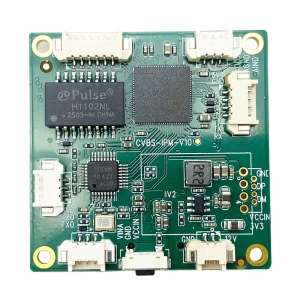
CVBS HDMI to IP Encoder

CVBS HDMI to IP Encoder
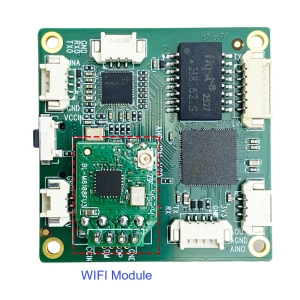
CVBS HDMI to IP Encoder
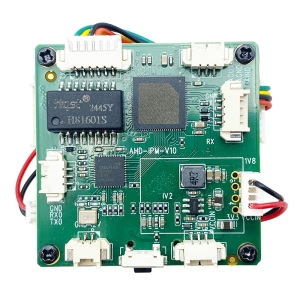
TX RX Module
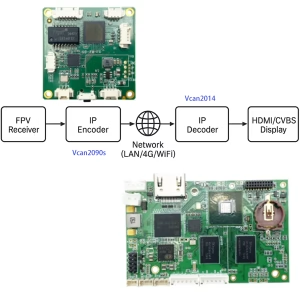
TX RX Module
Ask A Question
感谢您的回复。 ✨