





بله, you can connect an analog camera to an NVR (ضبط ویدیوی شبکه), but it requires additional hardware or specific compatibility since NVRs are designed to work with IP cameras. Below is a breakdown of methods, الزامات, and considerations:
1. Direct Connection (Only for Hybrid NVRs)
Some hybrid NVRs have built-in analog video inputs (به عنوان مثال, BNC ports) to support both analog and IP cameras.
- مراحل:
- Connect the analog camera directly to the NVR’s BNC port using coaxial cable.
- Power the camera via a separate 12V DC adapter or use a Siamese cable (combining power and video).
- Configure the analog camera channel in the NVR’s interface.
- محدودیت ها:
- Hybrid NVRs are less common and may cap analog resolutions (به عنوان مثال, 720ص).
- Analog cameras won’t support advanced IP features (به عنوان مثال, تجزیه و تحلیل, metadata).
2. Use a Video Encoder (Analog-to-IP Converter)
If your NVR is IP-only, you’ll need a رمزگذار ویدیو to convert the analog signal into an IP stream.
مراحل:
- Connect the Analog Camera to the Encoder:
- Use a coaxial (BNC) or composite (RCA) کابل.
- Power the Encoder:
- Via PoE (قدرت از طریق اترنت) or a 12V DC adapter.
- Connect the Encoder to the Network:
- Link the encoder to your network via Ethernet.
- Add the Encoder to the NVR:
- Use the encoder’s IP address or ONVIF/RTSP URL to integrate it into the NVR.
Key Requirements:
- A standalone single-channel یا multi-channel video encoder (به عنوان مثال, Axis T8310, Hikvision DS-6301H).
- Compatibility with your analog camera’s format (به عنوان مثال, NTSC/PAL, AHD, تلویزیون HD).
3. Use a DVR as an Encoder
If you already have a دستگاه دی وی آر (Digital Video Recorder), you can connect it to the NVR as an intermediate device:
- Connect analog cameras to the DVR.
- Link the DVR to the NVR via Ethernet.
- Add the DVR’s IP feed to the NVR (similar to adding an IP camera).
4. Power and Cabling Considerations
- قدرت: Analog cameras typically require 12V DC power. Use a separate power supply or PoE splitters/injectors if the encoder supports PoE.
- Cabling:
- Coaxial (RG59/RG6): For video transmission.
- Siamese Cable: Combines coaxial (ویدئو) و 18/2 (قدرت) wires.
- شبکه محلی کابلی: For connecting the encoder to the network.
Key Compatibility Factors
- Encoder/NVR Protocol Support:
- Ensure the encoder supports ONVIF یا RTSP to work with most NVRs.
- Resolution:
- Analog cameras max out at 0.3–2 MP (به عنوان مثال, 1080p for AHD), but the encoder will digitize at the camera’s native resolution.
- نرخ فریم:
- Analog cameras typically output 25/30 فریم در ثانیه, which the encoder preserves.
Pros and Cons
| Pros | Cons |
|---|---|
| Reuse existing analog cameras. | Limited resolution vs. دوربین های IP. |
| Cost-effective for legacy systems. | Extra hardware (encoder) مورد نیاز است. |
| Works with most modern NVRs. | Slight latency from encoding. |
Example Setup Diagram
                     ↑
              12V Power Supply/PoE
When to Use This Method
- You have functional analog cameras and want to integrate them into an IP-based system.
- Budget constraints prevent replacing analog cameras with IP models.
- Existing coaxial wiring is difficult to replace (به عنوان مثال, long-distance runs).
Troubleshooting Tips
- بدون سیگنال: Check power to the camera/encoder and coaxial connections.
- NVR Not Detecting Encoder: Verify ONVIF/RTSP compatibility and network settings (IP conflicts, firewall rules).
- Poor Video Quality: Ensure the encoder’s resolution matches the camera’s output.
به طور خلاصه, بله, you can connect analog cameras to an NVR using a video encoder or hybrid NVR. This approach preserves your investment in analog hardware while unlocking modern IP surveillance features.
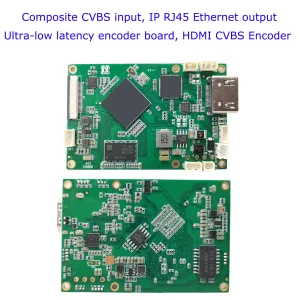
CVBS HDMI به IP رمزگذار

دوربین آی پی هوش مصنوعی
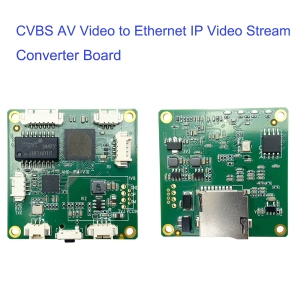
CVBS HDMI به IP رمزگذار
آنالوگ CVBS AV ویدئو به اترنت IP تبدیل جریان ویدئو رمزگذار برد پشتیبانی از UDP RTSP زمان کمتر

دوربین آی پی هوش مصنوعی