





是, you can connect an analog camera to an NVR (网络录像机), but it requires additional hardware or specific compatibility since NVRs are designed to work with IP cameras. Below is a breakdown of methods, 要求, and considerations:
1. Direct Connection (Only for Hybrid NVRs)
一些 hybrid NVRs have built-in analog video inputs (例如, BNC ports) to support both analog and IP cameras.
- 步骤:
- Connect the analog camera directly to the NVR’s BNC port using coaxial cable.
- Power the camera via a separate 12V DC adapter or use a Siamese cable (combining power and video).
- Configure the analog camera channel in the NVR’s interface.
- 局限性:
- Hybrid NVRs are less common and may cap analog resolutions (例如, 720p).
- Analog cameras won’t support advanced IP features (例如, analytics, metadata).
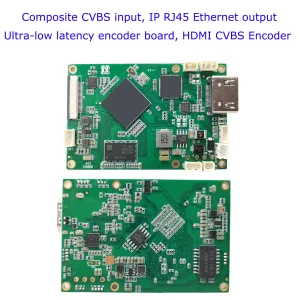
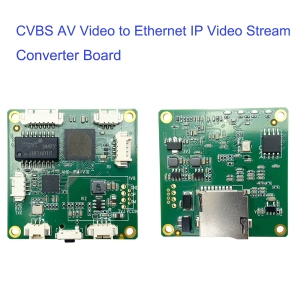
2. Use a Video Encoder (Analog-to-IP Converter)
If your NVR is IP-only, you’ll need a 视频编码器 to convert the analog signal into an IP stream.
步骤:
- Connect the Analog Camera to the Encoder:
- Use a coaxial (BNC) or composite (RCA) 电缆.
- Power the Encoder:
- Via PoE (以太网供电) or a 12V DC adapter.
- Connect the Encoder to the Network:
- Link the encoder to your network via Ethernet.
- Add the Encoder to the NVR:
- Use the encoder’s IP address or ONVIF/RTSP URL to integrate it into the NVR.
Key Requirements:
- A standalone single-channel 要么 multi-channel video encoder (例如, Axis T8310, Hikvision DS-6301H).
- Compatibility with your analog camera’s format (例如, NTSC/PAL制式, AHD, 高清电视).
3. Use a DVR as an Encoder
If you already have a 硬盘录像机 (数字录像机), you can connect it to the NVR as an intermediate device:
- Connect analog cameras to the DVR.
- Link the DVR to the NVR via Ethernet.
- Add the DVR’s IP feed to the NVR (similar to adding an IP camera).
4. Power and Cabling Considerations
- Power: Analog cameras typically require 12V DC power. Use a separate power supply or PoE splitters/injectors if the encoder supports PoE.
- Cabling:
- 同轴 (RG59/RG6): For video transmission.
- Siamese Cable: Combines coaxial (video) 和 18/2 (力量) 电线.
- 以太网络: For connecting the encoder to the network.
Key Compatibility Factors
- Encoder/NVR Protocol Support:
- Ensure the encoder supports ONVIF 要么 实时传输协议 to work with most NVRs.
- 解决:
- Analog cameras max out at 0.3–2 MP (例如, 1080p for AHD), but the encoder will digitize at the camera’s native resolution.
- 帧率:
- Analog cameras typically output 25/30 帧率, which the encoder preserves.
Pros and Cons
| 优点 | 缺点 |
|---|---|
| Reuse existing analog cameras. | Limited resolution vs. 网络摄像机. |
| Cost-effective for legacy systems. | Extra hardware (编码器) required. |
| Works with most modern NVRs. | Slight latency from encoding. |
Example Setup Diagram
                     ↑
              12V Power Supply/PoE
When to Use This Method
- You have functional analog cameras and want to integrate them into an IP-based system.
- Budget constraints prevent replacing analog cameras with IP models.
- Existing coaxial wiring is difficult to replace (例如, long-distance runs).
Troubleshooting Tips
- 无信号: Check power to the camera/encoder and coaxial connections.
- NVR Not Detecting Encoder: Verify ONVIF/RTSP compatibility and network settings (IP冲突, firewall rules).
- Poor Video Quality: Ensure the encoder’s resolution matches the camera’s output.
简而言之, 是的, you can connect analog cameras to an NVR using a video encoder or hybrid NVR. This approach preserves your investment in analog hardware while unlocking modern IP surveillance features.
$399.00

价格范围:$118.00 至 $178.00
CVBS HDMI到IP编码器
价格范围:$98.00 至 $158.00

人工智能网络摄像机
原价为:$199.00。$98.00当前价格为:$98.00。