





Micro COFDM Video Transmitter FPV1887 Wireless Video Transmission System Users Manual

目录
Micro COFDM Video Transmitter FPV1887 Feature
- 高度集成, 模块化组合设计
- Using COFDM modulation technology and H.265 encoding technology
- Can simultaneously transmit one channel of analog video signal and one channel of unidirectional data supporting the highest rate of 230400bps
- 低延迟, end-to-end latency minimum 120ms
- Omni-directional communication, extremely strong diffraction performance
- High-speed on-the-go communication
- Transmitter heat sink aluminum casing, shockproof and impact-resistant
- 非视距 (NLOS) 移动传输, ground transmission, when the sending and receiving height is 3 米, the transmission distance is not less than 3Km, and the distance under line-of-sight conditions is not less than 30 公里 (with slight non-co-frequency electromagnetic interference), the furthest The distance can reach more than 100Km (the electromagnetic environment is clean)
- 最大移动速度可达600Km/小时 (actual measurement)
- The receiver video signal is synchronously outputted in high-definition HDMI1080P with multiple formats optional, and standard-definition outputs DVD image quality
- 接收器可实现录像和备份功能
- 128-位AES加密和解密
- 完全可定制
Mirco COFDM Video Transmitter FPV1887 Application
This product is mainly used in technical reconnaissance and evidence collection by public security and safety inspection departments. Because of its extremely strong diffraction performance and narrow-band high anti-interference ability, this product is particularly suitable for video transmission of low-altitude, high-speed drones and ground unmanned equipment.

The relationship between transmission distance and height
Micro COFDM Video Transmitter Parameter Indicators
COFDM Video Transmitter Appearance (仅标准化图片, 除了定制)

Whole machine sample drawing

COFDM Video Transmitter Specification
| 调制方式 | COFDM图传 |
| 工作电压 | DC11V~DC18V |
| Working Current | Mainboard current: 160毫安; whole machine current: 0.5-Watt PA @≤0.6A DC12V; 1-Watt PA @≤0.8A DC12V; 2-Watt PA @≤1.1A DC12V; 3-Watt PA @≤1.8A DC12V, |
| 控制接口 | 标准RS232接口: 8 数据位 1 停止位 奇偶校验 波特率: 19200 |
| transparent Data interface | 一种单向透明串口传输 8 数据位 1 停止位 Supports odd parity, 奇偶校验, Wireless parity, 波特率: 1200, 2400, 4800, 9600, 19200, 38400, 57600, 115200 ,230400 |
| 加密方式 | 128-位 AES 加密 |
| 调制映射 | QPSK (4QAM), 16QAM, 64QAM (factory default is QPSK) |
| 前向纠错 | 1/2 2/3 3/4 5/6 7/8 (factory default is 1/2) |
| Guard Interval | 1/32 1/16 1/8 1/4 (factory default is 1/32) |
| Number of Carriers | 2K |
| 频率带宽 | 2/3/4/5/6/7/8M可调 (factory setting is 2MHz) |
| 传输流 | 1200kbs~20000kbs可调 (factory default is 1500kbs) |
| 发射功率 | Motherboard output power: -7分贝 (average power); Overall machine output: 0.5W/1W/2W/3W/5W (定制) |
| 传输频率 | 170-2900MHz frequency is continuously adjustable With a step of 100KHz (the default frequency of the tuner is 1MHz) The frequency of the whole machine needs to be customized |
| 功率平坦度 | Less than 0.2dB in 10MHz band |
| Belt to shoulder Ratio | Mainboard: 52分贝; When the output power of the whole machine is 30dB The belt-to-shoulder ratio is better than -30dB |
| 二次谐波 | ≤-65dB |
| 梅尔 | 32分贝 |
| Enter Video | CVBS: NTSC/PAL制式 |
| 视频编码格式 | H.265 |
| Video Time Lapse | End-to-end ≤120ms |
| 防护标准 | All-aluminum radiator chassis, 防锈, anti-shock design |
| 尺寸 | Mainboard size: 50mm×35mm×10mm; Overall machine size: 67*48*23毫米 |
| 重量 | Motherboard: ≤15g; Whole machine ≤85g (2输出功率) |
Micro COFDM Video Receiver Parameter Indicators
COFDM Video Receiver Appearance


COFDM Video Receiver Specification
| Receive Frequency Range | 170-860兆赫甚高频&UHF Over 860Mhz~6000Mhz needs to add 降频转换器 |
| 频率带宽 | 2/3/4/5/6/7/8兆赫, adjustable |
| 射频输入电平 | -94分贝~0分贝 (8M带宽) -98分贝~0分贝 (2M带宽下) |
| 射频输入阻抗 | 50 欧姆 |
| 射频输入连接器 | SMA 女性 |
| 解调方式 | COFDM图传 |
| Zodiac sign | QPSK, 16QAM, 64QAM (可选的) |
| 前向纠错 | 1/2,2/3,3/4,5/6,7/8 (可选的) |
| 承运商数量 | 2k, |
| Guard Interval | 1/32,1/16,1/8,1/4 (可选的) |
| 视频解码 | H.265 |
| Screen Aspect Ratio | 4:3 16:9 |
| 视频输出 | HDMI/CVBS |
| 工作电压 | DC12V<0.3A |
| 工作温度 | -35℃~+80℃ |
| 外观尺寸 | 80*60*16毫米(印刷电路板尺寸); Complete machine136*115*35mm |
| Equipment Weight | 0.1kg (PCBA weight); 0.35kg (complete machine weight) |
Micro COFDM Video Transmitter Parameter Adjustment Instructions

Parameter adjuster (Transmitter Programmer is optional, not at the default packing)
Transmitter Parameter Configuration Tool Functional Area Description
- Functional Area Description
- “蚂蚁”: 发射天线接口, 开机前请先连接天线
- “HDMI”: 高清视频输入接口, 输入1080/50P以下
- “Ctrl”: transmitter frequency modulator connection interface
- “直流12V”: DC12V电源输入端口. “+” 是电源正极, “-” 是电源的负极
- “直流”: 电源指示灯. When this light is always on, 说明发射模块电源输入正常.
- “TS”: 视频输入检测指示灯. This light is always on to indicate that the video is input and encoded normally.
Transmitter Parameter Configuration Instructions
Connect the transmitter parameter adjuster and press the “菜单/确定” 按钮进入菜单.
The encryption key and data serial port parameters are first displayed.
Press the left or right button to move the cursor and use the up and down buttons to adjust the parameters.

When this parameter setting is completed, 按 “菜单/确定” to enter the next level menu. 此时, 显示界面如图

Press the left or right button to move the cursor, and press the up or down button to adjust the required parameters. The interface prompt is as shown in the figure.

When all parameter settings are completed, 按 “菜单/确定” 确认键, and the display will appear as shown below.

设置完成后, 参数写入成功, 显示如图.
Micro COFDM Video Receiver Parameter Adjustment Instructions
Receiver Parameter Configuration Tool Functional Area Description
- “射频输入1” “射频输入2”: 接收天线接口. It is recommended to connect the antenna before turning on the power switch, because static electricity from the human body may cause the receiver to crash.
- “HDMI”: 视频输出接口, 输出视频格式可以通过调整 “HDMI” 控制面板上的菜单.
- “直流12V”: 电源输入接口, 请严格遵守电源电压要求, and over-voltage input is strictly prohibited.
- “USB”: Video storage interface. When the U disk is inserted, 按 “出口” key to start recording. After successful recording, the recording time will appear on the video monitor, and the storage file name is “TS”.
Receiver LCD parameter description
- Functional Area Description
- CH01解锁(锁定)
- “CH01” is the receiver channel number, “解锁” is the receiving signal that is not locked, 和 “LCKED” is the signal that is locked. “频道00” of the receiver is the starting writing channel, 发射机正常工作对应的默认通道为 “CH001”
- 频率:602.0兆赫
- “602.0兆赫” 是接收机的接收频率. This frequency must be consistent with the frequency set by the transmitter. 否则, the receiver cannot search or receive the transmitter signal.
- 体重:6.0兆赫
- “体重” 带宽, 如图所示, “体重: 兆赫” is understood to mean that the radio frequency bandwidth is 6MHz (default is 2MHz). This bandwidth must be consistent with the bandwidth set by the transmitter, 否则, the receiver will search for or cannot receive the transmitter signal.
- FEC:1/2
- “FEC:1/2” is channel error correction. This parameter synchronizes the transmitter setting parameters and cannot be modified by the receiving end.
- 胃肠道:1/32
- “胃肠道:1/32” 是通道保护间隔. This parameter synchronizes the transmitter setting parameters and cannot be modified by the receiving end.
- 地图: QPSK
- “地图: QPSK” 是调制映射. This parameter is synchronized with the transmitter setting parameters and cannot be modified by the receiving end.
- 信噪比: 0.0分贝(信噪比:15.0分贝)
- “信噪比:15.0分贝” 是信号质量 (IE. 信噪比, 值越大, 越好). 什么时候 “0.0分贝” 显示, 信号质量是 0, 并且接收器将无法锁定.
- “(信噪比:15.0分贝)” 表示接收信噪比大于15dB. 在 “QPSK” 调制映射状态, the receiver can lock as long as the signal-to-noise ratio is greater than 6dB.
- 密码:-72.1dBm(PW):-72.1)
- PW是接收信号强度, (参考电平值). The farther away the receiving end is from the receiving end, the weaker the signal strength, and the larger the displayed value. When the transmitter is not turned on, 如果接收器的信号强度大于-90dBm (如-79.7dBm), 可以认为是邻频干扰
Receiver Parameter configuration description
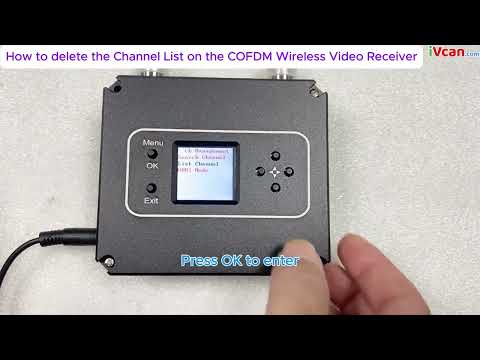
Turn on the power of the receiver and press the “菜单/确定” 按钮进入菜单. The menu with adjustable parameters is first displayed. If you want to search for a specified frequency, 按 “菜单/确定” 按钮进入菜单. If you need to remove a channel, press the down button to select “利斯坦布尔频道”, and then press the “菜单/确定” button to enter the menu operation; if you need to save the current channel, 按 “菜单/确定” at the same time and right-click to confirm the save.


频率搜索方法如下. 进入频率设置菜单后, 显示界面如图. Press the left or right button to move the cursor, press the up or down button to adjust the frequency, radio frequency bandwidth, 和与发射器匹配的密钥. 按 “菜单” /OK” key to search. 注意此时发射器必须开启, otherwise the receiver will not be able to lock because it cannot search for signals.


当搜索完成时, 按 “菜单/确定” 确认. 此时, the channel is saved in the parameter adjustment board register, 如图所示. If you need to save the channel to the receiver register, 按 “菜单/确定” 同时按下 键和右键.

接收机参数设置完成后, the panel button functions are as follows:
“↑”“↓“: Each individually selectable receiver channel “CH **”
“←”“→”: 您可以选择查看接收器的隐藏参数
“出口”: 开始和停止录音
Micro COFDM Video Transmitter and Receiver Typical troubleshooting
| Fault phenomenon | 解决方案 |
| No image, 没有声音 | 1. Check whether the transmitter battery is charged and whether the transmitter indicator light is normal. Pay special attention to the distance and wiring pattern of the transmitter video cable and power cable from the antenna. 2. Check whether the camera battery is charged, whether the audio and video cable has been connected to the transmitter, and whether the camera is in standby mode. 3. Check whether the receiver antenna is connected properly and whether the antenna connector is wet or loose. 4. Check whether the monitor audio and video cables are connected properly and whether the startup screen is normal. 5. Check the frequency settings, and whether the frequency settings for transmitting and receiving are the same. 6. Check the electromagnetic environment to see if there is interference from same-frequency signals nearby |
| The receiver has no picture, but the sound is normal | 1. Check whether the video cables of the camera and transmitter are connected properly 2. Check whether the video cable between the receiver and the PC is properly connected |
| No sound or noise from the receiver but the normal picture | 1. Check whether the audio cables of the camera and transmitter are connected properly. 2. Check whether the audio cable between the receiver and the TV or audio output device is properly connected. |
| The image is continuous, then pauses, and a black screen appears. | 1. The signal is not good, which is normal. 2. Whether the signal quality display on the LCD screen on the receiver keyboard is normal, and whether the parameter value fluctuates greatly (多于 10). 如果是这样, it means there is some frequency interference. |
| Coverage suddenly becomes smaller | 1. Check whether the transmitting antenna and receiving antenna are connected properly and whether there is water or poor contact 2. Check whether the power supply voltage of the transmitter is normal. 3. Check the surrounding environment for electromagnetic interference from signals of the same frequency. |
| The coverage is small and the transmission distance is not far enough | Check the installation position of the receiving antenna, increase the height of the receiving antenna, and use high-gain omnidirectional and directional antennas and diversity reception if necessary |
| There is image and sound, but the image is blurry | Check whether the camera at the front end of the transmitter is focused accurately and whether the autofocus function setting is turned on. |
视频操作指南
How to delete the Channel List on the COFDM Wireless Video Receiver
[VF-202408]
问一个问题
感谢您的回复。 ✨