





Micro COFDM Video Transmitter FPV1887 Wireless Video Transmission System Users Manual

İçindekiler
Micro COFDM Video Transmitter FPV1887 Feature
- Son derece entegre, modüler kombine tasarım
- Using COFDM modulation technology and H.265 encoding technology
- Can simultaneously transmit one channel of analog video signal and one channel of unidirectional data supporting the highest rate of 230400bps
- Düşük gecikme, end-to-end latency minimum 120ms
- Omni-directional communication, extremely strong diffraction performance
- High-speed on-the-go communication
- Transmitter heat sink aluminum casing, shockproof and impact-resistant
- Görüş hattı dışı (NLOS) mobil iletim, ground transmission, when the sending and receiving height is 3 metre, the transmission distance is not less than 3Km, and the distance under line-of-sight conditions is not less than 30 kilometre (with slight non-co-frequency electromagnetic interference), the furthest The distance can reach more than 100Km (the electromagnetic environment is clean)
- Maksimum hareket hızı 600Km/saat'e ulaşabilir (actual measurement)
- The receiver video signal is synchronously outputted in high-definition HDMI1080P with multiple formats optional, and standard-definition outputs DVD image quality
- Alıcı, video kayıt ve yedekleme işlevlerini gerçekleştirebilir
- 128-bit AES şifreleme ve şifre çözme
- Tam özelleştirme mevcut
Mirco COFDM Video Transmitter FPV1887 Application
This product is mainly used in technical reconnaissance and evidence collection by public security and safety inspection departments. Because of its extremely strong diffraction performance and narrow-band high anti-interference ability, this product is particularly suitable for video transmission of low-altitude, high-speed drones and ground unmanned equipment.

The relationship between transmission distance and height
Micro COFDM Video Transmitter Parameter Indicators
COFDM Video Transmitter Appearance (yalnızca standartlaştırılmış resimler, özelleştirme hariç)

Whole machine sample drawing

COFDM Video Transmitter Specification
| Modülasyon yöntemi | COFDM |
| Çalışma Gerilimi | DC11V~DC18V |
| Working Current | Mainboard current: 160mA; whole machine current: 0.5-Watt PA @≤0.6A DC12V; 1-Watt PA @≤0.8A DC12V; 2-Watt PA @≤1.1A DC12V; 3-Watt PA @≤1.8A DC12V, |
| Kontrol Arayüzü | Standart RS232 arayüzü: 8 veri bitleri 1 biraz dur Even parity Baud hızı: 19200 |
| transparent Data interface | Tek yönlü şeffaf seri port iletimi 8 veri bitleri 1 biraz dur Supports odd parity, Even parity, Wireless parity, Baud hızı: 1200, 2400, 4800, 9600, 19200, 38400, 57600, 115200 ,230400 |
| Şifreleme Yöntemi | 128-bit AES şifreleme |
| Modülasyon Haritalaması | QPSK (4QAM), 16QAM, 64QAM (factory default is QPSK) |
| İleri Hata Düzeltme | 1/2 2/3 3/4 5/6 7/8 (factory default is 1/2) |
| Guard Aralığı | 1/32 1/16 1/8 1/4 (factory default is 1/32) |
| Number of Carriers | 2K |
| Frekans Bant Genişliği | 2/3/4/5/6/7/8M ayarlanabilir (factory setting is 2MHz) |
| Taşıma Akışı | 1200kbs~20000kbs ayarlanabilir (factory default is 1500kbs) |
| İletim Gücü | Motherboard output power: -7dBm (average power); Overall machine output: 0.5W/1W/2W/3W/5W (özelleştirilmiş) |
| İletim Frekansı | 170-2900MHz frequency is continuously adjustable With a step of 100KHz (the default frequency of the tuner is 1MHz) The frequency of the whole machine needs to be customized |
| Güç düzlüğü | Less than 0.2dB in 10MHz band |
| Belt to shoulder Ratio | Mainboard: 52dB; When the output power of the whole machine is 30dB The belt-to-shoulder ratio is better than -30dB |
| ikinci harmonik | ≤-65dB |
| MER | 32dB |
| Enter Video | CVBS: NTSC/PAL |
| Video kodlama formatı | H.265 |
| Video Time Lapse | End-to-end ≤120ms |
| Protection standards | All-aluminum radiator chassis, anti-rust, anti-shock design |
| Boyut | Mainboard size: 50mm×35mm×10mm; Overall machine size: 67*48*23mm |
| Ağırlık | Motherboard: ≤15g; Whole machine ≤85g (2W çıkışı) |
Micro COFDM Video Receiver Parameter Indicators
COFDM Video Receiver Appearance


COFDM Video Receiver Specification
| Receive Frequency Range | 170-860MHzVHF&UHF Over 860Mhz~6000Mhz needs to add Frekans Düşürücü Dönüştürücü |
| Frekans Bant Genişliği | 2/3/4/5/6/7/8MHz, adjustable |
| RF giriş seviyesi | -94dBm~0dBm (8M bant genişliğinde) -98dBm~0dBm (2M bant genişliğinde) |
| RF giriş empedansı | 50 ohm |
| RF giriş konektörü | SMA dişi |
| Demodülasyon yöntemi | COFDM |
| Zodiac sign | QPSK, 16QAM, 64QAM (optional) |
| İleri hata düzeltme | 1/2,2/3,3/4,5/6,7/8 (optional) |
| Taşıyıcı sayısı | 2k, |
| Guard Aralığı | 1/32,1/16,1/8,1/4 (optional) |
| Video Kod Çözme | H.265 |
| Screen Aspect Ratio | 4:3 16:9 |
| Video Output | HDMI/CVBS |
| Çalışma Gerilimi | DC12V<0.3A |
| Çalışma Sıcaklığı | -35℃~+80℃ |
| Görünüm boyutu | 80*60*16mm(PCB size); Complete machine136*115*35mm |
| Equipment Weight | 0.1kilogram (PCBA weight); 0.35kilogram (complete machine weight) |
Micro COFDM Video Transmitter Parameter Adjustment Instructions

Parameter adjuster (Transmitter Programmer is optional, not at the default packing)
Transmitter Parameter Configuration Tool Functional Area Description
- Functional Area Description
- “KARINCA”: Verici anten arayüzü, lütfen açmadan önce anteni bağlayın
- “HDMI”: Yüksek çözünürlüklü video giriş arayüzü, 1080/50P'nin altındaki giriş
- “Ctrl”: transmitter frequency modulator connection interface
- “DC12V”: DC12V güç girişi bağlantı noktası. “+” güç kaynağının pozitif kutbu, “-” güç kaynağının negatif kutbu
- “DC”: Güç gösterge ışığı. When this light is always on, verici modülün güç girişinin normal olduğu anlamına gelir.
- “TS”: Video girişi algılama gösterge ışığı. This light is always on to indicate that the video is input and encoded normally.
Transmitter Parameter Configuration Instructions
Connect the transmitter parameter adjuster and press the “MENÜ/OK” menüye girmek için düğmeye.
The encryption key and data serial port parameters are first displayed.
Press the left or right button to move the cursor and use the up and down buttons to adjust the parameters.

When this parameter setting is completed, basmak “MENÜ/OK” to enter the next level menu. Şu anda, arayüz şekilde gösterildiği gibi görüntülenir

Press the left or right button to move the cursor, and press the up or down button to adjust the required parameters. The interface prompt is as shown in the figure.

When all parameter settings are completed, tuşuna basın “MENÜ/OK” key to confirm, and the display will appear as shown below.

Ayar tamamlandıktan sonra, parametreler başarıyla yazıldı, ve ekran şekilde gösterildiği gibidir.
Micro COFDM Video Receiver Parameter Adjustment Instructions
Receiver Parameter Configuration Tool Functional Area Description
- “RF girişi1” “RF girişi2”: alıcı anten arayüzü. It is recommended to connect the antenna before turning on the power switch, because static electricity from the human body may cause the receiver to crash.
- “HDMI”: Video çıkış arayüzü, çıkış video formatı aracılığıyla ayarlanabilir “HDMI” kontrol panelindeki menü.
- “DC12V”: Güç girişi arayüzü, lütfen güç kaynağı voltajı gereksinimlerini kesinlikle takip edin, and over-voltage input is strictly prohibited.
- “USB”: Video storage interface. When the U disk is inserted, tuşuna basın “ÇIKIŞ” key to start recording. After successful recording, the recording time will appear on the video monitor, and the storage file name is “TS”.
Receiver LCD parameter description
- Functional Area Description
- CH01 KİLİTLİ (LCKLİ)
- “CH01” is the receiver channel number, “KİLİDİ AÇIK” is the receiving signal that is not locked, ve “LCKED” is the signal that is locked. “CH00” of the receiver is the starting writing channel, ve vericinin normal çalışmasına karşılık gelen varsayılan kanal “CH001”
- FREKANS:602.0MHz
- “602.0MHz” alıcının alma frekansıdır. This frequency must be consistent with the frequency set by the transmitter. Aksi takdirde, the receiver cannot search or receive the transmitter signal.
- siyah beyaz:6.0MHz
- “siyah beyaz” bandwidth, şekilde gösterildiği gibi, “siyah beyaz: MHz” is understood to mean that the radio frequency bandwidth is 6MHz (default is 2MHz). This bandwidth must be consistent with the bandwidth set by the transmitter, aksi takdirde, the receiver will search for or cannot receive the transmitter signal.
- FEC:1/2
- “FEC:1/2” is channel error correction. This parameter synchronizes the transmitter setting parameters and cannot be modified by the receiving end.
- GI:1/32
- “GI:1/32” kanal koruma aralığıdır. This parameter synchronizes the transmitter setting parameters and cannot be modified by the receiving end.
- HARİTA: QPSK
- “HARİTA: QPSK” modülasyon eşlemesidir. This parameter is synchronized with the transmitter setting parameters and cannot be modified by the receiving end.
- SNR: 0.0dB(SNR:15.0dB)
- “SNR:15.0dB” sinyal kalitesi (yani. sinyal-gürültü oranı, değer ne kadar büyükse, daha iyi). Ne zaman “0.0dB” görüntüleniyor, sinyal kalitesi 0, ve alıcı kilitlenemeyecek.
- “(SNR:15.0dB)” alma sinyali-gürültü oranının 15dB'den büyük olduğu anlamına gelir. içinde “QPSK” modülasyon eşleme durumu, the receiver can lock as long as the signal-to-noise ratio is greater than 6dB.
- Şifre:-72.1dBm(PW:-72.1)
- PW alınan sinyal gücüdür, (referans seviyesi değeri). The farther away the receiving end is from the receiving end, the weaker the signal strength, and the larger the displayed value. When the transmitter is not turned on, alıcının sinyal gücü -90dBm'den büyükse (-79,7dBm gibi), bitişik frekans girişimi olarak düşünülebilir
Receiver Parameter configuration description
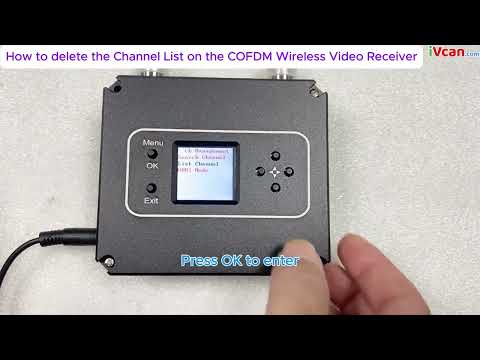
Turn on the power of the receiver and press the “MENÜ/OK” menüye girmek için düğmeye. The menu with adjustable parameters is first displayed. If you want to search for a specified frequency, tuşuna basın “MENÜ/OK” menüye girmek için düğmeye. If you need to remove a channel, press the down button to select “ListanbulKanal”, and then press the “MENÜ/OK” button to enter the menu operation; if you need to save the current channel, basmak “MENÜ/OK” at the same time and right-click to confirm the save.


Frekans arama yöntemi aşağıdaki gibidir. Frekans ayar menüsüne girdikten sonra, arayüz şekilde gösterildiği gibi görüntülenir. Press the left or right button to move the cursor, press the up or down button to adjust the frequency, radio frequency bandwidth, ve vericiyle eşleşen gizli anahtar. Basmak “MENÜ” /TAMAM” key to search. Vericinin bu sırada açık olması gerektiğini unutmayın., otherwise the receiver will not be able to lock because it cannot search for signals.


Arama tamamlandığında, basmak “MENÜ/OK” onaylamak. Şu anda, the channel is saved in the parameter adjustment board register, şekilde gösterildiği gibi. If you need to save the channel to the receiver register, tuşuna basın “MENÜ/OK” anahtar ve sağ tuş aynı anda.

Alıcı parametre ayarı tamamlandıktan sonra, the panel button functions are as follows:
“↑”“↓“: Each individually selectable receiver channel “CH **”
“←”“→”: You can choose to view the hidden parameters of the receiver
“ÇIKIŞ”: start and stop recording
Micro COFDM Video Transmitter and Receiver Typical troubleshooting
| Fault phenomenon | Çözüm |
| No image, ses yok | 1. Check whether the transmitter battery is charged and whether the transmitter indicator light is normal. Pay special attention to the distance and wiring pattern of the transmitter video cable and power cable from the antenna. 2. Check whether the camera battery is charged, whether the audio and video cable has been connected to the transmitter, and whether the camera is in standby mode. 3. Check whether the receiver antenna is connected properly and whether the antenna connector is wet or loose. 4. Check whether the monitor audio and video cables are connected properly and whether the startup screen is normal. 5. Check the frequency settings, and whether the frequency settings for transmitting and receiving are the same. 6. Check the electromagnetic environment to see if there is interference from same-frequency signals nearby |
| The receiver has no picture, but the sound is normal | 1. Check whether the video cables of the camera and transmitter are connected properly 2. Check whether the video cable between the receiver and the PC is properly connected |
| No sound or noise from the receiver but the normal picture | 1. Check whether the audio cables of the camera and transmitter are connected properly. 2. Check whether the audio cable between the receiver and the TV or audio output device is properly connected. |
| The image is continuous, then pauses, and a black screen appears. | 1. The signal is not good, which is normal. 2. Whether the signal quality display on the LCD screen on the receiver keyboard is normal, and whether the parameter value fluctuates greatly (bundan fazla 10). If so, it means there is some frequency interference. |
| Coverage suddenly becomes smaller | 1. Check whether the transmitting antenna and receiving antenna are connected properly and whether there is water or poor contact 2. Check whether the power supply voltage of the transmitter is normal. 3. Check the surrounding environment for electromagnetic interference from signals of the same frequency. |
| The coverage is small and the transmission distance is not far enough | Check the installation position of the receiving antenna, increase the height of the receiving antenna, and use high-gain omnidirectional and directional antennas and diversity reception if necessary |
| There is image and sound, but the image is blurry | Check whether the camera at the front end of the transmitter is focused accurately and whether the autofocus function setting is turned on. |
Video Operation Guide
How to delete the Channel List on the COFDM Wireless Video Receiver
[VF-202408]
Bir soru sor
Yanıtınız için teşekkür ederiz. ✨